How to Set Recurring Reminders on iPhone (2026): Every Other Friday, Every Quarter, Every Birthday, in Plain Sentences
How to set recurring reminders on iPhone: Apple's Repeat steps, yearly birthday alerts in Calendar, and one sentence that sets every-other-Friday reminders.
To set a recurring reminder on iPhone, open Apple Reminders, turn on Date or Time, tap Repeat and choose a frequency. For yearly birthdays, add the date to a contact and turn on the Birthdays calendar. In Codot you can say “every other Friday at 4pm remind me to pay the cleaner”; in our November 2026 test Codot wrote each of those Fridays into Apple Calendar. Recurring reminders in Codot need Codot Max.
Disclosure: Codot is our product. Updated November 2026 · Apple steps checked November 18, 2026 against Apple's iPhone User Guide (iOS 27), the Reminders for Mac guide (macOS 27) and Apple Support articles.
TL;DR:
- On iPhone, a repeating reminder is one setting in Apple Reminders: open the reminder's details, turn on Date or Time, tap Repeat, pick a frequency. Birthdays come from the date on a contact card plus the Birthdays calendar, with one alert time for all of them.
- Use Codot when the schedule is easier to say than to tap: one sentence set "every other Friday at 4pm", "the 15th of every third month" and "every year on March 3" in our test. The every-other-Friday reminder was written into Apple Calendar on November 20 and December 4, skipping November 27. Recurring reminders are part of Codot Max.
- Apple's gaps: the iPhone guide doesn't list the Repeat options, and there's no per-person birthday alert such as "a week before Maya's".
At a glance
| Method | Good for | Where it shows up | Price | Source |
|---|---|---|---|---|
| Codot, one sentence | Several different repeating reminders at once, in your own words | Every-other-Friday series: Apple Calendar and Apple Reminders. Quarterly and yearly: fire from Codot | Recurring reminders need Codot Max ($12.99/month, 7-day free trial for new users) | Our test, November 18, 2026 |
| Apple Reminders, Repeat | One reminder on a fixed frequency | Reminders app | Free | Apple: add details to reminders |
| Reminders for Mac, Custom | Patterns like "last weekday of each month" | Reminders, synced over iCloud | Free | Apple: Reminders for Mac |
| Apple Calendar, Repeat on an event | A recurring meeting or class | Calendar | Free | Not in Apple's iPhone guide; iPhone Life walkthrough |
| Contacts + Birthdays calendar | Every saved birthday, one shared alert time | Calendar | Free | Apple: use multiple calendars |
| Siri | One repeating reminder per request | Reminders | Free | Apple Support 102484 |
How do I set recurring reminders on iPhone without tapping through Repeat menus?
Use Codot when you have a few different repeating jobs and you'd rather say them than build each one by hand. Codot keeps tasks, calendar, reminders, notes and contacts in one app, so a single sentence can create a calendar series, a quarterly reminder and a contact card at the same time.
Before: three repeating jobs, three different places
Take Jonah, a freelance video editor (an illustrative example). He pays his cleaner every other Friday, files estimated taxes four times a year, and keeps missing his friend Maya's birthday on March 3. On a stock iPhone that's two Reminders items with different Repeat settings, plus Maya's birthday typed into her contact card, where it shares one alert time with every other birthday. If you freelance, our week-by-week look at freelancing with ADHD shows how fast those small recurring payments slip.
After: one sentence on November 18
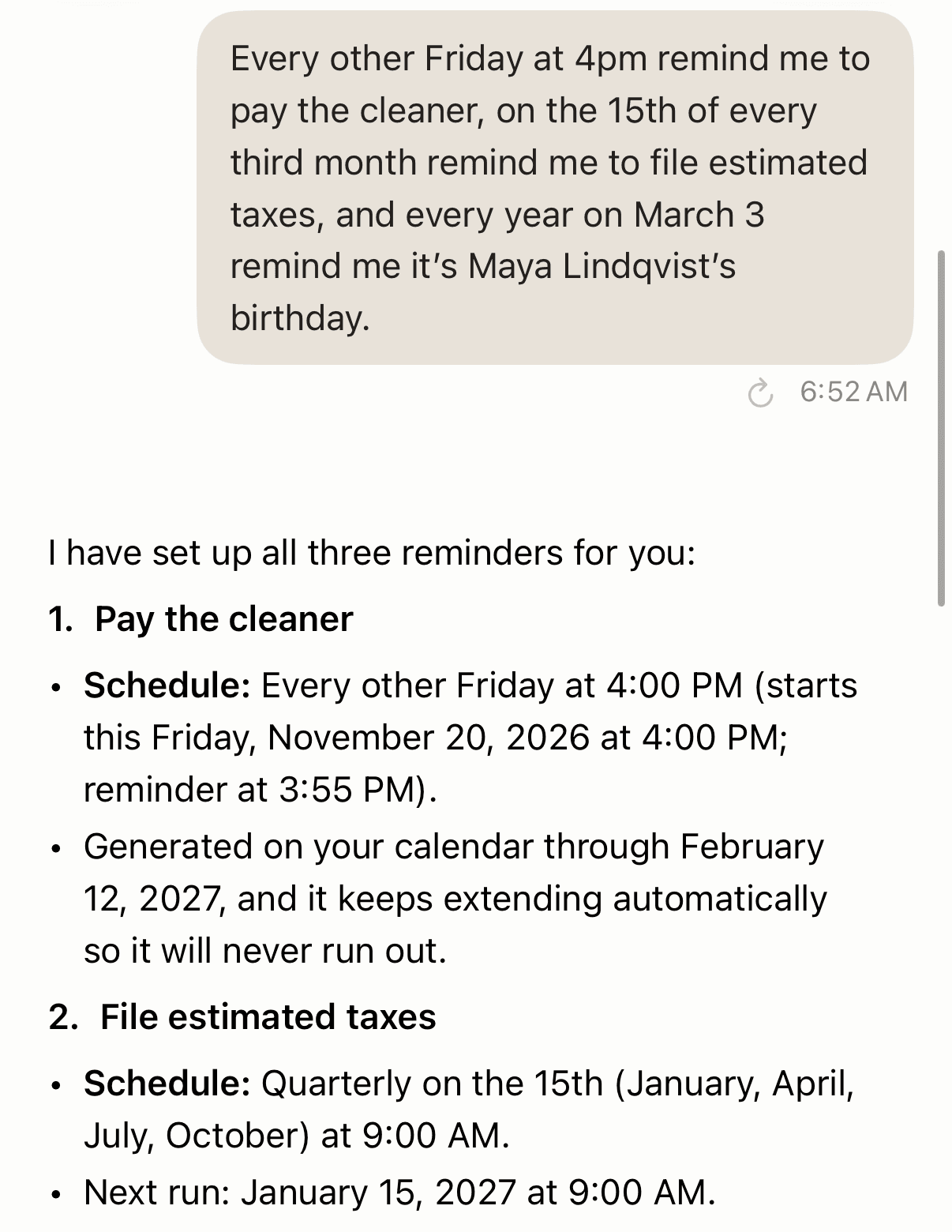
On November 18, 2026 we typed Jonah's three jobs into Codot as one sentence (typing and speaking go to the same place):
"Every other Friday at 4pm remind me to pay the cleaner, on the 15th of every third month remind me to file estimated taxes, and every year on March 3 remind me it's Maya Lindqvist's birthday."
Codot answered "I have set up all three reminders for you":
- Pay the cleaner: every other Friday at 4:00 PM, starting Friday, November 20, 2026, with a reminder at 3:55 PM. Codot said the series runs on the calendar through February 12, 2027 and keeps extending automatically.
- File estimated taxes: quarterly on the 15th of January, April, July and October at 9:00 AM. Next run: January 15, 2027.
- Maya Lindqvist's birthday: every year on March 3 at 9:00 AM. Next run: March 3, 2027.
| Job | Before (stock iPhone) | After (one Codot sentence) |
|---|---|---|
| Cleaner, every other Friday | Reminders item, Repeat every two weeks | Written into Apple Calendar and Apple Reminders as separate Fridays, 4 PM, reminder at 3:55 |
| Estimated taxes, quarterly | Second Reminders item, quarterly schedule | Codot reminder on the 15th, next run January 15, 2027 |
| Maya's birthday | Typed into her contact card; one alert time shared by all birthdays | Codot yearly reminder plus a Codot contact card with her birthday |
What showed up in Apple Calendar, and what didn't
We opened Apple's Calendar app on the same iPhone. "Pay the cleaner" was there at 4 PM on Friday, November 20 and again on Friday, December 4, as a calendar event and as an Apple Reminders item. Friday, November 27 was empty, so "every other" was counted correctly.
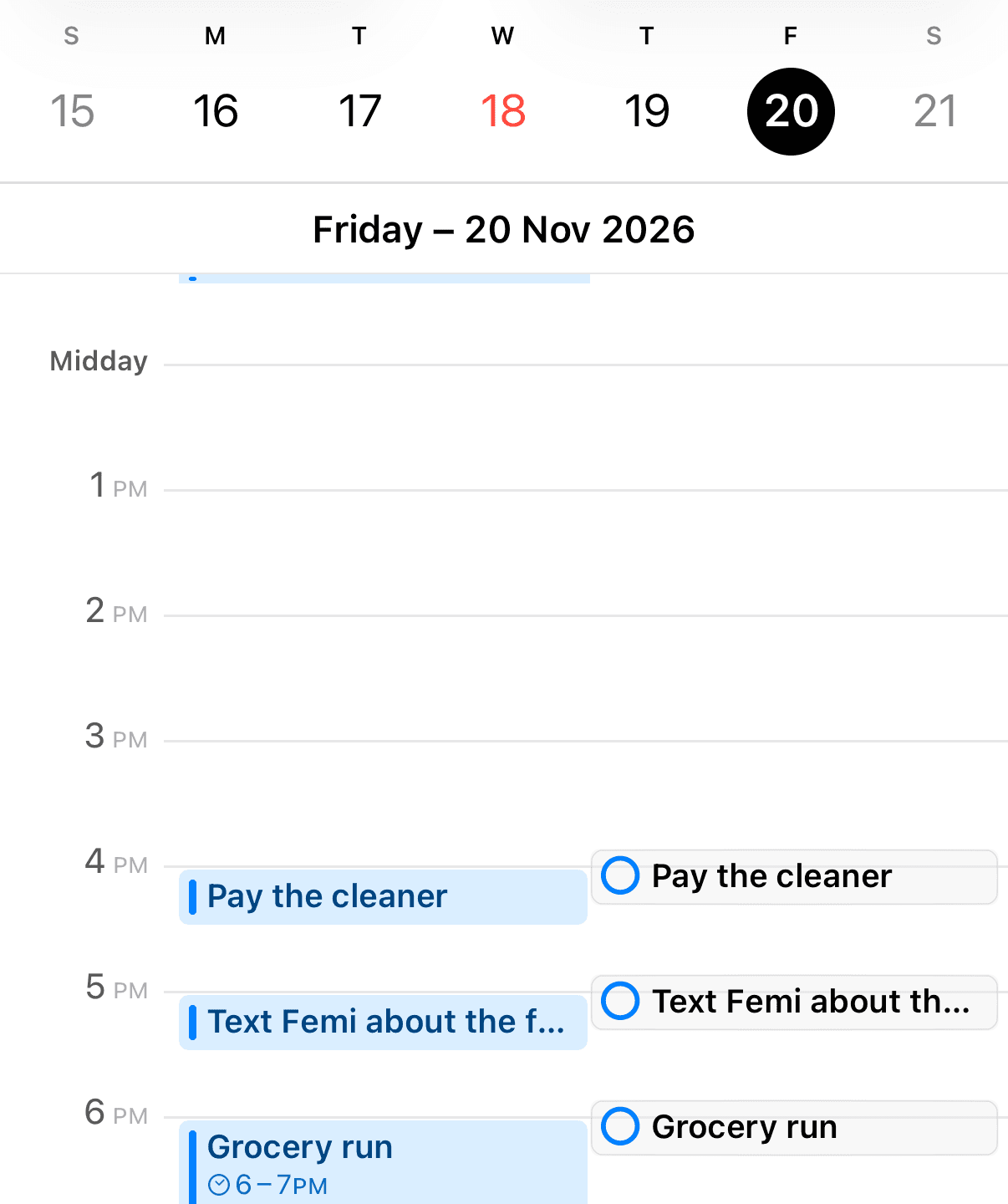
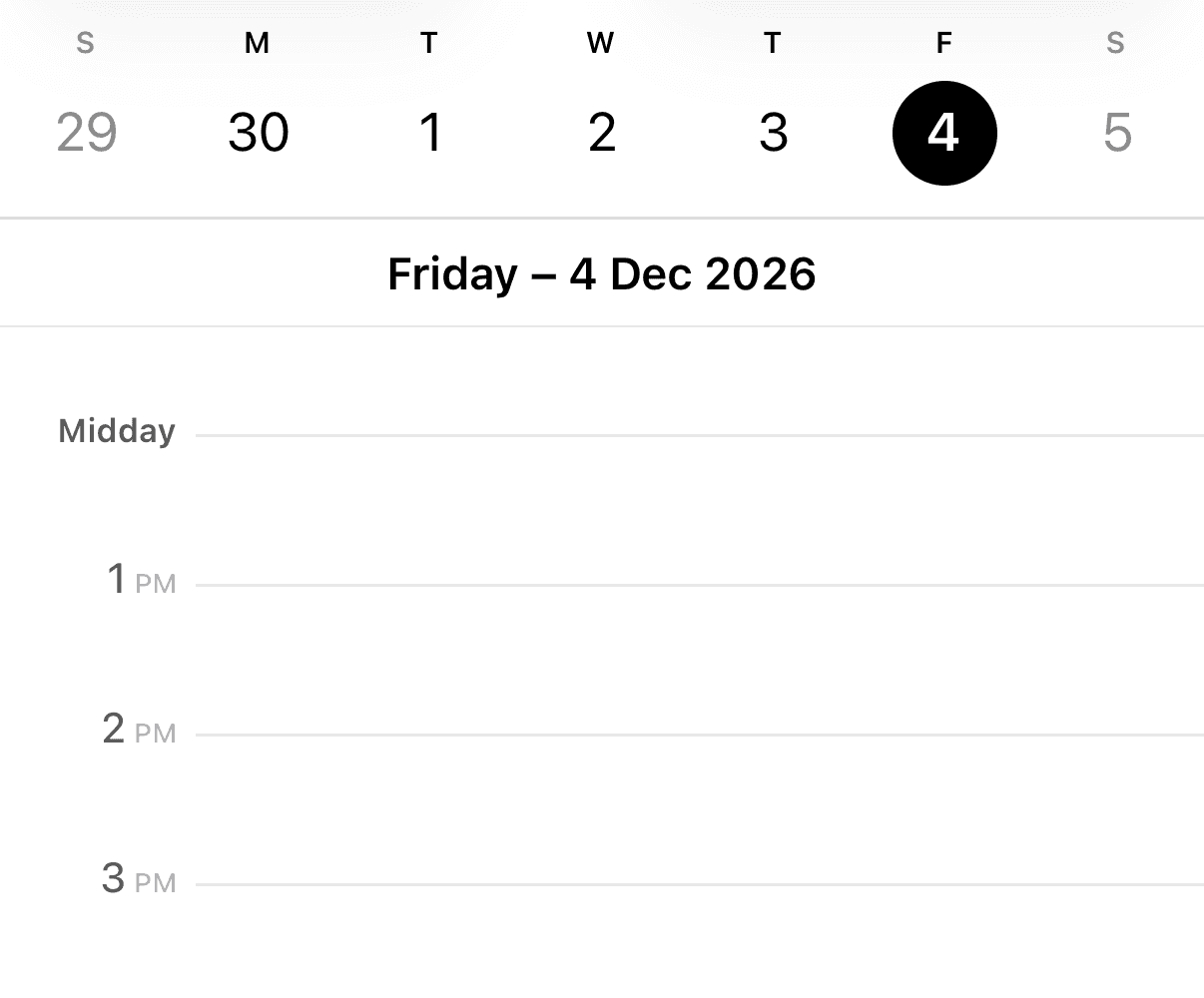
Codot writes each Friday as its own entry rather than an iOS Repeat rule, so to change the schedule, tell Codot. The quarterly and yearly reminders did not appear in Apple Calendar: they run inside Codot (the reply shows a "Next run" date) and alert you from the Codot app. The connection is one-way; Codot writes to Apple Calendar and doesn't read what's already there. Our hub on adding multiple events to iPhone Calendar at once covers that connection in detail.
The birthday became a contact
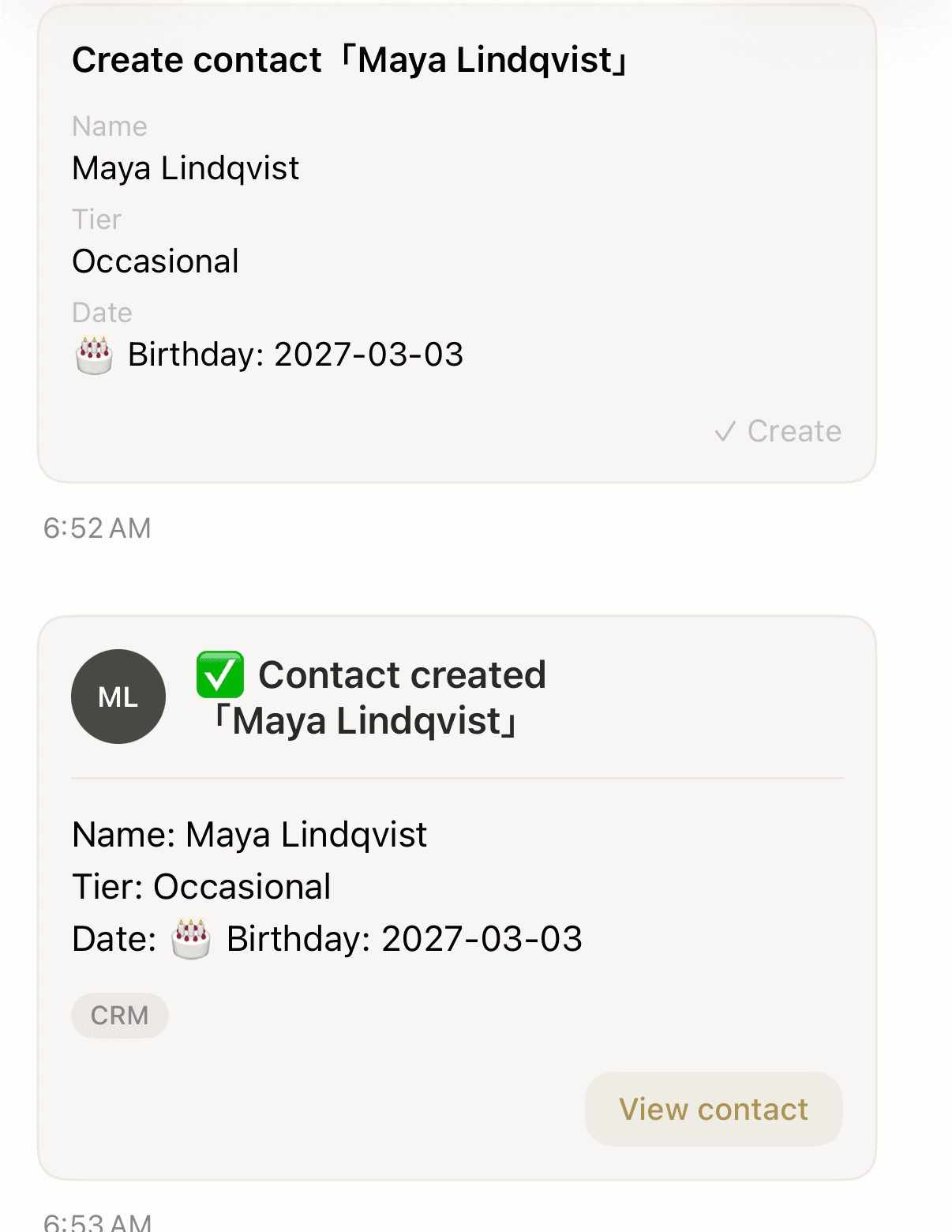
After the birthday line, Codot offered a card to save Maya as a contact. We tapped Create, and Maya Lindqvist was saved in Codot's own contacts with her March 3 birthday (Codot doesn't read the iPhone Birthdays calendar). The best personal CRM apps roundup compares other ways to remember people.
Say the time, and check the first date
We gave no time for the tax and birthday reminders, so Codot chose 9:00 AM; say the time you want. For "every third month" said in November, Codot picked January, April, July and October. If your deadlines fall in other months, name them, and check the first date on the card. Recurring and timed reminders are part of Codot Max: $12.99 a month or $99.99 a year on the US App Store, with 20x the free plan's usage. New accounts get 7 days of Max free, then return to the free plan with no charge. If you've ever had a Codot or Apple alert stay silent, run through iPhone Reminders not working first.
How to set a recurring reminder in Apple's Reminders app (iOS 27)
Apple's iPhone guide gives one line: tap the details button, "turn on Date or Time, tap Repeat, then choose the frequency" (Apple, iOS 27; the iOS 18 guide says the same). Apple's guide doesn't list the frequencies in that menu, so check them on your own phone.
Three Apple rules most how-to pages skip:
- An early alert is separate from the repeat. Tap Early Reminder and choose, for example, "2 days before" (same page).
- Repeats complete in order. Future instances "can only be marked complete after the most current instance is marked complete" (Apple).
- No time means 9:00 AM. A reminder with a date and no time notifies "by default at 9:00 AM"; change it in Settings > Apps > Reminders under All-Day Reminders (Apple Support, published October 9, 2026).
For odd schedules, Apple documents a Custom option in Reminders on Mac (macOS 27). Choose Custom, then a Frequency of Hourly, Daily, Weekly, Monthly or Yearly. Weekly can run "every 3 weeks on Monday, Wednesday, and Friday", and Monthly can follow a pattern such as "the last weekday of each month" (Reminders for Mac).
Siri can set one repeating reminder per request. Apple's own example is "Remind me to feed the dog every day at 7:30 a.m." (Apple Support). With Apple Intelligence on iOS 27, typing "Feed the cat every evening at 5pm" into Reminders fills in the timing for you (Apple). For more phrases, see Siri calendar commands. If you need several one-off alerts on the same day instead, our guide to how to set multiple reminders on iPhone covers that.
Your ideas shouldn't wait for a keyboard. Just say it — Codot handles the rest.
How do I add recurring events to Apple Calendar on iPhone?
Open the event, tap Repeat, pick a schedule, then set End Repeat. Apple's iPhone guide page on events (iOS 27 and 18) doesn't describe this menu; the newest walkthrough we found, from iPhone Life (November 16, 2026, iOS 26.2), shows choosing "Every Week" and End Repeat options "Never" or "After or On Date" (iPhone Life). Use an event for blocked time, like a weekly class, and Reminders for something to tick off; our guide on how to add tasks to Apple Calendar shows how those Reminders items appear on the calendar. Whether Siri can do this for Google or Outlook calendars is covered in can Siri add to calendar, in one table. If your events live in Google Calendar instead, see how to add multiple events to Google Calendar at once.
How to set birthday reminders in iPhone Calendar for every year
Birthdays in Apple Calendar come from Contacts, so you set them once on the contact card:
- In Contacts, edit the person and add a birthday (Apple).
- In Calendar, tap Calendars, then "Tap Birthdays to include birthdays from Contacts with your events" (Apple, iOS 27).
- For the alert, go to Settings > Apps > Calendar, "Tap Default Alert Times, tap Birthdays" and choose an option (Apple).
That third step is one default for every birthday in the calendar. Apple's guide doesn't describe a per-person setting, so "remind me a week before Maya's birthday, but the day of for my cousin" needs a separate yearly reminder for Maya, either in Apple Reminders with an early alert or in Codot (say "every year on February 24 remind me to buy Maya's gift").
Seeing the same birthday twice? Apple says to "check if you have more than one contact card for that specific person", then merge or delete the extra card (Apple Support). For partners who forget family birthdays, the ADHD partner setup shows how reminders can reach them directly, and sending a reminder to someone else's iPhone compares four ways to do it.
For a recurring bill split between two people, see the bill reminder app for couples comparison.
FAQ
How do I set a reminder for every other week on iPhone?
In Apple Reminders, turn on Date, tap Repeat and choose the frequency (on Mac, Custom > Weekly every 2 weeks). In Codot, say "every other Friday at 4pm"; our test put November 20 and December 4 in Apple Calendar and skipped November 27.
Do Codot's repeating reminders show up in Apple Calendar?
Codot wrote the every-other-Friday reminder into Apple Calendar as individual Fridays and keeps extending the series. Its quarterly and yearly reminders run from Codot and did not appear in Apple Calendar in our test.
Can iPhone Calendar remind me a week before a birthday?
The Birthdays calendar uses one alert setting for all birthdays (Settings > Apps > Calendar > Default Alert Times > Birthdays). For one person a week early, add a yearly reminder for that date in Apple Reminders or Codot.
Why do birthdays show up twice in my iPhone Calendar?
Apple says it usually means the person has more than one contact card. Search Contacts for the name and merge or delete the duplicate.
Are recurring reminders free in Codot?
Creating tasks and events is free; recurring and timed reminders are Codot Max ($12.99/month or $99.99/year in the US), with a 7-day free trial for new users.
To try the every-other-Friday sentence yourself, download Codot on the App Store. Comparing tools first? See the best voice calendar apps and the best AI assistant for freelancers.
Productivity & Tools Desk
This article was created with AI assistance and reviewed by our editorial team.Learn about our content process.