Best Voice Calendar Apps for iPhone and Android (November 2026): Voice-Activated Calendar Apps That Add and Move Events by Talking
Voice activated calendar apps for iPhone and Android compared: what Siri, Gemini, Fantastical, Reclaim and Codot do when you say an event out loud (November 2026).
On iPhone, Siri can add and move Apple Calendar events for free, and on Android Gemini can create and edit Google Calendar events. If you also want the same sentence to turn into tasks, reminders and a morning summary, a voice-first assistant such as Codot does that; if your real problem is a calendar that fills itself with meetings, an auto-scheduler like Reclaim fits better.
Disclosure: Codot, one of the apps below, is our product. We've tried to say plainly where it stops. Prices and features come from each vendor's own pages or the source linked next to them, checked October 31, 2026; Gemini and Reclaim rechecked November 18, 2026.
TL;DR:
- Free and already on your phone: Siri adds and moves Apple Calendar events, and Gemini on Android creates and edits Google Calendar events. Start there.
- Codot is what I'd use if one sentence often holds an event, a task and a reminder at once ("dentist Thursday at 3, and remind me to bring the insurance card"). It splits them up and writes them into Google Calendar and, on iPhone, into Apple Calendar and Reminders.
- Fantastical is the best calendar to type or dictate into, but it's a calendar app, so it won't run your tasks or send a summary of your day.
- Reclaim is for a different problem: a calendar that keeps filling with meetings. It's not built for talking to.
- None of these is a team scheduler. For finding a slot with five people, use a scheduling link.
What should a voice activated calendar app handle?
Adding "lunch with Sam Friday at noon" is the easy part, and every option below can do it. The differences show up with the sentences people actually say when they're walking between meetings:
- Moving things. "Push my 3pm to tomorrow morning."
- Mixed requests. "Call the accountant Monday, and block two hours Wednesday for the deck."
- Things that aren't events. "Remind me to send the invoice when I get home."
- Getting the day back out. Some way to see or hear what's coming, without opening three apps.
I used those four as the test for each app below. If you only ever need the first one, Siri or Gemini is enough and you can stop reading.
Voice to calendar in one sentence: Codot adds several events at once
Codot is a voice-first AI assistant that writes into your calendar. You say one sentence and it does the filing: events go to your calendar, to-dos go to your task list, and a time-based reminder gets set. It can also move things around after the fact ("move the dentist call to Monday 3pm"). Because tasks, events, reminders and notes all live in Codot, one sentence can create, change and move several things at once, without switching between a calendar app and a to-do app.
That clip is the same trick our guide to adding multiple events to iPhone Calendar at once compares against every other bulk method, from Siri to calendar imports.
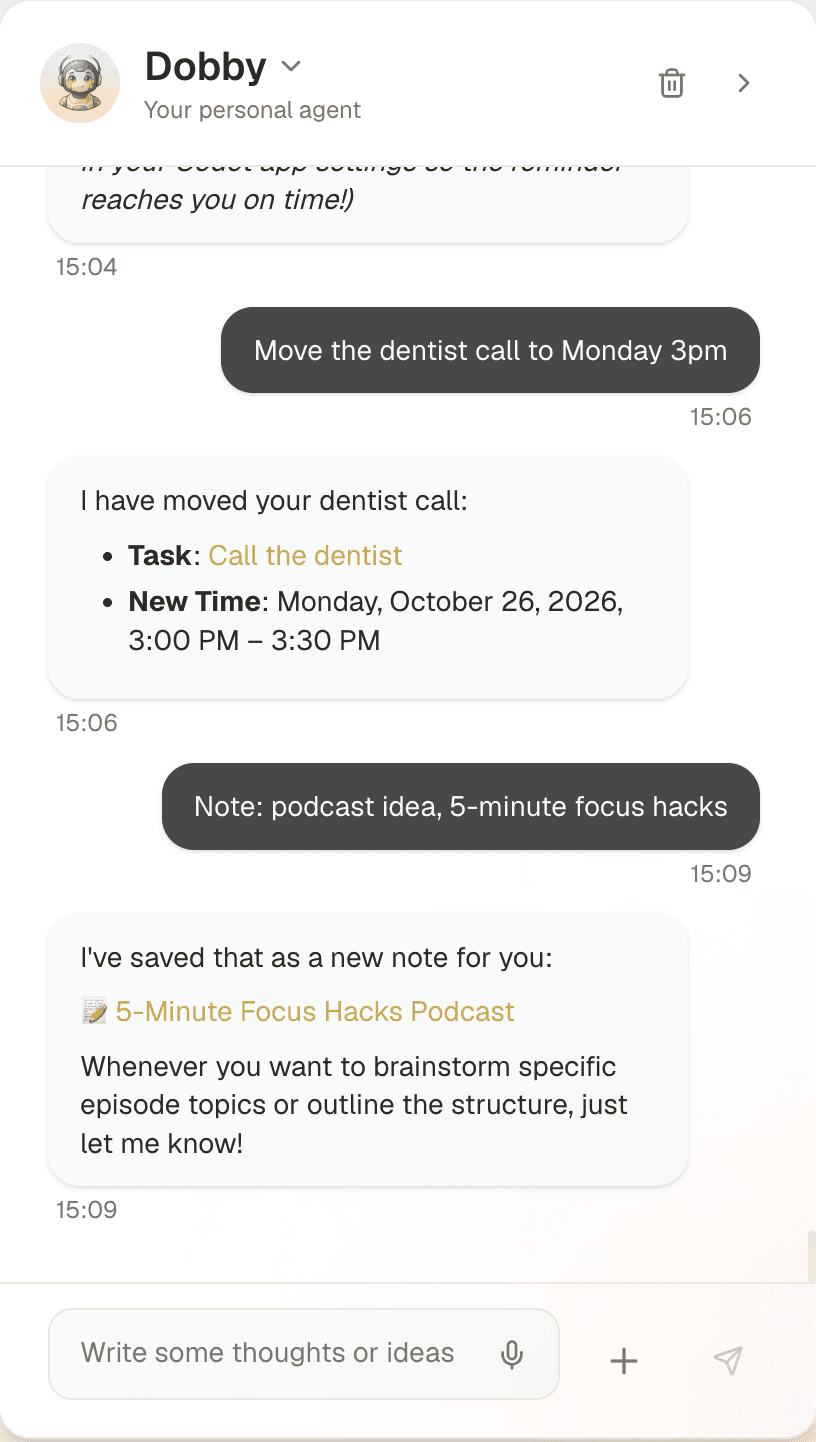
The parts that matter for scheduling:
- Where you can talk to it: iPhone, Apple Watch, the web, and a lock-screen widget. Android is on Google Play.
- Where things end up: it writes your events and tasks into Google Calendar. On iPhone it can also push tasks into Apple Calendar and Apple Reminders. That sync goes one way: tick something off in Reminders and Codot won't hear about it. If you mostly want to-dos to sit next to your events, here is how to add tasks to Apple Calendar through Reminders.
- Getting your day back: on iPhone, a daily brief with your reminders, plus scheduled automations if you want, say, a Friday review of what slipped.
- Languages: it understands spoken Czech, German, Swedish, Russian, Polish and Japanese as well as English. That matters because, according to Apple's feature availability page, Siri doesn't support Czech or Polish at all.
- Price: Codot's free plan covers tasks, the calendar, notes, the personal CRM, habits, calorie logging and expenses. Reminders at a set time, repeating tasks, daily briefings, scheduled automations and email triage are part of Codot Max ($12.99 a month or $99.99 a year, with 20x the free plan's usage). Every new account gets 7 days of Max free, then drops back to the free plan without charging you.
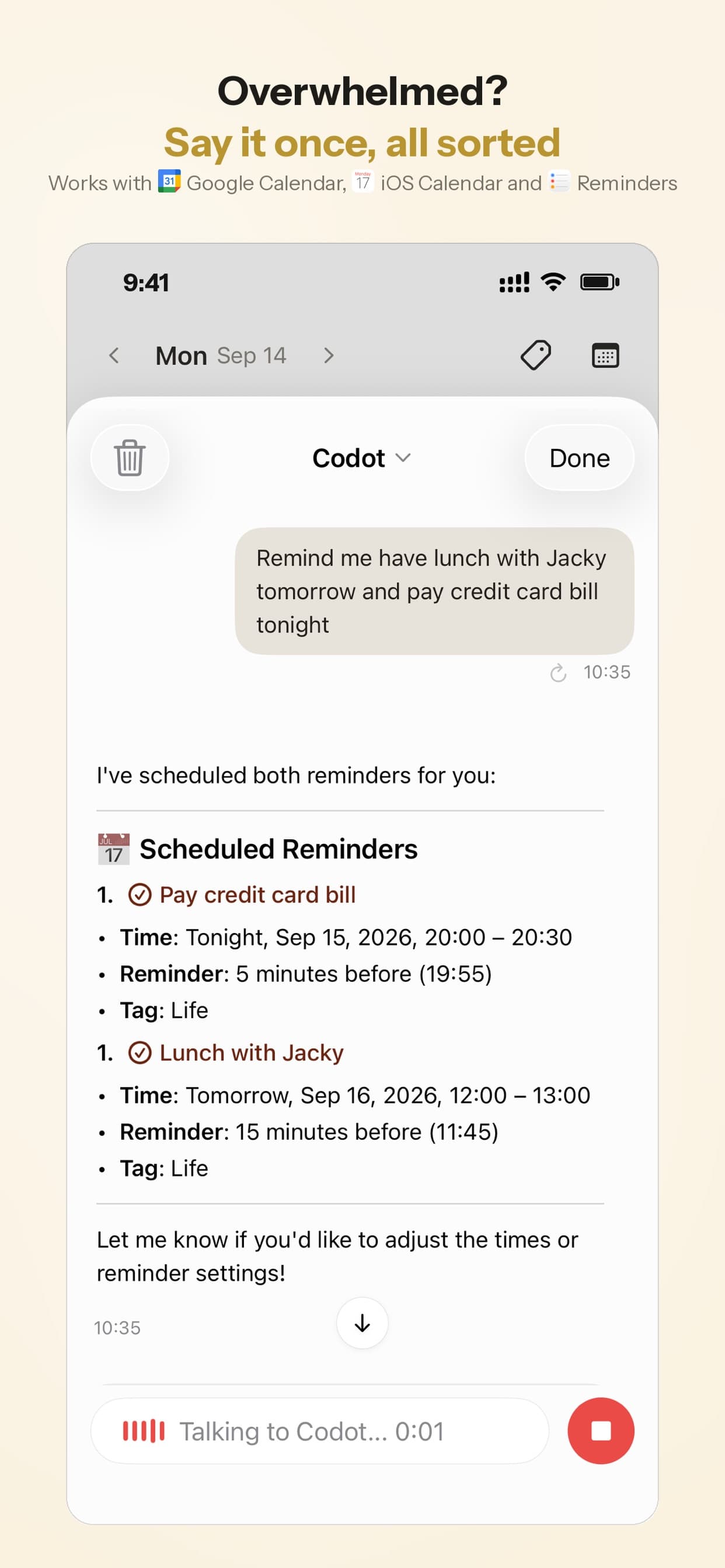
Who we built it for: founders and people with ADHD who think of things at bad moments (in the car, in the shower, halfway through another task) and lose them before they can type. If that's you, the ADHD daily routine template shows how the morning brief fits into a day.
Siri and Apple Calendar: free, and better at moving events than people think
If you live in Apple Calendar, try Siri properly before paying for anything. It adds events, and it can also reschedule them: "Move my 3pm meeting to 4pm" works, and Siri asks you to confirm before it changes anything. It can edit the title, location and repeat settings too (iDrop News walkthrough). Our table on whether Siri can add to Apple, Google and Outlook calendars shows which calendar accounts that works with, and the list of Siri calendar commands has the exact phrases to try.
Where it gets weaker:
- One thing per request. "Lunch with Sam Friday and remind me to book the table" usually turns into one event and a shrug.
- Calendar and Reminders stay separate apps. Siri will put an item in either one, but you have to say which.
- Language coverage. Siri is available in 37 countries and regions. Czech, Polish, Hungarian, Romanian and Greek aren't on the list, even though the iPhone keyboard can dictate them.
If Siri keeps mishearing you or ignoring requests, our iPhone reminders troubleshooting guide covers the usual settings culprits.
Gemini on Android: the default for Google Calendar users
On Android, Gemini can create, find and edit Google Calendar events once you connect Google Workspace in the Gemini app, according to Google's help page. New events go to your default calendar unless you name another one, and you can undo a fresh event from the confirmation notification.
One limit worth knowing: Google says Gemini can edit Google Calendar events directly, but for other calendar apps it "can't edit some event details, like the location or description". And like Siri, it handles calendar events, not your to-do list or a summary of your day. If you're on an iPhone with a Google account, the walkthrough on adding multiple events to Google Calendar at once covers CSV import, Gemini and one spoken sentence.
For a Google Calendar user on Android, Gemini plus Google Tasks covers a lot for nothing. You'd add Codot if you want tasks and reminders to come from the same sentence (the daily brief is iPhone only).
Fantastical: the calendar app with the best sentence parser
Fantastical's reputation comes from its natural-language entry: type or dictate "Coffee with Ana next Tue 9am at Blue Bottle" and it fills in every field correctly. You can use the iPhone's dictation button in that entry box, which makes it a voice calendar in practice.
It runs on iPhone, iPad, Mac, Apple Watch and Windows. The free version covers the basics (adding and deleting events, notifications, calendar views). Premium is listed at about $6.99 a month or $56.99 a year in Morgen's 2026 pricing breakdown; Flexibits only shows prices at checkout, so check there.
It stays a calendar, though. It won't take "remind me when I get home", turn a brain-dump into tasks, or brief you in the morning. It's a very good calendar.
Your ideas shouldn't wait for a keyboard. Just say it — Codot handles the rest.
Reclaim: for when the calendar fills itself
Reclaim solves the opposite problem. You don't talk to it. It defends focus time and habits by moving blocks around your meetings automatically. The free Lite plan includes habits, focus time and one calendar sync with a one-week scheduling range; paid plans start at $10 per seat per month billed yearly (Reclaim pricing). It works with Google Calendar and Outlook.
If your days look like Tetris played by other people, Reclaim helps more than any voice app. If your problem is getting things into the calendar in the first place, it doesn't help much.
Side-by-side
| Codot | Siri | Gemini | Fantastical | Reclaim | |
|---|---|---|---|---|---|
| Add an event by voice | Yes | Yes | Yes | Via dictation | No |
| Move an event by voice | Yes | Yes, with confirmation | Yes (Google Calendar events) | No, edit by hand | Moves blocks automatically |
| Tasks and reminders from the same sentence | Yes | One item per request | Calendar only | No | No |
| Daily summary | Daily brief (iPhone) | No | No | No | No |
| Calendars | Google; Apple Calendar and Reminders on iPhone | Apple Calendar | Google Calendar | Most major calendars | Google, Outlook |
| Platforms | iPhone, Apple Watch, Web, Android | Apple devices | Android, web | Apple devices, Windows | Web |
| Price | Free: tasks, calendar, notes, CRM, habits (no reminders at a set time, briefings, automations or email triage); 7-day Max trial; Max $12.99/mo or $99.99/yr (20x usage) | Free | Free | Free tier; Premium about $6.99/mo | Free tier; from $10/seat/mo |
Which one I'd pick, and why
A founder bouncing between meetings. Your calendar fills up with things people say to you in passing. Codot fits, mostly for the mixed sentences: "send Priya the deck Thursday, and book a call with her for next week." If you also struggle to protect focus time, Reclaim is a good second tool and the two don't clash. Our AI executive assistant comparison goes further into inbox and follow-up tools.
Someone with ADHD who loses track of time. The hard part is usually the gap between "I'll remember that" and actually writing it down, plus noticing that 3pm is now. Capture has to take seconds, and reminders should come before the event. A morning brief also helps more than a calendar you have to remember to open. Siri is fine for capture; Codot adds the brief (on iPhone) and catches the to-dos hiding inside a sentence.
A small team trying to book meetings. Skip all of these for that job. A scheduling link (Calendly, or Reclaim's scheduling links) settles a five-person slot faster than any voice assistant. Use voice for your own side of the calendar.
Mostly Apple, mostly simple. Siri. Add Fantastical if you type events often and want the parser.
What to pair Codot with
Codot handles your own side of the calendar: events, tasks and reminders from one sentence, plus the daily brief. Group scheduling, meeting polls and booking pages go to a scheduling link such as Calendly, and Codot pays off most when one sentence holds more than one job.
FAQ
Is there a free voice calendar app for iPhone?
Yes: Siri with Apple Calendar costs nothing and can add, move and edit events by voice. Fantastical has a free tier you can dictate into, and Codot's free plan adds events and tasks by voice; reminders at a set time and the daily brief are part of Codot Max, which every new account can try free for 7 days.
Can Google Assistant or Gemini add events to my calendar on Android?
Gemini can create, find and edit Google Calendar events after you connect Google Workspace in the Gemini app. Google says that for calendar apps other than Google Calendar, it can't change some details, such as an event's location or description.
How is Codot different from Siri for calendar?
Siri handles one calendar item per request. Codot takes a whole sentence, splits it into events, tasks and reminders, writes them into Google Calendar (and into Apple Calendar and Reminders on iPhone), then sends you a daily brief on iPhone. It also understands languages Siri doesn't support, such as Czech and Polish.
What's the best AI scheduling assistant for personal use?
It depends on the problem. If you have trouble getting things into the calendar, use a voice assistant (Siri, Gemini or Codot). If your calendar keeps filling with meetings, use an auto-scheduler such as Reclaim. Plenty of people end up using one of each.
If you want to try saying your next week out loud, Codot is on the App Store and Google Play.
Productivity & Tools Desk
This article was created with AI assistance and reviewed by our editorial team.Learn about our content process.