Typing Reminders Is Ironic. You're Interrupting Yourself to Remember Things
You stop what you're doing, open an app, type a reminder, lose your train of thought. Saying it out loud takes a few seconds and keeps your focus intact.
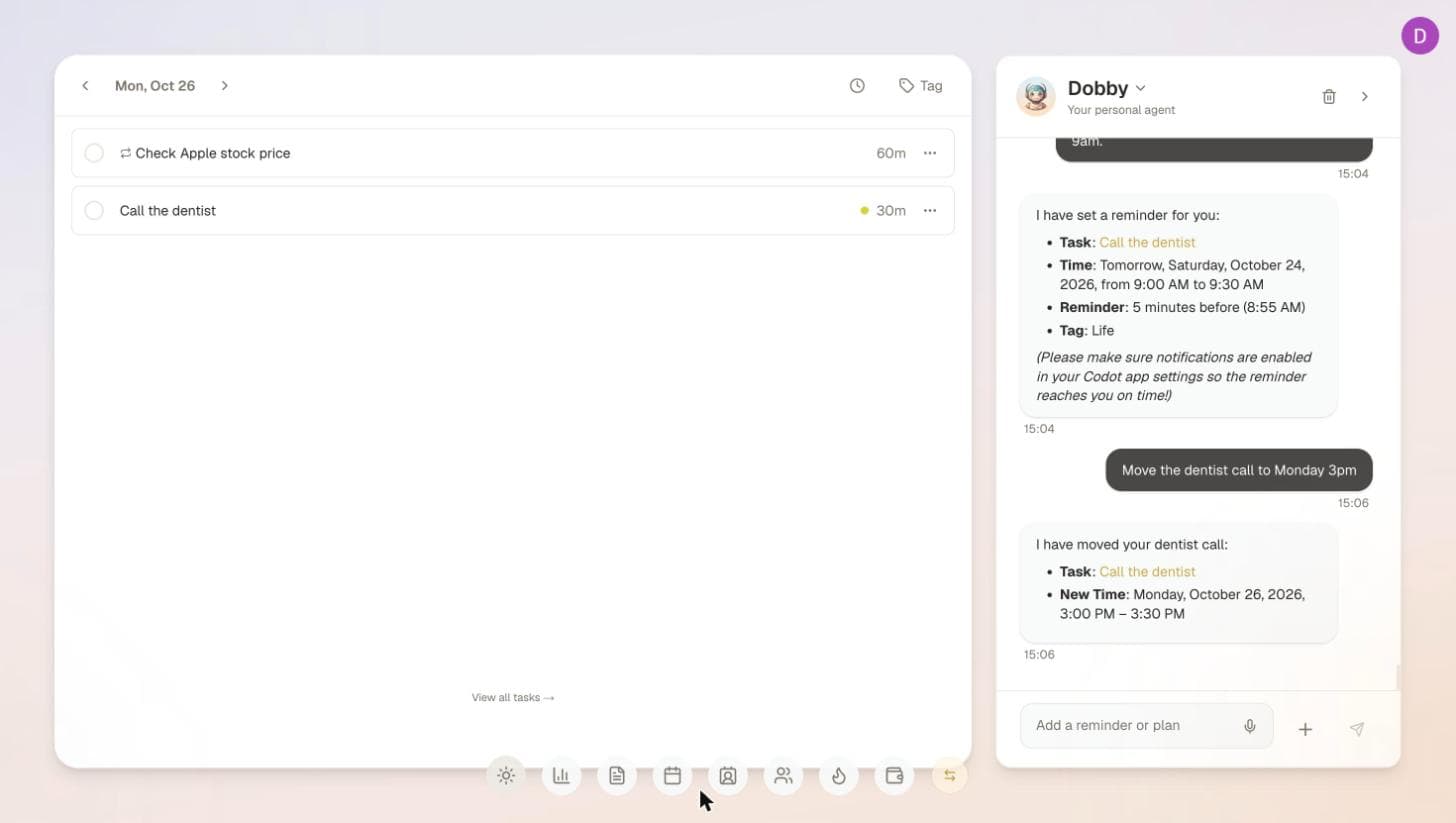
Typing a reminder means stopping what you're doing, opening an app and finding the right field, which is often when the thought gets lost. Voice capture skips those steps. With Codot, a voice-first AI assistant for iPhone, Android, Apple Watch and the web, you say "Remind me tomorrow at 9 AM to call Sarah" and it becomes a reminder; timed reminders are part of Codot Max, which every new account can try free for 7 days.
Busy professionals, especially founders and executives, juggle overflowing schedules and never-ending to-do lists. With an ADHD mind it's harder still: good ideas vanish as quickly as they appear, focus slips, and tasks get forgotten. A critical task surfaces mid-conversation and is lost by the time you've opened an app and typed it out. For too long, the default solution has been text reminders.
But let's be honest: do text reminders hold up in a fast-moving, high-pressure day? In our view, they often fall short.
The Hidden Friction of Text Reminders
Think about your typical day. You're in a meeting, walking between appointments, or stepping out of the shower when an important thought or task pops into your head. Your first instinct might be to grab your phone and type it into your daily planner or task manager. But this seemingly simple act introduces real friction:
- Context switching: You interrupt your current activity, breaking your flow to open an app, navigate to the right section, and type. Every switch costs a little attention, and the costs add up over a day.
- Speed vs. thought: Thoughts often move faster than fingers can type, especially when you're trying to capture a complex idea or detailed instructions. Nuance gets lost, and reminders end up incomplete. With ADHD, the window for capturing an idea before it fades can be too short for typing.
- Accessibility: What if your hands are full? What if you're driving, cooking, or simply don't want to pull out your phone? Typing isn't always an option, so ideas go uncaptured.
For ADHD minds and busy executives, this friction isn't just an inconvenience; it's a barrier to effective time management and productivity. It leads to missed opportunities, forgotten tasks, and a sense of overwhelm. Tools that cut the number of steps between "I just thought of it" and "it's saved" help most.
Embracing the Power of Your Voice with Codot
This is why Codot, our product, is built voice-first. Speaking is the most natural, low-friction way to capture something. You can capture a thought, schedule a meeting, or set a reminder just by talking.
Whether you're walking the dog, driving, or having a sudden brain dump away from your desk, you can speak into your phone or Apple Watch:
"Remind me tomorrow at 9 AM to follow up with Sarah about the Q3 report." "Schedule a 30-minute call with Mark for next Tuesday at 2 PM about the new product launch." "Add 'research AI ethics' to my to-do list for this week."

Codot's natural language scheduling works out what you meant and puts it into your calendar and task manager, and you can see the day at a glance in the calendar widget. It's like having a personal assistant that turns your voice notes into actionable items, which is exactly what an adhd app needs to do: make capture instant. Timed reminders and recurring tasks are part of Codot Max ($12.99/month or $99.99/year on the US App Store); every new account gets a 7-day Codot Max trial, and tasks, calendar and notes stay free.
We go deeper into how voice capture helps with reminders in "Your Brain Holds 4 Things at Once. You're Asking It to Hold 40".
More Than Just Reminders: Your AI Assistant
Codot goes beyond simple voice memos, and it's a different kind of tool from the Sunsama alternatives for daily planning or the apps in our AI planning roundup. It covers more of your day:
- Daily briefing: With Codot Max on iPhone, a morning briefing gathers your reminders, news and a summary of what needs you today.
- Cross-platform: It works on iPhone, Android, Apple Watch and the web, so you can capture and manage tasks wherever you are.
- Voice control for your calendar: Codot puts its events into Google Calendar, and you can add and move them by voice.

For founders and executives, Codot works like a virtual assistant that keeps you organized without you having to type a word. For people with ADHD, it lowers the effort it takes to get things out of your head and into a system.
Ready to Experience Frictionless Productivity?
It's time to move beyond the limits of text reminders and try a voice-first way to manage your day.
Download Codot on the App Store
Frequently Asked Questions (FAQ)
Q: How does Codot's voice-first approach help with ADHD?
A: Codot reduces the friction of capturing thoughts and tasks. For ADHD minds, the gap between having an idea and recording it is often where the idea is lost. Voice capture is immediate and natural, so there are fewer steps between thinking of a task and saving it.
Q: Is Codot compatible with my existing calendar and devices?
A: Codot runs on iPhone, Android, Apple Watch and the web, and adds its tasks and events to Google Calendar. On iPhone it can also send tasks to Apple Calendar and Apple Reminders. Outlook calendar sync isn't supported yet.
Q: What makes Codot different from other reminder apps?
A: Codot understands natural language and turns spoken thoughts into tasks and calendar events, instead of just storing a voice memo. It also covers notes, a personal CRM and, with Codot Max, daily briefings and automations.
Q: How secure is my data and voice recordings with Codot?
A: Codot encrypts your data and does not sell it.
Productivity & Tools Desk
This article was created with AI assistance and reviewed by our editorial team.Learn about our content process.