TickTick Alternatives for ADHD (October 2026): Fix the Setup First, Then Switch If You Still Need To
TickTick not working for your ADHD? Try a 15-minute setup first, then compare Codot, Todoist, Tiimo and Apple Reminders on capture, overdue tasks and price.
If TickTick isn't working for your ADHD, first cut it down to Inbox and Today, because a cluttered setup is often what people actually quit. Switch if capture is the real problem. Codot turns one spoken sentence into several tasks and events and moves them when you say so, Todoist Ramble does voice capture inside a list app, and Tiimo suits people who need to see the day as a timeline.
Disclosure: Codot, one of the apps below, is our product. TickTick, Todoist and Tiimo facts come from their own pricing and help pages, linked in each section and checked on October 27, 2026. We haven't run a timed test of these apps, so nothing here ranks them by speed.
TL;DR:
- Most people don't need to leave TickTick. They need fewer lists. Two views (Inbox and Today), a weekly reset and a five-task cap fix a lot of "TickTick doesn't work for my ADHD."
- Switch when the problem is getting things in at all. TickTick's voice input gives you one task per hold of the + button. If your thoughts arrive three at a time, that's the bottleneck.
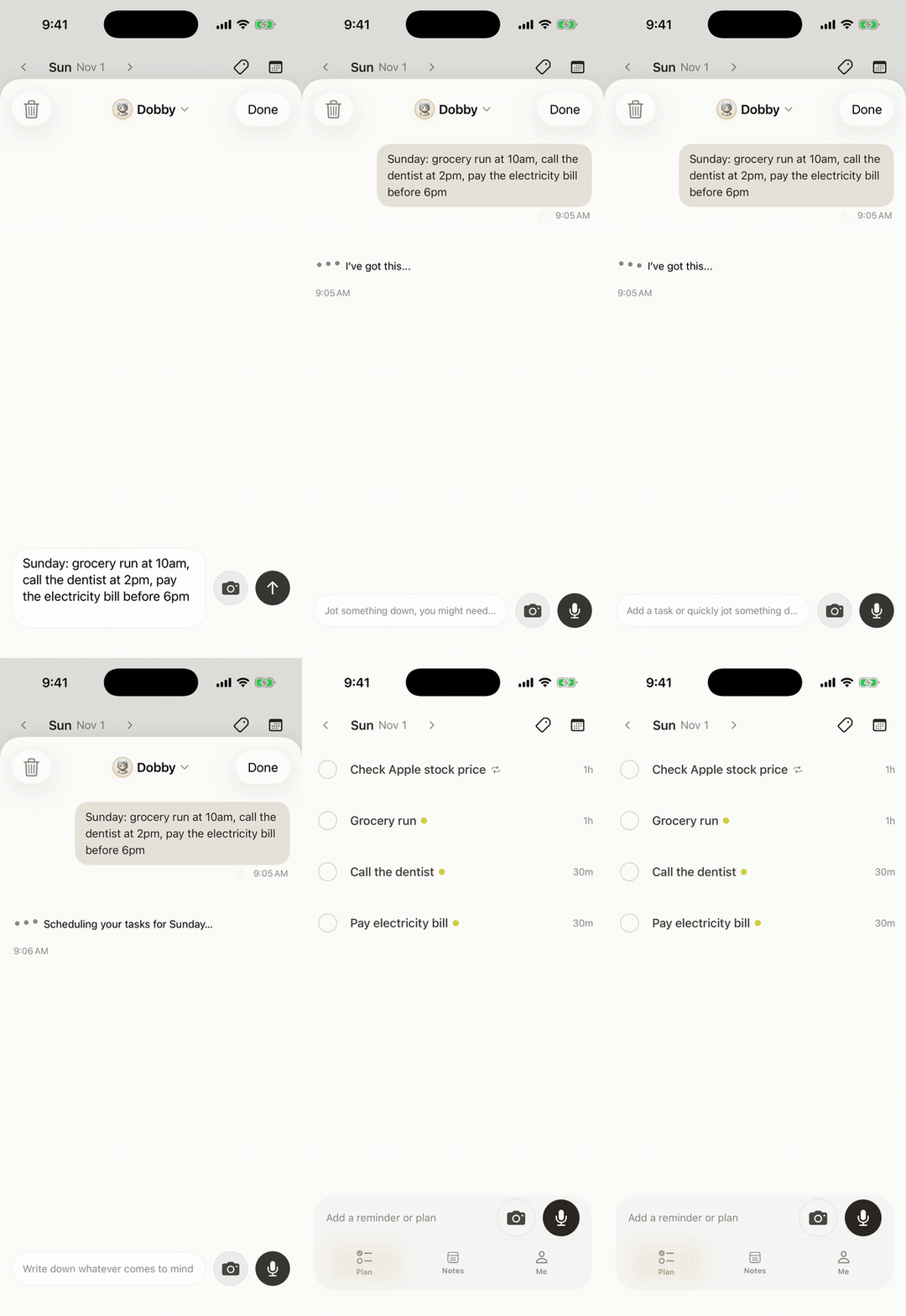
- Codot (our app) is a voice assistant rather than a list app: one rambling sentence becomes several tasks and calendar events, and "move what I didn't finish to tomorrow" moves them. Tasks and the calendar are free; reminders at a set time, daily briefings and automations are Codot Max, with a 7-day free trial.
- Todoist Ramble is the closest thing inside a classic list app (10 free voice sessions a month). Tiimo is for time blindness, not capture.
- Price check: older reviews say TickTick Premium is $35.99 a year. It's $49.99 now.
You open TickTick at 11 p.m. to add one thing, and the Today view greets you with 23 red tasks, some from August. You close the app without adding the thing. That's the moment people search for a TickTick alternative, and it's worth being honest about what went wrong, because a new app with the same setup ends the same way in about six weeks.
Is TickTick bad for ADHD, or is your setup the problem?
TickTick is one of the better list apps for ADHD on paper. Natural-language dates, multiple reminders per task, a habit tracker, an Eisenhower matrix and a focus timer, all in one place. The catch is that every one of those features is something you have to maintain. CHADD describes ADHD as a difficulty with executive functions like organizing, prioritizing and getting started, and a task manager with nine lists and twelve tags asks for exactly those skills before it gives anything back.
A quick way to tell which problem you have:
| What happens | Likely cause | What to do |
|---|---|---|
| Tasks are in TickTick but you never look at them | Too many views and lists | Fix the setup (next section) |
| You see the list and freeze | Overdue pile, no reset habit | Fix the setup, add a weekly wipe |
| Things never make it into the app | Capture takes too many steps | Look at a voice-first alternative |
| You know what to do but lose track of time | Time blindness | A visual timeline app like Tiimo |
If you're in the first two rows, try the next section before you install anything.
How to set up TickTick for ADHD in 15 minutes
- Hide every smart list except Inbox and Today. Settings → Smart List. You can turn the others back on later; you probably won't.
- Merge your lists down to three or four. Work, Home, Errands is enough. The free plan caps you at 9 lists of 99 tasks anyway (TickTick), which is a gift: it stops you building the system instead of using it.
- Never pick a date by tapping. Type "dentist Thursday 3pm" and let Smart Date Parsing set it. If the date picker opens, you've already added friction.
- Cap Today at five. If a sixth task needs to be today, one of the five moves.
- Set one recurring task: "Sunday: empty Inbox, push or delete everything overdue." The overdue pile is what makes people quit, so schedule its removal.
- Put the + button where your thumb lives. Long-press it to dictate a task when typing feels like too much (TickTick help).
Give that two weeks. If the app now gets opened but things still don't go in, the problem is capture, and that's where the alternatives below differ.
Where TickTick still loses an ADHD brain
Two things a tidier setup doesn't fix.
One task per hold. TickTick's voice input is good at "call the dentist tomorrow at 10." It turns the held + button into one task with a parsed date. Thoughts that come in a burst ("email Sam the deck, book the car service, and Friday's dinner moved to 8") need three holds, three checks, three saves. By the second one the third is gone.
Moving things is manual. Rescheduling overdue tasks means selecting them and picking a new date. It's quick once you're in, and getting in is the hard part at 11 p.m.
The upgrade price matters here too: TickTick Premium is $49.99 a year as of October 2026 (TickTick), up from the $35.99 most ADHD roundups still quote.
TickTick alternatives for ADHD, compared
| TickTick | Codot | Todoist | Tiimo | Apple Reminders | |
|---|---|---|---|---|---|
| What it is | List app with habits and focus timer | Voice-first AI assistant | List app with AI voice capture (Ramble) | Visual day planner | Built-in iPhone list |
| Several tasks from one spoken sentence | No, one per hold | Yes, plus calendar events | Yes, with Ramble | Speak or type tasks; AI splits into steps | No, Siri adds one at a time |
| Move tasks by saying so | No | Yes | No | Not documented | Not documented |
| Lock Screen / Apple Watch | Watch app | Lock Screen widget and Watch | Widgets and Watch | Watch app | Yes |
| Price (Oct 2026) | Free; Premium $49.99/year | Free: tasks, calendar, notes, CRM, habits (no reminders at a set time, briefings, automations or email triage); 7-day Max trial; Max $12.99/month or $99.99/year (20x usage) | Free; Pro $5/month yearly or $7 monthly | Free plan; Pro price shown at checkout | Free |
Your ideas shouldn't wait for a keyboard. Just say it — Codot handles the rest.
Try Codot — It's Free →Codot: say it once, and it gets filed and moved
We built Codot for the third row of that first table, the things that never make it in. It isn't a list app with a microphone added. You talk to it the way you'd talk to an assistant, and it decides what each part of the sentence is.
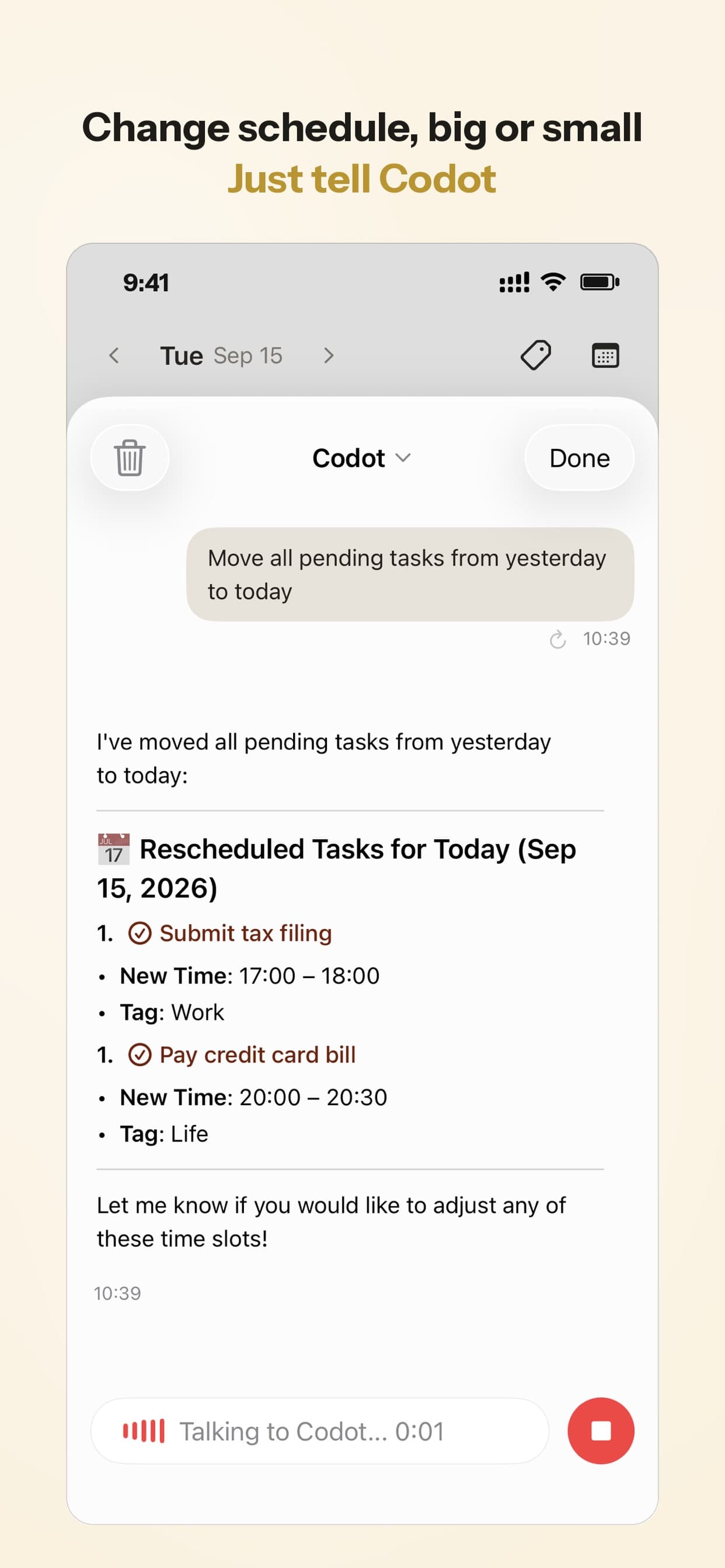
Picture the end of a Tuesday. You're walking to the car and you say: "Send Priya the contract tonight, the team call moved to Thursday at 2, and I need to renew the passport before March." Codot makes a task for tonight, moves the calendar event (an event you added through Codot; Codot writes its events into Google Calendar, so the change shows up there), and adds the passport task with a date. Later, sitting in front of the same red pile that drove you out of TickTick, you say "move everything I didn't finish today to tomorrow" and it does.
The other parts that matter for ADHD are about not having to open anything. You can talk to Codot from the Lock Screen widget or your Apple Watch, and each morning a daily briefing tells you what's on, so the list comes to you. There's a habit tracker if TickTick's habits are the thing you'd miss, and scheduled automations for recurring nudges. Your data is encrypted and never sold. It's on iPhone, the web and Google Play; the daily briefing is on iPhone.

App Store reviewers mostly talk about two things: that it replaced a paper planner, and that events land in their phone calendar without typing.
Where Codot is the wrong pick: if you love TickTick's matrix view, nested lists, tags and filters, you'll miss them. Codot keeps tasks simple and does the sorting itself, which is the point for some people and a loss of control for others. It isn't a project-management tool, so no Gantt charts or dependencies. Voice also means the AI can mishear you, so glance at what it created the first few weeks. And it doesn't do things on the web for you, like booking or filling forms.
Pricing: Codot's free plan covers tasks, the calendar, notes, the personal CRM, habits, calorie logging and expenses. Reminders at a set time, repeating tasks, daily briefings, scheduled automations and email triage are part of Codot Max ($12.99 a month or $99.99 a year, with 20x the free plan's usage). Every new account gets 7 days of Max free, then drops back to the free plan without charging you.
The other alternatives, briefly
Todoist with Ramble
If you want to stay in a classic list app and the problem is capture, Todoist is the straightforward move. Ramble lets you talk through several tasks in one go, picks up dates as you speak, and works in 40+ languages (Todoist help). Free accounts get 10 sessions a month, shared with Todoist's other AI capture tools; Pro removes the cap and costs $5 a month billed yearly or $7 monthly (Todoist pricing). The free plan's 5-project limit is tighter than TickTick's 9 lists. On "Todoist vs TickTick for ADHD": Todoist captures better by voice, TickTick has habits and a focus timer built in. Ramble adds tasks; it doesn't move your calendar.
Tiimo
Tiimo solves a different problem. It calls itself "a visual AI planner" and lays your day out as a timeline, with AI that breaks tasks into steps and estimates how long each takes (Tiimo). If your trouble is that 3 p.m. arrives and you thought it was noon, this is the one to try. There's a free plan on iOS and Android; the web app is Pro-only, and Tiimo doesn't publish a fixed price, it shows it at checkout by region (Tiimo pricing).
Apple Reminders
Free, already on your iPhone, syncs through iCloud, and Siri can add a reminder hands-free. If TickTick felt like too much, the honest answer may be less app, not a different one. The limit is the same as TickTick's voice input: one reminder per request.
How I'd choose
- You open TickTick but freeze: stay, and do the 15-minute setup. Switching won't fix an overdue pile.
- Things never get written down: Codot if you think in bursts and want your calendar handled too; Todoist with Ramble if you want a traditional list and the voice sessions are enough.
- You lose track of time, not tasks: Tiimo.
- You want something free with no setup: Apple Reminders.
We're biased, obviously. But I'd still tell a friend to try the TickTick setup first, because it's free and takes fifteen minutes. If you're comparing more tools, the ADHD AI agents ranking sorts them by setup effort, and the voice to-do list comparison goes deeper on capture. If your thoughts vanish the second you have them, this piece on ADHD and forgetting covers why speaking them out loud helps, and the Apple Watch to-do list guide covers capture when your phone isn't in reach.
FAQ
Is TickTick good for ADHD?
It can be, if you keep it small. The features people praise (natural-language dates, multiple reminders, habits, a focus timer) are the same ones that turn into upkeep. Start with Inbox and Today and add views only when you miss them.
What's the best free TickTick alternative?
Apple Reminders if you're on iPhone and want zero setup. Todoist's free plan if you want voice capture of several tasks, up to 10 Ramble sessions a month. Codot's free plan turns spoken sentences into tasks and calendar events; reminders at a set time and daily briefings need Codot Max, which every new account can try free for 7 days.
How is Codot different from TickTick?
TickTick is a list you organize. Codot is an assistant you talk to: one sentence can create several tasks, move a calendar event and set a date, and you can reschedule by saying so. TickTick has the richer list tools (matrix, tags, filters); Codot has the daily briefing, Google Calendar changes by voice and Lock Screen capture.
Todoist vs TickTick for ADHD: which is better?
Todoist if capture is your problem, because Ramble turns one spoken ramble into several tasks. TickTick if you want habits and a focus timer in the same app as your tasks.
How much is TickTick Premium in 2026?
$49.99 a year as of October 2026, per TickTick's upgrade page. Many guides still list the old $35.99 price.
If the problem is that things never make it into your list, try saying them instead: Codot on the App Store.
ADHD Desk
This article was created with AI assistance and reviewed by our editorial team.Learn about our content process.