Sunsama Alternatives (October 2026): Cheaper and Free Options for Daily Planning
The best Sunsama alternatives, from free to premium. Codot, Akiflow, Morgen, TickTick, Todoist and Super Productivity compared on yearly cost and the daily ritual.
The best Sunsama alternative depends on what you'd keep. Akiflow is the closest match, with a daily planning ritual and time blocking, but costs more. Morgen is a little cheaper at $15 a month billed yearly. Super Productivity is free and open source. TickTick and Todoist cost $50 to $60 a year. Codot is a voice AI assistant that sends your daily plan to you.
TL;DR:
- Sunsama Pro costs $17 a month billed yearly or $22 monthly, and its pricing page says there's no free plan and won't be one. That's about $204 a year.
- Akiflow is the closest match: inbox, time blocking and a planning ritual. It costs a bit more ($19 a month billed yearly).
- Morgen is the cheaper match at $15 a month billed yearly, strongest if you juggle several calendar accounts.
- Super Productivity is the free, open-source answer, with timeboxing and time tracking but no guided ritual.
- TickTick ($49.99 a year) and Todoist ($60 a year) are the cheap lists if you can live without timeboxing.
- Codot (our app) is a voice-first AI assistant. The morning plan arrives as a briefing, and you change the day by saying so from your phone, watch or the web. Tasks, calendar and notes are free; the morning briefing is part of Codot Max ($12.99 a month or $99.99 a year), with a 7-day free trial. The daily briefing and email triage are only on iPhone.
Codot is our product, so read our take on it with that in mind. Facts about the other apps come from their own pricing and product pages, linked below and checked on October 27, 2026. We haven't tested all six side by side.
Sunsama's daily ritual is good. You pick today's tasks, drag them onto the calendar, see that the day doesn't fit, and cut something. Then at five you run the shutdown. On Hacker News the people who recommend Sunsama mostly credit exactly this guided routine, and one commenter with ADHD said it kept their daily and weekly plans on track (HN thread).
The trouble starts on the days the ritual is meant for. A launch week, a sick kid, three client fires before nine. The planning session gets skipped, and the tasks that came up in the car never made it into the inbox anyway. Then the bill renews.
Why do people look for Sunsama alternatives?
Cost with no free floor. As of October 27, 2026, Sunsama's pricing page lists Pro at $17 a month billed yearly or $22 monthly, with a 14-day trial that doesn't need a card. The FAQ further down the same page lists $20 and $25, so confirm at checkout. The page's own "Pricing Manifesto" says Sunsama doesn't have a free forever plan and doesn't plan to (Sunsama pricing).
The ritual is a desk habit. Planning and shutdown are built for a computer session. Sunsama does have iOS and Android apps (sunsama.com), but the guided flow assumes you sit down for it.
Manual scheduling. Some people want the calendar filled for them. Sunsama asks you to drag every block.
Teams. It's a personal planner, not one of the best AI family organizer apps designed for shared household management. If you need shared projects, it isn't built for that.
Sunsama alternatives compared by yearly cost (as of October 27, 2026)
| App | What it is | Free plan | Cost for a year (one person) | Guided daily ritual |
|---|---|---|---|---|
| Sunsama | Guided daily planner | No, 14-day trial | $204 (Pro, billed yearly) | Yes |
| Codot | Voice-first AI personal assistant | Yes: tasks, calendar, notes, CRM, habits (no reminders at a set time, briefings, automations or email triage); 7-day Max trial | $99.99 (Max) | Morning briefing, sent to you |
| Akiflow | Task inbox plus time blocking | No, 7-day trial with card | $228 | Yes |
| Morgen | Calendar plus AI planner | No, 14-day trial | $180 | Not advertised |
| Super Productivity | Open-source task and time tracker | Free app | $0 | No |
| TickTick | To-do list with calendar views | Yes | $49.99 (Premium) | No |
| Todoist | To-do list | Yes | $60 (Pro) | No |
Yearly cost uses each vendor's billed-yearly price in US dollars.
Codot: the plan comes to you, and you change it by talking
Sunsama asks you to sit down and plan. Codot is an AI personal assistant that keeps the plan for you: you tell it what's going on, in whatever order, and it creates the tasks, events and notes, moves things when the day changes, and sends you the result.
Here's how it covers the jobs Sunsama's ritual does:
- The morning plan arrives on its own. Set a daily briefing for 8:30 and it lists today's tasks and events, plus anything else you asked it to track. If you skip the planning session, the plan still reaches you.
- Capture happens when the thought does. In the car after a client call: "Follow up with Marco about the renewal Thursday, add the quarterly report to Friday, and remind me to order the projector tonight at 8." Three items, sorted into a task, an event and a timed reminder.
- Cut the day by voice. When the day doesn't fit, "move my unfinished tasks to tomorrow" moves them. Calendar changes sync to Google Calendar.
- A shutdown that runs itself. A scheduled automation at 6pm can send a recap of what's left, so the end-of-day review happens even when you forget.
- Big goals become a plan. Say the goal and the deadline, and Codot acts as an AI accountability partner for self-improvement by breaking it into dated sub-tasks you can edit.
- People and email. It keeps notes on contacts in a personal CRM, and with Gmail or Outlook connected it triages the inbox and drafts replies to the important messages.
- On every device you carry. iPhone, Apple Watch, the web, a Lock Screen widget, and Android on Google Play. The daily briefing and email triage are only on iPhone. On Android you get tasks, reminders, notes, the personal CRM and routines.
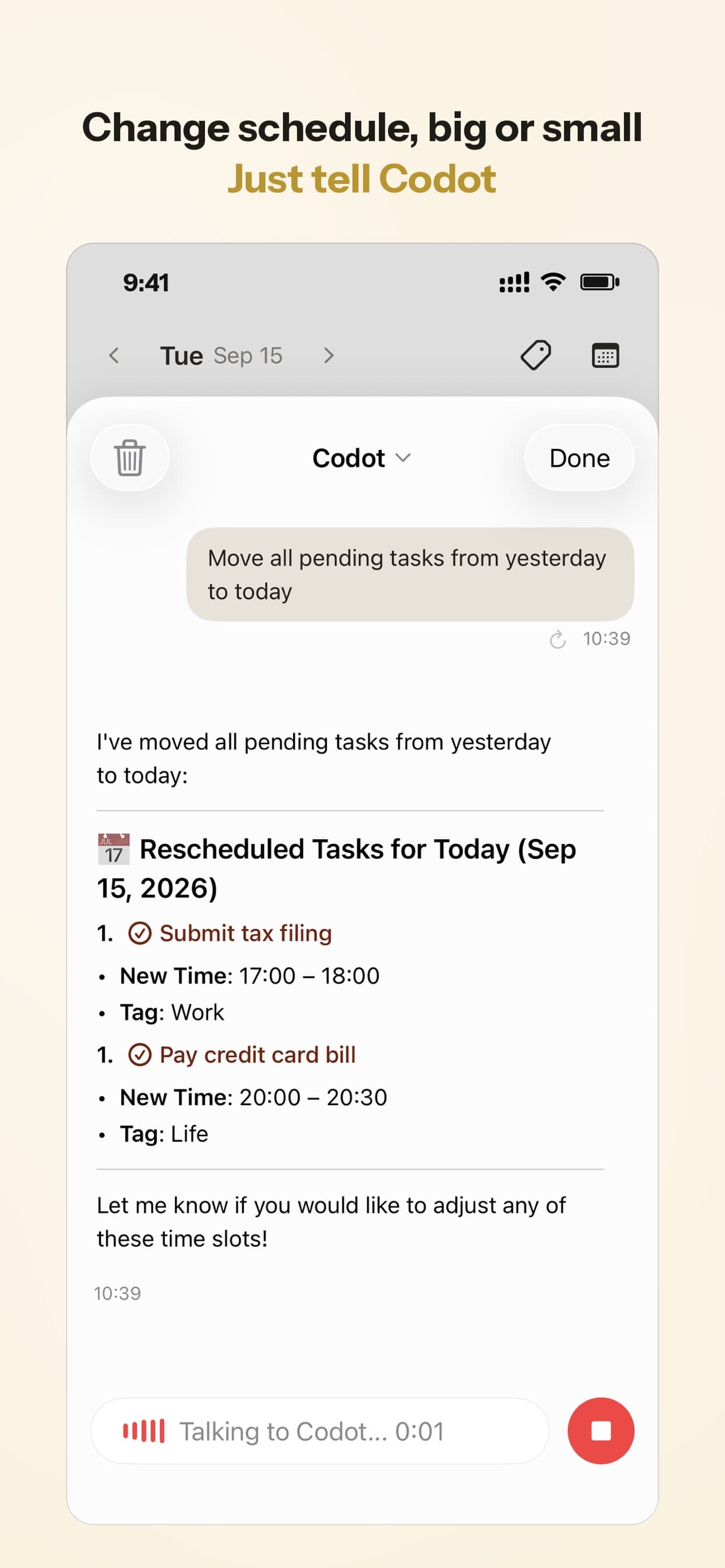
I'd point founders and managers here first: people whose day is mostly reacting, with the tasks arriving between meetings rather than at a desk, much like the users of contractor scheduling apps for solo businesses. People with ADHD tend to like that the plan shows up without them having to start a session; if that's you, my ADHD daily routine template pairs a written routine with the reminders.
Pricing: Codot's free plan covers tasks, the calendar, notes, the personal CRM, habits, calorie logging and expenses. Reminders at a set time, repeating tasks, daily briefings, scheduled automations and email triage are part of Codot Max ($12.99 a month or $99.99 a year, with 20x the free plan's usage). Every new account gets 7 days of Max free, then drops back to the free plan without charging you. Data is encrypted and never sold.
Your ideas shouldn't wait for a keyboard. Just say it — Codot handles the rest.
Try Codot — It's Free →The other Sunsama alternatives
Akiflow: the closest match, and not cheaper
Akiflow collects tasks from your other tools into one list, and you time-block them on the calendar yourself. It has two-way Google and Outlook sync, a daily planning ritual and an AI assistant, Aki. Pro is $19 a month billed yearly ($228) or $34 monthly. There's no free plan, and the 7-day trial takes a card and converts unless you cancel (Akiflow pricing). If you search "best Sunsama alternative" and mean "same thing, different logo", this is it. If you mean cheaper, keep reading.
Morgen: the cheaper one that keeps time blocking
Morgen is $15 a month billed yearly ($180) or $30 monthly for individuals, with a 14-day trial and no card (Morgen pricing). Its AI Planner time-blocks tasks on your calendar, and it connects Google, Outlook/Microsoft 365, iCloud and Fastmail calendars plus task tools like Notion, Todoist, Linear and ClickUp. It's the pick if your real mess is three calendar accounts. It doesn't advertise a guided ritual, so you'd bring the habit yourself.
Super Productivity: free and open source
The direct answer to "sunsama alternative free". Super Productivity is free and open source, runs on Windows, macOS, Linux, Android, iOS and the web, and has a schedule planner for timeboxing, time tracking with timesheets, Pomodoro, and GitHub, GitLab and Jira integrations (super-productivity.com). It gives you the parts and leaves the routine to you. Developers will like it most; its own Sunsama alternatives post ranks itself first, as every vendor list does, including this one.
TickTick and Todoist: the cheap lists
If Sunsama was mostly a pretty to-do list for you, these cost a quarter of it and are among the AI reminder apps for college students that you can choose based on how you forget. TickTick Premium is $49.99 a year and adds more calendar views and task durations; the free plan allows 9 lists (TickTick premium). Todoist Pro is $60 a year or $7 monthly, with a calendar layout and Ramble, which turns spoken rambling into tasks (Todoist pricing). Neither walks you through planning. I covered both for capture in the best voice to-do list apps.
Motion, if you want the opposite of a ritual
If dragging blocks was the chore, Motion's AI arranges the calendar for you. It's not cheaper: Pro AI is listed at $19 per seat per month with no free plan (Motion pricing). I compared Motion with Codot in Motion vs Codot.
What Sunsama still does better than Codot
Sunsama's guided ritual is more structured than anything Codot does. It shows the day's tasks against the hours you have and makes you choose, and Codot doesn't present a timeboxed view like that. Sunsama also pulls tasks in from project tools, email and messaging apps, while Codot connects to Gmail, Outlook and Google Calendar. Codot isn't a project-management tool and doesn't act on the web for you.
Which Sunsama alternative would I pick?
If you love the ritual and only want a different tool, Akiflow. If you love the ritual and want to pay less, Morgen, and keep the habit on your own.
If cost is the whole point, Super Productivity is free and TickTick is $49.99 a year.
If the ritual kept getting skipped on the days that needed it, Codot fits: the plan comes to you every morning, and changes take a sentence. That's the case we built it for.
FAQ
Is there a free alternative to Sunsama?
Yes. Super Productivity is free and open source with timeboxing and time tracking. TickTick and Todoist have free plans but no daily planning ritual. Codot has a free plan for tasks, calendar and notes; the morning briefing is part of Codot Max, which every new account can try free for 7 days. Sunsama itself has no free plan.
What is the cheapest Sunsama alternative with time blocking?
Morgen, at $15 a month billed yearly versus Sunsama's $17. Super Productivity's schedule planner does timeboxing for free if you don't need calendar automation.
Is Akiflow better than Sunsama?
They do similar jobs. Akiflow leans on collecting tasks from many tools and fast keyboard control; Sunsama leans on the guided planning and shutdown. Akiflow costs slightly more and its trial requires a card.
How is Codot different from Sunsama?
Sunsama is a planner you sit down with each morning and evening. Codot is a voice-first AI assistant: you say what's happening and it creates and moves tasks and events, sends a morning briefing on schedule, and can send an evening recap. Sunsama has the stronger guided timeboxing ritual; Codot works from your phone, watch or the web while you're away from a desk. The daily briefing and email triage are only on iPhone.
If your plans fall apart between meetings, try the version that comes to you: Codot on the App Store is free to download, and every new account gets 7 days of Codot Max free.
Productivity & Tools Desk
This article was created with AI assistance and reviewed by our editorial team.Learn about our content process.