Motion Alternatives (October 2026): 6 Options Compared on Price, Control and Setup
Looking for Motion alternatives? Reclaim, FlowSavvy, Akiflow, Sunsama, Todoist and Codot compared on price, free plans and how much setup each one needs.
The best Motion alternative depends on why you're leaving. Reclaim is the closest auto-scheduler and has a free plan. FlowSavvy auto-schedules for less and also has a free plan. Akiflow and Sunsama give you back manual control for $17 to $34 a month. Todoist is the cheap list. Codot is a voice AI assistant that does the task entry and rescheduling Motion still asks you to do by hand.
TL;DR:
- People leave Motion over price (Pro AI is $19 per seat per month, no free plan), blocks that move without a visible reason, or the work of entering every task with a duration and deadline.
- Reclaim is the nearest like-for-like swap. Its Lite plan is free and auto-schedules one week ahead on Google or Outlook calendars.
- FlowSavvy is the budget auto-scheduler: a free plan that plans two weeks out, and Pro at $10 a month billed yearly.
- Akiflow and Sunsama are for people who want to drag tasks onto the calendar themselves. Neither has a free plan.
- Codot (our app) is a voice-first AI assistant. You say what changed and it creates, moves or splits the tasks and events, from your phone, watch or the web. The free plan covers tasks and the calendar; briefings, timed reminders and automations come with Codot Max ($12.99 a month), which you can try free for 7 days.
Codot is our product, so weigh what we say about it with that in mind. Everything about the other apps comes from their own pricing and product pages, linked below and checked on October 27, 2026. We haven't run a formal side-by-side test of all six.
Motion's pitch is a calendar that plans itself. The part the pitch skips is the input. Each task needs a duration, a deadline and a priority before the scheduler can place it, and those tasks tend to show up at bad moments: walking out of a client call, in the car, at 11pm when you remember the invoice. When the entry doesn't happen, the scheduler plans a day from half a list. Decide which problem you're solving before you pick; the six tools below solve different ones.
Why do people look for Motion alternatives?
Price. Motion's pricing page lists two plans as of October 27, 2026: Pro AI at $19 per seat per month and Business AI at $29, with a toggle that says annual billing saves 33%. There's a free trial, but no free plan, and the page doesn't state the trial length (Motion pricing). Business AI is where Gantt charts, time tracking and team capacity planning live.
Control. Motion's homepage says its AI calendar "plans your day for you" and re-optimizes the schedule many times a day (usemotion.com). For some people that's the whole appeal. For others, a block that jumps to Thursday without explanation is the moment they stop trusting the calendar. The top-ranking alternatives pages, written by Reclaim and Akiflow, both lead with this complaint and both sell the fix.
Scope. Pro AI also bundles AI chat, docs, wiki, notes and an AI writer. If you came for the scheduler, you're paying for a workspace.
Input. The scheduler only knows what you typed into it. This is the reason I find most interesting, because none of the auto-schedulers below fix it either.
Motion alternatives compared (as of October 27, 2026)
| App | What it is | Free plan | Paid price (per month) | Calendars |
|---|---|---|---|---|
| Motion | AI workspace with auto-scheduling | No, trial only | Pro AI $19/seat; Business AI $29/seat | Not listed on pricing page |
| Codot | Voice-first AI personal assistant | Yes: tasks, calendar, notes, CRM, habits (no reminders at a set time, briefings, automations or email triage); 7-day Max trial | Max $12.99, or $99.99/year (20x usage) | Google Calendar sync |
| Reclaim | Auto-scheduler for tasks, habits and focus time | Yes (Lite, 1-week range) | Starter $10/seat yearly, $12 monthly | Google, Outlook |
| FlowSavvy | Budget auto-scheduler | Yes (2 weeks out) | Pro $10 yearly, $14 monthly | Unlimited synced calendars |
| Akiflow | Task inbox plus manual time blocking | No, 7-day trial with card | $19 yearly, $34 monthly | Google, Outlook |
| Sunsama | Guided daily planning ritual | No, 14-day trial | $17 yearly, $22 monthly | Calendar integrations listed |
| Todoist | To-do list | Yes | Pro $5 yearly, $7 monthly | Calendar layout on Pro |
Prices are in US dollars from each vendor's pricing page.
Codot: the assistant that does the entry for you
Codot sits in a different category from Motion. Motion is a planner you fill in and it arranges. Codot is an AI personal assistant: you tell it what's going on, in whatever order it comes out, and it takes the action. That covers the part of planning Motion leaves to you.
What that looks like in practice:
- Capture in one breath. "Send Priya the contract by Thursday, block two hours Friday morning for the pitch deck, and remind me to call the bank at 4." That becomes a task with a due date, a calendar event and a timed reminder. You don't fill in fields.
- Reschedule by saying so. "Move my unfinished tasks to tomorrow" or "move the dentist to Monday at 3pm." The events move, and if you use Google Calendar they move there too.
- Break a goal into steps. Say "I need to launch the new pricing page by the 15th" and Codot drafts the sub-tasks with dates leading up to the deadline. You edit the plan instead of writing it.
- A morning briefing with today's tasks, events and anything you asked it to track, delivered at a time you choose. Scheduled automations handle the other repeating things.
- Remember people. Say what a contact told you after a meeting and it lands on their card in a personal CRM.
- Email triage. Connect Gmail or Outlook and it sorts what matters and drafts replies to the important ones for you to send.
- Capture from anywhere. iPhone, Apple Watch, the web, a Lock Screen widget, and an Android app on Google Play. The daily brief and email triage are on iPhone; on Android you get tasks, reminders, notes, the CRM and routines.
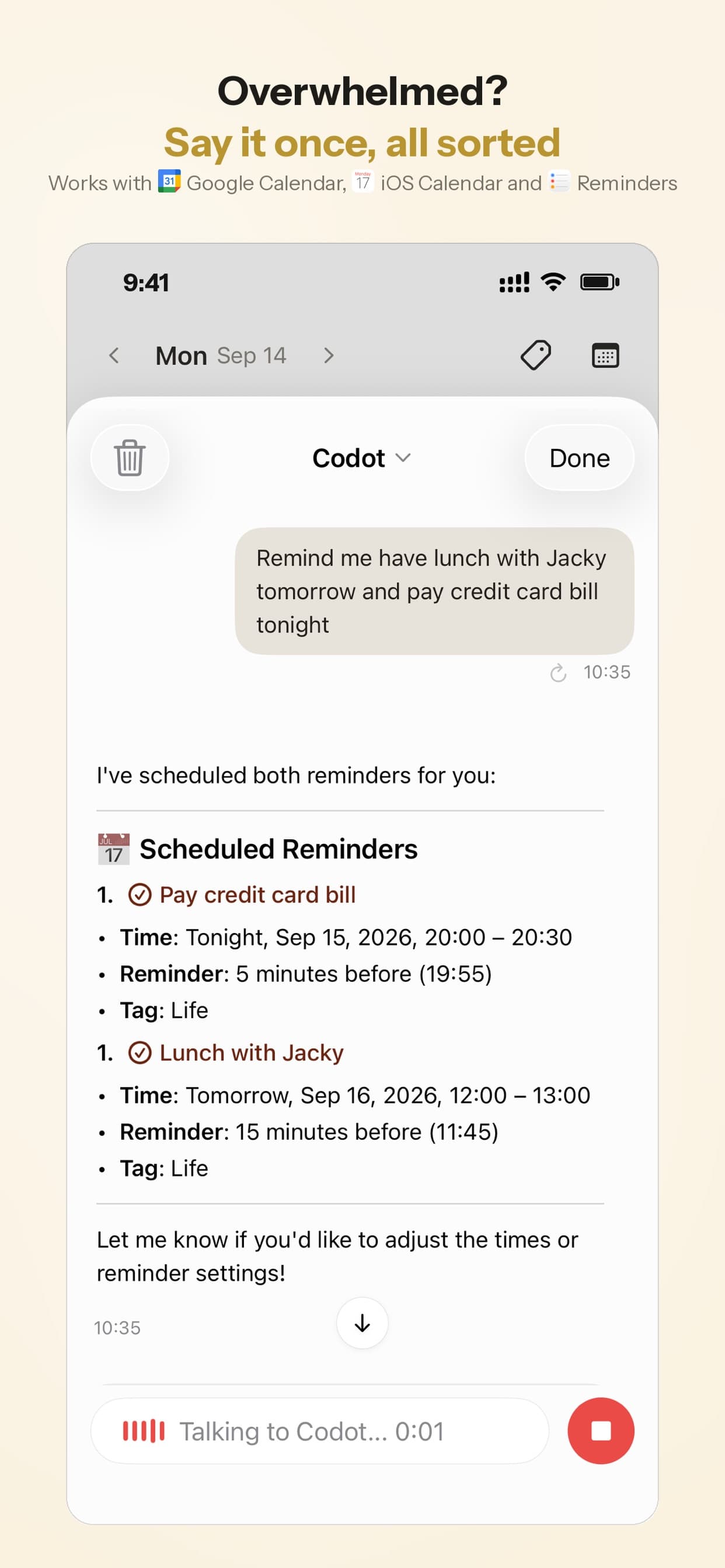
Codot fits founders, managers and anyone whose day is mostly reacting. Motion assumes a desk session where you enter work; Codot assumes the work arrives while you're doing something else, and that five seconds of talking beats remembering to type it later. People with ADHD tend to recognize this immediately; I wrote a longer head-to-head in Motion vs Codot for ADHD.
Pricing: Codot's free plan covers tasks, the calendar, notes, the personal CRM, habits, calorie logging and expenses. Reminders at a set time, repeating tasks, daily briefings, scheduled automations and email triage are part of Codot Max ($12.99 a month or $99.99 a year, with 20x the free plan's usage). Every new account gets 7 days of Max free, then drops back to the free plan without charging you. Data is encrypted and never sold.
Your ideas shouldn't wait for a keyboard. Just say it — Codot handles the rest.
Try Codot — It's Free →The other Motion alternatives worth testing
Reclaim: the closest swap if you want auto-scheduling
If what you liked about Motion was the scheduler itself, start here. Reclaim places tasks, habits, focus time and buffers on your Google or Outlook calendar and works around meetings. The free Lite plan is real but small: one user, a one-week scheduling range, two connected calendars and one scheduling link. Starter is $10 per seat per month billed yearly ($12 monthly) and stretches the range to eight weeks; it also adds integrations with Todoist, Asana, ClickUp, Jira and Linear (Reclaim pricing).
Reclaim is calendar-first. You'll still want a task list next to it.
FlowSavvy: auto-scheduling on a budget
FlowSavvy time-blocks your calendar and reschedules tasks when plans change. Its free plan schedules up to two weeks out with unlimited synced calendars, five task lists and three repeating auto-scheduled tasks. Pro is $10 a month billed yearly or $14 monthly, extends the range to eight weeks and adds priorities and task dependencies. The free plan includes web, iOS and Android apps (FlowSavvy pricing). For "motion alternatives free", this and Reclaim Lite are the two I'd test first.
Akiflow: for people who want their hands back on the calendar
Akiflow pulls tasks from your other tools into one list, and you drag them onto the calendar yourself. It has two-way sync with Google and Outlook, a daily planning ritual and an AI assistant called Aki. Pro is $34 monthly or $19 a month billed yearly. There's no free plan; the 7-day trial needs a card and converts unless you cancel (Akiflow pricing). It costs about what Motion does.
Sunsama: when you'd rather plan on purpose
Sunsama replaces automation with a guided routine: choose today's tasks, timebox them on the calendar, then a shutdown at the end of the day. Its pricing page shows Pro at $17 a month billed yearly or $22 monthly, while its FAQ on the same page lists $20 and $25, so check at checkout. The 14-day trial needs no card, and the page says plainly there is no free plan and none planned (Sunsama pricing).
Todoist: the cheap list, with some voice capture
If Motion was more than you needed, Todoist's free plan covers five personal projects, and Pro is $60 a year or $7 monthly with a calendar layout (Todoist pricing). Its Ramble feature turns a spoken ramble into several tasks, with limited sessions on free (Ramble help). Nothing gets scheduled for you; you get a good list. I wrote about where it falls short for ADHD in why Todoist didn't stick.
What Motion does better than Codot
Motion is the better tool if you want a fully automatic calendar. It packs your tasks around meetings by deadline and priority on its own, and Codot doesn't do that; Codot moves things when you ask. Motion's Business AI plan also has Gantt charts, team capacity planning and dashboards, and Codot isn't a project-management tool. Codot also doesn't act on the web for you, so it won't book, fill forms or buy anything.
Which Motion alternative would I pick?
If you loved the auto-scheduling and only hated the bill, move to Reclaim and see whether Lite's one-week range is enough before paying.
If you want auto-scheduling for as little as possible, FlowSavvy's free plan is the most generous of the schedulers here.
If the moving blocks were the problem, Akiflow or Sunsama put you back in charge. Sunsama if you want a ritual that forces you to say no; Akiflow if your tasks are scattered across Slack, email and project tools.
If the real gap was that half your tasks never made it into Motion, Codot fits. Saying it the moment it comes up is the habit that sticks, and the assistant does the filing and the rescheduling. It also works alongside any calendar tool above through Google Calendar. For other voice-first apps, see the best voice to-do list apps for iPhone, explore why family AI assistants shut down to avoid being stranded, or learn how to connect ChatGPT to iCloud Calendar for a chat-based alternative.
FAQ
What is the best free alternative to Motion?
Reclaim Lite and FlowSavvy's free plan both auto-schedule tasks at no cost; FlowSavvy plans two weeks out, Reclaim Lite one. Codot's free plan covers tasks, the calendar and notes; reminders at a set time and daily briefings need Codot Max, which every new account can try free for 7 days.
Is there a Motion alternative app for iPhone and Android?
Yes. FlowSavvy includes web, iOS and Android apps on its free plan. Codot has an iPhone app with an Apple Watch app and Lock Screen widget, an Android app on Google Play, and a web app. The daily brief and email triage are on iPhone; on Android you get tasks, reminders, notes, the CRM and routines. Todoist runs on both phone platforms too.
Is Reclaim better than Motion?
For calendar automation alone, Reclaim does much of the same job for less and has a free tier. Motion bundles more: projects, docs, notes and an AI writer. If you only used Motion's calendar, Reclaim is the cheaper fit.
How is Codot different from Motion?
Motion is a planning workspace: you enter tasks with durations and deadlines, and its AI arranges them on your calendar. Codot is a voice-first AI assistant: you say what's happening and it creates the tasks and events, moves them when plans change, breaks goals into steps and sends a morning briefing. Motion auto-packs your calendar and has team project features; Codot doesn't.
How much does Motion cost in 2026?
As of October 27, 2026, Motion's pricing page lists Pro AI at $19 per seat per month and Business AI at $29 per seat per month, with a discount for annual billing. There's a free trial and no free plan.
If most of your tasks show up while you're away from a keyboard, try saying them instead: Codot on the App Store is free to download, and every new account gets a 7-day Codot Max trial.
Productivity & Tools Desk
This article was created with AI assistance and reviewed by our editorial team.Learn about our content process.