Can ChatGPT Access Apple Calendar? How to Connect iCloud Calendar and Mail (October 2026)
Yes, since October 27, 2026. How to connect ChatGPT to iCloud Calendar and Mail, which calendars it still can't see, and when a voice assistant fits better.
Yes. Since October 27, 2026, ChatGPT has iCloud Calendar and iCloud Mail plugins on every plan, including free, on web, desktop and iOS. You connect each one under Settings > Plugins with an Apple app-specific password. They only reach iCloud data, so a Google or Outlook calendar shown in your iPhone's Calendar app stays out of reach.
TL;DR:
- Yes, as of October 27, 2026. OpenAI added two separate plugins, iCloud Calendar and iCloud Mail, on all ChatGPT plans including free, on web, desktop and iOS.
- Setup needs an Apple app-specific password, which requires two-factor authentication. You enter it under Settings > Plugins in ChatGPT, once for Calendar and once for Mail.
- The plugins only reach iCloud. A Google or Outlook calendar that appears in your iPhone's Calendar app is invisible to them.
- Changing your Apple Account password revokes every app-specific password, so the connection will quietly stop working until you make a new one.
- ChatGPT is now good at answering questions about a calendar that already lives in iCloud. If your problem is getting plans into the calendar while you're on the move, a voice assistant like Codot (our app) is built for that part.
Codot, a voice-first AI assistant that also manages calendars, is our product, so weigh the comparison section with that in mind. We haven't used the new plugins long enough to review them. What follows about ChatGPT comes from launch coverage on October 27, 2026 and Apple's support pages, all linked.
Picture the gap between two client calls. The third call of the day just moved to Thursday, and you'd rather type one line into ChatGPT than open Calendar and drag a block. Until this week ChatGPT had no way into an iCloud calendar, and most of what ranks for "can ChatGPT access Apple Calendar" still describes IFTTT recipes and do-it-yourself MCP servers. That changed on Tuesday.
Can ChatGPT access Apple Calendar now?
Yes. OpenAI's announcement, quoted by 9to5Mac, says the iCloud plugins are "available on all ChatGPT plans on web, desktop, and iOS." MacRumors reports that the Calendar plugin can read, schedule and update events that appear in the iPhone Calendar app or any other app that uses iCloud Calendar. The Mail plugin can search and read iCloud Mail, manage drafts, send email and look up iCloud contacts.
Here's what that covers in practice:
| You ask ChatGPT to… | Works with the iCloud plugins? | Detail |
|---|---|---|
| Tell you what's next today | Yes | Calendar plugin |
| Move or update an event | Yes | Calendar plugin can schedule and update |
| Find an email and summarize a thread | Yes | Mail plugin, @icloud.com, @me.com or @mac.com addresses only |
| Draft and send a reply | Yes | Mail plugin |
| Read a Gmail or Outlook calendar shown in iPhone Calendar | No | The plugins only see iCloud data |
| Add something to Apple Reminders | Not mentioned | None of the launch coverage mentions Reminders |
Two details are easy to miss. According to 9to5Mac these are the first plugins that also work with Dots, OpenAI's proactive agent, and Engadget says that on the Pro plan a Dot can use either plugin. And because Reminders isn't mentioned anywhere, I'd treat your Reminders lists as out of scope until OpenAI says otherwise.
How to connect ChatGPT to iCloud Calendar
The whole thing takes about five minutes. The steps below combine Apple's app-specific password guide with the setup described by Digital Trends.
- Check two-factor authentication. Apple only issues app-specific passwords to accounts with it turned on.
- Create the password. Sign in at account.apple.com, open Sign-In and Security > App-Specific Passwords and generate one. Name it "ChatGPT Calendar" so you can find it later.
- Connect the plugin. In ChatGPT, go to Settings > Plugins, find iCloud Calendar and connect it. Sign in with your primary Apple Account email, which may differ from your iCloud Mail address, and paste the generated password. Your normal Apple password won't work here.
- Repeat for Mail if you want it. iCloud Mail is a separate connection. Make a second password named "ChatGPT Mail" so you can revoke one without breaking the other.
- Start with a read-only question. Ask "What's on my calendar Thursday afternoon?" and check the answer against the Calendar app before asking ChatGPT to move anything.
Why did the connection stop working?
The most likely cause is a password change. Apple's page says that changing or resetting your Apple Account password revokes all app-specific passwords, so ChatGPT gets signed out and you need to generate a new one. Apple also caps you at 25 active app-specific passwords, which matters if you've connected years of mail clients and forgotten them.
When you stop using the plugin, disconnect it in ChatGPT and also remove the password at account.apple.com. The second step is what actually closes the door at Apple's end.
Which of your calendars can ChatGPT actually see?
This is where most "it doesn't see my meeting" confusion will come from. The iPhone Calendar app happily shows calendars from iCloud, Google and Exchange side by side, and the plugin only reaches the iCloud ones. Engadget points out that the plugins don't extend to the third-party accounts that Apple's own apps display.
To check yours, open Calendar on your iPhone and tap Calendars at the bottom. The list is grouped by account.
| Calendar is listed under | What ChatGPT can do with it |
|---|---|
| iCloud | Read and update it through the iCloud Calendar plugin |
| Gmail / Google | Not through this plugin. ChatGPT has a separate Google Calendar connection |
| Exchange or Outlook | Not through this plugin |
| Subscribed (holidays, sports, a shared feed) | Launch coverage doesn't say; I wouldn't count on it |
One consequence for anyone who mixes accounts: an event ChatGPT creates goes into iCloud. If your team books meetings off your Google work calendar, they won't see it there. Also check Settings > Apps > Calendar > Default Calendar, because new events from Siri and other apps land in that calendar, and it may not be the one you think.
Your ideas shouldn't wait for a keyboard. Just say it — Codot handles the rest.
Try Codot — It's Free →What the plugin doesn't fix
Here's our opinion, as the team behind a competing assistant. Being able to ask ChatGPT "do I have a conflict on Thursday?" is useful, and if your life runs on iCloud it's the most direct way to do that today.
The calendar mistakes I see founders and managers make mostly happen earlier. A meeting gets moved in a hallway, a client says "let's talk next week" at the end of a call, and nobody writes it down. ChatGPT can only manage the events that made it into the calendar, and getting them there still means opening ChatGPT, finding the right chat and typing or dictating. That's fine at a desk. It's the step that tends to get skipped in a car or between meetings.
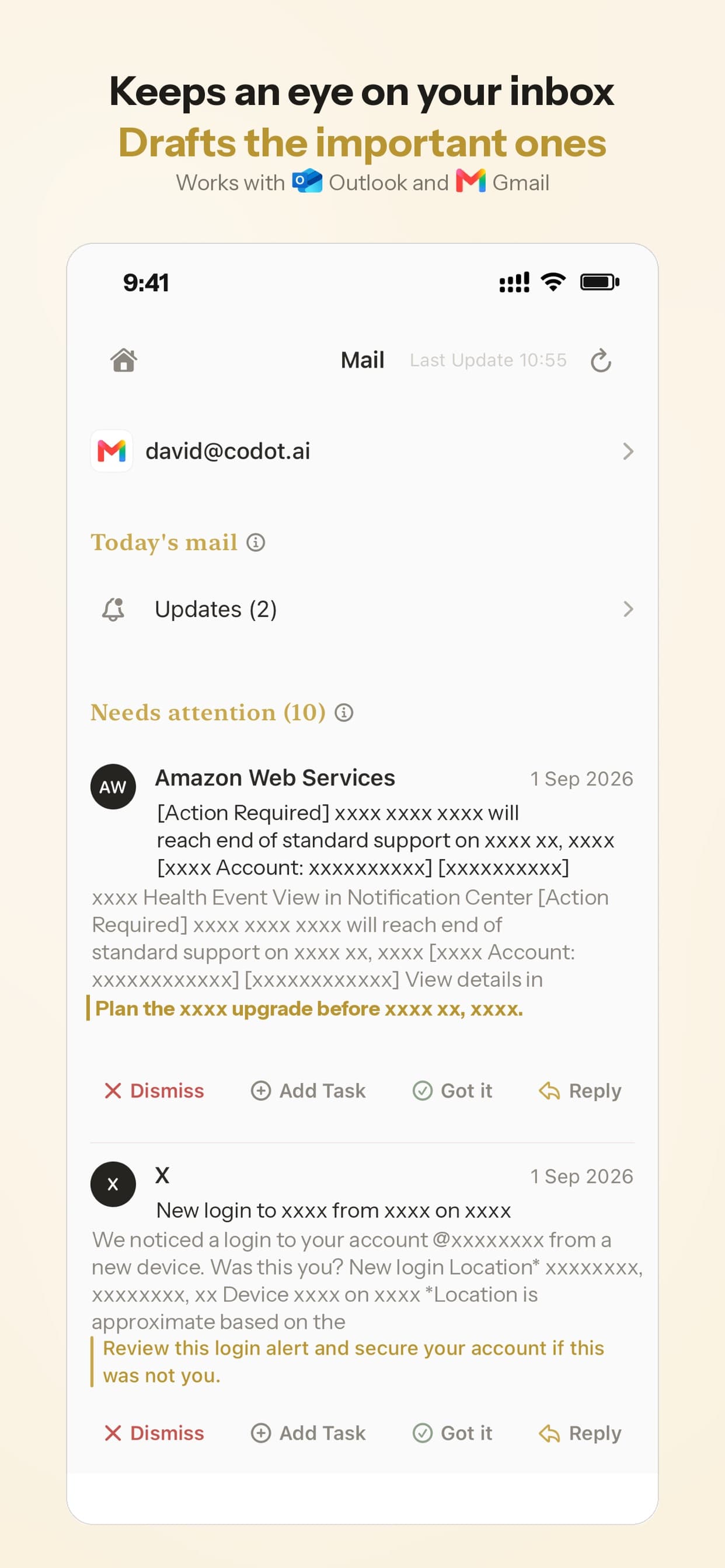
Email has a similar edge. The Mail plugin only covers Apple addresses, and for a lot of people the email that matters for work sits in Gmail or Outlook.
ChatGPT with iCloud vs Codot for managing your calendar
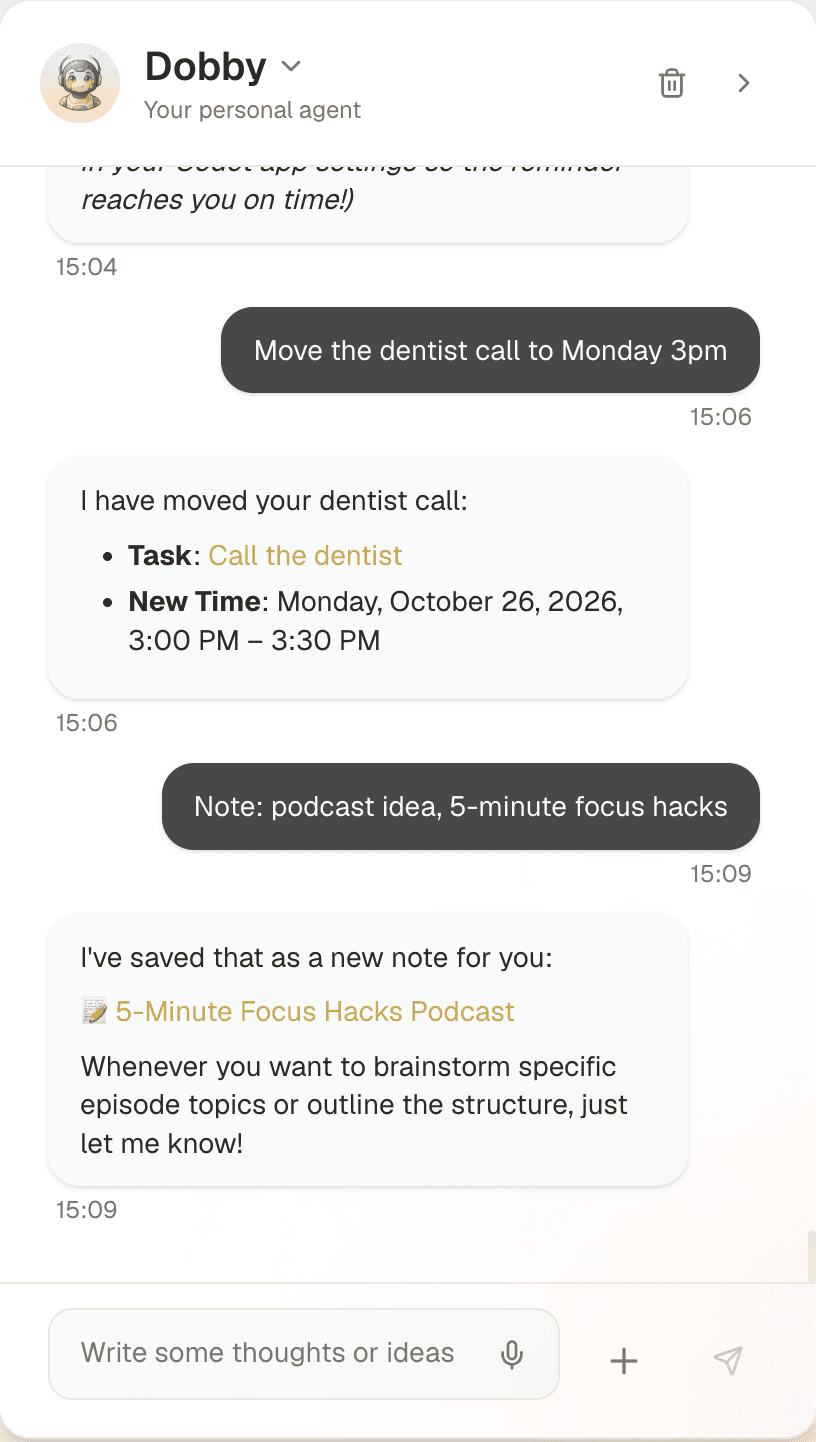
They're different kinds of product. ChatGPT is a general chatbot that now has a door into your iCloud account. Codot is a personal AI assistant: you say what changed, in whatever order it comes out, and it creates, moves or splits the tasks and events for you.
| ChatGPT + iCloud plugins | Codot | |
|---|---|---|
| Where you talk to it | ChatGPT on web, desktop or iOS | iPhone app, Lock Screen widget, Apple Watch, web |
| Calendars | iCloud via the plugin; Google via a separate connection | Codot's own calendar; writes your events into Google Calendar |
| iCloud Mail via the plugin | On iPhone: sorts Gmail and Outlook and drafts replies to the important messages | |
| Tasks, notes, people | General chat | One sentence can become a task, an event, a note and a contact detail |
| Proactive help | Dots, on Pro for these plugins (per Engadget) | Daily briefing (iPhone) and scheduled tasks |
| Price | Plugins included on all plans, free included | Free plan for tasks, calendar, notes and habits; Max $12.99/mo or $99.99/yr (20x usage), 7-day free trial |
Where Codot does better
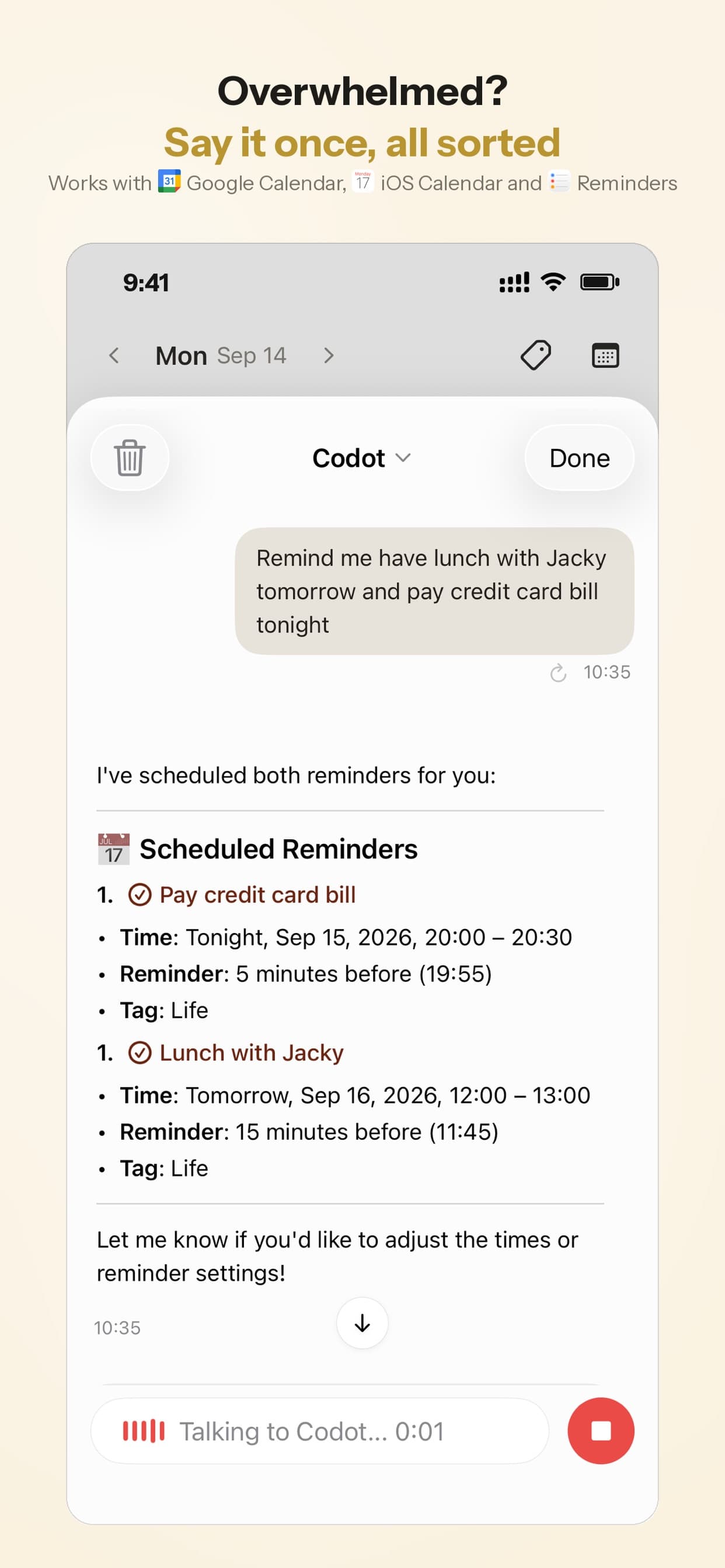
Codot is for the moment the plan changes. You can say "push the Acme call to Thursday at 2, remind me to send the deck before it, and note that Dana prefers mornings" from the Lock Screen or your watch, and that becomes a moved event, a task and a note on Dana's contact. The next morning's briefing lists what's due. Because Codot writes its events into Google Calendar, colleagues who see your Google calendar see the change.
Codot's free plan covers tasks, the calendar, notes, the personal CRM, habits, calorie logging and expenses. Reminders at a set time, repeating tasks, daily briefings, scheduled automations and email triage are part of Codot Max ($12.99 a month or $99.99 a year, with 20x the free plan's usage). Every new account gets 7 days of Max free, then drops back to the free plan without charging you. Data is encrypted and never sold.
Where ChatGPT is the better pick
If your calendar and email both live in iCloud and you already spend your day in ChatGPT, the new plugins reach your data without a sync step, and they're free. ChatGPT is also a far broader tool. Codot won't write your strategy memo, and it doesn't browse websites, fill in forms or buy things for you. It can mishear a name, so it's worth glancing at what it created the first few times.
How I'd set it up
- Your calendar is iCloud and you plan at a desk: connect the iCloud Calendar plugin and use ChatGPT for "what's next" and "does this conflict" questions.
- Plans change while you're away from a screen: capture by voice with Codot from the Lock Screen or Apple Watch, with Google Calendar as the shared calendar.
- Both: that works. Just keep track of which calendar each tool writes to, using the account check above.
I covered the wider voice-assistant picture in Can you replace Siri on iPhone? and the capture side in the best voice to-do list apps for iPhone. If you're weighing Dots against other agents, see Claude Duet vs OpenAI Dots vs Meta Muse, our guide to family assistant alternatives to Ollie AI, or our report on why family AI assistants shut down. To keep today's plan visible without opening any app, put a to-do list on your Lock Screen.
FAQ
Is the ChatGPT iCloud Calendar plugin free?
Yes. OpenAI says the iCloud Mail and Calendar plugins are available on all ChatGPT plans, and coverage confirms that includes the free tier. Using them with a Dot is a Pro feature, according to Engadget.
Can ChatGPT add events to my iPhone calendar?
Yes, if the calendar is an iCloud calendar. The plugin can schedule and update events, and they show up in the iPhone Calendar app like any other iCloud event. Events in Google or Exchange calendars on the same phone are outside its reach.
Why can't ChatGPT see my work meetings?
Your work calendar is probably a Google or Exchange account that the iPhone Calendar app displays next to iCloud. Tap Calendars in the app to check which account it belongs to. The iCloud plugin only reads iCloud calendars.
Is it safe to give ChatGPT an app-specific password?
It's Apple's standard way to let an outside app reach iCloud Mail and Calendar without your main password. Make one per plugin, name it clearly, and remove it at account.apple.com when you stop using the plugin. Changing your Apple Account password revokes all of them at once.
How is Codot different from ChatGPT for calendars?
ChatGPT answers questions and makes changes when you open it and ask. Codot is a voice assistant you reach from the Lock Screen, Apple Watch or web: one spoken sentence becomes events, tasks and notes, it writes events into Google Calendar, and on iPhone it sends a morning briefing. It doesn't do general writing or web browsing.
If your plans change faster than you can type them, try saying them instead: Codot on the App Store is free to download, and every new account gets 7 days of Codot Max free.
Productivity & Tools Desk
This article was created with AI assistance and reviewed by our editorial team.Learn about our content process.