Why Family AI Assistants Keep Shutting Down (Ollie, Maple, Milo, Life Sorted) and How to Pick One That Won't Strand You
Milo, Life Sorted, Ollie and Maple all closed or announced closure in 2026. A sourced timeline, what families lost, and a checklist for choosing the next app.
Four family organizer apps closed or announced closure in 2026: Milo in January, Life Sorted on October 4, Ollie on November 6 and Maple on December 31. Before you connect the next AI family assistant, check that it writes events into your own Google or Apple calendar, try its export on day one, see how it makes money, and keep shared lists somewhere your family controls.
TL;DR:
- Four closures in one year: Milo in January, Life Sorted on October 4, Ollie on November 6 (one week's notice), Maple on December 31.
- What survives: events written into the family's own Google or Outlook calendar. Lists, notes, recipes, the group thread and the app's routines don't.
- Before picking the next app, check where events live, whether export works, how it earns money, who owns it, what happens to the shared thread, and how to revoke access.
- Codot is a voice assistant for the parent carrying the schedule. It puts events into your own Google Calendar, so switching later doesn't lose them, and you can add family to a Space and assign them reminders by voice. Codot has been running for almost two years, and more people use it every month.
Disclosure: Codot is our product. We never used any of the four apps below. Everything about them comes from their own announcements and from news reports, checked on November 3, 2026, and each claim links to where we found it.
If you set up the family app, you're also the one who moves everything when it closes: an email you almost deleted, a deadline, and a list of recurring pickups that existed only in the app. This guide is for you.
Four shutdowns in 2026: the timeline
| Product | What it was | Notice | Last day | Export offered | Source |
|---|---|---|---|---|---|
| Milo | AI assistant for parents | Founder's farewell post, January 12 | Not stated in the post | Not mentioned | Milo's Substack |
| Life Sorted | Family organizer: shared calendar, lists, reminders | About one month | Sunday, October 4 | "The app does not have a facility to extract data" | lifesorted.com |
| Ollie | Family assistant that lived in your texts | Announced October 30 | November 6 | Instructions promised to customers | TechCrunch |
| Maple | Family calendar, lists, meal plans and an AI assistant | Banner on its site | December 31 | No export tool described | growmaple.com |
Milo was an AI assistant built to take family admin off parents' plates. On January 12, 2026, its founder published a farewell post. The reason given was timing: the team spent about 18 months trying approaches and couldn't get reliable results at scale. The post's own words were that they were "still too early." It doesn't give a shutdown date or say anything about data.
Life Sorted was a family organizer with no AI, but its notice is the plainest of the four. The calendar would stop "on Sunday October 4th" because it ran on a tech stack its vendors no longer supported. It had been free since January and had no export, so families copied what they needed by hand. (The notice prints no year; it wasn't on the archived homepage in June 2026, and October 4 is a Sunday this year.)
Ollie raised a $7.5 million seed round led by Khosla Ventures, according to TechCrunch. Its CEO announced on X on October 30 that it would close on November 6, blaming competition: with Muse, Instinct and others arriving, it "became harder to stand out, grow, and raise the capital we needed." Customers were promised export and refund instructions. We wrote a separate guide on what to save from Ollie before November 6.
Maple was acquired by Wander and "will sunset on December 31, 2026," its homepage says. Accounts stay open until then. After that, "All data will be deleted and there will be no way to recover it," and its connections to outside services such as calendars and TeamSnap are deleted too. Annual Maple+ plans won't renew; monthly plans run to the end of December.
What families lost, and what they kept
Put the four side by side and the safe data is easy to spot. Events an app had written into a calendar the family already owned, such as a Google or Outlook calendar, stay where they are. Anything stored only inside the app is at risk: grocery lists, to-dos, notes, saved recipes, the group text history.
Maple adds a wrinkle. It connected to Google Calendar, and its notice says those calendar connections are deleted at shutdown. If an app keeps its events in a separate calendar it set up for itself, copy that calendar into one of your own before the date.
The bigger loss can't be exported at all: the routines. Ollie's appeal was the text that caught a half-day buried in a school email. Those jobs ran in someone else's software, and when it stopped, the parent who'd handed them off took them back. With Ollie, the warning was seven days.
Why these apps keep closing
The four notices give four different reasons: competition from much bigger companies (Ollie), technology that wasn't ready (Milo), an acquisition by a company in another business (Maple), and an aging code base nobody could afford to rebuild (Life Sorted).
Our read, as a small team in the same space: an AI that reads every school email costs real money per family each month, and families compare it with free shared calendars. Life Sorted had stopped charging by January; Ollie had a $100-a-month plan and still couldn't raise enough. Funding and a famous investor didn't protect anyone's data, so pick an app assuming you may have to leave it.
Your ideas shouldn't wait for a keyboard. Just say it — Codot handles the rest.
Try Codot — It's Free →Six questions to ask before you connect the next family assistant
- Where do the events live? The best answer is your own Google or Apple calendar. Test it: add one event, then open Google Calendar on a laptop and see which calendar it landed in.
- Can you export today? Look for the export button in week one, not in the shutdown email. None of the four notices above pointed to a ready export tool.
- How does it make money? A paid plan priced to cover the AI it runs is a better sign than "free forever." A free launch period is fine if you know what happens after it.
- Who owns it, and what would a sale mean? Maple's buyer, Wander, is a vacation-rental company, and the family app is closing. Funding isn't protection either: Ollie had $7.5 million behind it and gave one week's notice.
- What happens to the shared thread? If your whole family coordinates in one text thread with the company's phone number, that thread goes when the company does. Keep the shared layer, meaning the family calendar and the grocery list, on a platform you already control: a shared Google calendar, a shared Apple Reminders list, or a long-running app like Cozi.
- How do you take its access back? For Google accounts it's Third-party connections. A closed company keeps whatever access you granted until you remove it.
Codot: an assistant for the parent carrying the load
Most of these apps tried to be the whole family's hub. In a lot of homes the real problem is narrower. One parent hears about the dentist, the swim schedule change and the class party, usually while doing something else, and has to get each one into the calendar before it's forgotten.
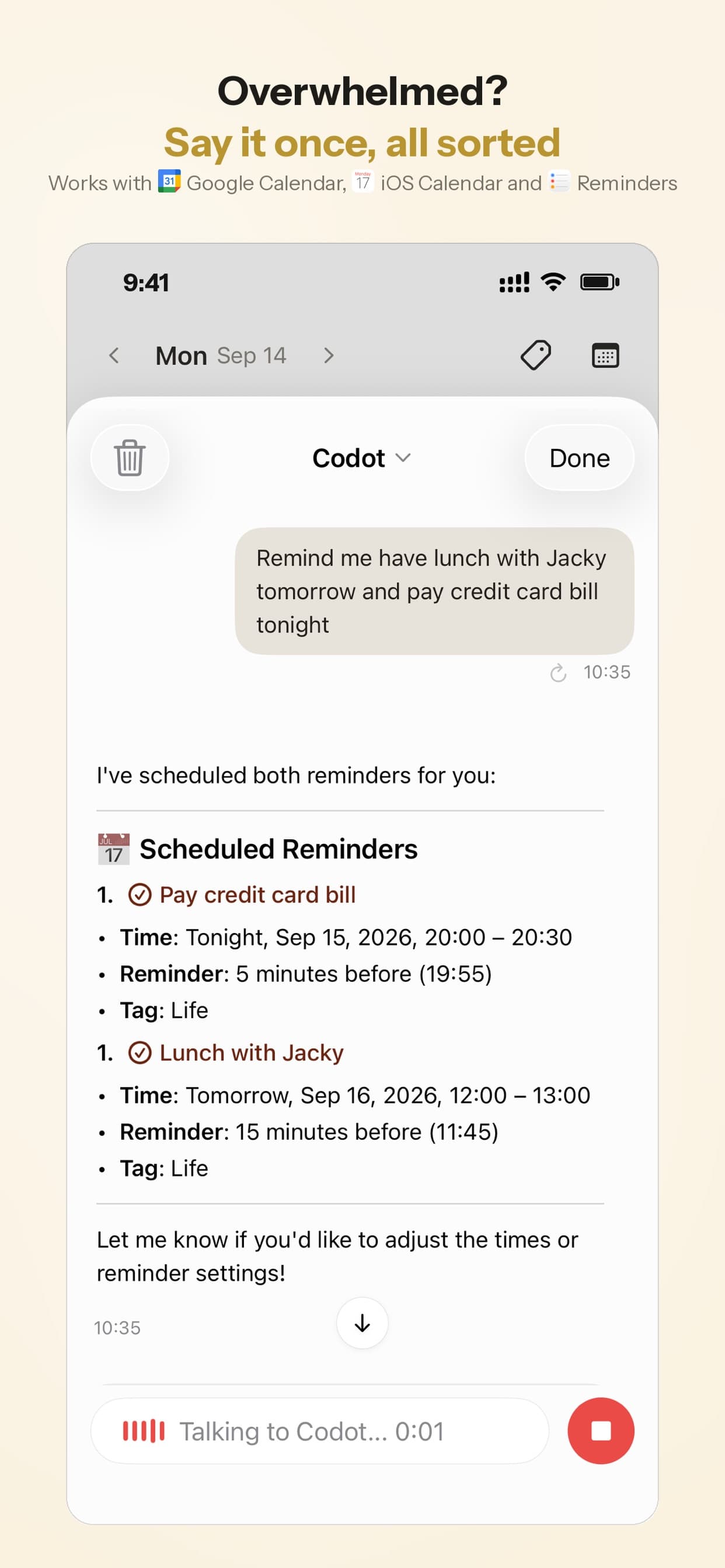
Codot is a personal AI assistant for that person. Picture the pickup line on a Wednesday. You say, "Swim moves to Thursdays at 5:30 starting next week, and the class party needs napkins by Friday." That becomes a recurring event and a task with a deadline. Codot also sorts your Gmail or Outlook inbox and drafts replies to the emails that need one, sends a daily briefing, and runs scheduled jobs such as listing next week's school events every Sunday at 7 pm. It runs on iPhone (with a lock-screen widget and Apple Watch), on the web, and on Android through Google Play. The daily briefing and email triage are only on iPhone. On Android you get tasks, reminders, notes, the personal CRM and routines.
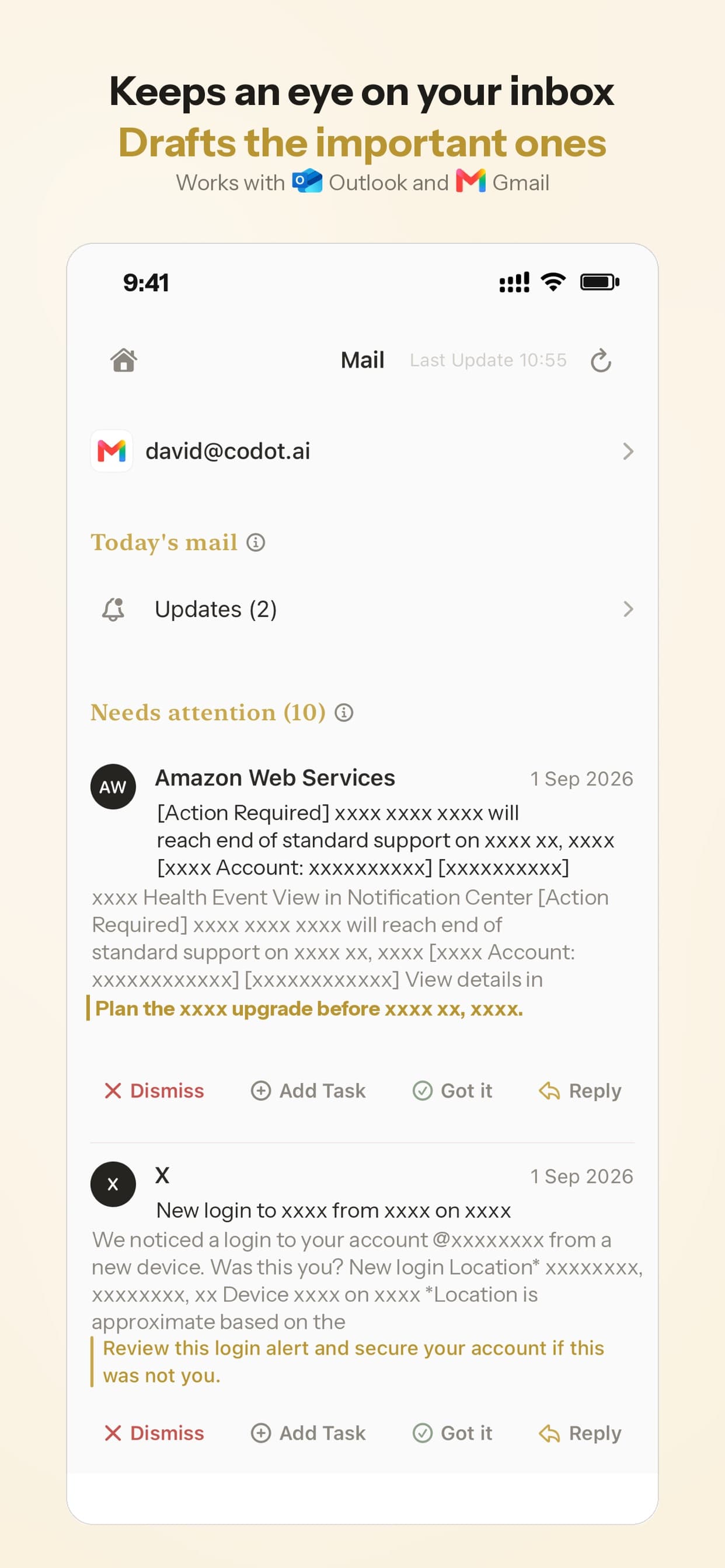
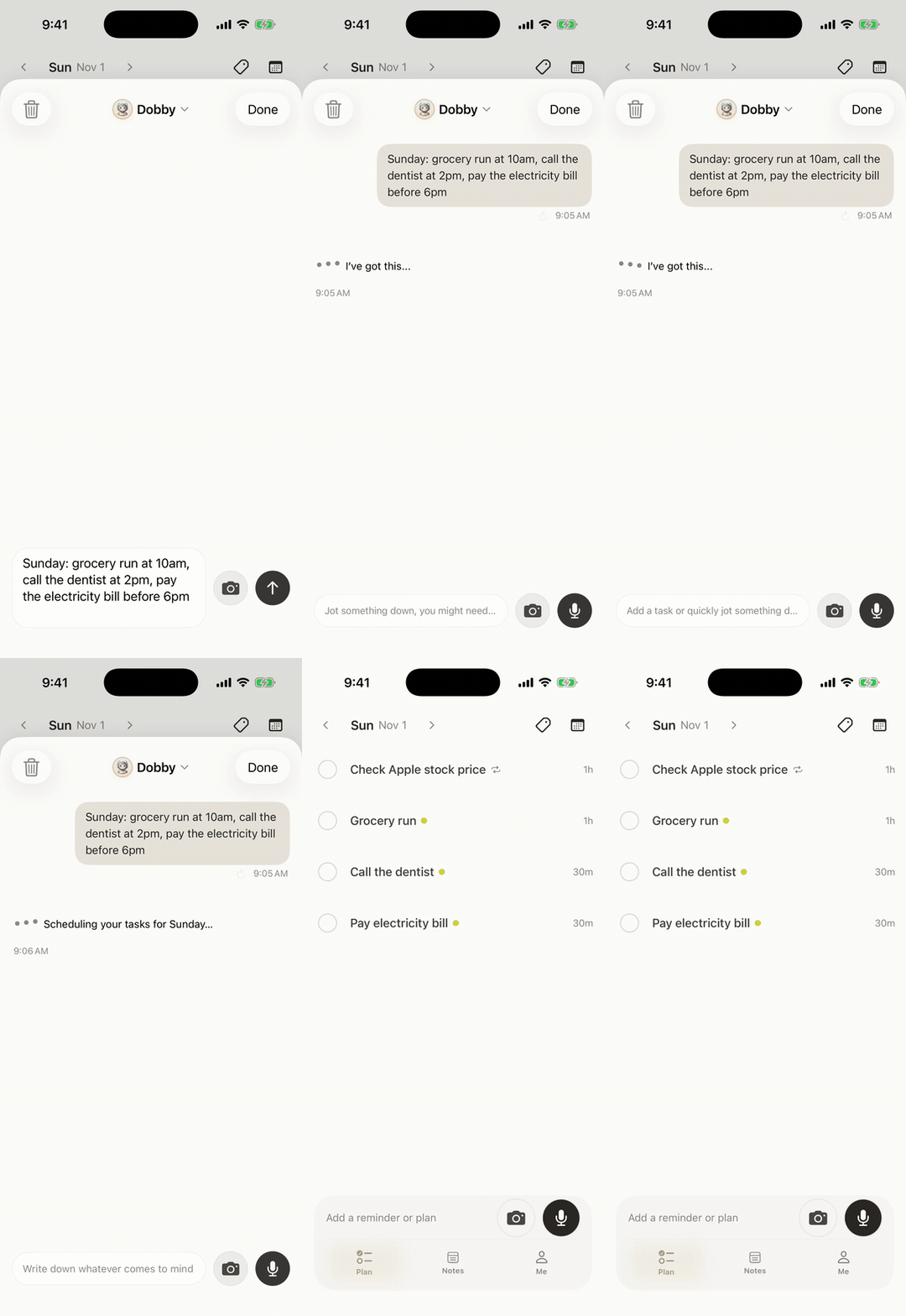
You can also hand things off. Add your partner or kids as friends, or to a family Space, and share tasks with them. Walking out of school pickup, you say "remind Brandon to pick up milk tomorrow," and Brandon gets the reminder in his own Codot app. Each person uses their own Codot account, so there's no company phone number or group thread to lose.
Against the checklist above:
- Events go into your own Google Calendar. Codot writes its events into Google Calendar, so the events you create by voice sit in a calendar you already own. On iPhone, tasks can also go to Apple Calendar and Apple Reminders, one way: ticking off a reminder there doesn't update Codot.
- Some things live only in Codot. Notes, people cards, shared tasks in a Space, briefings and scheduled automations are stored in Codot, while events go to your own Google Calendar. Whatever app you use, keeping the dates that matter in your own calendar is the safest habit.
- Pricing. Codot's free plan covers tasks, the calendar, notes, the personal CRM, habits, calorie logging and expenses, plus sharing tasks with family through a Space. Reminders at a set time, repeating tasks, daily briefings, scheduled automations and email triage are part of Codot Max ($12.99 a month or $99.99 a year, with 20x the free plan's usage). Every new account gets 7 days of Max free, then drops back to the free plan without charging you. Data is encrypted and never sold.
- Almost two years in. Codot has been running for almost two years, and more people use it every month.
What Codot doesn't do
Codot shares tasks and reminders through Spaces, but it isn't a family hub. There's no group chat thread or shared family email address, everyone needs their own Codot account, and it won't put a schedule on the kitchen wall. It doesn't plan meals, keep recipes, book appointments, order groceries or pay bills. For a calendar the whole house can see, pair it with a free shared Google calendar.
How we'd set up a family system that survives the next shutdown
We'd split it in two: a shared Google calendar plus an Apple Reminders list or Cozi for groceries, and a voice assistant for whoever does most of the remembering, one that can pass reminders to the others.
- You want a family group chat with an AI in it: Ohai is the closest thing to Ollie today; our Ollie guide compares it with Nori and Cozi.
- You want a free shared organizer with no AI: Cozi or a shared Google calendar. Our family organizer comparison for moms covers Cozi, TimeTree, Google and AnyList.
- You're the one carrying it all in your head: Codot, on top of the shared calendar, assigning reminders to the rest of your Space as you think of them. If ADHD is part of the picture, our guide to ADHD apps for parents splits the tools the same way.
FAQ
Which family AI assistants have shut down in 2026?
Milo announced its end on January 12, Life Sorted stopped on October 4, Ollie closes on November 6 and Maple on December 31. Sources are in the timeline above.
Will I lose my calendar events if my family app shuts down?
Events written into your own Google or Outlook calendar belong to that calendar. If the app kept them in a separate calendar of its own, copy them over before the date. Lists, notes and chat history inside the app go unless you export or copy them.
What is the best AI family assistant app?
For a whole family in one thread, look at Ohai. For a free shared calendar and lists, Cozi or a shared Google calendar. For the parent doing most of the planning, a voice assistant like Codot that writes into that calendar and lets you assign reminders to family members in a Space. Run any of them through the six questions first.
How is Codot different from Ollie or Maple?
Ollie and Maple were built as a household hub, with a group thread or a family email address. Codot is a voice assistant: you speak and it creates events, tasks and reminders, triages your inbox and sends a daily briefing (both on iPhone), with events going into your own Google Calendar. You can add family to a Space and say "remind Brandon to buy groceries tomorrow" so it reaches his own Codot app, but it doesn't do meals or errands.
How long has Codot been around?
Almost two years, and more people use it every month. Your events also live in your own Google Calendar, and on iPhone tasks you send to Apple Reminders stay there too, so the dates that matter are never only inside one app.
If you're the parent who'd be stuck with the move, try saying the next school date to Codot on the App Store and check that it shows up in your own Google Calendar.
Productivity & Tools Desk
This article was created with AI assistance and reviewed by our editorial team.Learn about our content process.