Ollie AI Is Shutting Down on November 6: What to Save First, and 5 Family Assistant Alternatives
Ollie AI shuts down November 6, 2026. What to export and disconnect first, then Ohai, Nori, Cozi, Meta Muse and Codot compared on price and what each replaces.
Ollie, the text-based family assistant, shuts down on November 6, 2026. Before then, save the data export Ollie sends, check that your events live in your own Google or Outlook calendar, and remove Ollie's access to your email. For a shared family hub, Ohai ($9.99 a month) is the closest match; for one busy parent's tasks and calendar, Codot has a free plan, with email triage and daily briefings in Codot Max ($12.99 a month, 7-day free trial).
TL;DR:
- Ollie closes on November 6, 2026. CEO Bill Lennon announced it on X and TechCrunch reported it on October 30. Ollie says export and refund instructions go out to customers.
- Do three things this week: save the export, confirm your events sit in your own calendar, and revoke Ollie's access to your Gmail or Outlook.
- Closest replacement for a family group chat: Ohai, from $9.99 a month (iOS and Android). Nori ($7.99 a month for its AI) and Cozi ($39 a year for Gold) cover shared calendars and lists.
- Codot is our product. It fits the parent who wants their own inbox, tasks and calendar handled by voice. Its free plan covers tasks and the calendar; email triage, briefings and reminders at a set time are Codot Max, with a 7-day free trial. It doesn't book appointments, pay bills or order groceries.
Codot, a voice-first personal AI assistant, is our product, so treat our opinion on the alternatives with that in mind. We never used Ollie ourselves. Everything below about Ollie comes from its own website and from the shutdown coverage, checked November 1, 2026.
If you used Ollie, what you'll miss is probably the Thursday-night text that said "Jake's class has a half day Friday, want me to add it?": the school email you never opened, caught for you. That's the job to replace first, and it's worth doing before the 6th, while the export is still coming.
What happens to Ollie on November 6?
Ollie was a family assistant you texted. You didn't install an app; you connected your email and calendars, and Ollie texted you what mattered: school emails, a morning briefing, shared lists, meal ideas and a grocery list. It could also run errands from a text, such as booking a grooming slot, placing a Walmart or Instacart order, or paying a bill.
On October 30, TechCrunch reported that Ollie will shut down on November 6, the latest in a string of family AI assistants shutting down recently. The company had raised a $7.5 million seed round led by Khosla Ventures and was among the first mainstream assistant apps with a SOC 2 audit. Lennon's explanation was competition: "With Muse, Instinct, and others entering the space, it became harder to stand out, grow, and raise the capital we needed to succeed."
Ollie's pricing page still showed three plans on November 1: Free (50 messages a month plus 6 a day), Everyday at $25 a month and Always-On at $100 a month. Customers are getting instructions for refunds and exporting their data.
What should you save from Ollie before it shuts down?
Most of what Ollie touched lives somewhere else already. Here's the order we'd go in:
- Save the export when it arrives. Ollie says customers will get instructions for exporting their data. Copy it into a note or email it to yourself; a text thread can disappear with the number.
- Check your calendar, not the chat. Events Ollie added were written into your connected Google or Outlook calendar, so they should still be there. Open next week and compare it with the last few Ollie messages.
- Rebuild the lists. Shared to-do and grocery lists that only lived in the text thread won't survive. Paste them into wherever you're moving (Apple Reminders shared lists are free if everyone has an iPhone).
- Write down recurring jobs. Ollie did things on a schedule: the morning briefing, scanning school email, meal suggestions on Sunday. List them, because each one needs a new home.
- Remove Ollie's access. For a Google account, open Third-party connections, find Ollie and remove it. For Microsoft accounts, do the same under app permissions in your account settings. A shutdown company still holds the access you granted until you take it back.
Which Ollie job do you actually need to replace?
Ollie bundled five jobs. Few replacements do all five, so pick by the job you'll miss most.
| What Ollie did | Ohai | Nori | Cozi | Meta Muse | Codot |
|---|---|---|---|---|---|
| Scan school / family email | Yes | Yes (forward emails) | No | Not its focus | Yes (Gmail / Outlook triage) |
| Shared family calendar and lists | Yes | Yes | Yes | Not its focus | Shared tasks via Spaces (each person has an account); no shared grocery list |
| Daily briefing | Reminders | Reminders | No | Not its focus | Yes, plus scheduled tasks |
| Meals and grocery list | Not its focus | Meal plans, shopping list | Recipes, meal planner | Via errand tasks | No |
| Errands (book, order, pay) | Not verified | No | No | Yes, agent tasks | No |
| Price (Nov 2026) | $9.99–$29.99/mo | AI $7.99/mo or $59.90/yr | Free; Gold $39/yr | Free tier; $20 / $100 plans | Free: tasks, calendar, notes, CRM, habits (no reminders at a set time, briefings, automations or email triage); 7-day Max trial; Max $12.99/mo or $99.99/yr (20x usage) |
Your ideas shouldn't wait for a keyboard. Just say it — Codot handles the rest.
Try Codot — It's Free →Ollie alternatives compared
Ohai: the closest swap for a family group chat
Ohai is the nearest thing to Ollie. Its assistant, O, works by text or voice, and it scans calendars, emails, PDFs, photos, school updates and sports schedules into events, tasks and reminders. Unlike Ollie it has real apps on iPhone and Android. Plans are $9.99 a month for one person, $19.99 for two and $29.99 for a group, with a free trial. If your family lived in one Ollie thread, start here. We couldn't confirm that O books appointments or pays bills the way Ollie did, so don't count on errands.
Nori: a screen on the wall plus an AI
Nori is built around a Family Hub display in the kitchen, with an app and web version that sync to it. The AI membership is $7.99 a month or $59.90 a year and covers the family. You can forward a school email and it pulls out the dates, and you can add things by voice or chat. Pick it if the kids need to see the schedule without a phone. The display costs extra.
Cozi: free shared calendar and lists, no AI butler
Cozi has been the default family organizer for years: a shared calendar, shopping lists, to-do lists, and a recipe box with a meal planner. The free version covers most families; Cozi Gold is $39 a year. Nothing reads your email for you, so you'll be typing the school dates in yourself. It's the cheapest way to keep the shared-list part of Ollie.
Meta Muse and Instinct: the agents Ollie named
Muse and Instinct are general agents that run errands on your behalf, which is the part of Ollie the family apps skip. Muse has a free tier with $20 and $100 plans; Instinct was still invite-only when we last checked. Both ask for broad access to your accounts, and Muse has a privacy incident on record. We compared them in detail in Claude Duet vs OpenAI Dots vs Meta Muse vs Instinct vs Codot. If errands were your main use of Ollie, read that before connecting your inbox.
Codot: for the parent who also runs a job
Many Ollie users were the one person in the house holding everyone's schedule while also working. For that person, everything lands in one head and one inbox at the same time, and the family group chat was only half of what Ollie fixed.
Codot is a personal AI assistant you talk to. You say one sentence, such as "Mia's dentist Tuesday at 4, and remind me to email her teacher about the field trip form tonight," and it becomes a calendar event and a reminder with a time. It runs on iPhone (including a lock screen widget and Apple Watch), on the web, and on Android via Google Play. The daily briefing and email triage are on iPhone; on Android you get tasks, reminders, notes, the CRM and routines. It adds its events to Google Calendar, and on iPhone it can push tasks to Apple Calendar and Apple Reminders.
The part closest to Ollie's school-email scanning is the inbox. Codot sorts Gmail or Outlook and drafts replies to the messages that need one.
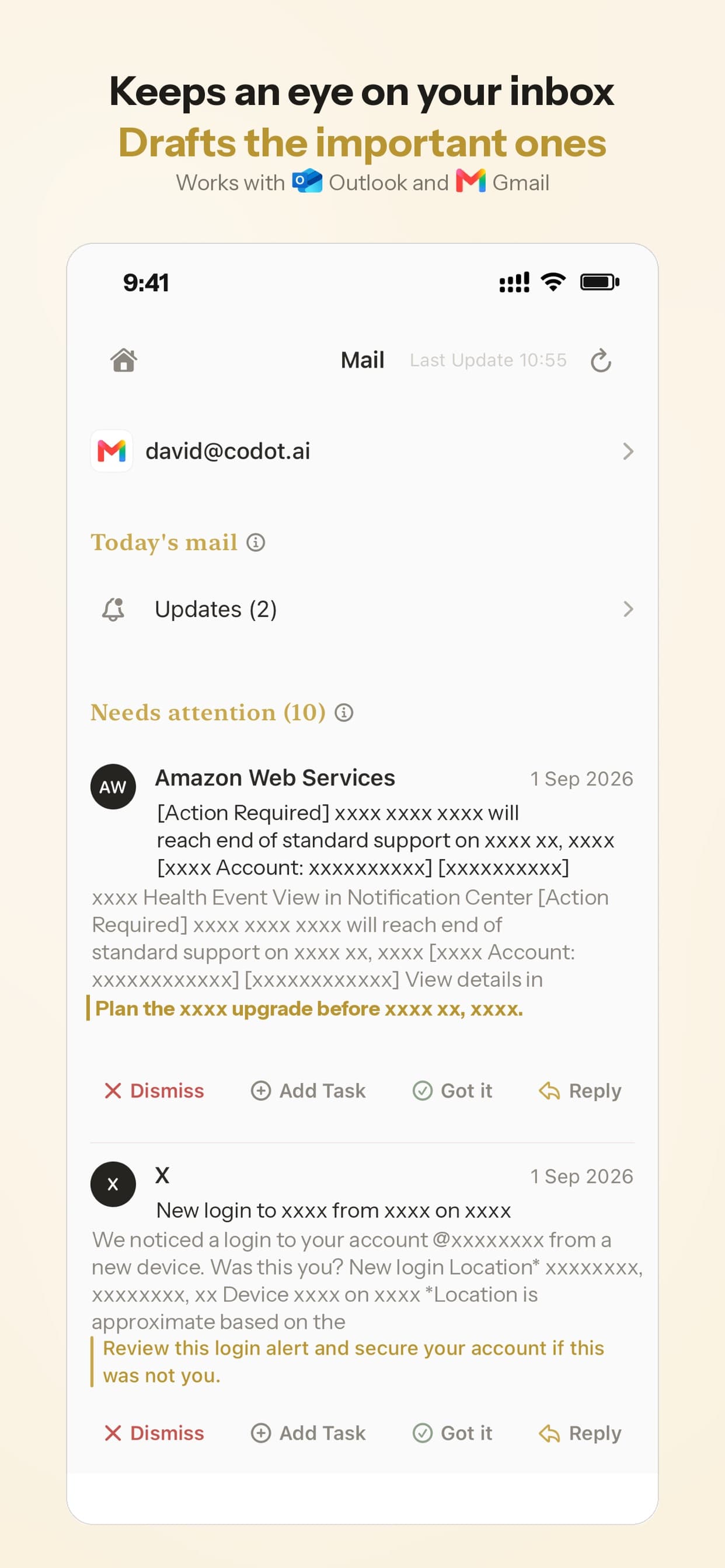
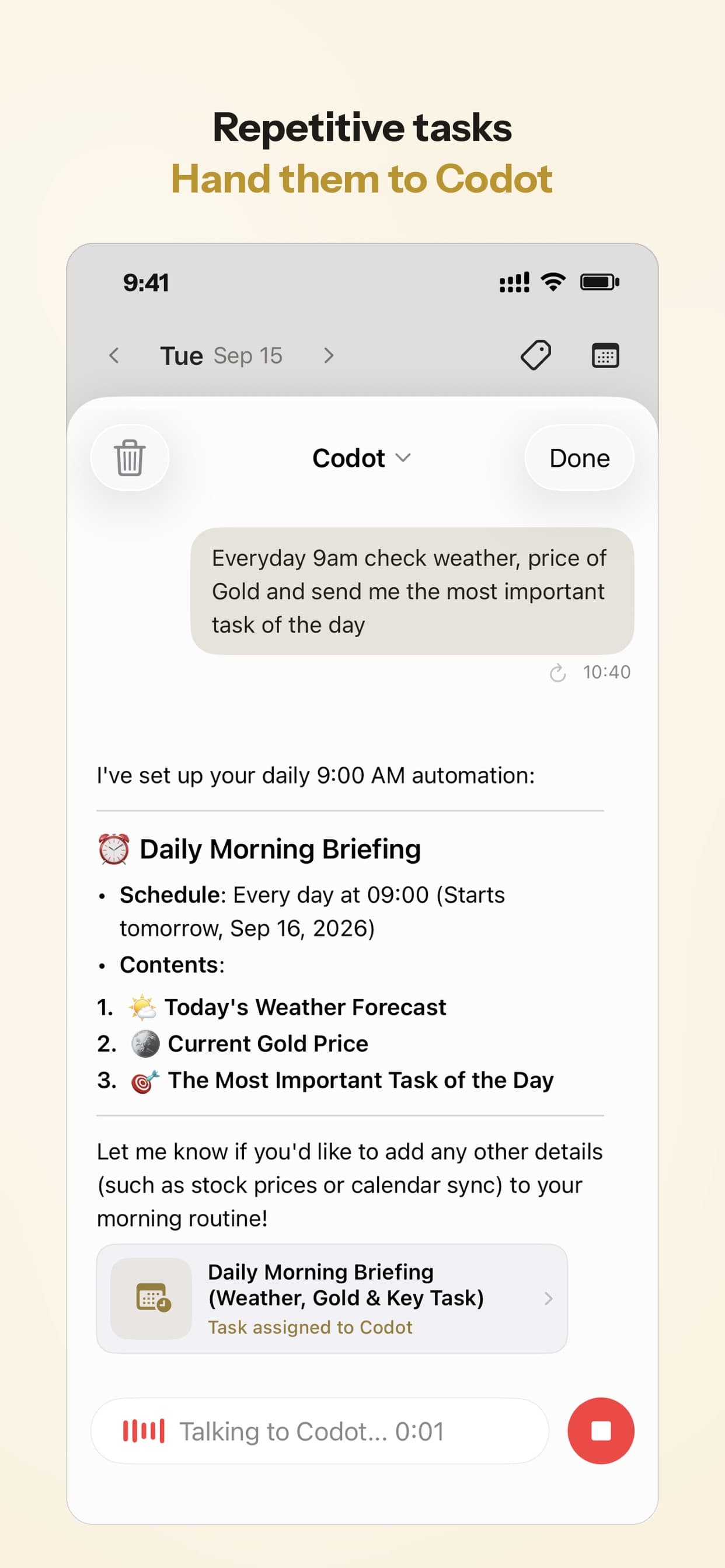
The morning text Ollie sent maps to Codot's daily briefing, and anything recurring ("every Sunday at 7 pm, list next week's school events and pickups") can be a scheduled task.
It also remembers people: say "Leo's coach is Dana, she prefers texts" and that sits on a contact card. Codot's free plan covers tasks, the calendar, notes, the personal CRM, habits, calorie logging and expenses. Reminders at a set time, repeating tasks, daily briefings, scheduled automations and email triage are part of Codot Max ($12.99 a month or $99.99 a year, with 20x the free plan's usage). Every new account gets 7 days of Max free, then drops back to the free plan without charging you. Data is encrypted and not sold.
The family part works through friends and Spaces. Add your partner to a shared Space, and on the way out of school pickup say "remind Brandon to pick up milk tomorrow": the task is assigned to Brandon and the reminder arrives in his own Codot app.
What Codot doesn't do
Codot isn't a family group chat. Everyone you share tasks with needs their own Codot account, there's no shared grocery list, and it won't put a schedule on the kitchen wall. It doesn't browse websites, fill in forms, book the groomer, order groceries or pay bills, all of which Ollie did. It doesn't plan meals. If those were the reasons you paid Ollie $25 a month, Codot alone won't cover them.
How would I choose?
- Your family ran on one Ollie group text: Ohai. It works the most like Ollie did, and costs less than half of Ollie's Everyday plan.
- The kids need to see the schedule: Nori, or Cozi if you don't want to pay for the AI. Our comparison of family organizer apps puts Cozi next to TimeTree, Google Calendar and AnyList.
- You mostly used Ollie for errands: Meta Muse, after reading the privacy section in our agent comparison.
- You're the parent carrying both work and home in your head: Codot for yourself (add your partner to a Space to hand tasks over), plus a free shared list (Cozi or Apple Reminders) for groceries. If ADHD is part of the picture, our guide to ADHD apps for parents splits it the same way: one tool for the kid, one for you.
If we were moving off Ollie this week, we'd do the export and access removal first, then try Ohai for the family thread and keep our own work and inbox in Codot. Two tools sounds like more, but Ollie was already doing two jobs.
FAQ
When does Ollie AI shut down?
November 6, 2026, according to CEO Bill Lennon's announcement reported by TechCrunch on October 30. Customers get instructions for exporting data and refunds before then.
Will I lose my calendar events when Ollie closes?
Events Ollie added to your connected Google or Outlook calendar belong to that calendar, so they should stay. Lists and notes that only existed in the text thread will not, so copy them out.
What's the difference between Ohai and Ollie?
Both are family assistants that read your calendars and email. Ollie worked only by text, with no app, and could run errands like orders and bill payments. Ohai has iPhone and Android apps plus text and voice, and plans start at $9.99 a month instead of Ollie's $25.
How is Codot different from Ollie?
Ollie was a shared family assistant in a text thread that also ran errands. Codot is a personal assistant you talk to: it handles your tasks, calendar, inbox triage, daily briefing and scheduled reminders. You can add family members as friends or to a shared Space and assign them tasks, which reach them in their own Codot app. It doesn't book, order or pay for things, and it isn't a family group chat. If you want something like it for your own work, see our roundup of AI executive assistant apps.
Is there a free Ollie alternative?
Cozi's free plan covers a shared calendar and lists. Codot's free plan covers your tasks, calendar and notes, and sharing tasks with family through a Space (each person needs their own Codot account); email triage, daily briefings and reminders at a set time need Codot Max, which every new account can try free for 7 days. Ohai and Nori offer trials, and Meta Muse has a free tier.
If you're the one carrying the household's dates in your head, try saying the next one to Codot on the App Store.
Productivity & Tools Desk
This article was created with AI assistance and reviewed by our editorial team.Learn about our content process.