AI Executive Assistant Apps Compared (October 2026): 6 Tools for Founders and Busy Professionals
Which AI executive assistant app fits one busy person? Codot, Martin, Lindy, Fyxer, Motion and Reclaim compared on what they do, how you reach them, and price.
For one busy person, the best AI executive assistant app is the one you can hand work to in the gap between meetings. Codot takes spoken requests and turns them into tasks, calendar events, contact notes and email drafts; tasks and calendar are free, and email triage is in Codot Max ($12.99 a month, 7-day free trial). Martin works over text and calls, Lindy runs automations across work tools, Fyxer drafts email, and Motion and Reclaim plan your calendar.
TL;DR:
- "AI executive assistant" covers three different kinds of product: assistants you talk to and hand errands (Codot, Martin), agent builders for workflows across many tools (Lindy), and single-job tools for email (Fyxer) or calendar planning (Motion, Reclaim).
- Codot (our app) is the voice-first one: say what's on your mind and it creates tasks and events, moves meetings, remembers what people told you, triages Gmail or Outlook with drafted replies, and sends a morning briefing. Tasks, calendar and contact notes are free; email triage and the briefing are Codot Max ($12.99 a month), with a 7-day free trial.
- Martin is the closest in spirit: an assistant you text, call or email, from $21 a month billed yearly.
- Lindy suits operators who want agents running across Slack, email and other tools. Team pricing starts at $49.99 a month.
- Fyxer is the pick if email is the whole problem. Motion and Reclaim are calendar planners first.
- Free options exist (Codot's free plan, Reclaim Lite, Fyxer Free), with limits listed below.
Codot is our product, so weigh our view of it accordingly. Everything we say about the other products comes from their own websites and pricing pages, checked on October 27, 2026. We haven't run a formal head-to-head test, and prices change often, so check before you pay.
It's 4:40 on a Thursday. You've just left your third meeting in a row, and you're carrying four things in your head: send the investor the updated deck, push Friday's 1:1 to Monday, remember that the new designer's partner is due in December, and answer the supplier who emailed twice. A human executive assistant would take all four from one sentence in the hallway, which is why we've compared virtual assistant options for contractors to see if human or AI help fits your workflow better. Most founders and small-team leads don't have one—whether they are building software or running a handyman business—and a to-do app expects you to sit down and type each item into the right box. That gap is what this category is trying to fill.
What should an AI executive assistant app do for one person?
A human EA is useful because you can hand them something half-formed and walk away. So I'd judge these apps on how close they get to that:
- Where do you talk to it? On the phone between meetings, on a watch, by text, inside Slack? If you have to open a laptop, you won't use it when it matters.
- Does it act, or only suggest? Creating the event and moving the meeting is the job. A summary that says "you should reschedule" is not.
- Does it ask before anything leaves your account? Drafting an email is safe. Sending one without you reading it is a risk most people don't want.
- Does it remember people? A lot of executive work is follow-up: who you met, what they need, when to check back.
- What does it cost for one person? Several tools here are priced per seat for teams.
AI executive assistant apps compared (as of October 2026)
| Tool | What it is | How you talk to it | Calendar | Price for one person | |
|---|---|---|---|---|---|
| Codot | Voice-first personal AI assistant | Voice or text on iPhone, Apple Watch, Android, web | Creates and moves events, syncs Google Calendar | Gmail / Outlook triage (iPhone), drafts important replies | Free: tasks, calendar, notes, CRM (email triage, briefings, automations and timed reminders need Max); Max $12.99/mo or $99.99/yr (20x usage), 7-day trial |
| Martin | Personal AI assistant | Text, phone call, email, Slack, iOS app | Manages and reschedules meetings | Reads, searches, drafts, labels | Basic $21/month yearly ($35 monthly); Pro $30 yearly ($49 monthly) |
| Lindy | Agent builder ("AI employee") | Slack, iMessage, email, browser | Meeting scheduling, prep, follow-up | Drafts in your voice; sends need approval | $50 free credits for 7 days; Team from $49.99/month |
| Fyxer | Email and meeting-notes assistant | Inside Gmail or Outlook | Meeting notes only | Sorts inbox, drafts replies you send | Free (400 credits, no drafting); Pro $37/month yearly ($49 monthly) |
| Motion | AI planner and project tool | Desktop, iOS, Android apps | Auto-plans your day around tasks | Not its focus | Pro AI $19/seat/month |
| Reclaim | Calendar optimizer | Google or Outlook calendar | Focus time, habits, scheduling links | No | Lite free; Starter $10/month yearly ($12 monthly) |
Codot: an assistant you talk to, and it does the admin
Codot is the product I'd put closest to "say it in the hallway". You talk to it the way you'd talk to an assistant, in whatever order things come to mind, and it works out what's a task, what's a calendar change, what's a note and what belongs on someone's contact card. Then it does those things. Back to the Thursday at 4:40:
"Send Priya the updated deck tomorrow morning, move Friday's 1:1 with Sam to Monday at 10, note that Alex's partner is due in December, and remind me to reply to the supplier at 6."
That one sentence comes back as a task for tomorrow, the 1:1 moved on your calendar, a note on Alex's contact, and a reminder at 6 pm. If you use Google Calendar, the moved meeting shows there as well. App Store reviewers mention the same thing most often: events land in the phone's calendar without typing them one by one.
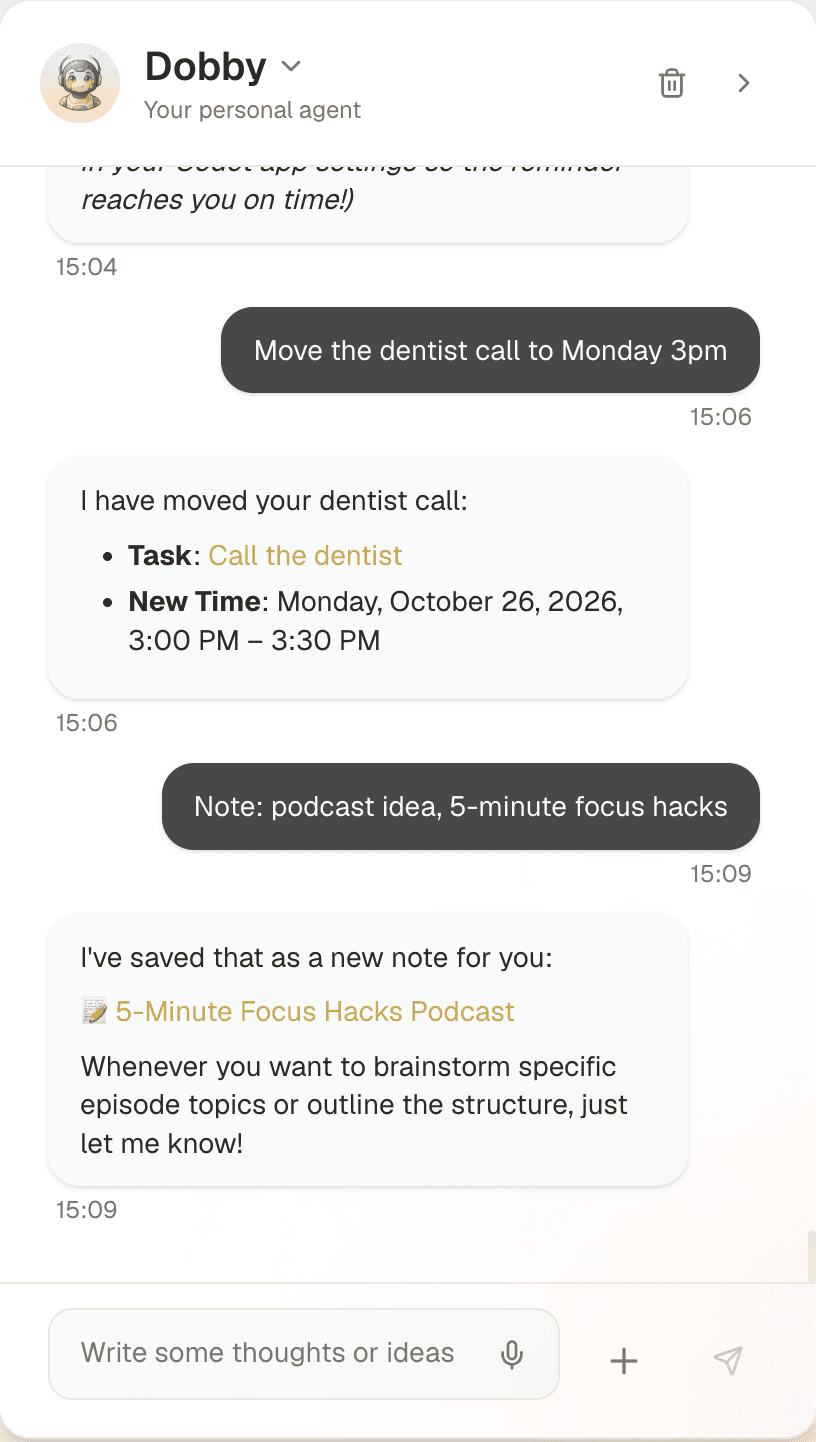
What else it handles for a founder or manager:
- Remembering people. After a call, say what you learned ("Dana runs ops at Northwind, prefers email, renewal in March") and Codot keeps it on her card for next time. I wrote a longer piece on a personal CRM you don't have to maintain.
- Email triage. Connect Gmail or Outlook and Codot sorts what matters and drafts replies to the important messages. You review and send.
- A morning briefing. Each morning it tells you today's meetings, what's due and anything you asked it to track, such as a news topic.
- Scheduled automations. "Every Friday at 4, list the follow-ups I haven't closed this week" runs on its own every week.
- Breaking down a goal. Give it "launch the pricing page by the 15th" and it proposes the steps and puts them on days.
- Capture from anywhere. iPhone, Apple Watch, the web, a lock-screen widget, and Android. The daily brief and email triage are on iPhone; on Android you get tasks, reminders, notes, the CRM and routines.
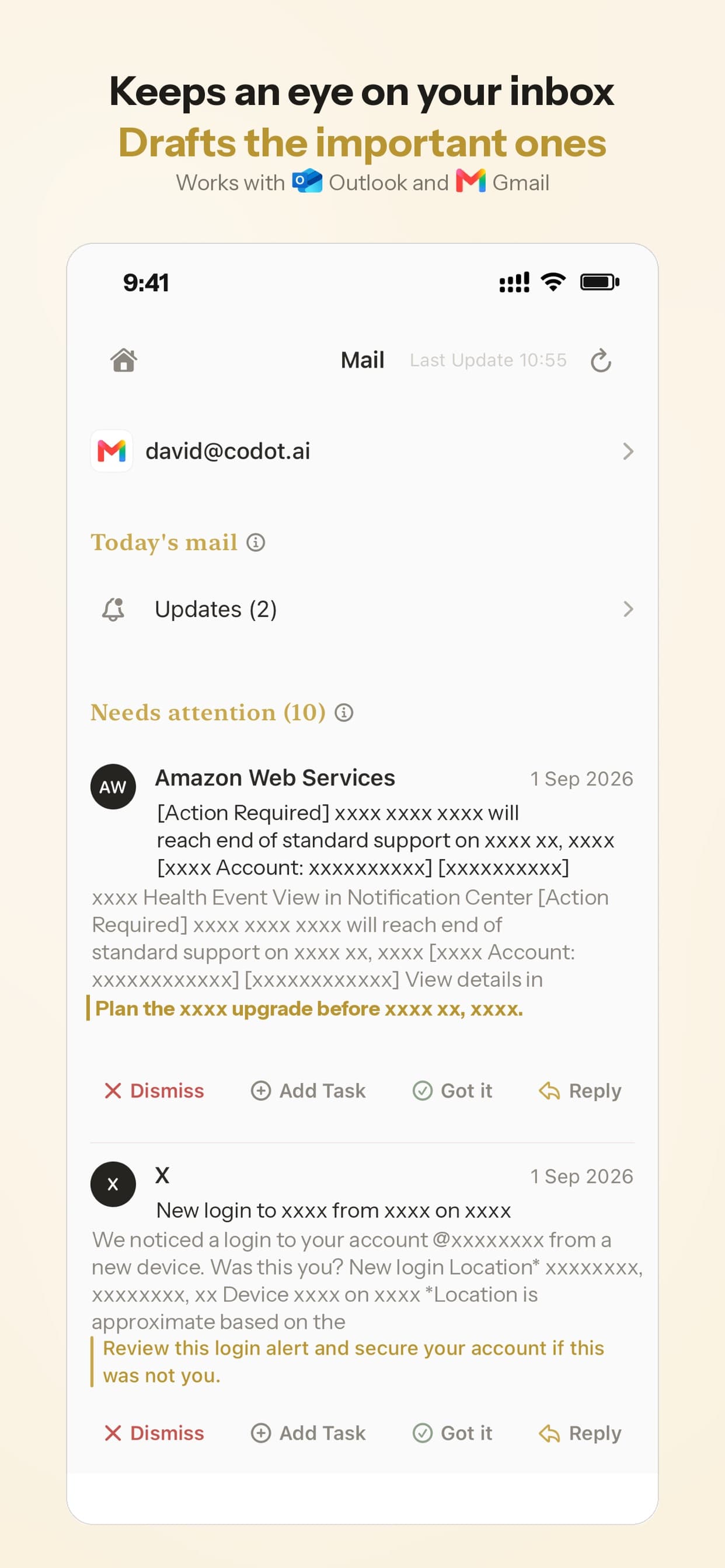
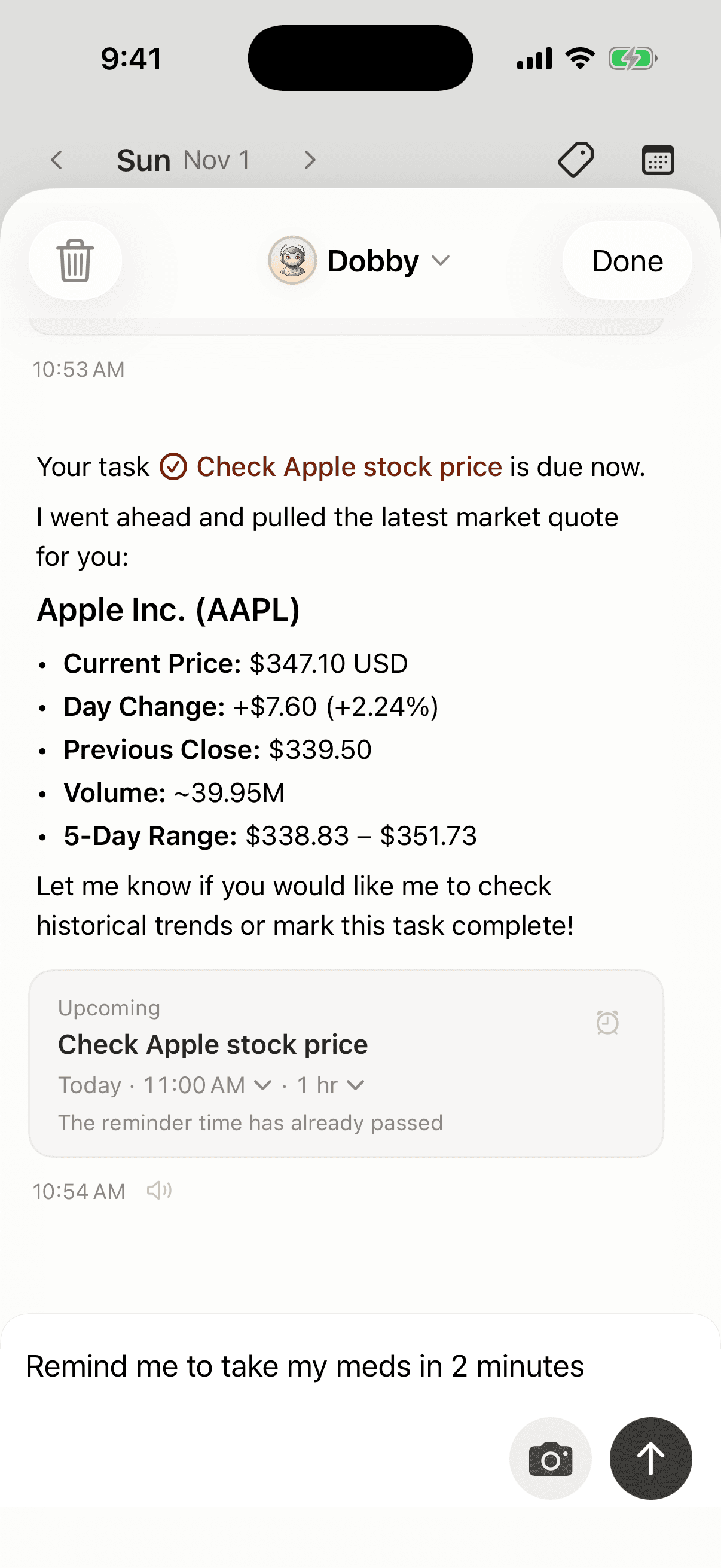
Pricing: Codot's free plan covers tasks, the calendar, notes, the personal CRM, habits, calorie logging and expenses. Reminders at a set time, repeating tasks, daily briefings, scheduled automations and email triage are part of Codot Max ($12.99 a month or $99.99 a year, with 20x the free plan's usage). Every new account gets 7 days of Max free, then drops back to the free plan without charging you. Data is encrypted and never sold.
The other five, and who each one is for
Martin
Martin is the closest competitor in shape. It describes itself as a personal AI agent, and you reach it by text, phone call, email, Slack or its iOS app. Its site lists calendar management including rescheduling, inbox search and drafted replies, reminders and to-dos, and talking wake-up calls. Basic is $21 a month billed yearly ($35 monthly) with a limit of two tasks at a time; Pro is $30 yearly ($49 monthly), with a 7-day free trial (Martin pricing). If you'd rather text an assistant than open an app, Martin is a good fit. It costs more than Codot for one person.
Lindy
Lindy calls itself an "AI employee" that plugs into your tools. The examples on its homepage are operational: reconciling Stripe charges, clustering support tickets, recurring reports. It also handles inbox and meeting work, and you reach it in Slack, iMessage, email or the browser. Its site says nothing irreversible happens without your approval. New accounts get $50 in credits for 7 days, and the Team plan starts at $49.99 a month for 5,000 credits (Lindy pricing). Lindy is the strongest choice for someone who wants to build workflows across many business tools. For one person's calendar and to-dos, it's more setup and more money than you need.
Fyxer
Fyxer does email and meetings. It sorts your Gmail or Outlook inbox, drafts replies in your tone and takes meeting notes; its FAQ says you decide what gets sent. The free plan has 400 credits a month and doesn't include drafting or sorting. Pro is $37 a month billed yearly or $49 monthly (Fyxer pricing). If email is 80% of your admin, Fyxer goes deeper on it than a general assistant.
Motion
Motion is a planner. It takes your tasks and deadlines and builds a schedule around your meetings, with projects, docs and meeting notes added on. Pro AI is $19 per seat a month, and there are iOS, Android and desktop apps (Motion pricing). Pick it if you want software to decide when each task happens. It expects you to enter tasks with durations and deadlines, which is the typing a hallway assistant is supposed to save.
Reclaim
Reclaim works on your existing Google or Outlook calendar: it defends focus time, schedules habits and gives you booking links. The Lite plan is free with a one-week scheduling range; Starter is $10 a month billed yearly ($12 monthly) (Reclaim pricing). It's a good add-on to any of the assistants above. You don't talk to it.
Your ideas shouldn't wait for a keyboard. Just say it — Codot handles the rest.
Try Codot — It's Free →Is there a free AI executive assistant?
Yes, with limits. Codot's free plan covers tasks, the calendar, notes and contact notes; email triage, briefings and scheduled automations are Codot Max, which every new account can try free for 7 days. Reclaim Lite is free for one user with a one-week scheduling window. Fyxer Free gives you 400 credits a month and meeting notes, but no drafting. Lindy's free credits last 7 days, and Martin has a 7-day trial.
A general chatbot like ChatGPT can draft an email or plan a day if you paste in the context, but as we found when comparing the best AI assistant for freelancers, it doesn't keep your calendar or contacts unless you connect them, so you end up being the assistant's assistant.
What people worry about before handing an AI their inbox
When April, a voice email-and-calendar assistant, launched on Hacker News in August 2025, the comments are a fair sample of what professionals worry about. The most common theme was not wanting an AI to send anything without review, because an email can't be unsent. Close behind were privacy (letting a third party read work email), prompt injection from malicious emails, AI-written replies that still need rewriting to sound like you, and subscription prices with trials too short to judge.
Those worries are reasonable, and they shaped how I'd set any of these tools up: let it draft, read before you send, start with calendar and tasks before you connect email, and check where your data goes. Codot drafts email replies for you to review, and Fyxer and Lindy say the same about theirs.
Where Codot falls short
- It doesn't act on the web. No booking flights, filling forms or buying things. If you want an agent that does that, I compared the new ones in Claude Duet vs OpenAI Dots vs Meta Muse vs Instinct.
- It's built for one person. Lindy, Motion and Reclaim have team features, shared workspaces and admin controls that Codot doesn't.
- It's not a project manager. No Gantt charts or task dependencies; Motion covers that.
Which one would I pick?
If you're a founder, manager or consultant whose work happens between meetings, and you want to hand things off by saying them, start with Codot. Every new account gets 7 days of Codot Max free, so trying all of it for a week costs nothing, and nothing has to be migrated: start talking, and the events it creates show up in Google Calendar.
If you'd rather text and call an assistant and you're happy to pay $21 to $30 a month for it, try Martin. If email is the whole job, Fyxer. If you run operations and want agents across Slack and your business tools, Lindy. If you want your calendar planned for you, Motion or Reclaim, and either works alongside Codot.
For a wider look at consumer assistants, see my review of Poke, Codot, Instinct and Town.
FAQ
What is an AI executive assistant app?
An app that does the admin a human executive assistant would: schedule and move meetings, keep track of tasks and follow-ups, draft email and remind you what's next. The better ones take a loose spoken or typed request and act on it, rather than giving you a form to fill in.
What's the difference between an AI executive assistant agent and an app?
"Agent" usually means it takes actions on its own, such as changing your calendar or drafting an email, instead of only answering questions. Most of the tools here are both: an app you install that runs agent actions. Lindy leans furthest toward building custom agents; Codot and Martin are assistants you talk to.
Can an AI replace a human executive assistant?
For calendar changes, reminders, follow-ups and email drafts, it covers a lot of the routine work. It won't handle judgment calls, phone diplomacy or anything that needs a person in the room, and you should still read emails before they go out.
How is Codot different from Martin?
Both are personal assistants you talk to. Codot is voice-first inside its own apps (iPhone, Apple Watch, Android, web, lock-screen widget), keeps contact notes as a personal CRM, and has a free plan, with email triage and briefings in Max at $12.99 a month. The daily brief and email triage are on iPhone; on Android you get tasks, reminders, notes, the CRM and routines. Martin works over text, phone calls, email and Slack, and starts at $21 a month billed yearly.
Is my data safe with an AI executive assistant?
It depends on the vendor, so read each privacy page before connecting email. Codot encrypts your data and doesn't sell it. Whatever you choose, start with calendar and tasks, and connect your inbox once you trust it.
If your admin piles up between meetings, try saying it instead of typing it: Codot on the App Store is free to download, with a 7-day Codot Max trial.
Founders & Professionals Desk
This article was created with AI assistance and reviewed by our editorial team.Learn about our content process.