Personal CRM for Founders: Remember Every Follow-Up Without Maintaining a CRM (October 2026)
Founders lose follow-ups in the minute after a meeting. What a personal CRM should hold, how to log someone by voice in 30 seconds, and Dex vs Mesh vs Monica.
A founder's personal CRM only works if logging a person takes less time than forgetting them. Capture four things right after each meeting (who and where, what they care about, what you promised and by when, one date that matters to them), by voice if possible, then review once a week. Dex and Mesh suit big networks with LinkedIn sync; Codot suits capturing by voice in seconds.
Disclosure: Codot, one of the tools below, is our product. Facts about Dex, Mesh and Monica come from their own pricing and home pages, checked on October 25, 2026. We haven't run a formal comparison test.
TL;DR:
- Most follow-ups die in the first ten minutes after a meeting, before anything is written down. Pick a system for that moment first and a database second.
- Four details are enough per person: who and where you met, what they care about, what you promised with a date, and one date that matters to them.
- Codot turns one spoken or typed sentence into a contact card with those fields, and turns "I'll send it Tuesday" into a dated task. It doesn't sync LinkedIn or enrich profiles.
- Dex ($12–$34 a month) and Mesh (free up to 1,000 contacts, formerly Clay) are better if you want your whole LinkedIn and inbox pulled in. Monica is free if you self-host and has no native phone app.
- Start with the 20 or 30 people who move your company, not your entire address book.
You walk out of a coffee with an investor who mentioned a portfolio founder you should meet, asked for your updated deck "early next week", and said her son just started college. By the time you've answered three Slack messages in the lift, you remember the deck. The intro and the son are gone, and those were the parts that would have made your follow-up sound like you were listening.
That gap between the conversation and the note is what this page is about. If you're a solo founder or run a small team, you probably don't need a sales CRM with pipelines and stages. You need somewhere to put what people told you before your next meeting starts.
Why do founders' follow-ups slip even with a CRM?
Because the CRM is somewhere you have to go. Opening an app, finding or creating the contact, choosing fields and typing on a phone takes a minute or two, and right after a meeting you rarely have a minute or two.
Hacker News has argued about personal CRMs for years, and the threads keep landing on the same points. One recurring view is that the tool is rarely the bottleneck: people simply don't record what they want to remember, and a notes app works fine for anyone who actually writes things down (Ask HN: What do you use as your personal CRM?). Another is that setup friction kills adoption before the first contact is saved; in the 2020 Monica thread, commenters complained about a long sign-up survey and a mandatory onboarding call at one personal CRM, and others said a missing two-way sync with Google Contacts was a dealbreaker.
Both complaints point at the same design rule. The capture step has to be faster than forgetting, and it has to work from wherever you are when the meeting ends: a pavement, a taxi, the lift.
What should a personal CRM actually hold?
Less than most templates ask for. Job title and company you can look up. What you can't look up later is what only that conversation told you. Per person, I'd capture four things:
| Field | Example | Why it matters |
|---|---|---|
| Who and where | "Maya, partner at a seed fund, met at the climate demo day" | Context for the next message and for search later |
| What they care about | "Hiring a CTO for a portfolio company; hates long decks" | This is what makes a follow-up specific |
| What you promised, with a date | "Send updated deck by Tuesday; intro her to Tom" | The part that actually costs you if it slips |
| One date that matters to them | "Son started college in September" | Gives you a reason to get in touch that isn't an ask |
Then add one thing a spreadsheet can't do for you: a reminder that fires on the promised date. A contact record without a dated follow-up is an archive. A record with one is a to-do list with context attached, and for founders that second kind is the one that pays off.
Tags, "relationship strength" scores and contact frequency rules are useful once you have 200 people in the system. With 20, they're admin.
How do you log someone by voice in 30 seconds?
This is the workflow Codot is built around, and it's where I think a founder gets the most out of a personal CRM. Codot is a voice-first personal assistant: you say a sentence, and it creates the tasks, calendar events, notes or contact records that sentence implies.
- Open the input without unlocking. Use the Lock Screen widget, the Apple Watch app or the web app. The lock screen setup guide takes about a minute to set up.
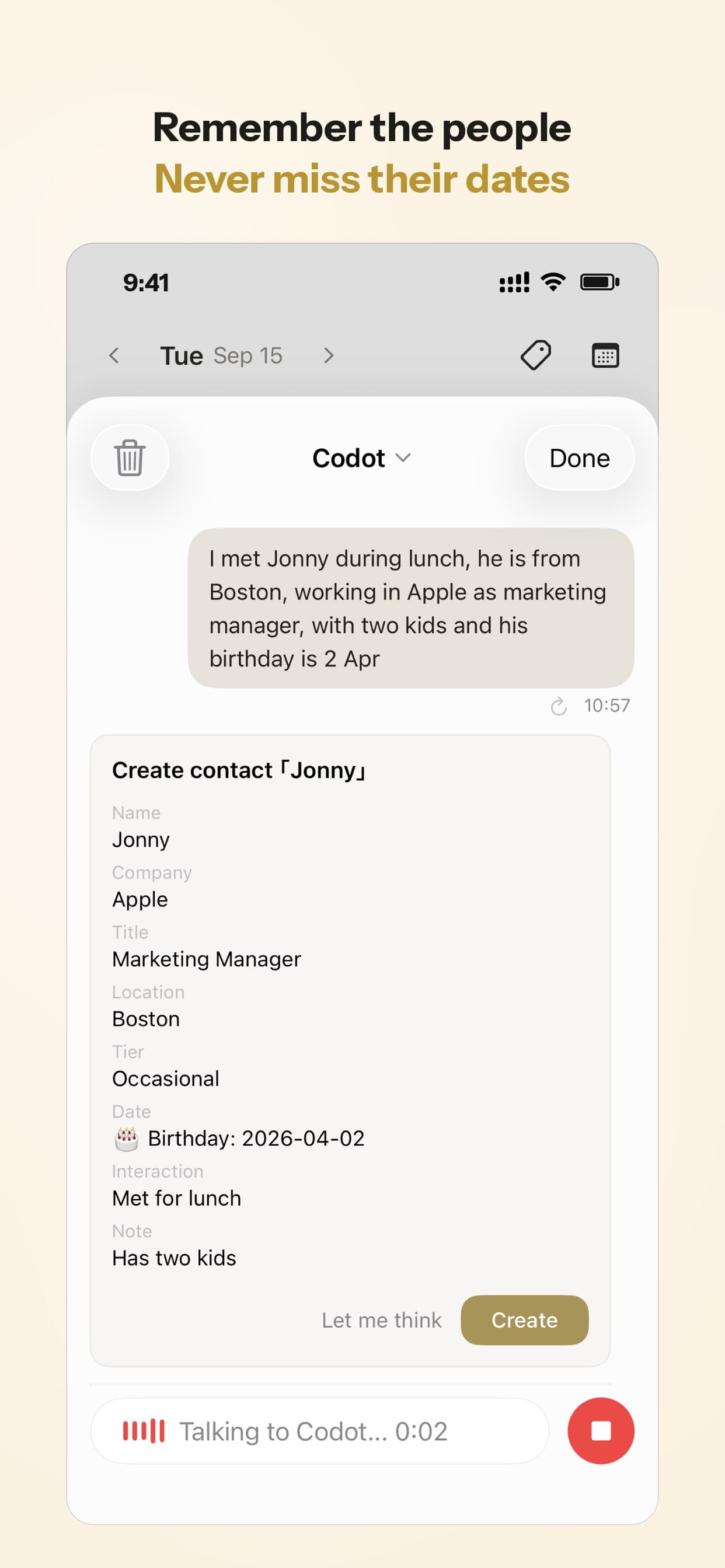
- Say it the way you'd tell a colleague. For example: "Met Maya from Northgate Ventures at the demo day. She's hiring a CTO for one of her companies and wants my updated deck by Tuesday. I promised to intro her to Tom. Her son just started college."
- Check the card and tap Create. Codot shows a "Create contact" card with the fields it pulled out: name, company, title, location, a closeness tier, likes and preferences, important dates and notes on how you met. If something's off, tap "Let me think" and correct it in a sentence. In the same message you can ask for the follow-up: "remind me Monday to send Maya the deck", which becomes a dated task.
The next time you search for Maya, or the next time she emails, the context is on her card. If you use Codot's email triage for Gmail or Outlook on iPhone, it can draft the reply to important emails for you to edit, which helps when the follow-up you promised is an email you keep postponing.
What Codot doesn't do for contacts
Codot doesn't import your LinkedIn connections, doesn't watch for job changes and doesn't enrich profiles with public data. It's built around the people you tell it about, so it won't populate a database of 3,000 people for you. It runs on iPhone, Apple Watch, Android and the web.
Your ideas shouldn't wait for a keyboard. Just say it — Codot handles the rest.
Dex, Mesh, Monica or Codot: which personal CRM fits a founder?
They solve different halves of the problem. Dex and Mesh start from data you already have (LinkedIn, email, calendar) and help you keep in touch with a big network. Codot starts from what you just heard and makes sure the promise turns into a task. Monica is for people who want to own the database outright.
| Codot | Dex | Mesh (formerly Clay) | Monica | |
|---|---|---|---|---|
| How people get in | You say or type a sentence after meeting someone | Imports LinkedIn, email, calendar; manual entry | Imports email, calendar, LinkedIn, X, iMessage and more | Manual entry; contact import |
| Follow-up reminders | Dated tasks from the same sentence, plus a daily briefing on iPhone | Keep-in-touch reminders, birthdays | Reconnect reminders, birthdays, job and location change alerts | Reminders, important dates |
| Voice entry | Core input, on phone, Watch and web | "Voice mode" on Professional plan | Not listed on pricing page | No |
| Price (as of October 2026) | Free: tasks, calendar, notes, CRM, habits (no reminders at a set time, briefings, automations or email triage); 7-day Max trial; Max $12.99/mo or $99.99/yr (20x usage) | Premium $12/mo annual ($20 monthly); Professional $20/mo annual ($34 monthly); 6-day trial | Free up to 1,000 contacts; Pro $10/mo | Free self-hosted; hosted version is a paid plan |
| Phone app | iPhone, Apple Watch | Yes | Yes | No native app yet |
Sources: Dex pricing, Mesh pricing, Mesh's rename announcement, Monica.
Dex makes the most sense if your network lives on LinkedIn and you'll actually work through a keep-in-touch list each week. Voice entry sits on the Professional tier, not Premium.
Mesh has the most generous free plan of the hosted tools and the strongest automatic enrichment: it tells you when someone changes jobs or moves city. If you meet a lot of people at events and mostly need to not lose them, it's a good default.
Monica is the pick for people who don't want relationship notes on anyone else's server. You run it yourself with Docker, and you give up a native phone app, which matters if your meetings end on a pavement rather than at a desk.
Codot fits if your real problem is the ten minutes after a meeting and the promises made in it. It's also the only one of the four that's a general assistant rather than a contacts app—performing many of the same tasks as a virtual assistant for contractors—so the same sentence that saves Maya's details can move tomorrow's 9am call and add the deck to your list.
How would I set this up as a founder?
My suggestion costs a little and saves a lot: don't import anything on day one. Write down the 20 or 30 people who can move your company in the next six months (investors you're talking to, two or three advisors, your first customers, candidates you're courting) and add each one the next time you speak to them. A list you built by hand in a few weeks is one you'll trust; an imported list of 2,000 is one you'll stop opening.
Then pick one weekly slot, Friday afternoon or Monday morning, to scan who you owe something to. In Codot that's a scheduled task ("every Monday at 8, list follow-ups due this week"), so the list comes to you instead of you going to it. If you want help splitting a bigger relationship goal ("close the seed round by March") into weekly steps, the AI agents for ADHD guide compares how different assistants handle planning, and the personal AI assistants review covers the wider category.
Is it creepy to keep notes on people?
The HN threads split on this too. Some commenters said people they told were touched that someone remembered the details; others worried it feels like being tracked. The consensus that emerged was about intent: notes that help you show up as a better colleague or friend are fine, and notes kept to work an angle aren't.
A practical line I'd draw: write down what someone told you directly, not what you found by digging through their social profiles. And if you'd be embarrassed for them to read the note, don't keep it.
Frequently asked questions
What is a personal CRM?
A personal CRM is a contacts app that also stores context and reminders: how you met someone, what they care about, what you owe them and when to get back in touch. It's built for one person's relationships rather than a sales team's pipeline.
What's the best free personal CRM?
Mesh is free for up to 1,000 contacts, and Monica is free if you host it yourself. Codot's free plan covers tasks, the calendar, notes, the personal CRM, habits, calorie logging and expenses; reminders at a set time, repeating tasks, daily briefings, scheduled automations and email triage are part of Codot Max ($12.99 a month or $99.99 a year, with 20x the free plan's usage). Every new account gets 7 days of Max free, then drops back to the free plan without charging you. Prices as of October 2026.
How is Codot different from Dex or Mesh?
Dex and Mesh pull in your existing network from LinkedIn, email and calendar and remind you to keep in touch. Codot builds contact cards from what you say after a meeting and turns your promises into dated tasks and calendar events. It doesn't sync LinkedIn or track job changes.
Is my contact data safe in Codot?
Codot encrypts your data and doesn't sell it. Like any hosted service, your notes sit on its servers; if you want them only on hardware you control, a self-hosted tool such as Monica is the stricter option.
If the last follow-up you forgot was one you'd said out loud, try saying the next one to Codot as you leave the room. Download Codot on the App Store.
Founders & Professionals Desk
This article was created with AI assistance and reviewed by our editorial team.Learn about our content process.