Voice Scheduling for ADHD Founders: Capture and Hand Off Tasks Before They Vanish
Traditional scheduling assumes everyone checks their calendar. If you have ADHD, capturing tasks and handoffs by voice keeps them from slipping between meetings.
For founders with ADHD, the most useful scheduling tool is one that captures tasks at the moment they come up. Codot, a voice-first AI assistant, turns what you say into tasks and calendar events, syncs with Google Calendar, and lets you assign reminders to people who have their own Codot account. It is a personal assistant, not a team scheduling or shift-planning system.
Traditional team scheduling tools often treat people like static blocks on a grid, and that's especially painful if you have ADHD. For founders and executives with a neurodivergent brain, the work doesn't arrive in neat 15-minute increments.
Picture sitting in your car after a board meeting with three tasks that need handing off. By the time you open your laptop, "time blindness" has set in, and those tasks have vanished. Codot is our product: a voice AI calendar for effortless scheduling that captures the task the moment it comes up.
Core Takeaways (TL;DR)
- Voice-first input: Say the task or meeting instead of typing it into a form.
- ADHD-friendly: Built to lower the effort of getting a task out of your head, which is where ADHD executive dysfunction bites.
- Video demo: See voice scheduling in action below.
- Privacy: Codot encrypts your data and does not sell it.
- Capture anywhere: Use Apple Watch, iPhone, Android or the web.
- Honest scope: Codot is a personal assistant. It can assign reminders to people who use Codot, but it has no team dashboards or shift planning.
What is a Team Scheduling Tool in the AI Era?
Modern team scheduling tools have moved beyond simple shift management toward assistants that understand plain language. Instead of filling in fields, you say what needs to happen and when, and the assistant creates the event or task.
In the past, a schedule planner was just a digital version of a paper book. Today, AI assistants like Codot act as a virtual assistant that understands the context of your requests. Whether you're on the web or using an Apple Watch, the goal is to get the plan out of your head with as little manual effort as possible.

Watch the Latest: Video Demo
See how Codot turns a spoken request into a scheduled meeting:
Why Traditional Scheduling Tools Fail ADHD Teams
Traditional tools often require high executive function to navigate menus. For neurodivergent professionals, this friction compounds "time blindness", the difficulty of sensing how much time has passed. When a task manager feels too complex, it invites task avoidance.
A dashboard that looks like an airplane cockpit creates its own anxiety. When you can "dump" messy thoughts into a voice memo and the assistant pulls out the deadlines, much of the planning friction goes away. That's the idea behind using Codot as an "external brain", as covered in our guide to voice scheduling.
Handing Off Tasks by Voice
You can capture a handoff the moment you think of it. Using Codot on Apple Watch or iPhone, you can say: "Remind Sarah to send the Q3 report on Friday." If Sarah has her own Codot account, you can assign the reminder to her; otherwise, keep it as a reminder for yourself to follow up.
Scenario: From Voice Command to Follow-Up
Imagine you're walking between meetings and realize a project timeline has shifted, a common challenge in AI-powered legal project management where deadlines are non-negotiable. Instead of stopping to type, you tap your Apple Watch and say: "Move the design review to Thursday morning, and remind me to ask Sarah for her notes on today's client call."
Codot moves the event on your calendar and creates the reminder. What it doesn't do is run your team: it won't track teammates' progress, send updates to a team channel, or summarize other people's work. For that, keep your project tool; use Codot to make sure the handoff gets out of your head in the first place.
For ADHD entrepreneurs overcoming execution friction, being able to capture a handoff while on the move removes one of the most common points where commitments get forgotten.
Managing Cognitive Load and Personal CRM
An assistant lowers cognitive load by holding the details you would otherwise try to keep in your head. By capturing ideas instantly with voice notes, you also build up a personal CRM: notes on the people you work with.
Imagine walking into a meeting already knowing, because you noted it last month, that a client mentioned his daughter's birthday. Keeping these details by voice helps you run a steady outside sales routine without the mental strain of remembering.
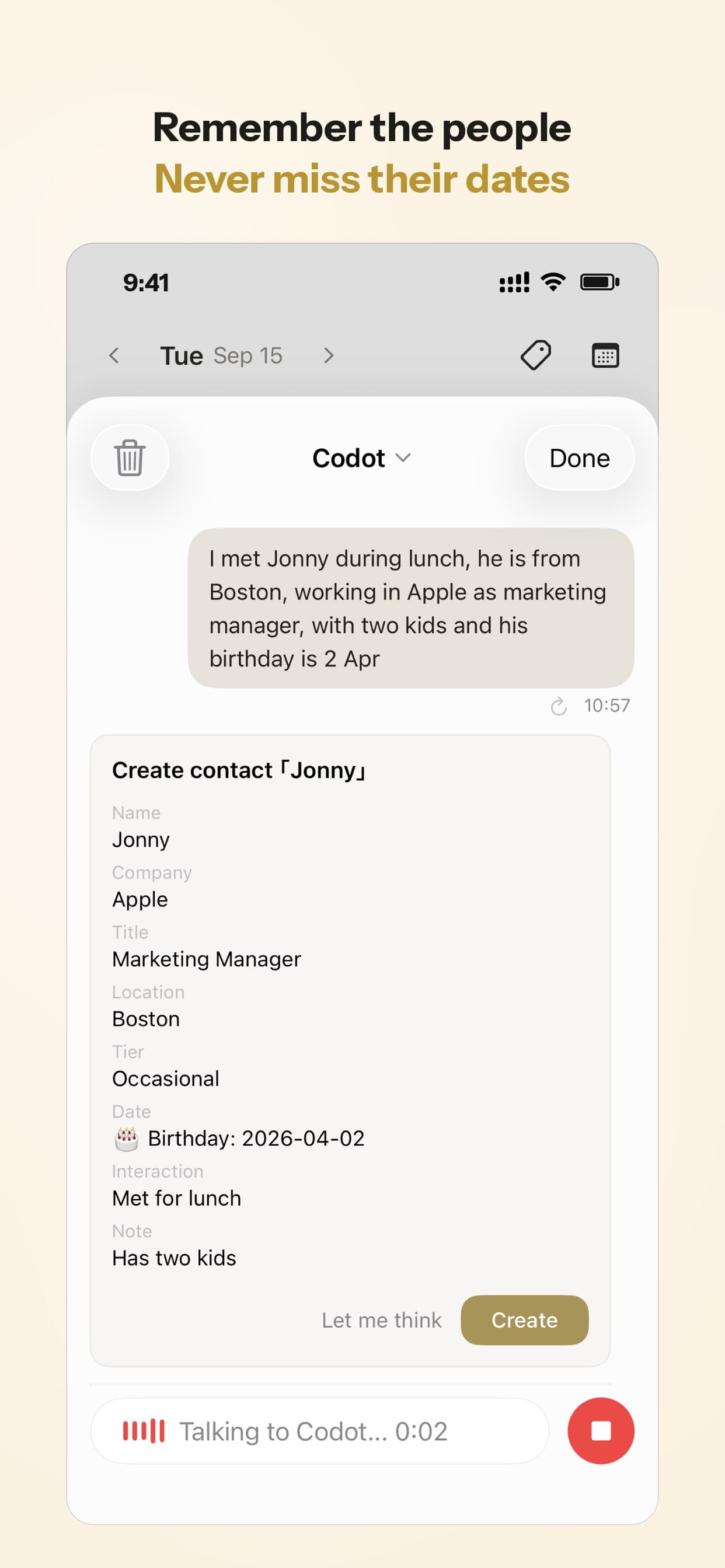
Your ideas shouldn't wait for a keyboard. Just say it — Codot handles the rest.
Addressing AI Limitations in Neuro-Inclusion
AI isn't a magic wand. Voice systems can still struggle with the non-linear, rambling speech that often comes with ADHD.
Codot uses a large language model to work out the intent behind what you say rather than relying on exact phrasing. Still, keep these limits in mind:
- Background noise: Loud environments can still affect transcription accuracy.
- Accents: Recognition is good across major languages, but names and uncommon words are worth checking.
- Very long tangents: If a recording mixes many topics, review what Codot extracted before relying on it.
Trust, Privacy, and Security
Security matters when you use a voice assistant for sensitive business details. Codot encrypts your data and does not sell it to third parties, so your personal CRM and schedule stay yours.
Review Summary
| Feature | Pros | Cons |
|---|---|---|
| Voice Capture | Low-friction capture of tasks and events | Works best in quiet environments |
| ADHD Focus | Less effort to get a task out of your head | Interface may be too minimal for some |
| Calendar | Google Calendar sync | Outlook calendar sync not supported yet |
| Team use | Assign reminders to people with a Codot account | No team dashboards or shift scheduling |
| Overall | A personal voice assistant for busy founders, not a team scheduling system. |
Frequently Asked Questions
Which team scheduling tool is best for ADHD?
It depends on what you need. For shift planning or shared team calendars, use a dedicated team tool; we compared AI executive assistant apps to help you find the right fit. Codot is the better fit if your problem is capturing tasks and meetings the moment they come up, because you just say them.
How do I manage my schedule with voice?
With Codot, you can say things like "Move Tuesday's 3 PM to Wednesday morning." Codot understands the request and updates your Google Calendar.
Can Codot handle messy, rambling voice notes?
Yes. You can give Codot a "brain dump", a long, rambling voice recording, and it pulls out tasks and deadlines. You don't need to be articulate, though it's worth a quick check after very long recordings.
Does this work as a Personal CRM too?
Yes. You can use voice notes to record details about people you meet, and Codot keeps them as contact notes you can look up before your next meeting.
What does Codot cost?
The free plan includes tasks, calendar, notes, the personal CRM and voice input. Timed reminders, recurring tasks, daily briefings, automations and email triage are in Codot Max ($12.99/month or $99.99/year on the US App Store, with 20x the free plan's usage). Every new account gets a 7-day Codot Max trial.
Ready to Reclaim Your Focus?
Stop fighting your calendar and start talking to it.
[Download Codot on the App Store](https://apps.apple.com/app/codot/id6743443746)
ADHD Desk
This article was created with AI assistance and reviewed by our editorial team.Learn about our content process.