ADHD Founders Have 100 Ideas and Ship Zero. Here's the Fix
The vision is never the problem. It's the gap between 'I should build that' and actually doing it. Here's how to close that gap without willpower.
ADHD entrepreneurs close the gap between ideas and execution by lowering the cost of starting. Capture ideas by voice the moment they appear, let a tool break big projects into small first steps, and choose sprint-based work over daily maintenance. Codot, a voice-first AI assistant for iPhone, Android and the web, turns spoken brain dumps into tasks, schedule items and notes; daily briefings and timed reminders need Codot Max ($12.99/month).
You have a million-dollar vision and the drive to work 14 hours straight on a new product, but execution friction—the thought of answering three emails or filing a tax receipt—makes your brain feel like it's wading through wet cement. You aren't broken; you're an ADHD entrepreneur, and you need a system that doesn't rely on your ability to sit still and type.
TL;DR: ADHD is a founder's superpower, but execution friction is the kryptonite.
- Reframing: Your impulsivity is actually your speed-to-market advantage.
- No Typing: Use voice-first tools to capture ideas before they vanish.
- Systems: Build a business that rewards high-energy sprints, not daily grind.
Is ADHD Actually an Advantage in Entrepreneurship?
It’s more than an advantage—it’s a toolkit for innovation. While others are busy writing five-year plans that will be obsolete in six months, your brain is wired for the high-risk, high-reward moves that build empires.
Many people with ADHD describe hyperfocus as a bug because it makes them forget to eat, but in business, that intensity is how you outpace the competition. When you stop fighting your brain and start using it, you move faster than anyone else in the room. You just need a way to catch the ideas before they fly away into the 'distraction void.'
The Friction Problem: Why ADHD Founders Get Stuck
For the ADHD brain, the distance between thinking and doing is filled with invisible hurdles. This is execution friction. It’s not that you’re lazy; it’s that your executive functions—the part of the brain that plans, prioritizes, and initiates—are wired differently.
Common friction points include:
- The Wall of Awful: The emotional dread of starting a task that feels 'boring' or 'administrative,' even if it takes five minutes.
- The Working Memory Gap: Having a brilliant strategic insight while driving, but losing it by the time you find a pen or open a complex project management app.
- Decision Fatigue: Getting overwhelmed by too many steps (e.g., 'I need to send this invoice, but first I need to find the client's email, then open the PDF tool, then...').
This friction leads to 'task paralysis,' where you end up doing nothing because the 'cost' of starting feels too high.
How Do ADHD Entrepreneurs Get Past Their Weak Spots?
They stop trying to fix their 'flaws' and start outsourcing them. Success comes when you build systems that support your intense focus instead of fighting the fact that you hate spreadsheets.
In practice that means keeping your own hours for the big-picture work and handing chores to a human or AI assistant instead of forcing yourself to get better at filing and calendar admin.
Why Entrepreneurs are Choosing Codot to Execute
In the high-stakes world of startups, speed is everything. We built Codot as a bridge over the executive function gap for founders who are done with traditional planners, not as one more note-taker.
1. Capturing "Lightning in a Bottle"
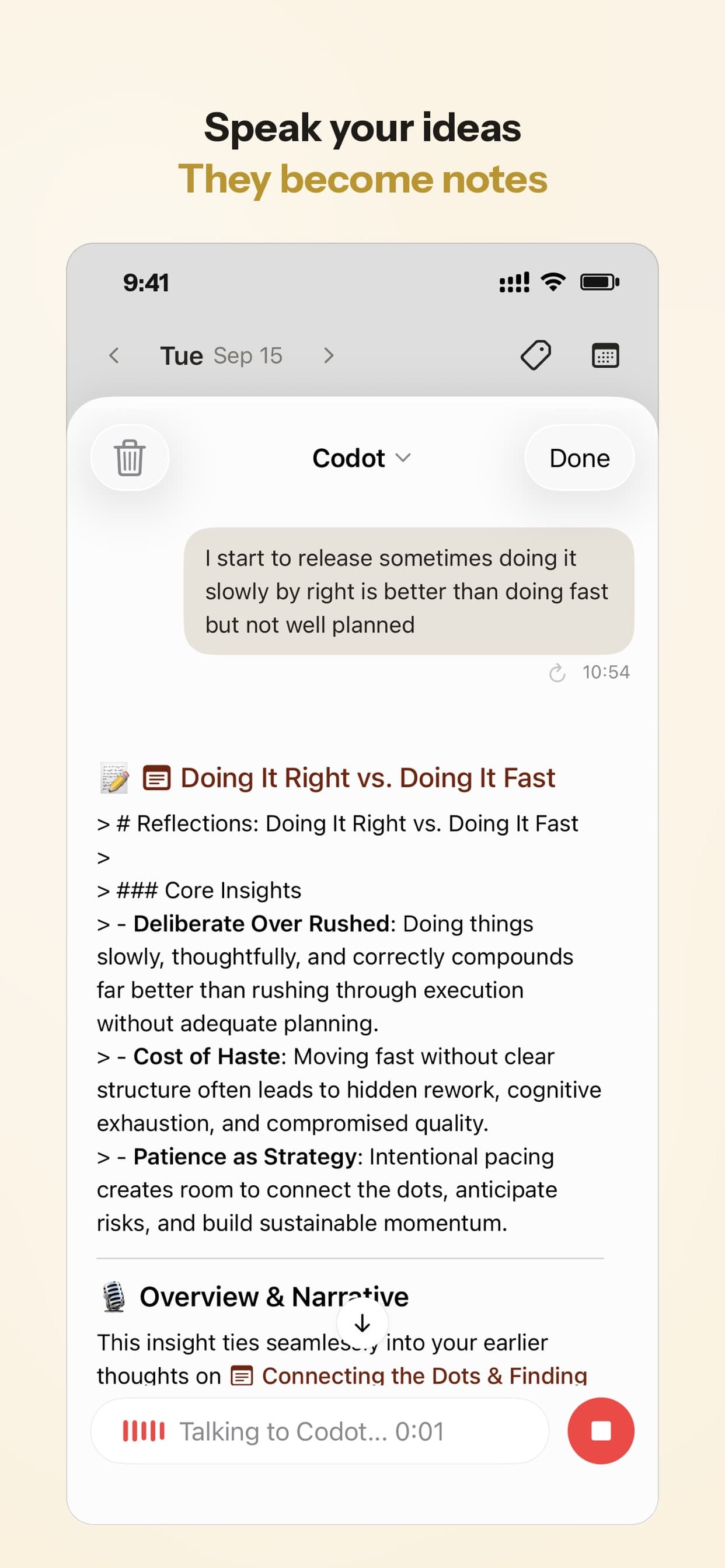
Entrepreneurs have their best ideas in the shower, the car, or mid-sprint. Codot allows you to capture these thoughts via voice with zero friction. You don't have to decide which folder it goes in or what the priority level is. You just speak.
2. Turning Brain Dumps into Project Tracks
One of the biggest struggles for ADHD founders is the 'messy middle'—taking a 10-minute rambling brainstorm and turning it into a concrete plan. Codot’s AI logic parses your rambles, identifies the actionable tasks, and structures them for you. It transforms 'I think we should maybe pivot the marketing toward LinkedIn and also I need to call Sarah' into a structured task list.
3. Managing Task Paralysis
By using a single-button interface, Codot removes the 'choice paralysis' of opening a complex app like Notion or Trello. Managing task paralysis with AI means you can talk your way through the 'Wall of Awful.'

Your ideas shouldn't wait for a keyboard. Just say it — Codot handles the rest.
Try Codot — It's Free →What Business Models Fit an ADHD Brain?
High-dopamine, sprint-based models are your best friend. If your business requires 'slow and steady' maintenance every single day, you're setting yourself up for a crash. You need a model that rewards your ability to solve complex problems in short, intense bursts.
Look for businesses like consulting, product launches, or creative agencies. These models thrive on variety. Avoid 'maintenance-heavy' businesses where you have to do the exact same boring task for years.
Managing the Hyperfocus Hangover
- The 90-Minute Dopamine Check: Set a vibrating alarm for 90-minute intervals during deep work to force a physical movement break, preventing the total physical exhaustion that follows a hyperfocus state.
- Record a 'Breadcrumb' Note: Before stepping away from a project, record a 30-second voice note explaining exactly what your next three clicks should be to lower the cognitive barrier to restarting.
- Schedule Post-Sprint Buffer Blocks: Automatically block out the 60 minutes following a major deadline for 'low-stimulation' tasks like filing or hydration to allow your nervous system to reset.
- The Sensory Reset Kit: Keep noise-canceling headphones or a weighted lap pad at your desk to help regulate your brain's sensory input once the high-intensity work period ends.
Which ADHD Productivity Tools Actually Work?
Focus on tools that act as an external brain. You need a stack that handles the remembering, the sorting, and the scheduling so you can stay in your 'zone of genius.' If a tool feels like extra work, you will stop using it within a week.
Codot can act as an external executive function. It takes messy, rambling voice notes, the ones you record while driving, and turns them into a structured plan.
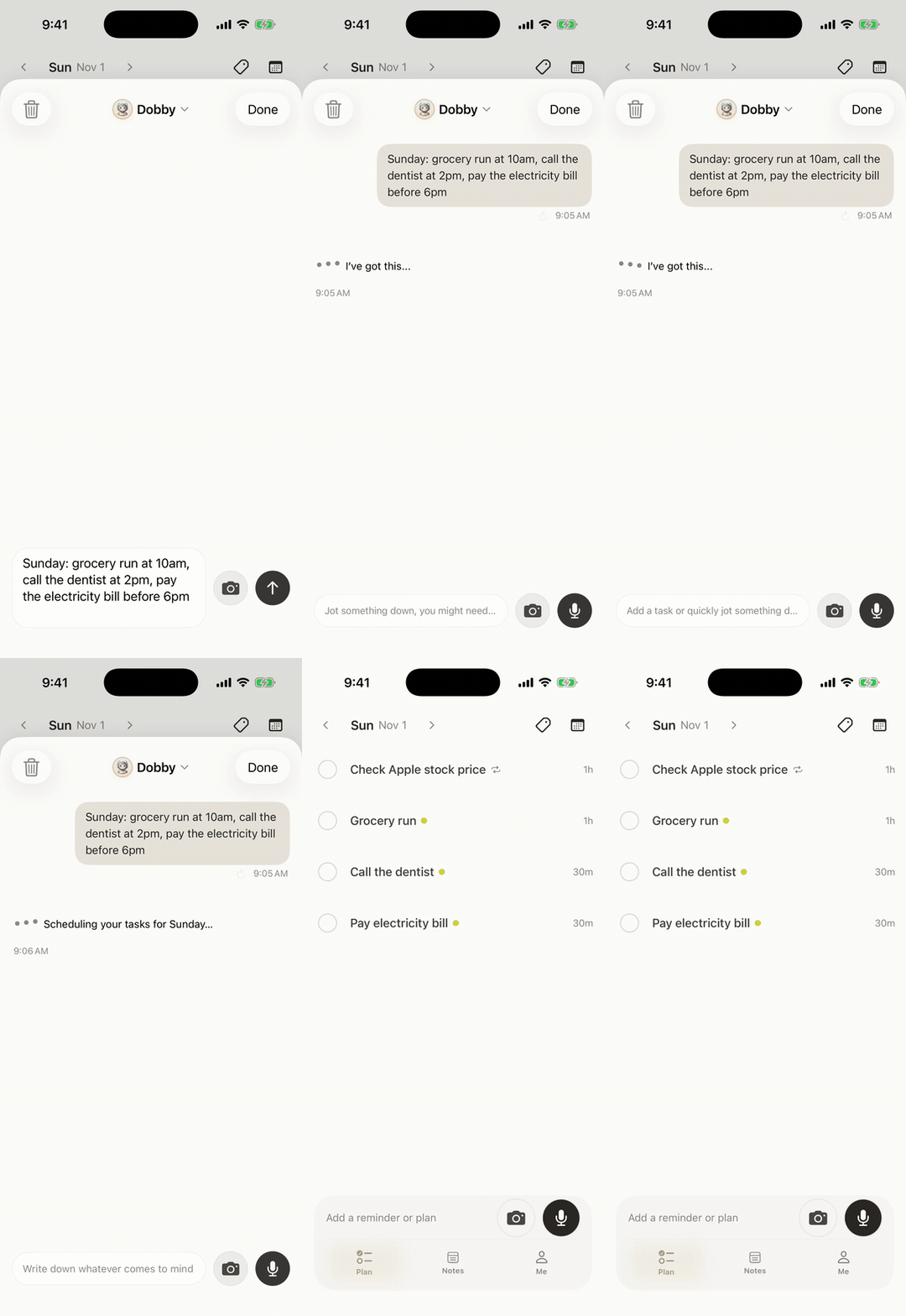
You need a daily planner designed for ADHD brains that feels like a conversation, not a data entry job.
Review Summary
Codot is designed to be the external brain for founders who think faster than they can type. It turns messy voice notes into a structured schedule without you ever touching a keyboard.
- Pros: One-tap voice capture, smart task breakdown, no manual sorting required, perfect for bypassing the 'Wall of Awful.'
- Cons: The AI needs an internet connection to process your notes. Daily briefings, timed reminders and automations are Codot Max features ($12.99/month or $99.99/year); new users get a 7-day free Max trial.
Frequently Asked Questions
Can ADHD entrepreneurs be successful?
Yes. The trick isn't 'curing' the ADHD, but building a business that utilizes your hyperfocus and automates the administrative tasks that make you feel stuck.
How do I handle task paralysis?
Task paralysis usually happens when a project feels too big or too boring. Use a tool like Codot to break the task down into tiny, one-minute steps just by talking. Once you hear the first tiny step, the 'mental wall' usually crumbles.
Why is voice better than typing for ADHD?
Typing requires you to decide where the note goes and how to phrase it, which is exhausting. Voice is raw and fast. It allows you to offload the thought before your brain gets distracted by a notification or a new idea.
How do I stop my voice notes from becoming a messy 'junk drawer'?
Use an AI-integrated tool like Codot that automatically parses your rambling thoughts into distinct items like tasks, notes and calendar events without manual sorting.
What if I feel awkward talking to my phone in public settings?
Hold the phone to your ear as if you are on a standard call or use Bluetooth earbuds; this allows you to capture ideas discreetly without drawing attention.
How do I handle the guilt of delegating tasks I 'should' be able to do?
Reframe delegation as a business necessity; your time is a finite resource that generates more ROI when spent on high-level strategy rather than administrative friction.
Can voice-first systems handle complex project planning?
Yes, by performing a 'brain dump' of all moving parts, the AI can structure those fragmented thoughts into a logical, step-by-step project roadmap for you.
Ready to Connect the Dots?
Stop fighting your brain and start supporting it. Try Codot, the AI daily planner that acts as your external brain—capturing fleeting thoughts via voice and breaking down intimidating projects instantly with no typing needed.
Download Codot on the App Store
Setting Up Your Voice Command Center
- Select Your Hardware Shortcut: Configure your smartphone's action button or lock-screen widget to trigger your voice tool instantly without unlocking the device.
- Sync Your Core Ecosystem: Connect your voice-first tool to your Google Calendar to ensure captured tasks automatically respect your existing schedule.
- Establish Voice Triggers: Practice using specific lead-in phrases like 'Remind me' or 'Note to self' to help the AI logic categorize your thoughts with higher accuracy.
- Perform a 5-Minute Evening Sync: Spend five minutes at the end of each day reviewing the AI-structured tasks to confirm priorities for the following morning.
ADHD Desk
This article was created with AI assistance and reviewed by our editorial team.Learn about our content process.