Tiimo Alternatives (November 2026): 6 Options for ADHD Planning, With Real Prices
Tiimo alternatives compared for ADHD: Codot, Structured, TickTick, Routinery and Goblin Tools, with App Store prices checked November 1, 2026, and who should switch.
The best Tiimo alternative depends on why you're leaving. For capturing tasks by voice before you forget them, try Codot. For a similar visual timeline at a lower price, Structured. For one app that does tasks, calendar and habits, TickTick. For routines with step timers, Routinery. For a free task breaker, Goblin Tools. Tiimo itself now runs on Android and the web, so platform is rarely the reason anymore.
Disclosure: Codot, one of the apps below, is our product. Prices are from each app's US App Store listing, checked November 1, 2026. We haven't used every app for months, so we stick to what each one says it does and what its listing shows.
TL;DR:
- Tiimo is good, and it's no longer iPhone-only. It runs on iPhone, iPad, Apple Watch, Android, Mac and the web. Many "alternatives" lists still say otherwise.
- Codot is for the moment before planning: you say the task out loud the second it shows up, and it lands in your list or calendar. It has no visual timeline like Tiimo's.
- Structured is the closest match to Tiimo's colorful day view, and its paid plan is cheaper on the US App Store.
- TickTick suits people who want tasks, calendar, habits and a focus timer in one place without the neurodivergent-first design.
- Routinery and Goblin Tools solve narrower problems (step-by-step routines, breaking a scary task into steps) and cost little or nothing.
Why people look for a Tiimo alternative
Tiimo has earned its reputation. It was Apple's iPhone App of the Year 2025, it's rated 4.6 from about 21,000 reviews on the US App Store, and it's co-designed with ADHD and autism experts. If it works for you, keep it.
The searches around it ("tiimo pricing", "tiimo free alternative", "tiimo vs structured") point to three reasons people look elsewhere:
- Price. Tiimo doesn't publish a price list. The free version covers a basic planner, limited AI chats and one profile. Pro is sold in the app; the US App Store lists Pro options between $7 and $54, and the 7-day trial only applies to the yearly plan. Pick monthly and you're charged right away (Tiimo FAQ).
- Getting things in. A visual timeline is only as good as what's on it. If tasks reach you while you're walking, driving or mid-conversation, typing them into any planner is where they get lost.
- Wanting something simpler or broader. Some people want just a routine timer. Others want one app for tasks, calendar and habits.
Each option below matches one of these.
Codot: say it before it's gone
We build Codot because of reason two. With ADHD, the problem often isn't planning the day; it's that the thought "email the landlord about the radiator" arrives in the shower and is gone by the time you find your phone.
Codot is a voice-first AI personal assistant. You say one sentence and it does the filing:
- "Remind me to email the landlord at 9 tomorrow" becomes a task with a reminder.
- "Move the dentist to Thursday afternoon" moves the calendar event.
- "Call mom this weekend, pay the electric bill by Friday, and buy printer ink" becomes three separate tasks.
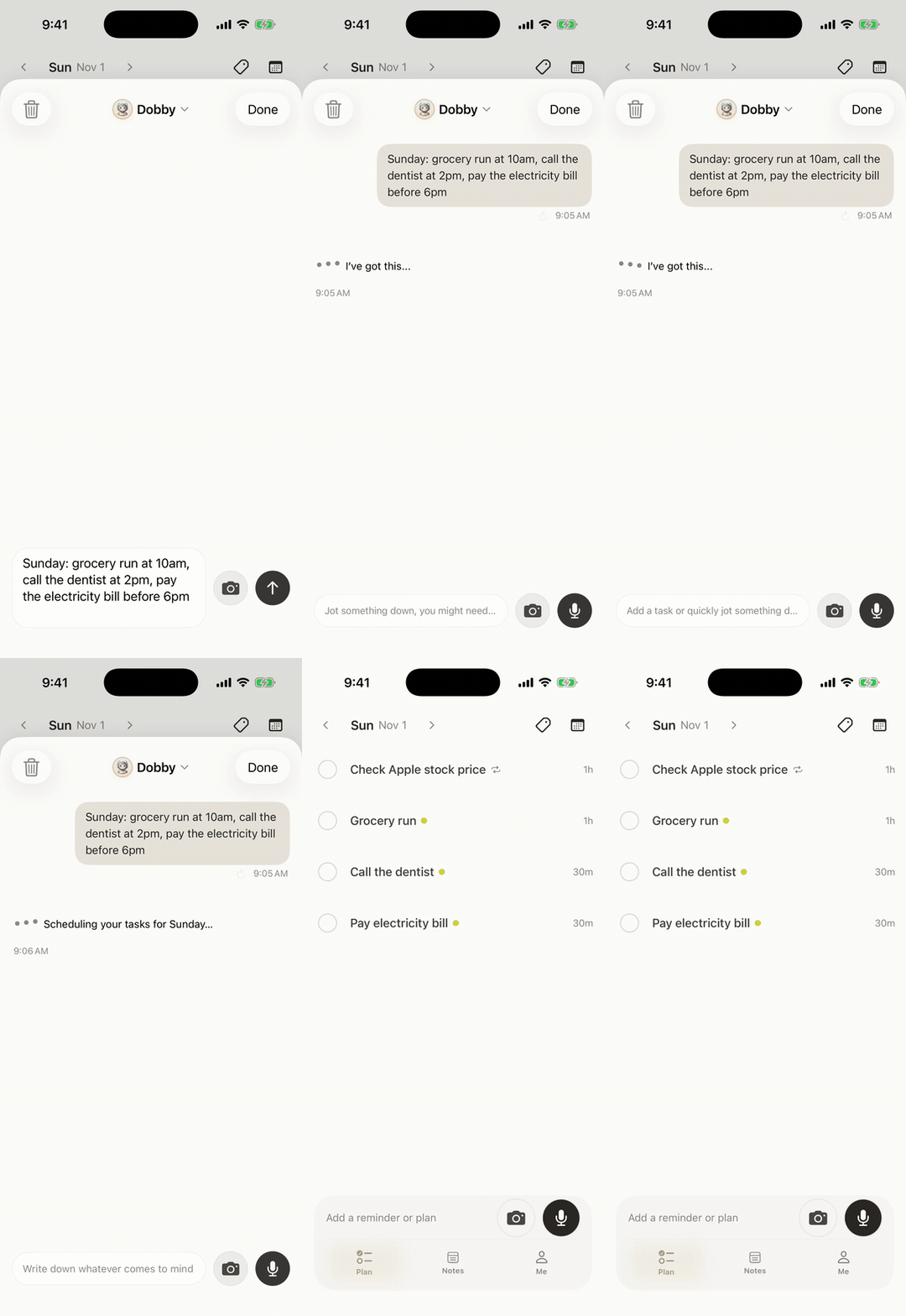
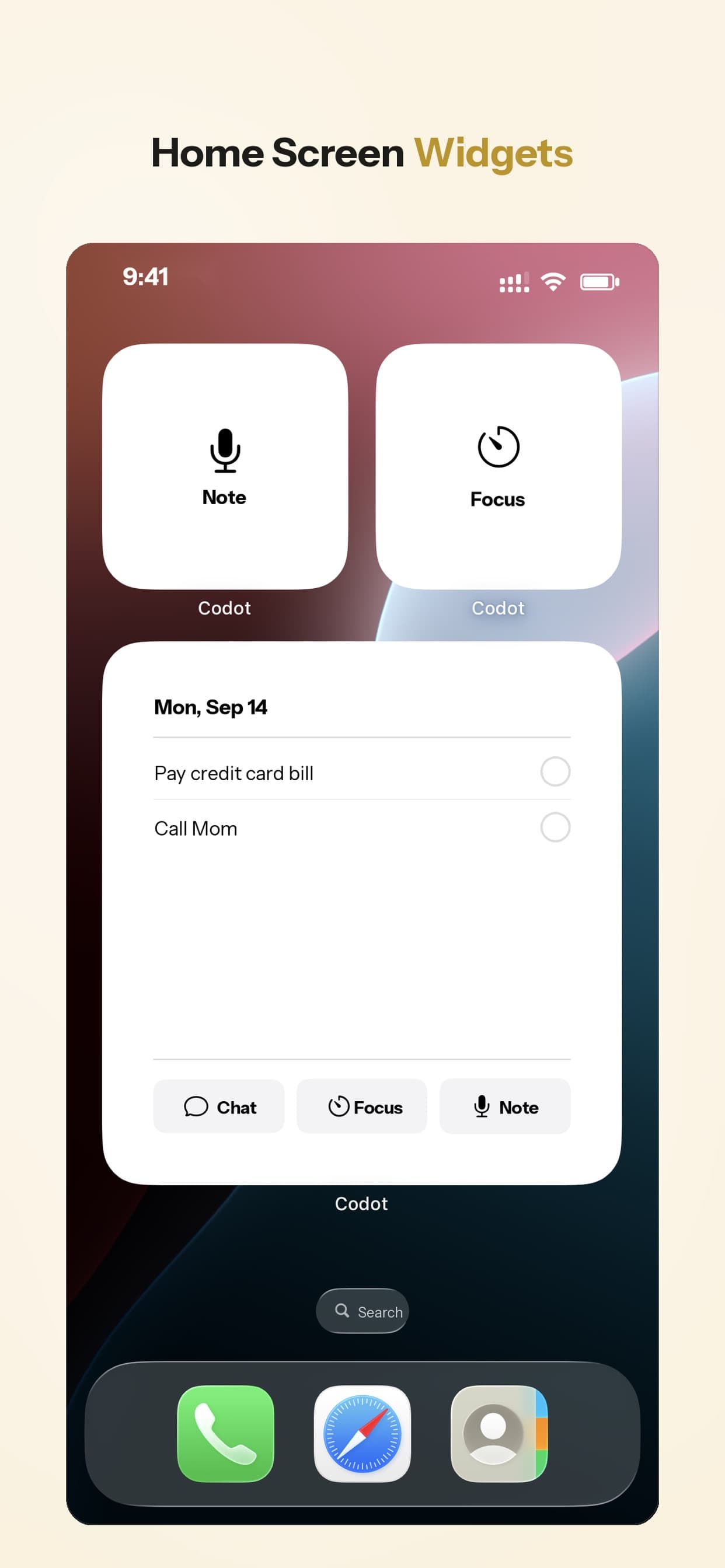
It adds its events to Google Calendar and, on iPhone, to Apple Calendar and Apple Reminders. On iPhone, a daily brief each morning tells you what's due. You can talk to it from an iPhone, Apple Watch, Android phone, the web, or a Lock Screen widget, which means capture takes about as long as the thought does. It understands most major languages.
Price: Codot's free plan covers tasks, the calendar, notes, the personal CRM, habits, calorie logging and expenses. Reminders at a set time, repeating tasks, daily briefings, scheduled automations and email triage are part of Codot Max ($12.99 a month or $99.99 a year, with 20x the free plan's usage). Every new account gets 7 days of Max free, then drops back to the free plan without charging you.
Where it falls short of Tiimo: no color-coded visual timeline, no visual countdown timer, no mood check-ins, no family profiles. Its Reminders sync runs one way. If seeing your day as blocks is what keeps you on track, Codot works better next to a visual planner than instead of one. More on that pairing in our guide to forgetting things the second you think of them.
Structured: the closest visual match
Structured shows your day as a vertical timeline of colored blocks with icons, which is the thing most Tiimo users like best. It's rated 4.8 from about 168,000 reviews on the US App Store.
Its paid tier, Structured Pro, is listed from $2.99 a month or $29.99 a year, with a $99.99 lifetime option; the listing shows several price points, so check what the app offers you. That's usually below Tiimo Pro.
What you give up: Tiimo's neurodivergent-specific touches, such as its courses, community and the gentler language around tasks. Structured is a general planner that happens to suit ADHD brains well.
TickTick: one app for tasks, calendar and habits
If part of your frustration is juggling a planner, a to-do app and a habit tracker, TickTick puts them in one place, with a calendar view, a Pomodoro timer and habit check-ins. TickTick Premium is $4.99 a month or $49.99 a year on the US App Store.
It's denser than Tiimo. Lots of features means lots of settings, and some people with ADHD find that overwhelming in the first week. I wrote about where it fits for ADHD and where voice capture helps in our TickTick alternative guide.
Your ideas shouldn't wait for a keyboard. Just say it — Codot handles the rest.
Try Codot — It's Free →Routinery: when the problem is routines, not days
Routinery is built around one job: getting through a sequence of steps, like a morning routine, with a timer on each step. If the part of Tiimo you used most was the visual countdown during routines, this is a focused, cheaper option. Premium is listed from $5 a month or $36 a year on the US App Store.
It won't hold your appointments or your random tasks, so it pairs with a calendar rather than replacing a planner.
Goblin Tools: free help breaking tasks down
Goblin Tools is a set of small AI tools built mostly for neurodivergent people. The best known, Magic ToDo, takes a task like "clean the kitchen" and breaks it into steps, with a "spiciness" setting for how small the steps get. The website is free and kept that way by sponsors; the iPhone app is a one-time $0.99 (goblin.tools).
It isn't a planner at all. Think of it as the thing you open when a task feels too big to start. Our ADHD daily routine template uses the same idea with a copyable AI prompt.
Side-by-side
| Tiimo | Codot | Structured | TickTick | Routinery | Goblin Tools | |
|---|---|---|---|---|---|---|
| Main strength | Visual day plan for ND brains | Voice capture and rescheduling | Visual timeline | Tasks + calendar + habits | Step-by-step routines | Breaking tasks into steps |
| Add tasks by voice | Not its focus | Yes, one sentence | Not its focus | Basic voice input | No | No |
| Visual timeline | Yes | No | Yes | Calendar view | Routine steps | No |
| Free to start | Free version | Yes: tasks, calendar, notes, CRM, habits (no reminders at a set time, briefings, automations or email triage); 7-day Max trial | Free tier | Free plan | Free download | Website free |
| Paid plan (US App Store) | Pro, $7–$54 options | Max $12.99/mo or $99.99/yr (20x usage) | From $2.99/mo | $4.99/mo | From $5/mo | Web free; app $0.99 |
Prices change by region and over time; the App Store shows your local price before you pay.
Which one I'd pick
Tiimo works but tasks keep slipping past it: keep Tiimo for the visual plan, add Codot for capture. Say it, and decide where it goes in your day later.
Tiimo Pro feels expensive for what you use: try Structured. The day view is similar and the paid plan costs less on the US store.
You want one app instead of three: TickTick.
Mornings are the hard part: Routinery.
You freeze in front of big tasks: Goblin Tools, free, alongside whatever planner you use. For a wider list sorted by problem, see our ADHD tools roundup.
FAQ
Is there a free alternative to Tiimo?
Tiimo has its own free version (basic planner, limited AI, one profile). Free alternatives include Structured's free tier, TickTick's free plan, Goblin Tools on the web, and Codot's free plan (tasks, calendar, notes and habits; reminders at a set time and briefings need Codot Max, which comes with a 7-day free trial).
Is Tiimo available on Android?
Yes. Tiimo lists iOS, iPad, Apple Watch, Android, Mac and web. Older articles that say it's iPhone-only are out of date.
Tiimo vs Structured: which is better for ADHD?
Tiimo is built specifically for neurodivergent users, with courses, community and gentler task language. Structured is a general visual planner with a similar timeline and a lower paid price. If the timeline is what you need, Structured is the cheaper test.
How is Codot different from Tiimo?
Tiimo helps you see and follow your day. Codot helps you capture tasks, reminders and calendar changes by voice the moment they come up, then sends a daily brief of what's due. They cover different steps, and many people would use both.
If you want to try capturing your next task out loud, Codot is on the App Store.
ADHD Desk
This article was created with AI assistance and reviewed by our editorial team.Learn about our content process.