ADHD Tools for Adults (October 2026): Gadgets and Apps for Work, Sorted by the Problem They Solve
Practical ADHD tools for adults at work and home: visual timers, earplugs, vibrating watches, body doubling and voice capture, with prices from each maker.
The ADHD tools adults keep using each fix one specific problem and sit where the problem happens. A visual timer like the Time Timer makes time visible on the desk, earplugs or noise-cancelling headphones cut interruptions, a vibrating watch delivers reminders, body doubling helps you start, and a voice capture app like Codot saves a thought before it disappears.
TL;DR:
- Buy for one problem at a time. The tools that stick are the ones that sit where the problem happens: on the desk, in your ears, on your wrist, by the front door.
- Time blindness: a visual timer you can see from across the desk. Time Timer's MOD Home Edition is $24.95 and the Original 8" is $38.95.
- Noise and interruptions: Loop Quiet 2 earplugs ($19.95, 24 dB) for heads-down work, Loop Engage 2 ($29.95, 16 dB) if you still need to hear people.
- Thoughts that vanish: a capture tool you can reach in two seconds. Codot (our app) lets you say several things at once and turns them into tasks, calendar events and notes, from the lock screen, Apple Watch, Android or the web. The free plan covers tasks, calendar and notes; reminders at a set time and the morning briefing (iPhone only) are Codot Max, which you can try free for 7 days.
- Reminders you ignore: a vibrating watch, either a WatchMinder or the smartwatch you already own.
- Starting: body doubling with Focusmate, free for 3 sessions a week.
- There's a printable checklist near the end.
Codot is our product, so read what we say about it with that in mind. Prices and specs for everything else come from the makers' own sites, checked on October 27, 2026. We're not clinicians, and none of this replaces treatment; these are practical tools for the day-to-day.
You sit down at 9:30 meaning to finish the proposal. A Slack ping, a quick look at email, and it's 11:10. Somewhere in there you remembered you need to move the dentist appointment, and now you can't remember what day you were going to move it to. The 2 pm meeting arrives as a surprise even though it's been in the calendar for a week. None of this is a willpower problem you can fix by trying harder, and a new planner rarely survives the second week. What helps is putting a specific tool exactly where each of those moments happens.
How to choose ADHD tools that don't end up in a drawer
Most adults with ADHD have a drawer, or a phone folder, of tools that worked for nine days. I'd use three rules before buying anything else:
- Name the moment. "I lose track of time once I start email" is a moment. "I want to be more organised" isn't, and no gadget fixes it.
- Put the tool where the moment happens. A timer in a desk drawer doesn't work. A capture app three screens deep doesn't work. If you have to go and find the tool, you won't.
- One new tool at a time. Give it two weeks before adding the next.
If you're looking for AI apps specifically, I ranked them by setup effort in the 7 best AI agents for ADHD. This piece is the wider toolkit: physical gadgets first, plus the few ADHD planning app alternatives I'd pair them with.
ADHD tools for adults at a glance (October 2026)
| Problem | Tool | Type | Price (maker's site) |
|---|---|---|---|
| Losing track of time | Time Timer MOD / Original 8" | Visual timer | $24.95 / $38.95 |
| Losing track of time (digital) | Time Timer TWIST | Digital 90-minute timer | $22.95 |
| Open-office noise | Loop Quiet 2 | Earplugs, 24 dB | $19.95 |
| Noise, but you need to hear people | Loop Engage 2 | Earplugs, 16 dB | $29.95 |
| Thoughts that disappear | Codot | Voice-first AI assistant app | Free for tasks, calendar and notes; Max $12.99/month (20x usage) adds set-time reminders and briefings; 7-day Max trial |
| Reminders you swipe away | WatchMinder or a smartwatch | Vibrating reminders | See maker's site |
| Can't get started | Focusmate | Online body doubling | Free 3 sessions/week; Plus $8/month yearly |
| Keys and wallet | Bluetooth tracker | Gadget | Varies |
Time blindness at your desk: a timer you can see
A clock tells you what time it is. A visual timer shows how much of a block is left, as a coloured disc that shrinks, so you can see it from across the desk without doing arithmetic. That's why it turns up on nearly every list of ADHD gadgets.
Time Timer is the brand most people mean. Its own shop lists the MOD Home Edition, a 60-minute timer, at $24.95, the Original 3" at $29.95, and the Original 8" at $38.95; the TWIST is a digital 90-minute version with a kickstand at $22.95 (Time Timer shop). How I'd use one at work:
- Set it for the length of the task you're avoiding, not a standard 25 minutes. "Until the disc is gone, I only work on the proposal."
- Put it in your eyeline, next to the monitor, rather than on a shelf.
- Use it for transitions too: ten minutes before a meeting, set it and stop starting new things.
A cheaper alternative is the timer on your phone or watch, but a phone timer lives on the device that distracts you. That's the argument for a separate object.
Noise and interruptions: earplugs or noise-cancelling headphones
If a conversation two desks away pulls your attention every time, reducing the noise is easier than ignoring it. Loop lists Quiet 2 at $19.95 with 24 dB of noise reduction (SNR), and Engage 2 at $29.95 with 16 dB, which it positions for staying present in conversation (Loop). Quiet suits heads-down work. Engage is the one to keep in during an open-office day when colleagues still need to get your attention.
Over-ear noise-cancelling headphones do the same job more strongly, and they also signal "busy" to the people around you, which earplugs don't. If you already own a pair, try them for a week before buying anything.
Thoughts that vanish: a capture tool within two seconds
This is the problem we care about most, because it's why we built Codot. You're mid-task and three things arrive: book the car service, tell Sam the numbers changed, buy a birthday card for Friday. If capturing them means unlocking the phone, finding the right app and typing into the right list, you either lose your place in the task or lose the thoughts. We wrote about why that happens in ADHD and forgetting things the second you think of them.
Codot is a voice-first AI personal assistant. You say all three in one breath, and it saves three separate items: a task, a message reminder and a reminder dated for Friday. It also does things a list can't:
- Move things by saying so. "Push the dentist to next Tuesday afternoon" moves the event, and Codot writes it into Google Calendar.
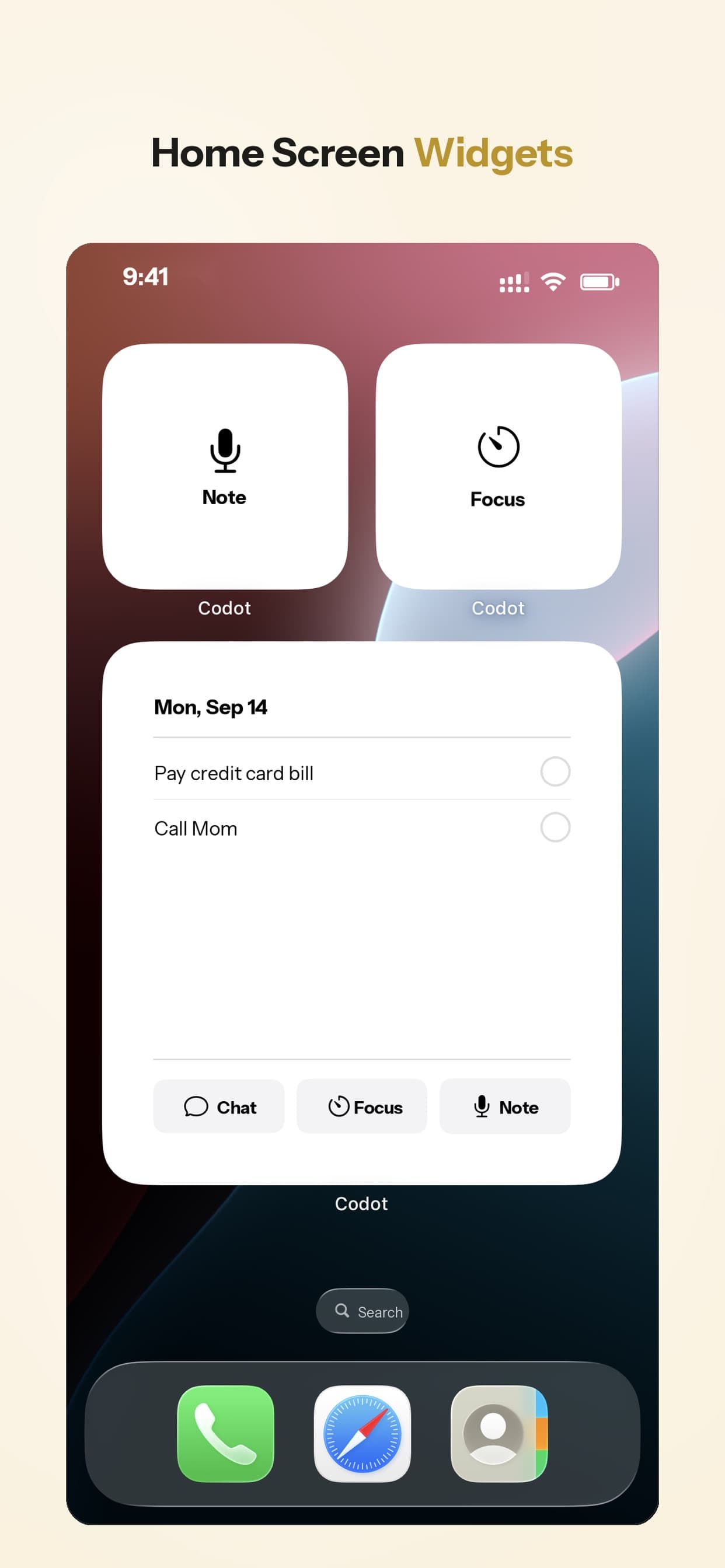
- Capture without opening the app. A lock-screen widget on iPhone, the Apple Watch app, Android, and the web.
- Keep it in sight. Home-screen widgets show today's tasks where your eyes already go.
- Tell you the plan. On iPhone, a morning briefing lists the meetings you've given Codot and what's due today, so the 2 pm meeting stops being a surprise.
- Remember people. Say what someone told you and it keeps it on their contact.
- Run routines. Scheduled automations and habit tracking cover the repeat stuff.
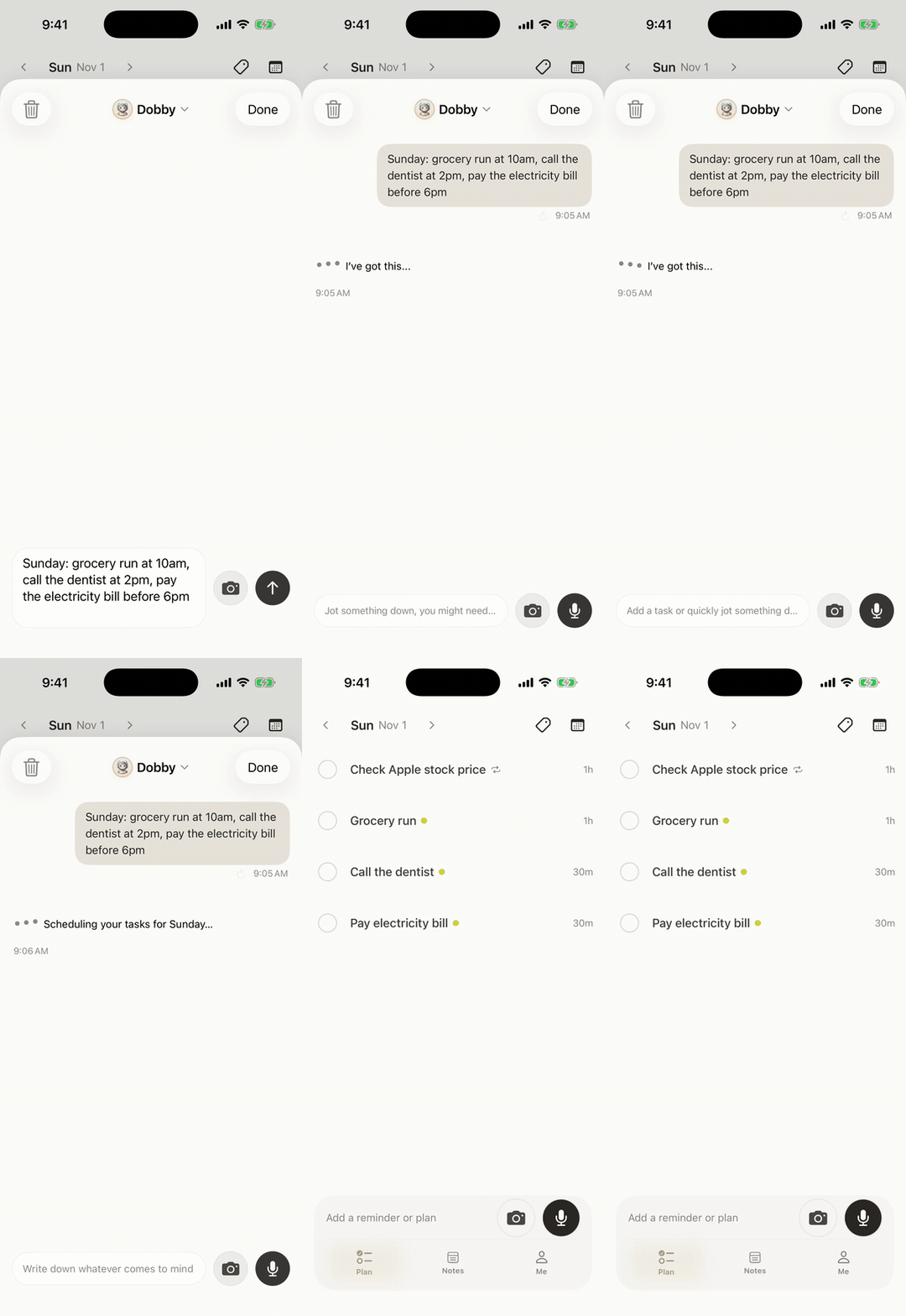
App Store reviewers who describe themselves as forgetful tend to mention the same thing: events and reminders land in the calendar without typing them one by one. Pricing: Codot's free plan covers tasks, the calendar, notes, the personal CRM, habits, calorie logging and expenses. Reminders at a set time, repeating tasks, daily briefings, scheduled automations and email triage are part of Codot Max ($12.99 a month or $99.99 a year, with 20x the free plan's usage). Every new account gets 7 days of Max free, then drops back to the free plan without charging you. Data is encrypted and never sold.
If you'd rather not use Codot, any app that puts a record button on your lock screen covers most of this. The point is the two seconds.
Reminders you'd swipe away: put them on your wrist
Phone notifications are easy to dismiss without reading. A vibration on the wrist is harder to miss, especially in a meeting. WatchMinder makes vibrating watches designed for people with ADHD and other needs; its site says they were invented by a psychologist and that a training mode can vibrate with a message at a set interval, such as a prompt to refocus, while reminder mode fires at specific times (WatchMinder). The watches have no Wi-Fi or Bluetooth, which is why its maker pitches them for classrooms too.
If you already wear an Apple Watch or another smartwatch, set your two or three most-missed reminders to come through as haptics there before buying a second device.
Your ideas shouldn't wait for a keyboard. Just say it — Codot handles the rest.
Try Codot — It's Free →Can't start: body doubling
Body doubling means working while someone else is present, even silently. Focusmate pairs you with a stranger on video for a session: you each say what you'll work on, work, then report back. The free plan includes 3 sessions a week, and Plus is $8 a month billed yearly or $12 monthly for unlimited sessions (Focusmate pricing). Book the session the night before for the task you've been avoiding; the booking is the commitment.
For a big task that feels impossible to start, an AI that breaks it into steps also helps. Goblin Tools is the free one most people mention, and it's covered in the AI agents ranking linked above.
Keys, wallet, laptop charger: trackers by the door
A Bluetooth tracker on your keys turns "where are my keys" into a sound. Apple's AirTag needs an iPhone (iOS 26 or later for the current model, per Apple); Android users need a tracker built for Android. Pair it with one fixed spot by the front door, a bowl or a hook, so the tracker is the backup and the habit is the system.
Paper still counts
A whiteboard by the door with tomorrow's three things, or one notebook that never leaves your bag, works for plenty of people. Readers in an ADDitude roundup described replacing sticky notes with a single reusable notebook so reminders stay in one place. The rule is the same as for apps: one place, always in the same spot.
A printable ADHD tools checklist for work
Copy this into a doc and print it, or keep it on your phone:
- [ ] I can see how much time is left in my current block without unlocking my phone
- [ ] I have earplugs or headphones at my desk for focus blocks
- [ ] I can save a thought in under two seconds, from the lock screen or watch
- [ ] My calendar tells me (not the other way round) what's next each morning
- [ ] My two most-missed reminders vibrate on my wrist
- [ ] I have a body-doubling slot booked for this week's hardest task
- [ ] Keys, wallet and charger have one fixed spot by the door
If you want this as a full day plan, the ADHD daily routine template turns it into a copyable schedule.
Where Codot fits, and what it doesn't do
Codot covers capture, reminders, calendar changes and, on iPhone, a morning plan. It doesn't block distracting websites, it isn't a timer you can see across the room, and it needs a connection to work. It also doesn't act on the web for you: no booking or form filling. Pair it with a visual timer and earplugs and you've covered the three moments most adults describe.
FAQ
What are the best ADHD tools for adults?
The ones that match a specific problem: a visual timer for time blindness, earplugs or noise-cancelling headphones for distraction, a vibrating watch for reminders, body doubling for getting started, and a quick capture app for thoughts that vanish. Start with the problem that costs you the most each week.
What ADHD tools help adults at work?
At a desk: a visual timer in your eyeline, earplugs for focus blocks, and a capture tool you can use without leaving the task. In meetings: a vibrating watch for time cues and a way to say follow-ups as soon as you walk out.
Is there an ADHD tools for adults PDF?
Use the printable checklist above: copy it into any document and save it as a PDF. It's deliberately short so it fits on one page.
How is Codot different from a regular to-do app for ADHD?
A to-do app asks you to type each item into the right list. Codot is an assistant: you say several things at once and it creates the tasks and calendar events, moves appointments when plans change, and sends a morning briefing on iPhone. You can capture from iPhone, Apple Watch, Android and the web.
Are there free ADHD tools?
Yes. Your phone's timer, a whiteboard, Focusmate's free plan (3 sessions a week) and Codot's free plan (tasks, calendar, notes and habits; set-time reminders and briefings need Max) all cost nothing.
If the thoughts that disappear are your biggest leak, try saying them instead of typing them: Codot on the App Store is free to download, and every new account gets 7 days of Codot Max free.
ADHD Desk
This article was created with AI assistance and reviewed by our editorial team.Learn about our content process.