ADHD and Forgetting Things the Second You Think of Them: Say It Out Loud, Keep It in Sight
Why ADHD makes you forget things seconds after you think of them, and a two-part fix from working memory research. Capture it by voice, then keep it in sight.
People with ADHD forget things seconds after thinking of them because working memory holds only a few items and ADHD weakens it further. Russell Barkley's advice is to externalize the information at the point of performance. In practice that means two habits. Capture the thought within seconds, ideally by voice, and put it somewhere you see without opening an app, such as a lock screen widget or a morning briefing.
TL;DR:
- Forgetting a task seconds after you think of it is a working memory problem. Adults hold roughly 3 to 5 items at once, and meta-analyses find weaker working memory with ADHD.
- ADHD researcher Russell Barkley's fix: put the information outside your head, at the place and moment you'll act on it.
- Capture first. Speaking is the shortest route from "I should..." to saved: a lock screen mic, a watch, or one sentence with five things in it.
- Then keep it visible on the lock screen, the home screen or in a morning briefing, because "out of sight, out of mind" is literal with ADHD.
- Codot, a voice-first AI assistant built around both halves, is our product, and we'll say where a sticky note still beats it.
Codot is our product, so we're biased. The research is linked so you can check it.
You're at the stove and remember the contractor needs an answer by Friday. You turn to find your phone, a message is waiting on the screen, you read it, and by the time you unlock the phone the contractor is gone. If that's a normal Tuesday for you, this article is about the ten seconds between the thought and the phone.
Why do people with ADHD forget things immediately?
Psychologist Nelson Cowan's review of the research puts the central limit at about 3 to 5 meaningful items for young adults (Cowan, 2010, Current Directions in Psychological Science). An item stays there only while your attention keeps hold of it. A notification, a question from your kid, or the act of opening an app is enough to push it out.
ADHD shrinks that already small space. A meta-analysis of 26 studies found children with ADHD had deficits across several kinds of working memory, largest on spatial tasks (Martinussen et al., 2005). A later review of 38 studies in adults found moderate deficits that persist into adulthood (Alderson et al., 2013, Neuropsychology). Those are group averages, and your own working memory may be better or worse.
The useful takeaway is narrow. The contractor got lost because the thought was parked in the one place your brain holds things worst, and the message on the screen needed the space. Caring more wouldn't have changed that.
Is "out of sight, out of mind" an ADHD trait?
It isn't a diagnostic criterion, but it follows from the same mechanism. If a task isn't in front of you, the only copy is internal, and the internal copy is the weak one. That's how the bill under the mail pile goes unpaid.
What Barkley means by "externalize it at the point of performance"
Russell Barkley describes ADHD as trouble doing what you know. In a fact sheet on executive function, he says people with weak working memory are best helped by "externalizing" information, with physical representations of it placed in the setting at the point of performance (Barkley, The Important Role of Executive Functioning and Self-Regulation in ADHD). He defines the point of performance as the place and time where a person is failing to use what they know. His summary principle is to "put external information around the person and within their sensory fields."
He describes verbal working memory as self-speech, the voice in your head, and his examples include saying rules aloud and recording reminders. He also writes that nagging people to try harder to remember doesn't work. So there are two jobs: get the thought out before it evaporates, and put it back in front of you when you'll act on it.
Step 1: capture it within seconds, out loud
Every extra step between the thought and a saved note is a chance for the thought to disappear. Count them for a typical to-do app: find the phone, unlock it, find the app, wait for it to load, tap the plus, type, pick a list, pick a date. Each of those is a small task competing for the same 3 to 5 slots as the thing you're trying to save.
Why voice capture works better for ADHD than typing
Speaking skips most of those steps, and you say the thought the way you were already thinking it. Typing makes you shorten it, file it and spell it while the original fades.
Voice notes alone aren't enough, though. A voice memo app saves audio, and audio is invisible. You'd have to remember to listen back, which is the exact skill that's weak. What you want is speech that turns into a written task, with a date, in a list you'll see.
Put the capture button where your hands already are
Put capture where you can reach it without unlocking or opening an app:
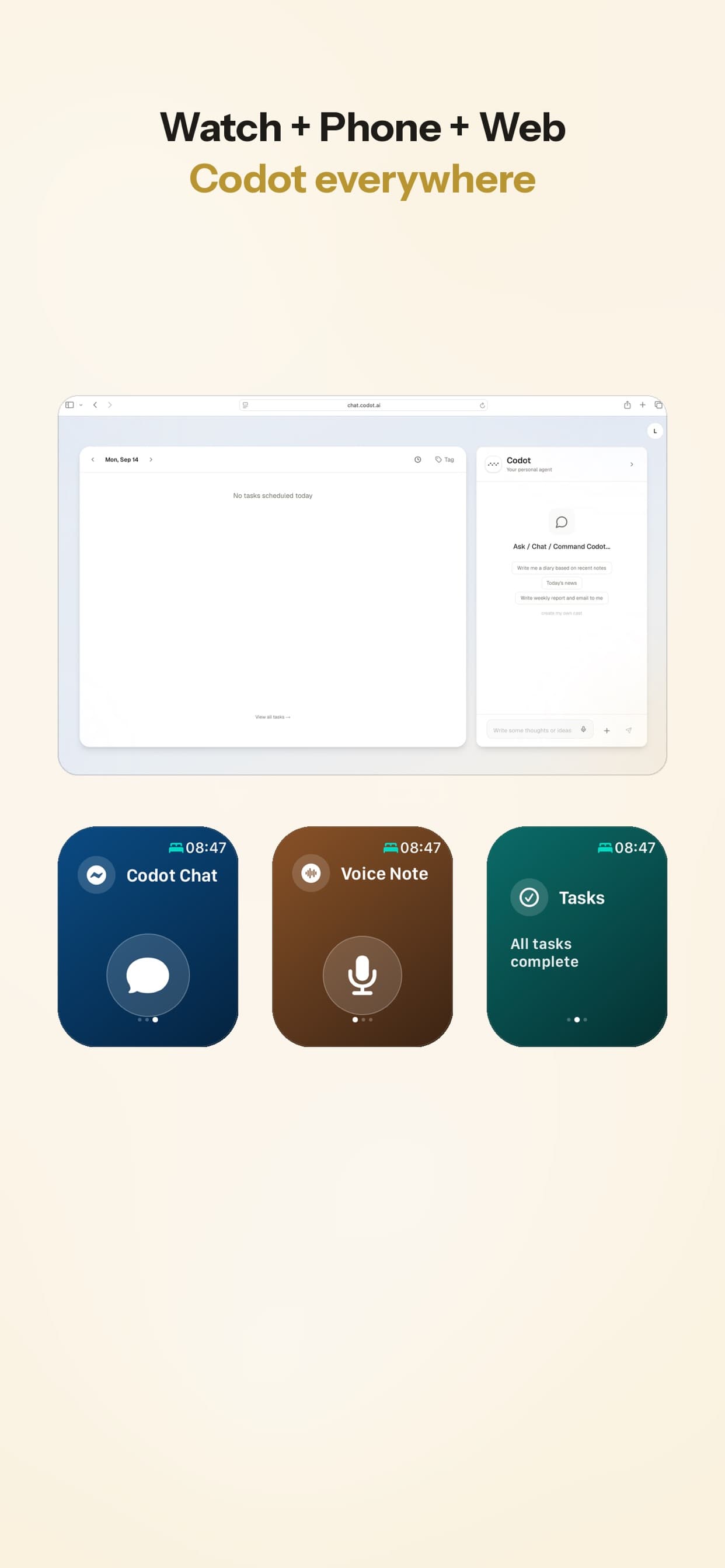
- Lock screen widget with a mic. iOS 16 and later lets apps put widgets under the clock. I wrote a step-by-step guide to putting a to-do list on your iPhone lock screen that covers Reminders, Todoist, Things and Codot.
- Your watch. When the phone is in another room, which with ADHD is often, the wrist is the only device on you.
- The web, if you spend the day at a laptop and the phone is face-down on purpose.
Say everything in one breath
ADHD thoughts rarely arrive one at a time. The contractor reminds you of the invoice, which reminds you the Thursday call should move. If the tool takes one reminder per command, you'll lose two while it confirms the first. Pick one that splits a run-on sentence for you. "Reply to the contractor by Friday, send the invoice tomorrow morning, and move Thursday's call to 4" should become two tasks and a calendar change. Apple's Siri does well with one reminder at a time; several in one breath is where it gets shaky.
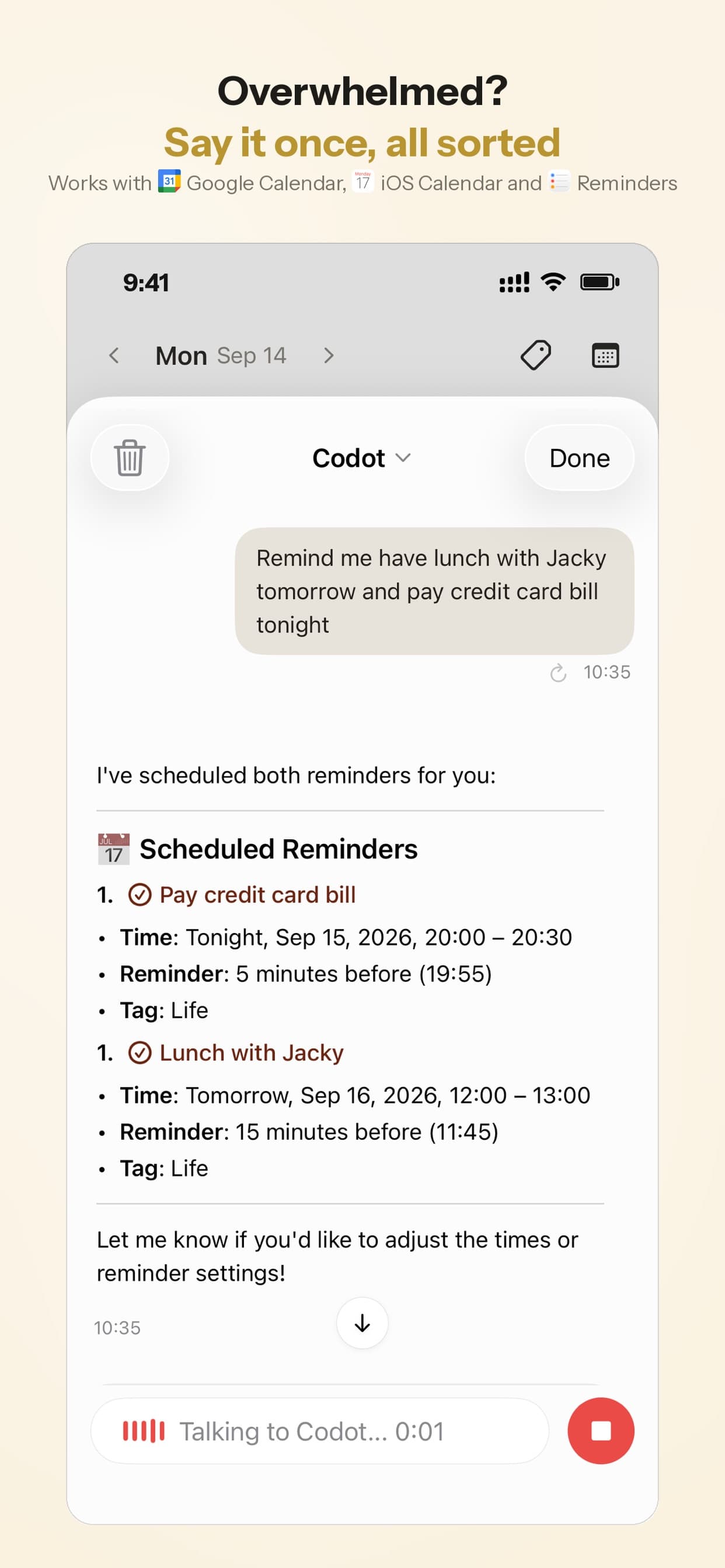
Your ideas shouldn't wait for a keyboard. Just say it — Codot handles the rest.
Try Codot — It's Free →Step 2: keep it where your eyes already go
Most systems fail after capture, when the task sits in an app you don't open, which is why many ADHD tools for adults focus on keeping information within your sensory field. A list you have to remember to check is one more working memory task. Aim to see it without deciding to look:
| Where the list lives | When you see it | Best for |
|---|---|---|
| Lock screen widget | Every time you pick up the phone | Today's 2 or 3 most important tasks |
| Home screen widget | Every time you unlock | A longer today list and a one-tap capture button |
| Calendar widget | When you check the time of your next thing | Seeing tasks and events on one timeline |
| Morning briefing | Once, at a time you choose, as a notification | The day's plan without opening anything |
| Paper note on the door or the object | When you physically reach for it | Things tied to one place, like medication or keys |
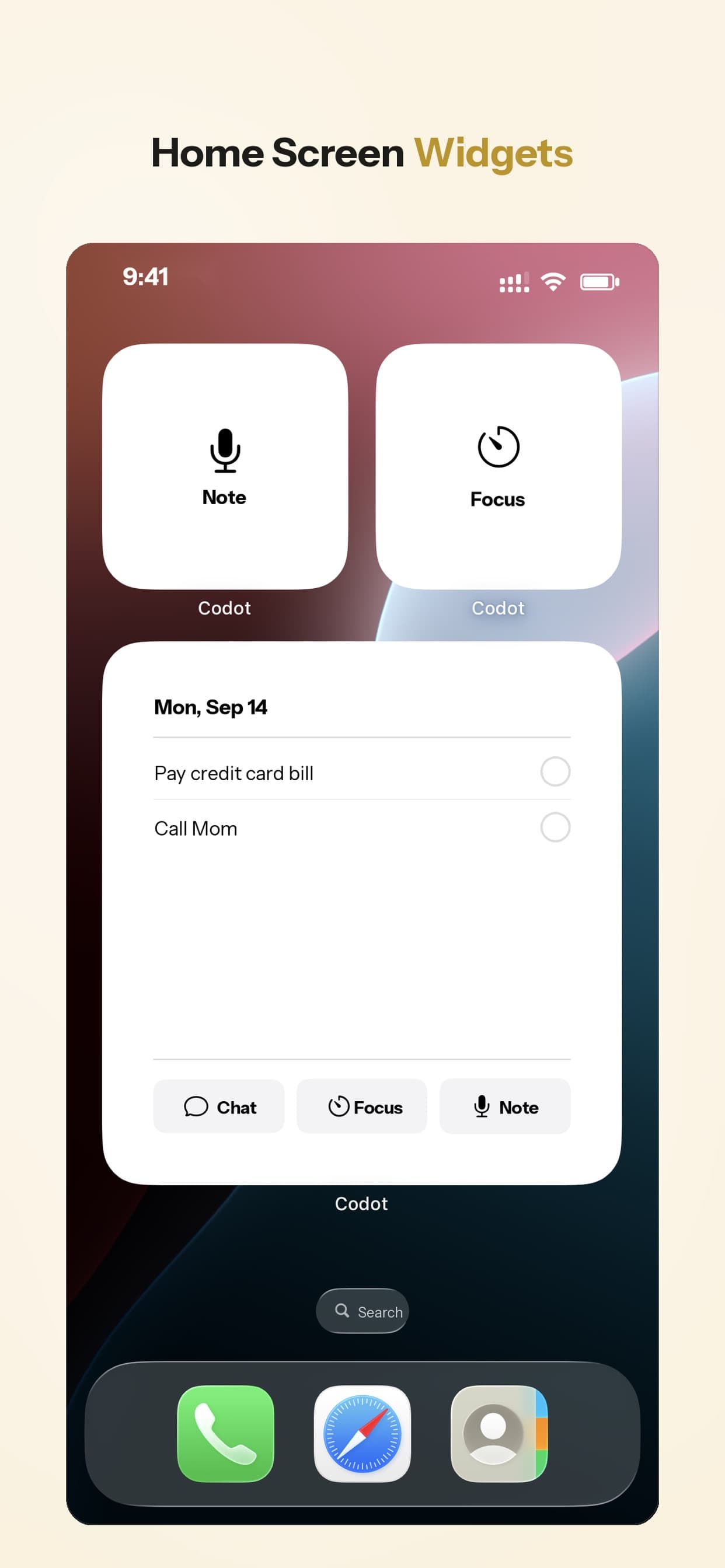
Widgets on the lock screen and home screen
You glance at the lock screen constantly, mostly by accident, and accidental looks are what you want. Keep it to today's handful of tasks; a long list turns into wallpaper. If task titles are private, use a widget that shows a count, since anyone holding your phone can read it.
A calendar you can see, so time stops being invisible
Tracking time is another thing you'd normally hold in mind, so tasks and events on one visible timeline help here too. More in ADHD time blindness and the calendar that works around it.
A daily briefing that arrives on its own
A briefing at 8:30 with today's tasks, what's overdue and the first meeting puts the list in front of you before email does, helping you maintain a consistent ADHD daily routine template for adults. You set it up once and never have to remember it again.
A five-minute setup with whatever app you use
- Pick one capture app. Two inboxes means remembering which one to check.
- Put its widget on the lock screen: touch and hold the lock screen, tap Customize, then Add Widgets.
- Add a home screen widget showing today's list, on the first page, not in a folder.
- Set one daily reminder or briefing at the time you usually start work.
- For anything tied to an object, skip the phone and put a sticky note on the object itself. A phone reminder about pills does little if the pills are in another room.
That works with Apple Reminders, Todoist, Things or Codot. Start with the one you already have.
Where Codot fits, and what it doesn't do
We built Codot, an AI assistant, for exactly these two halves. You say what's on your mind in any order, and it turns it into tasks, calendar events, notes and contact details. Capture works by voice on iPhone, Apple Watch, the web and a lock screen widget, and home screen and calendar widgets keep the list visible. It writes tasks and events into Google Calendar, so they show up in the calendar you already use. Daily briefings bring your reminders, news and a summary, and scheduled automations handle repeating things you'd otherwise have to remember.
App Store reviewers commonly mention that it replaced a paper planner and that events land in the phone's calendar without adding them one by one. At least one early reviewer asked for home screen widgets, which now exist.
What it doesn't do:
- It won't act on the web for you. It doesn't browse sites, fill in forms or buy things.
- It isn't a project management tool. There are no Gantt charts or task dependencies.
- Speech recognition can mishear, especially names. Glance at the confirmation.
For a broader comparison, see my ranking of the 7 best AI agents for ADHD.
Codot's free plan covers tasks, the calendar, notes, the personal CRM, habits, calorie logging and expenses. Reminders at a set time, repeating tasks, daily briefings, scheduled automations and email triage are part of Codot Max ($12.99 a month or $99.99 a year, with 20x the free plan's usage). Every new account gets 7 days of Max free, then drops back to the free plan without charging you.
My own view: if your problem is that tasks never make it onto any list, fix capture first and don't buy anything else until that works. If tasks get captured and then rot unseen in an app, the widgets and the briefing matter more than which app you pick.
More in this ADHD series: ADHD Working Memory and Long-Term Planning: Let AI Hold the Plan (October 2026) · External Structure for ADHD: Use AI as Your Accountability Partner After School Ends
FAQ
Why do I forget what I was doing the moment I get distracted?
It lived in working memory, which holds a few items only while your attention stays on them. A distraction takes the slots, and ADHD makes them fewer. Save the intention outside your head before you switch.
How do I stop forgetting things with ADHD?
Externalize instead of trying harder. Capture each thought within seconds, ideally by speaking, and keep the list where you see it passively, like a lock screen widget or a morning briefing.
Are voice notes good for ADHD?
Voice is the fastest way to capture a thought, but plain audio recordings are easy to never play back. Voice notes help most when the speech becomes written tasks with dates, in a list you see every day.
How is Codot different from a regular to-do app for ADHD?
A regular to-do app expects one typed task at a time and that you remember to open it. Codot takes several things in one spoken sentence, sorts them into tasks and events, and shows the list on your lock screen, widgets and a daily briefing. The daily briefing is on iPhone; capture also works on Apple Watch and the web.
If your best thoughts disappear between the stove and your phone, download Codot free on the App Store, put the widget on your lock screen, and say the next thing before it goes.
ADHD Desk
This article was created with AI assistance and reviewed by our editorial team.Learn about our content process.