ADHD Working Memory and Long-Term Planning: Let AI Hold the Plan (October 2026)
Weak working memory is why long-term planning with ADHD falls apart. A workflow that has AI write the day-by-day plan and puts it on your calendar in one step.
Long-term planning is hard with ADHD because working memory, the mental space that holds a goal, its steps and its deadline at the same time, is one of the most consistently measured weak spots in ADHD research. The practical fix is to stop holding the plan in your head. Have an AI turn the goal into a day-by-day plan, then let Codot or Gemini with Google Calendar put every step on your calendar.
TL;DR:
- Meta-analyses of children and adults with ADHD find working memory deficits that persist into adulthood, and a 2018 review of 34 meta-analyses puts working memory among the largest gaps measured.
- A long-range plan asks working memory to hold three things at once: the goal, the order of steps and the deadline. Drop one and the plan quietly stops existing.
- The workflow I recommend: describe the whole project to an AI and ask for a day-by-day plan, then hand that plan to a tool that turns plain language into calendar events.
- Codot (our app) does both halves: it can break a goal into daily steps, and a pasted or spoken plan becomes tasks and events that sync to Google Calendar.
- Gemini with Google Calendar is the other route I'd trust as of October 2026: Google's help page shows it adding several items from pasted text to your calendar.
Codot is our product, so read what we say about it with that in mind. Everything we say about Gemini comes from Google's own help page and recent reporting, linked below, checked on October 26, 2026.
It's Sunday evening. You've got six weeks to get something big done: a product launch, a move, a certification exam, a tax filing with five people to chase for documents. You know roughly what needs to happen. You can even feel the shape of it. Then Monday arrives, a client emails, and by Wednesday the six-week plan has dissolved into "I should really start on that." Three weeks later you're doing all of it in four nights. If that's your pattern, the problem sits in a specific place, and it's fixable without more willpower.
What does working memory have to do with ADHD?
Working memory is the short-term space where you hold information while you use it: the phone number you're about to dial, the three things your manager just asked for, the step you're on in a recipe. It is one of the most studied weaknesses in ADHD.
- A meta-analysis of 26 studies in children found deficits across several parts of working memory, largest for spatial tasks (effect sizes of 0.85 for spatial storage and 1.06 for spatial central-executive work) and smaller but real for verbal ones (Martinussen et al., 2005).
- A meta-analysis of 38 studies in adults found moderate deficits in both verbal and visuospatial working memory and concluded that they persist into adulthood (Alderson et al., 2013).
- A review of 34 meta-analyses found working memory (.54) and planning/organization (.51) among the domains where people with ADHD differ most from controls (Pievsky & McGrath, 2018).
Russell Barkley's model of ADHD puts working memory among four executive functions that depend on behavioural inhibition, and his review found the evidence strongest for deficits in inhibition, working memory, motivation and motor control (Barkley, 1997).
Two caveats. These are group averages, and moderate effect sizes mean a lot of overlap: plenty of people with ADHD test fine on working memory tasks. And a meta-analysis of working memory training found short-term gains on the trained tasks with no convincing transfer to other skills (Melby-Lervåg & Hulme, 2013), so I'd spend the effort on moving information out of your head instead.
Why does long-term planning with ADHD fall apart?
A plan that runs for weeks makes your working memory carry three things at the same time:
- The goal. What "done" looks like, and why it matters this month.
- The sequence. Which step comes first, which steps depend on others, and which one you're on today.
- The deadline. How much time is left, and whether today's step is on schedule.
A to-do list helps with the second item, partly. It doesn't carry the deadline or tell you which day a step belongs to. So every morning you have to rebuild the whole picture from the list: look at the goal, count the days, work out what today should be. That rebuild is exactly the job weak working memory does badly, and it competes with whatever is loudest that morning. The loud thing wins. From the outside it looks like procrastination. Mechanically, the plan was never written anywhere you'd see it on the right day.
If you also deal with time blindness, the deadline part is doubly unreliable. I wrote about that separately in the calendar that works around ADHD time blindness.
The fix follows from the mechanism. Each step needs to live on a specific day, ideally within an ADHD daily routine template for adults, so that on any given morning you only have to read one item. Doing that by hand for a six-week project means sitting down and dragging thirty blocks around a calendar grid, which is the kind of task that never gets started. This is the part AI is now good at.
The workflow: let AI write the plan and fill the calendar
Step 1: dump the whole project into an AI and ask for a day-by-day plan
Use whichever assistant you like: ChatGPT, Claude, Gemini, or Codot itself. Talk or type everything you know, in any order. Don't tidy it first. A prompt that works well:
Here's a project I need to finish by [date]: [everything you know, including what's already done and anything you're dreading]. I have about [X] hours on weekdays and [Y] on weekends. Make a day-by-day plan from tomorrow to the deadline. One or two concrete steps per day, each under 90 minutes, with the hardest step early in the week. Leave two buffer days before the deadline. Format each line as "Day, date, time: step".
The format line matters. A plan written as dated lines with times can go straight into a calendar tool without editing.
In Codot you can skip the separate chatbot: tell it the goal and the deadline, and it breaks the goal into smaller steps and lays them out as a plan.
Read the plan once before you accept it. AI plans tend to be optimistic about how long things take, and you know which steps will eat a whole afternoon.
Step 2: put the plan into Codot and let it create the events
Paste the plan into Codot's chat, or read it out loud. Codot turns each line into a task or a calendar event on the right day, and the events sync to Google Calendar, so they show up wherever you already look. You don't need to move your other calendars or lists anywhere to start.
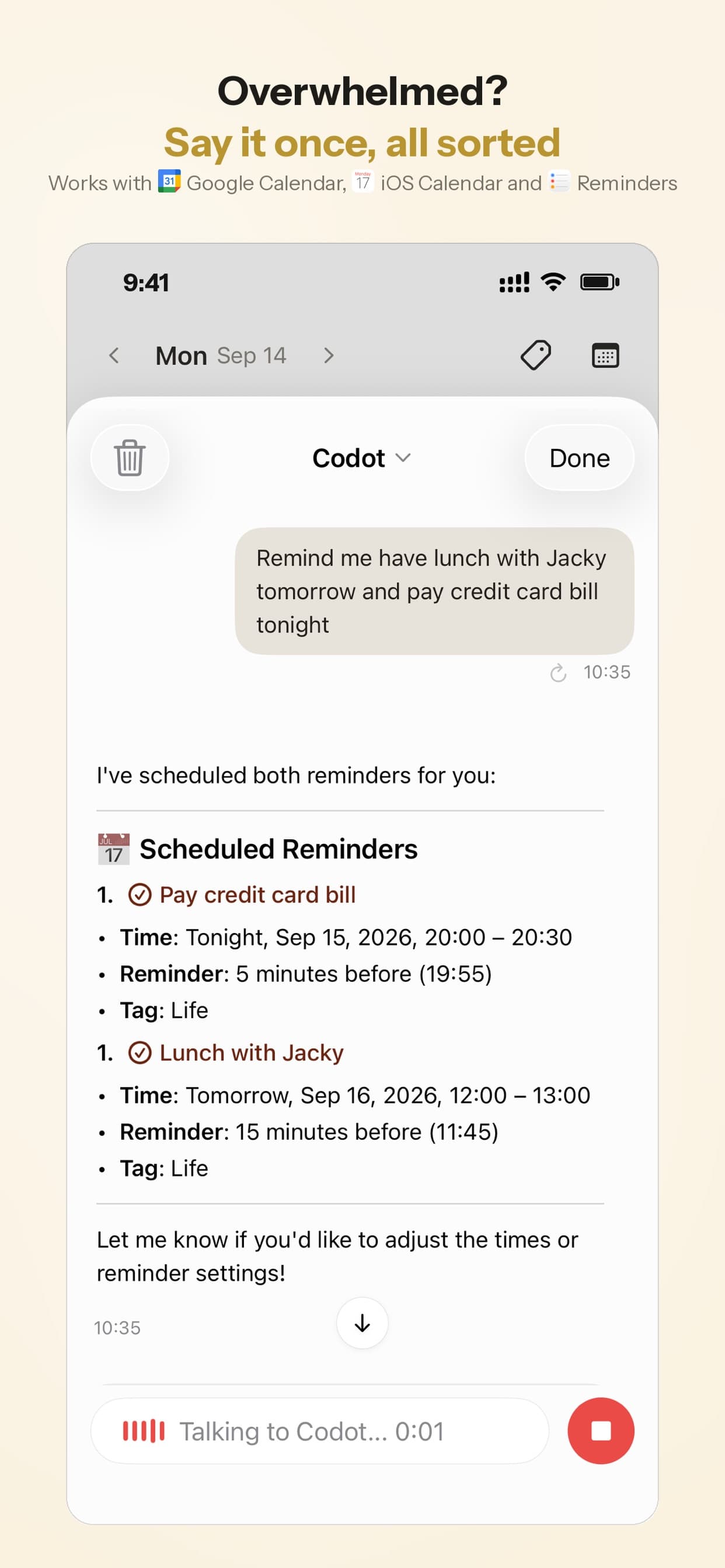
After that, the daily job shrinks to reading today's one or two items. Codot's daily briefing can send you those each morning, so the plan comes to you instead of waiting for you to open it.
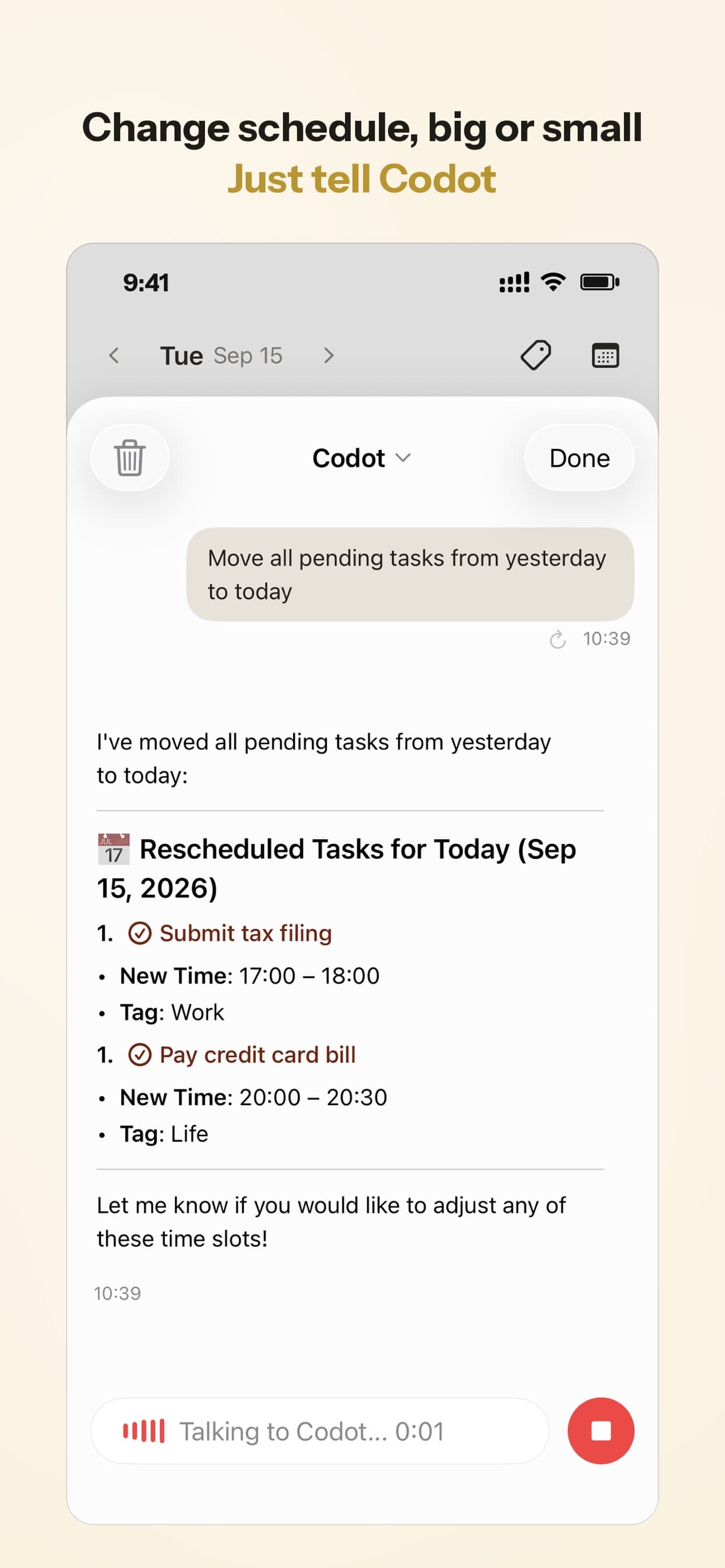
Plans slip, and with ADHD they slip often. When Thursday goes sideways, say "move today's launch tasks to Saturday" and Codot reschedules them. Re-planning by voice is cheap enough that you'll actually do it, instead of abandoning the whole plan the first time it breaks.
Step 3, the alternative: Gemini with Google Calendar
If you live in Google's apps and want to stay there, the Gemini app connected to Google Calendar is the other route I'd use. As of October 2026, Google's help page says Gemini can create, find and edit Google Calendar events, and it lists creating events from text in the conversation, such as an itinerary you paste, with a prompt like "Add these to my calendar" (Google Gemini Help). Since January 2026 it can also add events to secondary and shared calendars when you name them (Android Authority).
Things to know before you rely on it:
- You need Google Workspace connected in Gemini and Keep Activity turned on, per the same help page.
- New events go to your default calendar unless you name another one.
- The help page doesn't document recurring events, and Google warns that Gemini can give inaccurate responses. Check the calendar after a big paste.
So the honest version of the claim we'd make: of the tools we know, Codot and Gemini with Google Calendar are the two we'd point someone with ADHD to for going from a plan in plain language to a filled calendar in one step. Other assistants are adding calendar connections quickly, and I couldn't confirm the details for each one from their own documentation, so I'm leaving them out rather than guessing. If you'd rather not connect anything, most chatbots can write the plan as an .ics file that you import into Google Calendar by hand.
Your ideas shouldn't wait for a keyboard. Just say it — Codot handles the rest.
Try Codot — It's Free →Codot or Gemini for an ADHD planning workflow?
| Codot | Gemini + Google Calendar | |
|---|---|---|
| Writes the day-by-day plan | Yes, breaks a goal into steps | Yes |
| Plan in plain language to calendar events | Yes, pasted or spoken | Yes, from pasted text ("Add these to my calendar") |
| Where events live | Codot, synced to Google Calendar | Google Calendar |
| Tasks, notes, people in the same place | Tasks, notes and a personal CRM | Calendar only in this workflow |
| Morning nudge with today's steps | Daily briefing (iPhone) | Not part of this workflow |
| Voice capture | iPhone, Apple Watch, web, lock-screen widget | Gemini app |
| Platforms | iPhone, Apple Watch, Android, web | Wherever the Gemini app runs, including Android |
| Price | Free: tasks, calendar, notes, CRM, habits; daily briefing and reminders at a set time are Max (7-day free trial); Max $12.99/month or $99.99/year (20x usage) | Gemini app (check Google's plans) |
My take: if your plans die between "written" and "done", the morning briefing and voice rescheduling are the parts that keep a plan alive, and that's why we'd pick Codot. If you only need the calendar filled once and you'll manage the rest yourself, Gemini is the sensible choice, and you may already have it on your phone.
For a wider look at AI tools for ADHD, including ones that don't touch your calendar at all, see the best AI agents for ADHD, ranked by setup effort.
What Codot can't do
- It's a personal assistant, and it has no Gantt charts, task dependencies or team project views. For a multi-person project with a critical path, use a project-management tool and keep Codot for your own share of the work.
- It won't go off and do the steps on the web for you. It can't fill in forms, book things or buy things.
- The AI-written plan is a draft. Codot will put an unrealistic plan on your calendar just as faithfully as a good one, so the five-minute review in step 1 is on you.
How I'd use this on a real project this week
Pick one project with a real deadline, not your whole life. Do the brain dump on a walk or in the car if typing it out feels like a wall; talking is often easier than facing a blank text box, and the AI doesn't care about order. Accept a plan with fewer steps than feels ambitious. Then let the calendar carry it, and treat every missed day as a reschedule rather than a verdict on you. Most ADHD planning advice I read is about motivation. I think the missing piece is usually a system that remembers the plan for you, which is the argument I made in ADHD founders have 100 ideas and ship zero.
More in this ADHD series: ADHD and Forgetting Things the Second You Think of Them: Say It Out Loud, Keep It in Sight · External Structure for ADHD: Use AI as Your Accountability Partner After School Ends
FAQ
Does ADHD affect working memory?
On average, yes. Meta-analyses find working memory deficits in children and adults with ADHD, with a 38-study review concluding they persist into adulthood. Individuals vary a lot, and some people with ADHD score normally.
How can I improve working memory with ADHD?
Training programs improve the trained tasks in the short term, but a meta-analysis found no convincing transfer to other skills. The strategy with the most practical payoff is to stop asking working memory to hold long-term information at all: write the plan down, put each step on a specific day, and get a reminder at the moment you need it.
Can AI make a plan and add it to Google Calendar?
Yes. As of October 2026, Gemini can add several items from pasted text to Google Calendar, according to Google's help page, and Codot turns a pasted or spoken plan into tasks and events that sync to Google Calendar. Check the calendar after the first import either way.
How is Codot different from Gemini for ADHD planning?
Gemini fills your Google Calendar. Codot fills it too, and also breaks the goal into steps, keeps tasks, notes and people in one place, sends a morning briefing with today's steps, and lets you reschedule by voice. Both run on Android, though Codot's daily briefing is iPhone only.
Is Codot free?
Codot has a free plan that covers tasks, the calendar, notes, the personal CRM, habits, calorie logging and expenses. Reminders at a set time, repeating tasks, the daily briefing and scheduled automations are part of Codot Max, which is $12.99 a month or $99.99 a year with 20x the free plan's usage. Every new account gets 7 days of Max free, then drops back to the free plan without charging you.
If you want the plan to live somewhere other than your head, Codot is on the App Store.
ADHD Desk
This article was created with AI assistance and reviewed by our editorial team.Learn about our content process.