ADHD Daily Routine Template for Adults (Free Copyable Schedule + AI Prompt)
A free ADHD daily routine template for adults: what to do and what to ask yourself in each block of the day, plus an AI prompt to build your own version.
A good ADHD daily routine for adults decides the day in advance. Each time block, from the morning start through focus work, transitions, the afternoon slump and shutdown, gets one thing to do and one question to ask yourself, and the day's most important task is repeated back to you 3 to 5 times, because with ADHD it tends to slip out of mind within hours.
TL;DR:
- The template below splits the day into nine blocks. Each has a job and a short question to ask yourself, like "what's the first 2-minute step?" or "what did I just leave unfinished, and where is it written?"
- Pick one task each morning that would make the day a win, then have it repeated to you 3 to 5 times: at the first focus block, after lunch, in the afternoon slump and before shutdown. With ADHD the priority tends to drop out of working memory within hours, however much you care about it.
- Paste the prompt in this article into any AI chat to get a version built around your own wake time, work and energy.
- In Codot (our app), the morning plan is a daily briefing and the repeats are ordinary reminders made with one sentence. Labelled phone alarms work too.
Codot is our product, so weigh the Codot sections accordingly. The research is linked so you can check it.
You know what you're supposed to do today. The trouble starts at 9:40, after two emails and a tab you don't remember opening, when you have to decide what's next with nothing telling you. Then again at 11:15, and after lunch. By 3 p.m. the task that mattered hasn't been touched.
My answer is to make most of those decisions once, in the morning or the night before, and let the day run like a script. Here is the script.
Are schedules good for ADHD?
Mostly yes, for specific reasons. A meta-analysis of 83 studies by Erik Willcutt and colleagues in Biological Psychiatry found that groups with ADHD did worse on every executive function task measured, with the clearest gaps in response inhibition, vigilance, working memory and planning. The authors also note the effects were moderate and not universal.
Deciding on the fly uses exactly those functions: hold your goals in mind, compare options, resist the most interesting one. A schedule moves that work to a calmer moment and leaves you an instruction to follow. Russell Barkley's fact sheet on executive functioning and self-regulation makes the related point that in ADHD, plans kept in your head steer behavior weakly and work better when made external and put in front of you where the work happens.
Pre-deciding also has some direct evidence. In a 2008 study, Caterina Gawrilow and Peter Gollwitzer found that children with ADHD who added if-then plans to a goal held back an unwanted response on a lab task about as well as children without ADHD. It was children in a lab, so treat it as a hint for adults.
The ADHD daily routine template: what to do and what to think, block by block
The times assume a 7:30 wake-up and a desk job. Shift every row to fit your life. The last column marks where your one thing gets repeated back to you.
| Block | Example time | What to do | What to ask yourself | One-thing repeat |
|---|---|---|---|---|
| Start | 7:30–8:30 | Water, food, get dressed; leave the feeds closed | What's the one thing that makes today a win? | Choose it, say it out loud |
| Plan | 8:30–8:45 | Five-minute brain dump of loose thoughts into one place (saying them to Codot works), then check today's calendar and pick the first step | What's the first 2-minute step? | Write it at the top of the list |
| Focus block 1 | 8:45–10:15 | Work on the one thing, phone face down | If something pulls me away, where do I write it? | Repeat 1 |
| Transition | 10:15–10:30 | Stand up, refill water, capture loose ends | What did I just leave unfinished, and where is it written? | |
| Shallow block | 10:30–12:00 | Email, messages, calls, admin | Is this on today's list, or am I reacting? | |
| Lunch | 12:00–13:00 | Eat away from the screen | What does the afternoon need from me? | Repeat 2, after lunch |
| Afternoon slump | 14:30–15:30 | Low-demand work, a walk, tidy-up tasks | Am I tired or avoiding? What's a 10-minute version? | Repeat 3 |
| Shutdown | 17:00–17:20 | Move unfinished tasks, close tabs | What's tomorrow's first step, and is it written down? | Repeat 4: done, or moved? |
| Evening and wind-down | 18:00–22:30 | Free time, glance at today's log, screens down by bedtime | Is anything still in my head that belongs on the list? |
The questions carry the template. At 8:45, facing a blank document, "focus" gives you nothing to do; "what's the first 2-minute step?" does.
The transition row earns its 15 minutes. Half-done work lives only in your head, and the next task pushes it straight out, so write down what you left open before you switch.
If you take ADHD medication, ask your clinician how its timing should fit your focus blocks. I've left it out of the template on purpose.
Why the AI should repeat your one thing all day
Choosing the important task at 8:30 is easy. Still having it in mind at 2 p.m. is where plans fail.
A meta-analysis of 38 studies by Matt Alderson and colleagues found moderate working memory deficits in adults with ADHD and concluded that they persist into adulthood. Day to day, it looks like this: at 8:30 the investor email is obviously the priority. By 11, a client message, a bug and a delivery have each taken a turn at the front of your mind, and the email has dropped out. It still matters to you. It has left your head anyway.
So put it back in front of you where the day tends to reset: the start of the first focus block, just after lunch, the middle of the afternoon slump, and before shutdown as a done-or-moved check.
Keep it to 3 to 5 a day. Alerts you see too often become background noise you swipe away unread. Vary the wording ("Still the one thing: send the proposal", "Proposal sent yet?", "Last call for the proposal") and cancel the rest once it's done. There's more on keeping plans in sight in ADHD working memory and long-term planning.
How to build your own ADHD schedule template with AI
Your wake time, work and energy pattern will change the template. Paste this prompt into ChatGPT, Claude, Gemini or any AI chat, fill in the brackets, and ask for changes until it fits:
I have ADHD and want a weekday routine template. I wake up at [time] and need to stop working by [time]. My work is mostly [type of work, e.g. writing, client calls, coding]. My energy is best around [time] and worst around [time]. Fixed commitments: [school run, standing meetings, gym]. Build a table with these columns: block, time, what to do, one short question to ask myself at the start of the block, and whether my one most important task gets repeated to me in that block. Include a start-of-day block where I pick the one thing, a transition block between types of work, lunch, a low-demand block at my worst energy time, a shutdown block where I write tomorrow's first step, and a wind-down block. Repeat the one thing 3 to 5 times across the day. Leave at least 30 minutes of unplanned buffer. When you size the blocks, double my own time estimate for each task. Keep every question under 12 words. Do not give medical advice; if medication timing matters, tell me to ask my clinician.
Doubling your own estimate is a common rule of thumb for ADHD time blindness, because the guess you make in the morning tends to be the hopeful one.
Then ask: "Which block will I most likely skip, and how would you make it easier?" and "Make a bad-day version with only three blocks."
If you also want an evening score for how the day went, I covered that in using AI as an accountability partner.
Your ideas shouldn't wait for a keyboard. Just say it — Codot handles the rest.
Try Codot — It's Free →How to run the routine in Codot by voice
Codot is a voice-first AI assistant: you say what you want and it creates tasks, calendar events, reminders and notes, moves things on your calendar, and runs routines you set up once. Here is how the template maps onto it, including which parts are automations and which are plain reminders.
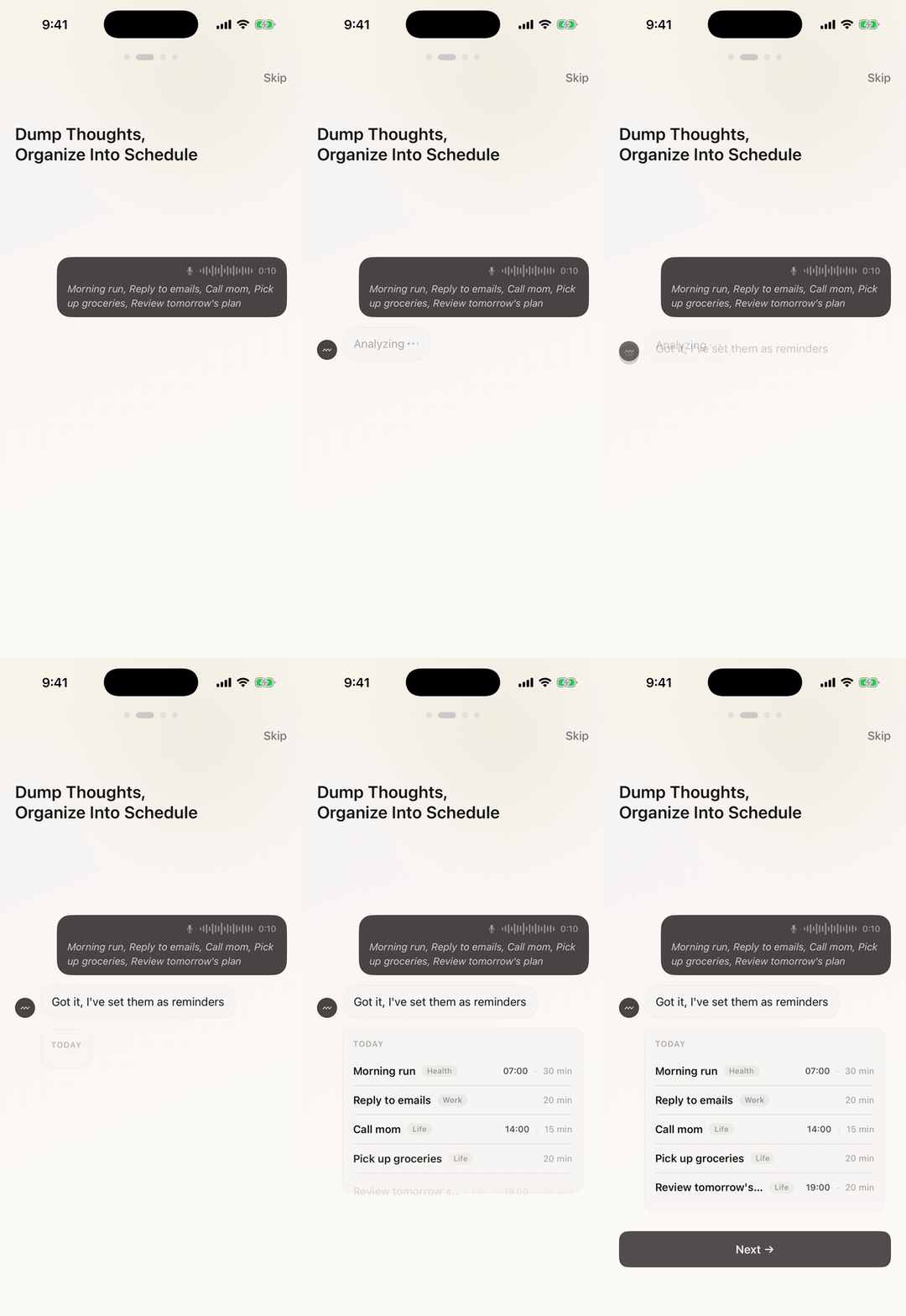
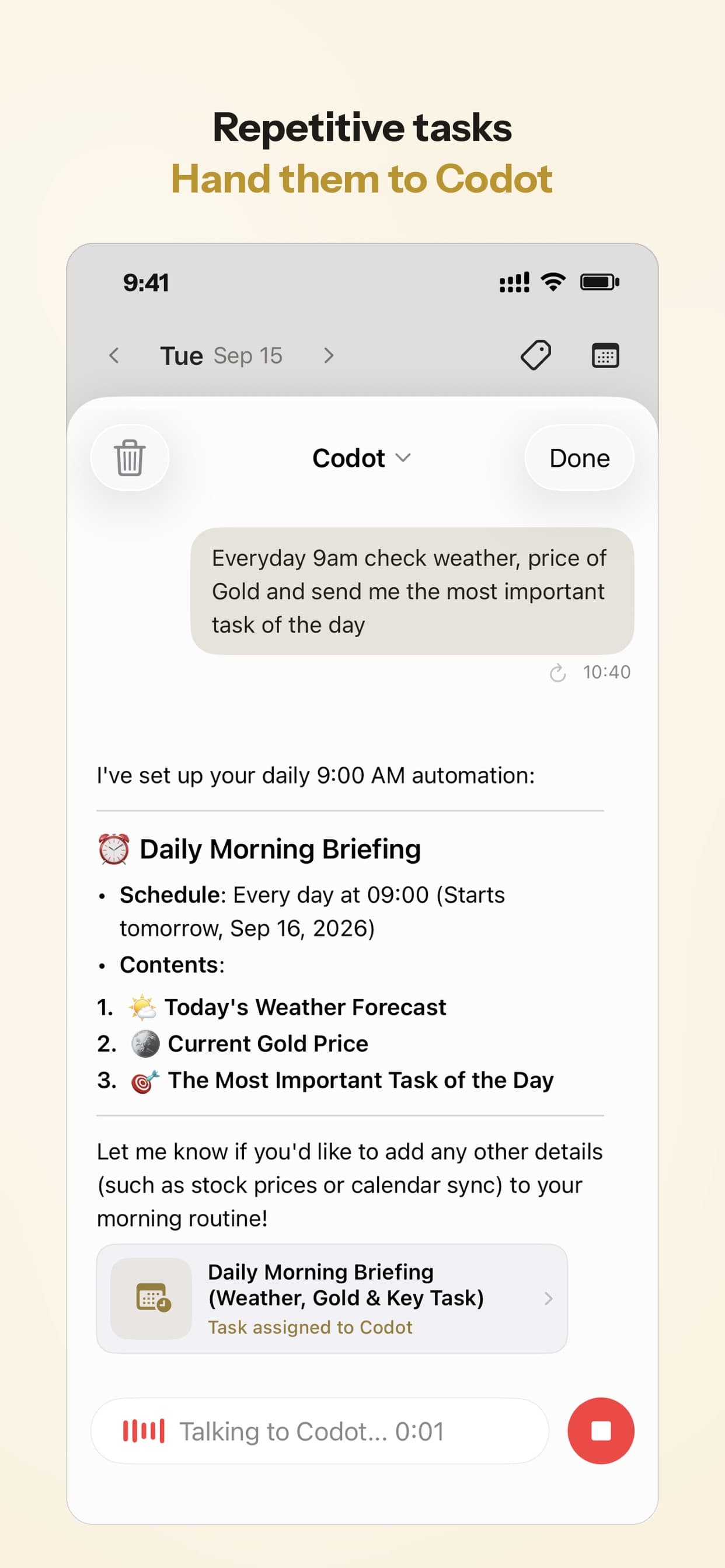
- Morning plan (daily briefing). "Every weekday at 8:30, show me today's calendar and open tasks and ask me what the one thing is."
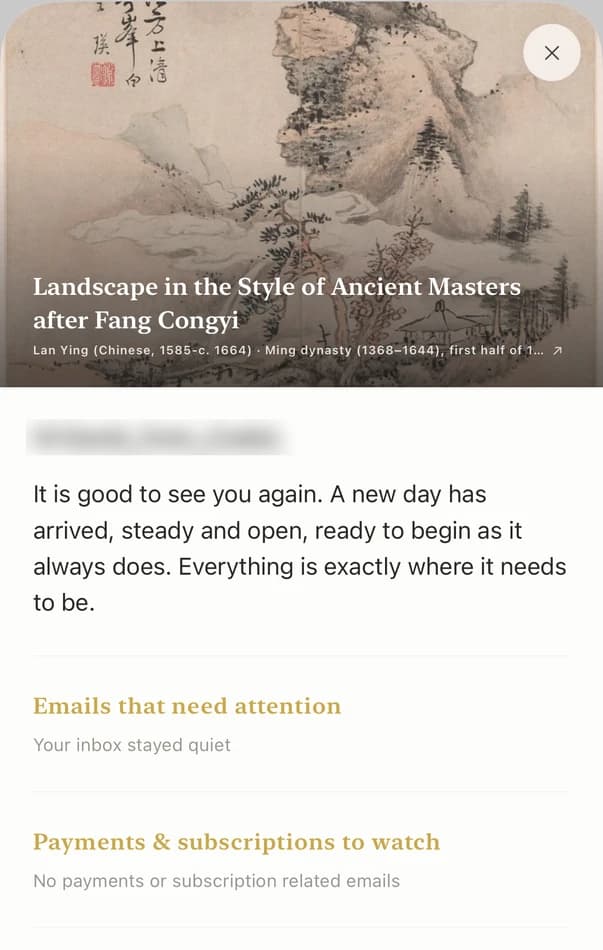
- One-thing repeats (ordinary reminders). After you choose, say: "Remind me at 8:45, 1:15, 3 and 5: still the one thing, send the proposal." That creates four timed reminders with that text. You set them fresh each morning, because the one thing changes.
- Block prompts (calendar events). Add the blocks to your calendar once, with the question in the title, such as "Transition: what did I leave unfinished?" Codot adds its events to Google Calendar.
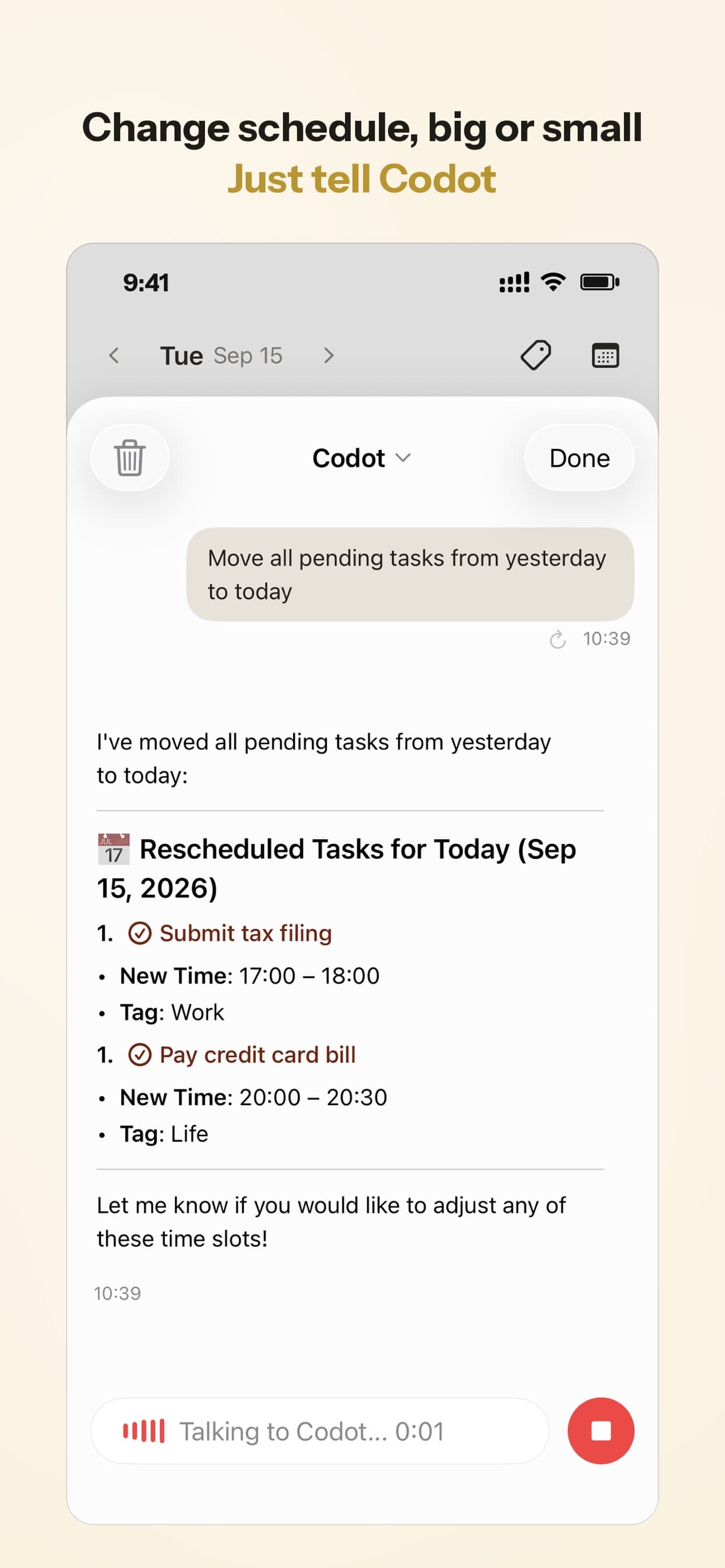
- Shutdown (scheduled automation). "Every weekday at 5, list what's still open and ask me for tomorrow's first step." When the day goes sideways, say "move everything I didn't finish to tomorrow."
- The first 2-minute step. If the one thing is too big to start, ask Codot to break it into steps and put the first on today's list.
Codot won't notice that you skipped a block, and it only puts the one thing into later reminders when you tell it to. It works from the iPhone, Apple Watch, web and lock-screen widget.
Codot's free plan covers tasks, the calendar, notes, the personal CRM, habits, calorie logging and expenses, so the block events and the log are free. The morning briefing, the shutdown automation and the timed one-thing reminders are part of Codot Max ($12.99 a month or $99.99 a year, with 20x the free plan's usage). Every new account gets 7 days of Max free, enough to try the whole routine, then drops back to the free plan without charging you. It runs on iPhone, Apple Watch, Android and the web; the morning briefing is on iPhone only. For other tools, see the best AI agents for ADHD, ranked by setup effort or compare Tiimo alternatives for ADHD planning if you prefer a visual schedule.
Record your day and let it become your structure
During the day, tell Codot in plain words what you're starting and what you've finished, and ask it to keep a simple table for the day in one note: what you did, the time you logged it, and points if you like, with the one thing scoring highest as in the accountability article. Glance at it in the evening. After a few weeks the record shows when you actually focus and what keeps slipping, and that becomes the structure you build the next version of your routine on. Codot creates and updates notes from what you say. It has no built-in timer or chart, and an AI-edited table can get a row wrong, so check it now and then.
The same routine with phone alarms and any AI chat
- Build your table with the prompt above and save it as a note or print it.
- Set a phone alarm for each block with the question as the alarm label.
- Each morning, write the one thing at the top of your list and set four alarms labelled with it, before you open email.
- Once a week, paste the table back in with what didn't work and ask for a revision.
A chatbot can't message you first, and setting four alarms by hand every morning gets old fast. That friction is why we built the voice version. If alarms suit you, keep them.
When an ADHD routine backfires
- Adopting all nine blocks on day one rarely lasts. Start with two anchors, the start-of-day block and shutdown. Psych Central suggests building a routine one small task at a time and adding the next once you've kept it up for about two weeks. Add blocks the same way.
- Rigid grids break on the first surprise. One late meeting and the day feels ruined. Keep at least 30 minutes of empty buffer, and when a block is lost, skip to the next one.
- Too many prompts become noise. If you dismiss reminders unread, cut them in half or change the wording.
- It isn't treatment. Barkley's fact sheet describes medication as probably the main treatment for these deficits, with external supports like ADHD gadgets and apps for work alongside. If a routine alone isn't enough, talk to a clinician.
FAQ
What should an ADHD daily routine for adults include?
A start-of-day block where you choose one priority, at least one focus block, transitions, lunch, a low-demand block for your weakest hours, a shutdown that sets tomorrow's first step, and a wind-down. Give each block one action and one question.
Why should my most important task be repeated during the day?
Working memory deficits are common in adults with ADHD, so a priority chosen at 8:30 can be gone by 11 without any loss of motivation. Three to five reminders at reset points, like after lunch and mid-afternoon, bring it back.
Can AI make an ADHD schedule template for me?
Yes. Give a chatbot your wake time, work, fixed commitments and energy peaks and ask for a table with an action and a self-question per block; the prompt above does this. Ask your clinician, not the AI, about medication timing.
How is Codot different from using ChatGPT for this?
ChatGPT can design the template but waits for you to open it. Codot sends the morning briefing and shutdown check on schedule, turns one spoken sentence into timed reminders, events or log entries, and reschedules by voice. It doesn't watch what you actually work on.
If you want the morning plan and the one-thing reminders to come to you, Codot is on the App Store.
ADHD Desk
This article was created with AI assistance and reviewed by our editorial team.Learn about our content process.