Best New AI Reminder App for College Students (2026): Pick by How You Forget
The best reminder app for college students depends on how you forget. Canvas, MyStudyLife, Todoist, TickTick, Codot and free options compared, with prices.
Start with the free reminders already on your phone: the Canvas app can alert you before any assignment your instructor posts with a due date. Add MyStudyLife if you need a class timetable and exam countdowns, Todoist or TickTick for a general task list, and Codot if things get lost because they were only said out loud and never written down.
Disclosure: Codot, one of the apps below, is our product. Prices are from each app's US App Store listing or official pricing page, checked November 2, 2026.
TL;DR:
- Plenty of missed deadlines were never typed into a phone at all: a quiz moved in lecture, a group meeting set in a chat, a reading the professor mentioned in passing.
- Canvas already does due-date reminders for free, but only for assignments your instructor posts with a due date.
- MyStudyLife is the student-specific pick: class timetable, exams and homework, with a free tier.
- Todoist and TickTick are solid general task apps with free plans and cheaper paid plans than most.
- Codot catches what never makes it into Canvas. You say it on your way out of class and it becomes a reminder or a calendar event. It doesn't import Canvas assignments, and reminders at a set time are part of Codot Max, the most expensive paid plan here. Every new account gets 7 days of Max free.
Why students miss deadlines that are "in the app"
Picture the walk out of a 9 a.m. lecture. On the way out the professor says the quiz is moving to Thursday and that chapter 6 is now on it. Your group chat picks Sunday at 4 for the project meeting. By lunch you've also promised to send a friend your lab notes. None of it is in Canvas, and you didn't stop to type any of it, because you were walking.
That's the first way students forget: it never got written down. The second is that it's written down somewhere you don't look in time, like a planner app you open twice a week. The third is quieter. You had a plan, fell two days behind, and now the list is a wall of overdue items you avoid opening.
Each failure needs a different fix, so pick the app that matches yours. A beautiful study planner won't help if things never get into it.
Start with what's already free
Before downloading anything, check what you already have.
Canvas app reminders. If your school uses Canvas, open an assignment and add a reminder. Instructure's guide says you can choose "five, fifteen, or thirty minutes before, one hour before, one day before, or one week before," or set a custom time, and reminders arrive as push notifications (Canvas app iOS guide). You can stack up to ten per assignment. The catch is coverage: it only works for assignments and quizzes your instructor has posted, with due dates. Anything announced verbally, or posted late, isn't there.
Google Calendar is free, and if your school uses Google accounts it's already there. It's good for classes and fixed events. It's weaker for a running list of small tasks.
iPhone Reminders is built in, free, and Siri can add to it hands-free. It works well for simple, one-line reminders. If alerts don't fire, our guide to iPhone Reminders not working covers the usual causes.
For a lot of students, Canvas reminders plus one of those two is enough. Read on if things still slip through.
The options compared
| App | Best for | Free version | Paid price (US) | What it won't do |
|---|---|---|---|---|
| Canvas app | Posted assignments and quizzes | Free with your school account | n/a | Anything your instructor didn't post |
| Google Calendar | Classes and fixed events | Free | n/a | Feel like a to-do list |
| iPhone Reminders | Quick one-line reminders | Built in | n/a | Know about your classes or Canvas |
| MyStudyLife | Timetable, homework, exams | Yes | $6.99/mo or $39.99/yr | Capture things by voice |
| Todoist | A general task list | Yes (custom reminders are paid) | $7/mo or $60/yr | Know your class schedule |
| TickTick | Tasks, calendar and habits in one | Yes | $49.99/yr | Know your class schedule |
| Codot (ours) | Things said out loud, never typed | Yes: tasks, calendar, notes, CRM, habits (no reminders at a set time, briefings, automations or email triage); 7-day Max trial | Max $12.99/mo or $99.99/yr (20x usage) | Import Canvas assignments |
Sources: MyStudyLife App Store listing, Todoist pricing, TickTick premium, Codot App Store listing.
Codot: for the things that only existed out loud
Codot is a voice-first AI assistant, also featured in our comparison of the best family organizer apps and our guide to the best teacher planner apps for its hands-free scheduling. You say what you need in a normal sentence and it does the filing. "Quiz moved to Thursday, add chapter 6, remind me Wednesday night. Group meeting Sunday at 4. Send Maya the lab notes after lunch." That becomes a reminder, a calendar event and a task, each at its own time, without you choosing lists or dates.
What makes it fit the walk out of lecture:
- You can start talking from the lock-screen widget or an Apple Watch, so the phone doesn't need to be unlocked and open. (Setup for both: lock-screen to-do list and Apple Watch to-do apps.)
- Events sync to Google Calendar, and on iPhone tasks can also go to Apple Calendar and Apple Reminders. Completing a reminder in Apple Reminders doesn't sync back to Codot, though.
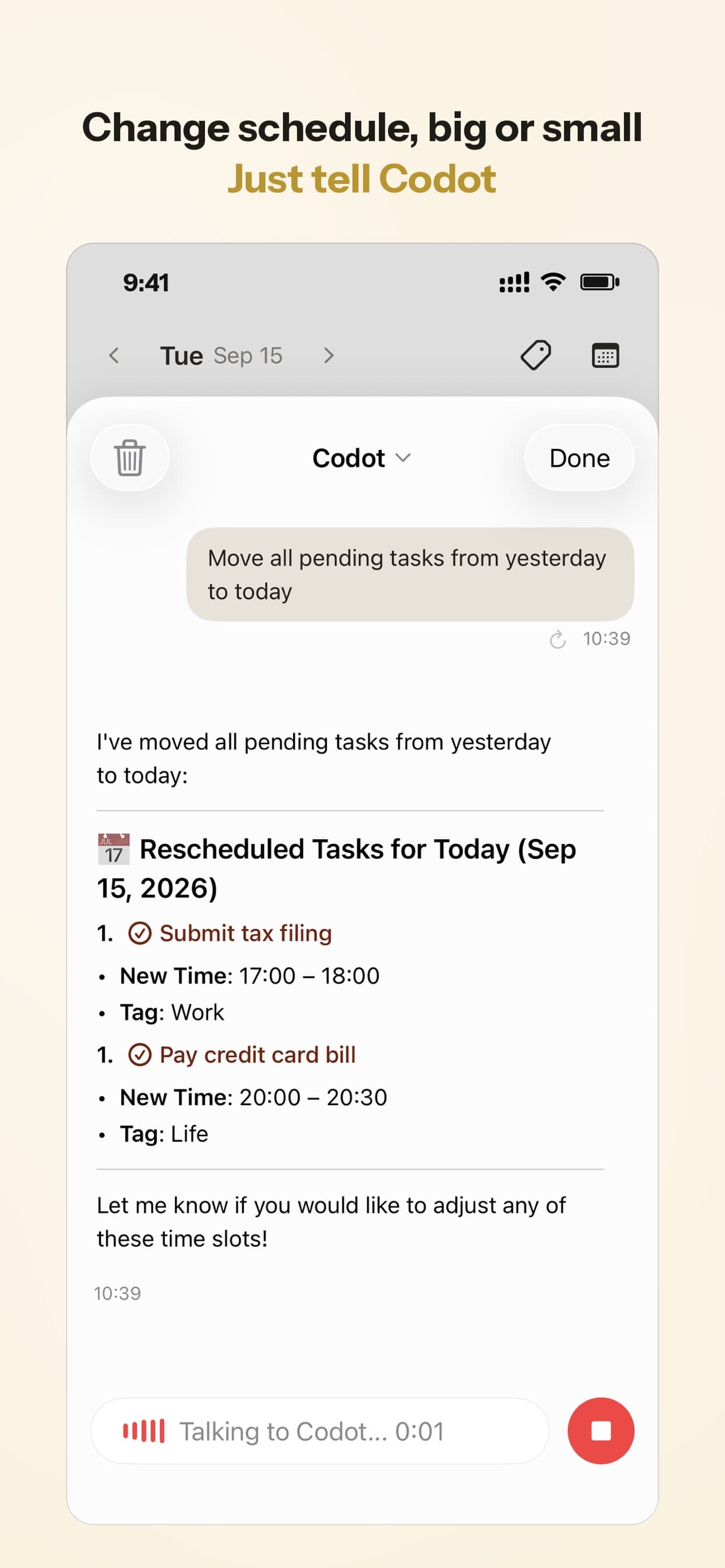
- When you fall behind, you don't have to drag ten overdue items one by one. Say "move everything I didn't finish today to tomorrow" and it reschedules them.
- A morning briefing tells you what's due today, and it has a built-in Pomodoro timer for study blocks.
It also takes photos. At the start of term, snap your printed schedule, add "Add my classes and finals to my calendar," and it creates each class as a weekly recurring event with the room and a reminder a few minutes before. In the clip below it read five classes and three finals from one photo. The schedule only listed exam dates, so it said it had estimated the exam times from the usual class slots. Check those against your exam timetable.
Where it's the wrong pick: Codot doesn't connect to Canvas, so it won't pull in your assignments. It doesn't do grade tracking or rotating timetables either. If your problem is seeing posted deadlines, Canvas reminders and MyStudyLife fit better. Reminders at a set time, repeating tasks, daily briefings, scheduled automations and email triage are part of Codot Max ($12.99 a month or $99.99 a year, with 20x the free plan's usage), which costs more than everything else here. The free plan covers tasks, the calendar, notes, the personal CRM, habits, calorie logging and expenses, and every new account gets 7 days of Max free, then drops back to the free plan without charging you. App Store reviewers most often mention that it replaced a paper planner and that events land in the phone calendar without typing, which tells you who it suits: people whose to-dos arrive by ear.
Your ideas shouldn't wait for a keyboard. Just say it — Codot handles the rest.
Try Codot — It's Free →MyStudyLife: the planner built around a semester
MyStudyLife is the most student-shaped app on the list. It handles class timetables, including rotating and block schedules, tracks homework, and counts down to exams, with alerts before each (MyStudyLife). It's rated 4.5 from about 6,200 ratings on the US App Store. The free tier covers the basics. MyStudyLife+ is $6.99 a month or $39.99 a year.
It assumes you'll type things in. If you're the kind of student who sits down on Sunday and enters the week, that's fine. If you aren't, it will be accurate for two weeks and then quietly out of date.
Todoist and TickTick: general task apps that also work for school
Neither knows what a semester is, and both are fine for students. Todoist's free plan includes task reminders, but custom reminder times need Pro at $60 a year (Todoist pricing). TickTick puts tasks, a calendar view, habits and a focus timer in one app, and its Premium is $49.99 a year (TickTick). Neither page lists a student discount.
Pick one if you want a single place for school and everything else, and you're comfortable typing tasks as they come. For more free options, see our list of free planner apps for iPhone and what each free version limits.
What we'd actually set up
If it were our semester, we'd use two tools, not five:
- Turn on Canvas reminders for every graded assignment, one day before and one hour before. It's free and it covers everything your instructors post.
- Pick one capture tool for everything else. If you type quickly and reliably, Todoist or TickTick. If things reach you while walking, in class or in chats, a voice app like Codot. Don't run both.
- Spend ten minutes on Sunday checking next week against the syllabus. Reminders fix forgetting. They don't fix a week with three exams in it.
The app that reminds you to study is usually just a calendar block with an alert, though for intensive prep, a 30-day PTE study plan can help you manage the workload. "Study chapter 6, Tuesday 7 to 9 p.m." works in any of these apps. What changes is whether you actually create the block, which is the case for making capture as close to zero effort as you can.
FAQ
Is there a free reminder app for college students?
Yes. The Canvas app's assignment reminders, Google Calendar and iPhone Reminders are all free. MyStudyLife, Todoist and TickTick have free versions, and Codot's free plan covers tasks and the calendar, though its reminders at a set time need Codot Max, which every new account can try free for 7 days.
Can Canvas remind me about assignments?
Yes. In the Canvas app, open an assignment or quiz and add a reminder from five minutes to one week before the due date, or a custom time. It only works for items your instructor posts with a due date.
What's the best app that reminds me to study?
Any calendar app can, if you schedule study blocks with alerts. MyStudyLife adds exam countdowns. TickTick and Codot include a Pomodoro timer for the session itself.
How is Codot different from MyStudyLife?
MyStudyLife is a semester planner you fill in by typing: timetable, homework, exams. Codot is a voice assistant that turns sentences into reminders, calendar events and tasks the moment you hear about them. It doesn't track classes or grades.
If most of your deadlines reach you out loud, try saying the next one to Codot on the App Store or Google Play.
Productivity & Tools Desk
This article was created with AI assistance and reviewed by our editorial team.Learn about our content process.