Teacher Planner App (2026): A Free Lesson Planner, Plus Something for Everything Else
Teacher planner apps compared: Common Planner and Planbook for lessons, plus iPhone Reminders and Codot for parent emails, duties and meetings outside the planbook.
Most teachers need two tools. For lesson plans, Common Planner's Basic plan is free and Planbook costs $20 a year with a 90-day trial. For everything outside the planbook, like parent emails, duty swaps and meetings, use a quick-capture app: iPhone Reminders is free, and Codot turns what you say between classes into tasks, events and reply drafts.
Disclosure: Codot, one of the apps below, is our product. Prices are from each company's own pricing page or US App Store listing, checked November 2, 2026.
TL;DR:
- A lesson planner holds what you teach. It doesn't hold the parent who stopped you at pickup, the duty you swapped, or the copies you need by Thursday. Most teachers need a second, faster tool for those.
- Common Planner has a genuinely free Basic plan with daily, weekly and monthly lesson planning, standards and posting to Google Classroom. Pro is $71.88 a year.
- Planbook is $20 a year for an individual teacher, with a 90-day free trial.
- iPhone Reminders is the free way to catch the small stuff, if you'll type it.
- Codot catches it by voice between classes and can draft replies to parent emails. It doesn't plan lessons.
Why a lesson planner isn't enough
Picture 3:10 p.m. at the car line. A parent asks whether you can meet about their kid's reading. The office radios that you're covering bus duty tomorrow. You remember the field-trip forms are due Friday and you're short six. Back in your room, an email asks why a grade dropped.
None of that is a lesson, so none of it goes into Planbook or Common Planner. It goes onto sticky notes or the back of your hand, or it doesn't go anywhere. Lesson planners are built around the timetable and standards, which is what they should do. The teaching day also produces a steady trickle of small commitments that need a different kind of tool. You need one you can use in ten seconds, standing up, between bells.
So we'd split it in two: a lesson planner for curriculum, and a capture tool for everything else.
The options compared
| App | Job | Free version | Paid price (US) | What it won't do |
|---|---|---|---|---|
| Common Planner | Lesson plans, standards, Google Classroom | Yes, Basic is free | Pro $71.88/yr | Catch non-lesson to-dos |
| Planbook | Lesson plans | 90-day trial | $20/yr (individual) | Catch non-lesson to-dos |
| iPhone Reminders | Quick typed reminders | Built in | n/a | Plan lessons or draft emails |
| Codot (ours) | Voice capture, reminders, email reply drafts | Yes: tasks, calendar, notes, CRM, habits (no reminders at a set time, briefings, automations or email triage); 7-day Max trial | Max $12.99/mo or $99.99/yr (20x usage) | Plan lessons or sync with Classroom |
Sources: Common Planner pricing, Planbook pricing, Codot App Store listing.
For lesson plans: Common Planner or Planbook
Common Planner (formerly Common Curriculum) is the one to try first if you want free. The Basic plan is free and includes an AI lesson assistant, daily, weekly and monthly planning, searchable standards, 50 posts to Google Classroom, and re-using lessons from past years. Pro, at $5.59 a month billed as $71.88 a year, adds unit planning, automatic standards tracking, unlimited Classroom posts, a class website for students and parents, and up to five collaborators (pricing page). Pro is for individual teachers only. Schools buy a separate plan.
Planbook charges one low price for everything: $20 a year for an individual teacher, less if you pay for two or three years, with a 90-day free trial (pricing page). If your school doesn't pay for a planner and you want a full-featured one without thinking about tiers, it's the cheapest paid option here.
Either is a fine choice. If your school already licenses one, use that.
Your ideas shouldn't wait for a keyboard. Just say it — Codot handles the rest.
Try Codot — It's Free →For everything else: Codot
Codot is a voice-first AI assistant, and it's for the part of the day that happens in hallways. Between classes you say something like: "Meet Jordan's mom about reading, find a time next week. I've got bus duty tomorrow at 3. Field-trip forms due Friday, I'm missing six. Make 28 copies of the lab sheet before Thursday." It turns that into a task, a calendar event and two reminders, each at the right time.
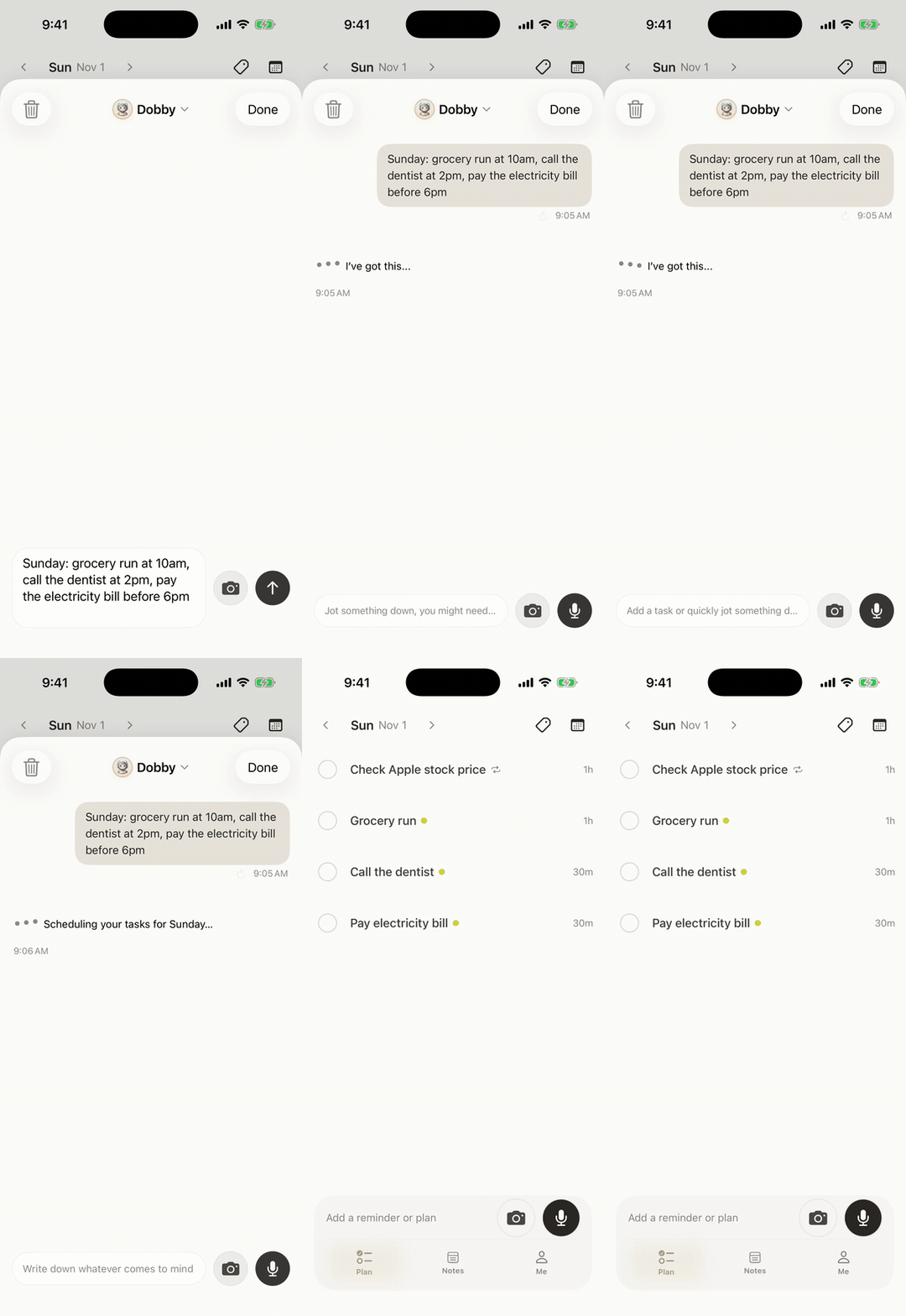
Two things make it useful for teachers specifically:
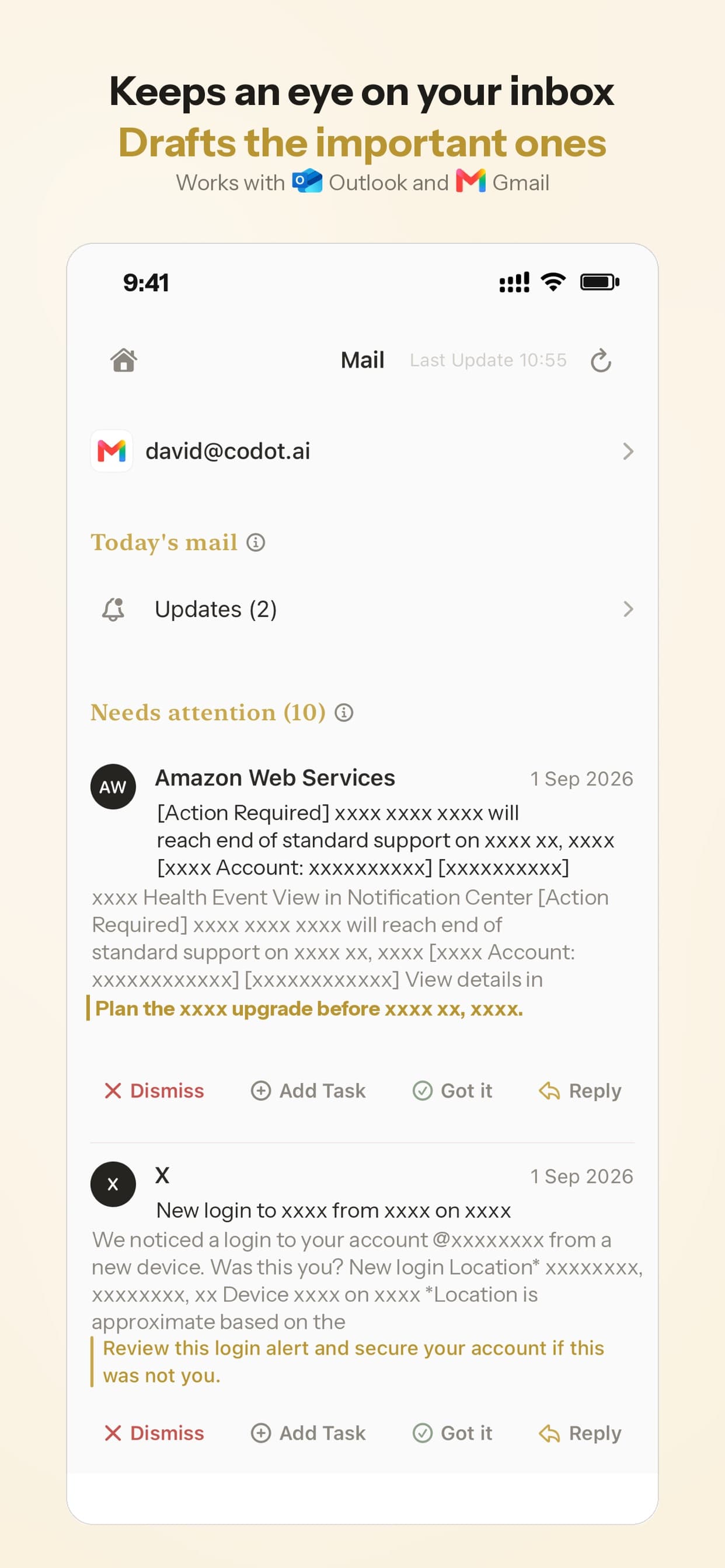
- Parent emails. Codot can sort a Gmail or Outlook inbox and draft replies to the important ones, so the email about the grade has a starting point waiting when you sit down. You still read and send it yourself.
- Photos of paper. Snap the duty roster or a printed schedule and it adds the items to your calendar, similar to its use as a rotating shift calendar app. In the clip below it reads a class timetable and creates each class as a weekly event, which is much faster than adding a class schedule manually. If something isn't on the page, it tells you it guessed.
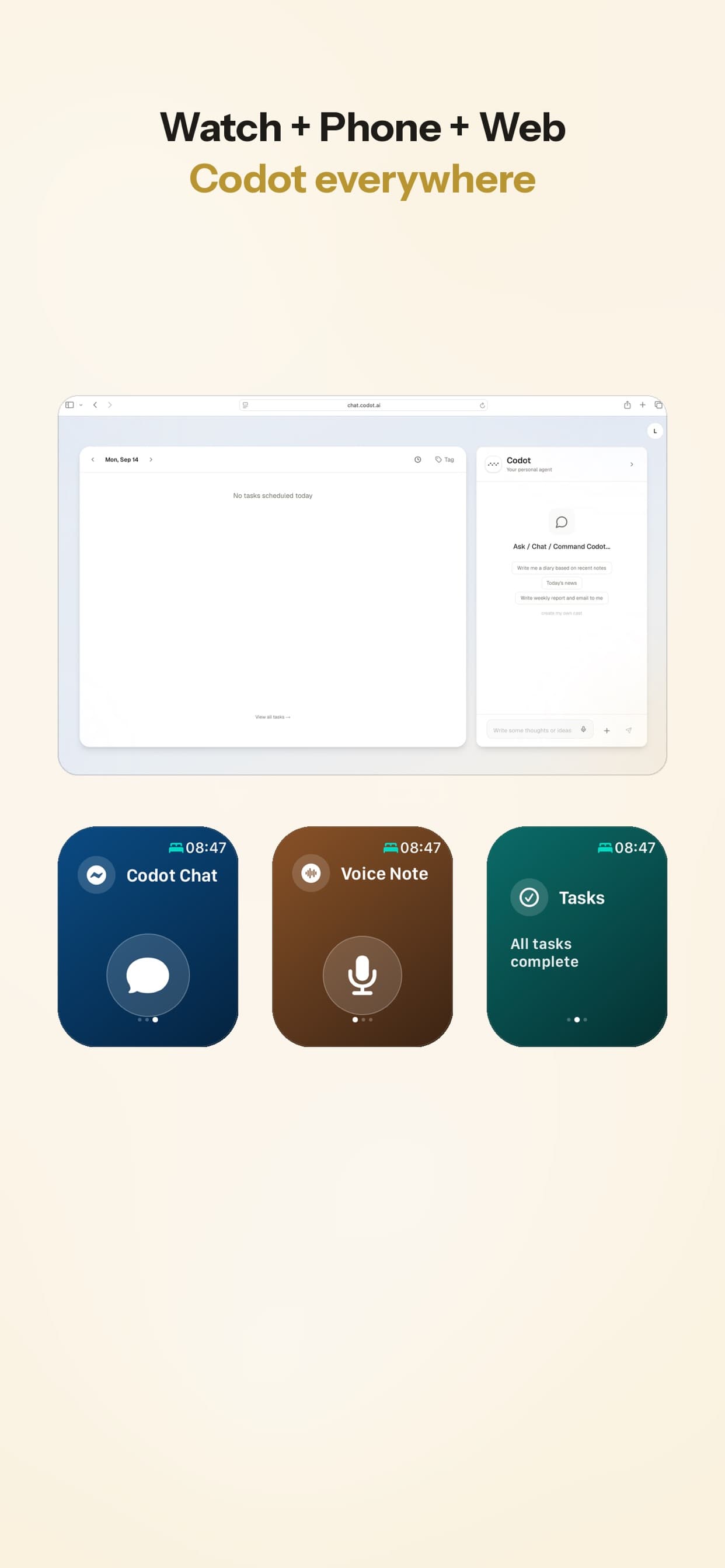
It also has a lock-screen widget and Apple Watch support, so you can talk without unlocking a phone in front of a class (setup guide). A morning briefing lists the day's meetings and duties before first period. It also remembers people, so "Ms. Rivera, Sam's mom, prefers texts after 4" is there next conference night.
Where it's the wrong tool: Codot doesn't plan lessons, track standards or connect to Google Classroom. Reminders at a set time, email reply drafts and the morning briefing are part of Codot Max, at $12.99 a month or $99.99 a year (five times Planbook) with 20x the free plan's usage; the free plan covers tasks, calendar, notes and the personal CRM, and every new account gets a 7-day Max trial. If you'd type every reminder anyway, iPhone Reminders does that for free.
A note on student information. Whatever capture app you use, check your district's rules before putting student names or details into it. In the US, student education records are covered by FERPA (U.S. Department of Education), and many districts list which apps are approved. Codot encrypts data and doesn't sell it, but your district's policy is what counts. When in doubt, use initials or "Period 3 parent."
The free option: iPhone Reminders
If you'd rather not add an app, iPhone Reminders is already there, and Siri can add simple reminders hands-free. It works well for one thing at a time. It won't split a hallway thought into four tasks, draft an email, or read a photo. For more free options and what each free tier limits, see our list of free planner apps for iPhone. If reminders don't fire, our iPhone Reminders troubleshooting guide covers the usual causes. Coming from Todoist? Our list of free Todoist alternatives shows what each free plan actually limits.
What we'd set up
- One lesson planner. Your school's licensed one if there is one; otherwise Common Planner Basic (free) or Planbook ($20 a year).
- One capture tool that works standing up. Codot if you want to talk and get email drafts, iPhone Reminders if you're happy typing.
- Five minutes at the end of the day to clear what you captured. Capture gets things out of your head. The end-of-day pass is when they actually get done.
If it's your students who keep missing deadlines, our guide to AI reminder apps for college students is one you can pass along.
FAQ
What is the best free teacher planner app?
For lesson planning, Common Planner's Basic plan is free and covers daily, weekly and monthly plans, standards and posting to Google Classroom. For non-lesson to-dos, iPhone Reminders is free, and Codot's free plan covers tasks, calendar and notes (timed reminders and email drafts need Codot Max, which you can try free for 7 days).
Is Planbook worth it?
At $20 a year with a 90-day free trial, Planbook is one of the cheapest full-featured lesson planners. It's worth it if your school doesn't provide a planner and you want everything in one tier.
Can I use Codot to plan lessons?
No. Codot doesn't build lesson plans, track standards or sync with Google Classroom. Use it alongside a lesson planner for the meetings, duties, emails and errands that come up during the day.
How is Codot different from Common Planner?
Common Planner organizes what you teach. Codot captures what comes up around teaching: you say it or snap a photo, and it becomes tasks, events and email reply drafts.
If your day runs between bells, try saying the next thing to Codot on the App Store or Google Play.
Productivity & Tools Desk
This article was created with AI assistance and reviewed by our editorial team.Learn about our content process.