How to Add a Class Schedule to Google Calendar or iPhone Calendar (2026): By Hand, by iCal Feed, or From a Photo
Three ways to add a class schedule to Google Calendar or your iPhone calendar: repeating events by hand, a university iCal feed, or a photo of the timetable.
To add a class schedule to Google Calendar, create one repeating event per class and set it to end on the last day of lectures, or subscribe to your university's iCal feed if it offers one. Codot, a voice AI assistant for iPhone, can read a photo of the timetable and write every class into Google Calendar or Apple Calendar; timed reminders and a weekly Sunday summary are Codot Max at $12.99 a month.
Disclosure: Codot is our product. The exchange student below is fictional, written to show one real first week of a winter semester step by step. Google Calendar steps are from Google's own help pages and university details from the universities' own pages, checked November 5, 2026.
TL;DR:
- The manual way works and costs nothing: one repeating event per class in Google Calendar, ending on the last day of lectures.
- Check for an iCal feed first. Some German universities let you subscribe to your timetable so room changes update on their own; others only export a one-time file.
- If all you have is a PDF or a screenshot, Codot can read a photo of it and write every class into Google Calendar or Apple Calendar. You then fix mistakes by saying one sentence.
- Week one needs more than the timetable: a reminder to leave for the tram, exam registration dates and a Sunday list of next week's classes. Timed reminders and the Sunday routine are Codot Max.
At a glance
- Google Calendar, by hand: create an event, open "Does not repeat", and "choose how often you want the event to repeat, and when you want the event that repeats to end." Repeating events are capped at 730 occurrences (Google Calendar Help: Create a recurring event).
- Google Calendar, from a link: adding a calendar "From URL" is done in Google Calendar on a computer, under "Other calendars" (Google Calendar Help: Subscribe to someone else's calendar).
- Google Calendar, from an .ics file: import runs on a computer via Settings, then "Import & Export" (Google Calendar Help: Import events).
- University feeds differ: the University of Mannheim says its timetable can be subscribed to as iCal and is then "automatisch" updated (Uni Mannheim); TU Darmstadt exports an iCal file and says "There is no subscription for the schedule so far" (TU Darmstadt).
- Codot: tasks, calendar entries, notes and voice input are free; timed and repeating reminders, the daily briefing and scheduled automations are Codot Max at $12.99 a month or $99.99 a year (20x the free plan's usage), with a 7-day free Max trial (codot.ai).
Why is a new timetable so hard to get into your calendar?
The timetable arrives in a format your calendar can't read. Lucía is a third-year economics student from Valencia, spending her winter semester in Freiburg on Erasmus. On Sunday, October 11, 2026, the night before lectures start, she has her timetable as a PDF from the faculty website and a photo of a printout from the welcome session. Neither one is in her phone's calendar.
Her week has seven slots across four courses: Macroeconomics, Statistics (with a tutorial every second week), Environmental Economics and a German course from the language centre. Most start "c.t.", a quarter past the hour, and one starts at 8:15 on the far side of town.
Typing all of that into a calendar is fifteen minutes of fiddly work that people skip. Then a room changes on Monday, and the paper timetable is wrong on day two.
How do you add a class schedule to Google Calendar by hand?
Create one repeating event per class and set the repeat to end on the last day of lectures. Google's help page describes the steps on a computer: click Create, add the title and details, click the arrow next to "Does not repeat", then "choose how often you want the event to repeat, and when you want the event that repeats to end", and save (Google Calendar Help). In the Google Calendar iPhone app, the repeat setting is under "More options" when you create the event.
For Lucía's semester, each class would look like this:
- Title with course and type: "Macroeconomics – lecture".
- Location: building and room number, so it shows on the event.
- Start time with the c.t. quarter hour already added: 10:15, not 10:00.
- Repeat weekly, ending Friday, February 5, 2027, the last week of lectures in her (fictional) semester.
- For the every-other-week tutorial, a custom repeat of every 2 weeks, starting on the right week.
Then delete the occurrences in the Christmas break, December 21 to January 1.
This is the right method for a short, stable timetable, and it's free. The cost is time and mistakes: a wrong start week on a biweekly tutorial is easy to miss until you're standing in an empty room.
Does your university have an iCal feed you can subscribe to?
Check before you type anything, because some German universities publish the timetable as an iCal link. The University of Mannheim's IT page says students can subscribe to their timetable as iCal by copying a link into a tool like Google Calendar, after which it is shown and updated automatically (Uni Mannheim). In Google Calendar you add that link on a computer, under "Other calendars", then "From URL" (Google Calendar Help).
Other systems export a file instead of a feed. TU Darmstadt's help page says its system creates "a calendar file in iCal-format" and that there is no subscription yet, so you export again when appointments change (TU Darmstadt). A file like that goes into Google Calendar through Settings, then "Import & Export" (Google Calendar Help).
If your university offers a live feed, use it: it's the only option here that follows room changes on its own. Lucía's faculty only posts a PDF, and her language course isn't in the university system at all.
Sunday 20:40: how do you turn a photo of a timetable into calendar entries?
Send the photo and say what you want done with it. Lucía opens Codot, picks the photo of the printout and says:
"Add these classes to my calendar, every week until February 5. Times are c.t., so add a quarter hour."
Codot reads the grid and writes each class into her Google Calendar as a weekly entry with the course name, room and start time (it can write to Apple Calendar instead). It answers with a list of what it created, which she checks against the PDF.
The demo shows a US college schedule with finals; the step is the same. Read the summary once, slot by slot, because a crowded grid can be misread like any scan.
Monday 9:55: how do you fix a wrong entry by voice?
Say the correction as one sentence, naming the class and what changed. On Monday morning Lucía arrives at the Macroeconomics lecture hall and finds a note on the door: the lecture has moved to a bigger room for the rest of the semester. Standing in the corridor, she says:
"Macroeconomics on Mondays and Wednesdays is in lecture hall 1098 from now on, not 1010."
Codot updates the room on every remaining Macroeconomics entry. At the Statistics lecture that afternoon, the lecturer explains the tutorial starts in week two and then runs every second week, so she adds one more sentence:
"The Statistics tutorial on Tuesday is every other week, starting October 20. Delete the one tomorrow."
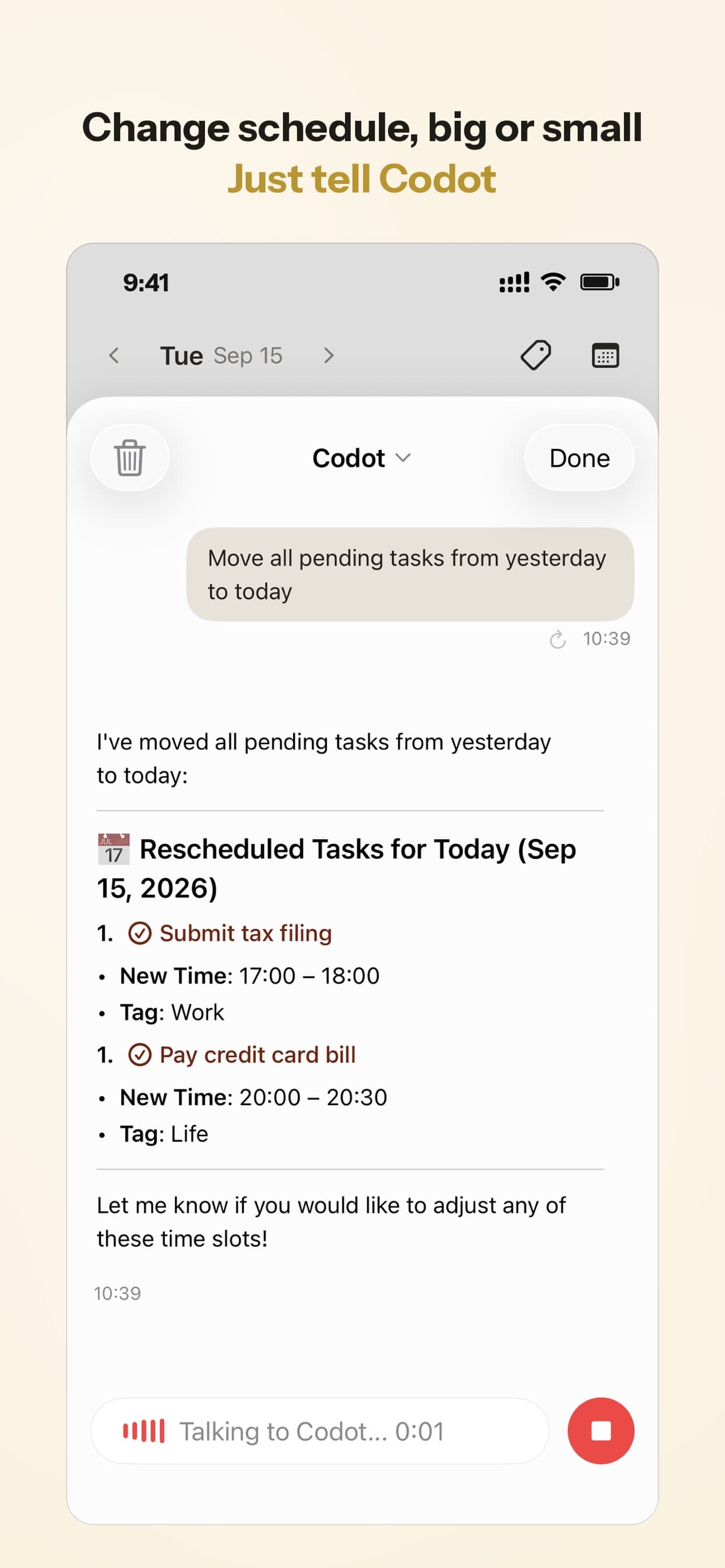
The holiday gap works the same way: "No classes from December 21 to January 1, remove them from my calendar." These are changes to entries Codot made. Codot doesn't see events that were already in her calendar from somewhere else, so a class she typed into Google Calendar by hand has to be fixed there.
Your ideas shouldn't wait for a keyboard. Just say it — Codot handles the rest.
Try Codot — It's Free →Tuesday 7:35: how do you get a reminder to leave for an early class?
Set a repeating reminder for the time you need to walk out, not the time class starts. Lucía's Tuesday and Thursday Statistics lecture starts at 8:15 c.t. on a campus 25 minutes away by tram. A calendar alert at 8:00 tells her she's late. She sets this once:
"Every Tuesday and Thursday at 7:35, remind me to leave for the tram to the Statistics lecture."

Timed and repeating reminders are part of Codot Max. On an iPhone with iOS 26 or later, a reminder that's due can ring like an alarm. If she ignores the 7:35 reminder, Codot doesn't send it again. Set it for when you really need to be at the door.
Wednesday 13:10: where do exam registration and hand-in dates go?
Say each deadline as its own sentence, with the date. At Lucía's host faculty, exams need a separate registration inside a fixed window, and the window is easy to miss in week one. Lucía's faculty email lists her dates, and she says them in a row on the way out of the Mensa:
"Exam registration for Macroeconomics and Statistics closes Friday, December 4. Remind me Tuesday, December 1 at 10."
"My Learning Agreement changes have to be signed and sent to Valencia by Friday, November 13."
"Environmental Economics seminar paper outline is due Wednesday, November 25 at noon."
Each becomes a dated task in her calendar; the plain deadlines are free, and the December 1 reminder is a timed reminder, so it's Codot Max. The Learning Agreement is the easiest one to forget, because the home university sets it and it never appears on the host timetable.
Sunday 19:00: what does a weekly routine for students look like?
A weekly routine is one scheduled message every Sunday evening that lists next week's classes, deadlines and anything to hand in. Lucía sets it on her first Wednesday:
"Every Sunday at 7pm, list next week's classes with rooms, any deadlines, and anything I have to hand in."
On Sunday, October 18, the first one arrives. Monday: Macroeconomics 10:15 in hall 1098, German B1 14:15. Tuesday: Statistics 8:15 and the first tutorial at 12:15. Wednesday: Macroeconomics 10:15. Thursday: Statistics 8:15, Environmental Economics 16:15. Coming up: Learning Agreement changes due Friday, November 13.
Scheduled automations like this are Codot Max, and you can keep up to 20 of them.
Which class schedule calendar app should a student use?
The best choice depends on where your timetable comes from and how often it changes:
- If your university offers a live iCal feed, subscribe to it in Google Calendar or Apple Calendar. It's free and follows changes the university makes.
- If you want a timetable grid with grades and a next-class widget, a dedicated timetable app fits. Class Schedule by ABLE SRL is free with in-app purchases (removing ads is $0.99), supports rooms and recurring classes, tracks exams and grades, and has widgets for your next class, per its App Store listing as of November 2026 (App Store).
- If your timetable is a PDF or a photo and the rest of your life also needs managing, use Codot. It turns the photo into calendar entries, takes corrections and deadlines by voice, and handles the tram reminder and the Sunday list. Codot has been running for almost two years, and more people use it every month.
For more on staying on top of a semester, see our pick of AI reminder apps for college students, voice calendar apps compared and Google Calendar alternatives for iPhone.
How to set it up before your first lecture
- Subscribe to your university's iCal feed if there is one.
- Install Codot from the App Store, connect Google Calendar or Apple Calendar, and send a photo of anything not in the feed, with the last day of lectures in your sentence.
- Add a reminder for your earliest class, your exam registration dates and the Sunday routine.
New accounts get 7 days of Codot Max free, enough to run your whole first week with the reminders and the Sunday list on. When the trial ends you go back to the free plan without being charged.
What Codot doesn't do for a student timetable
Codot doesn't log into your university portal or exam registration system, so it can't fetch the timetable or register you for exams. It doesn't read events already in your calendar, including a subscribed university feed. It also doesn't update your entries when the university changes the timetable; you tell it, in one sentence.
On the free plan you keep tasks, calendar entries, notes and voice input. Timed and repeating reminders, the daily briefing and scheduled automations like the Sunday list need Codot Max: $12.99 a month or $99.99 a year, with 20x the free plan's usage. The daily briefing is iPhone only.
FAQ
How do I add my class schedule to Google Calendar?
Create one repeating event per class, set it to repeat weekly and to end on the last day of lectures, as described on Google's "Create a recurring event" help page. If your university publishes an iCal link, add it in Google Calendar on a computer under "Other calendars", then "From URL".
Can I add a class schedule to my iPhone calendar from a photo?
Yes, with an assistant that reads images. Codot can read a photo or screenshot of a timetable and write each class into Apple Calendar or Google Calendar, then list what it created so you can check it.
What is a good free timetable app for students?
Your university's iCal feed in Google Calendar costs nothing. Class Schedule by ABLE SRL is free with in-app purchases as of November 2026, and Codot's free plan covers tasks, calendar entries and notes by voice.
Does Codot update my classes when the university changes the timetable?
No. Codot doesn't connect to university systems, so you tell it about a change in one sentence, such as a new room, and it updates the remaining entries it created.
Will Codot remind me before every class?
It can, with a repeating reminder at the time you choose, such as 7:35 on Tuesdays and Thursdays. Timed and repeating reminders are part of Codot Max ($12.99 a month), and a reminder you ignore isn't sent a second time.
If your timetable is still a PDF the night before lectures start, send a photo of it to Codot from the App Store and check the list it gives back.
Productivity & Tools Desk
This article was created with AI assistance and reviewed by our editorial team.Learn about our content process.