AI Accountability Partner for Your Self-Improvement System: Gym, Study and Side Projects (2026)
An AI accountability partner that plans your week of gym, study and side projects, sends a morning brief and re-plans when a day breaks. What each app covers.
An AI accountability partner for a self-improvement system is the part that plans your week, reminds you each morning and re-plans when a day falls apart. Workout loggers like Hevy and calorie trackers like MyFitnessPal record what you did; Codot, a voice-first assistant, schedules training, study and side projects from one sentence, sends a daily brief and moves things when plans change.
TL;DR:
- A self-improvement "system" has four jobs: plan the week, tell you what today is, record what you did, and rebuild the plan when a day goes wrong. Most apps do one of them well.
- Workout loggers (Hevy, Strong) and calorie trackers (MyFitnessPal) are good at recording. Gamified apps like Habitica make streaks feel like a game. None of them reshuffles your Tuesday when a late shift eats your gym slot.
- Codot, a voice-first AI assistant, is our product, so read its section with that in mind. It handles the planning and re-planning part: say the week out loud, get a morning brief, say "move it" and it moves.
- Keep your workout logger. Codot doesn't count reps or calories, and we'd use both.
Codot is our product, so we have a stake in this topic. We haven't run a controlled test of any app below, and we don't rank them by how much they improve anyone's results. What we can do is say what each type of app is built for, and where the gaps between them are.
Picture a Monday that starts well. Gym at 7, work until 4, an hour on the exam you're studying for, then the side project: a short story, a YouTube channel, a portfolio. By Wednesday a meeting runs over, you skip the gym, the study hour slides to "later", and on Friday you can't remember what you actually got done. The plan wasn't bad. Nobody was holding it.
What does a self-improvement system actually need?
People who search for "self improvement apps like Solo Leveling" usually want the feeling of that anime's system screen: daily quests, a visible level, something that notices when you skip. Strip the game layer off and four jobs are left:
- A week plan. Which days are training, which are study, which evening belongs to the side project.
- Today's list. Something that tells you in the morning what today is, so you don't decide from scratch.
- A record. What you lifted, what chapter you finished, what you ate if you track food.
- Re-planning. When Wednesday breaks, Thursday and Friday need to change, and doing that by hand is where most systems die.
The fourth job is the one that gets skipped most often. A missed workout isn't the problem. The problem is the plan still says "gym Wednesday 7:00" on Thursday, so you stop opening it.
Which apps cover which part?
Here's how the main app types split those jobs, as of October 2026:
| App type | Examples | Good at | Leaves to you |
|---|---|---|---|
| Workout logger | Hevy, Strong | Sets, reps, weights, progress charts | When you train and what happens when you can't |
| Calorie tracker | MyFitnessPal | Food log, macros | Everything outside food |
| Gamified habits | Habitica | Streaks, quests, a game feel for daily habits | Real dates and times; re-planning a broken week |
| AI chat coach | ChatGPT, Pi and similar chat apps | Talking through a plan, motivation | Saving the plan into a calendar and reminding you later |
| AI assistant | Codot | Planning the week by voice, a morning brief, moving things when plans change | Rep counting, calorie maths, exercise libraries |
The first three types record or reward, and the chat coaches talk. Very few of them write into your calendar and come back the next morning. If you've read our piece on using AI as an accountability partner for ADHD, it's the same gap, without the ADHD part. Here the person is simply running too many projects at once.
How Codot runs the week for you
Codot is a personal AI assistant you talk to. You say what you want to happen, and it creates the tasks and events, keeps notes, and sends a daily brief. It understands spoken English, Polish, Czech, German, Swedish, Russian and Chinese, on iPhone, Apple Watch, the web and Android. The daily briefing and email triage are only on iPhone. On Android you get tasks, reminders, notes, the personal CRM and routines.
Sunday: plan the week in one go
You can say the whole week as it comes to mind:
- "Every Monday, Wednesday and Friday at 7, gym. Tuesday and Thursday at 18:00, one hour of exam study. Saturday morning, two hours on the story."
Codot turns that into repeating calendar items. If you want the Sunday planning to happen without you remembering it, set a scheduled automation, for example "every Sunday at 19:00, remind me to plan next week and show me what I didn't finish". Scheduled automations are part of Codot Max, and every new account can try them in a 7-day free trial.
Every morning: a brief, not a decision
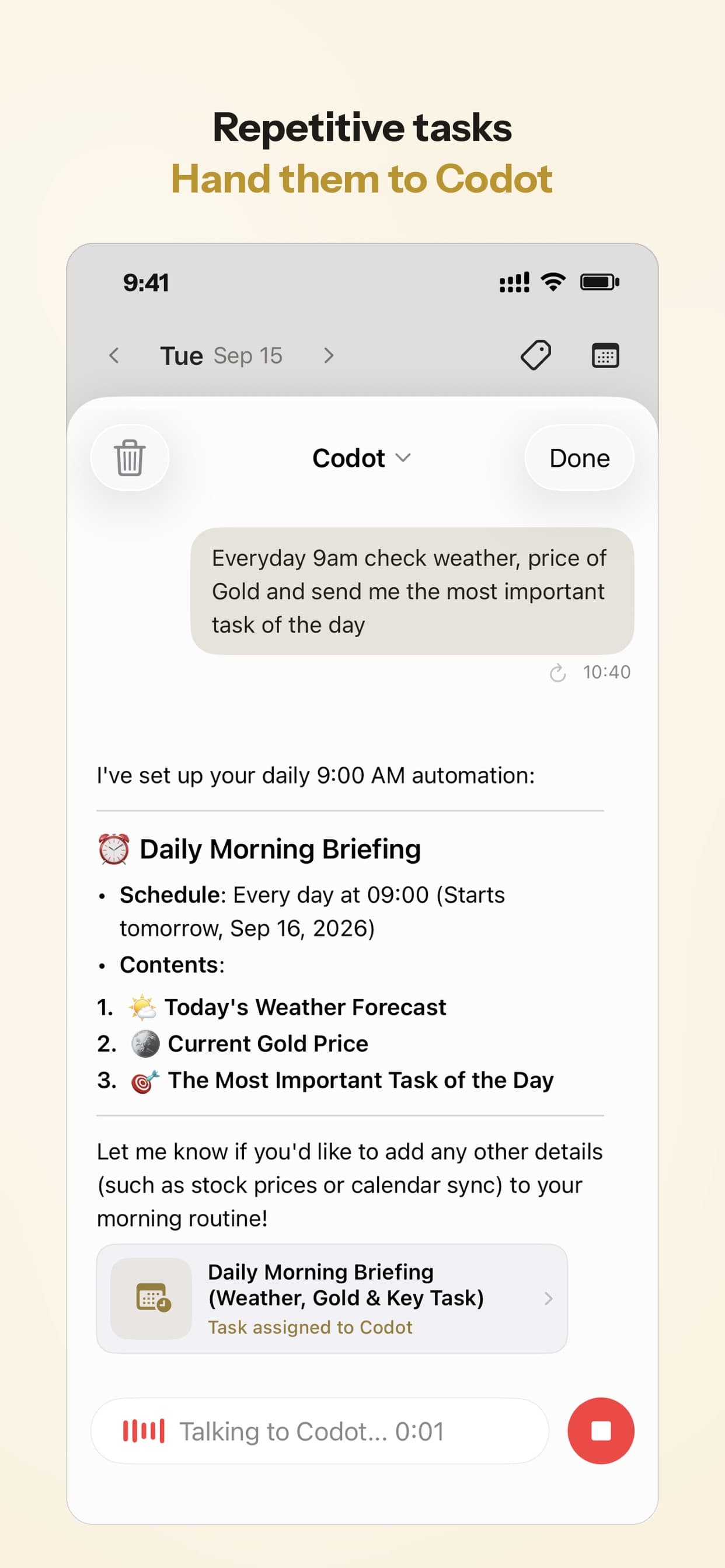
The daily brief lists what's on today. For a system like this, that's the "today's quests" screen people want from gamified apps, except it's built from your real tasks and events. You don't open five apps to work out whether today is a leg day or a study day.
Wednesday: when the plan breaks
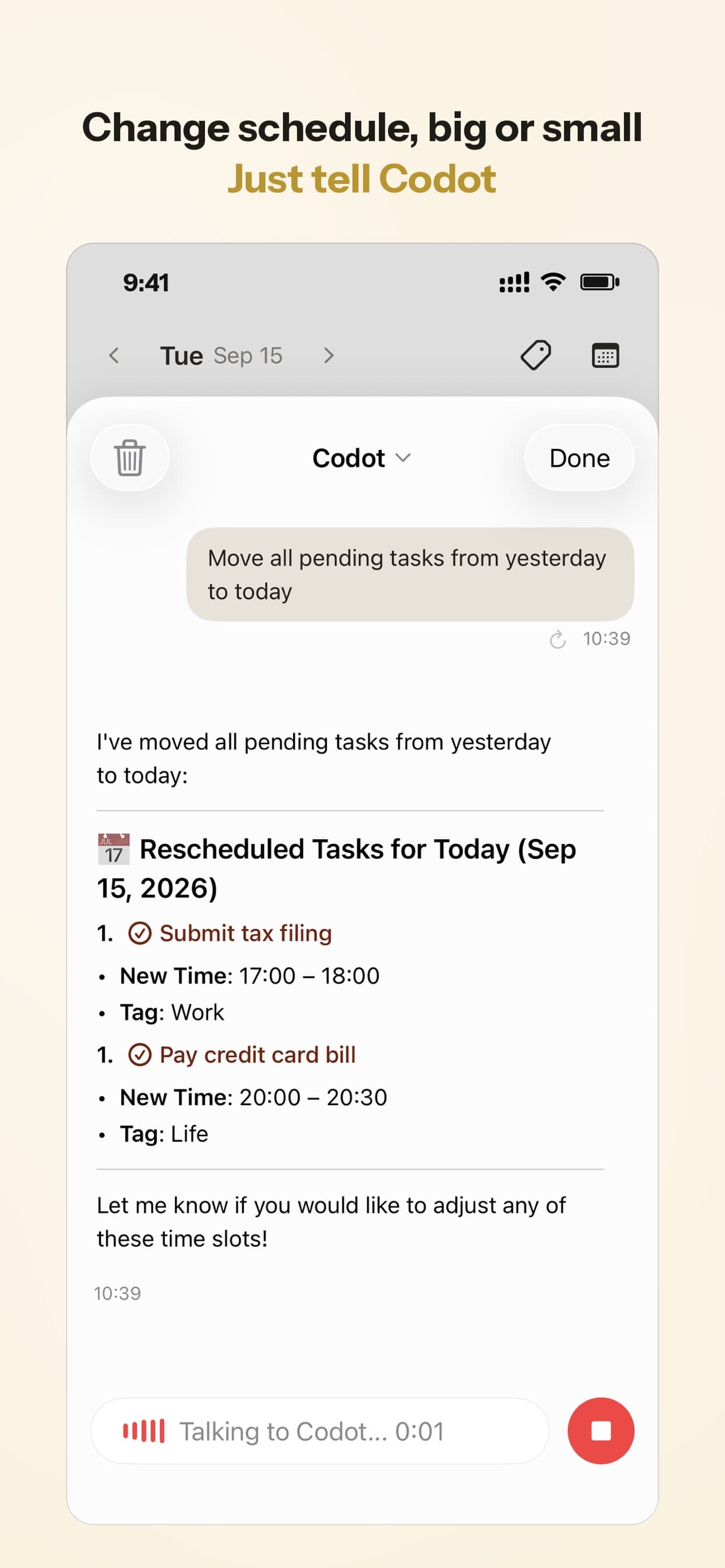
This is the part we care most about. You say what changed, and the plan follows:
- "I can't make the gym today, move it to tomorrow morning and cut tomorrow's study to 45 minutes."
- "This week is crunch at work, push the story sessions to next week."
Recording what you did
For training details, keep your workout logger. For everything else, a sentence is enough: "Note: finished chapter 4, practice test 72%." Codot saves it as a note you can search later, and habit tracking covers the yes-or-no habits like "stretched" or "no phone after 23:00". If you track food too, our comparison of voice calorie tracker apps shows which ones let you log a meal by talking and which are free.
If you're putting this together for the first time, our daily routine template with an AI prompt is a reasonable starting skeleton, ADHD or not.
Your ideas shouldn't wait for a keyboard. Just say it — Codot handles the rest.
Try Codot — It's Free →What Codot won't do
Codot doesn't log sets and reps, has no exercise library, and doesn't calculate calories or macros. It won't build you a training program; if you need one, get it from a coach or your logger app, then tell Codot when you'll do it. It also has no game layer: no XP, no levels. If the game feel is what keeps you going, Habitica does that and Codot doesn't.
It can also misunderstand an unusual phrase, so check what it created the first few times. And it isn't a person. It will remind you and re-plan, but it can't tell whether you actually went to the gym.
How we'd set it up
Our opinion, as the team that makes one of these:
- You only want to train consistently: a workout logger plus your phone's calendar is enough. Free.
- The game feel is what motivates you: try Habitica for habits, and keep real appointments in a calendar. Our winter arc app list compares more free habit trackers and planners.
- You're running three or four things at once (training, a course or exam, a side project, a job) and the plan keeps falling apart mid-week: that's what Codot is for. Use it for the plan and the re-planning, and keep your logger for the reps.
- You mainly need someone to talk to about motivation: a chat coach is fine, but save the outcome somewhere that will remind you.
If you're also comparing plain planners, our list of free planner apps for iPhone shows what each free version limits, solo professionals might prefer our breakdown of contractor scheduling apps for one-person businesses, and students can check our guide to AI reminder apps for college students.
On price: Codot's free plan covers tasks, the calendar, notes, the personal CRM, habits, calorie logging and expenses. Reminders at a set time, repeating tasks, daily briefings, scheduled automations and email triage are part of Codot Max ($12.99 a month or $99.99 a year on the App Store, with 20x the free plan's usage). Every new account gets 7 days of Max free, then drops back to the free plan without charging you. Data is encrypted and never sold.
FAQ
Is there a free AI accountability partner app?
ChatGPT has a free tier you can talk a plan through with, though it won't remind you later on its own. Check Habitica's current plans on its site before relying on any price. Codot's free plan covers tasks, the calendar, notes and habit tracking; the daily brief, reminders at a set time and scheduled automations are part of Codot Max ($12.99 a month), which every new account can try free for 7 days.
Are there self-improvement apps like Solo Leveling?
Gamified habit apps such as Habitica turn habits into quests and levels. If you want the "system tells you today's quests" part with your real tasks and events behind it, a daily brief from an assistant like Codot covers that, without the game graphics.
How is Codot different from a workout app like Hevy?
Hevy and Strong record what happens inside the workout: exercises, sets, weights. Codot handles when the workout happens, next to study, work and side projects, and moves it when the day changes. Most people who train seriously would use both.
Can I talk to Codot in Polish or another language?
Yes. Codot understands spoken Polish, Czech, German, Swedish, Russian, English and Chinese, so you can plan your week in the language you think in.
If your plan keeps breaking by Wednesday, try saying next week's plan to Codot on the App Store.
Productivity & Tools Desk
This article was created with AI assistance and reviewed by our editorial team.Learn about our content process.