Contractor Scheduling Apps (October 2026): Free Options, Prices and Which Fits a One-Person Business
Contractor scheduling apps compared: free options (Google Calendar, Connecteam), Jobber and Housecall Pro prices, and voice scheduling for solo contractors.
For a solo contractor, a free calendar plus a fast way to add and move jobs is often enough: Google Calendar is free, Connecteam is free for up to 10 users, and Codot lets you book or reschedule a job by saying it. Once you need quotes, invoices and crew dispatch in one place, field service software such as Jobber (from $29 a month billed annually) or Housecall Pro (from $59) is worth paying for.
Disclosure: Codot, one of the apps below, is our product. Prices come from each company's own pricing page, checked October 31, 2026. Codot isn't field service software, and we say where that matters.
TL;DR:
- Under about 15 jobs a week, the free tools hold up. Google Calendar costs nothing, Connecteam's scheduling is free for up to 10 users, and the hard part is getting jobs in and moved quickly from a van or a roof.
- Codot books and reschedules jobs when you say them out loud ("move the Henderson job to Friday at 8") and writes them into Google Calendar. It doesn't quote, invoice or dispatch a crew.
- Jobber (from $29 a month billed annually) and Housecall Pro (from $59, no free plan) earn their price once quotes, invoices, scheduling and payments need to live in one system.
- The usual mistake is paying for field service software to fix a problem that's really about capture: jobs that never made it onto any calendar.
When does a contractor actually need a scheduling app?
A whiteboard in the shop and a paper diary in the van work fine for a while. They stop working in a predictable order.
First, the whiteboard falls behind reschedules. A customer moves Tuesday to Thursday, a supplier delay pushes another job, and the board in the shop still shows Monday's plan. You find out when two customers expect you at 8 a.m.
Second, the same job gets written down three times: once in your notebook when the customer calls, once on the board, once in the quote. Every copy is a chance to get the address or the date wrong.
Third, the job never gets written down at all. "Can you come look at the deck next week?" said at the end of another job goes into your head, and your head is already full.
If the first two are your problem, a shared calendar or field service app fixes them. If it's mostly the third, you need something that takes a booking in the time it takes to say it. That's the split this comparison follows.
Codot: book and move jobs by saying them
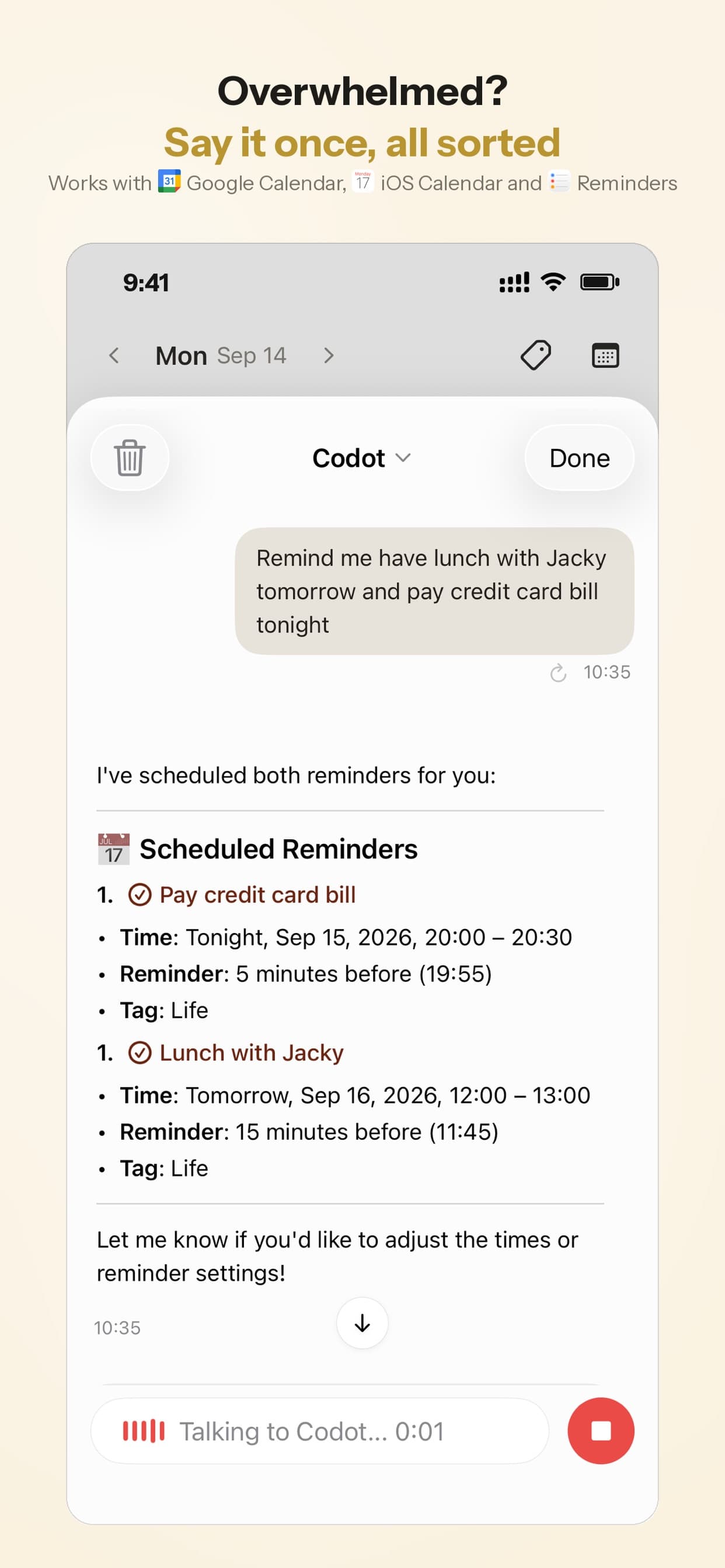
Codot is a voice-first AI assistant that writes into your calendar. You say one sentence while you're standing on site and it files it:
- "Look at the Garcias' deck next Wednesday at 3" becomes a calendar event.
- "Move the Henderson job to Friday at 8, fittings arrive Thursday" moves the event and saves the note.
- "Call Mrs. Patel tomorrow morning about the tile" becomes a task with a reminder.
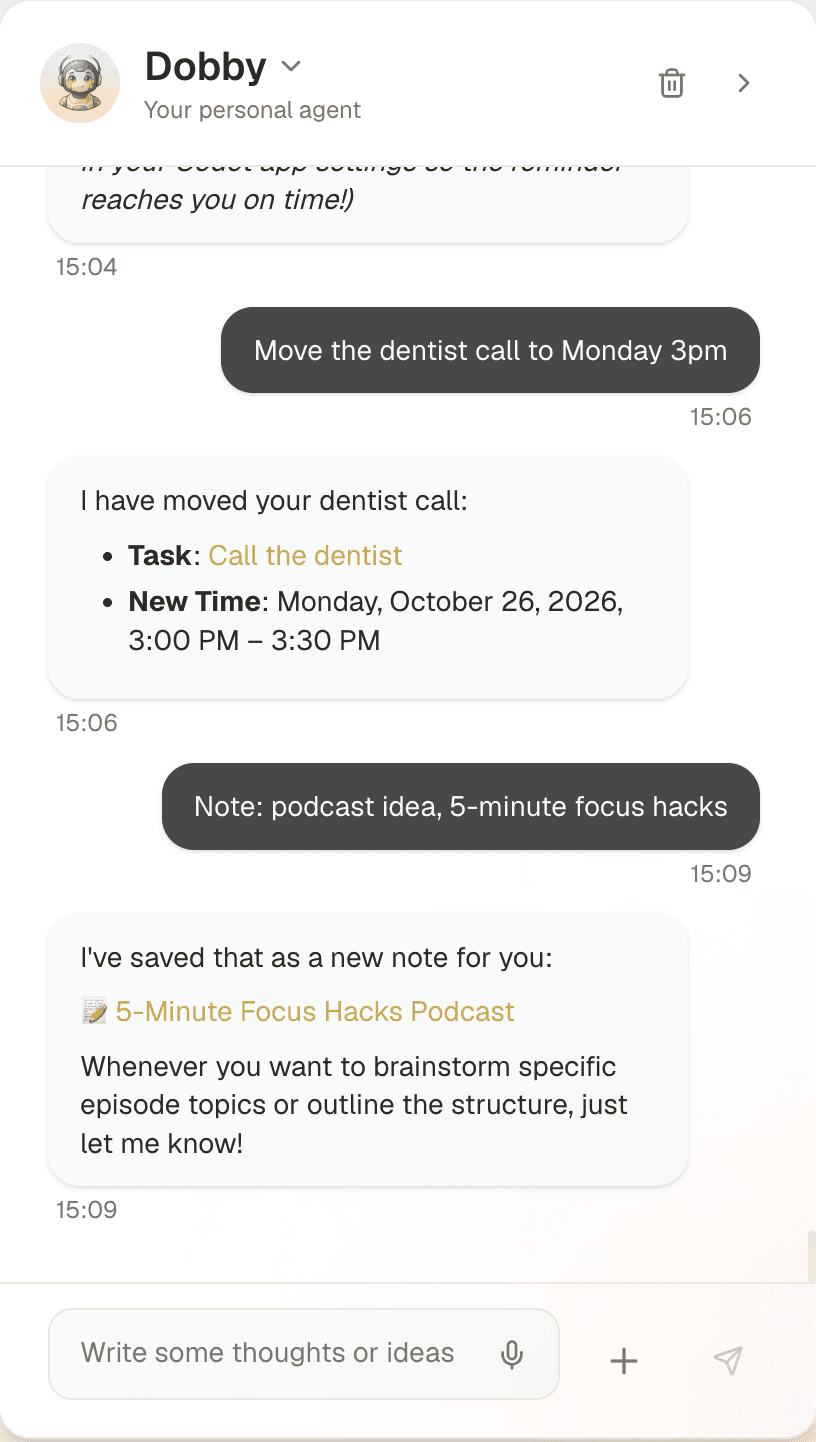
It writes jobs into Google Calendar and, on iPhone, into Apple Calendar and Apple Reminders, so they land on the calendar you or your office already look at. On iPhone, a daily brief each morning lists what's due. You can talk to it from an iPhone, an Apple Watch (handy on a ladder), an Android phone or the web, and it understands most major languages, including Spanish.
Price: Codot's free plan covers tasks, the calendar, notes, the personal CRM, habits, calorie logging and expenses, so booking and moving jobs by voice costs nothing. Reminders at a set time, repeating tasks, the daily brief, scheduled automations and email triage are part of Codot Max ($12.99 a month or $99.99 a year, with 20x the free plan's usage). Every new account gets 7 days of Max free, then drops back to the free plan without charging you.
What Codot doesn't do
It doesn't dispatch crews, show a team schedule, send customers appointment confirmations, take online bookings, quote, invoice or take payments. Its Apple Reminders sync runs one way. If you have a crew to coordinate, use one of the tools below for the team schedule and Codot for getting your own bookings in fast. I compared the bigger question of hiring help versus using an assistant in our virtual assistant for contractors guide.
Google Calendar: free, and underrated for solo contractors
For one person, Google Calendar does most of what a scheduling app does: color-coded jobs, the address in the location field so it opens in Maps, reminders, and a shared view if your partner does the books or uses a family organizer app for moms to coordinate the household. It costs nothing.
What it lacks is anything contractor-specific: no job notes beyond the event description, no quotes, no customer history. And adding an event on a phone with dirty hands is slow enough that jobs get left for later. One fix is pairing it with a faster way of entering things, which is where a voice assistant fits.
Connecteam: free team scheduling for small crews
If you have a few people on the tools, Connecteam's Small Business plan is free for up to 10 users and includes employee scheduling and unlimited jobs, limited to a single schedule (Connecteam pricing). Paid Operations plans with job scheduling start at $29 a month for the first 30 users on yearly billing.
It's built around shifts and crews, not customers, so you won't get quotes or invoices, but it's a strong choice for a rotating shift calendar app for small teams. For "who is on which site tomorrow," it's hard to beat at free.
Your ideas shouldn't wait for a keyboard. Just say it — Codot handles the rest.
Try Codot — It's Free →Jobber: when scheduling, quotes and invoices need to be one system
Jobber is field service software: requests come in, become quotes, become scheduled jobs, become invoices, and the customer gets reminders along the way. Core starts at $29 a month billed annually ($49 month to month) for one user; the plans with automated reminders and more users go up from there, and an AI Receptionist that answers missed calls is a $29-a-month add-on (Jobber pricing). Its mobile app also has Jobber Voice, available on all plans since September 2025, which can create jobs and add or reschedule visits by voice inside Jobber.
It's the right step when you're typing the same customer details into a notebook, a calendar and an invoice app. Some solo tradespeople find it more system than they need for one person; try it with your own real week before committing.
Housecall Pro: similar, priced higher, no free plan
Housecall Pro covers the same ground as Jobber with a strong focus on home services. Basic is $59 a month billed annually ($79 monthly) for one user, Essentials $149 for five users, and Max $299 for eight. There's no free plan, but there's a 14-day trial of the top tier without a credit card (Housecall Pro pricing).
Side-by-side
| Codot | Google Calendar | Connecteam | Jobber | Housecall Pro | |
|---|---|---|---|---|---|
| Starting price | Free plan (timed reminders and daily brief are Max); Max $12.99/mo or $99.99/yr, 7-day trial | Free | Free up to 10 users | $29/mo (annual) | $59/mo (annual) |
| Add a job by voice | Yes, one sentence | Via Gemini (Android) | No | Yes, Jobber Voice (mobile app) | Not checked |
| Reschedule by voice | Yes | Via Gemini (Android) | No | Yes, Jobber Voice (mobile app) | Not checked |
| Team / crew schedule | No | Shared calendars | Yes | Yes | Yes |
| Quotes and invoices | No | No | No | Yes | Yes |
| Best for | Solo, on the move | Solo, simple | Small crews | Growing service business | Home services teams |
Which one I'd pick
Solo, under about 15 jobs a week. Google Calendar plus Codot. Calendar is the record; Codot is how jobs get onto it from the van. Total cost today: nothing.
Two to ten people. Connecteam for the crew schedule, free. Keep your own bookings flowing into it however is fastest for you.
Quotes and invoices are where time disappears. Jobber, starting on Core. If you're in home services and want the extra marketing tools, compare Housecall Pro on its trial.
Whichever you choose, the calendar only helps if every job makes it in. If you lose bookings between "sure, I'll come Wednesday" and opening an app, fix that first. The voice calendar app comparison covers Siri and Gemini for the same job, and if reminders on your phone go quiet, this iPhone reminders guide lists the settings to check.
FAQ
Is there a free scheduling app for contractors?
Yes. Google Calendar is free for one person, Connecteam's scheduling is free for up to 10 users, and Codot's free plan covers booking and moving jobs by voice (reminders at a set time and the daily brief are Codot Max, which every new account can try free for 7 days). Jobber and Housecall Pro are paid, with trials.
What's the best app for a handyman business?
For a one-person handyman business, start with a free calendar and a quick way to capture jobs on the go, such as Codot. Move to Jobber or Housecall Pro once quoting and invoicing take real time each week.
How is Codot different from Jobber?
Jobber runs the whole job workflow: quotes, scheduling crews, invoices and payments. Codot gets jobs, reminders and notes out of your head and onto your calendar by voice, making it one of the best AI reminder apps for students and professionals alike. Plenty of contractors could use both.
Can I schedule jobs hands-free?
With Codot you can say a booking from an Apple Watch or the Lock Screen widget. If you already run your business in Jobber, Jobber Voice in its mobile app does the same inside Jobber. You'll still glance at the screen to confirm what it filed.
If you want to try booking your next job by voice, get Codot on the App Store.
Field & Trades Desk
This article was created with AI assistance and reviewed by our editorial team.Learn about our content process.