Best CRM for Contractors (2026): Free Options, Prices, and What Each Is Good At
Best CRM for contractors in 2026: free options (HubSpot, ServiceM8), Jobber, JobTread, Buildertrend and Pipedrive prices, and which fits roofers and GCs.
For most small contractors the best CRM is the one built into their job software: Jobber (from $29 a month billed annually) or Housecall Pro (from $59) for service trades, JobNimbus for roofing, JobTread or Buildertrend for general contractors. HubSpot's CRM is free for up to 2 users. If you work alone and leads die because follow-ups never get written down, Codot turns one spoken sentence into a contact note, a task and a calendar block.
Disclosure: Codot is our product, and it's one of the options below. Every other price comes from the company's own pricing page, checked November 3, 2026. Codot is a personal CRM, not job-management software, and we say where that matters.
TL;DR:
- Service trades (painting, electrical, plumbing, handyman): Jobber or Housecall Pro. The CRM comes with quotes, scheduling and invoices. Jobber Core starts at $29 a month billed annually; automated quote follow-ups start on Connect at $99.
- Roofing: JobNimbus is the name most roofing roundups land on. It doesn't publish a price; you ask for a quote.
- General contractors and remodelers: JobTread ($199 a month plus $20 per extra user, all features) or Buildertrend (custom quote, unlimited users).
- Free: HubSpot's CRM is free for up to 2 users. In Australia, ServiceM8 has a free plan for 30 jobs a month.
- Codot is for the solo contractor whose problem comes before any CRM: the follow-up never got written down. Say it after the call and it becomes a contact note, a task and a calendar block. It has no estimates, invoicing, pipeline or crew tools.
What "CRM" means when you swing a hammer for a living
Sales software vendors use "CRM" to mean a pipeline of deals moving through stages. For a contractor, the job is narrower and more painful: someone calls about a deck, you go look at it, you say you'll send a number by Friday, and then three other jobs happen. The lead goes cold because the estimate never went out.
A contractor CRM has to do four things, roughly in this order:
- Catch the lead with the details you heard (address, scope, budget, who decides).
- Remind you to follow up, and keep reminding you.
- Turn the lead into an estimate without retyping it.
- Keep the customer's history for the next job or the referral.
Most tools in this list are strong at 3 and 4. Where small outfits actually lose money is 1 and 2, because the details are spoken on a driveway and typed in, maybe, that night. Keep that in mind when you compare.
Codot: the follow-up gets written down the moment you say it
Codot is a voice-first AI assistant, recently featured in our guide to the best AI assistant for freelancers for its ability to handle the administrative 'work between projects'. You say one sentence and it does the filing: tasks, calendar events, notes about people, reminders. It also sorts your Gmail or Outlook inbox and drafts replies to the important emails, sends a daily brief each morning, and runs scheduled automations.
Say you walk out of a kitchen walkthrough, sit in the truck, and say:
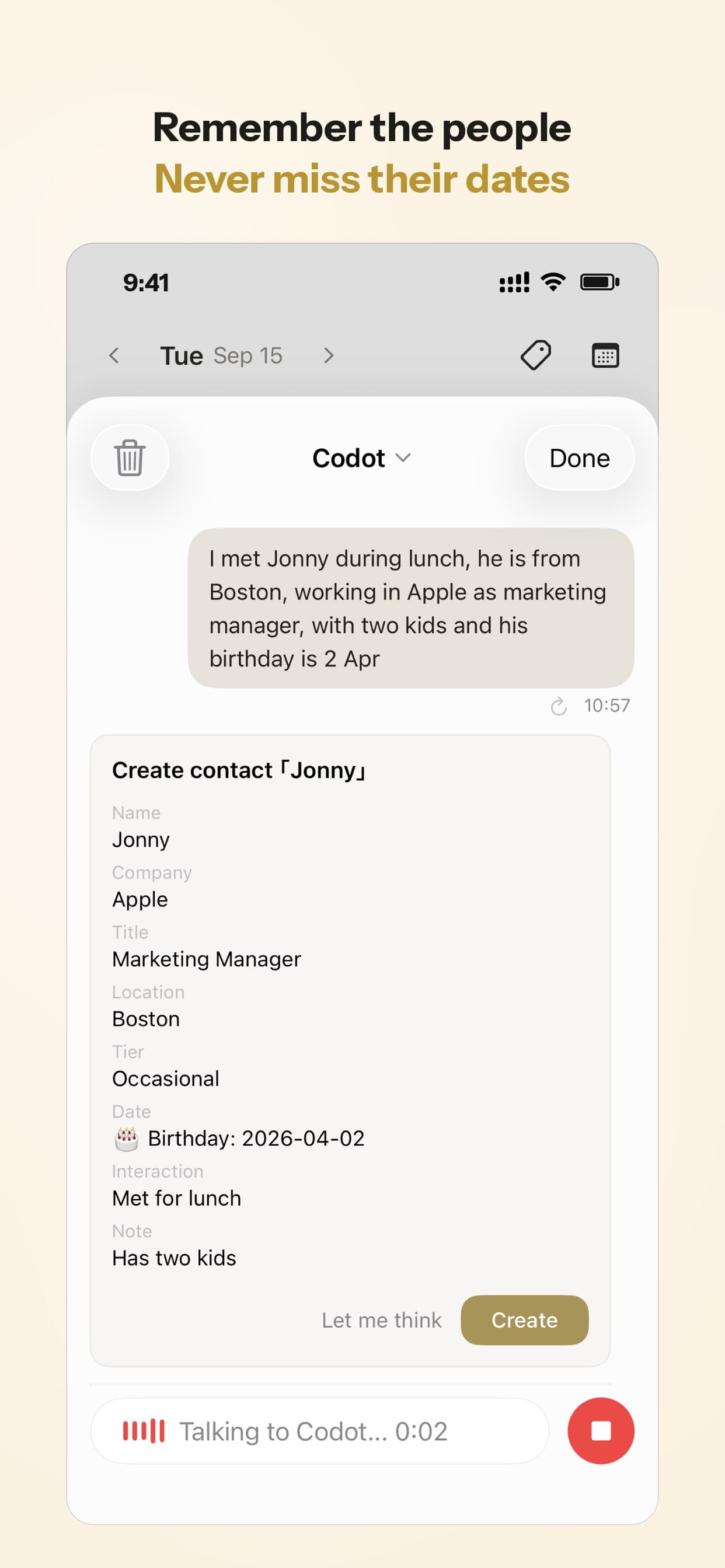
"Just met Dana Ruiz at 14 Elm. She wants the hall bath gutted, budget around eighteen thousand, her husband signs off. She prefers texts. Send her the estimate by Thursday, and block an hour Wednesday night to write it."
Codot saves Dana as a contact with those details, creates a task "Send Ruiz estimate" due Thursday, and puts a one-hour block on Wednesday evening in your calendar (it syncs with Google Calendar and, on iPhone, Apple Calendar). Thursday morning, the daily brief lists the estimate. When Dana calls back in March about the kitchen, her notes are still on her contact.
You can say it from an iPhone, an Apple Watch, the iPhone Lock Screen widget, an Android phone or the web, and it understands Spanish and most other major languages.
Price: Codot's free plan covers tasks, the calendar, notes, the personal CRM, habits, calorie logging and expenses, so the contact, the Thursday task and the Wednesday block above are free. Reminders at a set time, repeating tasks, the daily brief, scheduled automations and email triage are part of Codot Max ($12.99 a month or $99.99 a year, with 20x the free plan's usage). Every new account gets 7 days of Max free, then drops back to the free plan without charging you.
What Codot doesn't do
Codot's CRM remembers people, conversations and follow-ups. It is not a business CRM. It has no sales pipeline, no estimates or quotes, no invoicing or payments, no job costing, no crew dispatch, and no customer portal. Once estimates take real time each week, add one of the job tools below; Codot can still be where lead details get captured first.
Jobber: the default pick for service contractors
Jobber's flow is request, quote, job, invoice, with a "client manager (CRM)" holding everyone's history. Core is $29 a month billed annually ($49 month to month) for one user and covers quotes, scheduling and invoices. The part that fixes forgotten follow-ups, automated quote and invoice follow-ups, starts on Connect at $99 a month billed annually for one user. Extra users are $29 each, and there's a 14-day trial of Grow without a credit card (Jobber pricing, as of November 3, 2026).
For painters and electricians doing many short jobs, this is where we'd start. Budget for Connect if chasing quotes is your real problem; Core alone won't chase anyone.
Housecall Pro: same ground, home-services flavor
Housecall Pro covers similar territory with a home-services focus. Basic is $59 a month billed annually ($79 monthly) for one user, Essentials $149 for five users, Max $299 for eight. There's no free plan, but a 14-day trial of Max with no card (Housecall Pro pricing, as of November 3, 2026).
Run a real week of your own leads through it and Jobber's trial; pick the one you actually open from the truck.
JobNimbus: built around roofing and exterior work
JobNimbus comes up in nearly every roofing CRM roundup we read, for its board-style lead and job tracking aimed at roofing and exterior contractors. It doesn't publish prices; you request a quote. We couldn't load its pricing page from our location on November 3, so confirm plan limits and the trial length directly with them.
Your ideas shouldn't wait for a keyboard. Just say it — Codot handles the rest.
Try Codot — It's Free →JobTread and Buildertrend: for general contractors and remodelers
A GC's CRM has to feed estimating, budgets and change orders, because a remodel lead turns into a months-long project with subs. Both tools below do that.
JobTread is one plan with every feature: $199 a month with one internal user included, then $20 per user per month for users 2–10 (cheaper per user at higher counts, and 20% less on annual billing). Vendor, subcontractor and customer-portal users are free. It includes lead management, estimating, job costing and scheduling. There's no free plan or trial; monthly plans come with a 30-day money-back guarantee (JobTread pricing, as of November 3, 2026).
Buildertrend prices by custom quote based on your business, includes unlimited users and its lead management in every plan, and offers demos instead of a free trial (Buildertrend pricing, as of November 3, 2026).
Our read: JobTread's published price makes it easier to evaluate for a small remodeler. Buildertrend's unlimited users matter once you have a team of project managers.
HubSpot and Pipedrive: general CRMs, if you mostly sell
Neither does trade estimates, scheduling or invoicing. They fit contractors who sell bigger jobs through a longer sales process and already have field tools.
HubSpot's free CRM is free for up to 2 users and includes the HubSpot mobile app; the free account is capped at 1,000 contacts. Starter lists at $20 per seat per month, discounted for new customers to $7 a month on annual billing or $10 monthly (HubSpot pricing, as of November 3, 2026). For a two-person outfit that just needs a shared list of leads, it's the best free option we found.
Pipedrive has no free plan, but a 14-day trial with no card. Lite is $14 per seat per month billed annually; Growth ($39) adds email sync and automated follow-up sequences; Premium ($59) adds quotes, proposals and e-signatures (Pipedrive pricing, as of November 3, 2026). Pipedrive is built around a sales pipeline, which suits a commercial contractor bidding jobs more than a roofer with 40 open leads.
For Australian tradies: Tradify, ServiceM8 and Fergus
The US tools work in Australia, but these three are built there and price in AUD (all as of November 3, 2026):
- ServiceM8 has a free plan for one user and 30 jobs a month. Starter is A$29 a month including GST for 50 jobs and unlimited users; Growing is A$79 for 150 jobs. Paid plans have a 14-day trial (ServiceM8 pricing). Pricing by job count rather than per user suits a sole trader with a helper.
- Tradify is A$48, A$52 or A$62 per user per month (Lite, Pro, Plus) excluding GST, month to month, with a 14-day trial (Tradify pricing).
- Fergus starts from A$53 a month for Essentials and from A$77 for Professional, with monthly billing, no lock-in and a 14-day trial without a card (Fergus pricing).
Side-by-side
| Starting price (as of Nov 3, 2026) | Free option | Estimates / invoices | Best for | |
|---|---|---|---|---|
| Codot | Free plan; Max $12.99/mo or $99.99/yr (20x usage) | Yes: tasks, calendar, notes, CRM, habits (no reminders at a set time, briefings, automations or email triage); 7-day Max trial | No (contact notes, tasks, calendar by voice) | Solo contractor who forgets follow-ups |
| Jobber | $29/mo (annual), follow-ups from $99 | 14-day trial | Yes | Service trades |
| Housecall Pro | $59/mo (annual) | 14-day trial | Yes | Home services teams |
| JobNimbus | Quote | Not verified | Yes (estimates) | Roofing, exteriors |
| JobTread | $199/mo + $20/user | 30-day money-back | Yes, plus job costing | GCs, remodelers |
| Buildertrend | Quote, unlimited users | Demo only | Yes | Builders with PM teams |
| HubSpot | Free (2 users) | Yes | No trade estimates | Two-person shops, sales-led |
| Pipedrive | $14/seat (annual) | 14-day trial | Quotes from $59 | Commercial bidding |
How we'd choose
- You work alone and leads die in your head: start with Codot. The free plan covers contact notes, tasks and calendar, and it fixes the step before any CRM. Add Jobber when estimates take real time each week.
- Painter, electrician or plumber with a small crew: Jobber on Connect, or Housecall Pro if its trial feels better.
- Roofer: get a JobNimbus quote and compare it with Jobber.
- Remodeler or GC: JobTread if you want a published price, Buildertrend for a bigger team.
- Two people, need a shared lead list, no budget: HubSpot free.
- Australia: ServiceM8's free plan to start, Tradify or Fergus once you're quoting weekly.
If scheduling is your bigger headache than leads, we compared those tools separately in contractor scheduling apps. If you're weighing hiring help, see virtual assistant for contractors. For the personal-CRM approach in more depth, read our personal CRM guide.
FAQ
Is there a free CRM for contractors?
Yes. HubSpot's CRM is free for up to 2 users, ServiceM8 (Australia) has a free plan for 30 jobs a month, and Codot's free plan covers contact notes, tasks and calendar (timed reminders, daily briefs, automations and email triage need Codot Max). Jobber, Housecall Pro, JobTread, Buildertrend and Pipedrive are paid.
What is the best CRM for general contractors?
One that feeds estimating and job costing. JobTread (from $199 a month) and Buildertrend (custom quote) both do. A general sales CRM like HubSpot or Pipedrive will leave you retyping leads into your estimating tool.
What CRM do roofing contractors use?
JobNimbus is the most common recommendation for roofing and exterior work. Jobber is a reasonable alternative if you also do service jobs. Get quotes from both.
How is Codot different from Jobber?
Jobber runs the business side: quotes, jobs, invoices, payments, and automated quote follow-ups on Connect and above. Codot catches what you say on site and turns it into a contact note, a follow-up task and a calendar block, making it easy to log every mower by voice and answer customer status calls in seconds. Many solo contractors could use both.
Do I need a CRM if I'm a one-person business?
You need a reliable way to follow up. At a few estimates a week, a voice assistant plus a calendar can be enough; once you're retyping customer details into three places, move to Jobber or similar.
If you want to stop losing leads between the driveway and the evening, try Codot on the App Store or Google Play.
Founders & Professionals Desk
This article was created with AI assistance and reviewed by our editorial team.Learn about our content process.