Apps for Tradies (2026): Job Software for the Office, a Voice Assistant for the Site
Best app for tradies in 2026? Job software handles quotes and invoices. Here's what ServiceM8, Tradify and others cost, and what to use for everything said on site.
For quotes, scheduling and invoices, most tradies use job management software such as ServiceM8 (free plan, paid from A$29 a month) or Tradify (from US$47 per user a month). Those apps don't catch what gets said on site. A voice assistant like Codot does that part, turning "measure the Becker bathroom Monday, quote by Wednesday" into tasks, calendar events and client notes.
TL;DR:
- Job management software runs the business side. ServiceM8, Tradify and, in Germany, plancraft and Craftnote handle quotes, job cards, scheduling and invoices. Prices below are from each company's pricing page, checked October 31, 2026.
- The leak is between the site and the van. Promises made in a driveway ("I'll send the quote Friday", "she wants matte tiles") rarely make it into the job software while your hands are full.
- Codot catches that part. It's our product, so weigh this accordingly. You say one sentence; it becomes tasks with times, calendar events and notes on the client. It understands English and German.
- Codot doesn't quote, invoice or dispatch. Use it alongside your job software, not instead of it.
Codot, a voice-first personal AI assistant, is our product. None of us is a tradie, and we haven't run a business on ServiceM8 or Tradify, so we don't rank them against each other. What we can tell you is what each one is built for, what it costs, and where a voice assistant fits.
Picture a bathroom renovation on a Monday morning. You're on your knees measuring the floor, the client leans in the doorway and says she'd rather have matte tiles, and could the quote come by Wednesday. You say "no worries." By the time you're back in the van, two more calls have come in, and the matte tiles are gone from your head. That gap, between hearing something on site and getting it into a system, is what this article is about.
What do the main tradie apps do, and what do they cost?
Most "best app for tradies" lists are about job management: quoting, scheduling, job cards, invoicing and payments. Here's what the common ones cost as of October 2026:
| App | Built for | Price (October 2026) | Voice capture on site |
|---|---|---|---|
| ServiceM8 | Job management for sole traders and small teams (AU) | Free plan; paid from A$29/month incl. GST | Not its focus |
| Tradify | Quotes, jobs and invoices for small trade teams (AU/NZ) | From US$47 per user/month; 14-day trial | Not its focus |
| plancraft | Quotes and invoices for German trades businesses | From €59.90/month (annual, excl. VAT) | Not its focus |
| Craftnote | Site documentation and team chat (Germany) | Site licence €14.90 per user/month (annual, excl. VAT); 30-day trial | Not verified |
| Speakwise | Voice notes turned into summaries and lists (German market) | Paid App Store subscription; price not verified | Yes, its main feature |
| Codot | Personal voice assistant: tasks, calendar, client notes | Free plan: tasks, calendar, client notes; reminders at a set time and the morning briefing are Max (7-day free trial); Max $12.99/month or $99.99/year (20x usage) | Yes, in English and German |
Sources: ServiceM8 pricing, Tradify pricing, plancraft prices, Craftnote prices. Speakwise publishes its own comparison on its blog, which ranks itself first, so treat it as the vendor's view.
If you send more than a few invoices a week, you want one of the first four. None of them is designed to be talked to while you're holding a tile cutter.
Where do jobs actually leak?
The information that gets lost is rarely the big stuff. The job is booked, the address is in the system. What slips is the small talk that turns into obligations:
- "Can you also look at the tap in the laundry while you're here?"
- "Quote by Wednesday, we're getting two others."
- "Use the side gate, the dog's out the front."
- The supplier saying the adhesive is back in stock on Thursday.
Typing any of that into job software means stopping, wiping your hands and finding the right job card. Most people decide to remember it instead. Voice notes are the obvious fix, but a pile of recordings is just a second inbox you have to play back at night.
Codot: say it on site, find it sorted later
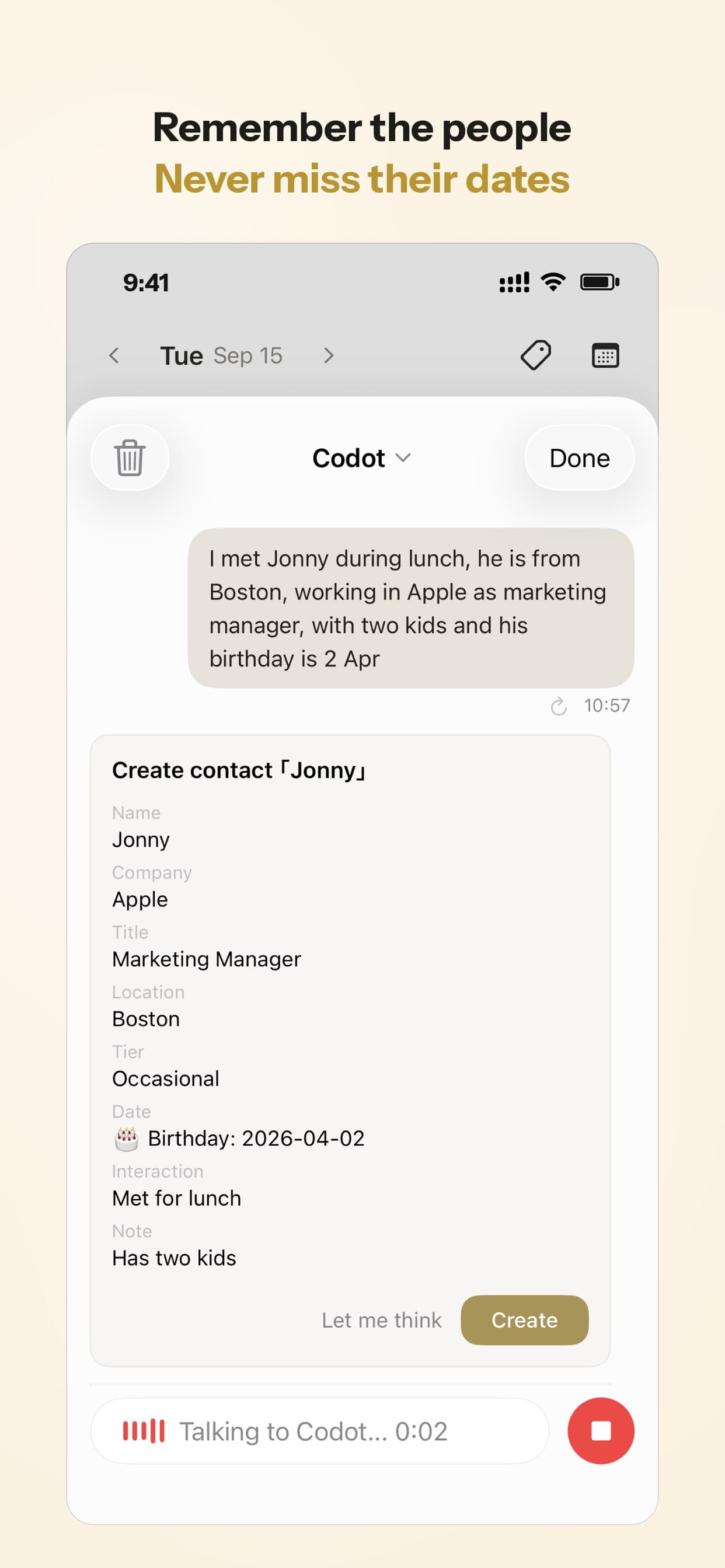
Codot is a personal AI assistant you talk to. You say what just happened, in one go, and it does the sorting: tasks with due times, calendar events, notes, and details saved to the person you were talking about. It works on iPhone (including a Lock Screen widget and Apple Watch), on the web, and there's an Android app on Google Play. Codot writes your tasks and events into Google Calendar, and on iPhone a briefing each morning lists what's due that day.
What you could say
You talk the way you'd talk to an apprentice:
- "Monday 7:30, Becker job: measure the bathroom, bring the tile adhesive. Quote to her by Wednesday, she wants matte tiles."
- "Move the Schmidt job to Thursday, the screed isn't dry yet."
- "Note on Mrs Yilmaz: side gate, dog in the front yard, wants a walk-in shower."
The first sentence holds an appointment, a materials reminder, a deadline and a client preference. The second moves something already in your calendar. The third is stored with the client, so it's there next time her name comes up. If you work in German, say it in German; Codot understands both (though Siri in Polish is still not available as of late 2026).
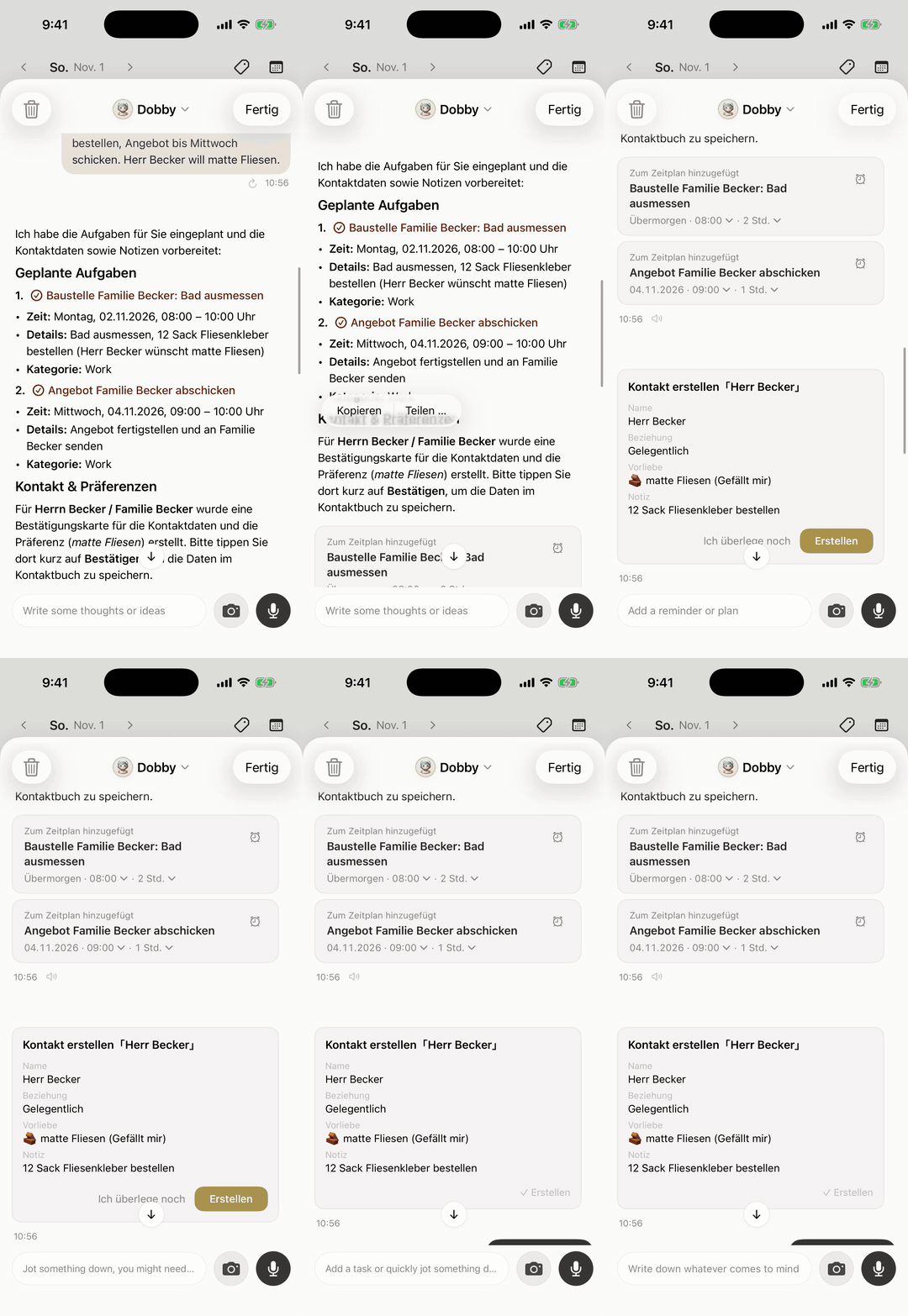
Here is what that looks like. We typed one German sentence into the iPhone app ("Monday 8 o'clock, Becker site: measure the bathroom, order 12 bags of tile adhesive, send the quote by Wednesday. Mr Becker wants matte tiles."). Codot answered in German, put "measure the bathroom" on Monday from 8:00 with the adhesive and the tile preference in the details, put "send the quote" on Wednesday morning, and offered a contact card for Mr Becker with "matte tiles" saved as his preference.
What Codot can't do
Codot doesn't write quotes, send invoices, take payments, track timesheets, dispatch staff or let customers book you. It doesn't connect to ServiceM8, Tradify, plancraft or Craftnote, so if the quote has to go out through your job software, Codot's job is to remind you to do it on time. It doesn't browse websites or order materials for you. It can mishear an unusual surname or a product code, so check what it created the first few times. On Android I haven't verified that every iPhone shortcut, such as the Lock Screen widget, has an equivalent.
On price: Codot's free plan covers tasks, the calendar, notes, client notes in the personal CRM, habits, calorie logging and expenses. Reminders at a set time, repeating tasks, the morning briefing and scheduled automations are part of Codot Max, which costs $12.99 a month or $99.99 a year on the App Store, with 20x the free plan's usage. Every new account gets 7 days of Max free, then drops back to the free plan without charging you. Data is encrypted and never sold.
Your ideas shouldn't wait for a keyboard. Just say it — Codot handles the rest.
Try Codot — It's Free →How I'd set it up as a one-person trade business
My suggestion for a sole trader, starting from nothing:
- Pick job software for the money side. If you're in Australia and starting out, ServiceM8's free plan is the cheapest way to try proper job cards. In Germany, plancraft and Craftnote both offer trials.
- Put Codot on the Lock Screen, so you can talk to it without unlocking with dusty hands. The setup is the same as in putting a to-do list on your iPhone Lock Screen.
- Say things the moment you hear them. Client preferences, promised deadlines, materials to grab. One sentence each, or all of them at once.
- Read the morning briefing before the first job. On iPhone, it lists what's due today, including the "send quote" reminders you made on site.
- Do the paperwork in one block. At the end of the day, go through what Codot captured and turn it into quotes and invoices in your job software.
If you mostly work with your phone in a pocket, an Apple Watch helps; I compared options in Apple Watch to-do list apps.
How to choose
- You need quotes, invoices and job cards: job management software. ServiceM8 if you want a free start in Australia; Tradify if your team wants per-user scheduling; plancraft or Craftnote in Germany.
- You only want recordings turned into text: Speakwise or your phone's built-in voice memos. You'll still have to move the results into your calendar yourself.
- You want what you say on site to turn into reminders, calendar entries and client notes without touching a list: that's what Codot does. Other voice-first options are compared in the best voice to-do list apps for iPhone.
- You keep forgetting things about people (who has the dog, who wanted matte tiles): see how a personal CRM without the CRM work works.
FAQ
What is the best app for tradies in Australia?
For running jobs, ServiceM8 and Tradify are the names that come up most often in Australian comparisons. ServiceM8 has a free plan and paid plans from A$29 a month; Tradify starts at US$47 per user a month on its pricing page. Try two with your own quoting workflow before committing.
Is there a free app for tradies?
ServiceM8 has a free plan. Most German Handwerker software offers trials rather than a free tier. Codot has a free plan for voice capture, tasks and the calendar, not invoicing; reminders at a set time and the morning briefing are part of Codot Max, which every new account can try free for 7 days.
Can I just use voice memos?
You can, and they're free. A recording isn't a reminder, though: nothing pings you on Wednesday to send the quote unless you play the memo back and set it up yourself.
How is Codot different from job management software like ServiceM8 or Tradify?
Job software is where quotes, jobs and invoices live. Codot is where the things you say on site go first: it turns one spoken sentence into tasks with times, calendar events and client notes, and reminds you each morning. Most tradies who'd use Codot would keep their job software too.
Does Codot understand German?
Yes. Codot understands spoken German as well as English, so a Handwerker can talk to it in German on site.
If you're tired of losing the small promises made on site, try saying your next one to Codot on the App Store.
Field & Trades Desk
This article was created with AI assistance and reviewed by our editorial team.Learn about our content process.