Bill Reminder App for Couples (2026): Apple Reminders, Google Calendar, Honeydue, Chronicle and Codot Compared
A bill reminder app for couples has to stop one partner from carrying every due date. Apple Reminders, Google Calendar, Honeydue, Chronicle and Codot compared.
Use Codot when one partner is tired of carrying every due date: say each bill once by voice and Codot sets the repeating reminder and sends it to the partner who pays (timed reminders need Codot Max, $12.99/month). Apple Reminders is the free option on two iPhones, though alert times are not shared. Honeydue is a free iPhone couples finance app with bank linking; Chronicle is a bill organizer with a $14.99 Pro plan.
Disclosure: Codot is our product. Prices, ratings and features for the other apps come from their US App Store listings and official help pages, checked November 4, 2026.
TL;DR:
- Most couples who split bills still have one "bill person" who holds every due date in their head. A good setup moves the dates out of that head and gets the right bill to the right partner.
- Codot is a voice assistant. You say "remind me on the 1st of every month at 9am to pay rent" and it sets the repeating reminder; it can also send you a Sunday list of what's due and hand a bill to your partner by name. Timed and repeating reminders are part of Codot Max.
- Apple Reminders is free and lets you share a list and assign a bill to your partner. Apple notes that the alerts you set "aren't shared with anyone else", so your partner sets their own.
- Google Calendar is free on iPhone and Android and handles repeating bills, but each person's notifications are personal to their account.
- Honeydue is a free iPhone couples finance app with bill reminders and bank linking. Chronicle is a dedicated bill organizer with a $14.99 Pro subscription and partner sharing through Chronicle Cloud.
At a glance
| App | Best for | Price (as of Nov 2026) | Platforms | Main limit | Source |
|---|---|---|---|---|---|
| Codot (ours) | Saying a bill once by voice; weekly due-soon list; assigning a bill to your partner | Free plan; timed and repeating reminders, briefings and automations need Codot Max at $12.99/month or $99.99/year; 7-day Max trial for new accounts | iPhone, Apple Watch, Android, Web (the daily briefing is iPhone only) | Bills are said once by voice rather than pulled from a bank | App Store |
| Apple Reminders | Free shared bill list on iPhone with assignees | Free | iPhone, iPad, Mac | Alerts you set are not shared with your partner | Apple Support |
| Google Calendar | Free repeating bill events for mixed iPhone and Android couples | Free | iPhone, Android, Web | Each partner sets their own notifications | Google Calendar Help |
| Honeydue | Couples who want balances, budgets and bills in one finance app | Free; optional monthly tips $0.99 to $9.99 | iPhone (listing says "Only for iPhone") | Built around linking bank accounts | App Store |
| Chronicle | A dedicated bill organizer without bank linking | Free; Chronicle Pro $14.99 auto-renewing subscription | iPhone, iPad, Mac | Partner sharing runs through Chronicle Cloud, a Pro feature | App Store |
Why one partner ends up remembering every bill
Maya and Sam split the bills down the middle. Rent is due on the 1st. Car insurance comes every quarter. The daycare invoice lands every other Friday, and a streaming subscription renews once a year in March. On paper they share all of it, but Maya is the one who wakes up on the 30th thinking about rent, and when the insurance renewal slips, she's the one on the phone asking for the late fee to be waived.
Sociologist Allison Daminger calls this the cognitive side of household labor: anticipating what's coming and monitoring whether it got done (Harvard Kennedy School summary). A bill app helps when it takes over those two jobs. A shared spreadsheet of due dates does neither, because someone still has to open it. (We covered the same pattern for family schedules in our family organizer app comparison.)
So the useful question for a couple is narrow: when a bill is three days out, whose phone tells them, and does the right person get it?
What is the best bill reminder app for couples?
Use Codot when the hard part is remembering, not paying. For everything else, pick by what breaks in your house.
Codot is our pick when the bill person is tired of being the bill person, and typing each bill into a form is the step that never happens. You say the bill out loud once, Codot sets the repeating reminder, and it can hand a bill to your partner by name. Codot handles the remembering and the reminders; your bank still pays the bills and shows balances, and each partner uses their own Codot account.
Apple Reminders works if you both have iPhones and want something free today. Share a list called "Bills", add each bill with a due date and a repeat, and assign it with the Assignment button or by typing @ and a name. Two details from Apple's support page matter here: "You can only assign a reminder after you have shared that reminder list," and "Notifications that you set for your reminders aren't shared with anyone else." In practice the person who set the alert gets it, and the partner needs to set their own. If alerts arrive silently, our iPhone Reminders troubleshooting guide covers the usual causes, and if the Bills list isn't updating on your partner's phone, here's why shared reminders stop syncing.
Google Calendar is the free choice when one of you is on Android. A repeating event on a shared calendar covers rent and the quarterly insurance bill (recurring events). Google's help page says your specific settings "don't affect the notifications of others who have access to the calendar" (Google Calendar Help), so again each of you sets alerts separately. A calendar event also has no "done" state, which makes it hard to see whether the insurance actually got paid.
Honeydue is a couples finance app. Its App Store listing describes tracking "your balances, budgets and bills together" and choosing "how much you share with your partner." It's free with optional tips, iPhone only according to the US listing, and rated 4.5 from about 10K ratings. It fits couples who are comfortable linking bank accounts and want spending and bills in the same place.
Chronicle is a classic bill organizer, rated 4.8 from about 3.9K ratings on the US App Store. It doesn't describe bank linking. You enter each bill and its interval, and it "reminds you to pay your bills." Sharing bills with a partner runs through Chronicle Cloud, which is part of the $14.99 Pro subscription.
Your ideas shouldn't wait for a keyboard. Just say it — Codot handles the rest.
Codot for a two-person bill routine: four moments
Codot Max covers the timed and repeating reminders, the briefing and the scheduled list. Expense logging is free.
Sunday 9:40 pm, on the couch: setting up the four bills in two minutes
Maya opens Codot and says four sentences:
- "Remind me on the 1st of every month at 9am to pay rent."
- "Remind me every three months on the 15th at 8am to pay the car insurance, starting January 15."
- "Remind me every other Friday at 8am to pay the daycare invoice."
- "Remind me on March 1 every year to check the streaming renewal before it charges."
Each sentence becomes a repeating task with its own time. On the 1st at 9:00, the rent reminder shows up on her lock screen. If she's busy, she can say "move rent to 6pm" and it moves.

The annual streaming renewal is the one nobody remembers, because there's no monthly habit around it. A reminder before the charge gives you time to cancel or switch plans.
Friday 7:50 am, at daycare drop-off: handing the invoice to Sam
The daycare invoice is Sam's this month. Standing in the parking lot, Maya says: "Remind Sam to pay the daycare invoice today at noon."
Because Maya and Sam have added each other as friends, Maya taps Confirm once on the share card and the task goes to Sam's own Codot with the noon time on it. Sam sees it on his list and gets the reminder at noon. Maya doesn't have to text him, and she doesn't have to check later. When Sam marks it done, it's done for both of them.
Adding each other as friends and handing a bill to your partner are on the free plan, and an assigned bill can repeat: "Remind Sam every other Friday at noon to pay the daycare invoice."
Monday 7:15 am, the morning briefing: bills due this week
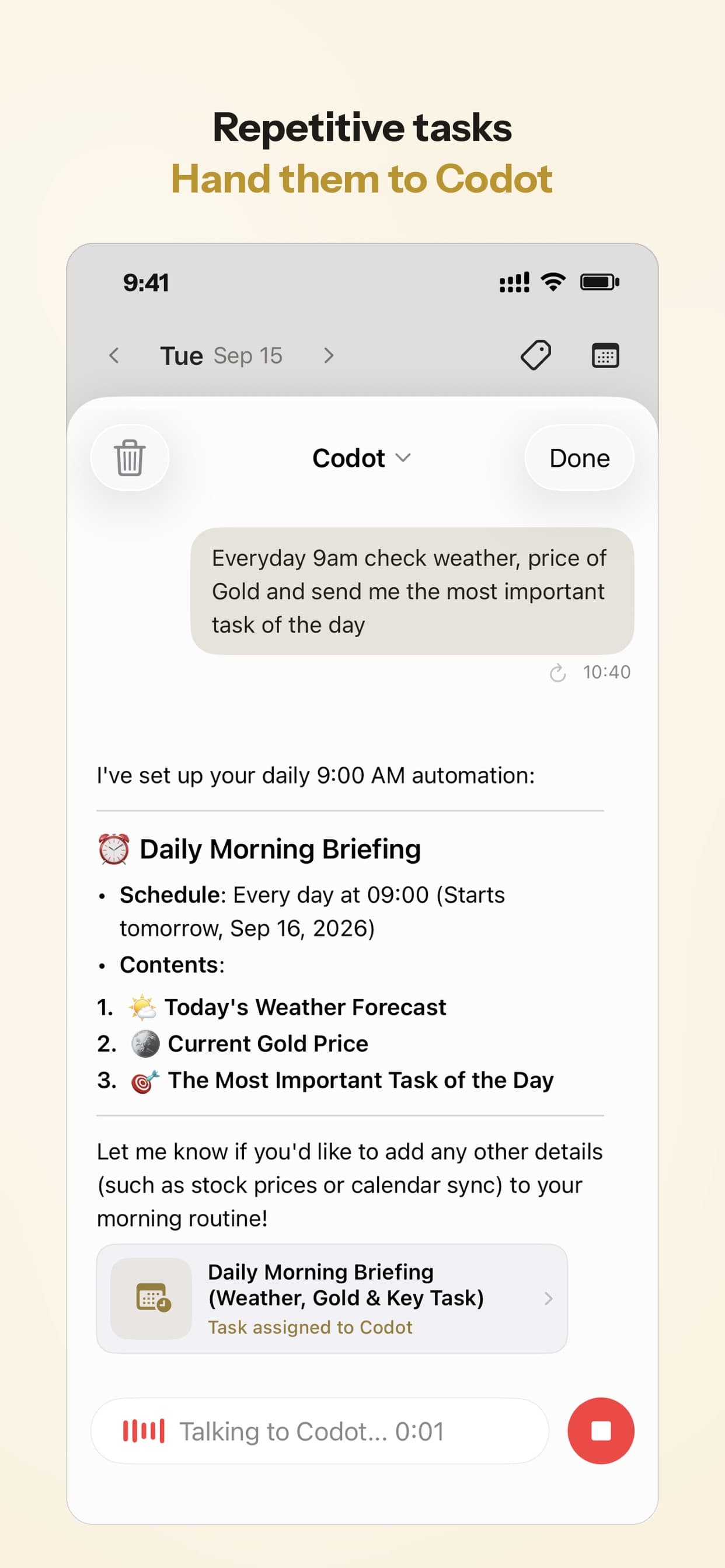
Maya's daily briefing arrives on her iPhone before she leaves the house. Alongside today's tasks and calendar events, it lists the reminders coming up, so on the last Monday of the month it reads roughly like this: rent due Saturday the 1st at 9am, daycare invoice Friday (assigned to Sam), dentist at 4pm today.
Nobody had to open a bill app; the bills sit in the summary she already reads with her coffee.
Sunday 7:00 pm, every week: "what's due in the next 7 days"
The briefing covers one day. For the week ahead, Maya set up a scheduled automation once: "Every Sunday at 7pm, list what's due in the next 7 days."
Every Sunday at 7, Codot runs that and sends the list. It's the weekly money check-in couples rarely get around to, already compiled. If the quarterly insurance is coming, it shows up there a week early, with time to move money between accounts.
After paying: logging what went out
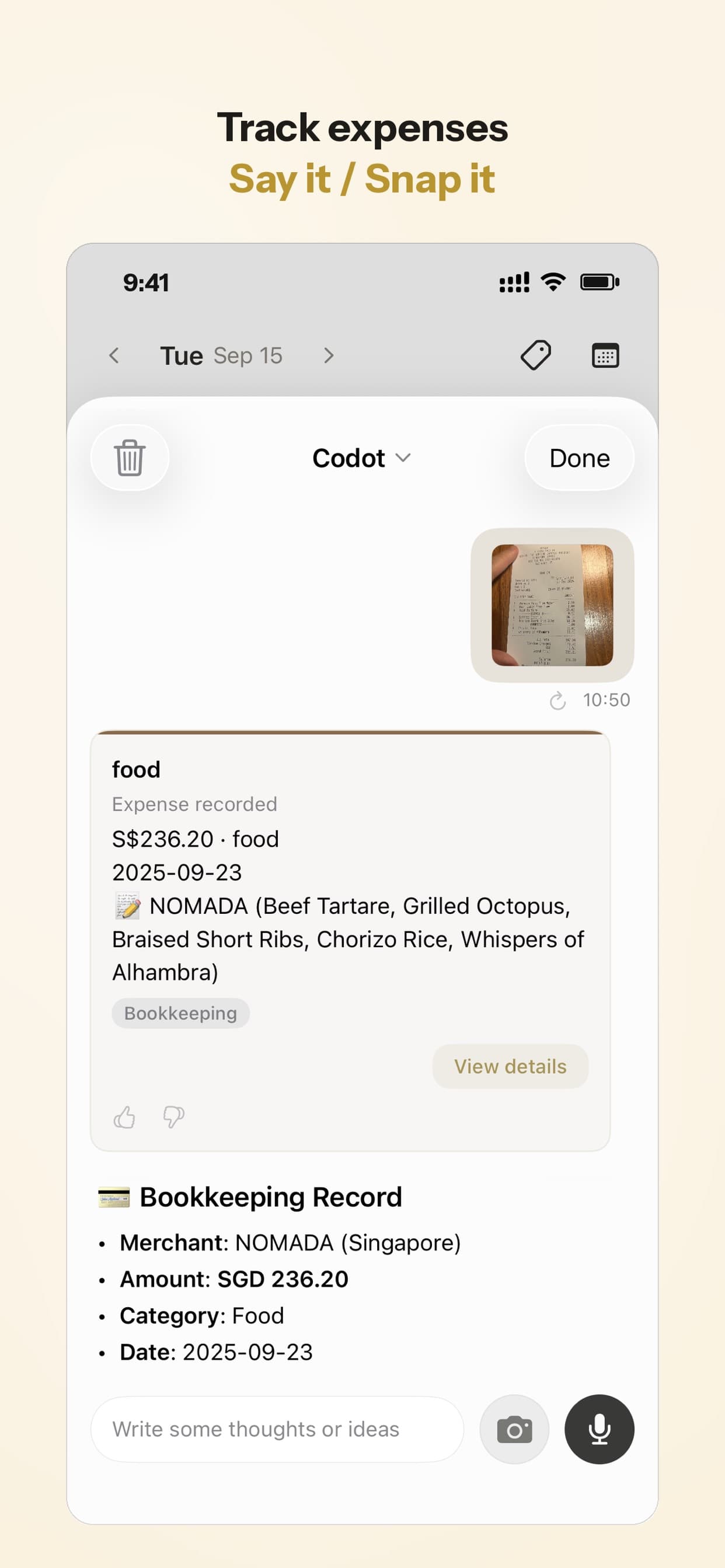
When Sam pays the invoice, he says "Paid daycare, $640, from the joint account." Codot logs it as an expense record. You can also photograph a paper bill or receipt and Codot turns it into a record. Expense tracking is in the free plan and supports multiple currencies, so a couple can look back at what actually went out each month without a separate budgeting app.
How to set it up in 5 minutes
- Install Codot on both phones (App Store or Google Play). New accounts start with a 7-day Codot Max trial.
- Add each other as friends in Codot.
- Say each recurring bill once with its day and time: "Remind me on the 1st of every month at 9am to pay rent."
- For bills that belong to your partner, say their name: "Remind Sam on the 15th at 8am to pay the car insurance."
- On iPhone, turn on the daily briefing so bills due soon show up in your morning summary.
- Add one automation: "Every Sunday at 7pm, list what's due in the next 7 days."
- After paying, say what you paid and how much so it's logged as an expense.
On iPhone, Codot can also put tasks into Apple Calendar and Apple Reminders, so the bills show up where you already look; tick them off in Codot.
What does Codot cost for a couple?
The free plan covers tasks, calendar, notes, voice input, expense tracking, and adding each other as friends to hand bills over. Timed and repeating reminders, the daily briefing and scheduled automations need Codot Max: $12.99/month or $99.99/year in the US App Store, with 20x the free plan's usage. After the 7-day trial, the account goes back to free and nothing is charged.
FAQ
What is the best free bill reminder app for couples?
Apple Reminders is the free option for two iPhones: share a "Bills" list, set repeats and assign each bill. Google Calendar is the free choice for mixed iPhone and Android couples; in both, each partner sets their own alerts. Codot's free plan lets you hand a bill to your partner by voice, with repeating reminders on Codot Max.
Is there a bill reminder app for iPhone that doesn't need my bank account?
Yes. Codot, Apple Reminders and Chronicle all work from bills you enter yourself; with Codot you just say each bill once, and it reminds whoever pays it.
Can my partner and I get the same bill reminder?
In Apple Reminders and Google Calendar, alerts are personal, so each partner sets their own, though there are other ways to send reminders to another iPhone. In Codot you can assign a bill to your partner by name ("remind Sam to pay the daycare invoice at noon") and it goes to their own Codot.
Is Codot free for bill reminders?
You can add bills as tasks and log expenses for free. Reminders at a set time and repeating reminders, like "the 1st of every month at 9am", are part of Codot Max ($12.99/month or $99.99/year). Every new account gets a 7-day Max trial with no charge afterward.
How is Codot different from Honeydue?
Honeydue is a couples finance app built around linking bank accounts and seeing balances, budgets and bills together. Codot is a voice assistant: you say a bill once, it reminds the right person at the right time, and it lists what's due each week.
If the bill person in your house is tired of being the bill person, try saying the four bills once. Get Codot on the App Store.
Productivity & Tools Desk
This article was created with AI assistance and reviewed by our editorial team.Learn about our content process.