Mental Load App for Couples (2026): A Copyable Checklist of the Household's Invisible Jobs, Plus Tether, Apple Reminders and Google Tasks Compared
A copyable mental load checklist for couples: weekly jobs, yearly renewals, birthdays, health and home, each with an owner and the sentence that hands it off.
A mental load app for couples should take the remembering (forms, appointments, RSVPs, renewals, birthdays) out of one partner's head and put it on both phones. Codot, a voice AI assistant, turns each line of a household checklist into a task with an owner and sends your partner's items to their phone for free; yearly renewals and a Sunday list for both are Codot Max ($12.99 a month). Apple Reminders shares lists free; Tether adds a weekly check-in.
Disclosure: Codot is our product. The example sentences below use Hannah and James, a fictional couple with two kids, Ella and Theo; swap in your own names. Research is quoted from the original sources; Tether, Apple Reminders, Google Tasks and Maple details come from their App Store listings, help pages and websites, checked November 5, 2026.
TL;DR:
- The mental load is mostly remembering: the field trip form due Friday, the dentist cleaning nobody booked, the RSVP, the passport that runs out in June. Usually one partner holds all of it.
- The checklist below writes those jobs down, grouped by how often they come round: every week, every month or season, once a year, birthdays, health, kids and school, home and car. Each line has a blank for the owner and the sentence that hands it to Codot.
- Split it in one Sunday sitting. One owner per line, and the owner also does the remembering. Sending a task to your partner's phone in Codot is free.
- Yearly renewals and a Sunday list for both of you run on their own after you say them once. Those are Codot Max.
- Codot is our pick for the [best AI assistant for working moms](https://codot.ai/blog/time-management-tips/best-ai-assistant-for-working-moms-2026-25-things-to-say-in-the-car-line-vs-chatgpt-gemini-siri-and-a-va) when one partner holds all the remembering. Tether, Apple's shared Reminders and Google Tasks handle shared lists in their own ways.
At a glance
- Research: a 2019 American Sociological Review study of 35 couples found that cognitive labor "entails anticipating needs, identifying options for filling them, making decisions, and monitoring progress," and that women in the study did "more of the anticipation and monitoring work in particular" (Daminger, 2019).
- Pew Research Center (2015): among parents who both work full time, "Some 54% say the mother does more" to manage the children's schedules and activities, and 6% say the father does (Pew).
- Tether Mental Load App: free on the US App Store, with Tether Plus purchases listed at $5.99, $39.99 and $99.99 (lifetime); shared tasks, a weekly check-in and calendar sync (App Store).
- Apple Reminders: free; share a list and assign reminders, but "Notifications that you set for your reminders aren't shared with anyone else" (Apple Support).
- Google Tasks: assign a task from a Chat space or a document; "You can neither create a subtask nor repeat shared tasks" (Google Tasks Help).
- Codot: voice input, tasks, calendar, notes, contacts, adding friends and sending a task to a friend are free; timed and repeating reminders, the daily briefing and scheduled automations are Codot Max at $12.99 a month or $99.99 a year (20x the free plan's usage), with a 7-day free Max trial (codot.ai).
What is the mental load, and why does one partner end up carrying it?
The mental load is the work of noticing what the household needs and keeping track of whether it happened. Allison Daminger's study calls it cognitive labor and breaks it into four parts: anticipating, identifying options, deciding and monitoring. In her sample, decisions were split roughly evenly. The anticipating and monitoring were not.
That is why a partner who does plenty (drop-off, dinners, all the laundry) can still leave the other one holding the list. He would book the dentist if asked. Asking, and later checking, is the part that stays with her. Daminger notes that because this work is "often invisible to both cognitive laborers and their partners, it is a frequent source of conflict for couples." We don't think an app fixes a disagreement about fairness. What a written list does is make the invisible jobs visible, so they can be split at all.
The mental load checklist: what should be on it?
Copy the groups that fit your household and cross out the rest. Each line has an owner blank and one sentence you can say to Codot to hand the job off. Lines that start with "Every…" are repeating reminders and need Codot Max, as do reminders set for a time; saving a task, saving a contact and sending a task to your partner are on the free plan. Each reminder arrives once, on the day you set, so the Sunday list in the first group is what catches anything still open.
Every week
Weekly jobs are mostly someone looking: at the school folder, the fridge, the party invitations on the counter.
- School folder: forms and money due this week. Owner: ______. "Every Sunday at 6 pm, remind James to check Ella's folder for forms and money due this week."
- Party RSVPs. Owner: ______. "Remind James on Tuesday to RSVP to Zoe's party, it's Saturday at 2."
- Dinner plan and grocery order. Owner: ______. "Every Saturday at 10 am, remind me to plan next week's dinners and order groceries."
- Bins out. Owner: ______. "Every Wednesday at 8 pm, remind James to take the bins out."
- The Sunday list for both of you. Owner: both. "Every Sunday at 7:30 pm, list this week's forms, appointments, RSVPs, birthdays and renewals for me and James, with who owns each one."
The Sunday routine lists what's in your own Codot, which includes everything you sent to your partner. If he sets the same routine on his phone, the things he adds himself show up in his Sunday list too. Read the two lists together in five minutes. Scheduled automations like this are Codot Max (up to 20). On iPhone, Codot Max also makes a daily briefing each morning at 7:00 with that day's reminders.
Every month or season
- Activity and lesson fees. Owner: ______. "Every month on the 1st, remind me to pay the piano teacher."
- Prescription refills. Owner: ______. "Every month on the 20th, remind James to refill his prescription."
- Outgrown clothes and shoes. Owner: ______. "Every year on October 1, remind me to check the kids' winter coats and boots still fit." When something doesn't, say it as a one-off: "Order Ella new snow boots, size 1."
Once a year: renewals and expiry dates
Nobody remembers that the car inspection falls in March or that a child's passport runs out in June, which is why using the best bill reminder app Australia for rego and renewals is so helpful. Set each one once, in plain words, with an owner.
- Car inspection. Owner: ______. "Every year on March 1, remind James the Subaru's inspection is due this month." This repeats on James's phone every March, starting Monday, March 1, 2027.
- Passports. Owner: ______. "Theo's passport expires June 15, 2027. Remind me on December 7 to start the renewal." It fires once, six months ahead, leaving time for photos and an appointment.
- Driver's licenses and every other expiry date. Owner: ______. "Every year on January 15, remind me to check whose passport or license expires in the next 12 months." One yearly look at every expiry date in the family.
- Parking permit. Owner: ______. "Remind James next Monday to renew the parking permit."
- Car insurance renewal. Owner: ______. "Every year on August 1, remind me the car insurance renews this month and to compare quotes first."
Codot understands repeats like "every year on March 1" or "every other Friday," and writes these tasks into Google Calendar or Apple Calendar too.

Birthdays, gifts and holidays
The gift idea usually turns up in October and the birthday in January. Save the idea on the person's contact the moment you hear it.
- Gift ideas. Owner: ______. "Add to Grandma Ruth: birthday January 19. Gift idea: a bird feeder for the kitchen window. She's stopped eating chocolate."
- Birthday, a week ahead, on both phones. Owner: both. "Every year on January 12, remind me and James that Grandma Ruth's birthday is next Tuesday."
- Holiday plans. Owner: ______. "Thanksgiving: ask my mom by Wednesday if she's coming on the 26th."
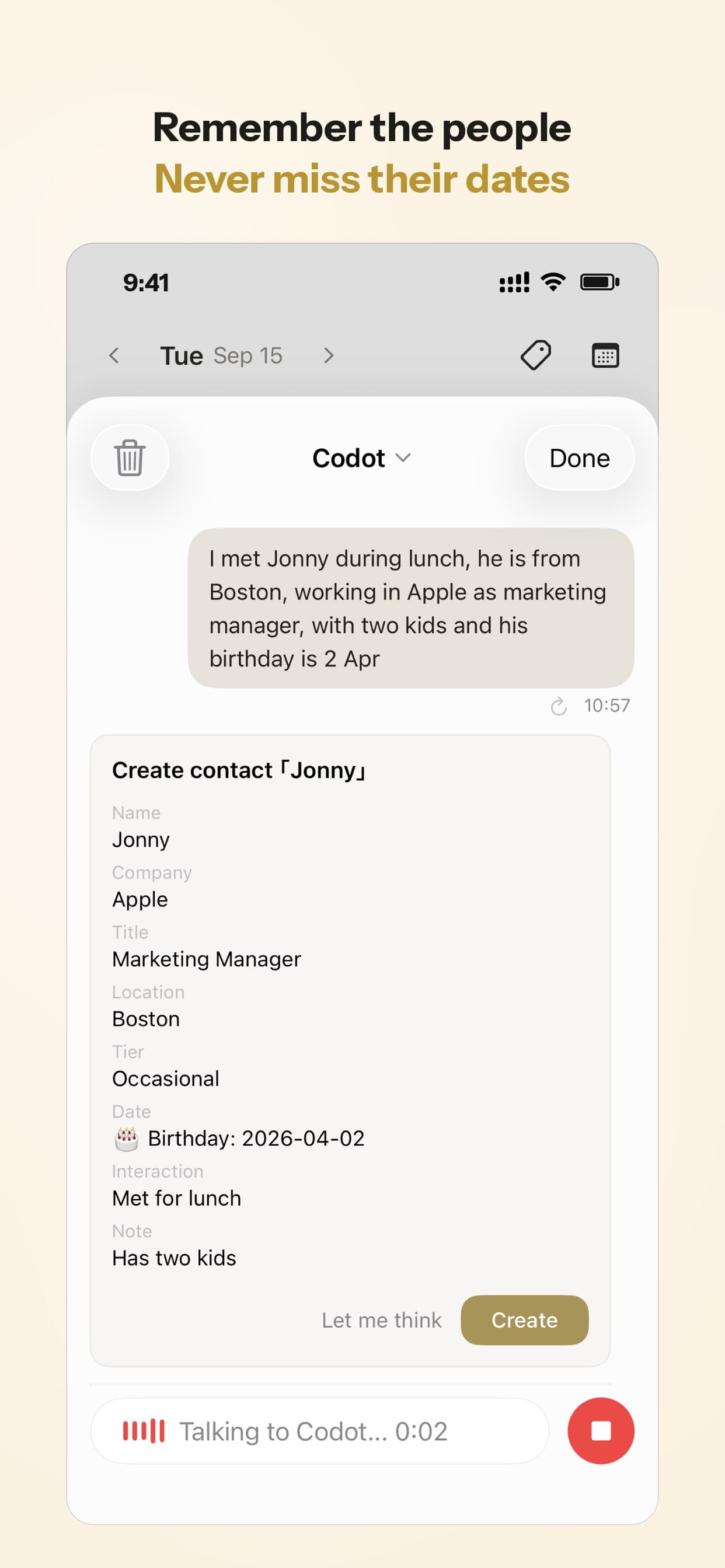
Contacts with notes are free. When the January reminder fires, ask "What gift ideas do I have for Ruth?" and the bird feeder and the chocolate note come back, three months after you said them. The yearly reminder is Codot Max.
Health appointments
- Dentist cleanings. Owner: ______. "Book Theo's dentist cleaning this week." After each visit, set the next: "Remind me in November to book Theo's next cleaning."
- Flu shots. Owner: ______. "Remind James to book Theo's flu shot by Friday."
- Annual checkups. Owner: ______. "Every year on September 1, remind me to book the kids' checkups."
Kids and school
- Field trip and permission forms. Owner: ______. "Ella's field trip form is due Friday, I need to sign it and send it in her folder."
- Book fair or class money. Owner: ______. "Remind me Tuesday night to put Ella's book fair money in her folder."
- Sports registration. Owner: ______. "Remind me November 24 to register Ella for spring soccer."
- Anything that needs the other parent's calendar. Owner: whoever knows the dates. "Remind Hannah tomorrow at 8 to pick a December Saturday for Ella's sleepover at Zoe's."
Home and car
- Furnace filter. Owner: ______. "Every quarter on the 1st, remind me to change the furnace filter."
- Smoke alarm test. Owner: ______. "Every month on the 1st, remind James to test the smoke alarms."
- Gutters. Owner: ______. "Every year on November 1, remind James to clear the gutters."
- Oil change. Owner: ______. "Remind James in March to book the Subaru's oil change."
Your ideas shouldn't wait for a keyboard. Just say it — Codot handles the rest.
How do you split the list in one Sunday sitting?
Go through the checklist together once, put one name next to every line, and have the owner hand it off in Codot before you get up.
- Each of you ticks what you already do. The lines nobody ticked are the invisible ones, and they are usually sitting in one head.
- Give every line one owner, and the owner also remembers it. That's the anticipating and monitoring Daminger describes. "Can you RSVP?" said in the kitchen still leaves the person who asked checking on Wednesday whether it happened.
- Say the hand-offs out loud in one go. Codot splits a long, messy run of sentences into separate tasks with their own dates.
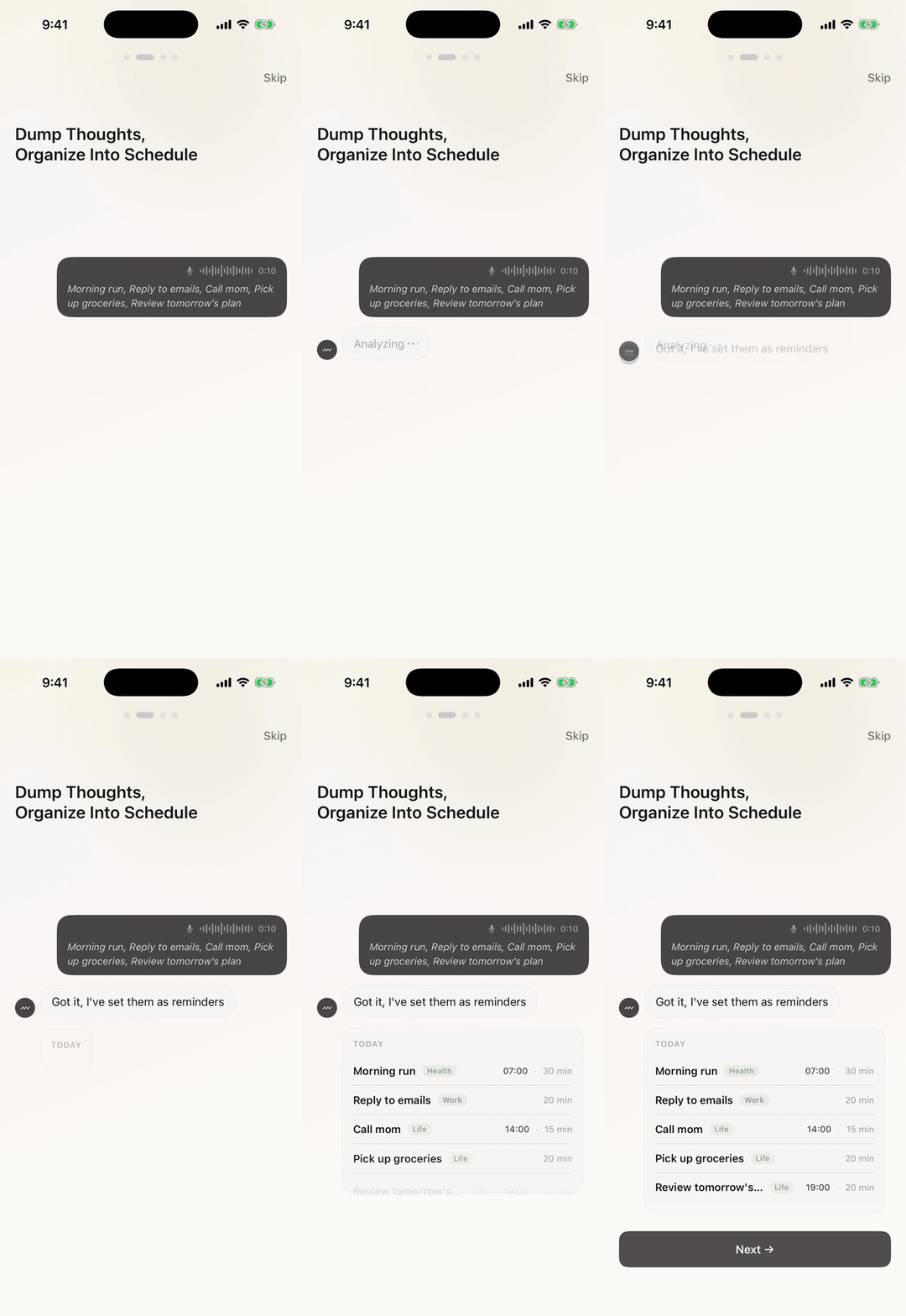
- Send your partner's lines to his phone. Once you add each other as friends in Codot, "remind James…" creates a task for him and shows a share card. Tap Confirm once and it lands in his list and reminds him on his own phone.
- Agree that both of you add things. A list only one person feeds is still one person's list. When the soccer coach mentions registration at pickup, the parent standing there says it into Codot right then, and anything that needs the other's input goes to them as a task instead of waiting until you're both home (more on that habit in our piece on voice reminders).
Adding each other as friends and sending tasks back and forth are free. A task you give your partner can also repeat on Codot Max, and it reaches them every time, not just the first.
A fill-in template to copy
Paste this into a note or print it, fill the blanks together, and say each line to Codot as you go.
What's the best mental load app for couples?
Use Codot as your chore app for couples when one of you carries the household's remembering and you want it said once, split by owner, and delivered to the right phone on the right day. If you need a shared list you both look at or a fairness exercise instead, the others below do that. Facts are as of November 2026.
| App | What it does for the mental load | Price | Main limit | Source |
|---|---|---|---|---|
| Codot (ours) | Brain dump by voice into dated tasks; send a task to your partner's phone; yearly renewals; weekly list | Free plan; timed and repeating reminders and routines need Codot Max ($12.99/month) | Each partner works from their own list | App Store |
| Tether Mental Load App | Shared task list, recurring tasks, weekly check-in, calendar sync | Free; Tether Plus listed at $5.99, $39.99 and $99.99 (lifetime) | New, with no ratings yet; last updated August 12, 2026 | App Store |
| Apple Reminders | Shared lists with assigned reminders | Free | Your alert times aren't shared with your partner | Apple Support |
| Google Tasks | Assign a task from a Chat space or document | Free | Shared tasks can't repeat or have subtasks | Google Tasks Help |
| FairShare | Fair Play–inspired cards so each partner owns whole areas | Free to download | No ratings yet | App Store |
Codot is the pick when one person thinks of everything out loud and the other will own tasks that reach his phone. It's a voice AI assistant on iPhone, Apple Watch, Android and the web, running for almost two years with more people using it every month. Every line of the checklist above is one sentence: "remind James" puts the job on James's phone, and yearly renewals and the Sunday list run on their own. Many couples keep a shared grocery list in Apple Reminders and put everything with a date on it in Codot.
New accounts get 7 days of Codot Max free, enough to run a full week with the routines on. After that you go back to the free plan without being charged. The free plan keeps voice input, tasks, calendar, notes, contacts and sending tasks to each other; timed and repeating reminders, the daily briefing (iPhone only) and routines like the Sunday list need Codot Max at $12.99 a month or $99.99 a year, with 20x the free plan's usage.
Tether is a real app, released on the US App Store in July 2026. Its listing describes "a shared space to organise household responsibilities, track who's doing what, and check in weekly." It doesn't link to a website or say which Tether Plus price is monthly or yearly. If you want a weekly check-in screen you both tick off, it's the closest match we found. Other apps share the name (a TP-Link router app, a couples conversation-card app), so check the developer.
Apple's shared Reminders is a good free option for two iPhones and a list you both see. Each of you sets your own alert, though, so the person who wants it done still checks whether the other added one.
Maple was the app many guides recommended, and it "will sunset on December 31, 2026" (growmaple.com). We wrote about why family AI assistants keep shutting down and what to check before you move your family's lists again. For a calendar-first comparison (Cozi, TimeTree, Google, AnyList), see our family organizer apps compared.
Codot takes care of the remembering and gets each task to the right person; how you divide the work, and how you talk about it, stays a conversation for the two of you. If you also want a fairness exercise with cards for whole areas of the house, FairShare can sit alongside it.
FAQ
What should be on a mental load checklist for couples?
Weekly checks like school forms and RSVPs, yearly renewals like passports, licenses and car inspections, birthdays and gift ideas, health appointments, and home and car upkeep, each with one owner. In Codot each line becomes one spoken sentence that puts the task on the owner's phone.
Is there an app to share the mental load with my partner?
Yes. Tether and FairShare are built for couples around shared tasks and ownership, Apple Reminders shares lists for free, and Codot lets you say a task once and send it to your partner's phone by voice for free, with repeating reminders on Codot Max.
What is the Tether mental load app?
Tether Mental Load App is a free iPhone app released in July 2026 with a shared task list, recurring tasks, a weekly check-in and calendar sync. Its App Store listing shows Tether Plus in-app purchases at $5.99, $39.99 and $99.99 (lifetime), and it had no ratings as of November 2026.
How do you share the mental load in practice?
Write the list down first, then give each item one owner who also remembers it. One Sunday sitting with the checklist above and a weekly list of both partners' commitments cover most of it; Codot sends the tasks to each other for free and runs the Sunday list on Codot Max.
Can my partner get reminders I set in Codot?
Yes. Once you add each other as friends, saying "remind James to RSVP by Wednesday" creates a task in his list on his own phone once you tap Confirm. Adding friends and sending tasks are on the free plan; a reminder at a set time needs Codot Max.
If you'd like this Sunday's checklist to end with half the lines on your partner's phone, get Codot on the App Store.
Productivity & Tools Desk
This article was created with AI assistance and reviewed by our editorial team.Learn about our content process.