Best Bill Reminder App Australia (2026): Rent, Power, Rego and the Phone Bill, Split Between Two by Voice
A bill reminder app for couples on iPhone: set each bill once by voice, send your partner theirs, log payments, and see how bank alerts and budget apps compare.
A couple can keep bills on different cycles straight by saying each one once as a repeating reminder, such as power every quarter on the 15th or the phone bill every month on the 25th. Codot, a voice AI assistant for iPhone, sets those reminders (Codot Max, A$19.99 a month in Australia), sends one partner's bills to the other's phone, and logs payments by voice for free. Use Codot when the problem is who pays which bill and when.
Disclosure: Codot is our product. Jess, Sam and their town are fictional, written to show how one household's bills could run through a month. Codot prices are from codot.ai and the App Store; the other apps and banks are described from their own pages, checked as of November 2026.
TL;DR:
- Household bills rarely share a cycle. Rent monthly, power quarterly, rego yearly: the yearly one is the bill nobody remembers.
- Say each bill once, in plain words. "Every quarter on the 15th, remind me the power bill is due" becomes a repeating reminder. Repeating and timed reminders are Codot Max.
- Give your partner their bills by voice. Add each other as friends in Codot, say "remind Sam to pay the electricity on the 15th", tap Confirm once, and it lands in Sam's list on his phone. Sharing with a friend is free.
- Log what you paid by saying it. "Paid electricity, 312 dollars" becomes an expense record. Bookkeeping is on the free plan.
- Codot handles the remembering and the split; your bank app keeps moving the money.
At a glance
- Codot: voice input, tasks, calendar, notes, friends and bookkeeping (income and expenses, multiple currencies) are free; timed and repeating reminders, the 7:00 daily briefing on iPhone and scheduled routines are Codot Max at A$19.99 a month or A$149.99 a year on the Australian App Store ($12.99 or $99.99 in the US), with 20x the free plan's usage and a 7-day free Max trial (codot.ai, App Store).
- CommBank says its app lets you "view predicted bills before they arrive" in its Insights feature, which works from your own account activity (CommBank).
- Apple Reminders is free on iPhone; a reminder can be set to repeat, and a shared list lets the other person "add items, delete items and mark them as completed" (Apple: add details, Apple: share and assign).
- YNAB costs US$14.99 a month or US$109 a year with a 34-day trial; its direct bank import "currently supports select US, Canadian, UK, and EU Banks", so Australian accounts go in by file import (YNAB pricing).
- Monarch lists $99.99 a year or $14.99 a month (Monarch pricing).
- Frollo describes itself as a "free money management app" from an Australian Open Banking provider (Frollo).
Why do couples miss bills that aren't even hard to pay?
Couples miss bills because each one runs on its own clock and nobody owns the clock. Jess and Sam rent a two-bedroom place in Wattle Creek, a made-up town in regional New South Wales, with a kelpie called Biscuit. The money is there. What goes wrong is timing.
Their list looks like most Australian households':
- Rent on the 1st of every month, paid by Jess.
- Electricity every quarter, due around the 18th, paid by Sam.
- The phone bill on the 25th of every month, on Jess's card.
- Car rego once a year, due 9 March, which neither of them thinks about until the renewal notice turns up.
Small jobs ride along: Biscuit's flea and tick chew on the first Saturday of the month, and the parcel card that expires if nobody gets to the post office.
The monthly bills become habit. The quarterly and yearly ones are where late fees come from, and a reminder only one of them sees fails when the person who gets the ping isn't the one paying.
Saturday 7 November: how do you set up every bill once and forget the dates?
Say each bill once as a repeating reminder, in the same words you'd use with your partner. On Saturday morning Jess sat at the kitchen bench with the power bill and the rego paper and said to Codot, one sentence at a time:
"Every month on the 1st at 8am, remind me to pay the rent."
"Every month on the 25th, remind me the phone bill comes out today."
"Every year on 23 February, remind me the car rego is due on 9 March."
"First Saturday of every month at 9, Biscuit's flea and tick chew."
Codot creates four repeating reminders. The rent one fires next on Tuesday 1 December at 8:00, the phone bill on Wednesday 25 November, the rego on 23 February 2027, two weeks before it's due, and Biscuit's chew on Saturday 5 December. Codot understands cycles like "every quarter on the 15th", "first Saturday of every month" and "every year on 23 February", so nobody has to pick from a repeat menu. Repeating and timed reminders are part of Codot Max.
The one-off jobs are quicker. The parcel card said the post office would hold it until Thursday, so Jess said: "Pick up the parcel from the post office by Thursday." That's a task on the free plan. If you want it to buzz at a set time, add one ("remind me Monday at 5"), which is a timed reminder on Codot Max.

If you connect Google Calendar or Apple Calendar, Codot writes its reminders there too, so the bills sit next to the rest of your week.
How do you split bills so the right partner gets the reminder?
Send each bill to the partner who pays it. Jess and Sam added each other as friends in Codot once. After that, Jess said:
"Remind Sam to pay the electricity on the 15th, every quarter."
Codot shows a share card. Jess taps Confirm once, and the reminder lands in Sam's list on his own phone. The next one fires on Sunday 15 November, three days before the power bill is due, and then every three months on the 15th. Adding each other as friends and sending a task to a friend is free; making the reminder repeat is Codot Max.
It works both ways, and small jobs go the same route: "Remind Sam to grab the parcel on his way home Monday."
This is the fix for "I thought you were doing it". Each bill has one name on it, and the reminder fires on the phone of the person whose name it is.
Codot sends each reminder once, so if Sam swipes the power reminder away while he's driving, the next two habits are his safety net.
7:00 every morning: what should you see before the day starts?
Look at the bills due in the next seven days, not just today's. Codot's daily briefing arrives on iPhone at 7:00 each morning with your reminders, news and a short summary; it's a Codot Max feature and only on iPhone. Jess wanted the week ahead in it, so she set up a morning routine by voice:
"Every morning at 7, tell me which bills are due in the next 7 days and who's paying each one."
On Monday 23 November, her morning list says: phone bill Wednesday the 25th, Jess; rent Tuesday 1 December, Jess. Two days' notice is enough to move money into the right account.
Codot builds this list from the bills you've told it about, which is why the two minutes on Saturday morning pay off every week after.
Your ideas shouldn't wait for a keyboard. Just say it — Codot handles the rest.
How do you keep track of what's actually been paid?
Say it the moment you pay. On Wednesday 18 November, Sam paid the power bill from the bank app and said:
"Paid electricity, 312 dollars."
Codot saves an expense record: electricity, 312 dollars, dated 18 November. Bookkeeping is on the free plan, covers income and expenses, and handles more than one currency, so a "paid 40 US dollars for the cloud storage" line stays in US dollars. Jess logs her side the same way: "Paid rent, 2,300 dollars" for November on the 7th, "phone bill 65 dollars" on the 25th.
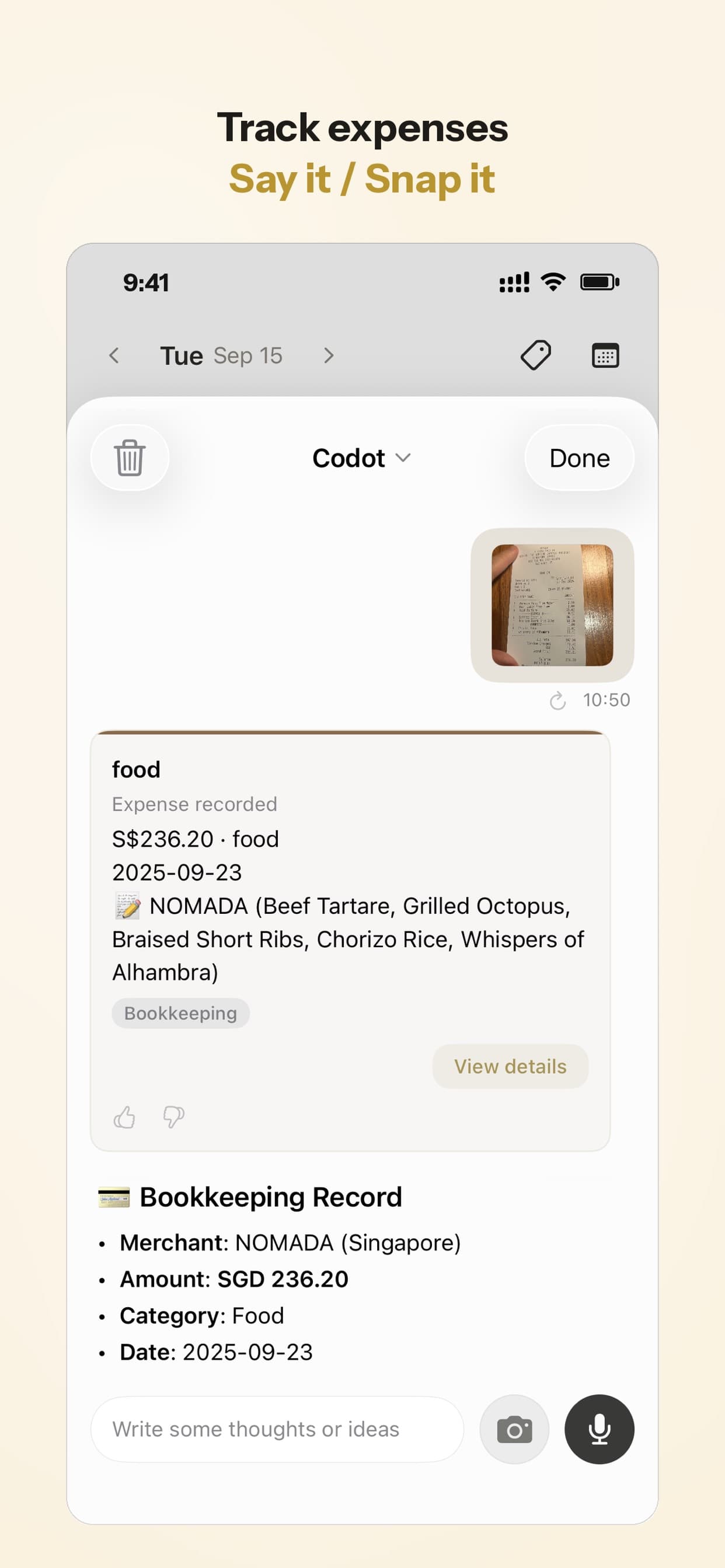
Either of them can ask "What did we pay in bills this month?" and Codot adds up the records they said. It's a running tally of what you told it, handy for spotting a quarterly bill that jumped.
Last Sunday of the month: how do you see next month's bills in one list?
Run one monthly routine that lists the bills coming next month. Jess set it once:
"On the last Sunday of every month at 7pm, list the bills due next month, the last amount we paid for each, and who's paying."
The first one runs on Sunday 29 November. It lists rent on 1 December (Jess, 2,300 dollars last time), the phone bill on the 25th (Jess, 65 dollars) and Biscuit's chew on Saturday the 5th. The power bill isn't due again until February, so it stays off the list. Scheduled routines are Codot Max, and you can keep up to 20.
The amounts come from their bookkeeping records; an unlogged bill shows without one.
Best bill reminder app Australia couples can share: Codot, bank alerts, Apple Reminders or a budget app?
Use Codot when the trouble is who pays which bill and when, rather than where the money went. You say each bill once, the right partner gets the reminder, and both of you log payments by voice. Codot handles the remembering and the reminders; your bank still pays the bills and shows balances, and Codot writes into your calendar without reading the events already there. Plenty of couples would use both: a bank or budget app for the numbers, Codot for the reminders and the split.
Your bank's own app knows what actually leaves your account. CommBank, for example, says its Insights feature lets you "view predicted bills before they arrive" (CommBank). That's the most accurate view of direct debits. It only sees one bank's accounts, though, and couples often bank separately, so each partner sees half the picture.
Apple Reminders is free and already on your iPhone. A reminder can repeat on a schedule you choose in Edit Details, and you can share a list with your partner; Apple notes that "you can only assign a reminder after you have shared that reminder list" (Apple). It costs nothing; it doesn't keep a payment log or build a "due next month" list.
Budgeting apps are built around transactions. YNAB is US$14.99 a month or US$109 a year, and its direct import covers select US, Canadian, UK and EU banks, so in Australia you'd import files (YNAB). Monarch lists $14.99 a month or $99.99 a year (Monarch). Frollo, an Australian Open Banking provider, offers a free money management app (Frollo). If you want a full budget with categories and balances, one of these is the right tool.
For more on running a household by voice, see the family organizer apps we compared, our third trimester checklist for couples, fixes for iPhone reminders that don't go off and why voice reminders beat typing them.
How to set it up this weekend
- Install Codot on both iPhones from the App Store and add each other as friends.
- Sit down with this year's bills and say each one once as a repeating reminder, with the cycle in plain words.
- For each bill your partner pays, say "remind [name] to pay … on the …" and tap Confirm.
- Set the morning routine for bills due in the next seven days, and the last-Sunday routine for next month's bills.
- Each time you pay, say "paid [bill], [amount]".
New accounts get 7 days of Codot Max free. When the trial ends you go back to the free plan without being charged, and your bookkeeping records stay.
On the free plan you keep tasks, calendar entries, notes, friends and voice bookkeeping. Timed and repeating reminders, the daily briefing and the monthly routine need Codot Max: A$19.99 a month or A$149.99 a year in Australia, $12.99 or $99.99 in the US, with 20x the free plan's usage. The daily briefing is iPhone only. This is a reminder setup, and we're not giving financial advice on how to split or pay your bills.
FAQ
What is the best bill reminder app for couples?
It depends on what you want reminded. Codot sends each bill to the partner who pays it by voice and logs payments for free, with repeating reminders on Codot Max. Apple Reminders does shared lists for free, and banking apps like CommBank show predicted bills from your own account.
Is there a free bill reminder app for iPhone?
Apple Reminders is free and supports repeating reminders and shared lists. Codot's free plan covers tasks, friends and voice bookkeeping; repeating and timed bill reminders need Codot Max, which every new account can try free for 7 days.
How does Codot remind my partner to pay a bill?
Add each other as friends in Codot, then say "remind Sam to pay the electricity on the 15th, every quarter" and tap Confirm. The reminder lands in your partner's Codot on their own phone; sharing is free, and making it repeat is Codot Max.
What is a good bill reminder app in Australia?
Australian banks such as CommBank show predicted bills inside their own apps, and Frollo offers a free money management app built on Open Banking. Codot works in Australia for voice reminders and bookkeeping, with Codot Max at A$19.99 a month on the Australian App Store.
If the next power bill should land on the right phone three days early, get Codot on the App Store.
Productivity & Tools Desk
This article was created with AI assistance and reviewed by our editorial team.Learn about our content process.