Voice Expense Tracker App (2026): A Sentence Library for Logging and Checking Your Spending Out Loud
Copyable sentences for a voice expense tracker: log at the till, snap a receipt, use another currency, get a Sunday summary. Spendee and Wallet compared too.
A voice expense tracker lets you log a payment by saying it, such as 'spent 46 euros at the supermarket, groceries.' Codot, a voice AI assistant for iPhone, saves that as an expense in the currency you name on its free plan, answers 'how much did I spend eating out this week,' and can send a Sunday spending summary with Codot Max ($12.99 a month). Use Codot when you want to log spending, cash included, the moment you pay.
Disclosure: Codot is our product. The sentences, names and amounts below are examples written to show what each one does. Codot prices are from codot.ai. Spendee, Wallet, Money Manager and Sayve details are from their US App Store listings, and Revolut's from its help center, checked November 5, 2026.
TL;DR:
- Most people stop tracking expenses because entering them is a chore. Open the app, pick a category, type the amount, choose a wallet. By Wednesday the receipts are in a pocket and the week is a guess.
- A voice expense tracker cuts that to one sentence at the till. In Codot, "spent 46 euros at the supermarket, groceries" becomes an expense record. Bookkeeping is on the free plan, you can name any currency, and a photo of a paper receipt works too.
- The library below is grouped by moment: at the checkout, splitting a cost, paying in another currency, money coming in, asking what you spent, and the weekly summary. Copy a sentence, change the numbers, say it.
- A Sunday routine closes the week with a summary by category. Routines and the 7:00 daily briefing on iPhone are Codot Max.
- Codot keeps spending, tasks and notes in one voice app, with cash and client trips explained in your own words. Wallet and Spendee are built for bank sync; Money Manager is a thorough manual tracker.
At a glance
- Codot: voice input, expense and income records in multiple currencies, tasks, notes and contacts are free; scheduled routines, timed reminders and the daily briefing are Codot Max at $12.99 a month or $99.99 a year, with 20x the free plan's usage and a 7-day free Max trial (codot.ai).
- Spendee lists bank and e-wallet connections, an AI receipt scanner, budgets and multiple currencies; Premium is $5.99 a month among its in-app purchases, as of November 2026 (App Store).
- Wallet by BudgetBakers lists automatic bank updates with 4,000 banks as a Premium feature; in-app purchases start at $5.99, with Lifetime Premium at $49.99, as of November 2026 (App Store).
- Money Manager by Realbyte is a manual tracker with budgets and multiple currencies; subscription $2.49 a month or $19.99 a year, or a $5.99 "Remove Ads" edition, as of November 2026 (App Store, Remove Ads edition).
- Sayve is a voice-first expense tracker; the first 20 voice inputs are free, then Pro is $3.99 a month or $29.99 a year, as of November 2026 (App Store).
- Revolut groups card spending by category, merchant, country and currency in its analytics screen (Revolut help).
Why do people stop tracking expenses after a week?
They stop because logging happens at the worst moment: at a till, with a bag in one hand and a queue behind them. Each payment means unlocking the phone, opening the app, picking a category from a grid and typing a number with your thumb while the cashier waits. So you tell yourself you'll add it later, and later turns into a Sunday evening trying to remember what a €23.40 card payment was.
The bank app helps less than it looks. Cash at the market never shows up there, and a client dinner looks the same as a Friday night out. What works is recording the payment while you still remember what it was, in about three seconds, without looking at the screen. Everything below is a sentence you can say in those three seconds, and what Codot does with it.
What do you say to log an expense at the checkout?
Say the amount with its currency, where you paid, and one word for what it was. Codot saves an expense dated today and shows it as a small record card in the chat. Bookkeeping is on the free plan.
| You say | Codot records |
|---|---|
| "Spent 46 euros at the supermarket, groceries." | Expense, €46.00, food, note "supermarket, groceries" |
| "9 euros at the market, cash, groceries." | Expense, €9.00, food, note "market, cash, groceries" |
| "Lunch, 14 euros, restaurant." | Expense, €14.00, food, note "lunch, restaurant" |
| "Metro card top-up, 20 euros." | Expense, €20.00, transport |
| "Pharmacy, 11.50 euros, cold medicine." | Expense, €11.50, health |
| "Make that 48." (right after a wrong entry) | The same entry, corrected to €48.00 |
Codot's categories are broad: food, transport, shopping, housing, entertainment, health, education, communication and other. Groceries and restaurant meals both land under food, so the words in the note do the sorting. Say "groceries" or "restaurant" every time, and add "cash" when it was cash, because that's what later questions search for.
You can say it in your own language. "Gastei 14 euros no almoço, restaurante, com a Rita" ("Spent 14 euros on lunch, restaurant, with Rita") is logged the same way as the English version. Siri, for comparison, doesn't support European Portuguese (Apple feature availability), though the iPhone keyboard's dictation does.
Can you photograph a receipt instead of saying it?
Yes. Take a photo of the paper receipt in Codot, and it turns the receipt into an expense record with the amount, the currency and the merchant. It's the faster option for a hotel bill or a long printed receipt you'd rather not read out.
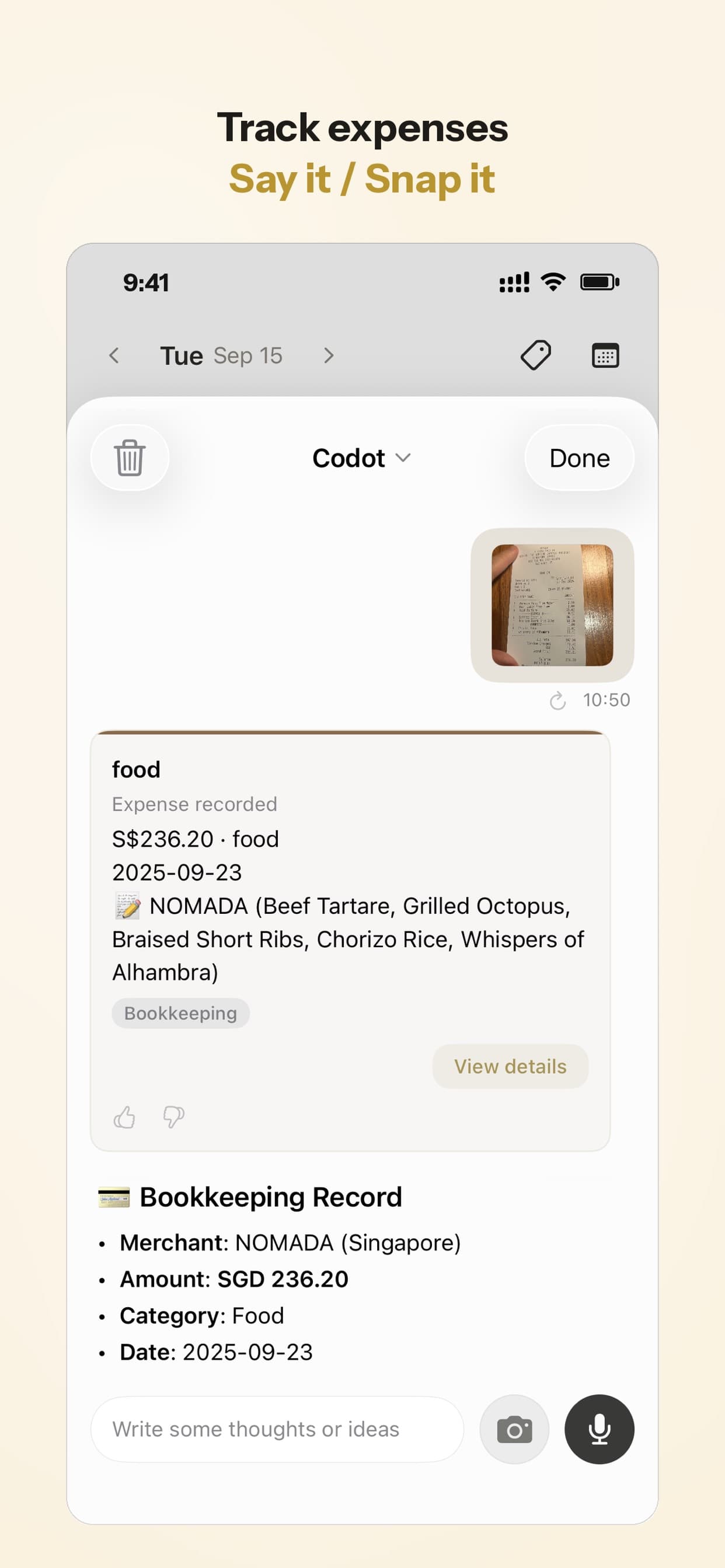
What do you say when you split a cost with someone?
Log your own share and put the other person's name in the note, so you can find it later.
| You say | Codot records |
|---|---|
| "Spent 30 euros, my half of dinner with Sam, restaurant." | Expense, €30.00, food, note "my half of dinner with Sam" |
| "Paid 120 euros for the cabin deposit, Sam owes me 60." | Expense, €120.00, note "cabin deposit, Sam owes me 60" |
| "Remind me Friday at 6pm to ask Sam for the 60 euros." | A reminder for Friday 18:00 (Codot Max) |
If Sam is one of your Codot friends, you can also say "remind Sam to send me the 60 euros for the cabin," and the reminder goes to Sam. Adding friends is on the free plan. For a household budget that two people edit together, Spendee's shared finances is built for that job.
How do you log expenses on a trip in another currency?
Name the currency in the sentence, and Codot records the expense in that currency. Add the trip's name to each entry so you can total it at the end.
| You say | Codot records |
|---|---|
| "Taxi from the airport, 650 koruna, client trip." | Expense, CZK 650, transport, note "client trip" |
| "Dinner with the client team, 1,280 koruna, restaurant, client trip." | Expense, CZK 1,280, food, note "restaurant, client trip" |
| "Train ticket to the airport, 150 koruna, client trip." | Expense, CZK 150, transport, note "client trip" |
| "What did the client trip cost in total, in euros?" | The total converted to euros, with each item listed in its original koruna amount |
That last answer is the number for a client expense sheet, with every item already listed. Codot also understands Czech, which matters if you live in Prague and would rather say it in Czech (our Czech voice assistant guide).
Can you log income by voice too?
Yes, the same way.
| You say | Codot records |
|---|---|
| "Client paid the October invoice, 1,200 euros, freelance income." | Income, €1,200.00, note "October invoice, freelance income" |
| "Sold the old bike, 80 euros." | Income, €80.00 |
Expenses and income sit in the same record list, which helps when your income moves around from month to month.
Your ideas shouldn't wait for a keyboard. Just say it — Codot handles the rest.
What can you ask Codot about your spending?
Ask the question in plain words, and Codot answers from the entries you've logged.
| You ask | Codot answers with |
|---|---|
| "How much did I spend on eating out this week?" | The restaurant and café entries since Monday, and the total |
| "And groceries?" | The supermarket and market entries, and the total |
| "What did I spend on transport this month?" | The transport entries and the total |
| "How much cash did I spend this week?" | The entries you tagged "cash" |
| "What did the client trip cost, in euros?" | The trip total converted, item by item |
The answers are only as good as the notes, which is why the checkout sentences above always carry one sorting word.
How do you get a weekly spending summary automatically?
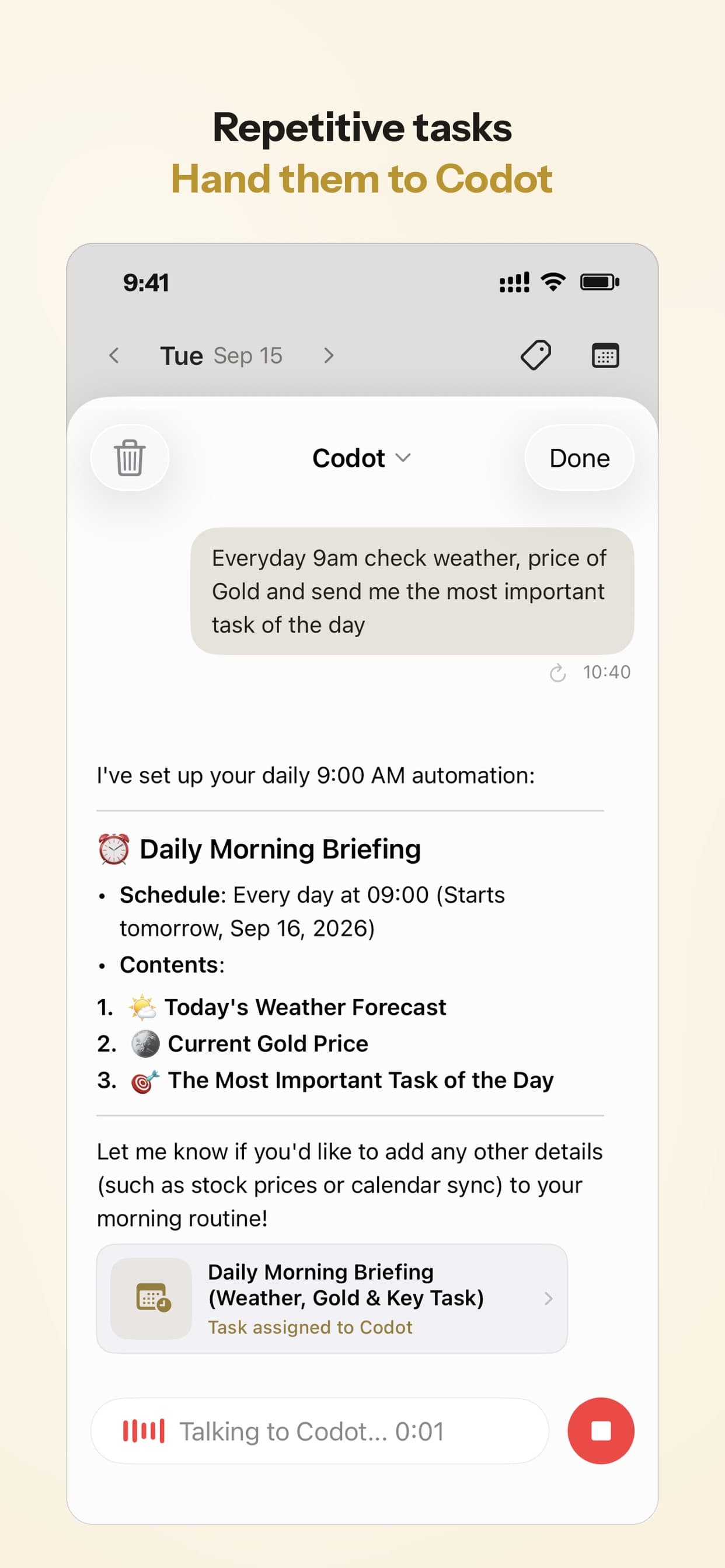
Set a routine once by voice, and Codot runs it on schedule whether or not you open the app. Scheduled routines are Codot Max, and you can have up to 20.
| Say once | What arrives |
|---|---|
| "Every Sunday at 8pm, summarize this week's spending by category, show the restaurant total separately, and convert anything in other currencies to euros." | Every Sunday at 20:00: totals by category, restaurants on their own line, foreign amounts in euros |
| "Every weekday at 7:30, tell me what I spent yesterday by category." | Each weekday at 7:30: yesterday's spending by category |
Most people only need the first one. A Sunday total with restaurants split out is usually enough to notice, say, that café lunches add up to more than the groceries.
What can the morning briefing include?
The daily briefing arrives each morning at 7:00 with your reminders, news and a short summary. It's iPhone only and part of Codot Max.
If you want a money line every morning, add the weekday routine from the table above; it runs as a second routine alongside the briefing.
What is the best app for tracking daily expenses?
The best one is the one you'll actually keep using, and that depends on how your money moves. Here's how we'd choose:
- If you want to log spending by voice in the same place as your tasks, notes and contacts, use Codot. Expenses, income, receipt photos and multiple currencies are free; the weekly summary and morning briefing are Codot Max.
- If most of your spending is on one bank card, your bank app already sorts it. Revolut, for example, sorts spending by category, merchant, country and currency without you entering anything. It can't tell a client dinner from a night out, and it doesn't see cash.
- If you want everything synced from several banks with budgets on top, look at Wallet by BudgetBakers or Spendee. Wallet's Premium lists automatic updates from 4,000 banks; Spendee adds a receipt scanner and shared finances for couples or flatmates.
- If you want a manual tracker with deep reports and budgets, Money Manager by Realbyte is cheap and thorough. The $5.99 "Remove Ads" edition is the closest thing to an expense tracker app free of ads and subscriptions.
- If you only want a dedicated voice expense tracker, Sayve is built for exactly that, keeps data on the device and gives 20 voice entries free.
Plenty of people would combine two: the bank app for card totals, Codot for the sentence at the till that explains what the payment was.
What is the best voice expense tracker app for iPhone?
Use Codot when you want spending, tasks and notes in one voice app and want to log a payment the moment you make it, cash included. Codot is a voice AI personal assistant, and expense logging is one thing it does alongside meeting minutes and grant deadlines, tasks, calendar, notes, contacts, habits and a calorie log. You say a payment, it saves the record; you ask a question about your spending, it answers from your records. It has been running for almost two years, and more people use it every month.
The same sentence habit carries over to the rest of your day: "remind me to send the invoice to the Prague client on Monday" for a task, or "lunch was a salad and a coffee" for the calorie log. If you already talk to Codot for tasks, logging an expense needs nothing new. Codot keeps the voice log and answers questions about it; your bank app still imports card transactions, and invoicing, budgets and taxes stay with the tools or accountant you already use. For more on voice logging, see our voice calorie tracker comparison and the best voice to-do list apps for iPhone.
How to start logging expenses by voice this week
- Install Codot on your iPhone from the App Store.
- At your next payment, say amount, place and purpose: "Spent 9 euros at the market, groceries."
- Say "restaurant", "groceries" or a trip name every time, so later questions can find the entries.
- Name the currency whenever it isn't your usual one.
- Set the Sunday routine: "Every Sunday at 8pm, summarize this week's spending by category."
New accounts get 7 days of Codot Max free, enough for one full week and one Sunday summary. When the trial ends you go back to the free plan without being charged, and your expense records stay.
On the free plan you get voice input, expense and income records in multiple currencies, and answers to questions about them. The weekly routine, any other scheduled routine, timed reminders and the 7:00 daily briefing need Codot Max: $12.99 a month or $99.99 a year, with 20x the free plan's usage. The daily briefing is iPhone only.
FAQ
What is a voice based expense tracker?
A voice based expense tracker records a payment from a spoken sentence, such as "spent 12 euros on lunch, restaurant." Codot, Sayve and similar apps pull the amount, currency and category from the sentence, so you don't fill in a form.
Is there a free AI voice expense tracker?
Codot logs expenses and income by voice on its free plan, in any currency you name. Sayve gives 20 free voice entries, then charges $3.99 a month for Pro, as of November 2026.
Can Codot track expenses in different currencies?
Yes. Say the currency, such as "650 koruna," and Codot records the expense in that currency, then can give trip or weekly totals converted to the currency you ask for.
Can Codot turn a receipt photo into an expense?
Yes. Photograph a paper receipt in Codot and it creates an expense record with the amount, the currency and the merchant.
Can I log cash payments by voice?
Yes. Say the payment the moment you make it, such as "9 euros at the market, cash, groceries," and Codot saves it like any other expense. That makes Codot a good fit for cash and market spending that a bank app never sees.
Which expense tracker app is free with no ads?
Money Manager by Realbyte sells a separate $5.99 "Remove Ads" edition, as of November 2026, for people who want a manual tracker without ads or a subscription. Codot's bookkeeping is on its free plan, with voice entry included.
If you'd like this week's spending to be a number you can actually check on Sunday, get Codot on the App Store and say your next payment at the till.
Productivity & Tools Desk
This article was created with AI assistance and reviewed by our editorial team.Learn about our content process.