How to Add Multiple Events to iPhone Calendar at Once (2026): Five Events From One Sentence, Plus Every Other Bulk Method Compared
How to add multiple events to iPhone Calendar at once: say five plans in one sentence and get five Apple Calendar events, or use copy, Repeat, .ics or Siri AI.
To add multiple events to iPhone Calendar at once, say or type them in one sentence to Codot, which writes each plan as its own event in Apple Calendar and Apple Reminders. In our November 2026 test, one sentence produced five timed events for the next day. Apple doesn't document adding several spoken events in one Siri request; without an extra app, you can copy and paste an event, use Repeat, or subscribe to an .ics calendar.
Disclosure: Codot is our product. Updated November 2026 · Apple features checked November 18, 2026 on Apple's iPhone User Guide, Apple Newsroom and the iOS Feature Availability page.
TL;DR:
- Apple Calendar on iPhone adds events one at a time by hand. Its built-in shortcuts for "many at once" are copy and paste, Repeat for the same event, and subscribing to someone else's .ics calendar.
- Use Codot when you have a list of different plans in your head: say "Tomorrow: dentist at 9am, call Dana Ruiz at 11, lunch with the Oakline team at 12:30, pick up dry cleaning at 5pm, and Harbor Street book club at 7pm," and Codot writes five separate events into Apple Calendar and Apple Reminders. Creating events is free; timed reminders need Codot Max.
- Siri AI (Beta) on iOS 27 can add several events that are already on your screen or in a photo, on an iPhone 15 Pro or later, outside the EU and China mainland. Apple doesn't document adding several spoken events in one Siri request.
At a glance
| Method | What it adds in one go | iPhone needed | Region and language | Source |
|---|---|---|---|---|
| Codot, one spoken or typed sentence | Several different events, each with its own time, written to Apple Calendar and Apple Reminders | Any iPhone that runs the Codot app | Understands all major languages, including Czech, Polish and Hungarian | Our test, November 18, 2026 |
| Siri (classic), by voice | One event per request in Apple's examples | Any iPhone with Siri | Only Siri languages; Czech, Polish, Hungarian, Romanian, Greek and others are missing | Apple Siri guide, iOS Feature Availability |
| Siri AI (Beta) or Visual Intelligence, from your screen or a photo | Several events that are already written on a flyer, post or printed schedule | iPhone 15 Pro or later on iOS 27 | English, French, Japanese, Korean, Portuguese, Spanish; not in the EU or China mainland; usage limits | Apple Newsroom, MacRumors |
| Type a description in Calendar (Apple Intelligence) | One event per description | iPhone 15 Pro or later | Apple Intelligence languages | Apple Calendar guide |
| Copy and paste an event | The same event on another date | Any iPhone | All | Apple Calendar guide |
| Repeat | The same event on a schedule | Any iPhone | All | Apple Calendar guide |
| Subscribe to an .ics calendar | Every event in a published calendar, read-only | Any iPhone | All | Apple: use multiple calendars |
| Import an .ics file | Every event in the file | A Mac (File > Import) | All | Apple Calendar for Mac |
How do I add multiple events to my iPhone calendar at once by voice?
Use Codot when the events are in your head instead of on a flyer: a dentist appointment, a call, a lunch and two evening errands that you want in Apple Calendar before you forget half of them. Codot keeps tasks, calendar, reminders, notes and contacts in one app, and one sentence can create several of them at once, so you skip opening Calendar five times and tapping + for each entry.
What we said, and what Codot did with it
On November 18, 2026, we typed this into Codot on an iPhone running iOS 26.1 (typing and speaking go to the same place; the mic button sits next to the text field):
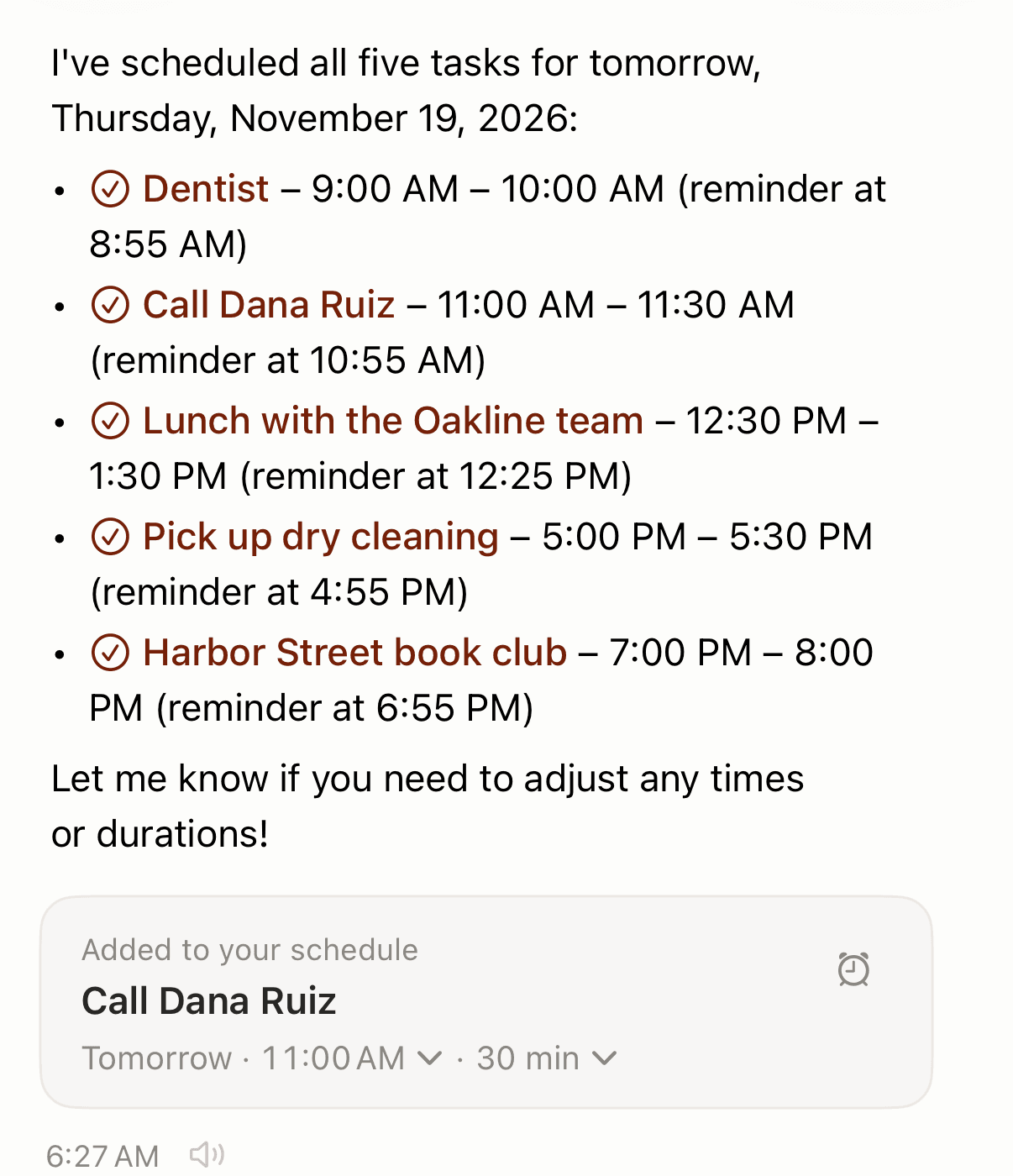
"Tomorrow: dentist at 9am, call Dana Ruiz at 11, lunch with the Oakline team at 12:30, pick up dry cleaning at 5pm, and Harbor Street book club at 7pm."
About 40 seconds later Codot answered "I've scheduled all five tasks for tomorrow, Thursday, November 19, 2026" and listed each one with a time and a reminder five minutes before. Codot chose the durations itself (an hour or half an hour) and added an editable card with time and duration menus.
What showed up in Apple Calendar
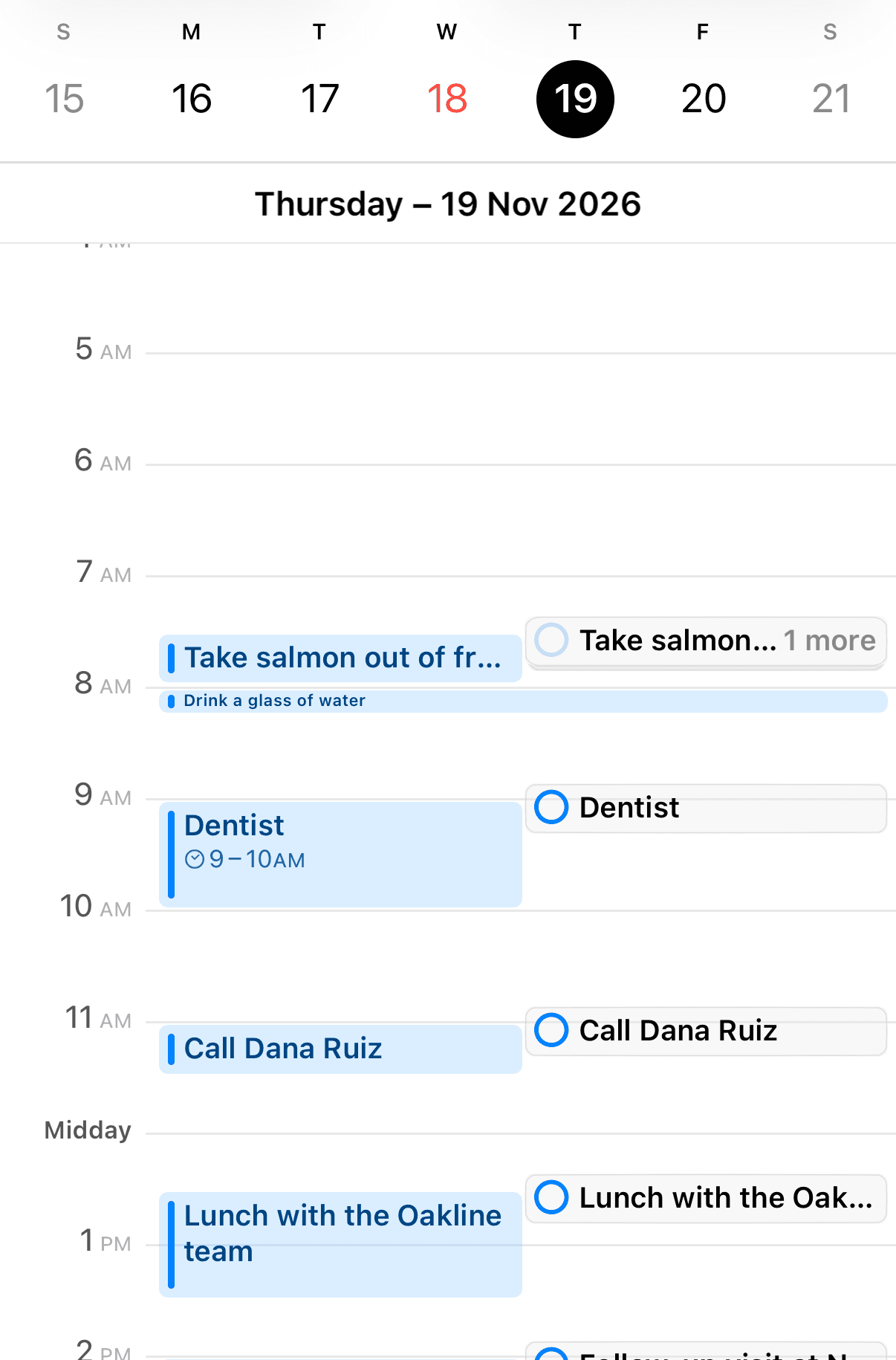
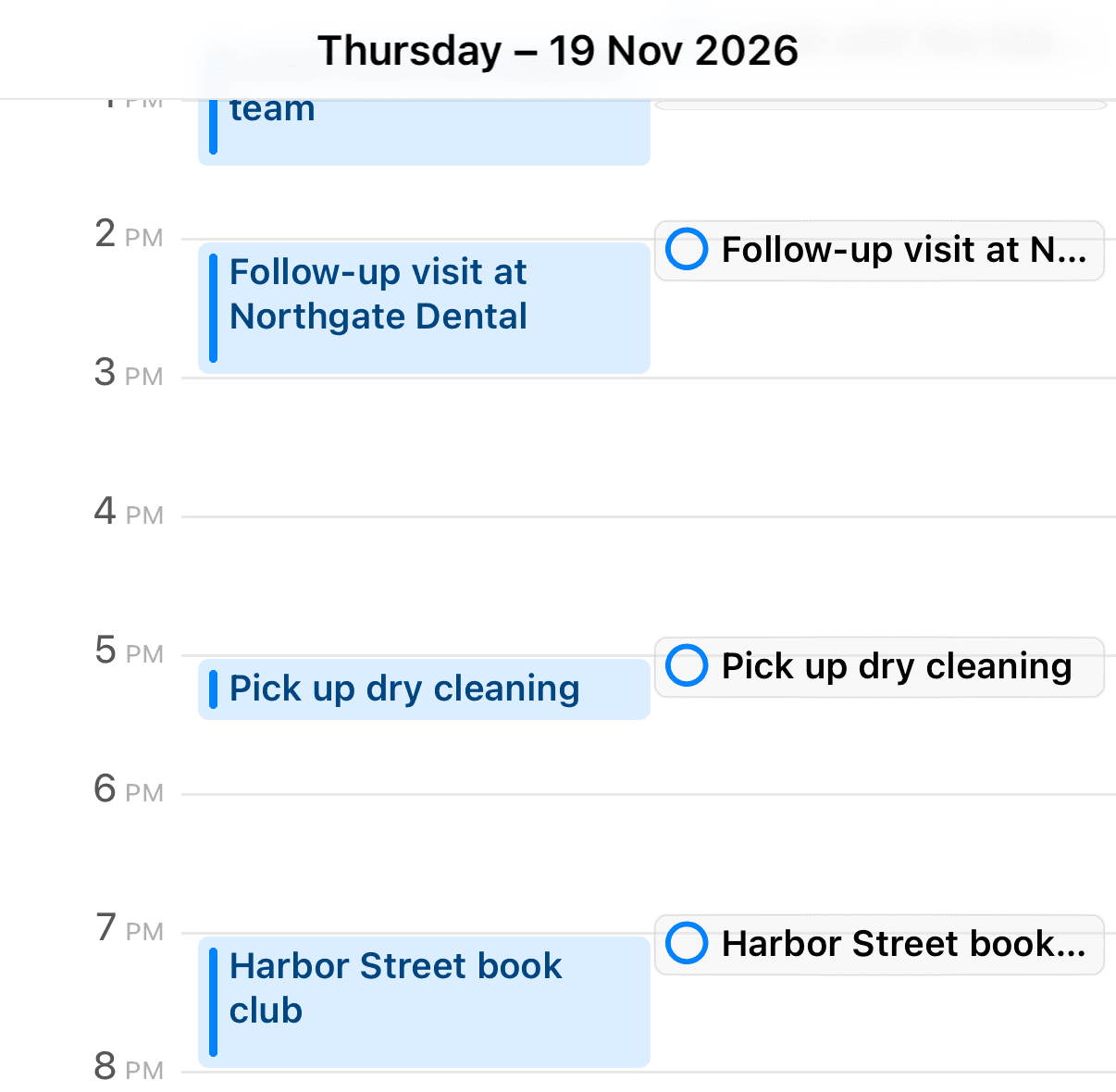
We then opened Apple's own Calendar app on the same iPhone and went to Thursday, November 19. All five were there at the right times as calendar events, and each also appeared as an Apple Reminders item in the right-hand column. The iOS Calendar connection was already switched on in this test account, so there was nothing else to tap.
What's free and what needs Codot Max
Creating tasks and calendar events by voice is on the free plan. The reminder at 8:55 before the 9:00 dentist is a timed reminder (see how to add multiple reminders on iPhone for stacking alerts), which is part of Codot Max, along with repeating tasks, the 7:00 daily briefing and scheduled routines. New accounts get 7 days of Codot Max free, then return to the free plan with no charge. Codot Max is $12.99 a month or $99.99 a year on the US App Store, with 20x the free plan's usage. For a wider look at talking to your calendar, see our best voice calendar apps for iPhone and Android.
How do I set up Codot to add events to Apple Calendar? (30 minutes)
Most of the 30 minutes goes to steps 4 and 5.
- Install Codot and sign in (5 minutes). Get it from the App Store. New accounts start with the 7-day Codot Max trial, so timed reminders work from day one.
- Connect iOS Calendar (5 minutes). In Codot's settings, open Connected Calendars and choose iOS Calendar. iPhone asks once for full Calendar access; allow it.
- Pick the calendar it writes to (2 minutes). If you keep Home and Work calendars, choose the one these events belong in.
- Say the sentence (5 minutes). Open Codot, tap the mic and say the whole list at once, the way you'd tell a friend: day first, then each plan with a time. If you add things on the move, the to-do list on your iPhone lock screen setup puts Codot one tap from the lock screen.
- Check Apple Calendar and fix a time (10 minutes). Open Calendar, go to the day, and confirm each event landed. If Codot guessed a duration you don't want, change it on the editable card in Codot, or just say "make the dentist 45 minutes." If an alert didn't sound, our iPhone Reminders not working guide covers notification settings.
Two habits help. Put new events in one sentence and changes to existing ones in a separate sentence. And remember the connection runs one way: Codot writes into Apple Calendar, but it doesn't read events you created elsewhere, and edits made in Apple Calendar don't flow back into Codot. Google Calendar users can connect that instead; our Google Calendar alternatives for iPhone piece covers that side.
Can Siri add multiple events to Apple Calendar at once?
Apple doesn't document it. The iPhone User Guide gives two Calendar phrases for Siri, "Set up a meeting with Gordon at 9" and "What's on my calendar for Friday?", and each covers a single request (Apple). In March 2026, iClarified, citing Bloomberg, reported that "Siri currently requires each request to be handled individually," with combined requests in development for iOS 27. Apple hasn't said whether that shipped. We did not test Siri for this article.
Siri AI (Beta), which arrived with iOS 27 on September 14, 2026, works from what you can see. MacRumors reports that "Visual Intelligence in iOS 27 supports adding multiple events to your calendar at one time from a schedule" (MacRumors), and TapSmart describes Camera Siri Mode pulling "every date on the page" into separate events (TapSmart). It needs an iPhone 15 Pro or later, and Apple says "Siri AI is currently unavailable in the EU in iOS, iPadOS, and watchOS" (Apple Newsroom). For printed timetables specifically, see how to add a class schedule to iPhone Calendar.
Language is the other limit. Apple's feature page lists no Siri for Czech, Polish, Hungarian, Romanian, Greek, Slovak, Croatian, Ukrainian or Catalan, though keyboard Dictation works in all of them (Apple). Our posts on Siri in Polish, voice assistants that understand Czech and Siri and Hungarian go into each.
Siri is still quick for a single event, and new events go to your default calendar, which you set in Settings > Apps > Calendar > Default Calendar (Apple). Which Siri calendar commands Apple documents, why Siri is not adding events to calendar, and whether Siri can add events to Google Calendar are separate questions with their own fixes. Weighing a full switch? Read can you replace Siri with ChatGPT or Gemini on iPhone.
Your ideas shouldn't wait for a keyboard. Just say it — Codot handles the rest.
How do I add multiple events to Apple Calendar without Siri or another app?
Apple's Calendar has three built-in options, and each fits a different kind of list.
Copy and paste, for the same event on several dates. Apple's steps: "Touch and hold the event, then tap Copy. On another date, touch and hold the time where you want to paste the event." Then tap the copied event and save (Apple). Five dates means five pastes.
Repeat, for one event on a fixed rhythm, such as a Tuesday class or a monthly bill. Set it once in the event's details; for reminders on rhythms like every other Friday or every quarter, see how to set recurring reminders on iPhone.
Subscribe to an .ics calendar, when someone else publishes the events: a school, a sports league, a shift rota. In Calendar, tap Add Subscription Calendar and enter the .ics address, or simply tap an .ics link (Apple). Apple calls these "external, read-only" calendars, so you can't edit those events. Importing an .ics file you received is documented by Apple only for Calendar on Mac (File > Import). Our guide to the best calendar app for students and shift workers shows how rotas and timetables fit together.
How we selected
We listed every multi-event method Apple documents in its iOS 27 iPhone guide, Calendar for Mac guide and Newsroom, plus Siri AI behavior reported by MacRumors, TapSmart and iClarified, each linked where cited. Device, region and language limits come from Apple's pages as of November 18, 2026. The Codot row is our own test from the same day. We left out anything we couldn't find documented, such as an official iPhone "Add All" import from Mail.
Which method fits your list?
If the list lives in your head and covers different plans, say it to Codot in one sentence; it writes into iOS Calendar or Google Calendar, and our guide on how to add multiple events to Google Calendar at once covers the Google side. If the dates are printed and you have an iPhone 15 Pro or later outside the EU, try Siri AI from a photo. If someone publishes a feed, subscribe. For one repeating event, use Repeat. For shared family calendars, see how to organize a family calendar.
FAQ
How do I add multiple events to my iPhone calendar at once?
Say or type them in one sentence to Codot, which writes each plan as a separate event in Apple Calendar and Apple Reminders; in our test, one sentence created five timed events. Without an extra app, Apple Calendar offers copy and paste, Repeat and .ics subscriptions.
Can Siri add more than one calendar event in one request?
Apple doesn't document it; its Siri examples cover one event per request, and a March 2026 Bloomberg report said Siri handled each request individually. Siri AI (Beta) on iOS 27 can add several events shown on screen or in a photo, on an iPhone 15 Pro or later.
Does Codot read my existing Apple Calendar events?
Codot writes its own tasks and events into Apple Calendar and Apple Reminders, and the sync runs one way. It doesn't read events you created elsewhere, and edits made in Apple Calendar don't come back to Codot.
Is adding events with Codot free?
Yes, creating tasks and calendar events by voice is on Codot's free plan. Timed reminders, repeating tasks, the daily briefing and routines need Codot Max, at $12.99 a month or $99.99 a year in the US, with a 7-day free trial for new accounts.
Does this work if Siri doesn't support my language?
Yes. Codot's speech recognition understands all major languages, including Czech, Polish and Hungarian, which Siri doesn't support. You can say the whole list in your own language.
Try it with tomorrow's plans: download Codot on the App Store and say your five things in one sentence.
Productivity & Tools Desk
This article was created with AI assistance and reviewed by our editorial team.Learn about our content process.