Siri Not Adding Events to Your iPhone Calendar? 7 Causes and the Fix for Each (2026), Including 'Something Went Wrong'
Siri not adding events to your iPhone calendar, or saying something went wrong? Seven causes in iOS 27, each matched to one setting, with Apple's own steps.
When Siri won't add an event to the iPhone Calendar, the cause is usually a wrong Default Calendar, a read-only subscribed calendar, Siri or voice setup switched off, no internet or a VPN, a language Siri doesn't support, or Siri AI limits on device and region. Apple has no support article for the Something went wrong message. To add several events in one spoken sentence, Codot writes each one into Apple Calendar on any iPhone that runs it.
Updated November 2026 · steps checked on November 18, 2026 against Apple's iOS 27 support pages
Codot is our product. Most of this guide fixes Siri and Apple's Calendar app; the Codot part covers the one case Siri isn't documented to handle: several events said in one go.
You say "add dentist tomorrow at 9" and Siri answers with "Something went wrong", or files the event in a calendar you never look at. Most answers online are old Apple Community threads, and the menu paths have moved since. Below are seven causes, each matched to one setting, with the iOS 27 paths from Apple's guide.
TL;DR:
- Check Settings > Apps > Calendar > Default Calendar first; it's the usual reason an event "disappears".
- To add several events by voice in one sentence, use Codot: in our test one sentence became five events in Apple Calendar, each with a reminder 5 minutes before.
- A subscribed calendar is read-only, so nothing can be added to it.
- Siri off, voice setup, no internet or a VPN profile are covered in Apple's support article 105037.
- "Something went wrong" has no Apple support article; cause 5 lists what to try.
At a glance
- Codot: one sentence can create several timed events, written one way into Apple Calendar and Reminders; creating events is free, timed reminders are Codot Max, $12.99/month or $99.99/year on the US App Store, with a 7-day free trial (App Store).
- Default calendar: "any new events you create are added to that calendar automatically" (Apple iPhone User Guide).
- A subscription calendar is "an external, read-only calendar" (Apple iPhone User Guide).
- Offline, Siri "will usually respond and say 'I'm having trouble with the connection.'"; "Some VPN profiles might not allow use of Siri" (Apple Support 105037).
- Siri AI (Beta) needs iOS 27 on an iPhone 15 Pro or later, a supported language, and isn't initially available in the EU on iOS or in China mainland (Apple iPhone User Guide).
How do I add multiple events to my iPhone calendar by voice at once?
Use Codot when you have several plans in your head and want all of them in your iPhone calendar from one sentence instead of five separate Siri requests. Codot is a voice-first AI assistant that keeps tasks, calendar, reminders and notes in one place, so a single sentence can put several things on your calendar at once.
Here is the sentence we gave Codot on November 18, 2026, on an iPhone simulator:
"Tomorrow: dentist at 9am, call Dana Ruiz at 11, lunch with the Oakline team at 12:30, pick up dry cleaning at 5pm, and Harbor Street book club at 7pm."
About 40 seconds later Codot replied that it had scheduled all five for Thursday, November 19, each 30 or 60 minutes long with a reminder 5 minutes before, on a card where you can change any time.
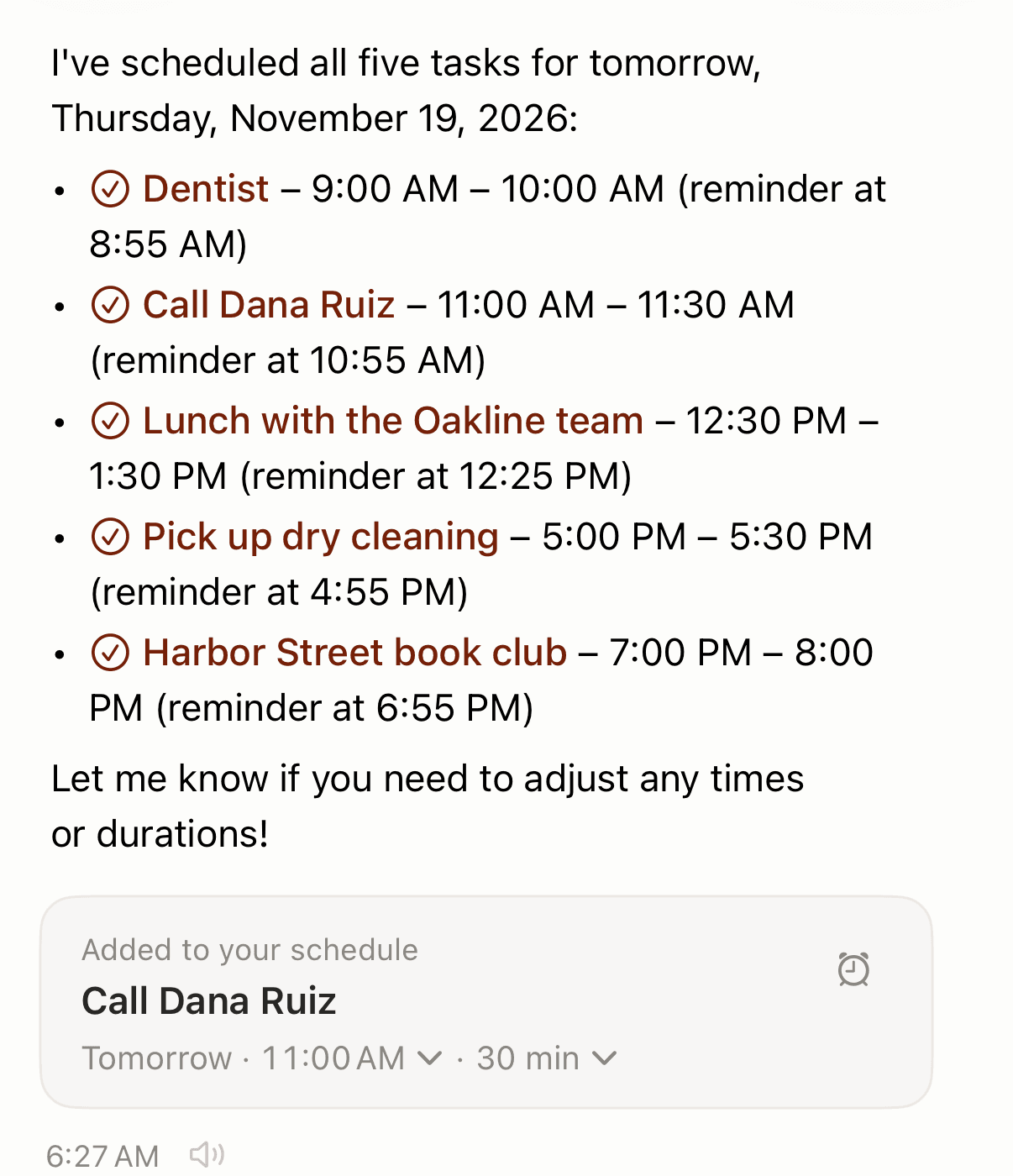
In Apple's Calendar app on the same phone, all five were there at the right times, and also in Apple Reminders (here's how tasks appear in Apple Calendar through Reminders). The connection was already on in that account; the first time, iOS asks for calendar access and you pick which calendar Codot writes to, which sidesteps cause 1 below.
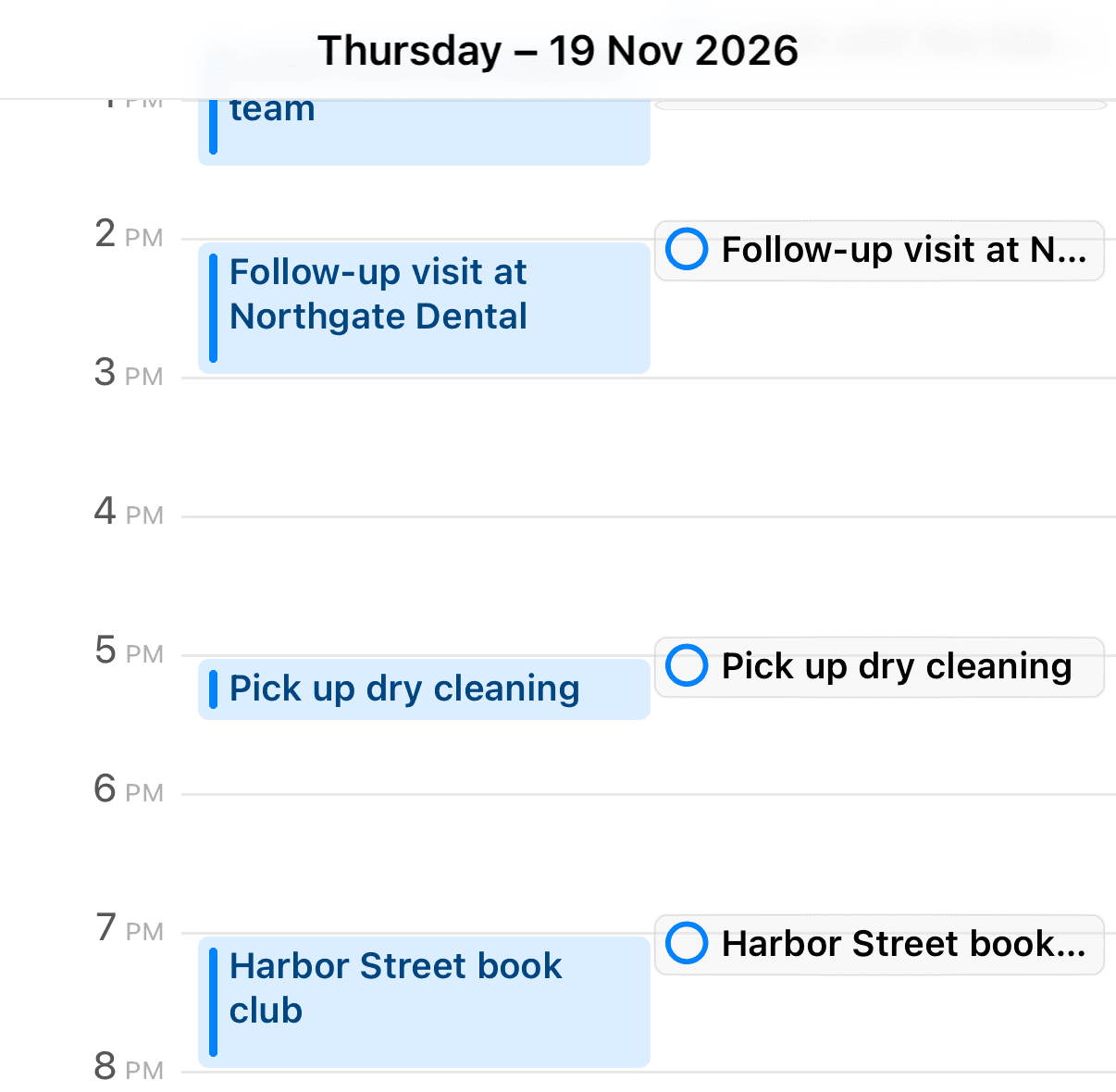
It works without Apple Intelligence, on any iPhone that runs Codot and in any major language, including Czech, Polish and Hungarian, where Siri isn't offered (cause 6). Creating events by voice is free; the 8:55 reminder before a 9:00 dentist, and anything repeating, is Codot Max (if one alert isn't enough, see how to add multiple reminders on iPhone), and new accounts get 7 days of Max free before dropping back to the free plan without a charge. The sync is one way: Codot doesn't see events you created elsewhere, and edits in Apple Calendar don't flow back. Five new items in one sentence is what we verified; if you also want to move an existing event, say that in a separate sentence.
You can open Codot from the lock-screen widget and talk straight away. For other apps that do this, see the best voice calendar apps; our guide to adding multiple iPhone events at once compares every bulk method.
Read more: Can You Replace Siri With ChatGPT or Gemini on iPhone? What Works in 2026
Why is Siri not adding events to my iPhone calendar?
Usually the event was added somewhere you aren't looking, or Siri never got the request because of a setting, a connection or a language. Work through the seven causes in order.
1. Why does Siri put my event in the wrong calendar?
New events go to your Default Calendar. Apple's guide says "any new events you create are added to that calendar automatically" (Apple). Apple doesn't say in writing that Siri follows this setting, but users in an Apple Community thread report "It creates the event in the default calendar every time" (thread 253660875). If your default is an old Work or Exchange calendar that's hidden, the event looks missing.
Fix: Settings > Apps > Calendar > Default Calendar, then pick the one you use. For an event already in the wrong place, Apple's step is: "Tap the event, tap Calendar, then select a calendar to move the event to." (Apple). Also tap Calendars at the bottom of the app and check that every calendar you need is selected; a deselected calendar hides its events.
2. Why can't I add events to my iPhone calendar at all?
Often because the calendar you're trying to add to is a subscription. Apple calls a subscribed .ics calendar "an external, read-only calendar" (Apple), and Apple's Holidays calendars are added the same way, as a subscription. If one of these is the default, adding fails with Siri and by hand.
Fix: make a calendar you own, such as iCloud or Google, the Default Calendar (cause 1).
3. Why doesn't Siri respond when I ask it to add an event?
Most likely Siri, or its voice trigger, is off or no longer recognises your voice. Apple's Siri troubleshooting page covers it.
Fix: Settings > Siri (on some versions Apple Intelligence & Siri) > Requests, or Talk & Type to Siri, and turn "Siri" or "Hey Siri" off and back on. When the setup screen appears, tap Continue and say each command shown. If voice still fails, Apple suggests typing to Siri.
Your ideas shouldn't wait for a keyboard. Just say it — Codot handles the rest.
4. Why does Siri say it's having trouble with the connection?
Because Siri needs the internet for this. Apple says that offline, Siri "will usually respond and say 'I'm having trouble with the connection.'" The same page adds that "Some VPN profiles might not allow use of Siri" (Apple Support 105037).
Fix: check Wi-Fi or mobile data, then turn off any VPN and try again.
5. Why does Siri say "Something went wrong" when I add a calendar event?
Apple has no support article for this exact message. The closest report we found is an iOS 16 Apple Community thread where Siri answered "sorry, something is wrong. Please try again" when creating appointments, and the poster noticed "This only happens for contacts that have an email address associated with them." The thread was closed with a recommendation to contact Apple Support (thread 254524830).
Fix: treat it as one of causes 1 to 4 until proven otherwise: check the Default Calendar isn't read-only, check the connection and VPN, and redo voice setup. Then update iOS, which Apple lists in 105037. If it only happens when you name a person, try the request without the name. After that, contact Apple Support.
6. Why doesn't Siri understand me in my language, or why don't I have the new Siri AI?
Siri isn't offered in every language, and Siri AI has stricter limits. Apple's feature availability page has no Siri entry for Czech, Polish, Hungarian, Romanian, Greek, Slovak, Croatian, Ukrainian or Catalan, although Dictation is listed for all of them. Siri AI (Beta) needs iOS 27 on an iPhone 15 Pro or later and a supported language, isn't initially available in the EU on iOS or in China mainland, and has usage limits (Apple).
Fix: if your device and region qualify, turn on Settings > Siri > Try Siri AI (Beta). If your language isn't on Apple's list, no setting changes that; our guides to voice assistants in Czech, Polish and Hungarian list what works instead.
7. Why does Siri only add one event when I list several?
Apple doesn't document a list of separate spoken plans as something Siri handles. Bloomberg reported in March 2026 that "Siri currently requires each request to be handled individually", with combined requests in development for iOS 27 (iClarified). Apple hasn't confirmed whether that shipped. What iOS 27 reviewers have shown is Siri AI adding several events that are already on your screen or in a photo, such as a flyer (MacRumors).
Fix: for one quick event, Siri is fine. For a list you're saying out loud, either make one Siri request per event, or say the whole list once to Codot, as shown in the section above. Copyable sentences for both are in our list of Siri calendar commands.
How do I stop Siri from adding events to my calendar, or get its suggestions back?
Both are the same switch. Apple says "Siri can suggest events found in Mail, Messages, and Safari—such as flight reservations and hotel bookings" and that you control it in Settings > Apps > Calendar > Siri > Show in App (Apple). Turn Show in App off to stop those suggested events appearing in Calendar; turn it on if suggestions have stopped.
If suggestions are on and still missing, an Apple Community post reports that "Siri suggestions for calendar Events from email and Gmail don't work after updating to iOS 18.5", with no fix posted (thread 256092193). Update to the current iOS.
For Google or Outlook accounts, see can Siri add events to Google or Outlook calendar; for an AI chatbot, see can ChatGPT access Apple Calendar.
Read more: Google Calendar Alternatives for iPhone (November 2026): Switch, or Keep It and Fix What Bugs You
Which fix should I try first?
Go by the symptom:
- The event was added but you can't see it: Default Calendar, or a hidden calendar (cause 1).
- Nothing can be added, even by hand: the calendar is a read-only subscription (cause 2).
- Siri doesn't react at all: Siri or voice setup is off (cause 3).
- "I'm having trouble with the connection": internet or VPN (cause 4).
- "Something went wrong": run causes 1 to 4, update iOS, then contact Apple (cause 5).
- Siri doesn't speak your language, or there's no Siri AI option: language, device or region (cause 6).
- You said five plans and got one, or none: one request per event, or say the list once to Codot (cause 7).
- Unwanted suggestions from Mail or Messages: Show in App off.
If reminders, not events, are the part that fails, the causes are different; see iPhone reminders not working, and for family lists shared reminders not syncing. Rotating weeks are covered in our calendar app for students and shift workers guide.
FAQ
Why does Siri say "Something went wrong" when adding a calendar event?
Apple has no support article for that message. Check that your Default Calendar isn't a read-only subscription, that you're online with any VPN off, and redo Siri's voice setup, then update iOS; if it continues, contact Apple Support.
Which calendar does Siri add events to on iPhone?
Users report Siri uses the Default Calendar, set in Settings > Apps > Calendar > Default Calendar. Apple's guide says new events go there "automatically", and you can move an event later by tapping it, tapping Calendar and choosing another.
Can Siri add several events to my calendar in one sentence?
Apple doesn't document it. Bloomberg reported in March 2026 that Siri handled each request individually; iOS 27's Siri AI can add several events shown on screen or in a photo. Codot adds several events from one spoken sentence and writes them into Apple Calendar.
Does Codot need Apple Intelligence or Siri AI?
No. Codot works on any iPhone that runs the app, in any major language, and writes events one way into Apple Calendar and Apple Reminders. Creating events is free; reminders at a set time are part of Codot Max, with a 7-day free trial.
Say your whole week once and let it land in Apple Calendar: download Codot on the App Store.
Productivity & Tools Desk
This article was created with AI assistance and reviewed by our editorial team.Learn about our content process.