Can Siri Add to Calendar? Apple, Google and Outlook Calendars Answered in One Table (November 2026)
Can Siri add to calendar? Yes: Apple, Google and Outlook calendars added to iPhone. One table compares classic Siri, Siri AI and Codot (November 2026).
Yes, Siri can add an event to your iPhone calendar, and it can reach Apple, Google or Outlook calendars once those accounts are added to the iOS Calendar app; new events go to the calendar set under Settings > Apps > Calendar > Default Calendar. Apple's guide only shows single-event phrases. Codot, a voice AI assistant app for iPhone, turns one sentence with several appointments into separate events in Apple Calendar or Google Calendar.
Disclosure: Codot is our product. Updated November 2026 · Apple, Google and Microsoft help pages checked November 18, 2026 · Siri AI facts as of iOS 27.2.
TL;DR:
- Siri can add events to any calendar that shows up in the iPhone Calendar app, including Google and Outlook calendars, as long as you add those accounts in Settings first. Siri reaches them through that app.
- Use Codot when you have several appointments to add at once: one sentence like "tomorrow dentist at 9, call Dana at 11, book club at 7" becomes separate events in Apple Calendar (and Apple Reminders) or Google Calendar, in any major language, on any iPhone that runs Codot.
- Which calendar Siri picks is decided by one setting: Settings > Apps > Calendar > Default Calendar. Change that and Siri's new events land somewhere else.
- Siri AI on iOS 27 (iPhone 15 Pro or later, beta, not in the EU) can also add events it sees on your screen or in a photo, according to MacRumors and iPhone Life. Apple's guide doesn't cover a spoken list of several separate events.
At a glance
Status as of November 18, 2026. "Several events in one sentence" means a spoken or typed list of different plans, as opposed to events already printed on a flyer on screen.
| Calendar or app | Classic Siri | Siri AI (Beta, iOS 27) | Several events in one sentence | Languages | Source |
|---|---|---|---|---|---|
| Codot (app on iPhone) | Not needed; you speak or type into Codot | Not needed; works without Apple Intelligence | Yes: five new timed events from one sentence in our November 18 test | All major languages, including Czech, Polish and Hungarian | App Store |
| Apple / iCloud Calendar | Yes; Apple's example is "Set up a meeting with Gordon at 9." | Yes, plus events it sees on screen or in a photo (third-party reports) | Not documented by Apple for spoken lists | Siri's language list; Siri AI in English, French, Japanese, Korean, Portuguese and Spanish | Apple Calendar guide |
| Google Calendar (account added to iPhone) | Yes, when a Google calendar is your Default Calendar | Writes through the same Calendar app; Apple gives no separate rule | Not documented by Apple | Same as above | Google help |
| Outlook / Exchange (account added to iPhone) | Yes, when an Outlook calendar is your Default Calendar | Writes through the same Calendar app; Apple gives no separate rule | Not documented by Apple | Same as above | Microsoft help |
Can Siri add several appointments to my calendar in one sentence?
Use Codot when your plans arrive as a list: a Sunday-night brain dump, a school week, a string of client calls. Apple's iPhone guide only shows single-event phrases for Siri, and a March 2026 Bloomberg report summarized by iClarified said Siri "requires each request to be handled individually". Apple hasn't documented a change for spoken lists since. Fine for one dentist appointment; slow for five things in a row. Our guide on how to add multiple events to iPhone Calendar at once compares every bulk method.
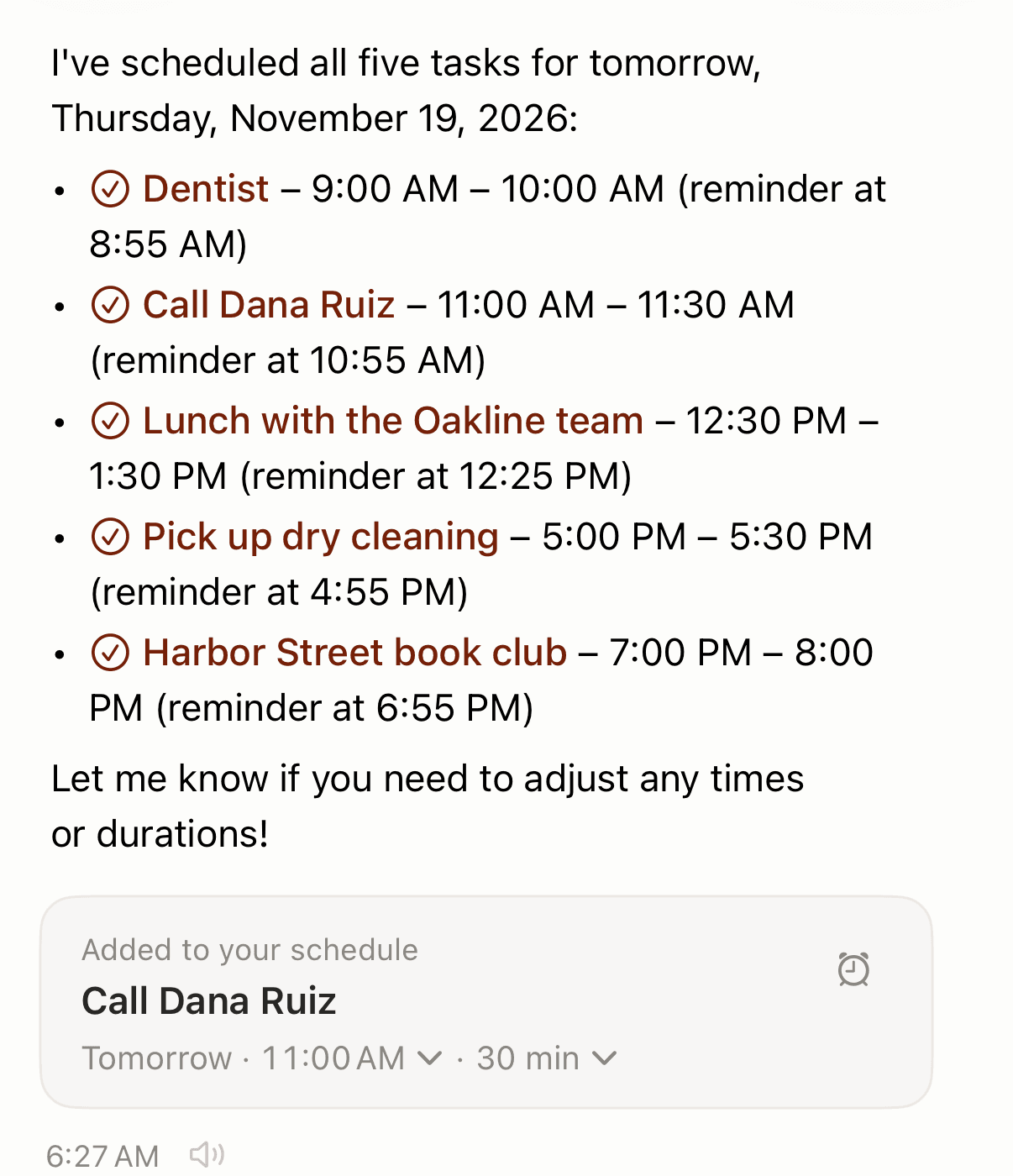
Codot is a voice AI assistant app. Your tasks, calendar events, reminders, notes and contacts sit in one place, and one sentence can create several of them at once. On November 18, 2026 we typed this into Codot on an iPhone simulator (typing and speaking go through the same chat):
"Tomorrow: dentist at 9am, call Dana Ruiz at 11, lunch with the Oakline team at 12:30, pick up dry cleaning at 5pm, and Harbor Street book club at 7pm."
About 40 seconds later Codot replied that it had scheduled all five for Thursday, November 19, each with its own time, a duration it picked (30 or 60 minutes) and a reminder five minutes before. An editable card underneath let us change any time or length.
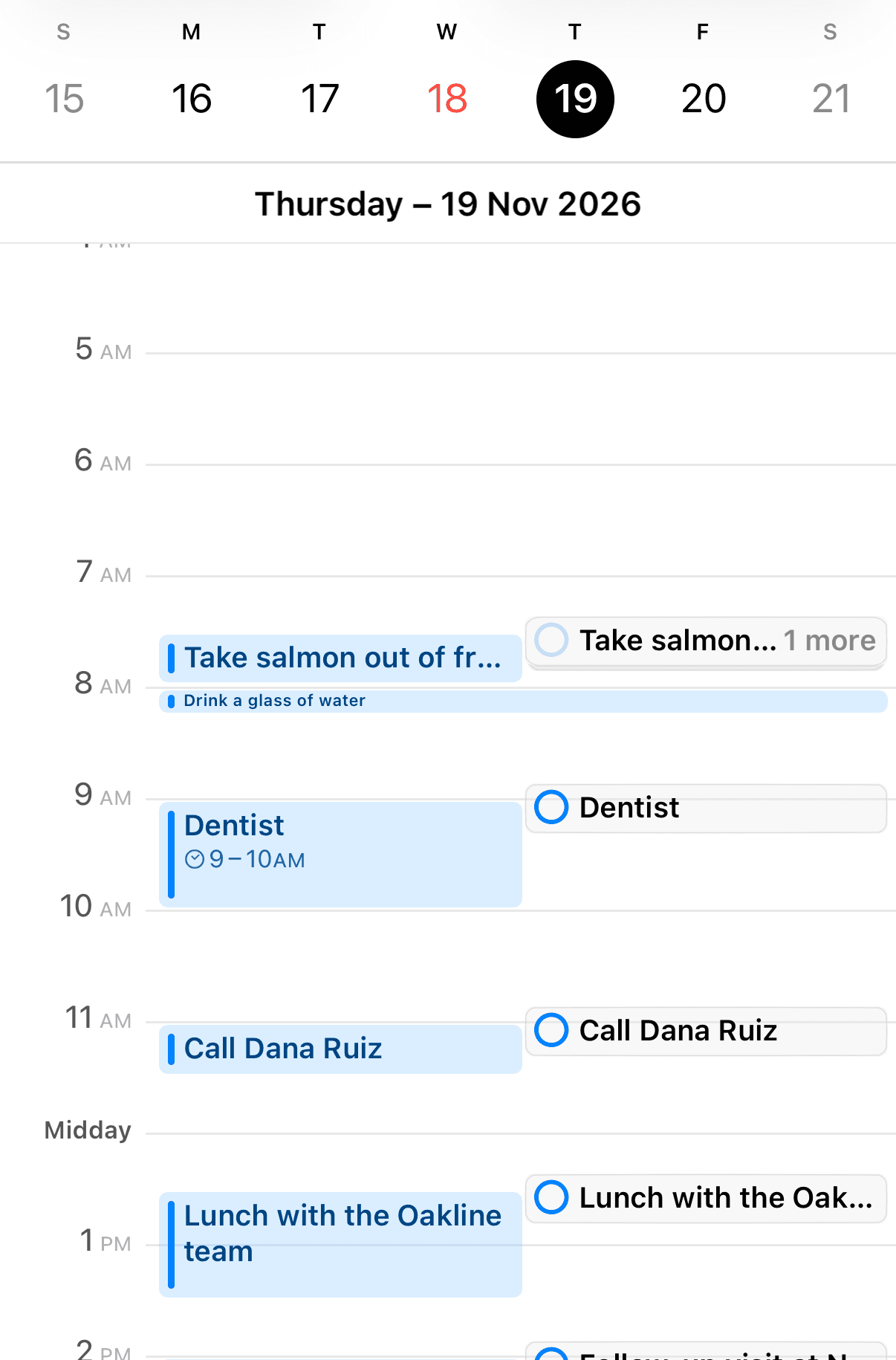
Then we opened Apple's Calendar app on the same device. All five were there on Thursday at the right times, and each also appeared as an Apple Reminders item.
A few facts that matter for the calendar question:
- Where it writes. On iPhone, Codot writes into iOS Calendar and Apple Reminders, and you choose which calendar it uses. You can also say "Connect Google Calendar" and Codot writes your events straight into Google Calendar.
- Direction. The sync is one-way. Codot doesn't read events you made elsewhere, and edits made in Apple Calendar don't flow back.
- Languages and devices. Codot's speech recognition runs on a large language model, so it understands all major languages, including the ones Siri doesn't speak at all, such as Polish, Czech and Hungarian. It doesn't need Apple Intelligence or an iPhone 15 Pro.
- Price. Creating tasks and events by voice is on the free plan. The reminder at a set time (the "8:55 for a 9:00 dentist" part) and repeating events are Codot Max: $12.99 a month or $99.99 a year on the US App Store, with 20x the free plan's usage. New accounts get a 7-day Max trial that drops back to free with no charge.
You can open Codot from the lock screen and talk.
How we selected
We compared the three calendar services people most often add to an iPhone (Apple's own iCloud calendar, Google Calendar and Outlook / Exchange) plus Codot, because those are the searches this page answers. Each claim about Siri comes from Apple's iPhone User Guide for iOS 27, Apple's iOS Feature Availability page or the Apple Newsroom, all read on November 18, 2026. The steps for Google and Outlook come from Google's and Microsoft's own help pages. Where Apple says nothing, we say so and name the third-party report instead. We did not test Siri on a device for this article; the hands-on test above covers Codot only.
Which calendar does Siri add events to?
Siri adds new events to your default calendar. Apple puts the rule this way: "any new events you create are added to that calendar automatically." Apple's page describes events in general and doesn't name Siri, but Apple Community users report the same behavior for Siri, for example this thread where the poster says Siri creates the event "in the default calendar every time."
To check or change it on iOS 27, per Apple's Calendar settings guide:
- Open Settings.
- Tap Apps, then tap Calendar.
- Tap Default Calendar, then pick the calendar you want.
Already added an event to the wrong one? Apple's multiple calendars guide says: "Tap the event, tap Calendar, then select a calendar to move the event to."
This is why people searching "can Siri add to Google Calendar" often find their event in iCloud instead. Siri did its job; the default pointed somewhere else. If the event doesn't show up in any calendar, see Siri not adding events to calendar for the other causes.
Your ideas shouldn't wait for a keyboard. Just say it — Codot handles the rest.
Can Siri add to Google Calendar?
Yes, once your Google account is in the iPhone Calendar app and a Google calendar is set as default. Apple's guide for iOS 27 lists the steps as Settings > Apps > Calendar > Calendar Accounts > Add Account, then "Tap a service (iCloud, Microsoft Exchange, or Google, for example), then sign in." Google's own help page describes the same route with slightly older labels (Calendar > Accounts > Add account > Google) and adds that if the account is already there, you "tap the account and turn on Calendars."
Google also lists features that don't carry over to Apple Calendar, including email notifications for events and creating new Google calendars. If you want events to land in Google Calendar without touching iOS settings, Codot can connect to Google Calendar directly, as described above; our guide on how to add multiple events to Google Calendar at once also covers CSV import and Gemini. For a broader look at apps that sit on top of Google's calendar, see our Google Calendar alternatives for iPhone.
Can Siri add appointments to Outlook calendar?
Yes, through the same door. Microsoft's help page gives these steps as of November 2026: open Settings, scroll to Apps and tap Calendar, tap Calendar Accounts, then select an existing account or tap Add Account and choose Outlook.com. Go back to the accounts list, pick the account and turn Calendar on. Work accounts appear in Apple's list as Microsoft Exchange.
Microsoft states that support for connecting Outlook to your iPhone "is provided by Apple support," so iOS problems go to Apple. And to make Siri write there, the Outlook calendar has to be your Default Calendar, using the steps in the section above. Codot does not connect to Outlook calendars, so for Outlook, Siri through the iOS Calendar app is the route.
Can Siri AI on iOS 27 add events to my calendar?
Siri AI (Beta) shipped with iOS 27 on September 14, 2026. Per Apple's Siri AI guide, it needs iOS 27 on an iPhone 15 Pro, iPhone 15 Pro Max or an iPhone 16 model or later. Apple's October 26 newsroom post says it's "currently unavailable in the EU" on iPhone, it isn't offered in China mainland, and it now covers English, French, Japanese, Korean, Portuguese and Spanish, with daily usage limits. You turn it on under Settings > Siri > Try Siri AI (Beta).
Its calendar strength is what's on screen. MacRumors reports that Visual Intelligence in iOS 27 can add multiple events from a schedule at once, and iPhone Life walks through asking Siri to add the events shown on a screen. That's useful for a concert poster or a school term sheet; our guide to adding a class schedule to iPhone Calendar covers the photo route too. For plans that are still in your head, Apple's guide doesn't describe a several-events-per-sentence request, which is the gap Codot covers. Our longer comparison of replacing Siri with ChatGPT or Gemini covers what the chatbots do with your calendar, and whether ChatGPT can access Apple Calendar goes deeper on iCloud.
When is classic Siri the right tool?
For one quick event, Siri is hard to beat: it's already on the phone and needs no setup. If Siri stops responding altogether, Apple's If Siri isn't working page starts with your internet connection and toggling Siri off and on under Settings > Siri > Requests. If Siri answers but nothing lands in Calendar, our list of why Siri is not adding events to your iPhone calendar covers seven causes. If you rely on iPhone reminders alongside the calendar, the same default-account logic applies there.
Codot is built for the list, the repeating event and the follow-up. Outlook calendars stay with Siri and the iOS Calendar app; Codot covers Apple Calendar and Google Calendar. Our roundup of voice calendar apps compares more options side by side.
FAQ
Can Siri add events to Apple Calendar?
Yes. Apple's iOS 27 guide gives "Set up a meeting with Gordon at 9" as the example phrase (more in our list of Siri calendar commands), and the event goes into the calendar chosen under Settings > Apps > Calendar > Default Calendar.
Can Siri add to Google Calendar?
Yes, after you add your Google account under Settings > Apps > Calendar > Calendar Accounts and set a Google calendar as default. Codot can also write to Google Calendar directly after you say "Connect Google Calendar."
Can Siri add appointments to Outlook calendar?
Yes, once the Outlook.com or Exchange account is added under Calendar Accounts with Calendar turned on, and an Outlook calendar is your default. Microsoft points iPhone setup questions to Apple support.
Can Siri add more than one event at a time?
Apple doesn't document adding several spoken events in one Siri request. Siri AI on iOS 27 can add multiple events it sees on screen, according to MacRumors. Codot adds several spoken or typed events from one sentence; we tested five at once on November 18, 2026.
How is Codot different from Siri for calendar entries?
Codot is an app you open (from the home screen or a lock-screen widget), and one sentence can create several events, reminders and tasks in Apple Calendar, Apple Reminders or Google Calendar, in any major language. Siri is built into iOS, and Apple's guide shows it adding one event per request.
Got a week of plans to get in? Download Codot on the App Store and say them in one go.
Productivity & Tools Desk
This article was created with AI assistance and reviewed by our editorial team.Learn about our content process.