Siri Calendar Commands (2026): The 2 Phrases Apple Documents, and 22 One-Sentence Alternatives That Add Several Events at Once
Siri calendar commands in 2026: the two phrases Apple documents, what Siri AI adds, and 22 copyable sentences that put several events into iPhone Calendar at once.
Apple documents two Siri calendar commands: “Set up a meeting with Gordon at 9” and “What's on my calendar for Friday?” Each covers one event or one question. To add several events with one sentence, Codot, a voice AI assistant for iPhone, turns a sentence like five plans for tomorrow into five timed events in Apple Calendar, with no Apple Intelligence needed. Creating events is free; a reminder before each one needs Codot Max at $12.99 a month.
Disclosure: Codot is our product. Siri facts come from Apple and the reports linked below; we tested the Codot sentences ourselves, not Siri.
Updated November 2026 · Apple pages and Codot prices checked November 18, 2026
TL;DR:
- Apple's guide gives exactly two Siri calendar commands: "Set up a meeting with Gordon at 9" and "What's on my calendar for Friday?" Each handles one event or one question.
- Codot is the sentence you say when you have several plans at once. In our test, one sentence with five timed plans became five events in Apple's Calendar app, each with a reminder 5 minutes before. Events are free; timed reminders and repeating tasks are Codot Max.
- Siri AI (Beta) on iOS 27 can add events it sees on screen or in a photo, on iPhone 15 Pro or later, outside the EU, in six languages.
- The library below has 22 copyable sentences for planning the week, after a client call, the school week, health appointments, a travel day and shift work.
At a glance
- Codot: one sentence creates several timed events in Apple Calendar and Reminders, in any major language; it writes to your calendar but doesn't read it. Events are free; timed and repeating reminders are Codot Max ($12.99 a month or $99.99 a year, 20x the free plan's usage, 7-day free trial) (codot.ai).
- Apple's documented Siri calendar phrases: "Set up a meeting with Gordon at 9." and "What's on my calendar for Friday?" (Apple iPhone User Guide).
- Several spoken events in one Siri request: Apple doesn't document it. Bloomberg reported in March 2026 that "Siri currently requires each request to be handled individually" (iClarified).
- Siri AI (Beta): iOS 27 on iPhone 15 Pro, 15 Pro Max or iPhone 16 and later, not in China mainland (Apple), and "currently unavailable in the EU" on iPhone (Apple Newsroom).
- Siri by language: not offered in Czech, Polish, Hungarian, Romanian, Greek, Slovak, Croatian, Ukrainian or Catalan, though keyboard dictation is (Apple feature availability).
Hey Siri, add to calendar: how do you add several events in one sentence?
Use Codot when you have three, four or five things to put on the calendar and want to say them in one breath. Siri handles one quick event well; a Sunday plan or the promises from a client call are several, and that's where one sentence to Codot saves the most taps.
This is the sentence we typed into Codot on November 18 (speaking it works the same way; the mic sits next to the text field):
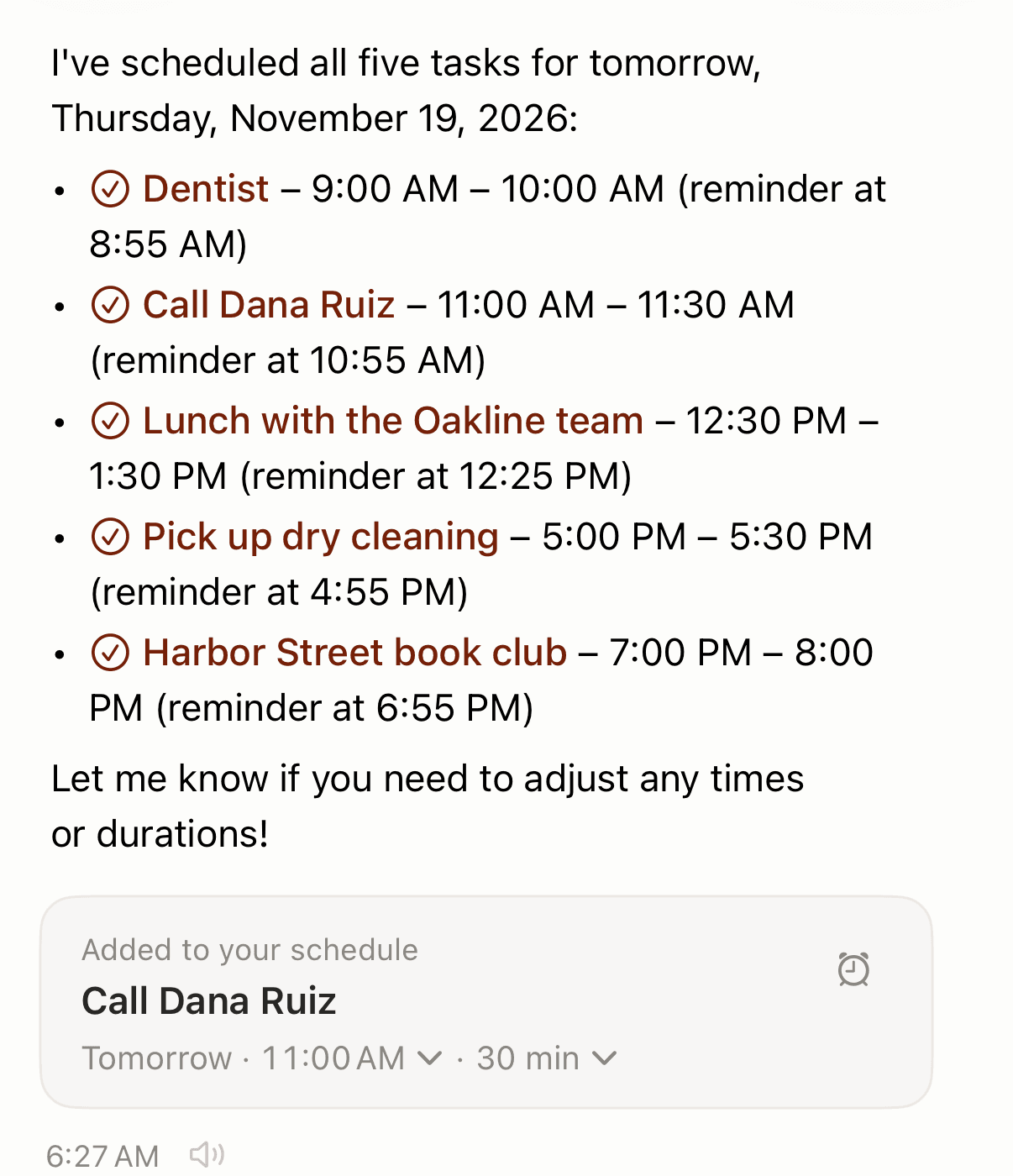
"Tomorrow: dentist at 9am, call Dana Ruiz at 11, lunch with the Oakline team at 12:30, pick up dry cleaning at 5pm, and Harbor Street book club at 7pm."
About 40 seconds later Codot had scheduled all five for Thursday, November 19, picked a length for each (30 or 60 minutes) and set a reminder 5 minutes before every one. In Apple's Calendar app on the same iPhone, all five sat on Thursday at the right times, and they appeared in Apple Reminders too.
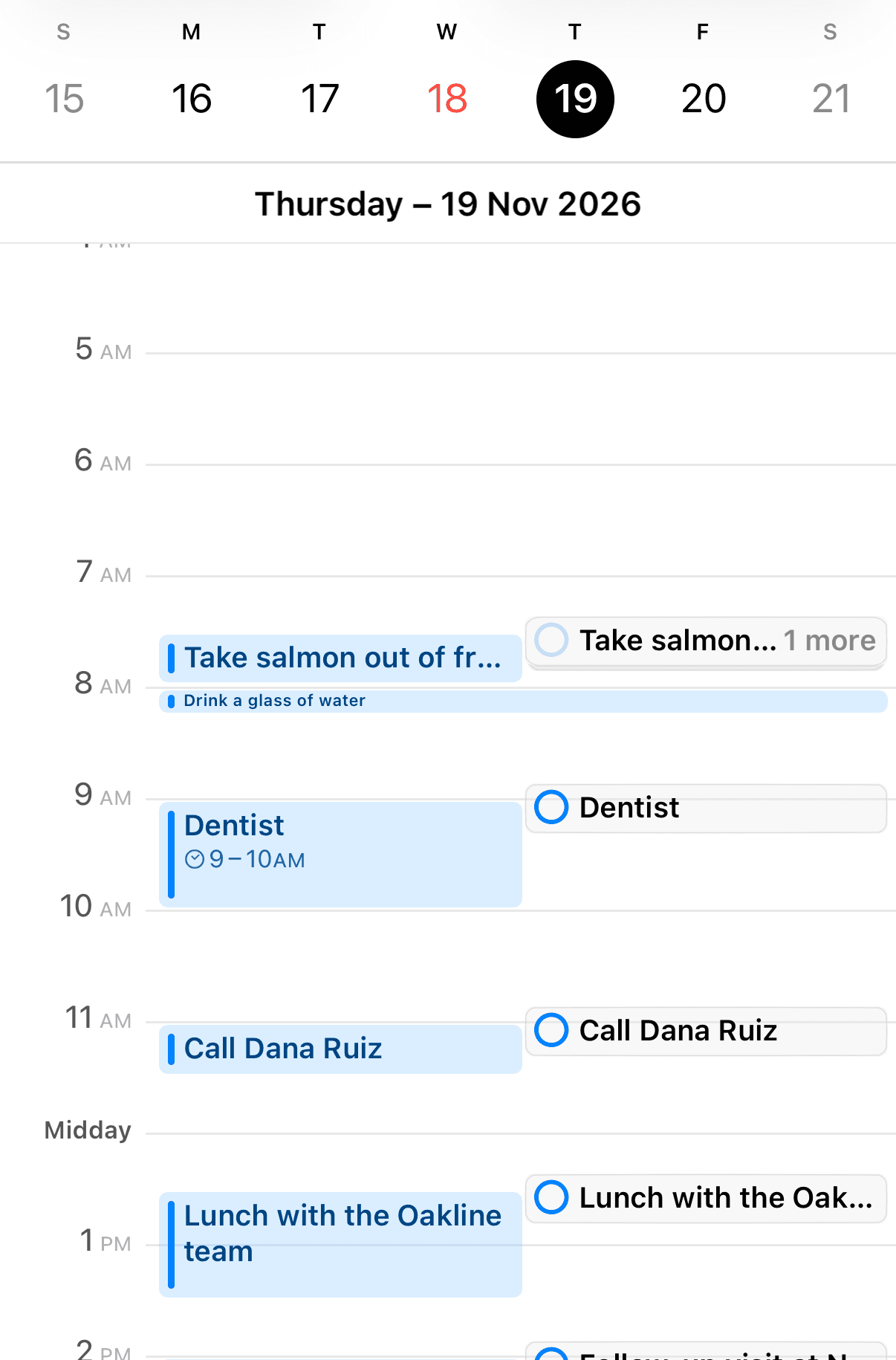
It runs on any iPhone that runs Codot, needs no Apple Intelligence, and understands all major languages, including ones Siri doesn't speak. You connect the calendar once: iOS asks for Calendar access and you choose which calendar Codot writes into, or you say "Connect Google Calendar" (whether Siri itself can write to those accounts is covered in can Siri add events to Google or Outlook calendar). And it writes one way, so Codot won't see events you created elsewhere; glance at the day for clashes.
Events, reminders, contact notes, a shopping list and a nightly routine all live in that one app, and one sentence can create several at once. For other calendar apps you can talk to, see the best voice calendar apps.
What Siri calendar commands does Apple actually document?
Apple documents two. Under "Create or change calendar events," the iPhone User Guide lists "Set up a meeting with Gordon at 9." and "What's on my calendar for Friday?" (Apple), and the Calendar chapter repeats the first (Apple). There's no official phrase list for moving, cancelling or choosing a calendar.
Older third-party lists, such as iMore's iOS 15 guide, add phrases like "Move my 3 pm meeting tomorrow"; nobody has republished them for iOS 27.
New events go to your default calendar, set in Settings > Apps > Calendar > Default Calendar; Apple says "any new events you create are added to that calendar automatically" (Apple). Apple doesn't say outright that Siri follows it, but users in an Apple Community thread report Siri's events land there every time. If they keep landing in the wrong place, our guide to Siri not adding events to calendar walks through the other fixes.
Which Siri do you have: classic Siri or Siri AI?
It depends on your iPhone, country and language. Siri AI arrived as a beta with iOS 27 on September 14, 2026, for iPhone 15 Pro and later; since iOS 27.2 it works in English, French, Japanese, Korean, Portuguese and Spanish, with usage limits, and Apple says it is "currently unavailable in the EU in iOS, iPadOS, and watchOS" (Apple Newsroom).
Where you have it, Siri AI can add events it sees. iPhone Life describes asking Siri to "add both/all events on your screen" (iPhone Life), and MacRumors reports Visual Intelligence adding several events "at one time from a schedule" (MacRumors). That covers a flyer or timetable; Apple's guide says nothing about a spoken list.
Everyone else has classic Siri, and some languages have no Siri at all. If you think in Polish, Czech or Hungarian, see Siri in Polish, voice assistants that understand Czech and Siri in Hungarian.
Your ideas shouldn't wait for a keyboard. Just say it — Codot handles the rest.
22 sentences to say instead, and what each one puts in your calendar
Copy a line, swap in your own names and times, and say it to Codot. Events land in Apple Calendar once the iOS Calendar connection is on. "Free" means the events are free and the 5-minute reminder on each needs Max; "Max" lines are timed reminders, repeating tasks or routines.
Planning tomorrow or the week
| # | Say this | What it creates | Plan |
|---|---|---|---|
| 1 | Tomorrow: dentist at 9am, call Dana Ruiz at 11, lunch with the Oakline team at 12:30, pick up dry cleaning at 5pm, and Harbor Street book club at 7pm. | Five events tomorrow | Free |
| 2 | Monday: deep work from 9:30 to 11:30, invoice the Hale project at 2, and gym at 6pm. | A two-hour block and two events | Free |
| 3 | Every Sunday at 7pm, remind me to plan next week. | A weekly reminder | Max |
| 4 | Every night at 10, ask me what I finished today. | A nightly check-in routine | Max |
Right after a client call
| # | Say this | What it creates | Plan |
|---|---|---|---|
| 5 | Call Priya Shah Thursday at 10 about the renewal, she prefers mornings and texts over email, and remind me Wednesday at 4 to pull her contract. | A Thursday event, a Wednesday reminder, her preferences on her contact | Free |
| 6 | Review the Fenwick proposal with Sam Monday at 3, send it Tuesday at 9, and check in with Fenwick Friday at 11. | Three events across the week | Free |
| 7 | Remind me in 50 minutes to send the recap email. | One reminder | Max |
| 8 | On the 25th of every month at 9am, remind me to send invoices. | A monthly reminder | Max |
More follow-up sentences: what field reps say between visits.
School and kid week
| # | Say this | What it creates | Plan |
|---|---|---|---|
| 9 | Wednesday: parent-teacher conference at 4:15, swim lesson at 5:30, and buy project supplies at 7. | Three Wednesday events | Free |
| 10 | Add glue sticks and poster board to my shopping list and remind me at 6pm to go to the store. | Two list items and a 6pm reminder | Free list, Max reminder |
| 11 | Friday: field trip forms due at 8am, early pickup at 1:30, and soccer practice at 4. | Three Friday events | Free |
| 12 | Every other Friday at 3pm, remind me to pack the gym bag. | A fortnightly reminder | Max |
See also how to organize a family calendar and an app that reads school emails.
Health appointments
| # | Say this | What it creates | Plan |
|---|---|---|---|
| 13 | Next Tuesday: blood test at 8am, physio at 12:30, and pick up the prescription at 5. | Three Tuesday events | Free |
| 14 | Thursday: dentist at 10 and eye exam at 3pm, and remind me Wednesday at 8pm not to eat after midnight. | Two events and a reminder | Free |
| 15 | On the 15th of every quarter at 10am, remind me to reorder contact lenses. | A quarterly reminder | Max |
Travel day
| # | Say this | What it creates | Plan |
|---|---|---|---|
| 16 | Friday: leave for the airport at 6am, flight to Denver at 8:40, hotel check-in at 3, and dinner with Marco at 7:30. | Four Friday events in order | Free |
| 17 | Add a phone charger, adapter and sunscreen to my shopping list and remind me Thursday at 7pm to pack. | Three list items and a reminder | Free list, Max reminder |
| 18 | Remind me in 2 hours to check in for my flight. | One reminder | Max |
| 19 | Monday: return the rental car at 10, train to the office at 11:15, and team catch-up at 2. | Three Monday events | Free |
Shift work
| # | Say this | What it creates | Plan |
|---|---|---|---|
| 20 | Tuesday: day shift from 7am to 3pm, gym at 4, and meal prep at 6. | A shift block and two events | Free |
| 21 | Every other Friday at 8pm, remind me to check the next roster. | A fortnightly reminder | Max |
| 22 | Remind me at 5:30pm to set out my uniform. | One reminder | Max |
Rotating patterns: our rotating shift calendar guide and the best calendar apps for students and shift workers.
How do you get clean results from a several-event sentence?
Give every item its own time, and keep new plans and changes in separate sentences. Codot picks a length when you only give a start time, so say "from 9:30 to 11:30" when length matters. When a plan changes, say the change on its own ("Move physio to Wednesday at 1"), then add new things in the next sentence; a move mixed with several new timed items is the case most likely to come back with a question.
A silent reminder is usually an iPhone setting (iPhone reminders not working), and if one alert isn't enough, you can add multiple reminders on iPhone. Every bulk method, from copy and paste to subscriptions, is compared in how to add multiple events to iPhone Calendar at once.
Where does Siri still fit?
Keep Siri for one quick event, a timer or "what's on today"; use Codot for lists, routines and follow-ups. Codot is an app you open, from the Home Screen or a lock-screen widget, and since it doesn't read your calendar, double bookings are yours to spot. If you're weighing a bigger switch, see whether you can replace Siri with ChatGPT or Gemini.
FAQ
What are the Siri calendar commands on iPhone?
Apple's iPhone User Guide documents two: "Set up a meeting with Gordon at 9." and "What's on my calendar for Friday?" Phrases for moving or cancelling events appear in older third-party guides such as iMore's iOS 15 article, not in Apple's list.
Can Siri add multiple events to my calendar at once?
Apple doesn't document adding several spoken events in one Siri request. Siri AI (Beta) on iOS 27 can add multiple events already on your screen or in a photo, on an iPhone 15 Pro or later and outside the EU. For a spoken list of plans, Codot turns one sentence into several Apple Calendar events.
Does Codot need Apple Intelligence or a new iPhone?
No. Codot runs on any iPhone that can install it and doesn't depend on Siri AI, so it works in the EU and in languages Siri doesn't support. Events by voice are free; timed and repeating reminders are Codot Max at $12.99 a month after a 7-day free trial.
Say your next five plans in one sentence: download Codot on the App Store.
Productivity & Tools Desk
This article was created with AI assistance and reviewed by our editorial team.Learn about our content process.