Best Calendar App for Students and Shift Workers (2026): Classes, Rotating Shifts and Study Time in One Week
The best calendar and schedule apps for students, shift workers and students with a shift job: Google and Apple Calendar, MyStudyLife, Supershift, My Shift Planner and Codot compared.
For most students the best free calendar is Google Calendar or Apple Calendar. MyStudyLife adds class timetables and assignments, and Supershift or My Shift Planner handle rotating work patterns. Codot, a voice AI assistant for iPhone, suits a student with a shift job: it turns a timetable photo into calendar entries, adds shifts by voice and writes them into Google or Apple Calendar; reminders and routines are Codot Max at $12.99 a month.
Disclosure: Codot is our product. The student below is fictional, written to show one realistic week of classes plus a part-time job with rotating shifts. Prices for other apps come from their App Store listings, checked November 5, 2026.
TL;DR:
- If you only have classes, Google Calendar or Apple Calendar is enough and free. Add MyStudyLife ($6.99 a month or $39.99 a year for MyStudyLife+) if you want assignments and exams tracked next to your timetable.
- If you only work shifts, a dedicated shift app like Supershift or My Shift Planner repeats a rotation pattern for months with one setup.
- If you're a student with a shift job, the hard part is the week that changes: a rota posted on Thursday, a swapped late shift, a study block that has to move. Codot handles that by voice and photo, and writes everything into the Google or Apple Calendar you already check.
- Free vs paid in Codot: tasks, calendar entries and voice input are free. Timed and repeating reminders, the 7:00 daily briefing on iPhone and scheduled Routines are Codot Max ($12.99 a month or $99.99 a year), with a 7-day free Max trial.
At a glance
| App | Best for | Price (as of November 2026) | Platforms | Main limit | Source |
|---|---|---|---|---|---|
| Google Calendar | Any student who wants a free shared calendar | Free | iPhone, Android, web | No class or shift templates | App Store |
| Apple Calendar | iPhone, iPad and Mac users | Free, built in | iPhone, iPad, Mac | Apple devices only | App Store |
| MyStudyLife | Weekly or rotating class timetables, assignments, exams | Free; MyStudyLife+ $6.99 a month or $39.99 a year | iPhone, iPad, Apple Vision | Built around school, not work shifts | App Store |
| Supershift | Repeating rotations like 2-2-3 or Pitman | Free; Pro $3.99 a month, $9.99 a year or $39.99 lifetime | iPhone, iPad, Apple Watch | Calendar export is a Pro feature | App Store |
| My Shift Planner | Custom shift patterns, earnings, shift alarms | Free; Pro Pack $0.99 a month, $9.99 a year or $49.99 lifetime | iPhone, iPad, Mac | Calendar sync is in Pro Pack | App Store |
| Codot | A student with a shift job whose week changes | Free plan; Codot Max $12.99 a month or $99.99 a year, 7-day free Max trial | iPhone, Android, Apple Watch, web | Writes into your calendar; answers from what you saved in Codot | App Store |
Why does a student with a shift job need more than a calendar?
A calendar holds events, but a student with a part-time job needs the week rebuilt every time the rota changes. Take Imani, a fictional second-year accounting student in the fictional city of Calder Bay. She has classes Monday, Wednesday and Friday mornings, a Tuesday evening lab, and about 20 hours a week at a grocery store on rotating shifts: early (6 to 2), late (2 to 10) and weekend opens.
The class timetable is fixed for the semester; the shifts change. Her manager posts next week's rota on Thursday afternoon, people swap on the group chat, and every move pushes a study block somewhere else. That's how a problem set due on the wrong night gets missed.
Most roundups treat students and shift workers as two separate questions. For Imani they are one week, so below we cover the strongest app for each half and how they fit together.
How do you get a class timetable into your calendar fastest?
Take a photo of the timetable and let Codot turn it into calendar entries. On Thursday, November 5, Imani photographs the printed class schedule from her course portal and sends it to Codot with one line: "Add these classes to my calendar for the rest of the semester."
Codot reads the course names, days, times and rooms from the photo and adds each class as a calendar entry, written into Google Calendar or Apple Calendar so it sits in the calendar app she already opens.
If you'd rather do it by hand or subscribe to your school's iCal feed, our guide on adding a class schedule to Google Calendar or iPhone Calendar walks through all three ways. MyStudyLife is the other strong option here: its listing describes support for "weekly & rotating schedules," which helps at schools that run an A/B week.
How do you add a rotating shift schedule without retyping it every week?
Say next week's shifts in one sentence as soon as the rota goes up. Imani's rota is posted Thursday afternoon, so on the bus home she says to Codot:
"My shifts next week: Monday the 9th late 2 to 10, Wednesday the 11th late 2 to 10, Saturday the 14th and Sunday the 15th early 6 to 2."
Codot adds four shift entries on the right days and writes them into her calendar next to the classes from the photo. Adding events like this is on the free plan.
This is where the dedicated shift apps work differently. Supershift lets you define a rotation once and, in its own words, "apply it up to 2 years in advance," and it handles named patterns like 4-on-4-off, DuPont, Pitman and 2-2-3. My Shift Planner offers custom patterns plus earnings calculations. If your rota repeats on a fixed cycle, those apps save you the weekly sentence. If your manager writes a new rota every Thursday, saying it takes about ten seconds. For a full three-shift example, see our rotating shift calendar walkthrough.
How do you swap a shift or move a study block by voice?
Tell Codot what changed and what should move with it. On Monday, November 9, a coworker asks to swap: Imani takes his Thursday late shift and gives up her Wednesday late. Standing at the register on her break, she says:
"Move my Wednesday late shift to Thursday the 12th, same time, and move my Thursday evening study block to Wednesday at 6."
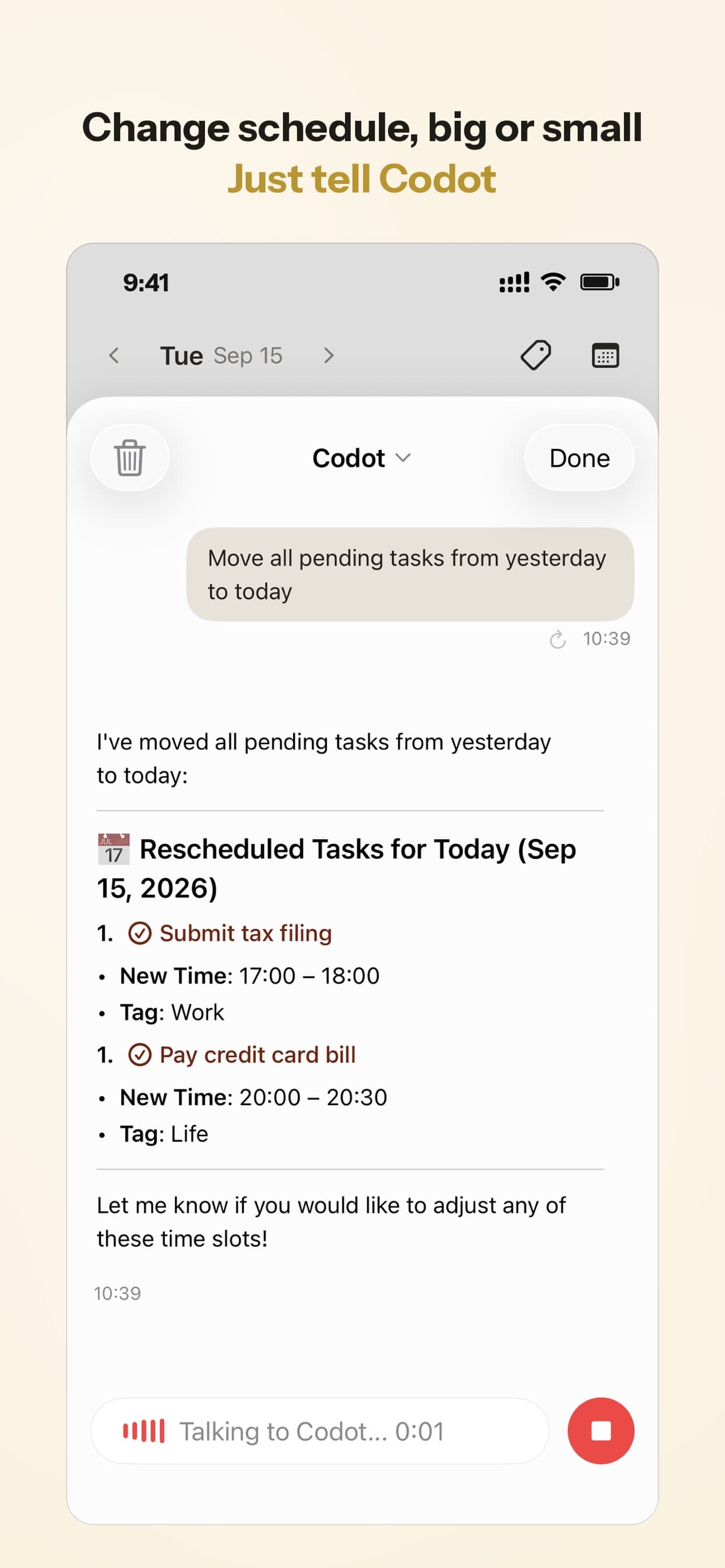
Before agreeing to a swap, she can also ask: "Which evenings next week have no shift and no class after 5?" Codot answers from the classes, shifts and study blocks she has saved with it. It doesn't read events that other apps put in her calendar, so the habit that keeps the answer right is adding shifts and classes through Codot.
How do you stop missing a shift or a deadline?
Set a reminder at the moment you learn the time, phrased the way you'd tell a friend. Imani's accounting problem set is due Friday, November 13 at 11:59 p.m., and she works the Thursday late shift the night before. So she says:
"Remind me Wednesday at 6 to start the accounting problem set, it's due Friday at midnight."
"Remind me Monday at 1:15 to leave for my late shift."

Timed and repeating reminders are Codot Max. On iPhone with iOS 26 or later, a reminder can ring like an alarm, which helps after a late shift when the phone is on silent. Codot sends each reminder once, so set it for the time you'll actually act on it. Our AI reminder apps for college students post compares reminder styles in more detail.
Your ideas shouldn't wait for a keyboard. Just say it — Codot handles the rest.
What should you check on Sunday night and each morning?
Look at the whole coming week on Sunday, then today's list each morning. Imani set one Routine on Sunday, November 8:
"Every Sunday at 8pm, list my classes and shifts for the week, anything due, and the evenings where I have two free hours to study."
On Sunday night she sees Monday's class and late shift, the Tuesday lab, the problem set due Friday, and that Wednesday after 6 and Friday afternoon are open. She puts study blocks there.
Routines are Codot Max, up to 20 of them. Codot also makes a daily briefing on iPhone each morning at 7:00 with your reminders, news and a summary, which on an early-shift day is the one screen worth reading before leaving at 5:30. When exam season arrives, the same weekly routine can carry a study plan; our 30-day PTE study plan shows a day-by-day schedule built around classes and other commitments.
What is the best calendar app for college students?
Use Codot when your classes are fixed but your work shifts, study blocks and deadlines move every week, and you want to change them by talking instead of tapping through a calendar. Codot is a voice AI personal assistant: you send a photo of a timetable or say a sentence, and it creates the entries, moves them, reminds you and summarizes the week—the same features that make it the best AI assistant for working moms who need to manage school forms and family deadlines by voice. It writes everything into Google Calendar or Apple Calendar, and on iPhone it can also put tasks into Apple Reminders—a popular tool for managing a household mental load checklist—so you keep the calendar app your classmates and family already see.
Codot has been running for almost two years. It works on iPhone, Android, Apple Watch and the web, with voice input everywhere; the daily briefing is iPhone only. New accounts get 7 days of Codot Max free, which covers a full week of classes and shifts with reminders and routines on. When the trial ends, the account returns to the free plan without being charged.
Which is the best free calendar app for students?
Google Calendar is the best free calendar for most students, and Apple Calendar is the best free choice if everything you own is Apple. Google Calendar runs on iPhone, Android and the web, so it works for group projects with classmates on different phones. Apple Calendar is built into iPhone, iPad and Mac and syncs through iCloud.
Neither has a class timetable or shift pattern built in, so many students pair one with something that fills it: MyStudyLife for the timetable, a shift app for the rota, or Codot's free plan for adding classes, shifts and tasks by voice into either calendar.
What are the best apps for shift workers?
Supershift and My Shift Planner are the strongest dedicated shift apps we checked, and they suit different people, including those looking for a nurse schedule app for 12-hour shifts. Supershift is built around repeating rotations: you set the cycle once and it fills months ahead. Its listing also describes sharing your schedule with "family, partners, friends, or coworkers" and tracking hours and pay. Pushing shifts to Apple, Google or Outlook calendars is part of Supershift Pro ($3.99 a month, $9.99 a year or $39.99 lifetime).
My Shift Planner covers custom patterns, shift alarms and earnings, and runs on iPhone, iPad and Mac. Its Pro Pack ($0.99 a month, $9.99 a year or $49.99 lifetime) adds calendar sync, calendar sharing and overtime calculations.
Both are cheap if all you need is a fixed rotation. They know your pattern, though, and not your Tuesday lab or Friday problem set.
How should a student with a shift job choose?
Pick by how often your week changes and how many kinds of things are in it.
- Classes plus a job whose rota changes weekly: use Codot. One photo for the timetable, one sentence per rota, voice for swaps, reminders and a Sunday plan, all written into Google or Apple Calendar.
- Classes only, with lots of assignments: use Google or Apple Calendar, plus MyStudyLife if you want homework and exams tracked by course.
- A fixed rotation that repeats for months: use Supershift or My Shift Planner, and turn on calendar export so shifts show in your main calendar.
- Free and nothing else: Google Calendar, with classes and shifts added by hand or by voice through Codot's free plan.
Codot handles the changing parts of the week and the reminders; if your rotation runs on a fixed multi-week cycle, pair it with Supershift or My Shift Planner for the pattern. Codot answers from what you've saved in it, so add new shifts and classes through Codot and keep the free calendar as the place everyone looks.
How do you set this up before next week's rota?
- Install Codot from the App Store and connect Google Calendar or Apple Calendar.
- Send a photo of your class timetable: "Add these classes to my calendar for the rest of the semester."
- When the rota goes up, say next week's shifts in one sentence with days and times.
- Add your next two deadlines with a reminder at the time you'll start, not the due time.
- Set the Sunday routine: "Every Sunday at 8pm, list my classes and shifts for the week, anything due, and the evenings where I have two free hours to study."
FAQ
What is the best calendar app for students for free?
Google Calendar is the best free calendar for most students because it works on iPhone, Android and the web; Apple Calendar is the free pick for all-Apple users. Codot's free plan adds classes, shifts and tasks to either calendar by voice.
What is the best schedule app for students who work part time?
Codot fits students with part-time shift work: it turns a timetable photo into calendar entries, adds each week's shifts from one spoken sentence, and moves them when you swap. Reminders and a weekly planning routine are Codot Max at $12.99 a month, with a 7-day free trial.
What is the best calendar app for shift workers?
For a fixed rotation, Supershift (Pro from $3.99 a month) and My Shift Planner (Pro Pack from $0.99 a month) repeat your pattern for months, as of November 2026. For a rota that changes every week, Codot adds and moves shifts by voice and writes them into Google or Apple Calendar.
How is Codot different from MyStudyLife?
Codot is a voice AI assistant that covers classes, work shifts, tasks and reminders in one place and writes them into Google or Apple Calendar. MyStudyLife is a school planner built around class timetables, assignments and exams, with MyStudyLife+ at $6.99 a month or $39.99 a year.
Does Codot sync with Google Calendar?
Codot writes the classes, shifts and tasks you add into Google Calendar or Apple Calendar, so they appear in the calendar app you already use. It answers questions about your week from what you've saved in Codot.
If next Thursday's rota is going to move your study night again, get Codot on the App Store and say the new week once.
Productivity & Tools Desk
This article was created with AI assistance and reviewed by our editorial team.Learn about our content process.