App That Reads School Emails for Parents (2026): Replace Ollie With a 30-Minute Setup, From One Email to Calendar, Reminders and a Packing List
Ollie used to read school emails for parents. A 30-minute setup to replace it, a worked example from one email to calendar and reminders, and 6 apps compared.
Ollie announced it would shut down on November 6, 2026, so parents who relied on it to read school emails need a replacement. Fambot (free in beta) reads your inbox with read-only access, Cozi Max ($79/year) imports events from email, and Ohai takes forwarded emails. Codot sorts Gmail or Outlook on iPhone, drafts replies, and turns a photo of a school notice into calendar dates, reminders and a partner's to-do; email triage and timed reminders need Codot Max ($12.99/month).
Updated November 2026 · prices checked on November 16, 2026 on each vendor's official page
Codot is our product. This guide shows how we would set it up to take over Ollie's school-email job, and compares five other apps that read school mail.
TL;DR:
- Ollie announced it would shut down on November 6, 2026 (our Ollie AI alternatives guide covers the rest of what it did). Rebuilding its school-email job takes about 30 minutes.
- Codot sorts your Gmail or Outlook inbox on iPhone and drafts replies to the important ones. When a school notice lands, you snap or screenshot it, Codot pulls out the dates, and one sentence turns the rest into reminders for you and your partner. Email triage and timed reminders are Codot Max.
- The real difference between apps is how they reach your mail: forwarding (you pick what they see) or a direct connection (they see everything), and whether that access is read-only or can send.
- For hands-off scanning with read-only access, Fambot (free in beta) is the closest match. Families already on Cozi can add AI Event Import with Cozi Max for $79 a year.
At a glance
| App | Best for | Price (as of Nov 2026) | How it gets school email | Can it send email? | Source |
|---|---|---|---|---|---|
| Codot | Dates, reminders and a partner's to-dos from one photo and one sentence | Free plan; Codot Max $12.99/month or $99.99/year, 7-day free trial | Direct Gmail and Outlook connection for triage (iPhone, Max); dates from a photo or screenshot you share | Yes, it drafts replies to important emails | App Store |
| Fambot | Hands-off scanning of school newsletters | Free while in beta | Direct connection, sign up with Google | No, read-only access | fambot.com |
| Ohai | Families who forward emails, PDFs and photos | $9.99/month on its website; App Store plans from $14.99 | Forwarding, uploads and email scanning | Not stated | ohai.ai |
| Cozi Max | Families already on Cozi's shared calendar | $79/year on the compare page ($79.99 on the Max page) | AI Event Import reads invitations from your inbox | Not stated | cozi.com |
| Anna | Parents who also want bookings done with approval | $20/month or $192/year after a 14-day trial | "School emails to calendar" feature | Not stated | hianna.ai |
| Skylight Plus | Homes with a Skylight wall display | $79/year; display sold separately | Forward school emails to Sidekick | Not stated | myskylight.com |
What app reads school emails and adds the dates to my calendar?
Use Codot when you want school dates, reminders and your partner's share of the prep set up in one place, from one photo and one sentence. Picture Rachel, a parent we made up, reading a field-trip email in the pickup line with four minutes before the bell: the date is in paragraph two, the slip deadline in paragraph four, the lunch instructions at the bottom.
Rachel screenshots the email (or photographs the paper notice from the backpack) and shares it in Codot. Codot reads the dates out of it, and one tap puts them on her calendar. Then she says one sentence, and Codot sets a reminder for her, a packing reminder and a to-do that lands on her partner's phone.
Tasks, calendar entries, reminders, notes and the people you share them with all sit in Codot. It writes its events to Google Calendar or Apple Calendar, so the family calendar you already check shows them. It doesn't read the events already in that calendar, so use the calendar for viewing and Codot for adding.
One school email, worked through: calendar event, reminders and what to bring
The email (invented): "Grade 3 is visiting the Science Museum on Friday, December 5. The bus leaves at 8:15 and returns at 2:30. Please return the signed permission slip and $12 by Wednesday, December 3. Students should wear their school T-shirt and bring a lunch in a disposable bag."
That one email holds four jobs:
| What's in the email | What it should become | Who gets it |
|---|---|---|
| Friday, Dec 5, 8:15 to 2:30 | Calendar event "Science Museum trip" | Family calendar |
| Slip and $12 due Wednesday, Dec 3 | Reminder Tuesday, Dec 2 at 8pm: sign slip, put $12 in the folder | You |
| School T-shirt, disposable lunch | Reminder Thursday, Dec 4 at 8pm: wash the T-shirt, pack the lunch | Your partner |
| Bus leaves at 8:15 | Reminder Friday at 7:30am: leave by 7:45 | Whoever drives |
After the dates are in, Rachel says: "Remind me Tuesday at 8pm to sign the museum permission slip and put $12 in the folder, remind Brandon Thursday at 8pm to wash Maya's school T-shirt and pack a disposable lunch, and remind me Friday at 7:30am to leave by 7:45." Codot splits that into three reminders. Brandon's goes to his phone once Rachel taps Confirm on the share card. Codot doesn't sign the slip or pay the $12; the school's own form and payment system handle that.
Forwarding vs. a direct connection, and read-only vs. send
Decide how much of your inbox an app should see before you pick one.
- Forwarding (Ohai, Skylight's Sidekick, Nori): the app sees only what you send it. Privacy exposure is small, but it depends on you remembering to forward, which is the step that fails on a busy week.
- Direct connection (Fambot, Cozi Max's AI Event Import, Codot's email triage, and Ollie before it): you grant access once and the app reads incoming mail on its own. It catches the email you never opened, and it also sees everything else in that account.
- Read-only vs. send: Fambot says it uses "secure, read-only access" and "never sends emails on your behalf" (fambot.com). Codot drafts replies and can send email, so its access goes beyond read-only. If school mail shares an inbox with work mail, that difference matters.
Codot connects one Gmail and one Outlook account per user. If school mail goes to a third address, forward it into a connected account or use the photo route.
Your ideas shouldn't wait for a keyboard. Just say it — Codot handles the rest.
How we selected
We started from the job Ollie's site described: read school email, pull out dates, offer to add them to the calendar. We kept apps that do this from email or a forwarded notice and publish a price, and checked each official pricing or feature page on November 16, 2026. SchoolDigest and Pally also come up in these searches, but we couldn't confirm their pricing or permissions on an official page, so they're not in the table. We did not test competitors hands-on.
The 30-minute setup, step by step
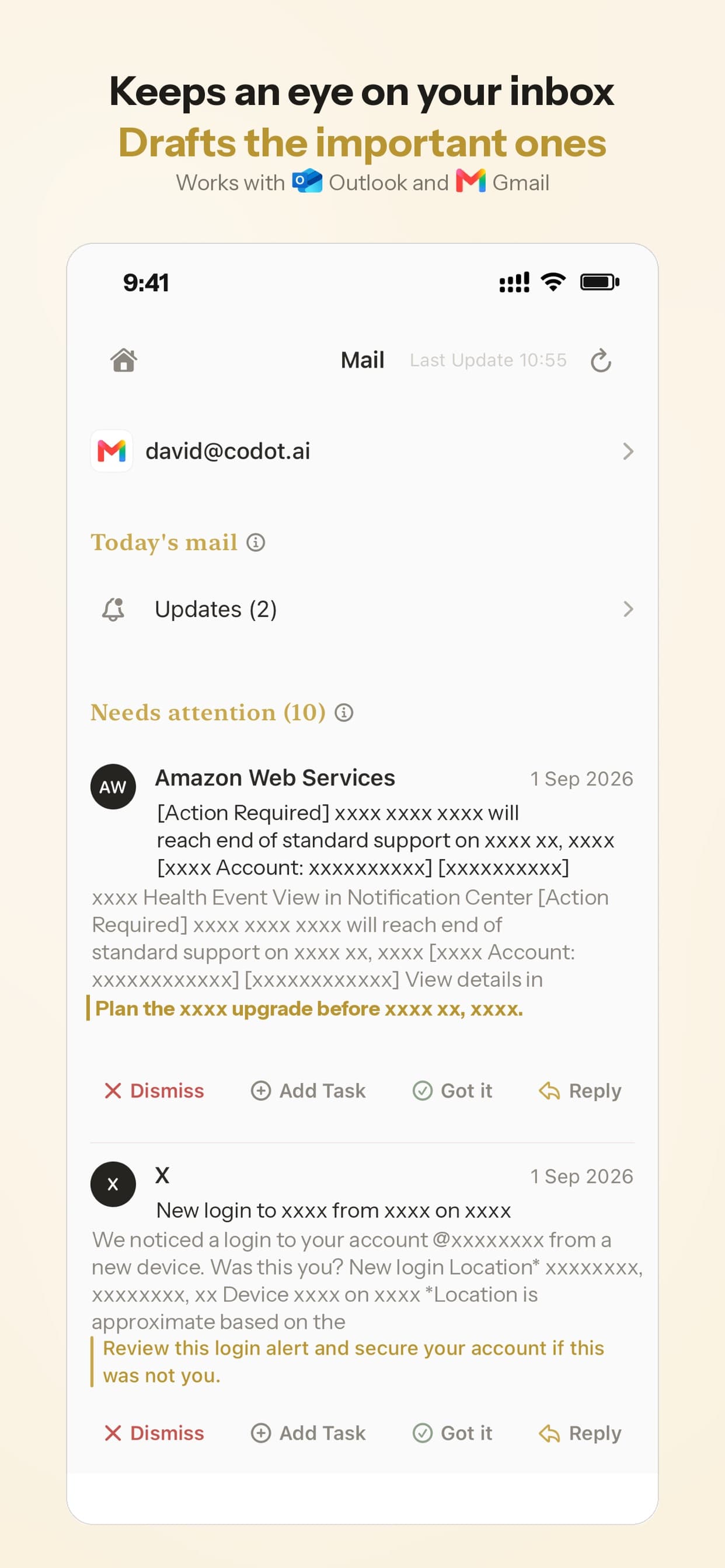
1. Connect your inbox for triage (5 minutes). Install Codot on your iPhone; new accounts get a 7-day Codot Max trial. Connect the Gmail or Outlook account the school writes to. Codot sorts incoming mail and drafts replies to messages that need an answer, such as "please confirm you can chaperone." The email assistant is iPhone-only and part of Codot Max.
2. Pick the calendar Codot writes to (3 minutes). Say "Connect Google Calendar," or turn on Apple Calendar in Codot. If the family calendar itself is a mess, see how to organize a family calendar.
3. Add your partner as a friend (3 minutes). Both of you install Codot and add each other. Adding friends and assigning tasks are free; reminders that fire at a set time are Codot Max. Our guide on sending a reminder to someone else's iPhone compares this with Apple's shared lists.
4. Run your first school email through it (6 minutes). Take the next email or paper notice with a date in it, screenshot or photograph it, share it in Codot, check the dates it found, and tap to add them. The same photo route works for timetables, as in how to add a class schedule to Google Calendar or iPhone Calendar.
5. Say the prep in one sentence (5 minutes). Who, what, when, in one breath, with a time ("Thursday at 8pm"); leave the time out and Codot may ask. For weekly things: "remind Brandon every Monday at 7pm to pack the library book." (more patterns in setting recurring reminders on iPhone) A repeating task you assign goes to the other person every time.
6. Add a Sunday look-ahead (5 minutes). Say "Every Sunday at 7pm, list this week's school events, what to bring, and Brandon's tasks." That's a Routine (Codot Max), and it can list your tasks and the ones you assigned to your partner together. Codot doesn't push an ignored reminder a second time, so this list is your safety net.
7. Decide what stays in the school app (3 minutes). Payments, sign-up forms and the portal stay where they are. Codot reminds you to do them; it doesn't fill forms or pay.
Why do school emails get missed?
School mail arrives in bursts during work hours, in formats built for reading rather than acting: a PDF newsletter with eight dates, a class email with the deadline below the photos. Ollie's back-to-school page called it "the avalanche of school emails" (ollie.ai). Reading takes a minute; the hard part is turning one email into three or four actions at the right times, often split between two parents.
That split is the invisible work in our mental load app for couples checklist; the chore app for couples setup divides the weekly jobs the same way. Parents with ADHD can find more in ADHD apps for parents, and the triage habit itself is shown in managing emails with ADHD.
Which one should you pick?
- Codot if you're on iPhone and want the email, the dates, your reminders and your partner's tasks handled in one app, from a sentence or a photo.
- Fambot if you use Gmail and want newsletters scanned automatically with read-only access.
- Cozi Max if the family already shares a Cozi calendar.
- Ohai or Skylight Plus if you'd rather forward only school emails; Skylight mainly makes sense with its display (see our Skylight Calendar alternatives).
Ollie also ordered groceries and paid bills from a text. For the dinner side, our Ollie for Meals alternatives compares meal planners with a grocery list. Codot covers the planning side and handles bills as reminders, as in our bill reminder app for couples comparison. Before committing to any family assistant, us included, read why family AI assistants keep shutting down.
FAQ
What is the best Ollie AI alternative for school emails?
Fambot is the closest match for automatic inbox scanning with read-only access, and it's free while in beta. Codot is the pick for turning a school notice into calendar dates plus reminders for you and your partner from one photo and one sentence, on iPhone.
Can Codot read my school emails automatically?
Codot sorts your Gmail or Outlook inbox and drafts replies to important emails (iPhone, Codot Max). To create calendar events, you share a screenshot or photo of the notice, check the dates Codot found, and add them with one tap.
Is it safe to let an app read my email?
It depends on the permission. Fambot uses read-only access and never sends email. Codot can draft and send email. Forwarding-based apps like Ohai and Skylight see only the messages you forward.
How much does Codot cost for parents?
The free plan covers tasks, calendar entries, notes, voice input, adding friends and assigning tasks to family. Codot Max ($12.99/month or $99.99/year on the US App Store) adds email triage, timed and repeating reminders, and Routines; new accounts start with a 7-day Max trial.
Set it up before the next school newsletter lands: download Codot on the App Store.
Productivity & Tools Desk
This article was created with AI assistance and reviewed by our editorial team.Learn about our content process.