Maple Family Organizer Is Shutting Down on December 31: What to Export First, and 5 Alternatives for Busy Families
Maple shuts down December 31, 2026 and deletes all data. What to export first, then Cozi, Skylight, TimeTree, Google's Family calendar and Codot compared.
Maple, the family organizer app, shuts down on December 31, 2026, and deletes all data with no way to recover it. Export the Maple Calendar from Google Calendar and give schools a new email address before then. Cozi is the closest free swap, Skylight Calendar Plus ($79 a year) imports forwarded school emails, and Codot puts tasks, events, reminders and notes in one app run by voice.
Disclosure: Codot is our product. We never used Maple; facts about it come from its website and help center, and other apps' prices from their official pages and US App Store listings, as of November 10, 2026.
TL;DR:
- Maple closes on December 31, 2026, after being acquired by Wander, and all data is deleted with no recovery.
- We found no export button. The calendar can be saved through Google Calendar; lists, notes and recipes have to be copied by hand.
- The step people forget: if the school or swim club emails your Maple family address, that mail stops arriving on January 1.
- Closest swaps: Cozi for calendar, lists and meals; Skylight with Calendar Plus to turn forwarded school emails into events; TimeTree or Google's Family calendar for a free shared calendar.
- Codot keeps tasks, events, reminders, notes, contacts and a shopping list in one app, and one spoken sentence can add several of them at once. Add your partner as a friend and say "remind Brandon to…" to put a reminder on their phone.
Maple's pitch was that the mental load should be shared. The shutdown hands it back to whoever set Maple up, right before December's concerts and January sign-ups.
At a glance
| App | Best for | Price (as of November 2026) | Platforms | Main limit | Source |
|---|---|---|---|---|---|
| Cozi | Shared calendar, shopping lists, recipes and meal plans | Free with ads; Cozi Gold $39 | iPhone, Android, web | Does not read school email | cozi.com |
| Skylight Calendar | A kitchen wall display, plus importing forwarded school emails | Display from $149.99; Calendar Plus $79 a year | Wall display, plus phone app | Needs the hardware for the full setup | myskylight.com |
| TimeTree | A free shared calendar with comments on each event | Free with ads; Premium $4.49 or $44.99 in-app | iPhone, Android | No meal planner or school email import | App Store |
| Google Family calendar | Households already on Google accounts | Free | Web, iPhone, Android | Family group holds up to 6 people; no lists | Google help |
| Codot | The parent who carries the schedule and wants it all in one app, by voice | Free plan; Codot Max $12.99/month or $99.99/year (US App Store), 7-day free Max trial | iPhone, Apple Watch, Android, web | No meal planner or recipe box | codot.ai |
What happens to Maple on December 31?
Maple was a family organizer with a shared calendar, lists, a meal planner and a family email address that turned school emails into suggested events. The notice on growmaple.com sets out the terms:
- Maple "has been acquired by Wander and will sunset on December 31, 2026."
- "Your account will remain active until December 31, 2026. After that, the account will be closed and inaccessible."
- "We highly recommend taking this opportunity to export or transfer your data to other apps or services before Maple shuts down."
- "All data will be deleted and there will be no way to recover it once Maple is officially shut down." That includes connections to Google Calendar, Apple Calendar, Outlook and TeamSnap.
- "Annual Maple subscriptions will no longer renew. Monthly subscriptions will remain active until December 31, 2026."
As of November 10 the notice doesn't describe an export tool or mention refunds.
On November 10, App Store searches in the US, Canada, UK and Australia returned no Maple listing, so don't delete the app yet. The site's Log in button is a backup on a computer.
What should you export from Maple before it shuts down?
We read through Maple's help center and found no export or download guide. Here's the order we'd work in.
- Save the calendar through Google. Maple's Google Calendar guide says that once you connect, "there is a 'Maple Calendar' added to your Google Calendar," and events you create in Maple appear there. The notice says connections end at shutdown, so copy it now. On a computer, point to "Maple Calendar" under My calendars, choose Settings and sharing, then Export calendar to get an .ics file (Google's export steps). Import it under Settings, Import & export, into a calendar you'll keep (import steps). Never connected Google? Photograph or retype the next few months.
- Replace your Maple family email address. Maple's Inbox guide tells families to "Use this email in place of any personal email address" for school, camps and sports. Send everyone who has it your new address, and delete any auto-forwarding rules into Maple.
- Copy lists, notes and recipes. None of Maple's help pages on lists, notes or recipe collections mentions exporting. Screenshot or paste them, and keep the original links for saved recipes.
- Sort out the subscription. Annual plans stop renewing on their own. Cancel a monthly plan in the App Store or Google Play if you've already moved. Maple's help center warns that deleting your profile "will not deactivate or cancel your Maple subscription."
- Take back access. Remove Maple from your Google account's third-party connections. If you connected Apple Calendar, Maple had you create an app-specific password for it; revoke that in your Apple Account under Sign-In and Security.
Leave deleting your Maple profile until last. Maple's own help page says it "is irreversible."
Your ideas shouldn't wait for a keyboard. Just say it — Codot handles the rest.
Which Maple alternative replaces which job?
Cozi: the closest like-for-like swap
Cozi covers Maple's core: a shared calendar, shopping and to-do lists, and recipes with a meal planner. Cozi says Gold "is available on the web or via in-app purchase for $39" and removes ads. School dates go in by hand. If Maple's lists and meal plan were what you used, start here.
Skylight: if Maple's inbox was the reason you paid
The Skylight Calendar is a touchscreen for the kitchen wall or counter, with a Skylight app to update it from your phone. The part that matters for Maple users is Magic Import in Calendar Plus, which Skylight describes as "Magically import events by simply forwarding school emails." That's the nearest thing we found to Maple's family inbox.
It costs more. Skylight's comparison page lists the 10" Calendar from $149.99, the 15" Calendar 2 from $289.99 and the 27" Calendar Max from $569.99, and Calendar Plus is $79 a year on top, and it also adds meal planning. Maple lived on everyone's phone; Skylight centers on a screen in one room.
TimeTree: a free shared calendar with a chat on every event
TimeTree gives every shared event its own comment thread, handy for families who argue about pickups in a group text. It also has memos and to-do lists; Premium is listed at $4.49 and $44.99.
Google's Family calendar: free, and you may already have it
"When you create a family on Google, a calendar called "Family" is automatically created," and everyone in the group can see and edit it (Google Calendar help). A family group holds up to 6 people. It's the obvious home for the .ics file you exported from Maple.
Two more, if meals or money were the point
FamilyWall lists Premium at $4.99 a month or $44.99 billed annually, with a meal planner, recipe box, budget tracker and location sharing. AnyList's household plan is $14.99 a year for groceries and recipes. Our voice shopping list guide covers adding groceries by voice.
What is the best Maple app alternative for a busy parent?
Use Codot when one parent was the real inbox and wants the family's tasks, appointments, reminders, notes and shopping list in one app they can run by talking. Codot is a voice-first personal AI assistant on iPhone (including a lock screen widget and Apple Watch), on the web, and on Android via Google Play.
In most homes, one parent set up Maple and did the noticing. With Codot, everything that parent notices goes into one place, and one sentence can handle several things at once. Standing in the car line, you might say: "Dentist for Mia Thursday at 4, add milk and printer paper to the shopping list, and remind me Sunday at 7pm to sign the field-trip form." Codot makes a Thursday 4:00 PM "Dentist for Mia" event, adds milk and printer paper to your Shopping List note, and sets a reminder for Sunday at 7:00 PM to sign the form.
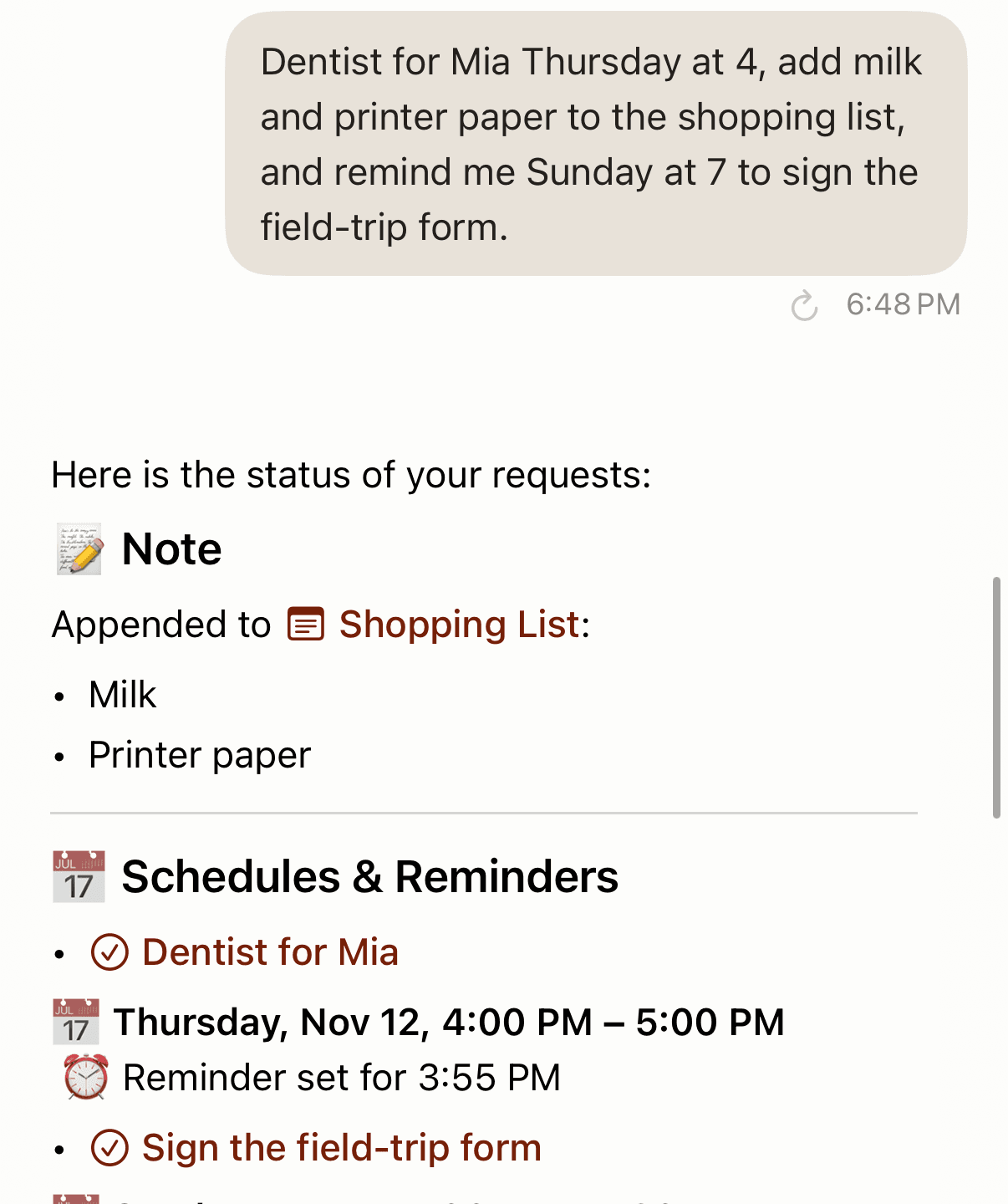
Events go to your Google Calendar (on iPhone, also Apple Calendar and Apple Reminders), so a calendar shared with your partner shows them too.
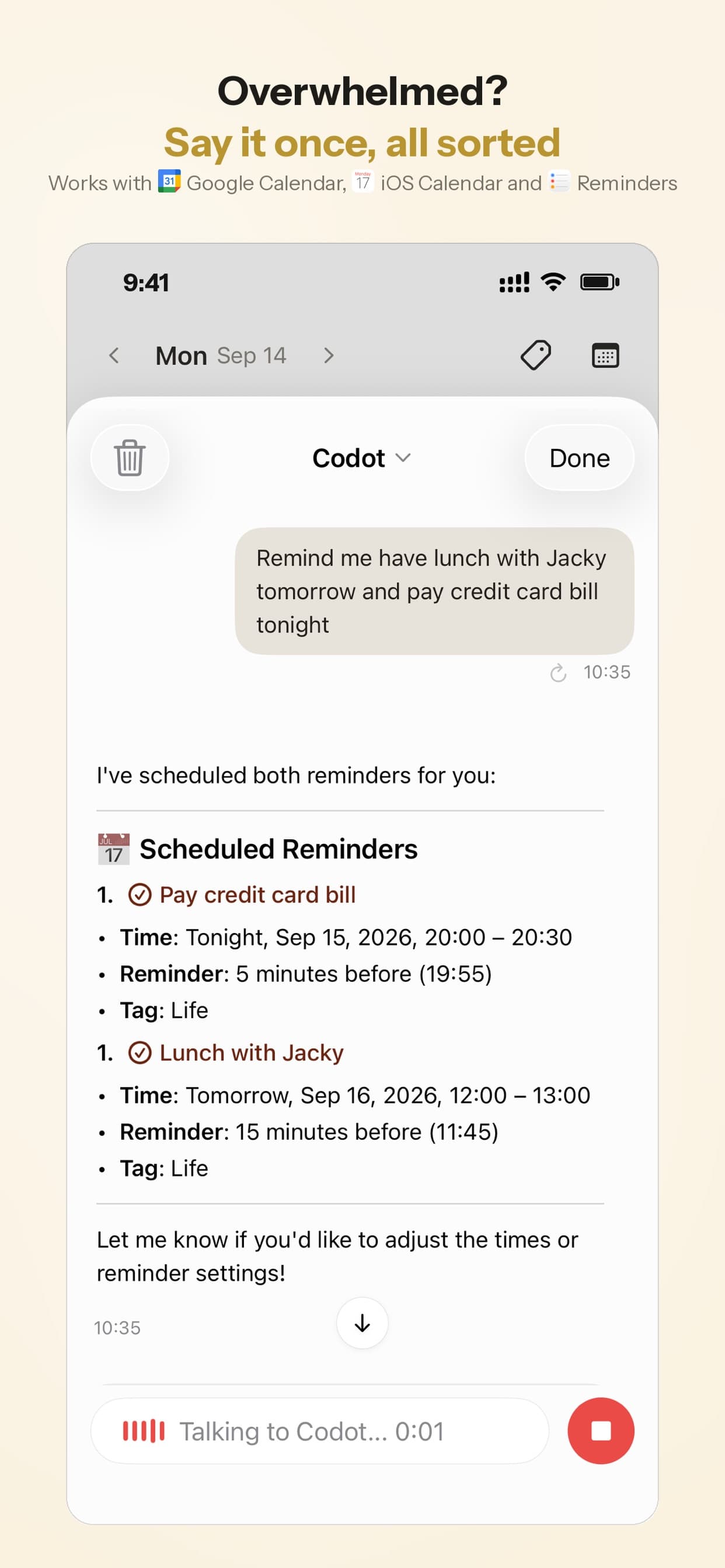
Handing jobs off works between people too. You and your partner each use your own Codot account and add each other as friends. Walking out of school pickup, you say "Remind Brandon to pick up the kids at 3:30 Friday," confirm the share card, and the reminder lands on Brandon's phone. That works both ways, on the free plan.
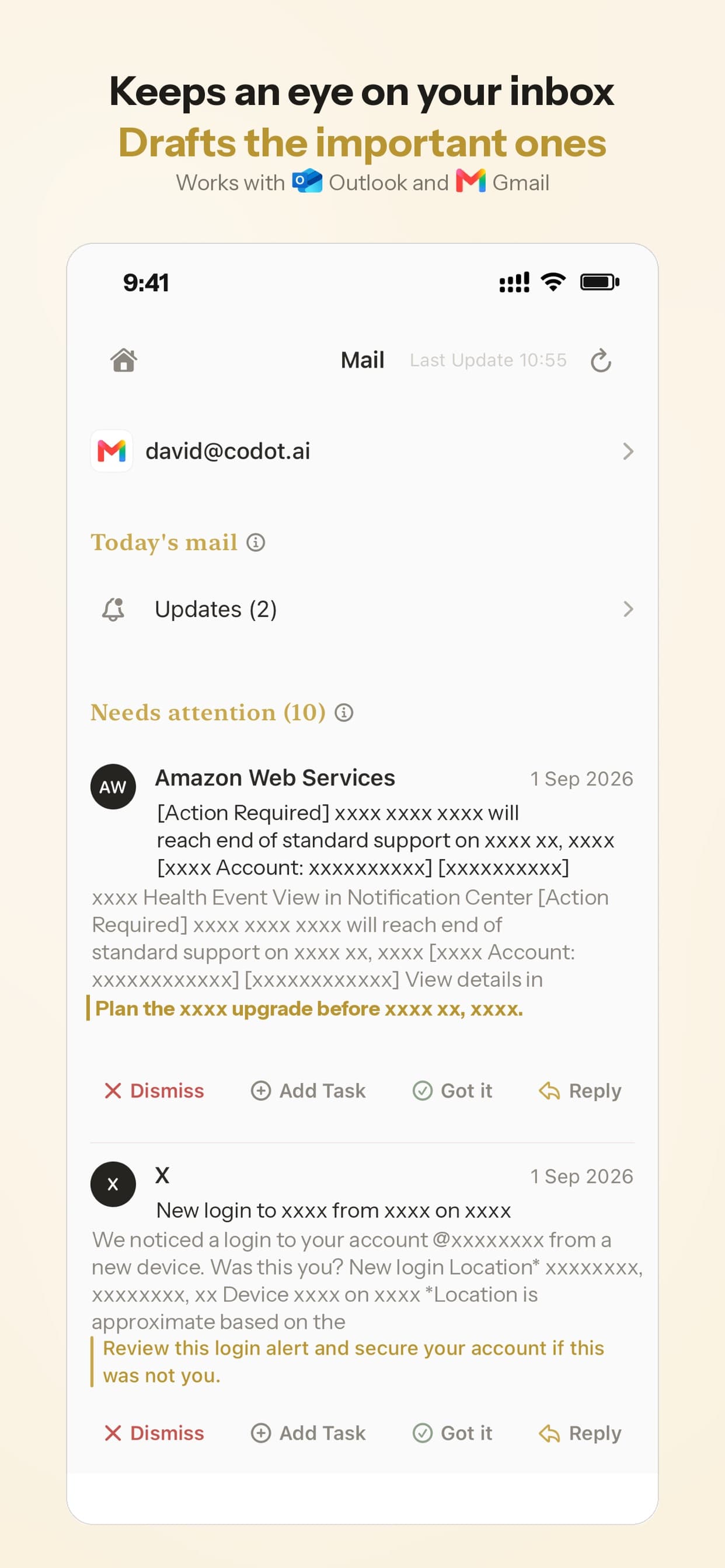
The same app sorts your Gmail or Outlook and drafts replies, so the coach's "can you drive Saturday?" email doesn't sink under newsletters. A daily briefing lists today's plan, and a scheduled task such as "every Sunday at 7 pm, list next week's events" runs on its own.
The free plan covers tasks, the calendar, notes, contacts, habits, calorie logging, expenses and reminding friends. Reminders at a set time, repeating tasks, daily briefings, scheduled tasks and email triage are part of Codot Max ($12.99 a month or $99.99 a year, with 20x the free plan's usage). Every new account gets 7 days of Max free, then drops back to the free plan without charging you. Data is encrypted and not sold.
How we'd choose
- You're the one who catches every date anyway: Codot, with tasks, events, reminders and the shopping list in one place and reminders handed to your partner by voice. If ADHD is part of your household, our guide to ADHD apps for parents splits it the same way.
- You used Maple mostly for lists and meal plans: Cozi. The free plan may be enough.
- The family inbox was the feature you paid for: Skylight with Calendar Plus, if a wall display and $79 a year fit your house.
- You only need everyone on one calendar: Google's Family calendar if you're a Google household, TimeTree if you're not.
Our family organizer app guide for moms compares these apps in more depth, and our Ollie shutdown guide covers the other family assistant closing this fall.
FAQ
When does Maple shut down, and will I get a refund?
Maple's website says it will sunset on December 31, 2026, and accounts stay active until then. The notice says nothing about refunds, so ask Maple or the store you paid through.
Will my Maple events disappear from Google Calendar?
Maple's notice says all connections to Google Calendar, Apple Calendar, Outlook and TeamSnap end at shutdown. It doesn't say what happens to the "Maple Calendar" it created in your Google account, so export that calendar as an .ics file now and import it into a calendar you own.
How is Codot different from Maple?
Codot is a voice assistant that keeps tasks, events, reminders, notes, contacts and a shopping list in one app, and one sentence can create several of them at once. Family members each use their own Codot account, add each other as friends, and send reminders by voice. Maple centered on a family email address and meal plans.
Cozi vs Maple, or FamilyWall vs Maple: which is closer?
Both Cozi and FamilyWall cover Maple's shared calendar, lists and meal planning. Cozi's free plan is the cheaper start, and FamilyWall Premium ($44.99 a year) adds a budget tracker and location sharing.
Is there a free Maple alternative?
Cozi's free plan, TimeTree's free plan and Google's Family calendar all cost nothing. Codot's free plan covers tasks, calendar, notes, contacts and reminding friends; timed reminders, daily briefings, scheduled tasks and email triage are in Codot Max, which new accounts can try free for 7 days.
Codot handles the noticing and the handing-off; if you want a meal planner or a kitchen display, pair it with Cozi or Skylight. If you're the parent who caught every school email in Maple, try saying the next one to Codot on the App Store, or get it on Google Play for Android.
Productivity & Tools Desk
This article was created with AI assistance and reviewed by our editorial team.Learn about our content process.