Best Voice Shopping List App (November 2026): What Still Works After Alexa, Google Assistant and Siri Changed
Voice shopping list apps compared for November 2026: Siri and Apple Reminders, Alexa, Gemini with Keep, AnyList, Bring!, OurGroceries, Listonic and Codot.
As of November 2026, the best voice shopping list app depends on your assistant. Apple Reminders with Siri is free and sorts groceries by aisle for iPhone households. AnyList ($14.99/year household) works across iPhone and Android, though Alexa+ often ignores its skill since March 2026. Codot, a voice AI assistant on iPhone and Android, adds and removes several items in one sentence, free, and can set a reminder in the same breath.
Disclosure: Codot is our product. Facts about the other apps come from their own help pages, pricing pages and App Store listings, linked below and checked on November 10, 2026. The Codot examples were run in the Codot iPhone app on November 10, 2026.
TL;DR:
- Voice shopping lists broke three times since 2024. Alexa stopped syncing to third-party list apps in July 2024, Alexa+ started ignoring the AnyList skill in March 2026, and Google began removing Google Assistant from phones on September 4, 2026.
- iPhone-only household: Apple Reminders with a Groceries list is free, sorts items by aisle, and shares through iCloud.
- Mixed iPhone and Android family: AnyList, Bring! or OurGroceries. With Siri you have to say "in AnyList" or "in Bring!", or the item lands in Apple Reminders.
- Codot (our app) keeps the shopping list in the same place as your tasks and reminders. One sentence can add three items, remove one you already bought, and set a reminder for the store run.
At a glance
The column most grocery-app roundups leave out is the one that matters in 2026: what broke this year.
| App | Best for | Voice: several items in one sentence | Shared with Android family? | Price (as of November 2026) | 2026 issue | Source |
|---|---|---|---|---|---|---|
| Apple Reminders + Siri | iPhone-only households that want items sorted by aisle | A 2022 third-party guide says yes; Apple's help page doesn't say | No, sharing needs an Apple Account and iCloud | Free, built in | Groceries lists need iCloud for Reminders turned on | Apple Support |
| Alexa Shopping List | Echo households | Not stated on Amazon's help page | Yes, through the Alexa app or the Amazon app | Free | No sync to AnyList, Bring! or other list apps since July 2024 | Amazon Help |
| Gemini + Google Keep | Android users already in Keep | Yes, "Add [item 1, item 2] to my list called [name]" | Yes, but you share the list inside Keep; Gemini can't share it | Free | Google Assistant leaving phones from September 4, 2026; Google Home list adds broke for some users in August | Gemini Help |
| AnyList | Mixed iPhone and Android households | Yes, through Siri, ending with "in AnyList" | Yes | Free; Complete $9.99/year individual or $14.99/year household | Alexa+ often ignores the AnyList skill since March 2026 | AnyList |
| Bring! | Shared lists with change notifications | Yes, through Siri, ending with "in Bring!" | Yes | Free; Premium $1.99/month or $8.99/year (US App Store) | No Google Assistant support; Alexa needs "open Bring!" first | Bring! Help |
| OurGroceries | A free shared list your partner sees right away | Not stated in its FAQ | Yes | Free with ads; one-time lifetime ad removal $19.99 | Siri often sends items to Apple Reminders; Google Home and Nest not supported | OurGroceries FAQ |
| Listonic | Saying quantities, like "2kg of potatoes" | Yes, in its own voice input, separated by "and" | Yes | Free, with optional Premium | Voice input stops after a long pause; Siri and Alexa not mentioned on its App Store page | Listonic |
| Codot | Adding groceries in the same sentence as your other errands | Yes, and it can add and remove items in the same sentence | Each person uses their own Codot account; you can remind a family member by voice for free | Free; Codot Max $12.99/month or $99.99/year, 7-day Max trial for new accounts | Uses its own voice input, so the Alexa and Google changes don't touch it | Codot pricing |
If your household already talks to an Echo, the Alexa list is still the fastest way to add one item. It just stays inside Amazon's apps now.
Why did my Alexa shopping list stop syncing with AnyList?
Amazon closed the door in July 2024. AnyList's help center says "Amazon shut down the List Skill API", the API that "allowed AnyList and other apps to sync directly with Alexa's lists" (AnyList). Bring! says the same: "Since July 1, 2024, Alexa no longer supports third-party shopping and to-do list apps, including Bring!" (Bring!).
The workaround was to name the app every time: "Alexa, ask AnyList to add apples to my grocery list." That workaround got worse in 2026. AnyList reports a problem that "started in March 2026": with Alexa+, "Alexa ignores the fact that you are trying to invoke the AnyList skill", and AnyList adds "Unfortunately, only Amazon can fix this." Its suggestions are to say "Alexa, open AnyList" first, or to turn Alexa+ off (AnyList).
If you searched "alexa shopping list not syncing", your setup is fine. You can keep everything in Alexa's own list, or move the list to your phone, where your voice goes straight into the app.
Can Google Assistant still add to my shopping list in 2026?
On phones, Google Assistant is on its way out. Google's email to users said "We will begin removing access to Google Assistant starting on September 4," and "Gemini will be the Google-provided assistant on your mobile device" (Droid Life). Cars with Google built-in are the exception.
Gemini can add several items at once to a Google Keep list, using the pattern "Add item 1, item 2, …] to my list called [list name]". It needs the Google Workspace connection and Keep Activity turned on, it works in the Gemini Android app, and Gemini can't share notes or lists ([Gemini Help). In late August, 9to5Google reported that adding items to a list through Google Home had stopped working for some users (9to5Google).
Third-party list apps lost Google voice earlier. Bring! says "Google has stopped the integration of Google Assistant Notes & Lists for non-Google apps", and OurGroceries says "Third party voice apps are no longer permitted by Google" for Google Home and Nest. We covered the wider Gemini switch in Google Assistant Is Gone From Android.
How do I get Siri to add items to a shopping list that isn't Apple Reminders?
Say the app's name at the end of the sentence. AnyList's help page is direct about it: without "in AnyList", "Siri will send your command to the Reminders app, not AnyList." Its example adds two items at once: "Add apples and persimmons to my shared grocery list in AnyList" (AnyList). Bring! uses the same shape: "Hey Siri, add bananas, potatoes, and cheese to my shopping list in Bring!" OurGroceries says that since iOS 16.4 Siri often sends items to Reminders anyway, and suggests a custom Shortcut. For Apple's own list, a 2022 iDownloadBlog guide says "Siri is smart enough to split multiple items."
If you don't need another app, Apple Reminders handles groceries well. Since iOS 17 you can pick Groceries as a list type, and Reminders "automatically categorizes and reorders them" by type. It needs iCloud for Reminders (Apple Support). A shared iCloud list lets everyone add, edit and check off items, but every person needs an Apple Account, which leaves out the family member on Android.
Your ideas shouldn't wait for a keyboard. Just say it — Codot handles the rest.
What is the best voice shopping list app for iPhone?
Use Codot when your shopping list comes up in the same breath as everything else you're trying to remember. Codot is a voice AI assistant, and the shopping list sits in the same app as your tasks, calendar, reminders, notes and contacts. One sentence can touch several of them, and you don't have to say an app name at the end.
Here's what happened when we tested it on November 10. We said: "Add milk, eggs, sourdough, two lemons and dish soap to my shopping list." Codot created a note called Shopping List with the five items on separate lines. Notes are on the free plan.
Then we changed the list with one sentence: "Add oat milk, coffee filters and basil to my shopping list. I already got the eggs, take them off." Codot opened the same Shopping List note, removed Eggs, added the three new items, and replied with the full list as it now stands.
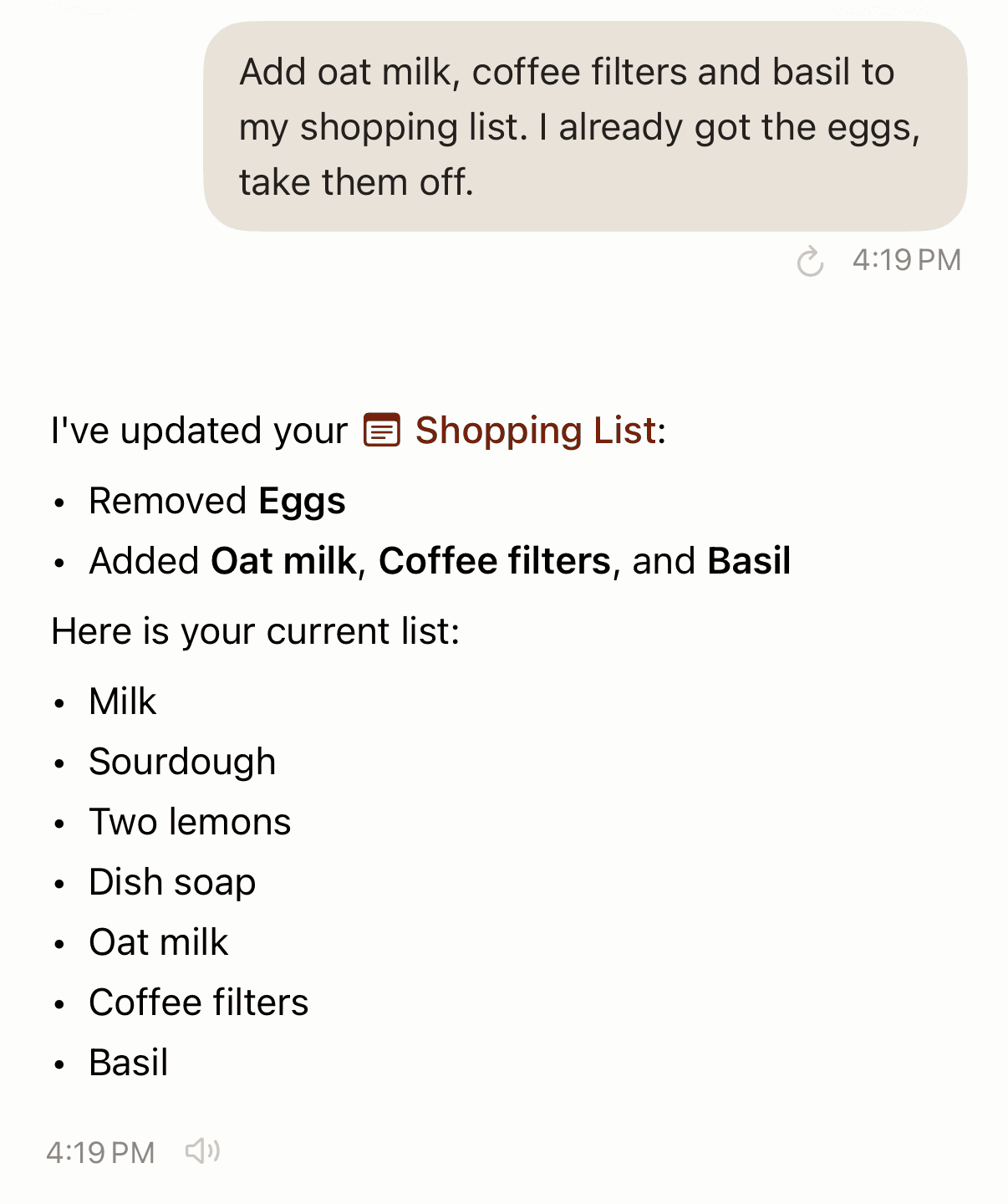
In the store, ask "what's on my shopping list?" and Codot replies with the current list.
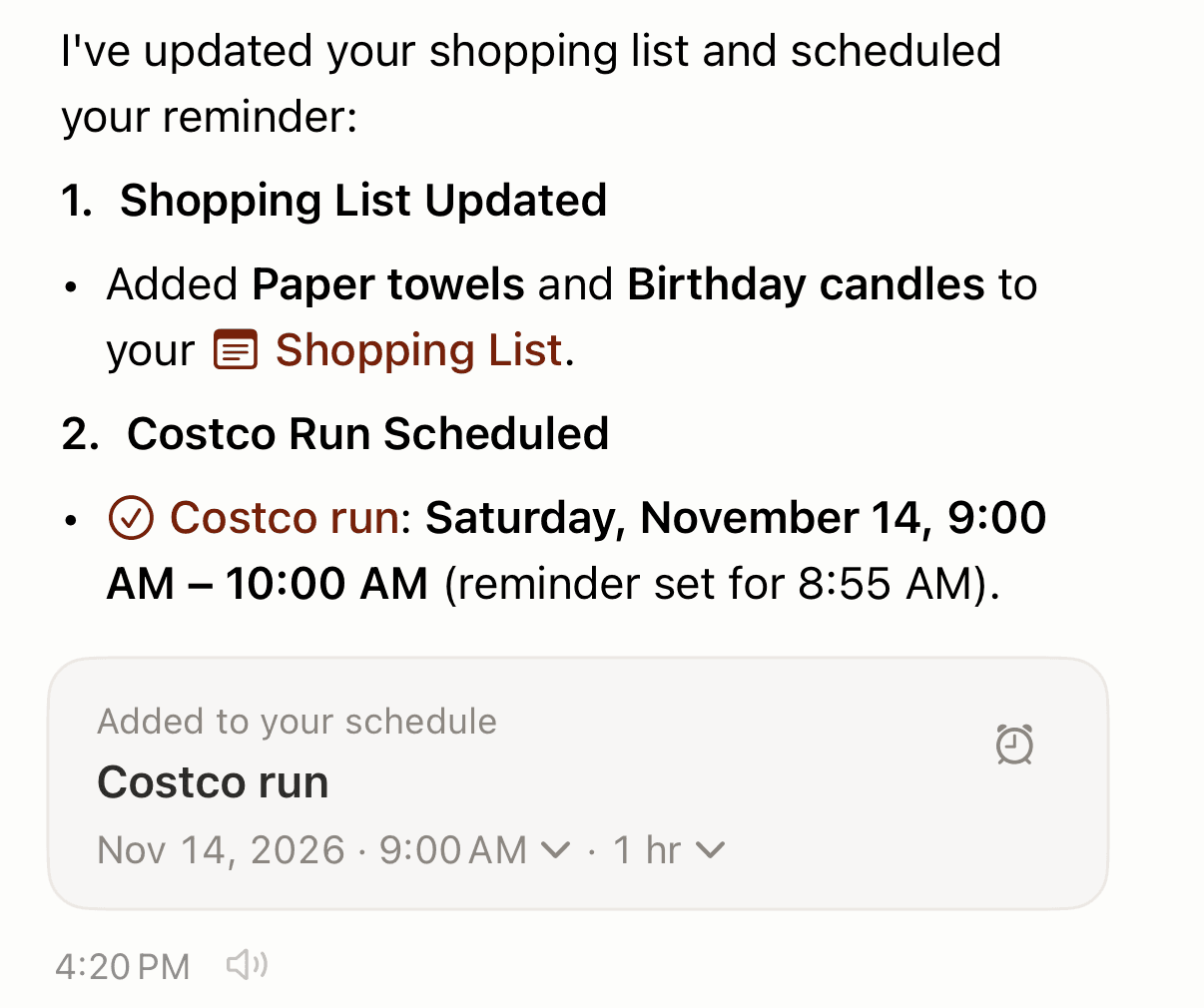
The same sentence can carry more than groceries. Try: "Put paper towels and birthday candles on the shopping list, and remind me Saturday at 9 to do the Costco run." That's a list update plus a reminder, from one sentence, in one app. Reminders at a set time are part of Codot Max.
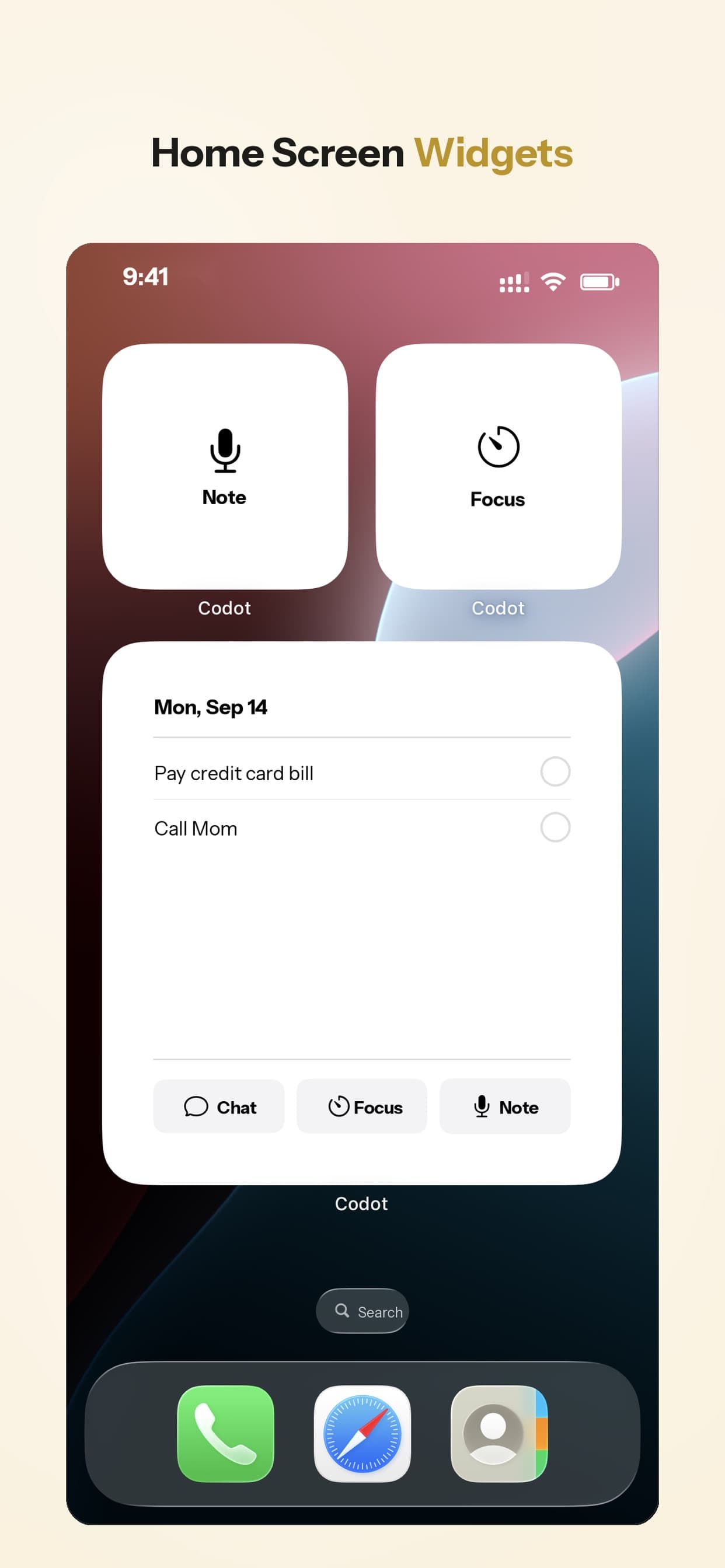
You can say these from wherever your hands are free, or record a voice memo from the iPhone lock screen to capture a list item the moment you think of it. Codot takes voice on iPhone, Apple Watch, the web and a lock-screen widget (see how to put a to-do list on your iPhone lock screen).
Which shopping list app can be shared with the whole family, including Android?
For one list that everyone edits at the same time, AnyList, Bring! and OurGroceries all run on iPhone and Android. AnyList's household plan is $14.99 a year. Bring! adds notifications when someone changes the list. OurGroceries is free with ads and promises "your partner sees it immediately—even if they're already at the store!" (OurGroceries).
In Codot, family members use their own accounts, add each other as friends, and hand things off by voice, and this is on the free plan. Say "Remind Brandon to buy groceries tomorrow" and Brandon gets the reminder on his phone after you tap Confirm on the share card. A shared task can also repeat (repeating is Codot Max), and every repeat goes to the other person, which suits a standing weekly shop. Our chore app for couples post shows that setup in more detail, and Cozi alternatives compares full family organizers.
How should you choose?
- Pick Codot if groceries usually arrive mixed in with other things to do ("milk, call the vet, Costco on Saturday") and you want to say it once. Saying items and editing the list is free; timed reminders need Codot Max.
- Pick Apple Reminders if everyone in the house uses an iPhone and you want items sorted by aisle at no cost.
- Pick AnyList or Bring! if the household mixes iPhone and Android and you want one list everyone checks off live.
- Keep the Alexa list if the Echo in the kitchen is how your family adds things, and accept that it stays inside Amazon's apps.
Codot keeps the list as a note you add to, edit and ask about. If you want aisle sorting and checkboxes in the store, keep a Reminders Groceries list or AnyList for the shop itself and let Codot handle the reminders and the hand-offs around it.
FAQ
What is the best voice grocery list app in 2026?
For an iPhone-only home, Apple Reminders with Siri is free and sorts groceries by aisle. For mixed iPhone and Android families, AnyList or Bring! work on both. Codot is the pick when you want one sentence to add and remove items and set a reminder, with list editing free.
Why isn't my Alexa shopping list syncing with AnyList anymore?
Amazon shut down the List Skill API in July 2024, so Alexa's list no longer syncs with AnyList, Bring! or other apps. Since March 2026, AnyList reports that Alexa+ often ignores its skill, and suggests saying "Alexa, open AnyList" first.
Can Siri add several items to a shared shopping list?
Yes, with the app name. AnyList's example is "Add apples and persimmons to my shared grocery list in AnyList." Without "in AnyList", Siri sends the items to Apple Reminders.
How is Codot different from a grocery list app like AnyList?
Codot is a voice AI assistant, so the shopping list lives next to your tasks, reminders and contacts, and one sentence can update several of them. AnyList is a dedicated list app with shared checklists across iPhone and Android.
Is Codot free for a shopping list?
Yes. The list is a note, and notes and voice input are on the free plan. Reminders at a set time are part of Codot Max ($12.99/month or $99.99/year), and every new account gets a 7-day Max trial that returns to free automatically.
Try it on your next fridge check: download Codot on the App Store, or get it on Google Play if you're on Android.
Productivity & Tools Desk
This article was created with AI assistance and reviewed by our editorial team.Learn about our content process.