Google Assistant Is Gone From Android: What Gemini Still Gets Wrong About Reminders, and Voice Assistant Alternatives (November 2026)
Google Assistant left Android phones from September 4, 2026. How to get Gemini reminders working, what it still can't do, and voice assistant alternatives.
Google began removing Google Assistant from Android phones, tablets, Wear OS watches, headphones and phone-projected Android Auto on September 4, 2026, and you can't switch back. Gemini can set reminders only through a connected Google Tasks or Samsung Reminder app with Keep Activity on. For voice reminders outside Gemini, Android users can try the Alexa app, ChatGPT scheduled tasks, Todoist Ramble, or Codot.
TL;DR:
- Google Assistant is gone from Android phones. Google's email to users said removal would start September 4, 2026, and that afterwards "you will no longer be able to use or switch back to Google Assistant" (9to5Google, August 4, 2026). Nest speakers, smart displays and TVs keep Assistant for now.
- Gemini sets reminders only through a connected app: Google Tasks, or Samsung Reminder on supported Galaxy phones, with Keep Activity on. Check those settings first.
- Alternatives on Android: the Alexa app, ChatGPT scheduled tasks, Todoist Ramble and Codot.
- Codot (our product) turns one spoken sentence into reminders and calendar events (its morning briefing is iPhone only). It doesn't replace "Hey Google," timers, music, calls, smart-home control or Android Auto.
Disclosure: Codot is our product. Facts about other products come from their own help pages, checked November 3, 2026; news coverage is linked only where Google's pages are silent. We haven't run a reliability test of Gemini's reminders, so we don't score it.
You're standing at the stove, hands wet, and you say "Hey Google, remind me to move the laundry in 40 minutes." For years that just worked. If the same phrase now gets a long answer, or a reminder you can't find later, start with the settings fix below before you switch apps.
What changed, and on which date
Google first said in March 2025 that the classic Assistant "will no longer be accessible on most mobile devices" (Google blog, March 14, 2025). The firm date came later, in an email to users reported by 9to5Google on August 4, 2026: removal starting September 4, rolling out over a few weeks, covering phones, tablets, Wear OS watches, headphones and Android Auto projected from your phone. By September 28, 9to5Google found the "Switch to Google Assistant" option gone from the Gemini app in Google app 17.60.
We couldn't find a Google help page that states the September 4 date. The Gemini help center describes the end state: "Gemini will replace Google Assistant on your other paired mobile devices, like smart watches, headphones, and earbuds," while "Smart Displays, smart speakers, TVs, cars, and Pixel Tablets that are locked" keep answering "Hey Google" with Assistant (Get started with the Gemini mobile app).
Can you switch back? On a phone where Assistant has been removed, no. The rollback toggle is gone, and Google's email said so in advance. One leftover: Google's own Gemini feature page still tells you to "Switch to Google Assistant to use Interpreter mode," which those phones can't do anymore.
What Gemini can and can't do for reminders, timers and routines
| Job | Gemini on Android today | Source |
|---|---|---|
| Reminders and to-dos | Yes, through Google Tasks or Samsung Reminder. Needs Keep Activity on | Capture your tasks & reminders |
| Location-based reminders | No. Keep reminders moved to Tasks, and "You can no longer create or get location-based reminders" | Google Tasks Help |
| Alarms, timers, stopwatch | Yes, via the Device assistance connected app; stopwatch pause and reset open the app instead | Device assistance |
| Google Home routines | You can start one by voice when Google Home is connected; multi-step back-and-forth actions aren't supported | What you can do |
| Podcasts, news and radio | "aren't currently supported in Gemini" | same page |
| Recurring summaries | Scheduled actions, up to 10 at a time; Google's limits table marks them as part of a Google AI plan | Schedules, Limits |
Two details matter. "Hey Google" and Voice Match with Gemini aren't available in 14 languages, including Croatian, Finnish, Greek, Hebrew, Hungarian, Romanian and Ukrainian, according to the same feature page. In those, you tap the microphone instead. And the reminder itself doesn't live in Gemini. It's a Google Tasks item, and Google Tasks rings through the Tasks or Calendar app.
Complaints collected by Android Authority on October 9, 2026 center on timers that need a second try, contacts Gemini can't find, and long answers to short commands.
How to get reminders working in Gemini
- Make the Google app your default assistant. Settings > Apps > Default apps > Digital assistant app should show the Google app, which hosts Gemini.
- Turn on Keep Activity. Google is blunt about it: "Gemini can't connect to these apps when this setting is off."
- Connect Google Workspace. Ask Gemini to add a task; if Workspace isn't connected, it offers to connect it. Use the same Google account as Tasks.
- Name the app in your request. Add "@Google Tasks" (or "@Samsung Reminder"). If you've connected both, Gemini "defaults to the last one it accessed." That's a common reason a reminder lands in the wrong app.
- Install Google Tasks or Google Calendar and allow notifications. Keep no longer sends reminder notifications.
- Don't ask inside Google Messages. Tasks and reminders aren't available in Gemini there.
- Update the Google app.
If a timer or alarm is the problem, note that on Samsung, Xiaomi, OnePlus, OPPO, HONOR and TECNO phones Gemini uses the manufacturer's clock app, and with third-party clock apps it can only set, check, update and delete.
Workarounds that stay inside Google
Treat Google Tasks as the home base and give Gemini both a date and a time, the way Google's example prompt does: "Remind me on [date] at [time] to [task]." Google Keep is now for notes; old Keep reminders appear in Tasks and Calendar marked "From Keep," and location reminders didn't survive the move, so "when I get home" has to become a time. For a morning summary, Gemini's scheduled actions list "Daily digests of your calendar, to-do list, and emails" as an example.
Your ideas shouldn't wait for a keyboard. Just say it — Codot handles the rest.
Voice assistant alternatives on Android
| What you say | Where it rings | Free limits (Nov 3, 2026) | Replaces "Hey Google"? | |
|---|---|---|---|---|
| Codot | One sentence with several tasks, dates and calendar changes | Codot reminders, Google Calendar | Free plan: tasks, calendar, notes, CRM, habits (no reminders at a set time, briefings, automations or email triage); 7-day Max trial; Max $12.99/mo or $99.99/yr (20x usage) | No |
| Alexa app | "Remind me to pick up dry cleaning" | The device you asked; phone if Alexa notifications are on | No limit stated on Amazon's help page | No |
| ChatGPT scheduled tasks | "Let me know when…" in a text chat | ChatGPT push or email | 3 active tasks, morning/afternoon/night windows | No |
| Todoist Ramble | A stream of tasks, edited by voice | Todoist | 10 sessions a month | No |
| Microsoft Copilot | Chat | No documented phone reminders | n/a | No |
Alexa app. Amazon's help page says you can set reminders by voice or in the Alexa app under More > Reminders, and you pick which Alexa device announces them. A reminder "is announced only on the device the reminder was set on," and to get it on your phone you have to allow Alexa notifications (Amazon: Set reminders, Get reminder notifications). It suits homes that already have Echo speakers.
ChatGPT scheduled tasks. Good for daily updates, weaker for reminders: Free and Go accounts get 3 active tasks, run at most once a day in flexible windows such as morning or night, and "exact delivery times require an eligible paid plan." Scheduled tasks also don't work in voice chats, so you type them (OpenAI Help Center). Plus gets 5 active tasks.
Todoist Ramble. If your list already lives in Todoist, start here. You tap the waveform in Quick Add, talk, and tasks appear while you speak; "Actually, I meant…" edits them. Free and Beginner plans get 10 sessions a month, Pro is unlimited, and there's a Wear OS beta. Ramble's own attribute table lists "Custom reminder" as unsupported, so a spoken time becomes a due time, not a separate alert (Todoist Help, updated October 8, 2026).
Microsoft Copilot. We found no Microsoft help page that documents setting reminders in the Copilot phone app. Its phone connection, which sets Android alarms and timers, "is available only on PC and is currently not supported in the Copilot mobile app" (Microsoft Support).
Codot: a voice assistant for your own to-do list and calendar
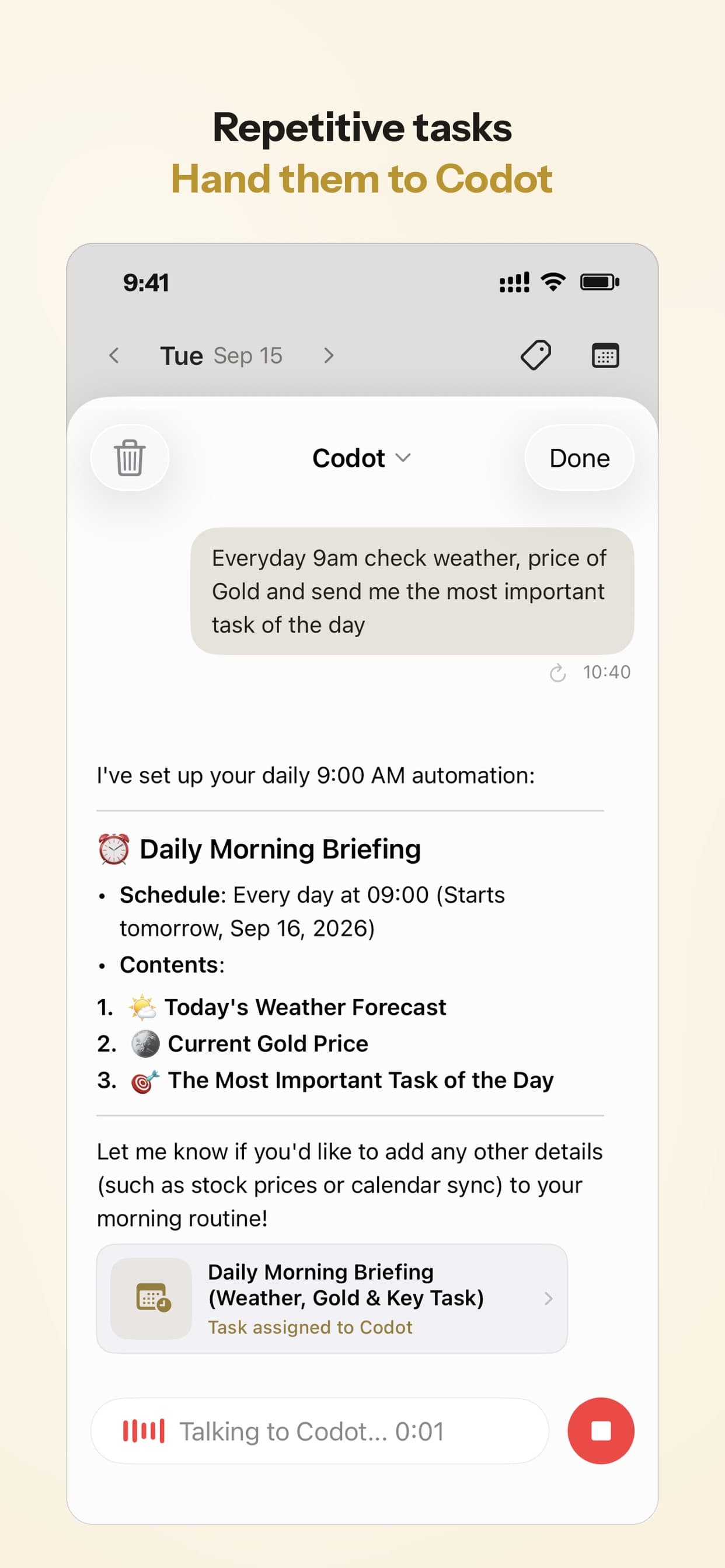
Codot is an AI personal assistant you talk to. You say what's on your mind, in whatever order it comes out, and it does the filing: tasks with reminders, calendar events (written into your Google Calendar), notes, and details about people you want to remember—making it an effective meeting minutes app for council members or busy professionals. You can also ask it to move things ("push the dentist to the 14th"). It runs scheduled automations, and on iPhone it also sends a morning briefing of what's due.
You're parked outside the pool after your kid's practice, phone in hand, and three things are in your head at once. You open Codot and say: "Pay the swim fees Thursday, the dentist moved to the 14th at 4, and remind me Sunday night to pack the goggles." That becomes two reminders and one moved calendar event. On Thursday, the swim fees reminder comes up.
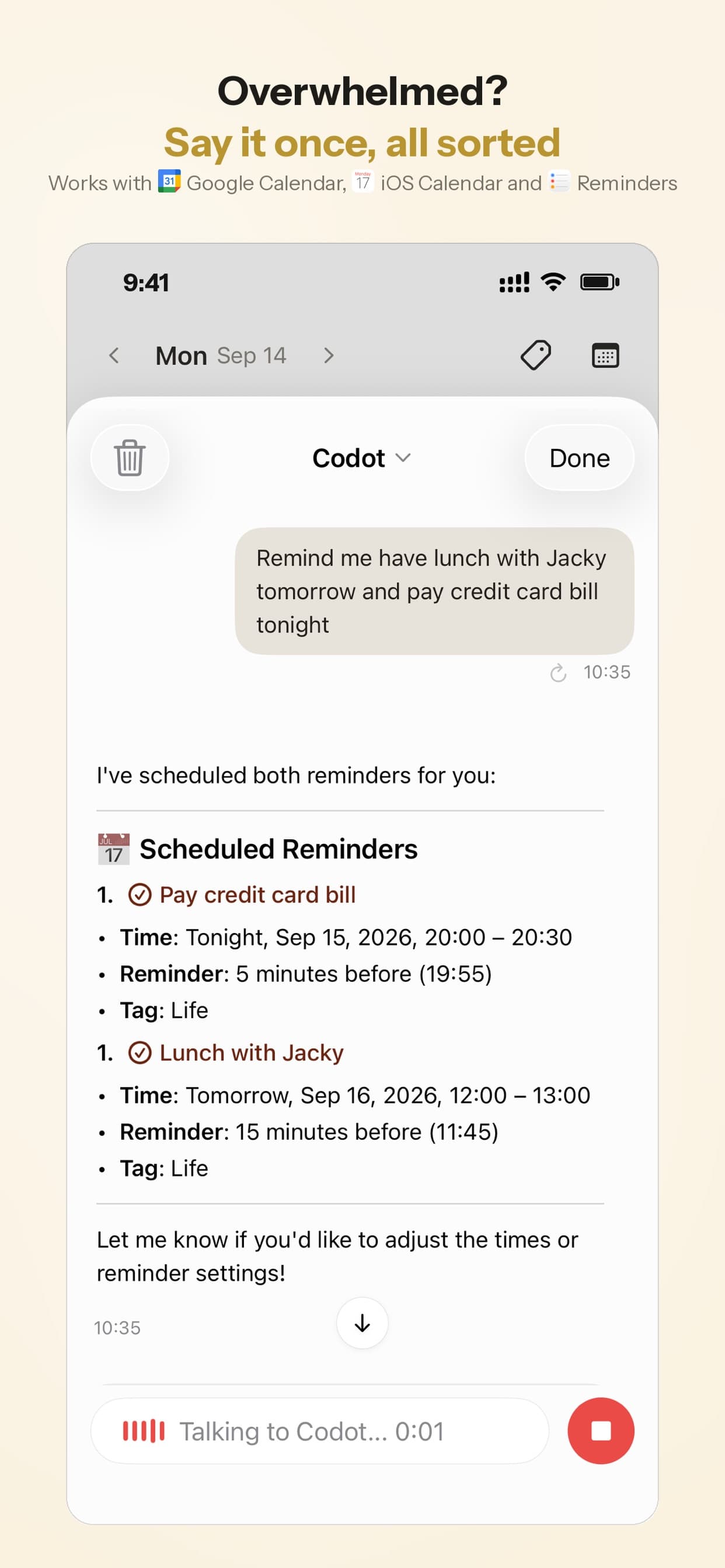
Our view: in Gemini, a reminder is one connected-app feature among many, routed to whatever task app it last touched. Codot is built around your list, so the reminders, the calendar and your notes are one system. (The morning briefing and email triage are iPhone only; on Android you get tasks, reminders, notes, the CRM and routines.) Speech recognition runs on a large language model, so it understands all major languages, including ones where "Hey Google" doesn't work with Gemini.
Codot does not replace "Hey Google": you open the app to talk to it. It doesn't set phone timers or alarms, play music or podcasts, make calls, control smart-home devices, or work inside Android Auto. Keep Gemini for those. We haven't verified Android widgets or a Wear OS app, so don't count on either.
Codot's free plan covers tasks, the calendar, notes, the personal CRM, habits, calorie logging and voice expense tracking. Reminders that ring at a set time (like "Sunday night" above), repeating tasks, the morning briefing (iPhone only), scheduled automations and email triage are part of Codot Max ($12.99 a month or $99.99 a year, with 20x the free plan's usage). Every new account gets 7 days of Max free to try the reminders, then drops back to the free plan without charging you. Your data is encrypted and never sold.
How to choose
- You mostly need timers, alarms, music and smart-home commands by voice: stay on Gemini and fix the settings above.
- You have Echo speakers at home: the Alexa app, and accept that reminders ring on the device you asked.
- You want a daily update more than a precise alert: ChatGPT scheduled tasks, typed in a chat.
- Your life already runs in Todoist: Ramble.
- You want one place where spoken reminders, calendar changes and notes stay together: Codot, alongside Gemini for the phone controls.
If you're on iPhone instead, we compared the same question for Siri in Can you replace Siri on iPhone?, analyzed Hungarian voice assistant options, and covered talking to your calendar on both platforms in Best voice calendar apps for iPhone and Android. For a household that shares one calendar, see our family organizer app comparison.
FAQ
Is Google Assistant shutting down completely?
On Android phones, tablets, Wear OS watches, headphones and phone-projected Android Auto, yes; removal began September 4, 2026. Google's help center says smart speakers, smart displays, TVs, cars and locked Pixel Tablets still answer "Hey Google" with Assistant for now.
Why can't Gemini set reminders on my phone?
The most common causes in Google's own requirements: Keep Activity is off, Google Workspace isn't connected, or Gemini sent the reminder to Samsung Reminder because that was the last app it used. Add "@Google Tasks" to the request and make sure the Tasks or Calendar app is allowed to send notifications.
Google Assistant vs Gemini: what did Assistant do that Gemini doesn't?
According to Google's help pages: podcasts, news and radio stations, some third-party music providers, location-based reminders, and Interpreter mode. Gemini also routes reminders through Google Tasks instead of handling them itself.
How is Codot different from Gemini?
Gemini controls your phone. Codot is built around your tasks, reminders, calendar, notes and people: one spoken sentence files them, and reminders bring them back (on iPhone, a morning briefing too). It has no wake word, timers, music or smart-home control, so most people would use both.
If you want reminders you can say in one breath and find again in the morning, try Codot on Google Play. On iPhone, it's on the App Store.
Productivity & Tools Desk
This article was created with AI assistance and reviewed by our editorial team.Learn about our content process.