Anna AI Family Assistant vs Skylight Assistant vs Ohai (November 2026): The Newest Ones Checked, Plus Codot
Anna, Skylight Assistant, Skylight Sidekick, Ohai and Niva: which new AI family assistants exist, what they cost, how they take in school info, and where Codot fits.
As of November 5, 2026, the new AI family assistants you can sign up for are Anna ($20 a month, texts and WhatsApp), Ohai (from $9.99 a month, iPhone and Android) and Skylight's Sidekick (inside the $79-a-year Calendar Plus plan); Skylight Assistant ($9.99 a month, text only) is waitlist-only. We found no downloadable app called Niva. Codot, a voice AI assistant with a free plan, suits the parent who carries most of the planning.
Disclosure: Codot is our product. We haven't used Anna, Ohai or either Skylight assistant ourselves. Everything about them below comes from their own websites, App Store listings and help pages, checked November 5, 2026. The family in the Codot section is fictional, written to show how a real week would run.
TL;DR:
- Ollie shuts down on November 6, 2026. Our Ollie shutdown guide covers what to export first; this article checks the newer names people are searching for.
- Anna (Braid Research) is closest to Ollie's text-first style: iMessage or RCS, WhatsApp, email and school apps. $20 a month or $192 a year after a 14-day trial.
- Skylight has two AI products. Sidekick comes with the $79-a-year Calendar Plus plan. Skylight Assistant is a text-only service at $9.99 a month, still behind a waitlist.
- Ohai has iPhone and Android apps plus texting, from $9.99 a month for one person to $29.99 for a group.
- Niva: we couldn't find a family assistant by that name in the US App Store or on the web as of November 5.
- Codot is our pick for the parent who holds the plan: say it out loud, hand jobs to the others. Tasks and reminders to family are free; a 7:00 daily briefing and repeating reminders are Codot Max.
At a glance
| App | Best for | Price (as of Nov 2026) | Platforms | Main limit | Source |
|---|---|---|---|---|---|
| Anna | Families who live in texts, WhatsApp and school apps | $20 a month or $192 a year, 14-day free trial | iPhone, Android, browser, iMessage or RCS | Can't read texts other people send you; you forward them or send a screenshot | hianna.ai |
| Skylight Assistant | Families who want a group text with tomorrow's rundown | $9.99 a month after a free trial | Text messages only, no app | Waitlist only | assistant.myskylight.com |
| Skylight Sidekick | Families who already own a Skylight screen | Included in Calendar Plus, $79 a year | Skylight calendar and the Skylight app | Needs Calendar Plus | Skylight help center |
| Ohai | A household that wants an app plus texting | $9.99, $19.99 or $29.99 a month, free trial | iPhone, Android, text | Every plan listed is paid after the trial | ohai.ai |
| Niva | Not found | Not found | Not found | No downloadable family assistant found | US App Store search, November 5, 2026 |
| Codot | The parent who carries the planning, by voice | Free plan; Codot Max $12.99 a month or $99.99 a year, 7-day free trial | iPhone, Android, Apple Watch, web | Each person has their own list rather than one family view | codot.ai |
What are families switching to now that Ollie is closing?
Most former Ollie families—and those preparing for the Maple family organizer shutting down—are choosing between two styles: an assistant you text (Anna, Skylight Assistant, Ohai) and an app the busiest parent talks to (Codot, or Sidekick inside the Skylight app). TechCrunch reported on October 30 that Ollie closes on November 6. It's one of four family assistants that closed or announced a closure in 2026, which is why the shutdown pattern matters as much as the feature list.
The top "best AI family assistant" pages we opened were roundups written by one of the apps being ranked, with no dated prices, and none covered Skylight Assistant or Niva. So we checked each name against its own site and App Store listing.
What is Anna, the AI family assistant?
Anna is a paid AI family assistant from Braid Research Inc. that you reach by text, email or WhatsApp. Several unrelated apps use the name "Anna," mostly chatbots and companion apps. The one people mean by "Anna AI family assistant" is Anna Family Assistant on the App Store, first released March 2, 2026, whose seller, Braid Research Inc, matches the copyright line on hianna.ai.
As of November 5, 2026, Anna's site says:
- Price: one plan, "US$20/month, or US$192/year," after a 14-day free trial with every feature.
- Where it runs: an app on the App Store and Google Play, plus a browser version.
- How information gets in: it connects Gmail, iCloud, Outlook and most other email; it links to WhatsApp and reads family and school chats without posting; it works with school apps like ParentSquare, ClassDojo, Compass and Google Classroom; and you can text it by iMessage or RCS. It says Anna "can't read the texts or iMessages other people send you," so those get forwarded or screenshotted.
- Calendars: Google Calendar both ways, iCloud and Outlook once you connect those accounts.
We'd look at Anna first if your family's information arrives through WhatsApp groups and school apps.
Does Skylight have an AI family assistant?
Yes, two, and they're easy to mix up. Sidekick is the AI feature inside Skylight's Calendar Plus subscription. Skylight's help center describes it as "a smart family assistant designed to streamline the logistics of your family life," and says it can create calendar events from flyer photos, images, documents, forwarded emails or a spoken description, build lists, import recipes and draft weekly meal plans. The same article says, "This feature is only available with Calendar Plus subscription." The Calendar Plus page lists it at "$79/year."
Skylight Assistant is a separate product. Its site calls it "an AI-powered family assistant that works entirely over text messages, no app required." It runs a voice-guided planning session every Sunday, texts the family group chat a rundown of tomorrow, and follows up with each family member on their tasks. Its FAQ says it connects to Google Calendar, Apple Calendar, Outlook and Skylight Calendar and "reads your existing calendar events." The price is "$9.99 per month after your trial." As of November 5, 2026, every sign-up button on the page says "Join Waitlist," so you can't count on it this week.
If you already own a Skylight screen, try Sidekick first. Skylight Assistant is worth a waitlist spot, but it can't replace Ollie this week.
Your ideas shouldn't wait for a keyboard. Just say it — Codot handles the rest.
How much does Ohai cost, and how is it different?
Ohai costs $9.99 a month for one person, $19.99 for its Duo plan and $29.99 for a group, after a free trial, according to its how-it-works page on November 5, 2026. It has iPhone and Android apps, and you can also text it. You get information in by texting, forwarding emails, or uploading screenshots, PDFs and photos, and it connects Google, Apple and Outlook calendars.
Among the names here, Ohai combines a real app with texting at the lowest entry price. Two parents who both want their own access should look at the Duo plan, $239.88 a year.
Is there a Niva AI family assistant?
We couldn't find one you can download. On November 5, 2026 a US App Store search for "Niva" returned a habit tracker, a photo editor, a health insurer's app and games, but no family assistant, and the web turned up only a design portfolio concept. If you see a Niva family app advertised, check the developer on its App Store listing before connecting your email or calendar.
What's the best Anna AI family assistant alternative for a parent who carries the plan?
Use Codot when one parent holds the family's plan in their head and wants to say it out loud and hand jobs to the others. It has been running for almost two years, and more people use it every month. Codot is a voice AI personal assistant: you say what needs to happen, and it saves the task, puts it in your calendar, remembers the person, or sends the reminder to the family member who has to do it. It suits the parent who already carries the plan. Here's a fictional week.
Priya Raman lives in Hollis Bay with her husband Owen and their kids, Leo (9) and June (6). The family ran on an Ollie group text. On Thursday, November 5, Priya exported what she could, then she and Owen each installed Codot.
Friday 7:10am: how do you get a school flyer into the calendar?
Take a photo of it. Leo's backpack has a paper flyer for a field trip and a winter concert, plus a printed after-school club timetable. Priya photographs the timetable and says:
"Add every date from this to my calendar, and remind me the day before anything that needs a permission slip."
Codot reads the photo and writes the dates into her Google Calendar or Apple Calendar. Here it is with a school newsletter:
Our guide to adding a class schedule to your calendar also covers the manual and iCal options.
Saturday: how do two parents remind each other without a group chat?
Add each other as friends in Codot, then say who the reminder is for. Owen and Priya each add the other as a friend. Folding laundry on Saturday morning, Priya says:
"Remind Owen to pick up June from swim at 5:30 on Tuesday."
Codot shows her a share card, she taps Confirm once, and the reminder lands in Owen's list on his phone. Owen does the same back: "Remind Priya to send the dentist forms by Monday." Adding friends and sending each other reminders is free.
Sunday 8pm: how do you set up the jobs that repeat?
Say the pattern once. Codot understands schedules like "every other Friday" or "the first Monday of the month":
"Every other Friday at 7am, remind me Leo's library books are due."
"Every Sunday at 8pm, list next week's school events and who's doing pickup each day."
Repeating reminders and scheduled routines are part of Codot Max, $12.99 a month or $99.99 a year, with 20x the free plan's usage. You can run up to 20 routines. The Sunday list is the moment Priya and Owen sort out who's doing what, and it picks up anything still open from last week.
Monday 7:00am: what's on today?
On iPhone, Codot Max makes a daily briefing each morning at 7:00 with your reminders, news and a summary of the day. On Monday, November 9, Priya's lists the field trip permission slip and the dentist forms Owen reminded her about.
Any day: how do you remember the other people in your kids' lives?
Save them as contacts with notes, by voice. Priya says, "New contact: Mrs. Alvarez, June's swim coach, prefers email, June moves up a level in January," and later "The babysitter Tess is free Wednesdays and Thursdays after 3." When she asks "When is Tess free?" the answer is there. Contacts with notes are free.
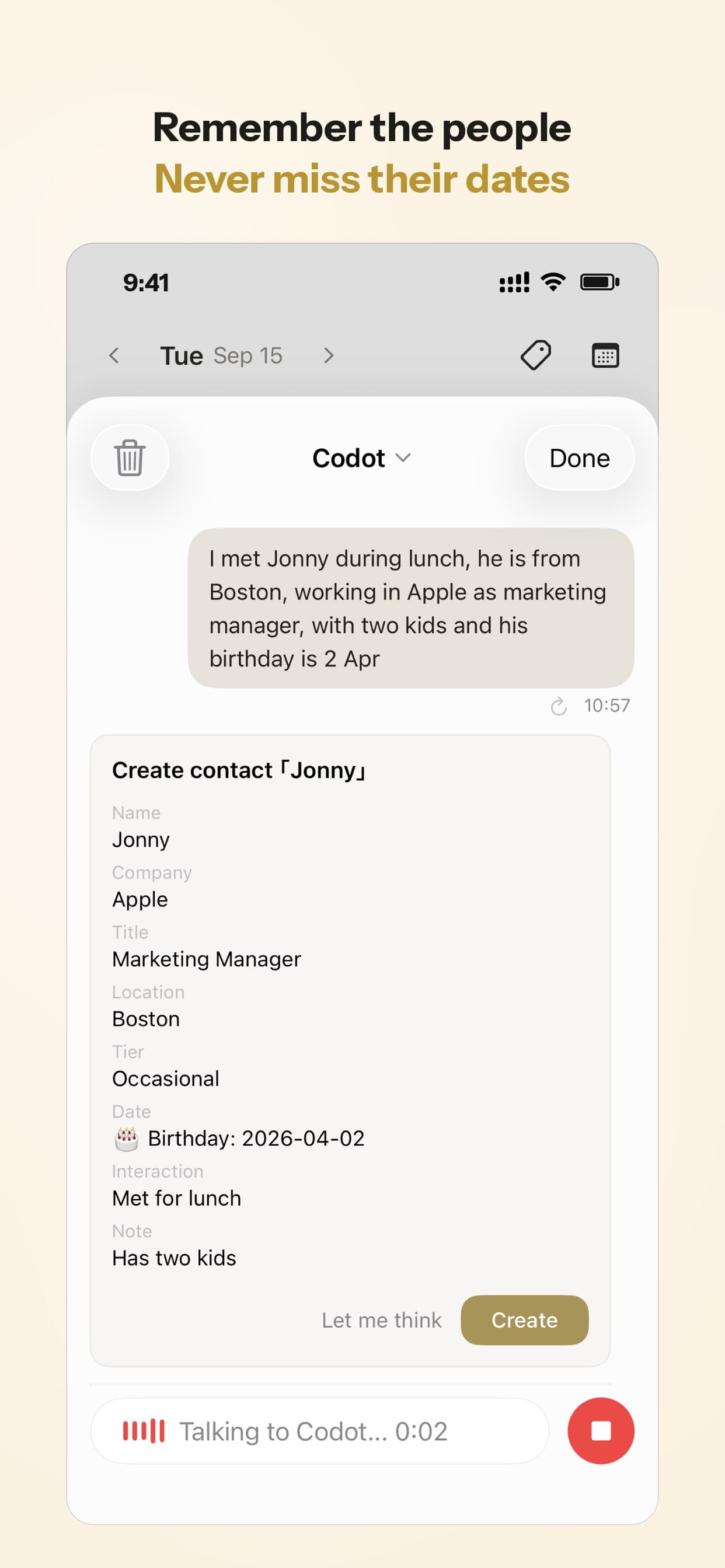
On iPhone, Codot Max can also sort a Gmail or Outlook inbox and draft replies to the important emails, which helps when school mail piles up.
Will Codot shut down like Ollie?
Codot has been running for almost two years, and more people use it every month. It also writes your events into your own Google Calendar or Apple Calendar, so the dates stay in a calendar you own, a habit worth keeping with any assistant here.
How should you choose an AI family assistant?
Start from where your family's information arrives and who acts on it.
- One parent holds the plan and wants to say it out loud: Codot. Start on the free plan for tasks, calendar, contacts and reminders to your partner, and try Codot Max free for 7 days for the 7:00 briefing and repeating reminders.
- Your school and family news comes through WhatsApp and school apps: Anna, at $20 a month.
- You already own a Skylight screen: turn on Sidekick through Calendar Plus ($79 a year).
- You want the whole family on one group text with a nightly rundown: join the Skylight Assistant waitlist, and use Ohai or Anna until you get in.
- You want an app and texting at the lowest price: Ohai, from $9.99 a month.
Codot works from what you tell it: it writes its entries into your Google Calendar, Apple Calendar or Apple Reminders, and reminders to family members arrive in their own Codot app. If your news mostly lands in WhatsApp groups, say the important bits to Codot as they come in, or photograph the flyer.
Plenty of families will use two: one of the Cozi alternatives for a shared view, and Codot for what one parent says while making lunches. For a wider look at family organizers, see our comparison of AI family organizer apps for moms.
FAQ
What is the best AI family assistant app after Ollie?
It depends on how your family communicates. As of November 2026, Codot (free plan, Max $12.99 a month) suits the parent who plans by voice and hands tasks to the family, Anna ($20 a month) suits families on WhatsApp and school apps, and Ohai (from $9.99 a month) offers an app plus texting.
Is Niva an AI family assistant app?
We couldn't find a downloadable family assistant called Niva in the US App Store or on the web as of November 5, 2026. The only match we found was a design concept, so check the developer on any Niva listing before connecting your accounts.
How much does Anna AI family assistant cost?
Anna, from Braid Research Inc, costs $20 a month or $192 a year after a 14-day free trial, according to hianna.ai on November 5, 2026. It runs on iPhone, Android and the web, and you can text it by iMessage or RCS.
What is Skylight's AI family assistant?
Skylight has two. Sidekick is included in Calendar Plus ($79 a year) and turns flyer photos and emails into events; Skylight Assistant is a text-only service at $9.99 a month that was still waitlist-only on November 5, 2026.
How is Codot different from Anna, Ohai or Skylight Assistant?
Codot is a voice AI assistant on your phone rather than a family group text. It writes entries into your own Google or Apple calendar and sends reminders to family members you've added as friends, free; those reminders arrive in their Codot app rather than as texts. On iPhone, Codot Max adds a 7:00 daily briefing and email triage with draft replies.
Ollie's last day is tomorrow. If you're the one who keeps the family's week in your head, get Codot on the App Store and say the first three things that need to happen.
Productivity & Tools Desk
This article was created with AI assistance and reviewed by our editorial team.Learn about our content process.