How to Add Multiple Reminders on iPhone (2026): Early Reminder, Urgent Alarms, a Second Alert, and Four Reminders From One Sentence
How to add multiple reminders on iPhone: Early Reminder, Urgent alarms (iOS 26.2), a Calendar second alert, one reminder per time, or four reminders in one sentence.
To add multiple reminders on iPhone, Apple Reminders gives each reminder one due-time alert plus an Early Reminder, and on iOS 26.2 or later an Urgent alarm. For several different reminders at once, say them in one sentence to Codot: in our November 2026 test, one sentence created four timed reminders, each alerting 5 minutes before its time. Timed reminders in Codot need Codot Max.
Disclosure: Codot is our product. Updated November 2026 · Apple features checked November 18, 2026 on Apple's iPhone User Guide (iOS 27), Apple Support and the iCloud User Guide.
TL;DR:
- One Apple reminder can nudge you three ways: the due-time notification, an Early Reminder, and on iOS 26.2 or later an Urgent alarm that rings even when silenced. For several times a day, make one reminder per time and set each to repeat daily.
- Use Codot when you have several different reminders in your head: we said "Today remind me at 2:45 to leave for school pickup, at 3:30 to call the plumber, at 6 to start dinner, and at 9:30pm to take my vitamins," and got four timed reminders, each alerting 5 minutes before. Timed reminders need Codot Max (7-day free trial).
- Two alerts on a Calendar event: Apple documents a "2nd Alert" only on iCloud.com. Third-party guides describe one on iPhone, and Apple Community users report it missing on Outlook or Exchange calendars.
At a glance
| Method | What you get | Where and which iOS | Main limit | Source |
|---|---|---|---|---|
| Codot, one spoken or typed sentence | Several different reminders at once, each with its own time and a reminder 5 minutes before | Codot app on iPhone | Timed reminders need Codot Max | Our test, November 18, 2026 |
| Early Reminder (Reminders app) | A second notice before the due time | iPhone, iOS 18 and iOS 27 guides | One early reminder per item in Apple's steps | Apple iPhone User Guide |
| Urgent (Reminders app) | An alarm when the reminder is due, even when silenced or in a Focus | iOS 26.2 or later, iCloud Reminders | Rings only on the device Find My uses as your location | Apple Support |
| Repeat (Reminders app) | The same reminder on a schedule | iPhone | One time per reminder; several times a day means several reminders | Apple iPhone User Guide |
| Calendar event Alert | One alert before an event | iPhone, iOS 18 and iOS 27 guides | Apple's iPhone guide doesn't mention a second alert | Apple iPhone User Guide |
| Calendar 2nd Alert | A second alert on the same event | iCloud.com on a computer or tablet | Officially documented only for iCloud.com | iCloud User Guide |
How do I add multiple reminders on iPhone at once?
Use Codot when the reminders are different things at different times and you want them all set before you put the phone down. Codot keeps tasks, calendar, reminders, notes and contacts in one app, and one sentence can create several at once, so you skip opening Reminders four times. Our best voice calendar apps roundup covers the same idea for events.
The sentence we used, and what came back
On November 18, 2026, we typed this into Codot on an iPhone (typing and speaking go to the same place; the mic button sits next to the text field):
"Today remind me at 2:45 to leave for school pickup, at 3:30 to call the plumber, at 6 to start dinner, and at 9:30pm to take my vitamins."
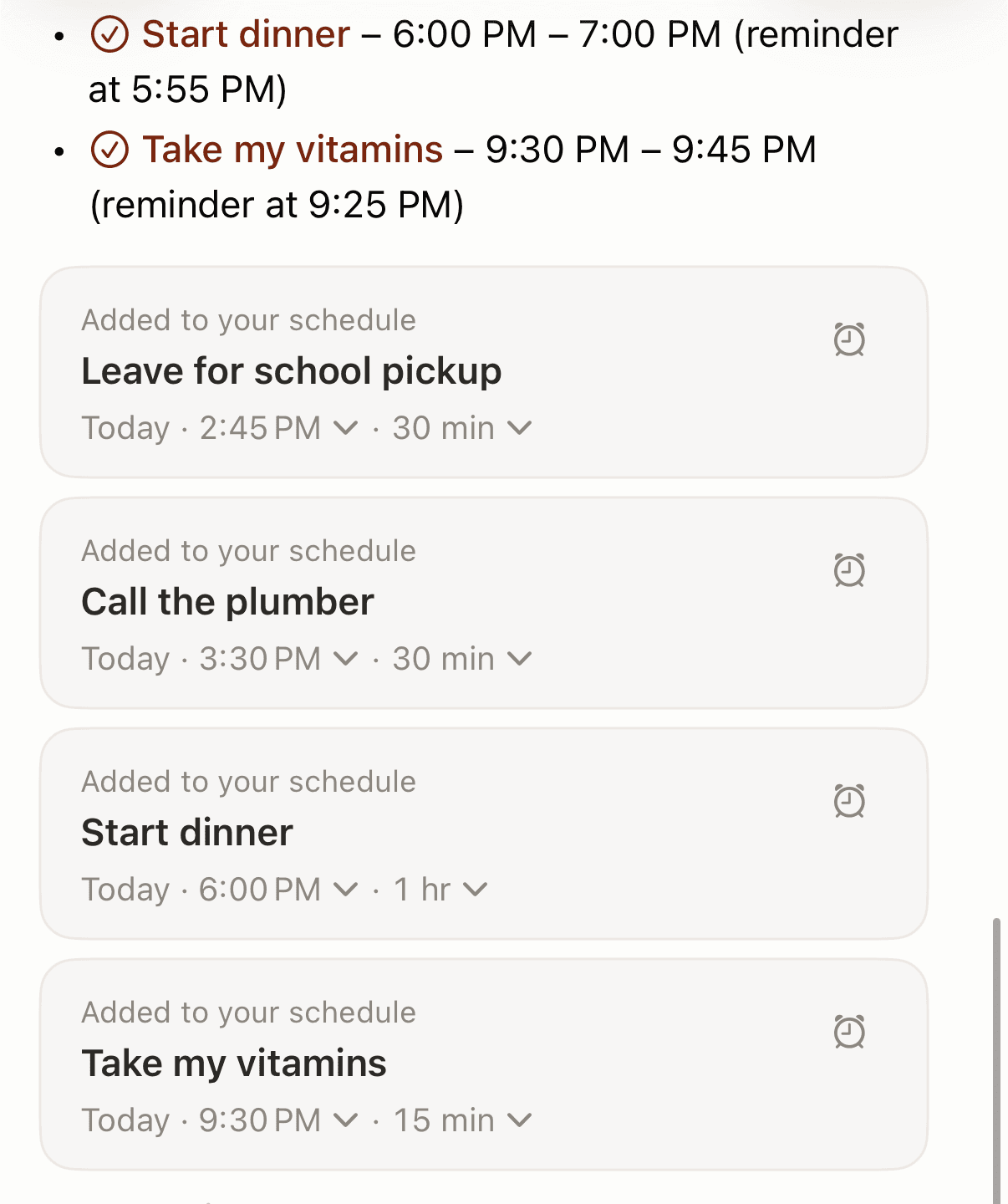
Codot replied "I've scheduled all four reminders for today, Wednesday, November 18, 2026" and listed them: leave for school pickup at 2:45 PM, call the plumber at 3:30 PM, start dinner at 6:00 PM with a reminder at 5:55 PM, and take my vitamins at 9:30 PM with a reminder at 9:25 PM. Each became a timed item with a reminder 5 minutes before its time, so say "at 2:40" if 2:45 is the latest you can leave.
Below the reply sat four editable "Added to your schedule" cards with time and duration menus. Codot picked the durations itself (dinner got an hour, the vitamins 15 minutes); change them on the card.
Where the reminders show up
A school pickup, a plumber call, dinner and a pill have nothing in common except the day, and in Apple Reminders each needs its own entry (since iOS 18, scheduled ones also appear as tasks in Apple Calendar). With the iOS Calendar connection on, Codot also writes timed items into Apple Calendar and Apple Reminders; our guide on how to add multiple events to iPhone Calendar at once shows five events from one sentence landing there. The sync runs one way: Codot writes, and checking an item off in Apple Reminders doesn't flow back.
What's free and what needs Codot Max
Creating tasks and events by voice is free. Timed reminders, like the 5:55 nudge before dinner, are part of Codot Max, along with repeating tasks, the 7:00 daily briefing and scheduled routines. New accounts get 7 days of Codot Max free, then return to the free plan with no charge. Codot Max is $12.99 a month or $99.99 a year on the US App Store, with 20x the free plan's usage. If you add reminders while walking out the door, the to-do list on your iPhone lock screen setup puts Codot one tap away.
How do I set multiple daily reminders on iPhone, like a pill at 8, 2 and 8?
Make one reminder per time and set each to repeat daily. Apple's step for repeating is: "Tap …, turn on Date or Time, tap Repeat, then choose the frequency" (Apple). Apple doesn't document one reminder with several daily times. On the Apple Community, a user asking for a medication reminder three times a day was told to "Create three entries," each "a daily reminder for a specific time of day" (Apple Community).
Hourly repeat exists on the Mac: Apple's Reminders for Mac guide lets you enter the number of hours between repeats, "every 6 hours, enter the number 6" (Apple). Apple's iPhone guide doesn't list the Repeat options, and an Apple Community user on iOS 16.2 wrote in December 2022, "On my phone there is not an option to repeat hourly" (Apple Community).
In Codot, repeating reminders are part of Codot Max, and you describe the rhythm in words. For a full medication routine with refills and check-ins, see our medication reminder for ADHD setup; for monthly bills, the bill reminder app for couples comparison. Our companion guide on how to set recurring reminders on iPhone covers repeat rules in detail.
How do I get more than one alert for a single reminder?
Stack Early Reminder and Urgent on the same item, both in the reminder's details screen.
Early Reminder. Apple's step: "tap Early Reminder, then choose when you want to be reminded. For example, '5 minutes before,' '2 days before,' or another choice" (Apple). The iOS 18 and iOS 27 guides use the same wording.
Urgent, on iOS 26.2 or later. "In iOS 26.2, you can mark a reminder as urgent and Reminders will schedule an alarm when that reminder is due. Alarms activate even when your device is silenced or a Focus is on" (Apple Support). Three conditions from the same page:
- The alarm rings "only" on "the device that Find My uses as your location." If your iPad is set as your location, the iPhone stays quiet.
- You need iCloud Reminders.
- In Settings > Apps > Reminders, turn on Alarms under Allow Reminders to Access.
All-day reminders are the trap: "If you set a due date for a reminder but don't assign a time, the notification appears by default at 9:00 AM," changeable under Settings > Apps > Reminders > All-Day Reminders (same Apple page). Set a time, or a 7 a.m. task arrives at 9.
If one of these alerts stays silent, our guide on iPhone Reminders not working walks through notification, Focus and sync settings, and the best voice alarm app for iPhone covers proper alarms.
Your ideas shouldn't wait for a keyboard. Just say it — Codot handles the rest.
How do I set two alerts on iPhone Calendar?
Open the event, tap Edit, tap Alert and pick a time; Apple's iPhone guide gives "At time of event," "5 minutes before," or another choice (Apple). That guide, for iOS 18 and iOS 27, says nothing about a second alert. The only official Apple instructions for one are for Calendar on iCloud.com: "Set a second alert: Select the 2nd Alert pop-up menu, then choose an option" (iCloud User Guide), and Apple notes you need a tablet or computer for that site.
On the iPhone itself, third-party guides describe a Second Alert field. iPhone For Dummies (2016) says "Tap Second Alert if you want to receive two alerts for the same event" (Dummies), and Morgen (March 2026) writes that "on the iPhone and iPad, you can only set two" (Morgen).
If Second Alert is missing
Apple Community threads report the field disappearing, with no official fix. Two things people tried:
- Check the event's calendar. One reply says "If your Default Calendar is Outlook or Exchange you won't see the Second Alert," while iCloud and Gmail calendars show it; the asker confirmed that worked (Apple Community, 2023). Change it in Settings > Apps > Calendar > Default Calendar.
- Set the first alert first. In a 2025 thread where the option vanished after an update, other users on current iOS said they could still pick a second alert once the first was set (Apple Community, 2025). That thread closed without a confirmed cause.
To give every new event an alert automatically, Apple's path is Settings > Apps > Calendar: "Tap Default Alert Times, tap Birthdays, Events, or All-Day Events, then choose an option" (Apple).
Can Siri set several reminders in one request?
Apple's Siri examples are single reminders, such as "Remind me tomorrow at 3:00 p.m. to call Tara" (Apple Support). On iOS 27 with Apple Intelligence, Reminders can suggest reminders from text in other apps, and you "tap Include All to add all suggestions" (Apple). We didn't test Siri for this article. For the phrases Apple documents, see our list of Siri calendar commands; if Siri replies but nothing appears, read Siri not adding events to your iPhone calendar.
How we selected
We listed every Apple feature that adds a second notice or reminder, from the iPhone User Guide (iOS 27, compared with iOS 18), Apple Support and the iCloud User Guide, checked November 18, 2026. Where Apple was silent (the iPhone Second Alert field, hourly repeat), we quoted third-party guides and Apple Community threads. The Codot result is our own test from the same day.
FAQ
How do I add multiple reminders on iPhone?
Say them in one sentence to Codot; in our test, one sentence created four timed reminders. In Apple Reminders, add each one separately and use Early Reminder or Urgent (iOS 26.2+) for extra alerts.
How do I set multiple daily reminders on iPhone?
Create one Apple reminder per time of day and set each to Repeat daily; Apple doesn't document one reminder with several daily times. Codot handles repeating reminders described in plain words as part of Codot Max.
Why can't I see Second Alert on my iPhone Calendar event?
Apple documents a 2nd Alert only on iCloud.com. Apple Community users report the iPhone field missing on Outlook or Exchange calendars; switching to an iCloud or Gmail calendar brought it back for one user.
Does Codot remind me exactly at the time I say?
Codot sets the item at the time you say and sends the reminder 5 minutes before it. In our test, "start dinner at 6" got a reminder at 5:55 PM. Timed reminders need Codot Max, which new accounts can try free for 7 days.
Download Codot on the App Store and say this afternoon's reminders in one sentence. For reminders another person needs, see how to send a reminder to someone else's iPhone.
Productivity & Tools Desk
This article was created with AI assistance and reviewed by our editorial team.Learn about our content process.