Best Voice Alarm App for iPhone (November 2026): How to Set an Alarm by Voice
Voice alarms on iPhone, compared for November 2026: setting an alarm with Siri, which talking alarm apps read your words aloud, and which ones ring on silent.
To set an alarm by voice on iPhone, ask Siri “Set an alarm for 7 a.m.” The Clock alarm plays a vibration, song or ringtone and does not read its label aloud. For a talking alarm, Alarm That Talks and Wake AI use Apple's AlarmKit on iOS 26 and ring through Silent mode. Codot, a voice AI assistant, turns one sentence into tasks and can ring a task as an alarm with Codot Max, but does not speak.
Disclosure: Codot is our product. Facts about Apple's Clock app and AlarmKit come from Apple's support and developer pages, and facts about the other apps come from their US App Store listings, all linked below and checked on November 10, 2026. Apple's iPhone User Guide now opens on the iOS 27 version by default. The Codot screenshots were taken in the Codot iPhone app on November 10, 2026.
TL;DR:
- "Voice alarm" means two different things. Setting an alarm with your voice is built into every iPhone through Siri. An alarm that speaks to you when it goes off is not: Apple's Clock alarm plays a vibration, a song or a ringtone, and nothing in Apple's documentation says it reads the label.
- For an alarm that talks, you need a third-party app. Since iOS 26, apps built on Apple's AlarmKit (Alarm That Talks and Wake AI in our table) can ring through Silent mode and Focus, the way the Clock app does.
- Older talking alarm apps rely on notifications. One says outright that it won't play a sound if your phone is on silent.
- Codot (our app) treats the alarm as part of a task. Say "airport shuttle tomorrow at 6:15" along with anything else on your mind, then switch on "Ring as an alarm" for that task. Codot does not read the alarm out loud.
At a glance
The column that decides whether you wake up at all is the fourth one: does it ring when the phone is on silent?
| App | Best for | Talks out loud? | Rings on silent? | Price (as of November 2026) | Source |
|---|---|---|---|---|---|
| Clock app + Siri | Setting a plain wake-up alarm with one sentence | No. Sound is a vibration, song or ringtone | Yes, also through Do Not Disturb and other Focus modes | Free, built in | Apple iPhone User Guide |
| Alarm That Talks: Loud Wake Up | Hearing your own typed words, like "Take your blood pressure pill" | Yes, it reads your message | Yes on iOS 26, per its App Store page | Free download; Pro Access $3.99/week, $8.99/month or $39.99 | App Store |
| Wake AI: Talking Alarm Clock | A spoken message per alarm, with built-in or custom voices | Yes | Yes. It uses Apple's AlarmKit and needs iOS 26.1 or later | Free download; subscriptions from $2.99/week, $4.99 to $7.99/month, $19.99 to $39.99/year | App Store |
| Talking Voice Alarm - Reminder | A free alarm that reads a short text and the time | Yes, it reads the text you add | Not stated. If you force quit the app, you get a push notification instead | Free | App Store |
| TalkClok | A spoken morning briefing with weather, commute and schedule | Yes | Not stated on its App Store page | $1.99 | App Store |
| Talking Alarm (Burnt Slice) | Hearing the current time spoken | Yes, the time only | No. Its page says the sound will not play on silent | Free; last updated 2017 | App Store |
| Codot | An alarm attached to a task you set up in one spoken sentence | No | Yes, on iOS 26 or later, after you allow alarms | Free app; ringing as an alarm needs Codot Max, $12.99/month or $99.99/year, 7-day Max trial for new accounts | Codot pricing |
HeyClock, which turns up in some talking-alarm searches, showed a "not found" page on the US App Store when we checked, so it isn't in the table.
How do I set an alarm by voice command on iPhone?
Ask Siri. Apple's guide gives the exact wording: "Ask Siri something like, “Set an alarm for 7 a.m.”" (Apple). Siri creates a normal Clock alarm, so everything Apple documents for Clock alarms applies to it.
That includes the part people worry about most. Apple's guide says "Your alarm sounds even when you: Turn on Silent mode. Turn on Do Not Disturb (or another Focus)."
What a Siri alarm gives you is a time and, if you edit it in Clock, a label. Apple's own label example is "Water the plants."
If you mostly use Siri for reminders rather than alarms and keep getting silent ones, our guide to iPhone reminders not working covers the settings behind that.
Can the iPhone alarm talk or read the label out loud?
No. The Clock app's alarm options are a label, a sound, snooze and snooze duration, and Apple describes the sound setting as "Choose a vibration, song, or ringtone." Nothing on Apple's alarm pages mentions reading the label aloud. The label shows on screen. You don't hear it.
Several copied how-to pages claim you can "record a new sound" inside the alarm settings. Apple's alarm documentation doesn't list that option. The route Apple does document is making a custom ringtone in GarageBand: "With GarageBand on your iPhone, you can create a ringtone from an audio file, a song from your Apple Music library, or a song that you made," and "ringtones can be up to 30 seconds long" (Apple). Record yourself saying "get up, the shuttle leaves at 6:15", turn it into a ringtone, and pick it as the alarm sound. It works, but it's the same recording every day.
One related fix from Apple: "If your alarm only vibrates, make sure that your alarm sound isn't set to None." (Apple)
Your ideas shouldn't wait for a keyboard. Just say it — Codot handles the rest.
Which talking alarm app for iPhone still rings on silent?
Check for AlarmKit before you check for voices. AlarmKit is the framework Apple added in iOS 26 so other apps can "schedule prominent alarms and countdowns" (Apple Developer). Apple's developer guide says an AlarmKit alarm "overrides both a device’s focus and silent mode, if necessary" (Apple Developer). Apple's WWDC25 session adds that they show on the Lock Screen, in the Dynamic Island and on a paired Apple Watch. The app has to ask your permission first. Without it, Apple says, an alarm the app creates "isn't scheduled and subsequently doesn't alert."
Before iOS 26, a third-party alarm was a notification with a sound attached, and notifications follow your silent switch. The 2017 Talking Alarm app says so plainly: "Your device must not be set to silent, if it is set to silent the alarm sound will not play."
From our table, the two AlarmKit apps fit different people.
Alarm That Talks is the one to pick if you want to hear your own sentence. Its listing says it "speaks your own words out loud" and that "On iOS 26, alarms use Apple's system alarm technology, so they ring through Silent mode and Focus." It runs on iOS 17 too, where that system behavior isn't available. Ratings were thin when we checked (3.9 from 7 reviews).
Wake AI states "Wake AI uses Apple AlarmKit, Apple's native iPhone alarm framework," and it needs iOS 26.1. Its pitch is a spoken message per alarm with a choice of voices, and its listing says you can create alarms with Siri. It had a 4.8 rating from 17 reviews.
Talking Voice Alarm is free and reads the text you attach, but says nothing about silent mode. TalkClok reads a full briefing with weather and news; read its reviews first (2.5 from 44).
What is the best alarm clock set by voice on iPhone?
Use Codot when the alarm is really a thing you have to do, and you'd rather say it once than set an alarm in Clock and a reminder somewhere else. Codot is a voice AI assistant. Tasks, calendar, reminders, notes and contacts live in one app, and one sentence can create or change several of them at once.
Say something like: "Tomorrow, airport shuttle at 6:15, text the house sitter the door code at 9 tonight, and call the dentist Friday at 10." Codot splits that into separate tasks with their own times. In our November 10 test, a single sentence produced three timed tasks in the chat, each with its own card.
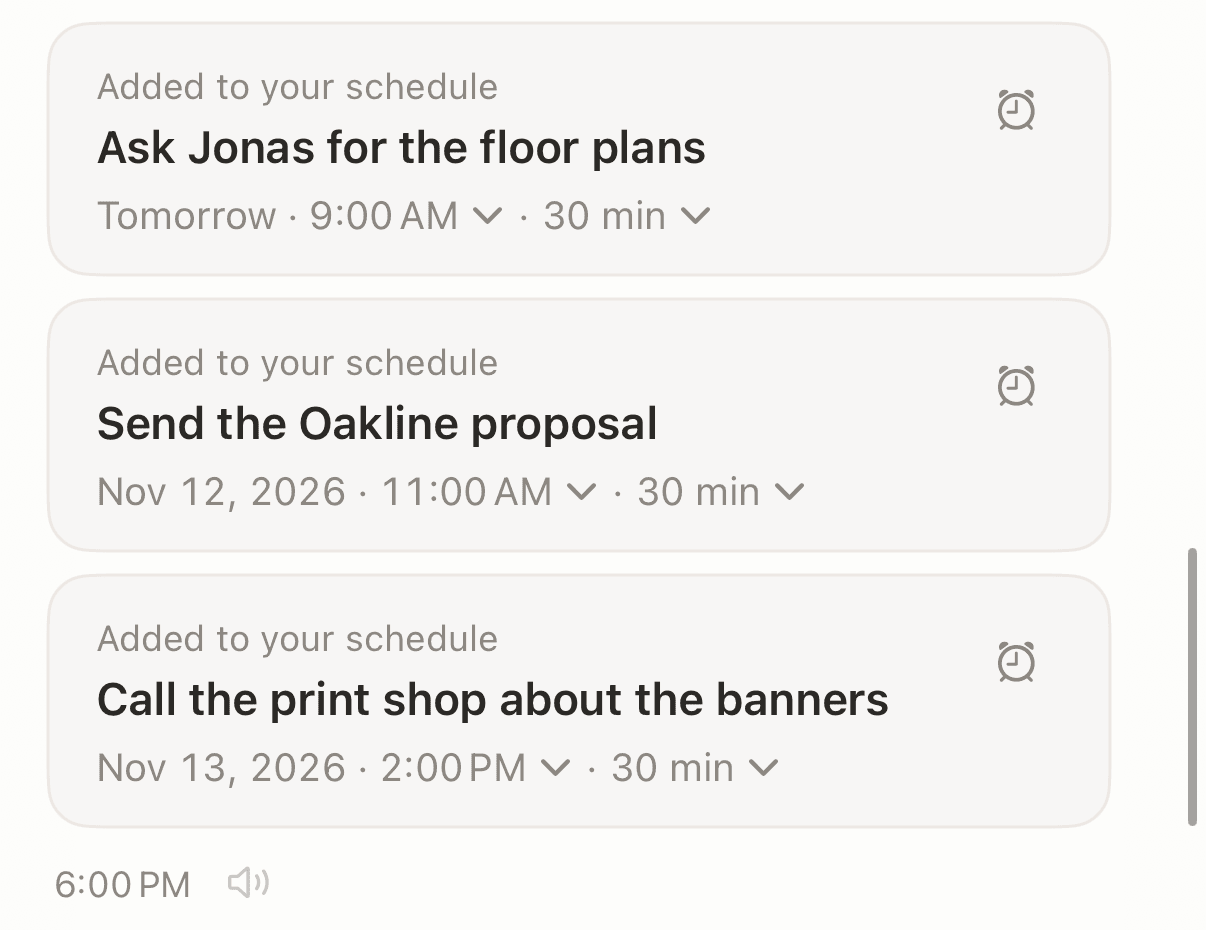
Then pick the one that has to wake you. Open the task card or the task details and switch on "Ring as an alarm." An "Alarm Time" row appears: at the start time, 5, 15 or 30 minutes before, an hour before, or a custom time. When it rings you get Snooze and Stop, like any alarm.
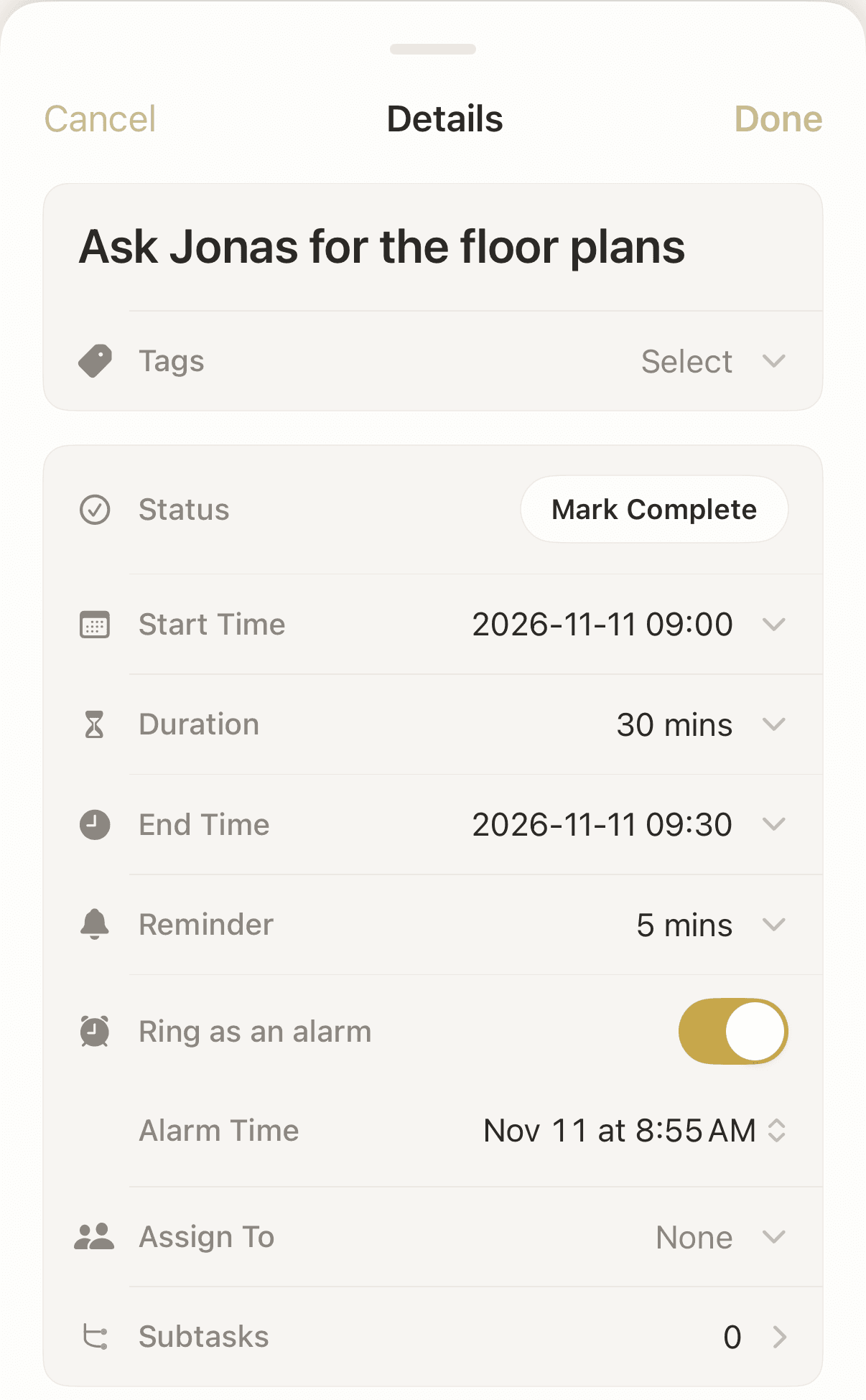
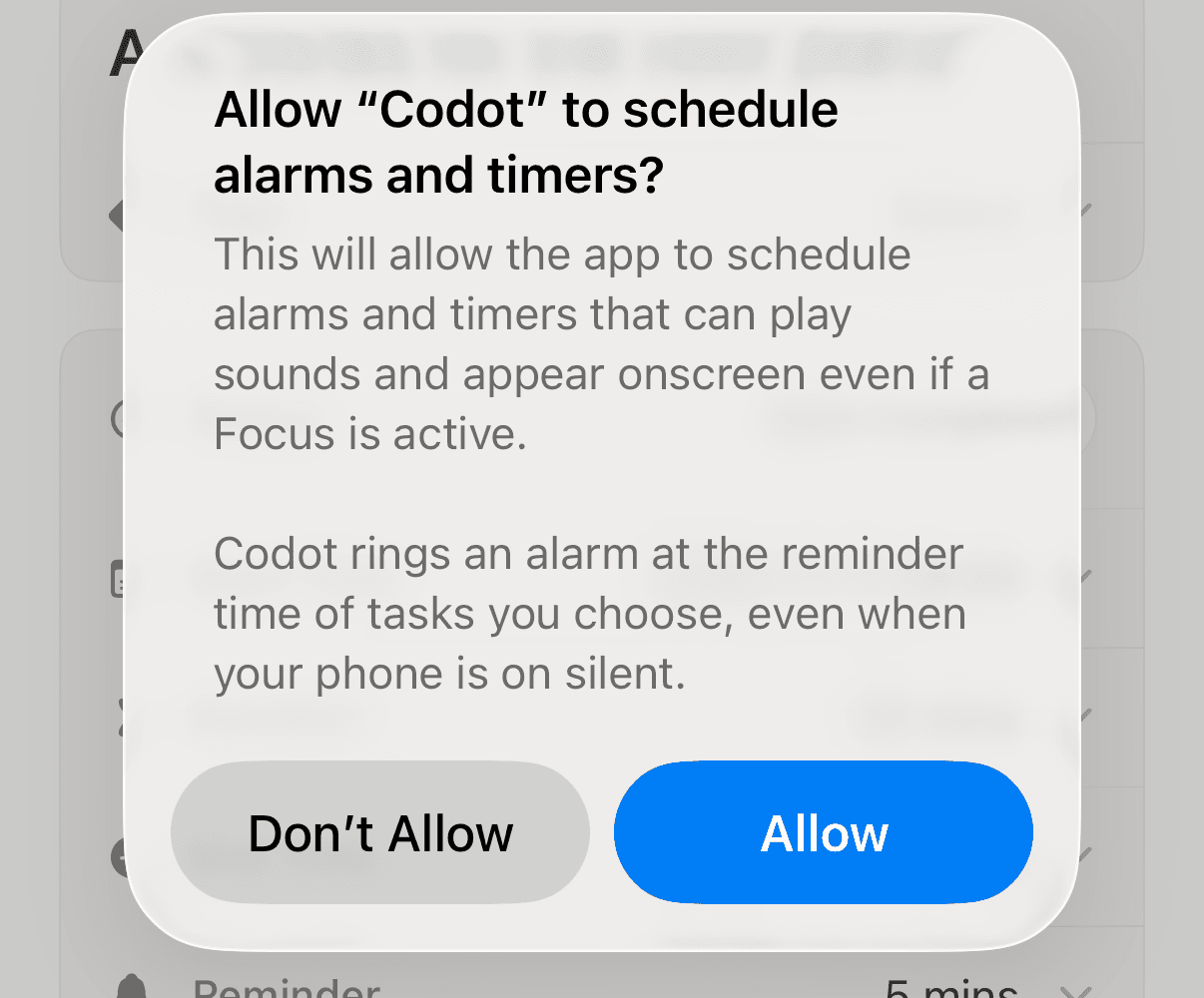
The first time you turn it on, iOS asks for permission. The dialog reads "Allow “Codot” to schedule alarms and timers?" and Codot's line underneath says it "rings an alarm at the reminder time of tasks you choose, even when your phone is on silent." Tap Allow, or the alarm won't be scheduled.
The difference from a Clock alarm is that the alarm belongs to a task. When it goes off at 5:45, the shuttle task is sitting in Codot with whatever else you said about it, and the house-sitter text and the dentist call are already scheduled for later. You talked once.
The switch shows up on iOS 26 or later, because it runs on AlarmKit. Ringing as an alarm is part of Codot Max ($12.99/month or $99.99/year on the US App Store); new accounts get 7 days of Max free, and the free plan covers tasks, calendar, notes and voice input. To start talking from the Lock Screen instead of opening the app, see how to put a to-do list on your iPhone lock screen.
Should I use an alarm or a reminder?
Use an alarm when missing the moment costs you something: a flight, a shuttle, a pill that has to be on time. An alarm takes over the screen with Snooze and Stop, and Clock alarms play on silent. Use a reminder for things that can wait a few minutes, like paying a bill today. A reminder banner is easy to swipe away half asleep, and in Codot an unanswered reminder isn't sent a second time.
If the same Siri sentence keeps landing in the wrong app, our piece on replacing Siri with ChatGPT or Gemini on iPhone explains what each assistant can and can't hand off.
FAQ
How do I set a voice alarm on iPhone?
Say "Set an alarm for 7 a.m." to Siri, which is Apple's own example, and iPhone creates a Clock alarm. If "voice alarm" means an alarm that speaks, the Clock app can't do that; you need a talking alarm app such as Alarm That Talks or Wake AI.
Is there an alarm clock app that talks to you on iPhone?
Yes. Alarm That Talks reads a message you type, Wake AI plays a spoken message with a voice you choose, and TalkClok reads a morning briefing. As of November 2026, Alarm That Talks and Wake AI use Apple's AlarmKit on iOS 26, so they ring through Silent mode.
Will a talking alarm app work when my iPhone is on silent?
Only if it uses AlarmKit on iOS 26 or later and you allowed it to schedule alarms. Older talking alarm apps use notifications, and the 2017 Talking Alarm app says its sound will not play on silent.
Can Codot read my alarm out loud?
No. Codot turns a spoken sentence into tasks and, with Codot Max on iOS 26 or later, can ring a task as a system alarm that sounds on silent. It doesn't speak the task when it rings, so pair it with a talking alarm app if hearing the words matters to you.
Codot handles the part before the alarm: saying what you need to do once and getting the task, the time and the alarm set up together. If you want the alarm itself to talk, keep Alarm That Talks or Wake AI for your wake-up and let Codot hold the rest of the day.
Download Codot on the App Store and try "Ring as an alarm" on tomorrow's first task during the 7-day Max trial.
Productivity & Tools Desk
This article was created with AI assistance and reviewed by our editorial team.Learn about our content process.