Best Free Reminder App for iPhone (November 2026): What Each Free Version Limits
Best free reminder app for iPhone: what Apple Reminders, Microsoft To Do, Google Tasks, Todoist, TickTick, Due and Codot do at reminder time, and what's paid.
As of November 2026, the best free reminder app for iPhone is Apple Reminders: it is built in, repeats tasks, and since iOS 26.2 can mark a reminder Urgent so it rings as an alarm. Microsoft To Do and Google Tasks are also free with no paid tier. Todoist and TickTick are free with caps. Due costs $7.99 and keeps re-alerting. Codot captures tasks by voice for free; timed and repeating reminders need Codot Max.
Disclosure: Codot is our product. Theo, the freelancer below, is a fictional example. Facts about the other apps come from their own pricing pages, App Store listings and help docs, linked below and checked on November 10, 2026. We haven't run a formal hands-on test of each app.
TL;DR:
- Is the Reminders app free? Yes. Apple Reminders comes with every iPhone, repeats tasks at no cost, and since iOS 26.2 an Urgent reminder rings as an alarm, even on silent.
- Fully free, no paid tier listed: Microsoft To Do (best if you also use Windows) and Google Tasks (best if you live in Gmail).
- Free with caps: Todoist stops at 5 projects; TickTick allows 2 reminders per task and 9 lists.
- If you ignore reminders on purpose: Due ($7.99, paid up front) keeps re-alerting until you act.
- Codot (our app) is the voice option. Saying the task is free; the reminder that rings at a set time is Codot Max ($12.99/month), with a 7-day Max trial for new accounts.
At a glance
Read the table first. The column most people skip is "What happens at reminder time," and it's the one that decides whether you actually see the reminder.
| App | Price (as of November 2026) | Repeating reminders free? | What happens at reminder time | Main free-version limit | Source |
|---|---|---|---|---|---|
| Apple Reminders | Free, built in | Yes | Notification; Urgent reminders ring as an alarm (iOS 26.2 and later) | Apple devices only; the alarm needs iCloud Reminders | Apple Support |
| Microsoft To Do | Free | Yes | Notification | No paid tier listed | Microsoft Support |
| Google Tasks | Free | Not stated in the App Store listing | Due-date notification | Plain, few options | App Store |
| Todoist | Free; Pro $60/year or $7/month | Yes | Task reminder notification | 5 personal projects, no custom reminders, no calendar layout | Todoist |
| TickTick | Free; Premium $49.99/year or $4.99/month | Yes | Notification | 2 reminders per task, 9 lists, 99 tasks per list | TickTick |
| Due | $7.99 up front (not free) | Yes | Rings like an alarm until you act, then auto-snoozes | Paid app | App Store |
| Codot | Free; Codot Max $12.99/month or $99.99/year, 7-day Max trial for new accounts | No, repeating reminders are Max | On Max: a reminder at the time you set; on iOS 26 or later it can ring like an alarm | Free plan captures tasks and calendar entries by voice; timed and repeating reminders need Max | Codot pricing |
Pick by row: Apple Reminders if you only own Apple devices, Microsoft To Do if a Windows PC is part of your day, Due if you need to be nagged, and Codot if you need the best voice shopping list app for when your hands are busy.
Is the Reminders app free on iPhone, and does it have an alarm?
Apple Reminders is free and already installed. It handles repeating tasks, shared lists, location reminders and Siri at no cost, and it syncs to a Mac, iPad and Apple Watch through iCloud.
The alarm is new. Apple's support page says: "In iOS 26.2, you can mark a reminder as urgent and Reminders will schedule an alarm when that reminder is due." It also says "Alarms activate even when your device is silenced or a Focus is on" (Apple Support). That answers the most common follow-up search, "does Apple Reminders have an alarm": yes, if you turn on Urgent for that reminder.
Three setup details from the same page catch people out:
- You have to allow alarms for Reminders: Settings, Apps, Reminders, then turn on Alarms.
- "To mark reminders as urgent, you need to set up iCloud Reminders."
- "Alarms for urgent reminders only activate on the device that Find My uses as your location." If your iPad is set as your location, the alarm goes off there and your iPhone stays quiet.
One more rule from Apple applies to repeats: "Reminders that are set to repeat appear when the previous repeating reminder is complete" (Apple Support). If you leave this week's copy unticked, next week's doesn't appear. If a reminder never shows up at all, our iPhone Reminders troubleshooting guide walks through the usual causes.
Which free reminder app works on both iPhone and Windows?
Microsoft To Do. It's free, its App Store listing promises "one-time or recurring due dates and reminders" (App Store), and Microsoft's help page lists repeats "daily, on weekdays, weekly, monthly, yearly, or a custom repetition" (Microsoft Support). My Day gives you a short list for today with suggested tasks. Reminders arrive as normal notifications, so a phone on silent will not ring.
Google Tasks is the other free cross-platform pick. Its strength is Gmail: you can "Create a task directly from an email in Gmail" and get "due date notification reminders" (App Store). We'd only choose it if your day already runs inside Google's apps.
What do Todoist and TickTick limit on their free plans?
Both are good reminder apps that put a ceiling on the free version.
Todoist keeps task reminders and recurring due dates on the free Beginner plan, but custom reminders are "Not available," the calendar layout is "Not available," and you get "5 personal projects" (Todoist pricing). Pro costs $60 billed yearly or $7 billed monthly. If five projects already feels tight, our list of free Todoist alternatives compares the others plan by plan.
TickTick gives free accounts "9 Lists, 99 Tasks per list" (TickTick) and two reminders per task. Premium lets you "Add up to 5 reminders to each task" and costs $49.99 a year or $4.99 a month (App Store). Two reminders covers "the day before" and "an hour before," which is enough for most deadlines.
Your ideas shouldn't wait for a keyboard. Just say it — Codot handles the rest.
Is there a reminder app that keeps alerting until you do it?
Due, and it isn't free. The App Store lists it at $7.99 with an optional $4.99 Annual Upgrade Pass. Its Auto Snooze "keeps nudging you about a missed reminder until you mark it done or reschedule it," five times by default and up to ten. On iOS 26 or later, its Prominent Alerts "ring like an alarm until you act" and "break through Silent and Focus modes" (App Store).
If you know you swipe reminders away without reading them, Due is the one app here built around that habit. For one or two must-not-miss items a week, Apple's free Urgent toggle may be enough.
What is the best voice reminder app for iPhone?
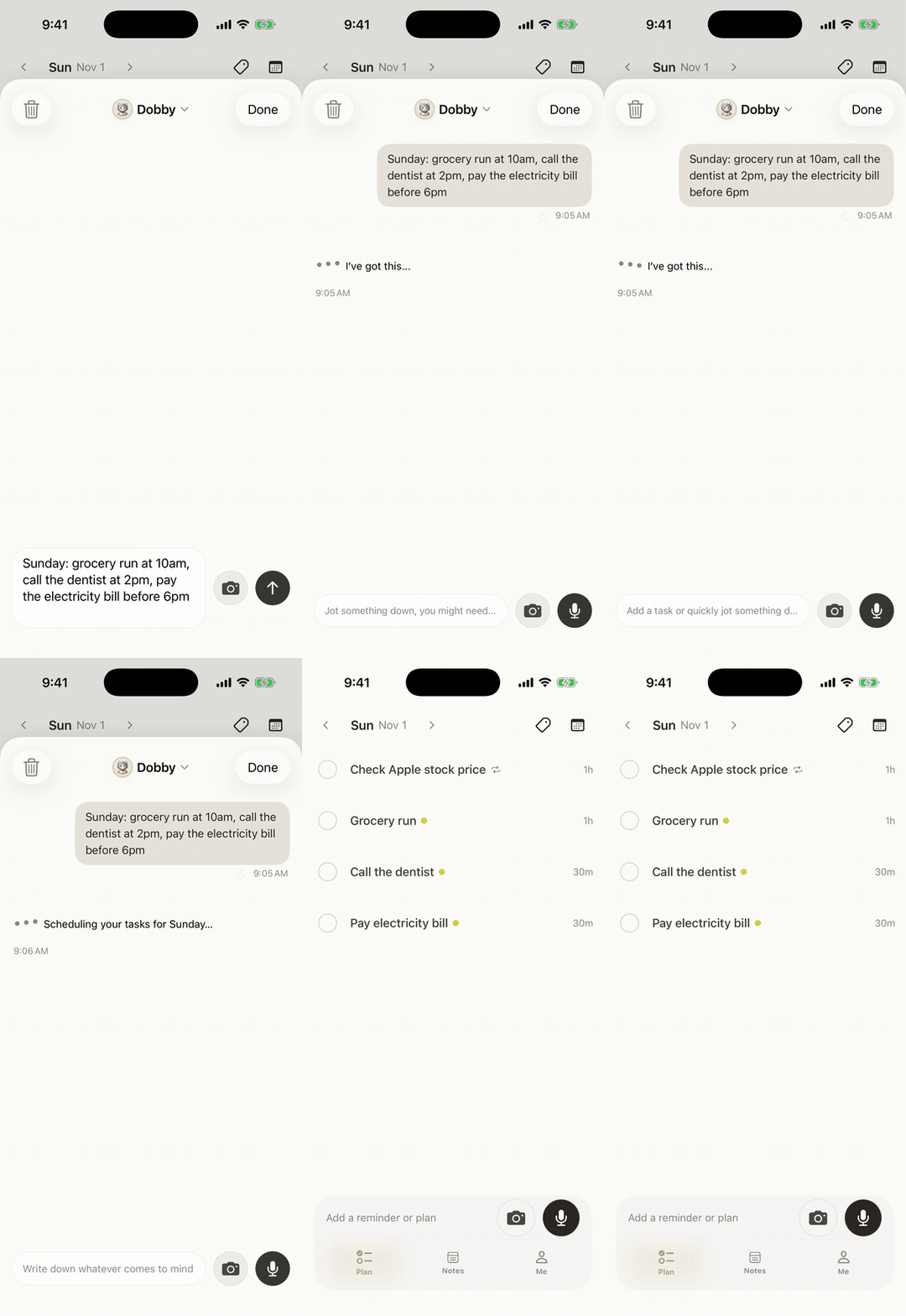
Use Codot when your reminders arrive in the middle of something else (a client call, the drive home, a shoot) and opening a list app to type them is the step you skip. Codot is a voice-first AI assistant. You say the thing the way you'd say it to a person, and it becomes a task with the right day, time and wording.
Here's how that plays out for Theo, a fictional freelance video editor with four clients and no assistant.
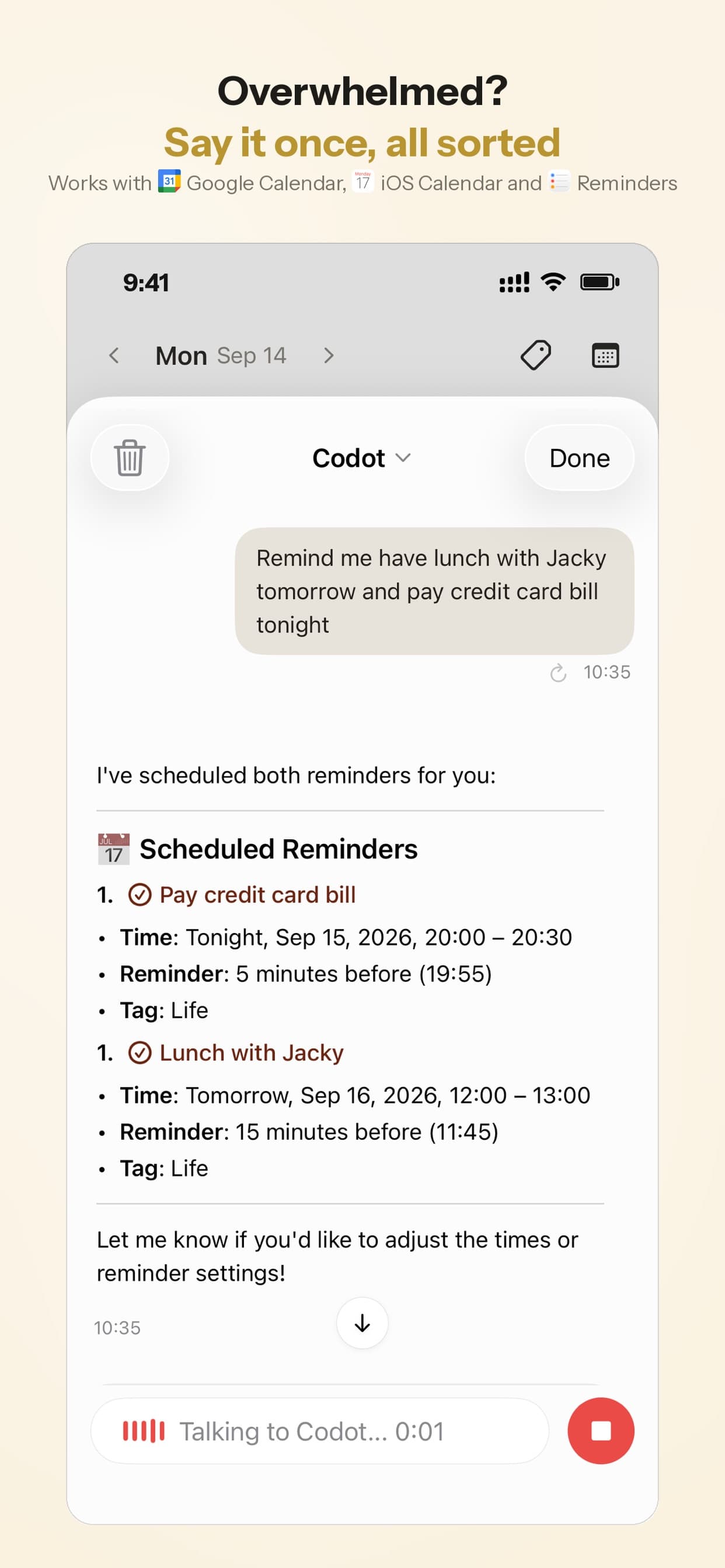
Monday, 9:12 a.m., on a call with a client. Lena wants the rough cut by Thursday at 6. When they hang up, Theo taps the mic and says: "Lena's rough cut is due Thursday at 6, remind me Thursday at 5:30 to export it, and call the music library about the license tomorrow morning." Codot splits that into two tasks, each on its own day, instead of one long note he'd have to untangle later.
Wednesday, 11:40 p.m., in bed. He remembers he invoiced the Brightwater retainer late again. He says: "Every month on the 25th at 9 a.m., remind me to invoice Brightwater." Codot understands natural repeat patterns like "every other Friday" or "quarterly on the 15th," so he doesn't pick from a repeat menu.
<!-- MEDIA: Codot iOS 聊天页:说 "Every month on the 25th at 9 a.m., remind me to invoice Brightwater" 后,回复里出现一条每月 25 日 9:00 重复的任务卡 -->
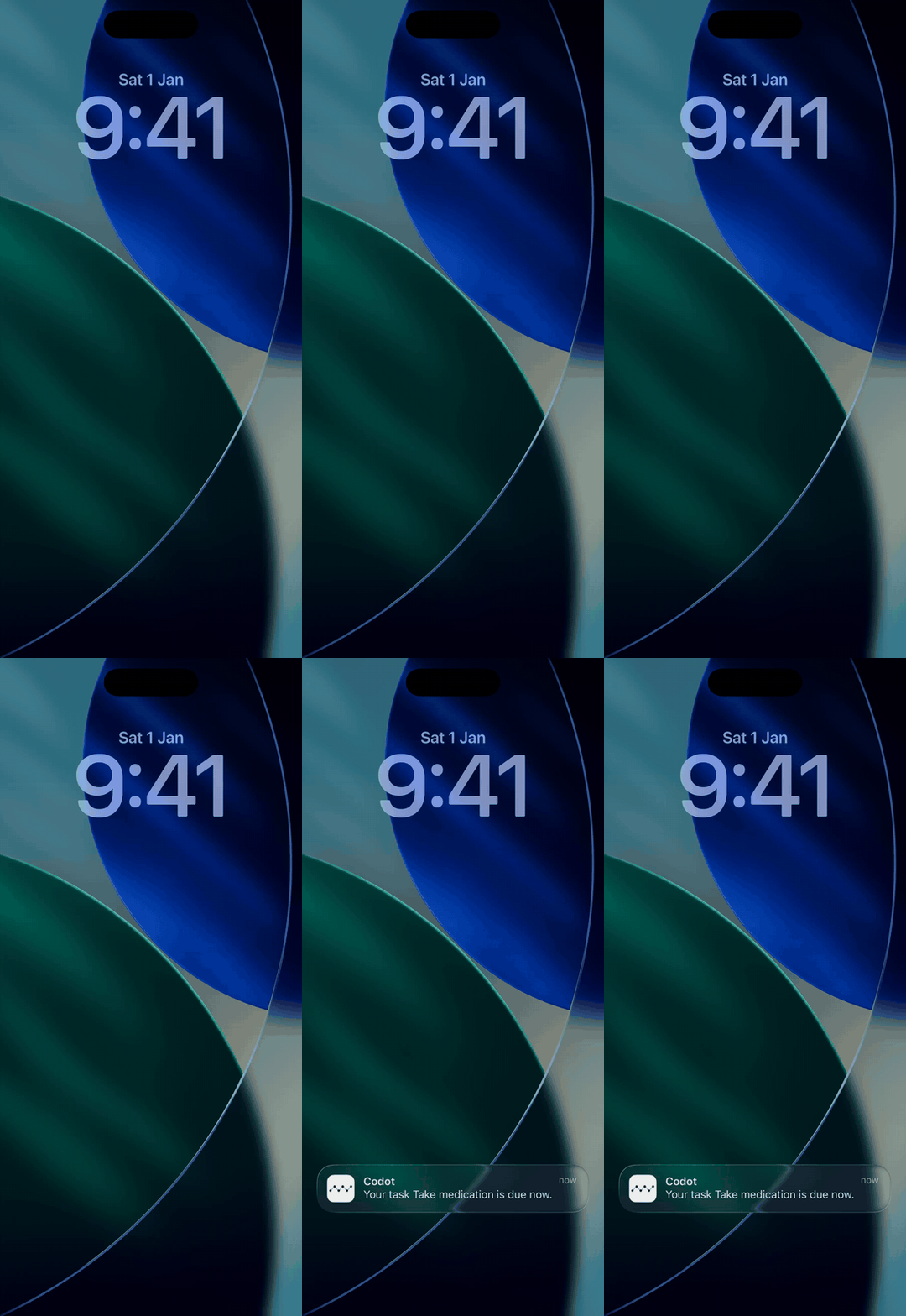
Thursday, 5:30 p.m., headphones on, phone face down. The export reminder fires. On iOS 26 or later, Codot's timed reminders can ring like an alarm, so he hears it over the edit instead of finding a banner an hour later.
<!-- MEDIA: iOS 26 模拟器:Codot 到点提醒像闹钟一样全屏响铃的画面(任务 "Export Lena's rough cut",5:30 PM) -->
Friday, 8:05 a.m., making coffee. He asks, "What's still open this week?" and Codot lists what is left, including the license call he hasn't made.
Codot also writes its tasks into Apple Calendar and Apple Reminders on iPhone, and into Google Calendar, so the week shows up in the calendar you already check. That makes it a reasonable answer to "best free calendar reminder app" too: you speak, and the entry lands in your phone's calendar.
Reminders can go to other people as well. Add a friend, partner or collaborator in Codot and say "remind Maya every other Friday at 5 to pick up Mia," and each repeat lands on Maya's phone.
What's free and what's Max. Codot's free plan captures one-time tasks and calendar entries by voice, plus notes, a personal CRM, free habit tracking for iPhone, a calorie log, bookkeeping and friends. Reminders at a set time, repeating reminders, the 7 a.m. daily briefing on iPhone and Routines are Codot Max, at $12.99 a month or $99.99 a year with 20x the free plan's usage (pricing). Every new account gets 7 days of Max free, then drops back to the free plan without charging you. So Codot is free for capture, and Max is what you pay for when you want the reminder that rings.
Codot sends each reminder once at the time you set. If you need an app that keeps re-alerting after you dismiss it, pair Codot with Due, or mark the one critical reminder Urgent in Apple Reminders.
Which free reminder app should you choose?
- Your reminders show up mid-task and you'd rather say them than type them: Codot. Capture is free; use the 7-day Max trial to see if timed reminders that ring are worth $12.99 a month to you.
- Apple devices only: Apple Reminders, with Urgent on for the few reminders you can't miss.
- iPhone plus a Windows PC: Microsoft To Do.
- Your work lives in Gmail: Google Tasks.
- You think in projects and have five or fewer: Todoist's free plan.
- You dismiss reminders and need to be nagged: Due, $7.99.
For a broader planner view with the same "what does free leave out" approach, see our best free planner apps for iPhone.
FAQ
Is the Apple Reminders app free?
Yes. Apple Reminders is built into every iPhone, iPad and Mac at no cost, including repeating reminders, shared lists and location reminders. Since iOS 26.2 you can also mark a reminder Urgent so it rings as an alarm.
Does Apple Reminders have an alarm?
Yes, from iOS 26.2. Turn on Urgent for a reminder and it schedules an alarm at the due time that sounds even on silent or in a Focus. You need iCloud Reminders and the Alarms permission, and the alarm rings on the device Find My uses as your location.
What is the best free reminder app with an alarm for iPhone?
Apple Reminders with Urgent turned on, as of November 2026, because it costs nothing and rings through silent mode. Due also rings like an alarm and re-alerts until you act, but it costs $7.99.
Is Codot a free reminder app?
Codot's free plan turns spoken tasks into one-time tasks and calendar entries. Reminders at a set time and repeating reminders are part of Codot Max ($12.99 a month or $99.99 a year), and on iOS 26 or later those reminders can ring like an alarm. New accounts get 7 days of Max free.
What is the best free reminder app for iPhone and Windows?
Microsoft To Do. It's free on iPhone, Apple Watch, Windows and Android, with one-time and repeating reminders and a My Day list for today.
If your reminders tend to arrive while your hands are full, download Codot from the App Store and say the next one out loud.
Productivity & Tools Desk
This article was created with AI assistance and reviewed by our editorial team.Learn about our content process.