Can You Add Tasks to Apple Calendar? Yes, Through Reminders (iOS 18 and Later), Plus a Faster Way to Add a Whole To-Do List (2026)
Can you add tasks to Apple Calendar? Yes: since iOS 18, scheduled reminders show in Calendar. Apple's steps, the limits, and a whole to-do list in one sentence.
Yes. Since iOS 18, Apple Calendar on iPhone shows scheduled reminders from the Reminders app next to your events, and you can create one by tapping + and then Reminder. Calendar has no task type of its own, so a task in Apple Calendar is a reminder. To add a whole to-do list at once, say it to Codot in one sentence; in our November 2026 test, five timed tasks landed in both Apple Calendar and Apple Reminders.
Disclosure: Codot is our product. Updated November 2026 · Apple and Google steps checked November 18, 2026 on Apple Support article 102484, the iOS 27 iPhone User Guide and Google's Help Centers.
TL;DR:
- Yes, you can add tasks to Apple Calendar, as reminders. Apple says that "in iOS 18 and later, your scheduled reminders now appear in the Calendar app alongside your events." In Calendar, tap + and choose Reminder to add one; tap Calendars and select Scheduled Reminders to show them.
- Use Codot when your to-do list has several items with different times: say five things with times in one sentence, and Codot writes each as its own task into Apple Calendar and Apple Reminders. In our November 18, 2026 test, all five showed up on the right day and time.
- Apple Calendar has no task type of its own (our reading of Apple's guides), reminders with only a date sit in the all-day row, and a repeating reminder has to be completed in order. Google documents no way to show Google Tasks in Apple Calendar; it points iPhone users to its own Tasks app.
At a glance
| Way to add tasks | What shows up in Apple Calendar | What you need | Source |
|---|---|---|---|
| Codot, one spoken or typed sentence | Several tasks at once, each at its own time, plus matching Apple Reminders items | The Codot app with iOS Calendar connected; timed reminders need Codot Max | Our test, November 18, 2026 |
| Calendar app: + then Reminder | One reminder at a time, on its date or time | iOS 18 or later | Apple Support 102484 |
| Reminders app, with a date or time | Every scheduled reminder, once Scheduled Reminders is selected in Calendar | iOS 18 or later | Apple iPhone User Guide |
| Reminders, typed description (Apple Intelligence) | One reminder per description, with the time filled in | iPhone 15 Pro or later, iOS 27, supported languages and regions | Apple iPhone User Guide |
| Google Tasks | Nothing documented; Google shows tasks in its own Google Calendar app | The Google Tasks app on iPhone | Google Tasks Help |
How do I add a whole to-do list to my iPhone calendar at once?
Use Codot when the list is already in your head and you want every item on the calendar before you lose half of them. Apple adds one reminder per trip through the + button; Codot keeps tasks, calendar, reminders, notes and contacts in one app, and one sentence can create several of them at once.
On November 18, 2026, we typed this into Codot on an iPhone running iOS 26.1 (typing and speaking work the same way):
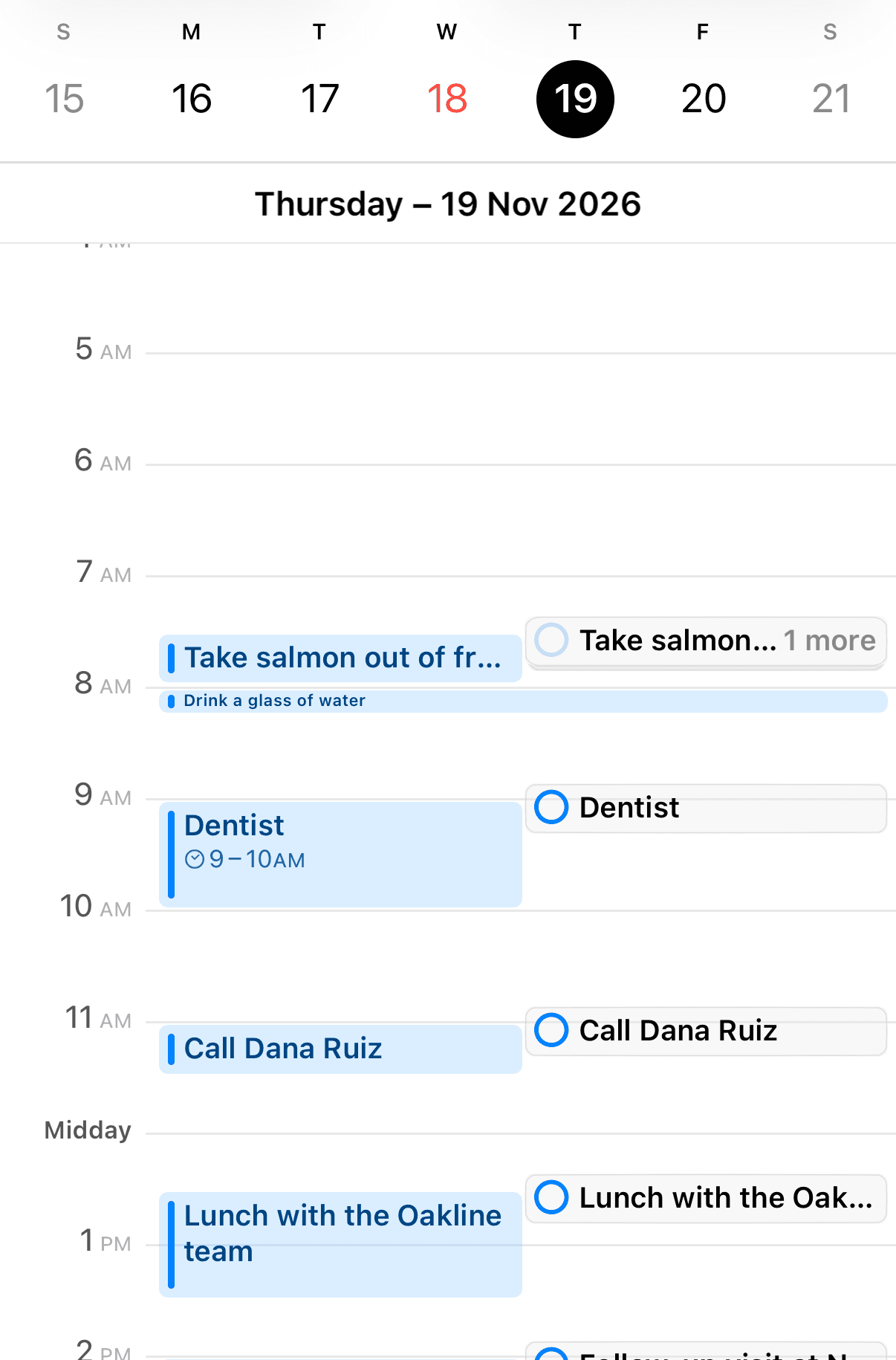
"Tomorrow: dentist at 9am, call Dana Ruiz at 11, lunch with the Oakline team at 12:30, pick up dry cleaning at 5pm, and Harbor Street book club at 7pm."
About 40 seconds later Codot replied that it had scheduled all five tasks for Thursday, November 19, and listed each with a time and a reminder five minutes before (8:55 for the 9:00 dentist). It picked the durations itself and added an editable card for changing them.
What the round markers in Apple Calendar mean
We then opened Apple's own Calendar app on the same iPhone. Each task appeared twice on Thursday: once as a regular calendar event in the day grid, and once as an Apple Reminders item, which Calendar draws as a small round marker in the right-hand column. That second copy is what Apple's guide describes: a scheduled reminder showing in Calendar.
Before you try it: a short checklist
- [ ] Connect iOS Calendar once. In Codot's settings, open Connected Calendars, choose iOS Calendar, allow Calendar access, and pick which calendar Codot writes to.
- [ ] Give each task a time. Our test covered tasks with times; that's what put them on the calendar grid.
- [ ] Add new tasks in one sentence, changes in another. Moving an existing event is a separate request.
- [ ] Remember it runs one way. Codot writes into Apple Calendar and Apple Reminders. It doesn't read events you made elsewhere, and ticking a task off in Reminders doesn't flow back into Codot.
- [ ] Know what's free. Creating tasks by voice is on the free plan. The reminder five minutes before and repeating tasks are part of Codot Max: $12.99 a month or $99.99 a year on the US App Store, with 20x the free plan's usage. New accounts get 7 days of Max free, then return to the free plan with no charge.
The full setup and every other bulk option are in our guide on how to add multiple events to iPhone Calendar at once. If you add tasks while walking, a to-do list on your iPhone lock screen puts Codot one tap away.
How do I add a task to Apple Calendar on iPhone?
You add it as a reminder, from inside Calendar. Apple's support article 102484 (published October 9, 2026) and the iOS 27 iPhone User Guide give these steps:
- ] **Show reminders in Calendar.** Tap Calendars at the bottom of the screen and "select Scheduled Reminders" ([Apple Support).
- ] **Create one.** Tap the + button at the top of the screen, then "Tap Reminder, then enter a title" ([Apple iPhone User Guide).
- [ ] Pick the day. "To choose a date for the reminder, tap Date."
- [ ] Pick the time, if it has one. "Optionally, turn on Time and choose a specific time for the reminder."
- [ ] Choose the list. Apple's article mentions other options "like Repeat or List." If you skip List, "new reminders are added to the default list you chose for Reminders."
- [ ] Tap Done. Apple says this creates the reminder and has it "appear in your Calendar."
Reminders you made in the Reminders app with a date also appear once Scheduled Reminders is on. On iOS 27 with an iPhone 15 Pro or later, Apple Intelligence lets you "type a description of the reminder—for example 'Feed the cat every evening at 5pm'" and Reminders fills in the timing (Apple); Apple notes it "is not available in all languages or regions." Each description still makes one reminder. Siri can add one too; our table on whether Siri can add to calendar covers which calendars it reaches.
What can't you do with tasks in Apple Calendar?
Four limits come from Apple's own pages, and they explain most "my task isn't showing" questions.
- [ ] There's no separate task type. Apple's guides only describe reminders inside Calendar; we found no "task" item of Calendar's own. That's our reading of Apple's documentation.
- ] **A reminder with only a date goes to the all-day row.** Apple: "Reminders with a due date appear as an all-day event in Calendar" ([Apple), and "Reminders scheduled at a specific time appear at that time in the full-day schedule." If you want a task in the 3 PM slot, give it a time.
- ] **Repeating reminders must be completed in order.** "If you set a scheduled reminder to repeat, future instances are dimmed and can only be marked complete after the most current instance is marked complete" ([Apple).
- [ ] Hiding isn't deleting. Deselecting Scheduled Reminders clears them from Calendar, but "Removing reminders from Calendar doesn't delete the reminders from the Reminders app."
If reminders show in Calendar but don't alert you, our iPhone Reminders not working guide walks through notification settings, and shared reminders not syncing on iPhone covers shared lists. Setting more than one alert per item is a separate topic, how to set multiple reminders on iPhone.
Your ideas shouldn't wait for a keyboard. Just say it — Codot handles the rest.
Can I add Google Tasks to my iPhone calendar?
Google doesn't document a way to show Google Tasks inside Apple Calendar. On iPhone, Google's answer is its own app: "To add and manage tasks from your mobile device, download the Tasks app" (Google Tasks Help). Tasks do show in Google's Calendar app, with two conditions from Google's help page: "Tasks must have a date to appear in Google Calendar," and "Tasks with subtasks can't repeat" (Google Calendar Help).
Apple's page on adding a Google account to iPhone Calendar doesn't mention tasks, and third-party automation services offer applets for it. If your household already splits jobs between Apple Reminders and Google Tasks, our mental load app for couples comparison puts both side by side. Codot can also write its tasks into a Google calendar you pick (say "Connect Google Calendar"); the other direction is outside its job, since it doesn't read Google events. Bulk adding inside Google's own app is its own topic, how to add multiple events to Google Calendar.
How we selected
We answered the searches people type (can you add tasks to Apple Calendar, how to add a to-do list to Apple Calendar) from Apple Support article 102484, the iOS 27 iPhone User Guide, and Google's Tasks and Calendar Help Centers, checked November 18, 2026 and linked where quoted. The Codot section is our own test from the same day on iOS 26.1. Where no official page answered the question, as with Google Tasks in Apple Calendar, we say so instead of guessing.
Which way fits your to-do list?
For one task with a date, Apple's + then Reminder inside Calendar is quick and free. For a list of different things with different times, say them to Codot in one sentence and check Calendar afterwards. For a wider comparison, see our best voice to-do list apps for iPhone, best voice calendar apps, and, if lists keep slipping because of ADHD, the ADHD planner app for adults comparison. Codot handles capture and the calendar entries; a project board with dependencies is a job for a tool like Todoist alongside it, and our free Todoist alternatives list covers those plans.
FAQ
Can you add tasks to Apple Calendar on iPhone?
Yes, as reminders. On iOS 18 and later, Apple Calendar shows scheduled reminders next to your events; tap + and then Reminder to create one, and tap Calendars, then Scheduled Reminders, to show them.
How do I add a whole to-do list to Apple Calendar at once?
Say or type the list in one sentence to Codot with a time for each item. In our November 18, 2026 test, one sentence created five timed tasks that appeared in both Apple Calendar and Apple Reminders.
Why is my reminder showing as all-day in Apple Calendar?
It has a date but no time. Reminders with a due date "appear as an all-day event in Calendar"; turn on Time in the reminder to move it into the hourly schedule.
Does Codot sync with Apple Reminders both ways?
No, it's one-way. Codot writes its tasks into Apple Calendar and Apple Reminders, but checking off an item in Reminders or editing it in Calendar doesn't change it in Codot.
Is Codot free for adding tasks to Apple Calendar?
Creating tasks by voice is on Codot's free plan. Timed reminders and repeating tasks need Codot Max, at $12.99 a month or $99.99 a year in the US, and new accounts get a 7-day free trial.
Try it with tomorrow's list: download Codot on the App Store and say every task in one sentence.
Productivity & Tools Desk
This article was created with AI assistance and reviewed by our editorial team.Learn about our content process.