ADHD Planner App for Adults (November 2026): Tiimo, Structured, Sunsama, Motion, Todoist and Codot Compared
ADHD planner apps for adults compared on price, free plans and iPhone support, plus a freelancer's week set up in Codot: morning top 3, evening review, client follow-ups.
The best ADHD planner app for adults depends on where your plan breaks. As of November 4, 2026, Tiimo and Structured show the day as a visual timeline, Sunsama ($17 a month billed yearly) and Motion ($19 a month) suit desk planners, and Todoist and TickTick are cheap lists. Codot is a planner you talk to that also runs your own rules every day, such as a morning top 3 and an evening review, on iPhone, Android and the web.
TL;DR:
- An ADHD planner app has two jobs: holding the plan, and bringing it back to you at the right moment. Most apps only do the first.
- Tiimo and Structured are the visual picks. They show your day as colored blocks on a timeline. Structured's paid plan costs less on the US App Store.
- Sunsama and Motion are for people who plan at a computer. Neither has a free plan.
- Todoist and TickTick are the cheap, flexible lists with real free tiers.
- Codot (our product) is the planner you talk to. You say the plan out loud, and you also give it standing rules: "every weekday at 8, send me my top 3", "every night at 10, ask me what I finished", "every Friday, list clients I haven't contacted this week". It runs those rules whether or not you open the app. The rules need Codot Max; every new account gets 7 days of it free.
Disclosure: Codot is our product, and it's one of the options compared here. Competitor prices come from each company's pricing page or US App Store listing, checked November 3–4, 2026. We haven't run long trials of every app, so we describe what each one says it does.
At a glance
| App | Best for | Price (as of Nov 2026) | Free plan | Platforms | Main limit | Source |
|---|---|---|---|---|---|---|
| Codot | Talking the plan through, then having daily rules run for you | Free plan; Codot Max $12.99/mo or $99.99/yr (US), 7-day Max trial for new accounts | Yes: tasks, calendar, notes, personal CRM, habits | iPhone, Apple Watch, Android, web | No visual timeline; writes to your calendar but doesn't read existing events | codot.ai/pricing |
| Tiimo | Seeing the day as a visual timeline, neurodivergent-first design | Pro price shown at checkout, varies by country; 7-day trial only on yearly | Yes, a selection of tools on iOS and Android | iPhone, iPad, Apple Watch, Android, Mac, web | Web planner and full features need Pro | Tiimo pricing |
| Structured | A visual timeline for less money | Pro from $2.99/mo or $29.99/yr, $99.99 lifetime (listing shows several price points) | Yes, timeline and inbox | iPhone, iPad, Mac, Apple Watch | Calendar connections and AI planning are Pro | App Store |
| Sunsama | A guided daily planning ritual at a desk | $17/mo billed yearly or $22 monthly | No, 14-day trial | Web, Mac, Windows, Linux, iOS, Android | About $204 a year, no free floor | Sunsama pricing |
| Motion | Letting AI place tasks on your calendar | Pro AI $19/seat/mo; Business AI $29 | No, trial only | Web, desktop, mobile | Every task needs a duration and deadline | Motion pricing |
| Todoist | A flexible list with filters | Pro $60/yr or $7 monthly | Yes, 5 projects | All major platforms | Custom reminders need Pro | Todoist pricing |
| TickTick | Tasks, calendar view, habits and a focus timer in one | Premium $49.99/yr | Yes, 9 lists | All major platforms | Dense settings in the first week | TickTick Premium |
Why do ADHD planner apps stop working after two weeks?
Picture a freelance brand designer, call her Maya. She has four clients, no boss, and an ADHD diagnosis she got at 31. Every few months she downloads a new planner, spends a Sunday color-coding the week, and by the second Wednesday the app sits unopened on page three of her phone while she answers whatever client emailed last.
The planning was never the weak spot. Maya can plan a week beautifully. What she lacks is the thing an office used to provide: a manager who asks at 9am what she's working on, a standup, or the external accountability of body doubling apps for ADHD. A planner that waits for her to open it depends on the exact executive function she's short on. The app works for ten days, then the habit of opening it fades.
So when you compare ADHD planner apps, ask two questions. How easy is it to get the plan in? And what brings the plan back to you when you've forgotten it exists?
Tiimo and Structured: the visual timeline planners
If time blindness is your main problem, a visual timeline helps. Both apps show today as a column of colored blocks, so "I have three hours" becomes something you can see.
Tiimo was built with neurodivergent users in mind and runs on iPhone, iPad, Apple Watch, Android, Mac and the web. Its free version gives you a selection of planning tools on the phone apps; the web planner and the full feature set need Tiimo Pro. Tiimo doesn't list a price on its pricing page. Prices vary by country and show at checkout, and the 7-day trial only applies to the yearly plan, so a monthly plan is charged right away (Tiimo pricing).
Structured has a similar timeline and is rated 4.8 from about 168,000 ratings on the US App Store. The free version includes the drag-and-drop timeline and an inbox. Pro adds calendar connections and AI day planning, with listed prices from $2.99 a month or $29.99 a year and a $99.99 lifetime option (App Store listing). If you just want the visual planner and money is tight, Structured is the cheaper test. We compared the two in more depth in our Tiimo alternatives guide.
Sunsama and Motion: planners for people who plan at a desk
Sunsama walks you through a planning ritual each morning: pull in tasks, estimate time, drag them onto the calendar, then review at the end of the day. Pro is $17 a month billed yearly or $22 monthly, with a 14-day trial and no card required. Its own pricing page says it has no free plan and doesn't plan to add one (Sunsama pricing). The ritual is good structure, but you have to sit down for it, and on a scattered day that's the step that gets skipped.
Motion goes the other way and lets AI arrange your calendar. You give each task a duration, deadline and priority, and Motion fills the gaps. As of November 4, 2026, Pro AI is $19 per seat per month and Business AI is $29, with a trial and no free plan (Motion pricing). It suits someone who already lives in a desktop calendar. Our Motion review for ADHD covers who it fits.
Your ideas shouldn't wait for a keyboard. Just say it — Codot handles the rest.
Todoist and TickTick: cheap lists you shape yourself
Both have real free plans and work everywhere. Todoist's free Beginner plan allows 5 personal projects; Pro is $60 a year or $7 monthly and adds custom reminders, a calendar layout and task durations (Todoist pricing). TickTick's free plan allows 9 lists, and Premium is $49.99 a year (TickTick). TickTick also bundles a calendar view, habits and a Pomodoro timer.
They're flexible, which is the catch with ADHD: you build the system yourself, and you're also the one who has to keep showing up to it.
Codot: the ADHD planner you talk to, and that runs your rules
Codot is a voice-first AI personal assistant. You say what's on your mind in any order, and it turns that into tasks, calendar entries, notes and contact details. That covers getting the plan in.
For getting the plan back to you, Codot has routines: rules you set once by voice that Codot runs on a schedule. They work as an external executive function. Here's what that looks like across Maya's week.
Sunday 7:00pm, on the couch: planning the week out loud
The routine she set up once: "Every Sunday at 7pm, ask me to plan next week."
At 7pm a notification arrives. Maya opens Codot and talks for two minutes without organizing anything: "Monday finish the Ridgeway logo concepts, Tuesday 2pm call with Ellis about the menu redesign, invoice Ridgeway on Wednesday, Thursday morning is portfolio update, and sometime this week renew the font license."

Codot creates five tasks with dates, and the ones with times go into her Google Calendar. Because Codot writes to the calendar but doesn't read her existing events, she glances at the week once to make sure the Tuesday call doesn't sit on top of something else.
Weekdays 8:00am, lock screen: the top 3
The rule: "Every weekday at 8am, send me my top 3 for today."
At 8:00 a message lands on her lock screen with three tasks pulled from today's list. On Monday that's the Ridgeway concepts, a reply to the printer and the font license. She doesn't have to decide what matters while her brain is still booting up; the decision arrives as three lines.
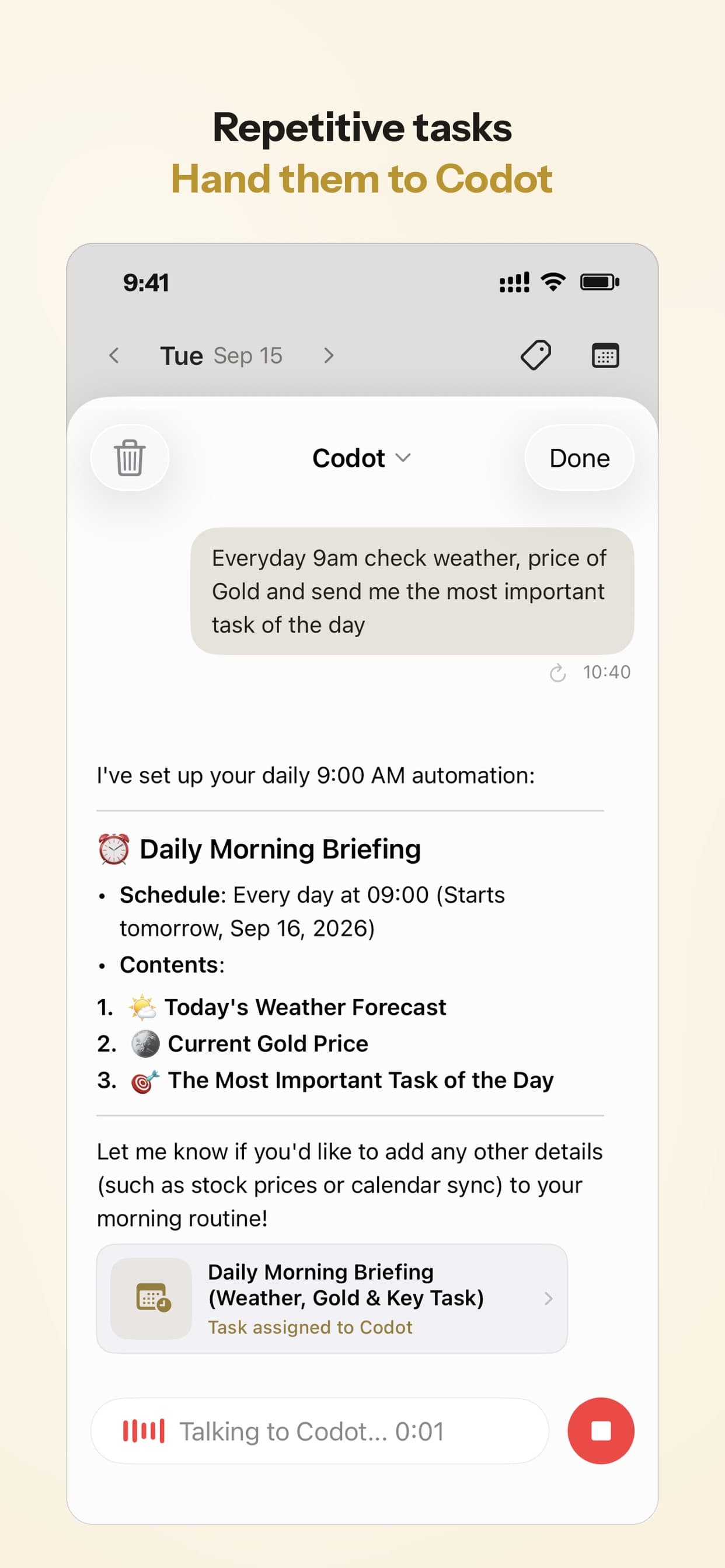
On iPhone she also gets the Daily Brief at 7am: today's tasks and reminders, important emails and any news topics she picked. The routine and the brief do different jobs. The brief is the full picture; the 8am routine is the short list she actually acts on.
Tuesday 2:40pm, right after the client call: the follow-up
The call with Ellis ends, and Maya has maybe 30 seconds before the details are gone. She says: "Remind me Thursday at 10 to send Ellis the second menu round, and note that Ellis hates green and wants it printed by the 20th."
Codot creates a reminder for Thursday at 10:00 and saves the note on Ellis's contact card in the personal CRM. On Thursday the reminder fires. When Maya opens Ellis's card before writing the email, "no green, print by the 20th" is right there. One thing to know: if she swipes the reminder away and does nothing, Codot doesn't send it again. Anything that slips this way still shows up in tomorrow's top 3 if it's still on the list.
Every Friday 4:00pm: who hasn't heard from me?
Freelancers lose work quietly when a client goes cold. The rule: "Every Friday at 4pm, list my clients I haven't contacted in 7 days."
Codot filters her contacts and sends the names. On a typical Friday that's one former client and a lead from a conference, which takes two short emails and ten minutes. Without the rule, she'd notice in March that the lead had hired someone else. Related: our guide to personal CRM for founders.
Every night 10:00pm: the review nobody else asks for
The rule: "Every night at 10, ask me what I finished today."
At 10 Codot asks. Maya answers in one breath: "Finished the concepts, sent the printer reply, didn't get to the font license." Codot checks off what she finished; the font license stays open, so it can come up in tomorrow's 8am top 3. The review takes under a minute, and the next morning starts from an honest list instead of a guess. If you want to build the whole day around fixed check-ins like these, our ADHD daily routine template has a copyable version.
The 1st of every month, 9:00am: the money chores
Invoices and estimated tax payments have no client chasing you about them, so they're easy to miss until there's a late fee. Two repeating reminders cover them: "On the 1st of every month at 9, remind me to send invoices" and "Remind me quarterly on the 10th to pay estimated taxes." Repeating reminders accept natural periods like "every other Friday" or "quarterly", so the schedule reads the way you'd say it.
How to set up Codot as your ADHD planner in 5 minutes
- Download Codot from the App Store and connect Google Calendar (or, on iPhone, Apple Calendar and Reminders) so dated tasks show up where you already look.
- Say your current open loops in one go: "Things on my plate: ..." Let Codot split them into tasks.
- Add the morning rule: "Every weekday at 8am, send me my top 3 for today."
- Add the evening rule: "Every night at 10, ask me what I finished today."
- Add the weekly ones: "Every Sunday at 7pm, ask me to plan next week" and "Every Friday at 4pm, list clients I haven't contacted in 7 days."
That's four routines. You can have up to 20, and they run on iPhone, Android and the web. Add the Lock Screen widget so the next thought takes one tap to capture. For the reasoning behind leaning on outside prompts, see external structure for ADHD.
Honest limits
Codot has no color-coded visual timeline or visual countdown timer, so if seeing blocks of time is what keeps you on track, keep Tiimo or Structured for that. Codot writes its tasks into Google Calendar, Apple Calendar and Reminders, or your Android calendar, but it doesn't read the events already there (an .ics subscription link is the exception). It doesn't move unfinished tasks automatically or keep score. The Daily Brief and the email assistant are iPhone only.
Routines, reminders at a set time, repeating reminders, the Daily Brief and email triage are Codot Max features: $12.99 a month or $99.99 a year in the US, with 20 times the free plan's usage. Tasks, calendar, notes, the personal CRM, habits and voice input are free. Every new account gets 7 days of Max free and drops back to the free plan afterward without charging you.
FAQ
What is the best ADHD planner app for adults?
It depends on where your plan breaks. Tiimo and Structured are best if you need to see your day as a timeline; Codot is best if you can plan but need something to bring the plan back each morning and evening, with routines like a daily top 3 and a nightly review.
What is the best free ADHD planner app for iPhone?
Structured's free version gives you a visual timeline and inbox, TickTick's free plan allows 9 lists, and Todoist's free plan allows 5 projects (as of November 2026). Codot's free plan covers voice capture, tasks, calendar, notes and habits; timed reminders and daily routines need Codot Max after the 7-day trial.
Is there an ADHD planner app that checks in with me every day without me opening it?
Codot does this with routines you set by voice, such as "every weekday at 8am send me my top 3" and "every night at 10 ask me what I finished". Routines are a Codot Max feature and run on iPhone, Android and the web.
How is Codot different from Tiimo?
Tiimo is a visual planner built for neurodivergent users, with a color-coded timeline. Codot is a voice AI assistant: you talk the plan in and it runs scheduled rules for you, but it has no visual timeline. Some people use both.
Does Codot see the meetings already on my calendar?
No. Codot adds its own tasks and events to Google Calendar, Apple Calendar or your Android calendar, but it doesn't read existing events, except from an .ics subscription link you give it.
Codot has been running for almost two years, and the planner-plus-routines setup above takes about five minutes. Download Codot on the App Store and start with the 8am top 3.
ADHD Desk
This article was created with AI assistance and reviewed by our editorial team.Learn about our content process.