Body Doubling Apps for ADHD (November 2026): Free Options, Prices, and What to Do Before and After a Session
Body doubling apps for ADHD as of Nov 2026: Focusmate, Flow Club, Deepwrk, dubbii and free Discord rooms, with prices, plus what to do before and after a session.
As of November 4, 2026, the best free body doubling app to start with is Focusmate, which gives 3 video sessions a week free and charges $8 a month billed yearly for unlimited. Flow Club ($40 a month) adds hosted group sessions, and Deepwrk and Discord study rooms offer free drop-in options. Codot is not live body doubling; it plans the work before a session and checks in afterwards, with timed check-ins on Codot Max.
TL;DR:
- Free to start: Focusmate (3 sessions a week free), Deepwrk's free daily Power Hour, dubbii (free download) and Discord study servers like Study Together cost nothing to try.
- Paid and hosted: Focusmate Plus is $8 a month billed yearly ($12 monthly). Flow Club is $40 a month or $33.33 a month billed yearly, for hosted group sessions all day.
- What a body doubling app can't do: it covers the 25 to 75 minutes you're on camera. Choosing what to work on, remembering what you finished, and starting tomorrow are still on you, often requiring a dedicated ADHD planner app for adults to bridge the gap.
- Where Codot fits: Codot (our app) is a voice-first AI assistant that handles the parts around a session. You say what you'll work on, it checks in at the time you name ("at 11:30 ask me what I finished"), runs a 10 p.m. review every night, and sends your top three each morning. Use it with a body doubling app, not instead of one.
Disclosure: Codot is our product. Facts about the other apps come from their own pricing pages, help centers and App Store listings, checked on November 4, 2026.
You write for clients from your kitchen table, nobody expects you anywhere until a deadline, and the hardest moment of the day is the first sentence. On a good day a Focusmate partner on screen gets you writing within five minutes. On a bad day the session ends, you close the laptop, and by 3 p.m. you can't remember what you got done or what was supposed to come next.
At a glance
Prices as of November 4, 2026, US pricing, from each product's own page.
| App | Best for | Price (as of Nov 2026) | Platforms | Main limit | Source |
|---|---|---|---|---|---|
| Focusmate | One-to-one video sessions with a stranger, booked in advance | Free: 3 sessions a week. Plus: $8/month billed yearly or $12 monthly | Browser video sessions | Free plan runs out by Wednesday if you rely on it daily | Focusmate pricing |
| Flow Club | Hosted group sessions with music and a facilitator | $40/month or $33.33/month billed yearly, after a free trial | Browser video sessions | Most expensive option here | Flow Club help center |
| Deepwrk | ADHD-focused hosted coworking with a short share and recap | Free daily Power Hour; $19/month or $12/month on the annual plan; 7-day trial | Browser video sessions | Free tier is one daily slot | Deepwrk pricing |
| dubbii | Chores, admin and follow-along videos on your phone | Free download; in-app subscriptions listed at $9.99 and $49.99 | iPhone, Android | Live sessions are still rolling out to users | App Store listing |
| Study Together / StudyStream | Free drop-in rooms, camera optional | Free account | Discord, Zoom, own app | Busy rooms, no fixed partner | Study Together |
| Codot | Planning before a session, timed check-in after, nightly review and morning top three | Free plan: tasks, calendar, notes, personal CRM, voice input, habits. Codot Max $12.99/month or $99.99/year (20x the free plan's usage); 7-day Max trial | iPhone, Apple Watch, Android, web | Not live body doubling: nobody is on camera with you | App Store listing |
What is a body doubling app, and does it work for ADHD?
A body doubling app puts another person in the room with you, usually on video, while you each work on your own task. The ADHD association ADDA describes body doubling as a productivity strategy used by people with ADHD and is direct about the evidence: it says "there's no research to prove its effectiveness" while noting it helps many people get things done (ADDA).
The structure is the same in most apps. Focusmate's version: you book 25, 50 or 75 minutes, get matched with someone, share your goals at the start, keep your camera on, and check in on what you accomplished at the end (how Focusmate works). Deepwrk's hosted sessions follow a similar script: a 3-minute intro, 2 minutes to say your task, 50 minutes of silent work, and a 3 to 5 minute recap (Deepwrk).
Which body doubling app is free?
Focusmate is the best free body doubling app to start with: 3 sessions a week, no credit card. That's enough to find out whether a stranger on camera helps you before paying $8 a month (billed yearly) for unlimited sessions.
The other free routes each give up something:
- Deepwrk runs a free daily Power Hour. If that hour lines up with your writing time it works well; if it doesn't, it's a reason to start late.
- Study Together and StudyStream run rooms on Discord, Zoom and their own app with a free account. You join instantly and leave anytime, which also means there's no specific person who notices you left.
- dubbii is a free download built around chores, self-care and admin, with follow-along videos and hosted live sessions that its listing says are rolling out gradually. It suits the dishes and the tax folder more than a 2,000-word draft.
Flow Club has no free plan beyond its trial. Its help center explains the $40 a month as paying for more than 2,500 live sessions a week with hosts.
Which one should a freelance writer working from home pick?
For a freelance writer with ADHD who needs to start drafting at a fixed time, we'd pick Focusmate. A booked one-to-one session at 10 a.m. is an appointment with a real person, and the "share your goal" step at the start forces you to name the piece you're writing. If three free sessions a week isn't enough, Plus at $8 a month is the cheapest unlimited option.
Pick Flow Club if you work better with a host and a group and $40 a month fits the budget, Deepwrk for an ADHD-specific community with a structured recap, and a Discord room for the unplanned afternoon slump when nothing is booked.
Your ideas shouldn't wait for a keyboard. Just say it — Codot handles the rest.
What happens before and after a body doubling session?
A body doubling app holds you for one session. The usual failure points sit outside it: you join the 10 a.m. session without deciding what to write, the session ends and nothing records what you finished, and tomorrow starts from zero. That's the gap Codot fills.
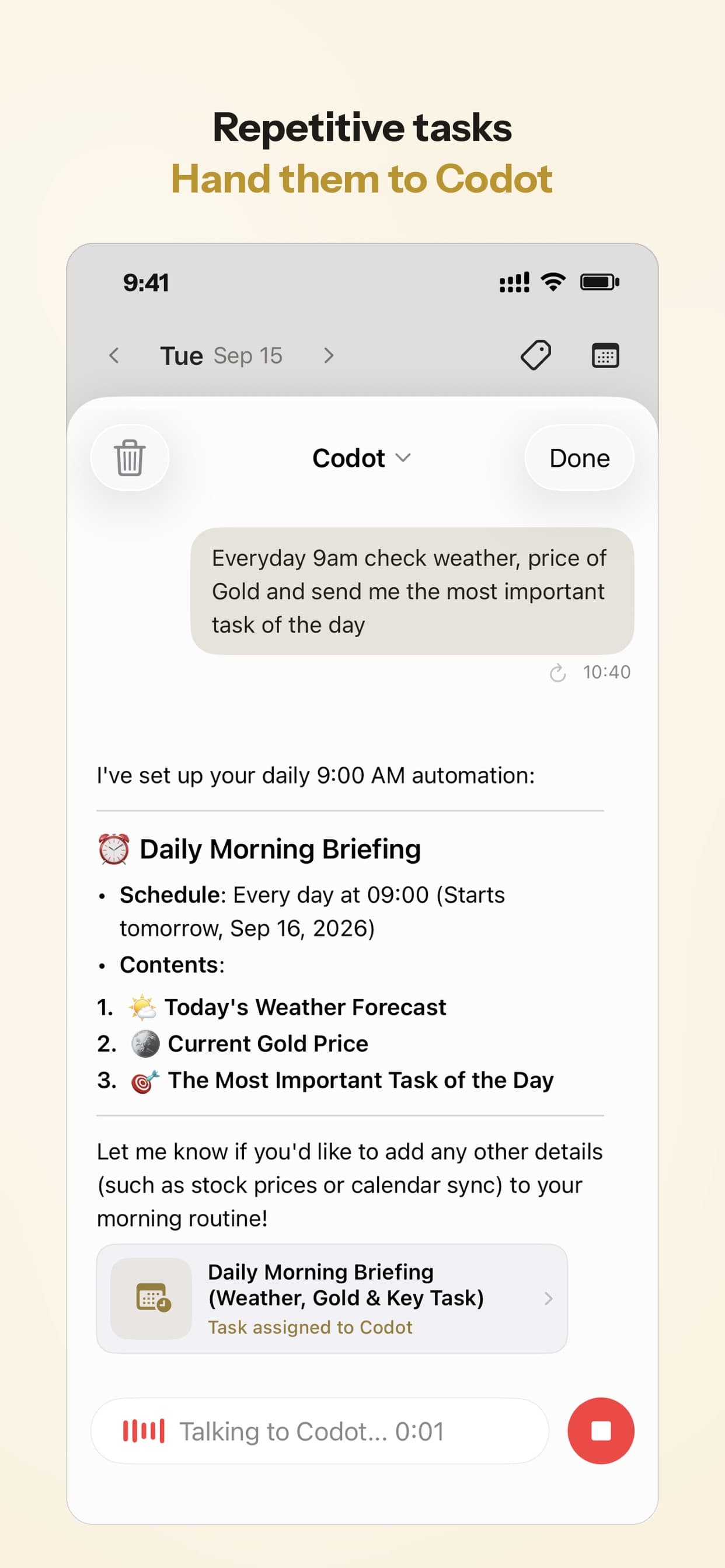
Codot is a voice-first AI assistant. You say a sentence and it turns it into tasks, calendar events, notes and reminders, and on Codot Max it runs routines on a schedule: a set of rules you hand it once, which it carries out every day. Here's what that looks like for a fictional writer, Maya, across one Wednesday.
8 a.m., coffee still brewing: the top three arrives
On Sunday, Maya set one routine: "Every weekday at 8, send me my top three tasks for today." At 8:00 on Wednesday a message lands on her phone listing the Northwind fintech draft (due Friday), the revisions her editor asked for on Monday's piece, and the invoice for October.
That's the decision she used to make at 9:40 while scrolling, now made before she opens the laptop.
On iPhone, the Daily Brief adds a 7 a.m. summary of today's tasks, reminders and important emails for freelancers, so an editor's note sent overnight shows up before she starts.
9:55 a.m., two minutes before Focusmate: say the plan and set the check-in
Before joining, Maya taps the Lock Screen widget and says: "From 10 to 11:30 I'm drafting the Northwind piece, aim for 1,200 words. At 11:30 ask me what I finished."
Codot creates a task for the draft, puts a 10:00 to 11:30 block on her Google Calendar, and sets a reminder for 11:30 asking what got done. She now has the answer to Focusmate's "what are you working on?" ready, and the session has an end point that someone will ask about.
11:30 a.m., the session ends: answer the check-in
The session closes and her partner leaves. At 11:30 Codot's check-in appears on her lock screen. She answers out loud: "Got about 900 words, the intro is still rough. Finish the draft at 2 tomorrow, and mark the editor revisions done."
Codot marks the revisions complete and creates a task with a 2 p.m. Thursday block for the rest of the draft. Without that sentence, the plan for the last 300 words would be gone by lunch.

3:10 p.m., the afternoon slump with no session booked
Maya used her third free Focusmate session of the week this morning. At 3:10 she opens a Discord study room, camera off, and says to Codot: "Next 45 minutes, write the October invoice and send it to Northwind. Remind me at 4 to check it's sent."
The Discord room gives her other people working. Codot gives the 45 minutes a named task and a 4 p.m. reminder. If she skips the reminder, it doesn't fire again, so the 10 p.m. review is the backstop.
10 p.m., the nightly review
Her second routine: "Every night at 10, ask me what I finished today." At 10 p.m. Codot asks. She answers from the sofa: "Invoice sent. Book Focusmate for Friday at 10 for the Northwind edit. Tomorrow's top priority is finishing the draft."
Codot marks the invoice done and adds a Friday 10 a.m. calendar event for the session. It can't book Focusmate for her, so she books the slot in Focusmate herself; the event is there so she doesn't double-book the morning. Thursday's 8 a.m. message then leads with the draft.
Sunday, 7 p.m.: next week's sessions go on the calendar
A third routine runs on Sundays: "Every Sunday at 7 p.m., help me plan next week." Maya lists her deadlines and the three Focusmate slots she booked, and Codot writes them into Google Calendar as events and deadlines as tasks. A monthly client invoice can be a repeating task: "on the 1st of every month, invoice Northwind."
How to set this up in 5 minutes
- Install Codot from the App Store. Every new account starts with 7 days of Codot Max, which covers routines, timed reminders and the Daily Brief.
- Connect Google Calendar, or on iPhone let Codot write tasks to Apple Calendar and Reminders.
- Say: "Every weekday at 8, send me my top three tasks for today."
- Say: "Every night at 10, ask me what I finished today."
- Before your next body doubling session, say what you'll work on and when to check in: "From 10 to 11:30 I'm drafting X. At 11:30 ask me what I finished."
- Add the iPhone Lock Screen widget so the pre-session sentence takes one tap.
Run it for the 7-day trial alongside your usual sessions. Afterwards the account goes back to the free plan without charging you.
Where Codot stops
Codot is software, and nobody is on camera with you. If you need another person in the room to start, use one of the body doubling apps above; Codot works around their sessions. A few more specifics:
- Routines, reminders at a set time and repeating tasks are on Codot Max ($12.99 a month or $99.99 a year, 20x the free plan's usage). Tasks, calendar, notes and voice input are free.
- A reminder you ignore isn't sent a second time.
- The Daily Brief and the email assistant are iPhone only; routines work on every platform, up to 20 of them.
- Codot writes events to your calendar but doesn't read the ones already there, so it won't see a Focusmate booking unless you tell it.
For more ways to build structure around an ADHD workday, see our ADHD daily routine template, external structure for ADHD after school ends, and ADHD tools for adults sorted by problem.
FAQ
What is the best free body doubling app for ADHD?
Focusmate is the best free body doubling app to try first: it gives 3 one-to-one video sessions a week with no credit card, as of November 2026. Deepwrk's free daily Power Hour and Discord study servers like Study Together are free drop-in alternatives.
How much does Focusmate cost compared with Flow Club?
Focusmate Plus costs $8 a month billed yearly or $12 monthly for unlimited sessions. Flow Club costs $40 a month or $33.33 a month billed yearly, and includes hosted group sessions throughout the day.
Is Codot a body doubling app?
No. Codot is a voice-first AI assistant with no live video or co-working rooms. It handles the planning around a body doubling session: it records what you'll work on, checks in at a time you set, and runs a nightly review and morning top-three routine on Codot Max.
Can an AI replace a body double?
An AI check-in doesn't give you another person in the room, and another person watching is the whole mechanism of body doubling. Codot's timed check-ins and routines work best paired with a session on Focusmate, Flow Club, Deepwrk or a Discord room.
Does body doubling work for freelancers who work alone?
Body doubling suits freelancers because nobody else sets their start time, and a booked session creates one. ADDA notes there's no research proving it works, so the 3 free Focusmate sessions a week are a cheap way to test it on your own work.
Codot has been running for almost two years. To try the before-and-after routine with your own sessions, download Codot on the App Store; the first 7 days include Codot Max.
ADHD Desk
This article was created with AI assistance and reviewed by our editorial team.Learn about our content process.