ADHD Time Blindness at Work (2026): 16 Sentences to Say to Your Phone So 3 PM Stops Sneaking Up
ADHD time blindness at work, handled out loud: 16 copyable sentences for the start of day, deep work, lunch, client calls and wrap-up, plus visual timer picks.
ADHD time blindness at work means hours pass unnoticed until a call or deadline is already close. For remote and self-employed workers, one practical fix is an outside clock that interrupts at set times. Codot, a voice AI assistant for iPhone, turns one spoken sentence into a timed reminder that can ring like an alarm on iOS 26 or later (Codot Max, $12.99 a month), while visual timers such as Time Timer show time passing inside a work block.
Disclosure: Codot is our product. Owen below is fictional, used to show where each sentence fits in a workday. Codot features and prices are from codot.ai, checked November 2026.
TL;DR:
- Time blindness at work looks like starting a task at 9:40, looking up, and finding it's 3:10, lunch never happened and a client call started ten minutes ago.
- People who work alone lose the cues an office gives for free: colleagues heading to lunch, a manager stopping by, the commute home. Those cues have to be rebuilt on purpose.
- This page is a sentence library. 16 things you can say to Codot, grouped by moment of the workday, each with what it creates and when it fires.
- Use Codot when you need something outside your head to interrupt you at clock times. Pair it with a visual timer like Time Timer or Tiimo if you also want to see time draining inside a work block.
At a glance
- Timing differences in ADHD are measurable. A 2022 meta-analysis of 55 studies found people with ADHD performed worse than comparison groups on time discrimination, estimation, production and reproduction tasks (Marx et al., JAACAP 2022).
- NIMH lists poor time management, planning and organization among the everyday problems adult ADHD symptoms can cause (NIMH, ADHD: What You Need to Know).
- CHADD's Attention magazine describes time blindness at work as missed deadlines, double-booked meetings, last-minute rushing and late arrivals (CHADD).
- Codot: voice input, tasks and calendar events written into Google Calendar or Apple Calendar are free. Timed and repeating reminders, the 7:00 daily briefing (iPhone only) and scheduled Routines (up to 20) are Codot Max at $12.99 a month or $99.99 a year, with 20x the free plan's usage and a 7-day free Max trial (codot.ai).
Why is it suddenly 3 PM when you work from home with ADHD?
It's suddenly 3 PM because nothing between 9:40 and 3:10 told you the time had changed. Research on ADHD and time perception keeps finding the same thing: estimating and producing intervals of time is harder, on average, for people with ADHD (Marx et al., 2022; summary at ADHD Evidence). Russell Barkley's term for this, time blindness, is a widely used description rather than a formal diagnosis (Talkiatry), and it matches how the day feels from the inside.
In an office, other people supply the missing clock: someone asks about lunch, a meeting room empties, the last train is at 6:12. A freelancer at a kitchen table only has the clock they remember to check, and hyperfocus is the state in which you don't check.
Meet Owen, a fictional freelance motion designer who works from a spare room. On a Tuesday he opens a client's video project at 9:40 to "fix one transition." The next time he looks at the corner of his screen it's 3:10. He hasn't eaten, the 3:00 review call with the client has been running without him, and the invoice he meant to send before lunch is still a draft, lost among 900 unread emails.
A to-do list he has to open won't catch this. Most practical guides suggest alarms that include prep time (Talkiatry), which puts the time outside your head so it reaches you.
Which sentences can you say to Codot to stop losing track of time at work?
Say each sentence once, and Codot turns it into a calendar event, a timed reminder or a Routine that runs on a schedule. The library below is grouped by the moment in a workday where time usually disappears. Copy the ones that match your day and swap in your own times.
A note on plans: anything that only creates a task or a calendar event is free. Anything that fires at a set time or repeats needs Codot Max, which every new account can try free for 7 days.
Start of the day: decide the shape before you open anything
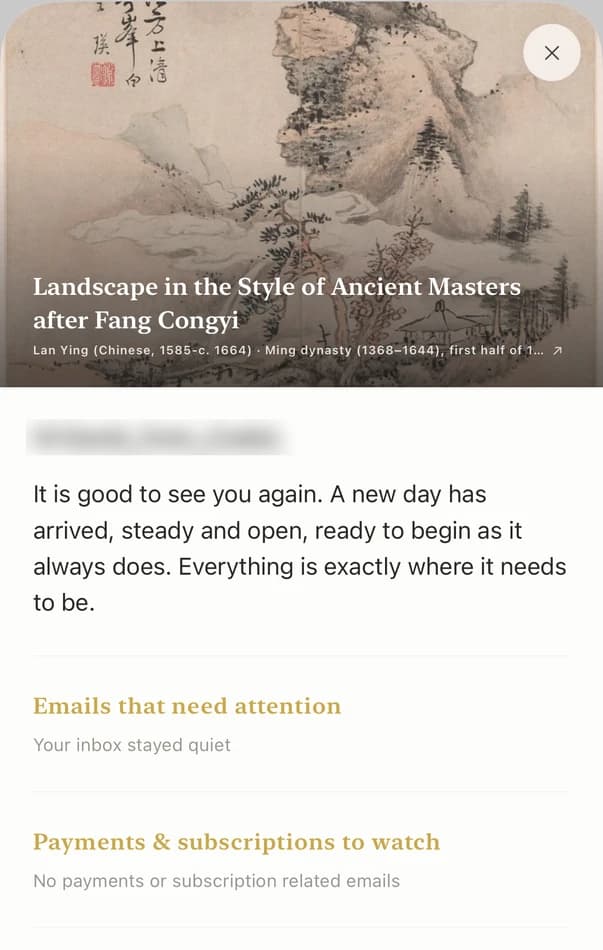
The most useful minute of the day is the one before your first app opens. On iPhone, the Codot daily briefing arrives at 7:00 each morning with that day's reminders, so the 3:00 call is on screen while you're still making coffee.
| Say this | What Codot creates | When it fires | Plan |
|---|---|---|---|
| "Every weekday at 9, ask me which three things matter today." | A Routine that opens the day with that question | 9:00, Monday to Friday | Max |
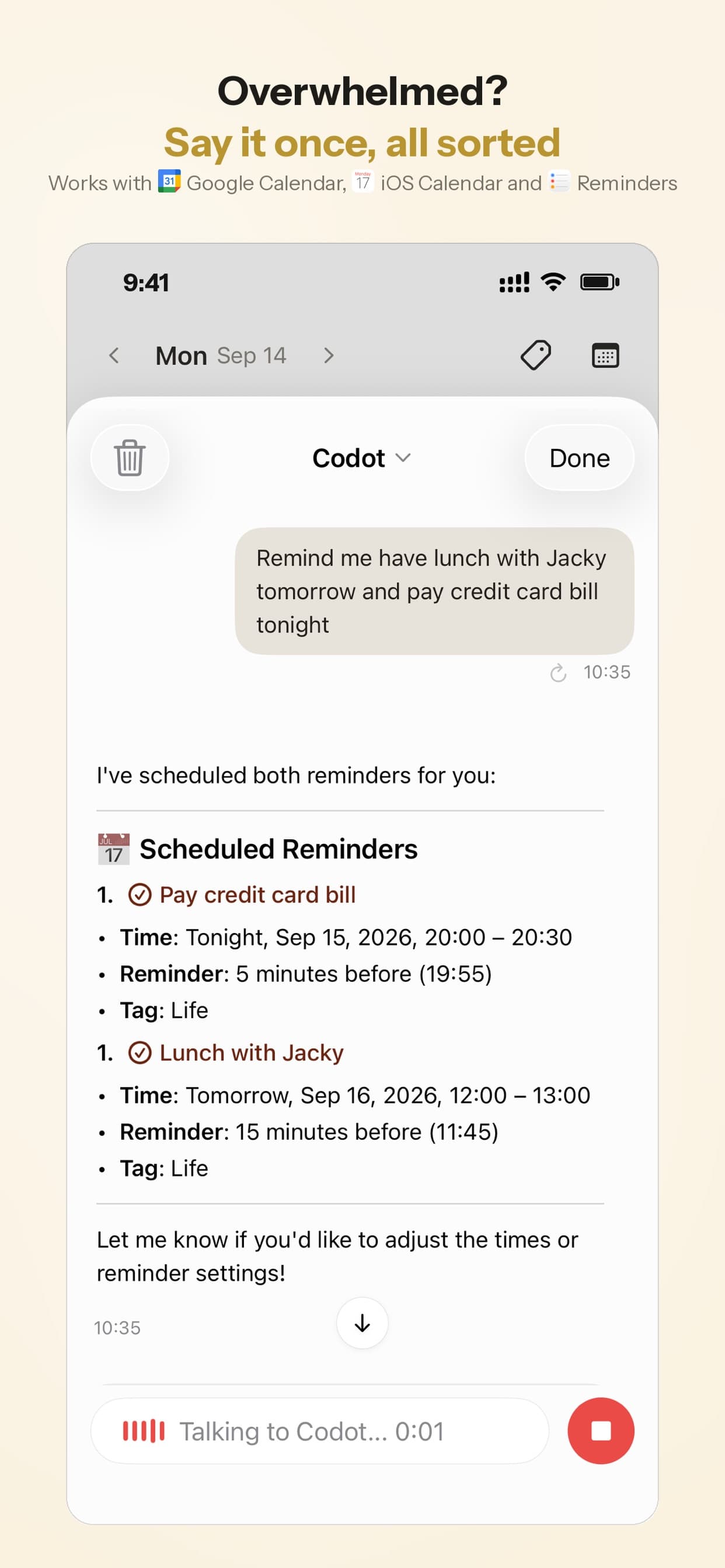
| "Put the Halverson storyboard on my calendar today from 9:30 to 11:30." | A 9:30–11:30 block in Codot's schedule, also written to Google or Apple Calendar if you connected one | Shows as a block on your day | Free |
| "Client review with Mara Thursday at 3." | A calendar event for Thursday at 3:00 | On your calendar, and in Thursday's briefing | Free |
Before deep work: set the exit before you go in
Hyperfocus is the moment time blindness costs the most, so set the interruption before you start. On iPhone with iOS 26 or later, a Codot reminder can ring like an alarm, which is harder to ignore than a banner sliding past while you're in the middle of a render.
- "Remind me at 11:15 to stop and export the Halverson draft." A timed reminder at 11:15 (Max).
- "Remind me in 50 minutes to stand up and check the time." A one-off reminder 50 minutes from now (Max).
- "Remind me at 2:45 to close the project file, and again at 2:55 to open the call link." Two reminders, ten minutes apart (Max).
The third sentence is deliberate: Codot sends each reminder once, so for anything you can't miss, ask for two.
On Wednesday at 11:15 Owen's phone rings mid-edit. He exports the draft, sends it, and the afternoon has a shape again.

Lunch and the afternoon slump
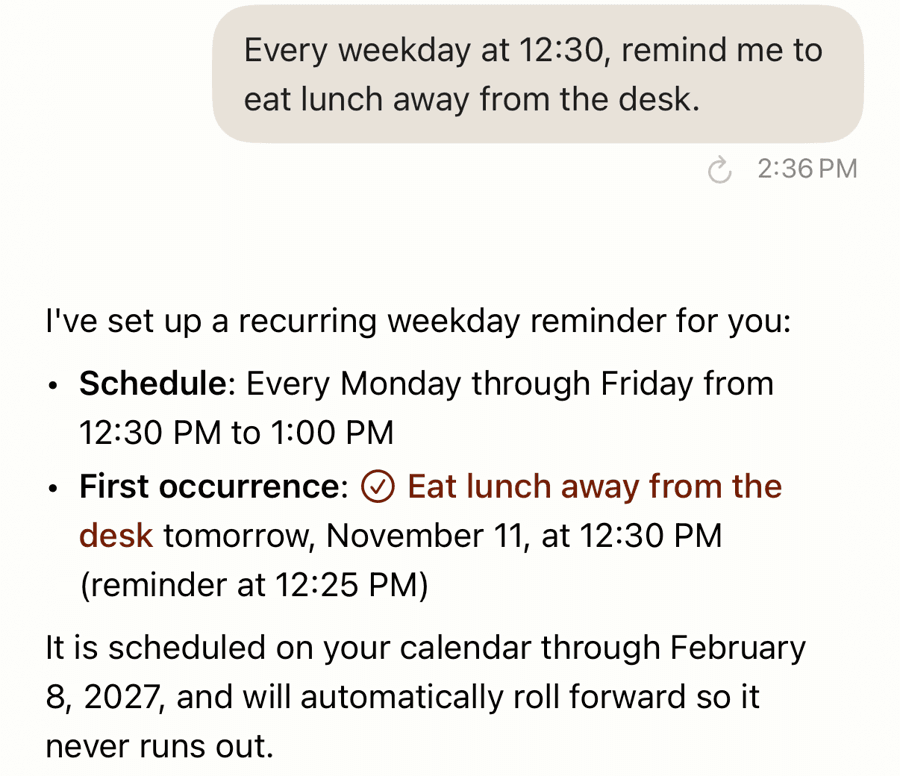
Lunch is the first thing time blindness deletes when you work alone. A repeating reminder in plain language puts it back without you having to remember to set it each day.
- "Every weekday at 12:30, remind me to eat lunch away from the desk." A repeating reminder, Monday to Friday (Max).
- "Remind me at 1:30 to get back to the Halverson edit." A one-off reminder so lunch has an end too (Max).
- "Every weekday at 3, remind me to check what's left before 5:30." A mid-afternoon anchor, so 3:00 is a checkpoint you chose instead of a surprise (Max).
Meetings and client calls
Client calls are where time blindness becomes visible to other people. Each call needs two things: the event on the calendar and a warning early enough to stop what you're doing.
- "Call with Jonas Friday at 10, remind me at 9:40 to open the brief." A calendar event at 10:00 (free) and a reminder at 9:40 (Max).
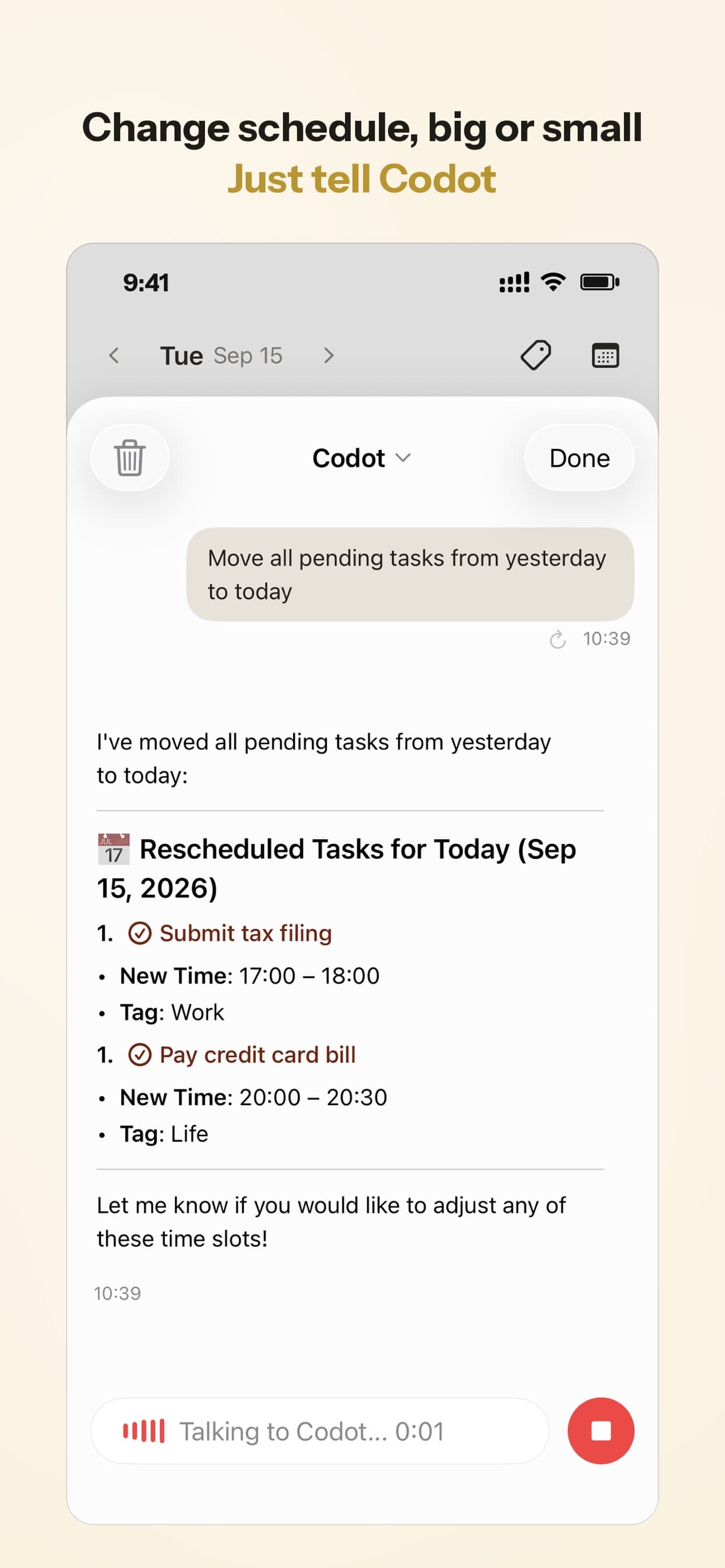
- "Move the logo revisions to tomorrow at 10." The task moves to tomorrow at 10:00 (a timed reminder, so Max).
- "Every other Monday at 9:30, remind me about the standup with the agency." A repeating reminder on alternate Mondays (Max).
End of the day
Without a commute, the workday has no edge, and time blindness runs in both directions: you can also look up and find it's 9 PM. A Routine gives the day a fixed close.
- "Every weekday at 5:30, ask me what I finished today and what's first tomorrow." A Routine that asks the question in Codot at 5:30 (Max). Answer with a sentence like "remind me tomorrow at 9 to start the color pass" and it lands on tomorrow's list.
- "Remind me at 6 to shut the laptop." A one-off reminder for a long day (Max).
On Thursday at 5:30 Owen tells Codot he finished the storyboard and the invoice, then adds "remind me tomorrow at 9 to start the color pass." That reminder is on Friday's list, and Friday's briefing shows it at 7:00.
Once a week
A weekly check catches what the daily ones miss, mostly deadlines that were "next week" until suddenly they were tomorrow.
- "Every Sunday at 7 PM, help me plan next week." A Routine that walks you through the week ahead (Max).
- "Every Friday at 4, list the tasks I said I'd do this week that are still open." A Friday list, so nothing open is carried into Monday by surprise (Max).
Your ideas shouldn't wait for a keyboard. Just say it — Codot handles the rest.
What is the best app for ADHD time blindness at work?
Use Codot when your problem is that the clock disappears while you work and you need something outside your head to interrupt you at the times you set. You say one sentence, and Codot turns it into a calendar event, a reminder that can ring like an alarm on iOS 26 or later, or a Routine that runs every weekday without you remembering to start it.
The 7:00 daily briefing tells you what's fixed before you start, the 5:30 Routine gives the day an end, and voice input works from the iPhone, the lock-screen widget and Apple Watch, so setting a reminder mid-task takes seconds. For more rules that replace a boss's structure, see our guide for the self-employed with ADHD, and for a full schedule to adapt, the ADHD daily routine template.
The other strong category is visual timers, which show how much of the current block is left. A Time Timer shows remaining time as a colored disc that shrinks, and Tiimo lays the day out as a color-coded visual timeline with timers, built with neurodivergent users in mind. Our Tiimo alternatives and ADHD planner app comparison cover those apps and their prices in detail.
We'd use them together. A visual timer on the desk makes the current 50 minutes visible; Codot handles the clock times that sit outside any single block, like 12:30 lunch, the 2:45 call warning and the 5:30 close.
Which five sentences should you start with?
Start with these five. Too many alarms turn into background noise within a week.
- "Every weekday at 9, ask me which three things matter today."
- "Every weekday at 12:30, remind me to eat lunch away from the desk."
- "Every weekday at 3, remind me to check what's left before 5:30."
- "Every weekday at 5:30, ask me what I finished today and what's first tomorrow."
- One per client call: "Call with [name] [day] at [time], remind me 20 minutes before."
Run them for two weeks before adding more. If one keeps arriving at a bad moment, say "move my lunch reminder to 1" instead of deleting it.
Codot handles the interruptions and the daily rules; the visible countdown inside a work block is a job for Time Timer or Tiimo next to it. Codot writes events into your calendar, and appointments booked elsewhere reach its daily briefing through that calendar's .ics subscription link.
FAQ
What is ADHD time blindness at work?
ADHD time blindness at work is difficulty sensing how much time has passed or how long a task will take, which shows up as missed deadlines, late calls and skipped lunches. A 2022 meta-analysis of 55 studies found measurable timing differences in people with ADHD.
What are the best apps for ADHD time blindness?
The best apps for ADHD time blindness fall into two groups: visual timers such as Time Timer and Tiimo that show time passing, and reminder apps that interrupt you at set clock times. Codot is in the second group: you say a sentence and it sets a reminder that can ring like an alarm on iOS 26 or later (Codot Max).
How do I stop losing track of time when I work from home?
Rebuild the cues an office would give you: a fixed start question, a lunch reminder, a mid-afternoon check and an end-of-day close. In Codot these are four sentences, each set once as a repeating reminder or Routine with Codot Max.
How do I make sure I don't miss a client call with ADHD?
Put the call on your calendar and set a warning early enough to stop what you're doing. Codot sends each reminder once at the time you set, so for a call you can't miss, ask for two reminders at different times, like 2:45 and 2:55 (Codot Max).
Is Codot free?
Codot's free plan covers voice input, tasks, notes, contacts and calendar events written into Google Calendar or Apple Calendar. Timed and repeating reminders, the daily briefing and Routines need Codot Max ($12.99 a month or $99.99 a year), and every new account gets a 7-day free Max trial.
Set your 12:30 lunch reminder today: download Codot on the App Store and say it once.
ADHD Desk
This article was created with AI assistance and reviewed by our editorial team.Learn about our content process.