AI Personal Assistant for ADHD (2026): A Self-Employed Editor's Full Day, and the 5 Routines That Run It
An ADHD-friendly AI personal assistant for freelancers: the exact sentences for a morning top 3, a 10pm check-in and client follow-ups, vs ChatGPT and a coach.
An AI personal assistant for ADHD is most useful to self-employed people when it runs a fixed set of rules every day instead of waiting to be asked. Codot does this with Routines: a top-3 push at 8am, a 10pm check-in, a Sunday planning prompt and client follow-ups, all set up by voice. Routines need Codot Max ($12.99 a month in the US), and every new account gets 7 days of Max free.
TL;DR:
- If you work for yourself and have ADHD, the hard part is rarely knowing what to do. It's that nobody starts your day, checks your progress or asks what got finished. An AI personal assistant can take over those three jobs if you give it rules.
- Codot (our product) runs those rules as Routines: "every morning at 8, send me today's top 3", "every night at 10, ask me what I finished", "every Sunday at 7pm, help me plan next week". You set each one with a single spoken sentence.
- Between the rules, you talk to it all day: client notes, ideas, meals and errands become tasks, contact notes and calorie logs.
- ChatGPT runs up to 5 scheduled tasks on Plus. Goblin Tools breaks tasks into steps for free but runs nothing on a schedule. A human coach gives judgment software can't, at $60 a week on Shimmer.
- Routines, reminders at a set time and the daily briefing are Codot Max features. New accounts get 7 days of Max free, then drop back to the free plan without a charge.
Disclosure: Codot is our product. Facts about ChatGPT, Goblin Tools and Shimmer come from their own help and pricing pages, checked November 3–4, 2026. Codot is ADHD-friendly software for planning and memory. It is not a treatment and not medical advice.
At a glance
| Codot | ChatGPT (Plus) | Goblin Tools | Human ADHD coach (Shimmer) | |
|---|---|---|---|---|
| Best for | Running a daily set of rules for you and catching everything you say | Long conversations, thinking a problem through | Breaking one scary task into small steps | Accountability from a person who knows you |
| Price (as of Nov 2026) | Free plan; Codot Max $12.99/mo or $99.99/yr (US), 7-day Max trial | $20/mo | Website free; paid app on iOS and Android | $60/week, billed every 4 weeks |
| Runs on a schedule | Yes, up to 20 Routines | Yes, 5 active scheduled tasks on Plus | No | Weekly 30-minute session |
| Platforms | iPhone, Apple Watch, Android, web (daily brief and email assistant are iPhone only) | Web, iOS, Android, desktop | Web, iOS, Android | Video calls and app |
| Main limit | Daily brief and email assistant are iPhone only | Scheduled tasks can't be set up in voice chats | Doesn't remember anything between sessions or remind you | Cost; one session a week |
| Source | codot.ai/pricing | OpenAI Help Center, ChatGPT pricing | goblin.tools/About | shimmer.care/cost |
What is the best AI personal assistant for ADHD if you work for yourself?
Use Codot when nobody else starts, checks or closes your workday: you give it a handful of rules in plain sentences, and it runs them on schedule, pushing your top 3 at 8am, asking what you finished at 10pm and listing clients you haven't contacted. Between the rules, anything you say becomes a task, a note or a contact detail.
Maya edits videos for four small brands and runs her own YouTube channel on the side. Her deadlines come from clients by email, her own uploads have no deadline at all, and on a bad day she opens the editing software at 11 and is still choosing music at 4 while a client's revision notes sit unread. Nothing is broken about her skill; the cost shows up as late invoices, a channel that posts in bursts, and evenings spent working out what she forgot.
An office job hands you executive function for free: a start time, a manager who asks for status, a weekly meeting that forces planning. Self-employed, you supply all of it yourself, which is exactly what ADHD makes expensive (we covered the background in using AI as an accountability partner once school ends).
So the useful AI personal assistant for ADHD is one you hand a set of rules, which it runs on schedule without being opened, plus a place to dump every thought in a few seconds. Codot has been running for almost two years, more people use it every month, and it is built around both halves. Here is one person's set of rules, as the sentences you'd say. (Maya is a composite we made up to show the setup, not a real customer.)
Maya's day with the rules running
7:00, still in bed: the daily brief
Before she's touched anything, the Codot daily brief is waiting on her iPhone. It lists today's tasks and the reminders she set, summarizes the emails that matter, and adds the topics she asked to follow (for Maya, YouTube creator news). The brief is generated at 7am and is an iPhone feature.
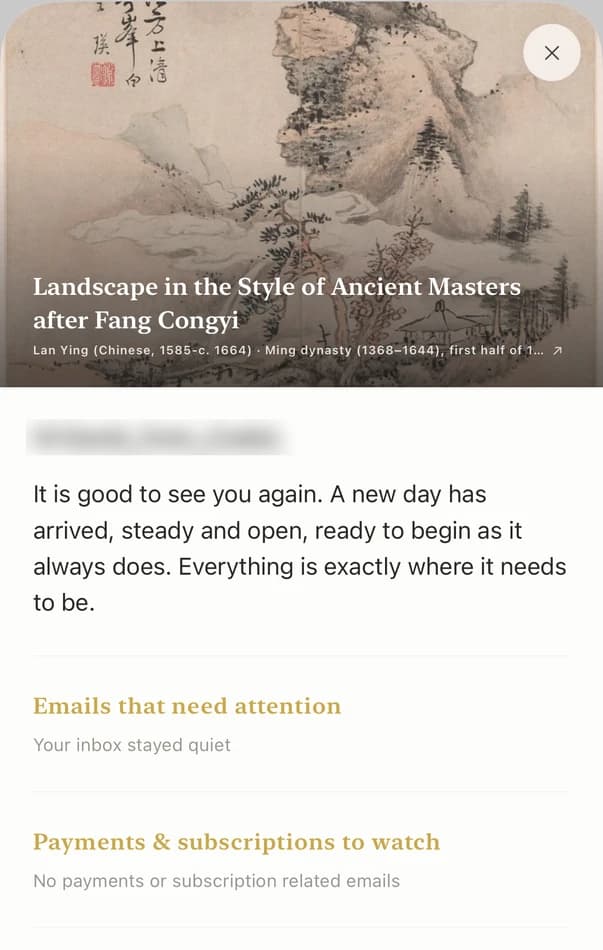
Because her Gmail is connected, the brief has already flagged the email from the coffee brand asking for a shorter cut, and Codot has drafted a reply confirming Thursday. She reads the draft, changes one line and sends it.
8:00, coffee: the top 3
At 8:00 a notification arrives from her first Routine, set weeks ago with one sentence: "Every morning at 8, look at my tasks and send me the three that matter most today, with the client deadline first." This morning it says: finish the 60-second cut for Harlow Coffee (due tomorrow), send the March invoice to Northline, record the voiceover for her own Thursday video.
A list of 23 open tasks is where an ADHD morning stalls. Picking three is a decision she no longer makes before caffeine.
10:40, mid-edit: voice capture
Halfway through a timeline, three unrelated things arrive in her head at once. She holds the lock-screen widget and says: "Ask Dana if the logo can be white, buy SD cards, and the video idea about color grading phone footage."
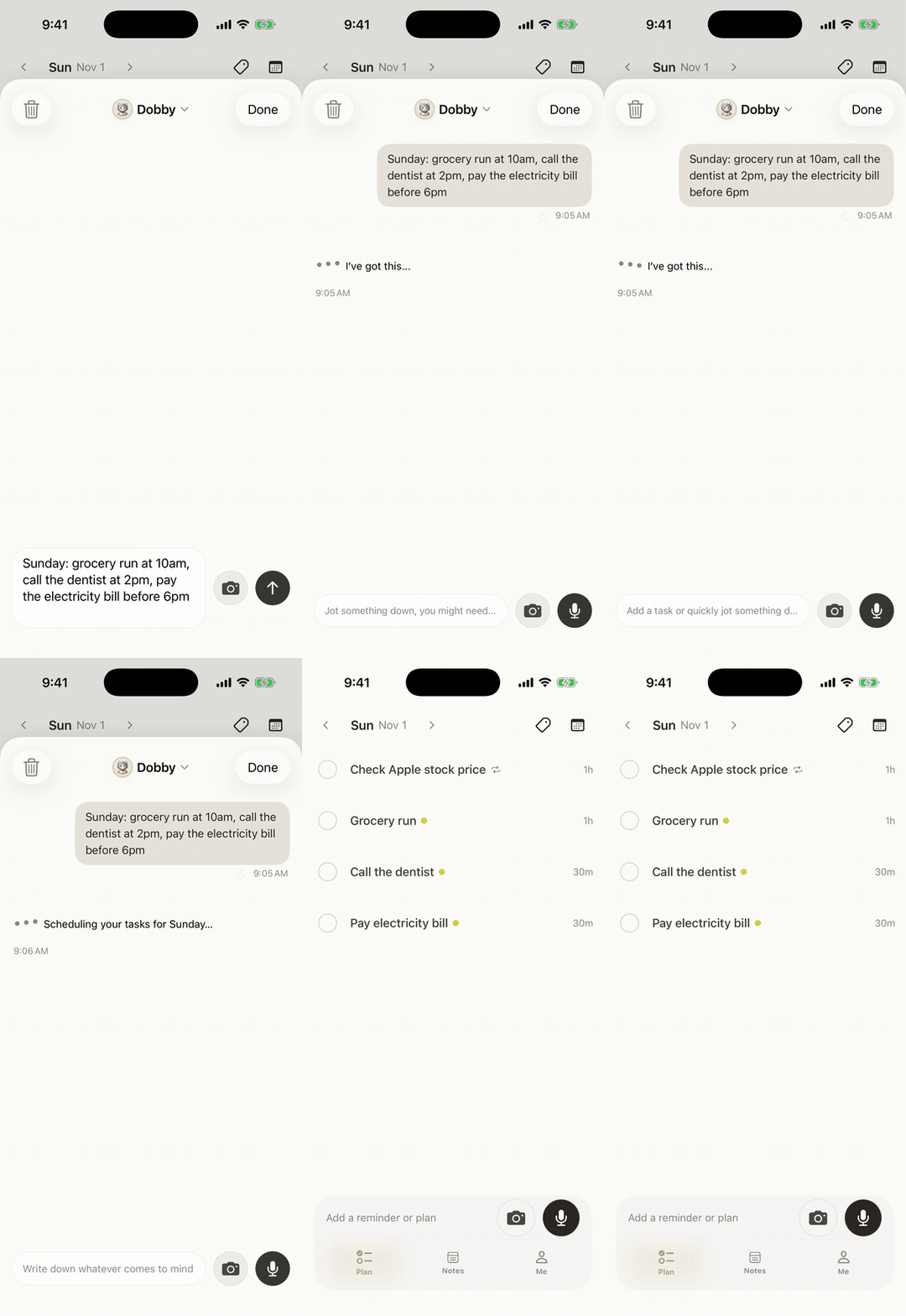
Codot splits it: a task to ask Dana about the logo, an errand for SD cards, and a note titled "Color grading phone footage" for the channel. She's back in the timeline in seconds. Earlier she'd said "Dana at Harlow prefers feedback as a Loom", so that sits on Dana's contact card in the personal CRM.
13:15, lunch: calories and water
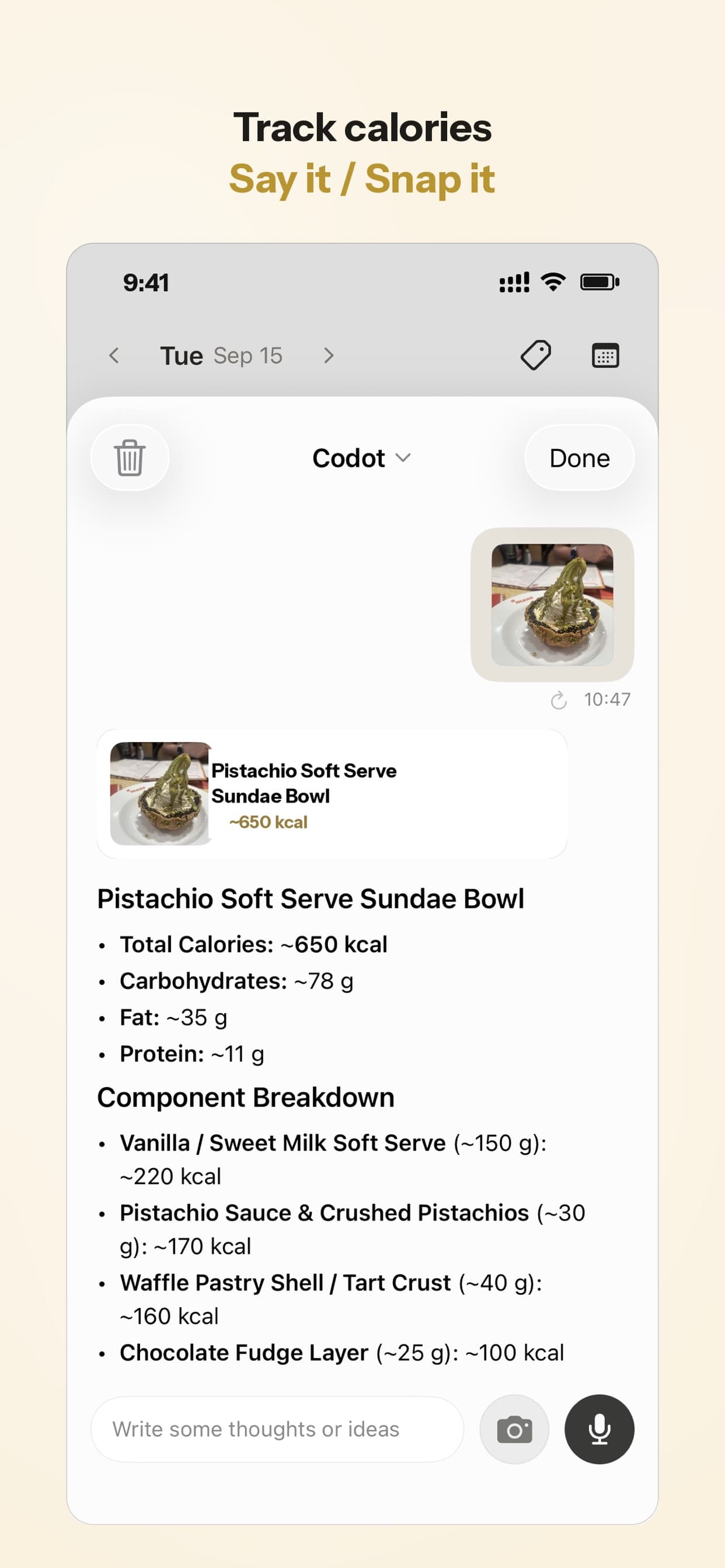
Maya is trying to stop eating crackers over the keyboard as lunch. She photographs her burrito bowl, and Codot logs the meal and adds it to the day's nutrition summary against her calorie goal. Water is a daily habit she checks off by saying "drank my first bottle", much like using a medication reminder for ADHD to log doses and refills by voice. Calorie logging and habits are on the free plan.
Monday 9:00 and every other Friday: client follow-ups that don't depend on memory
Every other Friday at 4pm a repeating reminder tells her to send invoices. She set it with "Remind me every other Friday at 4pm to send invoices to every client I worked for." On Mondays a second Routine runs at 9am: "Every Monday at 9, list my clients I haven't contacted in 7 days." Today it surfaced Northline, which is why the invoice made her top 3.
For the contact side in more depth, see our guide to remembering every follow-up without maintaining a CRM.
22:00, on the couch: "what did you finish?"
The night Routine reads: "Every night at 10, show me what I checked off today and ask me what else I finished." Tonight it shows two of the three done. She answers out loud: "Harlow cut is done, sent it. Didn't record the voiceover. Move it to tomorrow at 10." Codot marks the cut complete and moves the voiceover. Unfinished tasks don't move by themselves; she decides in one sentence, and the day ends on two real wins and one thing moved instead of a vague sense of failure.
Sunday, 19:00: planning next week
The weekly Routine: "Every Sunday at 7pm, list everything due next week by day and ask me to pick three priorities for Monday." Maya sees the Harlow revision Tuesday, the Northline shoot Thursday and her own upload Friday, then says "Monday: storyboard the Northline shoot, edit my Friday video, reply to the new lead." Those become Monday's tasks, and Codot writes them into her Google Calendar.
Codot builds this list from its own tasks. If clients book you through a scheduling tool, give Codot that tool's .ics subscription link once, and those bookings show up in the list too.
Your ideas shouldn't wait for a keyboard. Just say it — Codot handles the rest.
How do I set up my first 5 routines in Codot?
Download Codot, sign in, and open the chat. Each of these is one sentence, said or typed. Edit the times and wording to your own week.
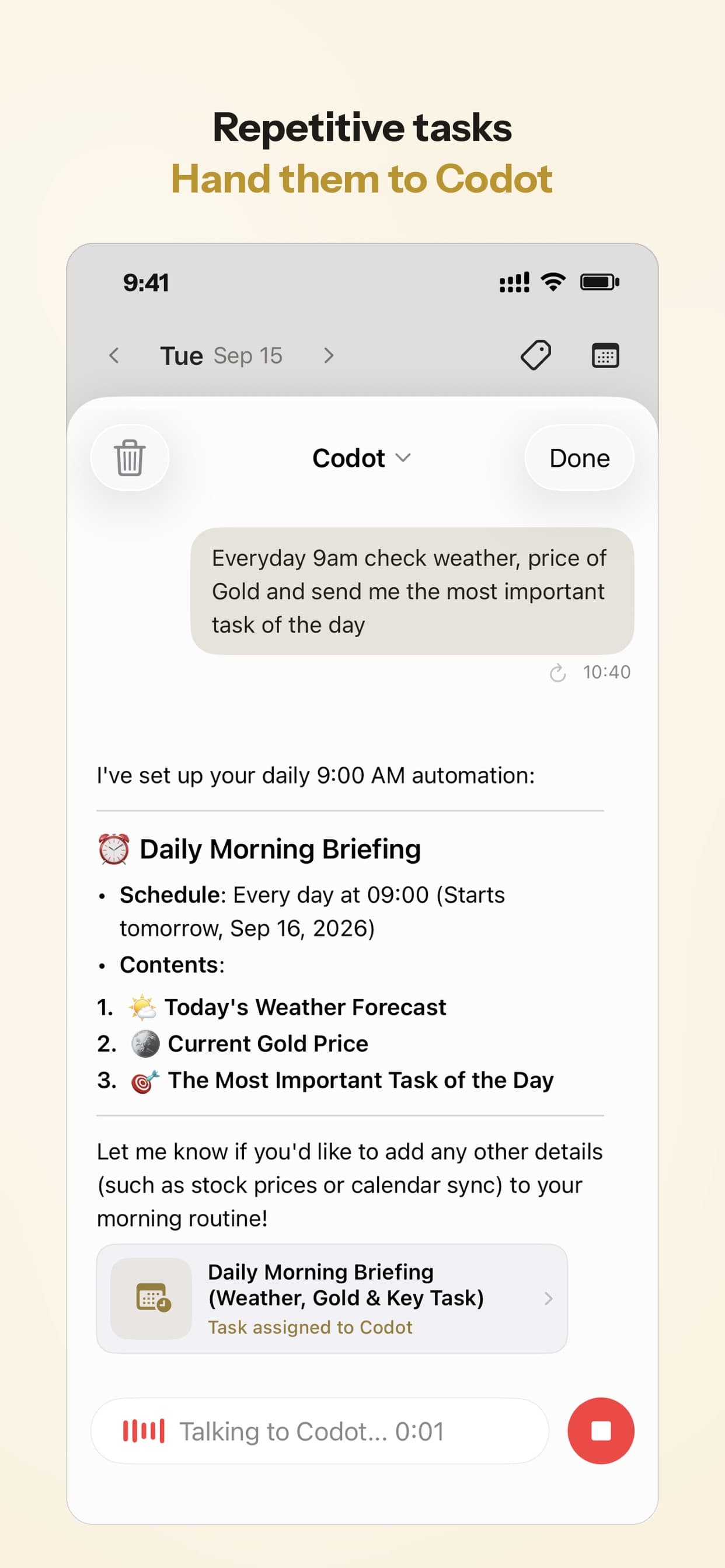
- Morning top 3: "Every morning at 8, look at my tasks and send me the three most important for today, client deadlines first."
- Night check-in: "Every night at 10, show me what I finished today and ask me what to move to tomorrow."
- Sunday plan: "Every Sunday at 7pm, list what's due next week by day and ask me for three priorities for Monday."
- Client follow-up: "Every Monday at 9, list my clients I haven't contacted in 7 days."
- Body check: "Every day at 1pm, ask me what I ate for lunch and whether I've had water." Answer out loud and Codot logs the meal.
Then add one repeating reminder for money ("remind me on the 1st of every month to send retainer invoices") and connect Gmail or Outlook on your iPhone if you want client emails in the morning brief. You can run up to 20 Routines; start with five, because rules you ignore stop working. Our ADHD daily routine template has a copyable schedule if you want a base to adapt.
How does Codot compare with ChatGPT, Goblin Tools and a human coach?
ChatGPT is the better thinking partner. If Maya needs to talk through whether to raise her rates, it will go further than any planner. It also has scheduled tasks, which OpenAI says handle "reminders, recurring work, daily updates, and monitoring." As of November 3, 2026, Plus allows 5 active tasks (Free and Go get 3), and scheduled tasks don't work in voice chats, so you type them (OpenAI Help Center). It doesn't keep a task list or a contact card for each client, so the 10:40 brain dump has nowhere structured to land.
Goblin Tools is a set of small single-purpose helpers "mostly designed to help neurodivergent people with tasks they find overwhelming or difficult" (goblin.tools). Magic ToDo breaks "edit the Harlow cut" into steps when starting feels impossible, and the website is free. It has no schedule and no memory between sessions, so it pairs well with an assistant instead of replacing one. We ranked it among other options in our AI agents for ADHD comparison.
A human ADHD coach notices patterns, pushes back and cares whether you show up. Shimmer's coaching plan lists 30-minute weekly 1:1 sessions plus daily body doubling for $60 a week, billed every 4 weeks (shimmer.care/cost, checked November 4, 2026). A coach can help you decide which rules to write. Codot is cheaper and runs them at 8am and 10pm, every day, which a weekly session can't. Many people would do well with both.
How much does Codot cost, and what's in the free plan?
Codot's free plan covers tasks, the calendar, notes, the personal CRM, voice input, habits, calorie logging and expenses. Routines, reminders at a set time, repeating tasks, the 7am daily brief and email triage are Codot Max: $12.99 a month or $99.99 a year in the US, with 20x the free plan's usage. Every new account gets 7 days of Max free, then returns to the free plan without charging you.
Codot handles the daily rules, the capture and the client memory. The daily brief and the email assistant run on iPhone, while Routines, tasks and voice capture also work on Android and the web. A reminder you swipe away isn't sent a second time, so the 10pm check-in is the natural backstop, and the judgment calls about which rules to write are a good job for a coach or a long ChatGPT conversation.
FAQ
What is the best AI personal assistant for ADHD if I'm self-employed?
Pick one that runs on a schedule without being opened. Codot runs up to 20 Routines, such as a top-3 push at 8am and a 10pm check-in, set by voice. ChatGPT is stronger for open-ended conversation but allows 5 active scheduled tasks on Plus.
Can ChatGPT be my ADHD assistant?
Partly. ChatGPT is good for talking a problem through and can run scheduled tasks (3 active on Free, 5 on Plus as of November 2026), but it doesn't keep a structured task list or client contact cards.
Is Goblin Tools enough for ADHD on its own?
Goblin Tools is excellent for breaking a single task into steps, and its website is free. It doesn't remind you, run anything on a schedule or remember your tasks, so most people pair it with a planner or an assistant like Codot.
Can Codot work alongside an ADHD coach?
Yes. Codot runs the daily rules you and a coach decide on, every morning and night, for $12.99 a month on Codot Max. The coach brings a person's judgment and accountability (Shimmer lists weekly 30-minute sessions for $60 a week).
Does Codot work on Android for ADHD routines?
Yes. Codot's Routines, tasks, reminders and voice capture work on Android and the web as well as iPhone and Apple Watch. The 7am daily brief and the Gmail / Outlook email assistant are iPhone features.
If you're the one who has to start, check and close your own day, give the first two Routines a week. Download Codot on the App Store; the 7-day Max trial covers everything in this article.
ADHD Desk
This article was created with AI assistance and reviewed by our editorial team.Learn about our content process.