ADHD Partner Forgets Plans? A 20-Minute Setup So Dinners, Birthdays and Pickups Reach Them Without You Reminding (2026)
Your ADHD partner forgets plans, and you've become the reminder. A 20-minute setup for two: shared reminders, a Sunday list and the free Apple and Google options.
When an ADHD partner forgets plans, an outside system works better than more reminding: the plan is recorded when it is made and fires on the forgetful partner's own phone. Codot, a voice AI assistant for iPhone, does this in one sentence, such as 'remind Jonah Saturday at 6 to leave for dinner'. Adding each other and assigning tasks is free; timed and repeating reminders need Codot Max ($12.99/month, 7-day free trial).
Updated November 2026 · Codot, Apple and Google features checked on November 15, 2026 against each vendor's own pages
TL;DR:
- If your ADHD partner forgets plans, more reminding from you rarely fixes it. A plan needs to leave both your heads at the moment it's made and come back on their phone at the moment it matters.
- Codot (our product) does that by voice: say "remind Jonah Saturday at 6 to leave for my parents' dinner" and the reminder lands in Jonah's Codot, not yours. One sentence can also hold three plans at once.
- The setup takes about 20 minutes for the two of you: add each other, put the fixed dates in once, set one Sunday evening list, and put the reminders where the ADHD partner already looks.
- Free alternatives exist: a shared Apple Reminders list with assigned items, or a Google Calendar invite. They work if both of you open them.
At a glance
- Codot: voice AI assistant for iPhone, Android and web. You can add your partner as a friend, share a Space and assign tasks on the free plan; timed reminders, repeating reminders and Routines need Codot Max, $12.99/month or $99.99/year in the US App Store, with a 7-day free trial that drops back to the free plan without charging. App Store
- Why plans slip: HelpGuide says that "Even when someone with ADHD is paying attention, they may later forget what was promised or discussed." HelpGuide
- What tends to work: Melissa Orlov writes that "working memory is tough to improve—the best strategies are actually behavioral". Psychology Today
- Free Apple route: a shared Reminders list where you assign items; Apple: "You can only assign a reminder after you have shared that reminder list". Apple Support
- Free Google route: a Google Calendar event with your partner as a guest. Google Calendar Help
Is there an app for an ADHD partner who forgets plans?
Use Codot when the plans that keep slipping are made out loud, in passing, and the person who made them is not the person who needs the reminder. Elena agrees to dinner at her parents' place on a Tuesday night. Jonah, who has ADHD, says "yes, put it in" from the other room, and by Saturday afternoon he is halfway through a project with his headphones on. Nobody forgot on purpose. The plan simply had nowhere to live except Elena's memory, so she became the reminder.
With Codot, Elena says one sentence the moment the plan is made: "Remind Jonah Saturday at 6 to leave for dinner at my parents', and remind me Friday to buy the wine." Codot splits that into two items: one goes to Jonah (Elena taps Confirm on the share card once), one stays with her. At 6 on Saturday the reminder fires on Jonah's phone. Elena doesn't text him, and he doesn't hear it from her in a tone neither of them likes.
Codot keeps tasks, calendar events, reminders, notes, contacts and habits in one place, and one sentence can create, move and assign several of them at once. "Move the dentist to Thursday at 2, remind Jonah every other Friday at 5 to pick up Mia, and add Mom's birthday on March 3" becomes a reschedule, a repeating shared reminder and a dated note, without opening three apps. For an ADHD partner that matters: every extra app is one more place a plan can hide.
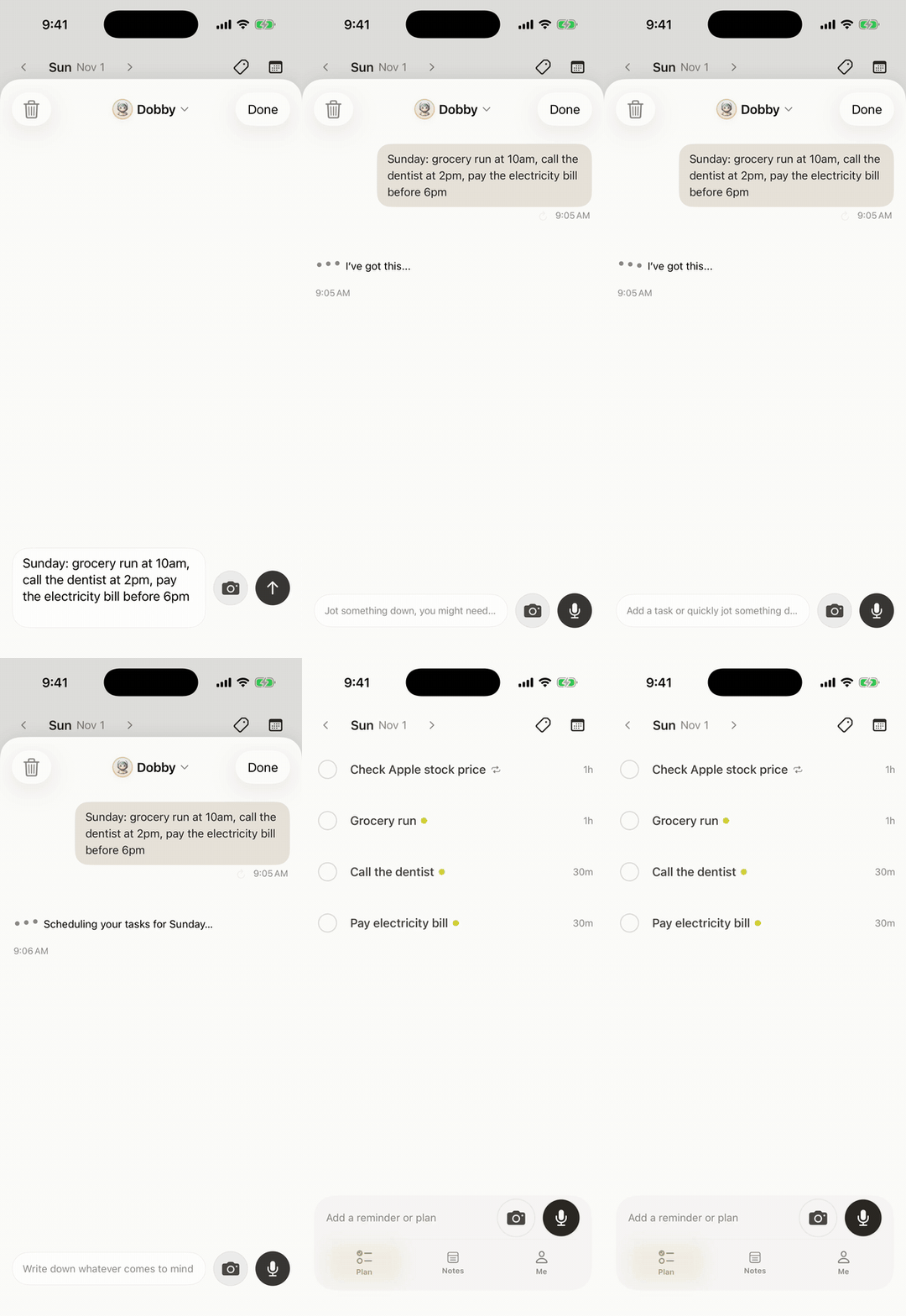
The pricing split is simple. Adding each other as friends, sharing a Space and assigning tasks are on the free plan. A reminder that fires at a set time, a repeating one, and a Routine such as "every Sunday at 7 p.m., list both of our plans for the week" need Codot Max. A repeating reminder assigned to your partner is sent to them every time it comes round, not just the first time.
Why does my ADHD partner forget plans they agreed to?
Your ADHD partner forgets plans mostly because a spoken agreement depends on working memory, and ADHD makes working memory unreliable. HelpGuide puts it plainly: "Even when someone with ADHD is paying attention, they may later forget what was promised or discussed" (HelpGuide). That's why "but you said yes" lands so hard on both sides. He did say yes. The yes didn't get stored anywhere.
Medication doesn't close this gap on its own. Melissa Orlov, who writes about ADHD in marriages, notes that "ADHD meds don't specifically help memory in the same way that they immediately impact focus," and that "it's important to really dig into setting up a great reminder and memory system, because meds just won't get one there" (Psychology Today). Our guide to ADHD working memory and long-term planning goes deeper on why plans that are weeks away are the first to vanish.
The cost lands on the other partner. HelpGuide advises the non-ADHD partner to "Stop trying to "parent" your partner. It is destructive to your relationship and demotivating to your spouse," and to "recognize their forgetfulness and lack of follow-through as symptoms of ADHD" (HelpGuide). A reminder system doesn't replace that conversation, but it takes the daily reminding out of it. If you're the one with ADHD and the same thing happens with your own commitments, our piece on ADHD and forgetting appointments covers the solo version.
How we selected
We looked for setups that move a plan out of one partner's head and onto the other partner's phone at the right time, without the non-ADHD partner sending it by hand. That kept three routes: a shared Apple Reminders list, a Google Calendar invite, and Codot. Features come from Apple's and Google's help pages and Codot's App Store listing, checked on November 15, 2026. The behaviour advice comes from HelpGuide and Psychology Today and is quoted word for word; nothing here is medical or couples-therapy advice.
Your ideas shouldn't wait for a keyboard. Just say it — Codot handles the rest.
How do we set it up? The 20-minute setup for two
Do this together, once, on a calm evening. Not after a missed dinner. The ADHD partner holds their own phone for every step, because a system set up on your behalf tends to feel like surveillance.
Step 1 (3 minutes): Agree on one rule for who writes plans down
The person who makes the plan says it into the app at the moment it is made, and assigns it to whoever has to act. If Elena books the dinner, Elena says it. If Jonah promises to collect the dry cleaning, Jonah says "remind me Thursday at 5 to get the dry cleaning." This one rule ends most "you never told me" arguments, because the plan now has a timestamp and an owner. HelpGuide's version of the same idea is to "Divide tasks and stick to them" (HelpGuide).
Step 2 (4 minutes): Add each other in Codot
Both of you install Codot, add each other as friends and create a shared Space for the household. From then on, "remind Jonah…" goes to Jonah and "remind Elena…" goes to Elena. This part is free. If one of you would rather stay with Apple's built-in apps, the step-by-step for each route is in our guide on how to send a reminder to someone else's iPhone.
Step 3 (3 minutes): Put the fixed dates in once
Birthdays, the anniversary, the school pickup rota and the bills that come every month are the plans an ADHD partner forgets most, because nobody mentions them until it's too late. Say them all in one go:
- "Remind Jonah every year on March 1 that Mom's birthday is March 3, and to order flowers."
- "Remind Jonah every other Friday at 5 to pick up Mia."
- "Remind both of us on the 25th of every month to pay the rent."
Repeating reminders need Codot Max. Bills are their own topic; our bill reminder app for couples comparison covers who pays what and when.
Step 4 (3 minutes): Set one Sunday evening list for both of you
Say: "Every Sunday at 7 p.m., list my plans and Jonah's plans for the coming week." One Routine can list your own tasks and the ones you've assigned to your partner, so the weekly look-ahead is a single message instead of a conversation that starts with "did you remember…". HelpGuide suggests couples "Schedule weekly sit-downs" (HelpGuide); the list gives that sit-down an agenda. Routines need Codot Max, and you can have up to 20.
Step 5 (2 minutes): Put reminders where the ADHD partner already looks
A reminder in an app nobody opens is a reminder that never happened. On iPhone, add the Codot widget to the Lock Screen; on iOS 26 and later a timed reminder can ring like an alarm; Codot also runs on Apple Watch. If Jonah lives in his calendar, let Codot write his tasks into Apple Calendar or Google Calendar too. Codot writes its own tasks there; it does not read the events already in your calendar.

Step 6 (5 minutes): Agree what happens when a reminder is missed
Codot sends each reminder once. If Jonah swipes it away, it won't come back on its own. So decide now, together, what a missed reminder means. Most couples settle on something like: the ADHD partner adds a second, earlier reminder himself for anything with a hard start time ("remind me at 5:30 and at 5:50"), and the Sunday list catches anything that slid. Our ADHD chore app for adults setup uses the same idea for housework.
What do I say instead of reminding my ADHD partner?
Instead of reminding your ADHD partner, point to the system and say nothing else. These are the swaps that keep you out of the reminder role once the setup is done:
| Instead of… | Say to Codot… | What happens |
|---|---|---|
| "Don't forget Saturday." | "Remind Jonah Saturday at 6 to leave for dinner at my parents'." | It fires on his phone at 6. |
| "Did you call the plumber yet?" | "Remind Jonah tomorrow at 9 to call the plumber." | One reminder, no follow-up from you. |
| "It's your mom's birthday next week!" | "Remind Jonah every year on March 1 about Mom's birthday on March 3." | It comes back every year. |
| "What are we doing this week?" | "Every Sunday at 7 p.m., list my plans and Jonah's for the week." | One list for both of you. |
The ADHD partner gets the mirror version. When Elena mentions something in passing, Jonah says it into his phone right there ("remind me Wednesday to book the vet"), the habit our guide on ADHD and forgetting things the second you think of them is built around. The same works for friends: ADHD and keeping in touch with friends has check-in lines and reminders for that.
Read more: Chore App for Couples (2026): Split Household Chores by Voice and Remind Each Other
Can we do this with free Apple or Google tools instead?
Yes, if you're both on iPhone or both live in Google Calendar. On iPhone, make a shared list in Reminders and assign items to your partner; Apple's support page notes that "You can only assign a reminder after you have shared that reminder list" (Apple Support). If assigned items stop showing up on the other phone, our fix list for shared reminders not syncing on iPhone covers the usual causes. With Google, create an event and add your partner as a guest, so the plan appears in their calendar with its own notification (Google Calendar Help).
Both routes are free and solid. The difference is effort at the moment the plan is made: you open the app, pick the list or event, type it out and assign it, which is exactly the step that gets skipped mid-conversation. Codot's version is one spoken sentence. For the invisible household jobs neither route captures well, our mental load app for couples has a copyable checklist, and our ADHD planner app for adults comparison covers tools for the ADHD partner's own day.
Codot handles the reminders, the shared tasks and the Sunday list. How you split the household, and how it feels when a plan still slips, is a conversation for the two of you, and a couples counsellor who knows ADHD can help with that part.
FAQ
What app helps when my ADHD partner keeps forgetting plans?
Codot lets you say a plan once, by voice, and assign it to your partner so the reminder fires on their phone. Adding each other and assigning tasks is free; timed and repeating reminders need Codot Max ($12.99/month, 7-day free trial). A shared Apple Reminders list with assigned items is the free built-in option on iPhone.
Will Codot keep reminding my partner until they do it?
No. Codot sends each reminder once, and a dismissed reminder isn't pushed again. For plans with a hard start time, set two reminders, such as 5:30 and 5:50, and let the Sunday Routine catch anything that slid.
Does my partner need Codot too?
Yes. Codot reminders reach your partner when you're friends in Codot. If your partner won't install another app, use a shared Apple Reminders list or a Google Calendar invite instead.
Is it controlling to set reminders for my ADHD partner?
It can feel that way if one person sets everything up for the other. In the setup above, whoever makes a plan writes it down, and the ADHD partner sets up their own phone and adds their own reminders, which HelpGuide's advice against "parenting" your partner points toward.
Can Codot remind my partner about recurring things like birthdays or pickups?
Yes. Say "remind Jonah every other Friday at 5 to pick up Mia" or "every year on March 1 about Mom's birthday", and the reminder is sent to your partner every time it repeats. Repeating reminders are part of Codot Max.
Get Codot on the App Store and set up the shared reminders tonight: Download Codot for iPhone.
ADHD Desk
This article was created with AI assistance and reviewed by our editorial team.Learn about our content process.