Best Apps for Tradesmen (2026): Quoting, CRM, Scheduling and On-Site Voice Capture, Free Options Included
The best apps for tradesmen in 2026, sorted by job: quotes and invoices, customer follow-ups, scheduling, and saving jobs and reminders by voice on site. Free tiers and prices compared.
The best apps for tradesmen depend on the job. Jobber, Tradify, ServiceM8 and Housecall Pro handle quotes, invoices and job management; HubSpot's free CRM tracks customers; Connecteam schedules small teams free for up to 10 users. Codot, a voice AI assistant for iPhone and Android, saves jobs, customer contacts and notes from one spoken sentence on its free plan, with timed reminders and daily routines on Codot Max at $12.99 a month.
Disclosure: Codot is our product. The plumber below is fictional, written to show how one week of jobs moves through each type of app. Codot details are from codot.ai; every other price comes from that company's own pricing page, checked November 5, 2026. Some vendors show prices in the currency of the country you visit from, so the figure on your screen may differ.
TL;DR:
- Most one-person trade businesses need four kinds of app: job software, a customer list, a diary, and something that catches jobs while their hands are full.
- Quotes, invoices and job management: Jobber, Tradify, ServiceM8, Housecall Pro and Joist. ServiceM8 has a free plan for one user and 30 jobs a month.
- Customers and follow-ups: HubSpot's CRM is free for two users and 1,000 contacts. Many sole traders keep customers in the job software they already pay for.
- Team scheduling: Connecteam is free for up to 10 users.
- Saving things on site by voice: Codot turns one spoken sentence into a dated job, a customer contact and a note on its free plan, and runs timed reminders and daily routines on Codot Max ($12.99 a month). Use Codot when the job gets agreed while you're up a ladder.
At a glance
| App | Best for | Price (as of November 2026) | Platforms | Main limit | Source |
|---|---|---|---|---|---|
| Codot | Saving jobs, customer contacts, notes and reminders by voice on site | Free plan; Codot Max $12.99 a month or $99.99 a year, 7-day free Max trial | iPhone, Android, web, Apple Watch | Pair with job software for quotes and invoices | codot.ai |
| Jobber | Quotes, invoices and scheduling for a home-service business | Core $29 a month billed yearly or $49 monthly (1 user); Connect from $99 a month billed yearly | iPhone, Android, web | Team plans cost more: Connect for 5 users is $149 a month billed yearly | Jobber pricing |
| Housecall Pro | Booking, dispatch and invoicing for US service trades | Basic $59 a month billed yearly or $79 monthly (1 user) | iPhone, Android, web | More users means Essentials, $149 a month billed yearly for 5 | Housecall Pro pricing |
| ServiceM8 | Job cards, quotes and invoices with a free starting plan | Free for 1 user and 30 jobs a month; Starter $29 a month on the US page | iPhone, iPad, Android, Mac and PC | Free plan caps jobs at 30 a month | ServiceM8 pricing |
| Tradify | Quotes, timesheets and invoicing for small crews | Lite $47 per user a month on the US page; local prices vary | iPhone, Android, web | Charged per user | Tradify pricing |
| Joist | Fast estimates and invoices from the phone | Basics $10 a month | iPhone, Android, web | Focused on estimates and invoices | Joist pricing |
| HubSpot CRM | A free customer database and pipeline | Free for 2 users and 1,000 contacts | iPhone, Android, web | Built for sales teams more than site work | HubSpot CRM |
| Connecteam | Rotas, time clock and chat for a small team | Free for up to 10 users | iPhone, Android, web | Manages staff, not customers | Connecteam pricing |
What are the best apps for tradesmen in 2026?
The best set is one app per job: job software for quotes and invoices, a customer list, a diary, and a voice assistant for the site. Most "best apps" lists rank quoting and invoicing tools and stop there. Trade2Base's 2026 UK list, for example, covers job platforms, invoicing, tax, WhatsApp Business, compliance and marketing apps, but nothing for catching a job while you're under a sink.
For a one-person business, that gap is where money goes missing: a quote never written down, a callback scribbled on a merchant's receipt. This guide is sorted by the job each app does, with a fictional week to show where each fits.
Callum is a plumbing and heating engineer working alone in Brackenford, a made-up market town. He does boiler services, leaks and bathroom refits, with an apprentice, Kieran, three days a week.
Which app should a tradesman use for quotes, invoices and job management?
Pick one job management app and put every quote and invoice through it. This is the category with the most choice, and the right one depends on your size more than your trade:
- Jobber suits a home-service business that wants quotes, invoices, scheduling and online payments in one place. Core is $29 a month billed yearly, or $49 month to month, for one user.
- Housecall Pro is built around booking and dispatch for US service trades, with Basic at $59 a month billed yearly or $79 monthly.
- ServiceM8 has a free plan for one user and 30 jobs a month, which covers a quiet sole trader. Paid plans add users and jobs.
- Tradify charges per user and suits a small crew logging time and materials against jobs.
- Joist is the cheapest way to send a tidy estimate and invoice from the phone, from $10 a month.
Callum uses ServiceM8's free plan because he does fewer than 30 jobs most months. If you want the longer comparison for small outfits, see our Todoist setup for a handyman, our handyman business system and apps for tradies, which splits the office tools from the site tools.
What is the best free CRM for tradesmen?
HubSpot's CRM is the strongest free option, with two users and 1,000 contacts at no cost. It suits a business that gets website leads and wants a pipeline from enquiry to job won.
A sole trader mostly needs to remember what you did at each house and when to call again. Job software keeps the job history; Codot keeps the notes you'd otherwise forget, such as "side gate code 4417" or "wants an en-suite quote in spring." We compare the options in more depth in the best CRM for a handyman business and the best CRM for contractors.
What is the best scheduling app for tradesmen?
For one person, the best scheduling app is the calendar you already check, fed by your job software or your voice. Jobber and Housecall Pro schedule jobs as part of their plans. Connecteam is the free pick once you have staff: rotas, a time clock and team chat for up to 10 users.
Callum's diary is Google Calendar, where his voice-booked Codot jobs also land. The full comparison, including free options, is in contractor scheduling apps.
Your ideas shouldn't wait for a keyboard. Just say it — Codot handles the rest.
What is the best diary app for tradesmen?
Use Codot when jobs, callbacks and customer details turn up while your hands are full and the only thing free is your voice. Codot is a voice AI personal assistant for iPhone, Android, the web and Apple Watch. You say a sentence; it saves a dated job, a customer contact and a note, and writes the job into Google Calendar or Apple Calendar so it sits in the diary you already use. Those parts are on the free plan. Timed and repeating reminders, daily routines and the morning briefing are Codot Max.
Here is Callum's week, Monday 9 to Friday 13 November 2026.
Monday 9 November, 8:40, in a loft: how do you book a job without climbing down?
Say the whole job in one sentence before the call ends. Callum is in a loft checking a hot water cylinder when a customer rings about a boiler service. He hangs up and says:
"New job: Mrs. Abernethy, 14 Mill Lane, annual boiler service, quoted 95, Thursday the 12th at 9. She has a Worcester combi."
Codot saves a job for Thursday at 9:00 with the address, the work and the price, and a contact for Mrs. Abernethy with the boiler model as a note. The job also appears in his Google Calendar.
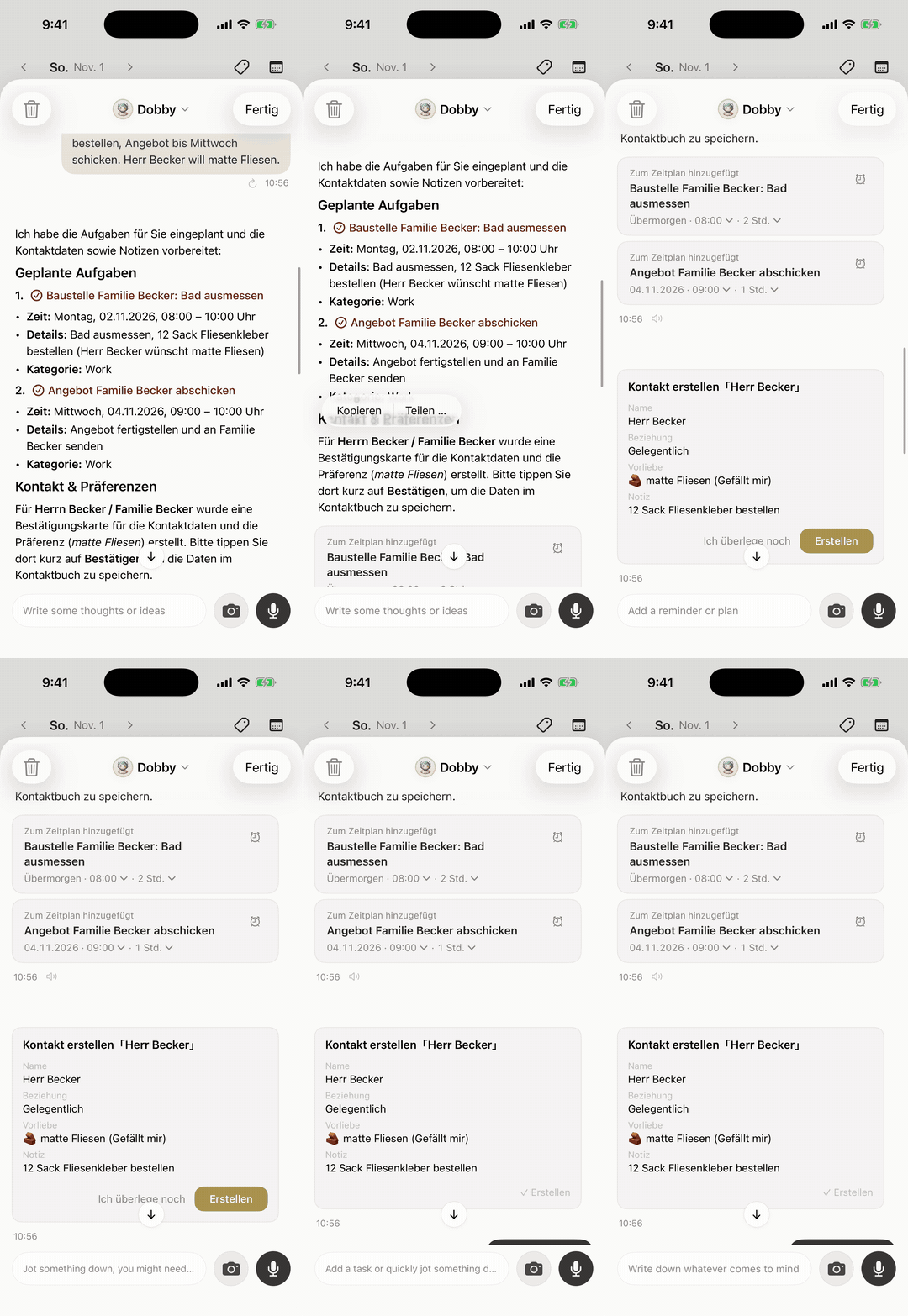
Keep the order the same each time: who, where, what, how much, when.
Monday, 4:00 p.m.: how do you remember the quotes you promised to send?
Set one afternoon routine that lists them. Callum set this up once:
"Every weekday at 4pm, list the quotes I promised today and haven't sent, and tomorrow's jobs with the parts I need from the merchant."
At 4:00 the list lands on his lock screen: the en-suite quote for the Patels, the radiator swap on Station Road, and a reminder that Tuesday's leak repair needs a 15mm compression kit. He sends the en-suite quote from ServiceM8 before he drives home. Scheduled routines are Codot Max, and you can keep up to 20 of them.

Tuesday 10 November, 11:15: how do you follow up a customer while you're still on site?
Say what happened and when to call back, and Codot files it on the customer's contact. Under a kitchen sink on Tuesday, Callum spots a corroded isolation valve the customer didn't ask about. He tells her, she wants to think about it, and he says:
"Add to Gareth Pryce: isolation valve under the kitchen sink is corroded, quoted 60 to replace. Remind me Friday at 10 to call him."
On Friday at 10:00 the reminder fires once, he calls, and Gareth books the valve for the following week. When Kieran needs to collect parts, Callum says "remind Kieran to pick up the valve from the merchant on Monday at 8." They've added each other as friends in Codot, so it lands in Kieran's list on his phone after Callum taps Confirm on the share card. That part is free.
Wednesday 11 November, at the merchant: what about receipts?
Photograph the receipt and Codot turns it into a bookkeeping entry. Bookkeeping is on the free plan and works as a running tally; invoices and tax returns stay in your job and accounting apps.
Friday 13 November, 5:00 p.m.: what did the week come to?
Ask one question: "How much did I quote this week, and what's booked for next week?" Codot adds up the prices you said in each job and lists next week's bookings from the jobs you've saved with it. A second routine can ask every Friday for a list of customers you haven't contacted in six months, which turns into a call list for annual services on a slow afternoon.
The same pattern carries over to other trades, including our look at the best virtual assistant for realtors, the best CRM for mortgage loan officers, and how they handle a solo agent's week. See the mobile mechanic's van, a small engine repair shop in the spring rush, and, for anyone selling on the road, apps for outside sales reps and the routine around every visit.
Are there free apps for tradesmen in the UK?
Yes, and a sole trader can cover most of the basics without paying. The free tiers that hold up for real work, as of November 2026:
- ServiceM8 Free: one user, 30 jobs a month, with quotes and invoices.
- HubSpot CRM: two users and 1,000 contacts.
- Connecteam Small Business plan: up to 10 users for scheduling and team chat.
- Codot free plan: voice input, tasks, calendar entries, notes, customer contacts, habit tracking and bookkeeping.
New Codot accounts get 7 days of Codot Max free; when the trial ends you return to the free plan without being charged. Several vendors set local prices, so check each pricing page from the UK.
What are the best phone apps for a small business owner on an iPhone?
On an iPhone, a small trade business needs a job app, a calendar, a banking or accounting app, and an assistant you can talk to. The assistant catches what happens between the others, by voice, from the lock screen or Apple Watch.
Codot's daily briefing is made each morning at 7:00 on iPhone, with your reminders, news and a summary, and it can also sort your Gmail or Outlook inbox and draft replies to important emails. Both are Codot Max. If you'd rather pay a person to answer the phone, our guide to virtual assistants for contractors compares a human VA, an AI receptionist and an AI assistant.
How do you choose the right apps for your trade business?
Start with where jobs actually go missing, and add one app at a time. We'd choose like this:
- If jobs, callbacks and customer details get lost between the site and the van, start with Codot. Use Codot when you need to save a booking or a note in ten seconds with dirty hands; the free plan covers jobs, contacts and notes.
- If you send several quotes and invoices a week, add job software. ServiceM8's free plan or Joist at $10 a month suit a sole trader; Jobber and Tradify suit a growing crew.
- If leads arrive from a website and you want a pipeline, add HubSpot's free CRM.
- If you employ people, Connecteam's free plan handles rotas and time sheets for up to 10.
Codot handles the remembering: jobs said out loud, customer notes, reminders and the routines that bring them back at the right time. Pair it with job software for the quotes and invoices your customers receive, and with an accounting app for tax. Codot sends emails; customer texts stay in your phone's messaging app or WhatsApp Business.
FAQ
What is the best app for tradesmen?
There isn't one app that covers everything. Most sole traders combine job software such as ServiceM8, Jobber or Tradify for quotes and invoices with Codot for saving jobs, customer notes and reminders by voice on site. Codot's free plan covers jobs, contacts and notes.
What is the best free app for tradesmen in the UK?
ServiceM8's free plan covers one user and 30 jobs a month with quotes and invoices. Codot's free plan saves jobs, customer contacts and notes by voice, and HubSpot's free CRM holds 1,000 contacts for two users.
How does Codot help a tradesman?
Codot saves a job, a customer contact and a note from one spoken sentence and writes the job into Google Calendar or Apple Calendar. On Codot Max ($12.99 a month) it also runs timed reminders and daily routines, such as a 4 p.m. list of quotes still to send.
Do tradies need a CRM?
A sole trader needs somewhere to keep customer history and next steps, but not always a full CRM. Job software holds job history, and Codot keeps customer notes and callback reminders by voice; HubSpot's free CRM suits businesses with a sales pipeline.
Which scheduling app is best for a small trade team?
Connecteam is free for up to 10 users and covers rotas, a time clock and chat. Jobber and Housecall Pro include job scheduling and dispatch in their paid plans.
Download Codot from the App Store and book your next job by voice; new accounts start with 7 days of Codot Max free.
Founders & Professionals Desk
This article was created with AI assistance and reviewed by our editorial team.Learn about our content process.