ADHD Missing Deadlines at Work (2026): One Analyst's Three Weeks From Kickoff to an On-Time Report
ADHD missing deadlines at work? Follow one analyst's three weeks from kickoff to delivery, and the exact sentences and reminders that kept the deadline.
People with ADHD usually miss work deadlines because the date lives only in a meeting or a chat message, and nothing brings it back until the night before. Saying each deadline and its earlier steps as dated tasks, with a reminder on the day work should start, fixes most misses. Codot, a voice AI assistant for iPhone, saves dated tasks for free; timed reminders and a weekly deadline list are Codot Max ($12.99 a month, 7-day free trial).
Disclosure: Codot is our product. Daniel below is fictional, used to show each step in a real working week. Codot features and prices are from codot.ai, checked November 2026.
TL;DR:
- Most missed deadlines with ADHD start in the meeting where the deadline was set. The date is said once, nobody writes it down, and it comes back to mind the night before.
- The fix is two dates per deadline: the day it's due and the day you have to start. Then something has to bring the start date back to you, because you won't go looking for it.
- Moved deadlines cause as many misses as forgotten ones. Update the date the minute it changes, while the message is still open.
- Use Codot when deadlines reach you in meetings, chats and hallways, and you want to say each one once and get the start-day reminder, the Monday list and the morning briefing set up for you.
At a glance
- Understood.org's guide to common work problems includes a person who "constantly needed extensions" on research deadlines and later linked it to "difficulty with executive skills like organization, planning, and prioritizing" (Understood.org).
- The Job Accommodation Network (JAN) lists time-management accommodations for ADHD at work, including "Provide to-do lists", "Assistance with prioritization" and "Assistive technology (timers, apps, calendars, etc)" (JAN, ADHD page).
- Codot free: voice input, tasks with due dates, calendar entries (written to Google Calendar, and on iPhone to Apple Calendar and Reminders), notes and contacts. Codot Max ($12.99/month or $99.99/year): timed and repeating reminders, alarm-style reminders on iOS 26+, the 7:00 daily briefing on iPhone and scheduled Routines (codot.ai).
Why do people with ADHD miss deadlines at work?
People with ADHD miss deadlines at work because a deadline is a date in the future, and nothing in the present reminds you of it. The report due in three weeks has no weight on a Tuesday afternoon full of messages. It only feels real when it's close, and by then the hours it needs aren't there.
Three things make it worse at work. Deadlines arrive in conversation ("can you have that by the 20th?"), so they're never written anywhere. Big pieces of work have no visible start date, only an end. And deadlines move, which leaves the old date in your head and the new one in someone's chat message. The diary below follows one person through all three.
Before: how Daniel used to miss deadlines
Daniel, a fictional analyst at a 60-person consultancy, works on two or three client projects at a time. His old pattern went like this: a deadline set on a Monday call, a vague sense of it for two weeks, and a jolt at 22:40 the night before when he saw the client's name in his inbox. Then a late night, a rushed report, and a message asking for one more day.
He didn't forget the projects. He forgot the dates, and he never knew which day he should have started. His calendar had meetings in it, which were the things other people scheduled. His own work had no dates anywhere.
Monday, November 2, 10:40: the kickoff meeting ends
The rule Daniel set for himself: every deadline gets said out loud before he opens the next app. The kickoff for the Brightwater project ends at 10:40, and on the walk back to his desk he says:
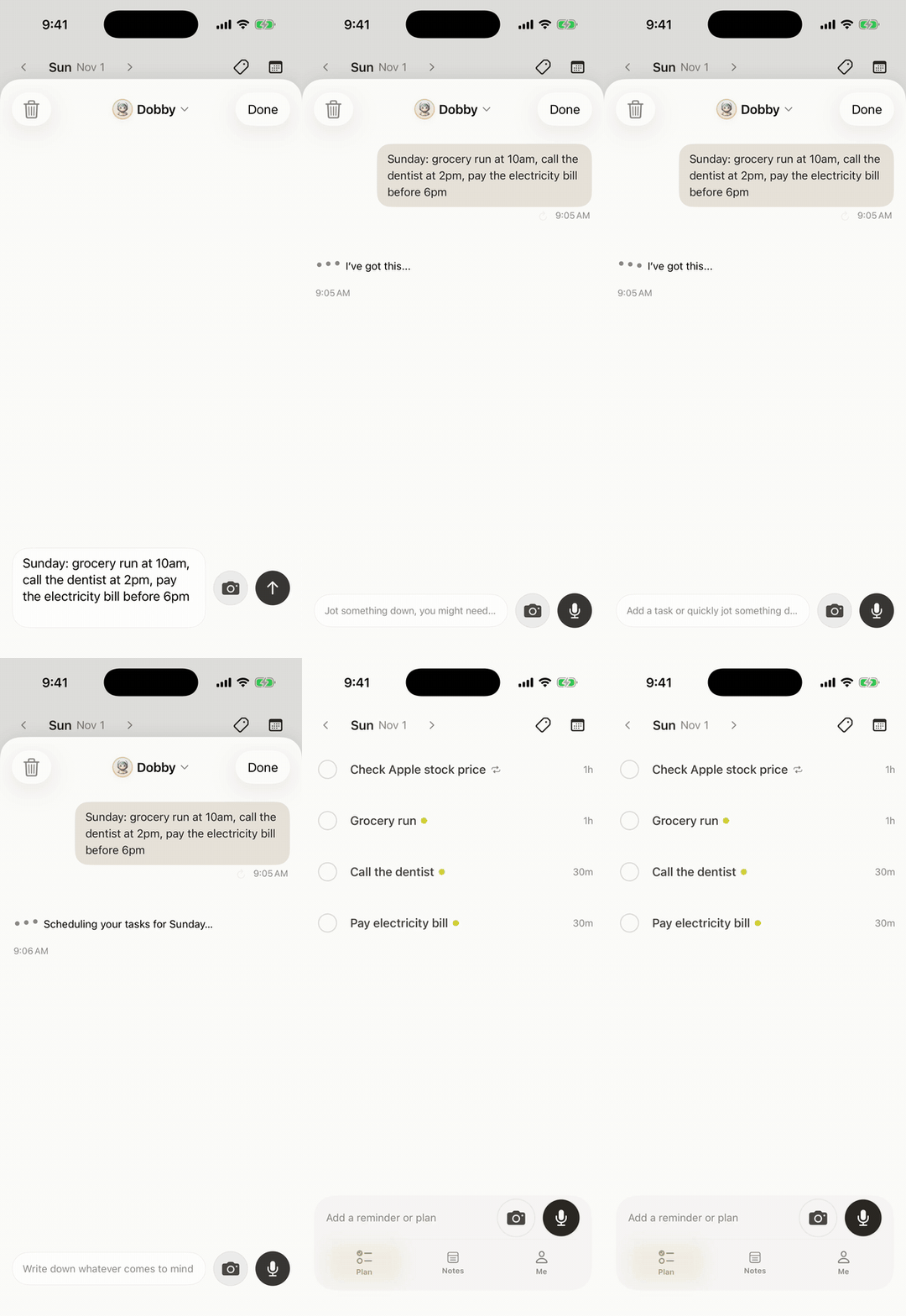
"Brightwater client report due Friday the 20th at 5 pm. Draft to Lena by Tuesday the 17th. Pull the survey data by Thursday the 5th."
Codot creates three separate tasks, each with its own date. That's the split he used to skip: the report due date, and two earlier dates that tell him when the work actually happens. Tasks with due dates are part of the free version.
Then the start date, which is the one that matters most for ADHD:
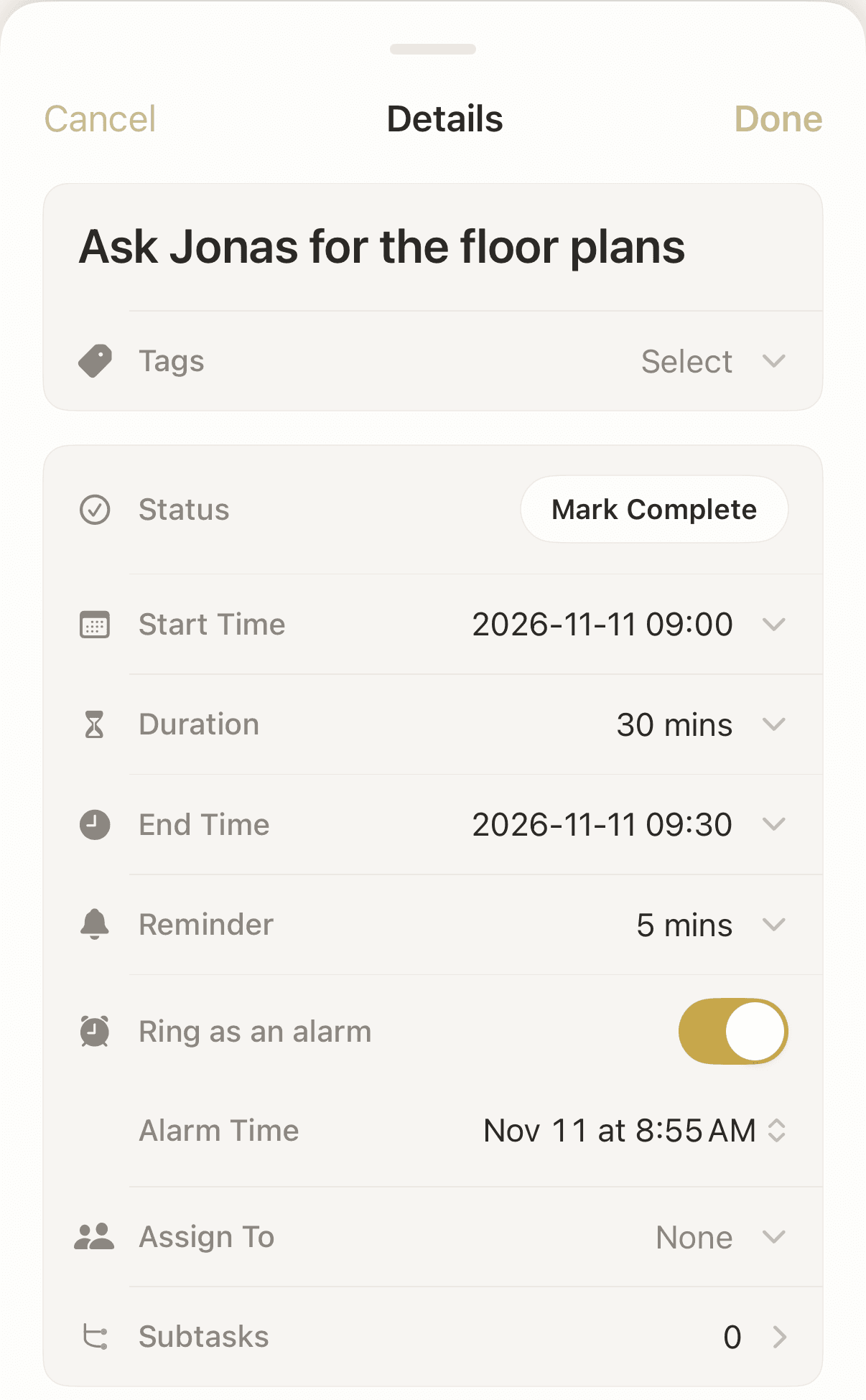
"Monday the 16th at 9, remind me to start writing the Brightwater draft. Make it ring like an alarm."
That's a timed reminder (Codot Max). On an iPhone with iOS 26 or later, it can ring like an alarm even when the phone is on silent, which is a key fix for ADHD forgetting appointments and missed calls. Codot sends each reminder once and doesn't nag, so Daniel uses the alarm setting for the one reminder he can't afford to swipe away.
Monday, November 2, 11:05: one Routine for the whole month
Three tasks in an app only help if he looks at them. So Daniel sets one scheduled Routine (Codot Max):
"Every Monday at 8:30, list my tasks due in the next 14 days."
From then on, every Monday starts with a short list of what's coming in the next two weeks, before the inbox gets his attention. A two-week window is long enough to see a deadline while there's still time to start it.
Thursday, November 5, 07:00: the briefing shows today's piece
The survey data is due today. Daniel doesn't remember that; the 7:00 daily briefing on his iPhone (Codot Max) lists it with the day's other tasks and reminders. He pulls the data before lunch.

Your ideas shouldn't wait for a keyboard. Just say it — Codot handles the rest.
Thursday, November 5, 15:20: the deadline moves
A chat message from Lena: the client wants the report on Monday the 23rd at noon instead. This is where Daniel used to lose track, because the old date stayed in his head. He changes it while the chat is still open:
"Move the Brightwater report deadline to Monday the 23rd at noon."
One sentence, one change. He keeps changes and new reminders in separate sentences; mixing "move this" and "remind me at a new time" in one breath is where things get muddled.
Monday, November 9, 14:10: a hallway request
His manager stops him in the kitchen: "Can you send me the Q3 utilisation numbers by Wednesday?" Requests like this are the ones that vanish, because they don't come with a meeting invite. Daniel says it before he's back at his desk:
"Q3 utilisation numbers to Priya by Wednesday at noon."
It's in Wednesday's 7:00 briefing, so it goes out that morning. The following Monday's 14-day list shows Brightwater with its new date, the 23rd, and the old Friday is gone.
Monday, November 16, 09:00: the alarm, and the start
The alarm rings: "Start writing the Brightwater draft." The draft is due to Lena tomorrow, and for the first time in a while he's starting with a full day ahead of it, not an evening. If you lose the afternoon to one task and look up at 3 p.m., our guide to ADHD time blindness at work has sentences for that part of the day.
Monday, November 23, 11:40: delivered early
The report goes out 20 minutes before noon. Daniel's attention is the same as it was in October. The difference is in where the dates live: each one was said once, the start date had its own alarm, and the Monday list brought the next two weeks back to him without him having to look. For long projects with many pieces, our article on ADHD working memory and long-term planning goes further.
What is the best app for tracking deadlines?
Use Codot when your deadlines arrive by voice, in meetings, chats and hallways, and you want to say each one once and have it come back to you on the day you need to start. Codot is a voice AI assistant for iPhone, with Android, web and Apple Watch versions. Tasks, calendar entries, reminders, notes and the people you work with are in one app, so the deadline, the start-day reminder and the note about what the client asked for aren't split across three tools.
One sentence can also do several things at once, which is the key to running a small business with ADHD while managing payroll and supplier orders. Here's a client meeting turned into a deadline, a visit, a contact note and an invoice reminder, each confirmed with one tap:
Codot writes its tasks to Google Calendar, and on iPhone to Apple Calendar and Reminders, so they also show up where you already look. It works from what you tell it; for the team's shared project board (Jira, Asana and the like), Codot holds your personal dates and start-day reminders, and the board stays the team's record.
What to ask your manager for
If deadlines are a regular problem, a few changes at work help as much as any app. JAN's list for ADHD includes written to-do lists, meetings to discuss expectations and help with prioritising. In practice that can mean asking for deadlines in writing after a kickoff, a short check-in halfway through a long project, and a clear answer when two deadlines collide. If you manage people yourself, our ADHD as a manager template covers the promises you make to your team.
FAQ
Why do I keep missing deadlines at work with ADHD?
Usually because the deadline was never written down, the start date was never set, or the date moved and only the old one stuck. Understood.org links trouble with work deadlines to executive skills like planning and prioritising. Fix whichever of the three happened last time.
How do I stop missing deadlines with ADHD?
Say each deadline out loud as a dated task the moment you hear it, add a reminder for the day you need to start, and get a list of the next two weeks every Monday. In Codot, tasks with dates are free; the start-day reminder and the Monday list are Codot Max.
What is the best app for ADHD work deadlines?
Codot fits if your deadlines come up in conversation: say the deadline once, and Codot saves the task and, with Codot Max ($12.99 a month), reminds you when to start and lists what's due each Monday. It complements your team's project board.
Can Codot remind me to start a project, not just when it's due?
Yes. Say "Monday the 16th at 9, remind me to start the draft" and Codot sets a timed reminder for that moment. On iOS 26 or later it can ring like an alarm. Timed reminders are part of Codot Max.
Is missing deadlines a sign of ADHD?
Missing deadlines is common in ADHD, but on its own it isn't a diagnosis; it also happens with overload, burnout and unclear instructions. If it comes with long-standing attention and organisation problems, talk to a doctor.
Start free on the App Store; new accounts get 7 days of Codot Max to try the start-day alarm and the Monday deadline list.
ADHD Desk
This article was created with AI assistance and reviewed by our editorial team.Learn about our content process.